

 100% Security Verified | No Subscription Required | No Malware


 ChatGPT
 Perplexity
 Gemini
 Claude
 Grok
Grok
White silver sits between pure white and metallic gray, giving you a look that feels clean, futuristic, and quietly luxurious. In color psychology, it is linked with clarity, simplicity, and innovation, which makes it perfect for creators who want visuals that look modern without feeling cold. In video and design, a white silver color palette can make your thumbnails, lower thirds, intros, and channel branding look crisp and professional while keeping the focus on your story or product.
For YouTube thumbnails, intros, vlog titles, or full channel makeovers, white silver color combinations are a great neutral base that work with almost any accent color. Below you will find ready-made white silver aesthetic palettes with HEX codes, designed for Filmora users and creators who want reliable color schemes for editing, motion graphics, overlays, and social content. You can copy these HEX values directly into your design tools or use them as references when color grading in Filmora.
In this article
Minimalist White Silver Color Palettes
Frosted Studio Minimal

- HEX Codes: #f9fafb, #e5e7eb, #d1d5db, #9ca3af
- Mood: clean, calm, and modern with a soft tech feel
- Use for: Great for tech reviews, productivity tutorials, and minimalist channel branding.
This palette feels like a frosted glass desktop: light whites, cloudy grays, and soft silver tones that never shout for attention. It keeps your canvas neutral so the viewer can concentrate on your product shots, screen recordings, or talking-head content without distraction.
Use it for YouTube thumbnails, titles, and lower thirds where you want a minimalist white silver aesthetic that still feels friendly. It works especially well for clean logo animations, productivity vlog intros, app or SaaS explainers, and any video where your brand voice is calm, focused, and modern.
Pro Tip: Keep Your White Silver Minimalism Consistent in Filmora
With a subtle palette like Frosted Studio Minimal, consistency is everything. In Filmora you can build a simple style guide by reusing the same HEX-inspired tones in your titles, shapes, and overlays so every intro, B-roll label, and end screen follows the same white silver look.
Create a few reusable title presets using soft grays for backgrounds and slightly darker silver for text, then save them as custom presets. This way, whether you are editing a long tech review or short social cutdowns, your minimalist white silver brand feels coherent from first frame to last.
AI Color Palette
If you have a reference image for this frosted white silver look (a screenshot of your website, a still frame, or a mood board), Filmora's AI Color Palette feature can automatically spread that style across your whole edit. Instead of adjusting clips one by one, you match the color mood once and let AI handle the rest.
Drop your reference shot onto the timeline, run AI Color Palette on other clips, and Filmora will harmonize exposure and tones to keep whites clean and silvers soft. This is ideal for tech channels and productivity creators who want every video to share the same polished white silver identity without spending hours in manual grading.
 secure download

HSL, Color Wheels & Curves
To perfect a white silver palette, subtle adjustments in Filmora's HSL, color wheels, and curves tools make a big difference. You can cool down the highlights for a more techy feel, lift the shadows slightly so grays do not crush into black, or gently reduce saturation in any stray colors that distract from your minimalist scheme.
Combine these tools with the looks you explore through Filmora's video filters and 3D LUTs to create custom white silver grades that suit different series on your channel, from tutorials to cinematic B-roll.
secure download1000+ Video Filters & 3D LUTs
Once your base white silver tones are in place, Filmora's huge library of filters and LUTs lets you push the style further in seconds. You can add a light cinematic wash, a subtle glow, or a cool tech LUT that respects your neutral whites and silvers while giving the whole edit a consistent finish.
Filmora's video filters and 3D LUTs make it easy to create different moods with the same core white silver palette: soft for educational content, sharper for app demos, or more dramatic for promo videos and trailers.
secure downloadClean Interface Chrome

- HEX Codes: #ffffff, #e5e5e5, #c4c4c4, #7d7d7d, #111827
- Mood: sleek, structured, and professional
- Use for: Ideal for software walkthroughs, UI demos, and portfolio reels needing a polished tech aesthetic.
Clean Interface Chrome feels like a modern app dashboard: stacked whites, silvers, and a deep charcoal accent for precise contrast. It is perfect when you want text, buttons, and icons in your video overlays to echo the look of clean product UIs.
Use this white silver color combination in your screen-recording frames, tutorial chapters, YouTube thumbnails, and outro cards. The near-black #111827 is ideal for titles on light thumbnails, while #e5e5e5 and #c4c4c4 work well as panel backgrounds for callouts and interface-inspired motion graphics.
Soft Screen Glow

- HEX Codes: #fefefe, #e8edf2, #cfd8e3, #9ba4b5
- Mood: gentle, airy, and reassuring
- Use for: Best for tutorials, explainers, and educational videos that need a calm, trusted tone.
This palette looks like soft daylight bouncing off a laptop screen. The whites are slightly warmed by silvery blues, which makes information-heavy layouts easier on the eyes compared with harsh high-contrast schemes.
Try Soft Screen Glow for course thumbnails, educational infographics, subtle lower thirds, and chapter markers inside Filmora. The gentle blue-silver tint (#e8edf2 and #cfd8e3) helps your content feel trustworthy and relaxed, whether you are filming study-with-me videos or step-by-step software workshops.
Monochrome Cloud Edit

- HEX Codes: #f5f5f5, #dedede, #bfbfbf, #808080, #1f2933
- Mood: balanced, neutral, and editorial
- Use for: Perfect for cinematic edits, lookbooks, and monochrome thumbnails with subtle depth.
Monochrome Cloud Edit moves smoothly from cloud white to deep slate gray, giving your visuals a magazine-style monochrome look. It is minimal but still expressive, especially when paired with high-quality photography or cinematic B-roll.
Use the lighter tones for backgrounds and frames, with #808080 and #1f2933 as text or border colors in thumbnails, title cards, and end screens. This palette is great for fashion edits, documentary intros, and any video series where you want a cool, editorial white silver aesthetic without bright accent colors.
Luxury White Silver Color Palettes
Platinum Premiere Title

- HEX Codes: #f9fafb, #e5e7eb, #d4af37, #b3b6c2, #111827
- Mood: glamorous, premium, and confident
- Use for: Use for intros, title cards, and sponsor segments that need a high-end, award-show feel.
Platinum Premiere Title blends cool whites and silvers with a single rich gold accent (#d4af37). The result feels like a premium event graphic: clean, luxurious, and made for the spotlight.
Use the white silver tones for backgrounds and frames, then reserve the gold for logos, key words in your titles, and sponsor badges. This palette is ideal for branded intros, product launches, paid partnership lower thirds, and cinematic opening credits where you want your video to feel like a premiere night.
Opulent Pearl Intro

- HEX Codes: #fdfdfd, #f1f5f9, #c0c5ce, #8b5cf6, #312e81
- Mood: elegant, dreamy, and slightly mystical
- Use for: Great for beauty intros, fashion reels, and branded bumpers needing a luxe but creative edge.
Opulent Pearl Intro pairs pearl white and smooth silver with deep violet accents. The purples (#8b5cf6 and #312e81) add a dreamy, almost mystical twist to an otherwise neutral base, making it ideal for creative luxury content.
Use the white silver shades for backgrounds, frames, and soft glows, then let the violets highlight call-to-action buttons, logo marks, and animated lines in your intros and reels. It is a strong choice for beauty channels, perfume ads, fashion lookbooks, and social bumpers that need to feel both premium and imaginative.
Silver Champagne Glow

- HEX Codes: #fefcf7, #f3e9dd, #d1d5db, #b3b8c6, #8b5e3c
- Mood: warm, celebratory, and inviting
- Use for: Ideal for event highlights, wedding films, and lifestyle promos with a premium feel.
Silver Champagne Glow mixes soft champagne creams (#fefcf7, #f3e9dd) with cool silvers for a beautifully balanced warmth. The muted brown-gold accent (#8b5e3c) gives your graphics a celebratory, toasting-glass atmosphere without becoming flashy.
Use this palette for wedding highlight films, engagement stories, brand events, and upscale lifestyle promos. The creamy tones flatter skin, while the silver shades work well for text blocks, overlays, and elegant thumbnail borders. It is a great option when you want a white silver palette that still feels human and emotional.
Gala Night Overlay

- HEX Codes: #f9fafb, #e5e7eb, #9ca3af, #4b5563, #000000
- Mood: dramatic, polished, and cinematic
- Use for: Perfect for cinematic trailers, luxury product teasers, and dark-mode lower thirds.
Gala Night Overlay takes white silver into a darker, more cinematic direction. The gradient from soft gray to near-black creates red-carpet contrast that is perfect for trailers and dramatic promos.
Use #f9fafb and #e5e7eb for subtle lens flares, text highlights, or logo reveals, while #4b5563 and #000000 form the base of your frames and overlays. This palette is ideal for luxury product teasers, dark-mode UI graphics, and bold thumbnails that still keep a refined white silver theme.
Soft & Airy White Silver Color Palettes
Morning Mist Vlog
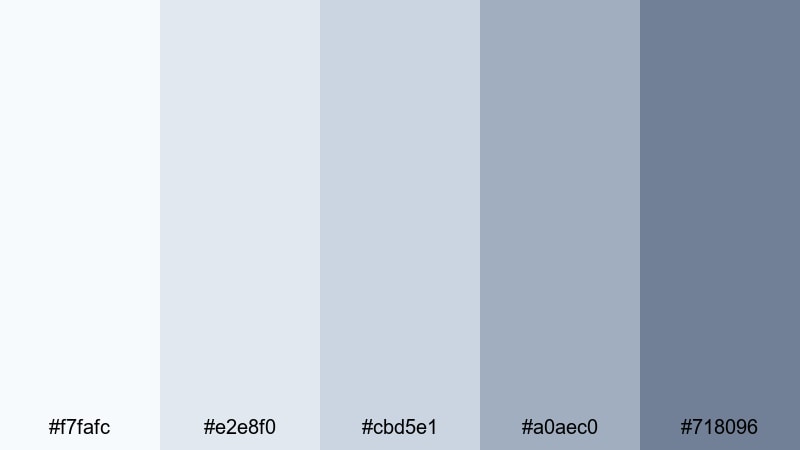
- HEX Codes: #f7fafc, #e2e8f0, #cbd5e1, #a0aec0, #718096
- Mood: fresh, peaceful, and reflective
- Use for: Best for morning routines, travel vlogs, and calm productivity content.
Morning Mist Vlog feels like opening your window on a quiet, cloudy morning. Gentle whites and misty blue-grays keep the frame soft and inviting, making it ideal for content that aims to calm and motivate viewers at the same time.
Use this palette to design lower thirds, text blocks, and chapter titles for routines, journaling vlogs, or scenic travel videos. It works beautifully on Pinterest-style thumbnails, subtle gradient backgrounds, and soft gradients behind your main subject in Filmora.
Featherlight Lifestyle

- HEX Codes: #ffffff, #f5f7fa, #d2e3f3, #bfcad9, #8da2c0
- Mood: light, optimistic, and lifestyle-friendly
- Use for: Ideal for home, fashion, and wellness channels that lean into soft, bright visuals.
Featherlight Lifestyle is all about airy brightness. Crisp white, pastel silver, and light powder blue create a fresh, Instagram-ready mood that flatters interiors, outfits, and faces equally well.
Use the brightest tones for backgrounds in vertical reels and story covers, while #d2e3f3 and #bfcad9 can support text blocks, badges, and frames. This white silver aesthetic palette is great for home decor tours, closet clean-outs, wellness tips, and any channel where softness and positivity are part of the brand.
Snowfall Storytime

- HEX Codes: #f9fafb, #e5e7eb, #d1d5db, #e0f2fe, #93c5fd
- Mood: cozy, gentle, and nostalgic
- Use for: Great for storytime videos, winter content, and reflective voiceover edits.
Snowfall Storytime feels like watching snow through a window: pale whites, soft silvers, and a hint of icy blue. It has a seasonal vibe without using heavy reds or greens, which keeps it versatile for all kinds of reflective content.
Use the blue accents (#e0f2fe, #93c5fd) sparingly in titles, borders, or animated snowflake elements, and keep most backgrounds in the neutral whites and silvers. This palette suits winter vlogs, nostalgic storytime videos, soft-spoken commentary, and calm talking-head setups with simple overlays.
Bold Accent White Silver Color Palettes
Neon Edge Contrast

- HEX Codes: #f9fafb, #e5e7eb, #111827, #22d3ee, #6366f1
- Mood: energetic, bold, and techy
- Use for: Perfect for gaming intros, motion graphics, and high-impact callouts on screen.
Neon Edge Contrast starts with a clean white silver base, then charges it with electric cyan (#22d3ee) and indigo (#6366f1). The result is a futuristic, gaming-ready look that still feels controlled and professional.
Use the neutral tones for most of your layout and bring in the neon colors only for key elements: subscribe buttons, streak lines in your intro, animated HUD graphics, or strong text callouts. It is a great white silver color palette for tech YouTubers, gaming highlights, SaaS promos, and motion graphics-heavy edits.
Cinematic Steel Teal

- HEX Codes: #f5f7fa, #d1d5db, #64748b, #0f766e, #020617
- Mood: moody, cinematic, and modern
- Use for: Great for trailers, B-roll sequences, and documentary-style edits.
Cinematic Steel Teal takes white silver into a dramatic film-grade direction. Steely grays and blues sit against deep teal (#0f766e) and near-black (#020617), giving your footage a serious, modern tone that works well for storytelling.
Use the lighter silvers for text and UI elements, and let the darker shades handle frames, letterbox bars, and background panels. This palette is ideal for YouTube trailers, B-roll montages, cinematic travel edits, and documentary intros that need a polished, filmic white silver color scheme.
Rose Quartz Highlight

- HEX Codes: #ffffff, #e5e7eb, #fecdd3, #fb7185, #4b5563
- Mood: romantic, stylish, and social-friendly
- Use for: Ideal for beauty, lifestyle, and social shorts where you want soft but eye-catching accents.
Rose Quartz Highlight combines a clean white silver base with trendy rose tones (#fecdd3 and #fb7185). The palette feels chic and social-media-ready, perfect for content that needs to be both soft and clickable.
Use the pinks for highlight words, badges, stickers, and animated arrows in your thumbnails or short-form videos, while #4b5563 keeps text readable on light backgrounds. This palette shines on beauty channels, outfit-of-the-day reels, GRWM videos, and any social edits that blend elegance with playfulness.
Electric Sunset Frame

- HEX Codes: #fdf2f8, #e5e7eb, #f97316, #ea580c, #111827
- Mood: dynamic, warm, and attention-grabbing
- Use for: Best for announcements, sale graphics, and high-energy vlog moments.
Electric Sunset Frame charges a gentle white silver base with vivid orange accents (#f97316 and #ea580c). It is eye-catching without losing sophistication, making it a strong choice for promos and important updates.
Use the silvers for most of your layout, letting the oranges frame your subject, outline your thumbnails, or highlight urgent call-to-action text. The deep #111827 keeps typography punchy and legible. This palette works brilliantly for sales graphics, channel milestones, big announcements, and fast-paced vlog segments that need instant attention.
Tips for Creating White Silver Color Palettes
White silver is a flexible base for video and design, especially when paired with a few intentional accent colors. Use these tips to build your own white silver color palette or adapt the HEX combinations above for your branding and edits.
- Balance warmth and coolness: Decide whether your white silver should feel warm (creamy, champagne tones) or cool (blue-gray tones) and keep that choice consistent across your thumbnails, intros, and overlays.
- Control contrast for readability: Always test your text against background colors. Pair very light whites (#ffffff, #f9fafb) with dark charcoal or black text, and use mid-silver tones behind subtitles and lower thirds.
- Limit accent colors: Stick to one or two accent hues (like rose, teal, gold, or neon cyan) so your white silver base stays dominant and your brand looks cohesive on every platform.
- Match your footage: If your raw clips are warm (indoor lighting, golden hour), choose warmer whites and silvers. For cool, techy footage, lean into bluish silvers that match your lighting and camera profile.
- Use hierarchy in shades: Reserve the darkest shade in your palette for titles or key buttons, mid-tones for panels and shapes, and the lightest for backgrounds and breathing space.
- Design for multiple formats: Check how your palette looks in both horizontal and vertical layouts. Make sure titles and brand colors are still clear on phone screens, YouTube home feed, and Shorts or Reels.
- Save presets in Filmora: Once you have styled a few titles and overlays to match your white silver scheme, save them as custom presets in Filmora so your color choices stay consistent across series and future uploads.
- Test in grayscale: Quickly preview your design with saturation turned down. If elements are still clear and readable in near-monochrome, your white silver contrast is strong enough for most viewers and devices.
White silver color palettes are powerful because they are both neutral and expressive. They can make your channel look minimalist, luxurious, cozy, or high-energy depending on the accents you choose and how you use contrast. With the 15 palettes above and their HEX codes, you have ready-made options for thumbnails, intros, motion graphics, and full brand systems.
Try importing these palettes into Filmora, building a few custom title and overlay presets, and then refining your footage with AI Color Palette, HSL, and LUTs. Over time your viewers will recognize your signature white silver style, making your brand feel more polished and memorable across every video.
Whether you create vlogs, tutorials, trailers, or social shorts, a well-planned white silver aesthetic can keep your content clean, modern, and instantly recognizable.
secure download