

 100% Security Verified | No Subscription Required | No Malware


 ChatGPT
 Perplexity
 Gemini
 Claude
 Grok
Grok
When the festive season comes, you need to decorate everything, including your social media feed. Although small, profile pictures are the visual representation of a profile. With Halloween around the corner, your feed should scream holiday.
This blog focuses on exploring ideas of Halloween profile pictures and how to create them. We will also learn about a platform that helps you make creative display pictures from scratch.
In this article
Part 1. Why a Halloween Profile Picture Matters
Before you start working on making a display picture, you must know why it is important. The following points cover the reasons why you must create a DP that reflects the festive season:
- Creates a Festive Vibe: A Halloween profile picture instantly shows you're participating in the season's fun. It gives a party mood to your followers or friends and makes communication lively.
- Increases Social Media Activities: Seasonal changes in profile usually prompt followers to comment, react, or share your posts due to the inventive feel. This will aid in making your profile shine in an overcrowded feed of everyday posts.
- Showcases Your Creativity: A Halloween-themed profile picture lets you show humor, creepiness, or your art. It provides others with an idea of your character and the way you like seasonal customs, which makes your online image feel more similar and natural.
- Boosts Online Identity: With a Halloween profile picture, you are already connected to a larger cultural event, and it demonstrates that you are trend-conscious. It helps you connect with others celebrating Halloween and strengthens your online identity.
Part 2. Popular Styles of Halloween Profile Pictures
Choosing a profile picture can sound easy, but it requires exploration. The following list features popular styles of holiday DPs that can be used this holiday season:
Trendy Halloween Profile Picture in Classic Spooky
This style is based on the conventional Halloween elements, such as pumpkins or dark haunted elements. It fits perfectly into the collection of those who want to feel the spooky atmosphere of the holiday but do not want to go too far.
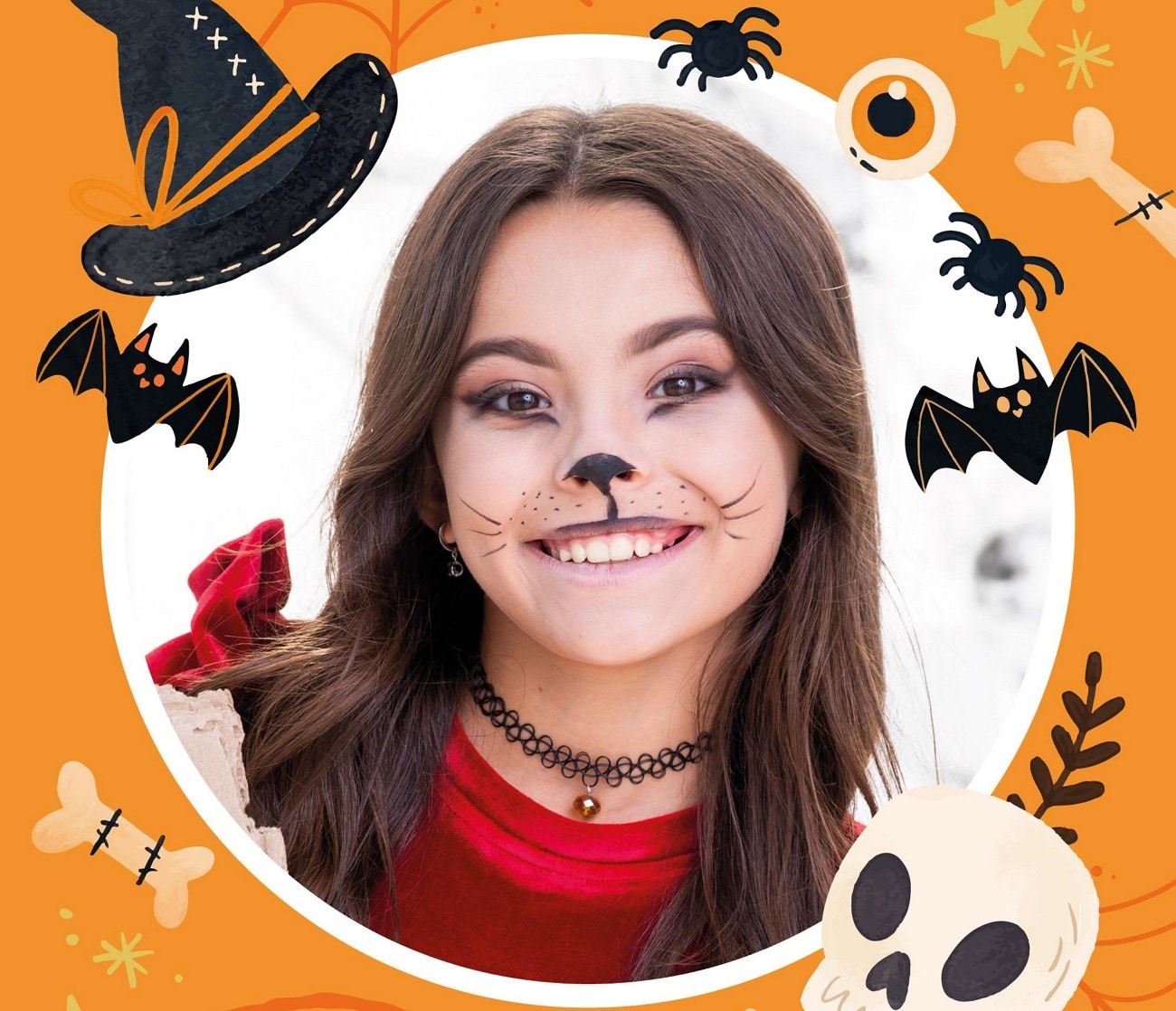
Cute Halloween Profile Picture
These pictures have light-hearted features like smiling pumpkins, cartoon witches, or mischievous skeletons. They are perfect for cases where a person wants to participate in Halloween without it being too frightening.
Halloween Profile Picture- Horror
Dark to frightening images, it is a daring decision that will attract horror and shock lovers. Such a type of Halloween profile pic certainly catches the eye and creates a strong impact on the social media followers.
Minimalist Halloween Profile Picture
This is a subtle and smooth way of presenting that utilizes minimal icons and dull colors. It works well on people who desire to have a seasonal update yet would not go over the top of their aesthetics.
Halloween Profile Picture with a Pop Culture Inspirational Expression
Halloween DPs with pop inspiration combine with popular characters or memes. This style is a combination of humor, relevance, and creativity and is very shareable.
Part 3. DIY Halloween Profile Picture Tips
Not everyone can afford high-end equipment for photography, and that's where DIY steps in. The following tips will help you capture great photos for your display:
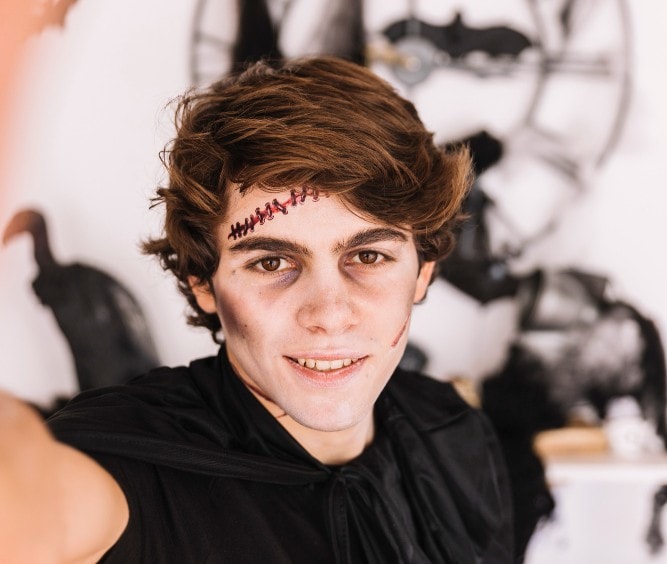
Taking the Perfect Halloween Selfie for Profile Picture
Candlelight or neon, pick a good source and bring out the spookiness. You can pair this with DIY makeup looks or ghostly pale skin. The right combination of lighting and makeup instantly transforms a normal selfie into a Halloween-ready shot.
Editing Apps for Halloween Profile Picture
Apps like the Filmora App make it easy to add Halloween effects such as spooky filters or creepy backgrounds. With just a few edits, a simple photo can look cinematic and themed. This strategy helps polish your scary Halloween profile pictures while keeping it fun and eye-catching.
Using AI Tools for Halloween Profile Picture
Using AI-driven tools makes the picture-creating process a million times easier. Wondershare Filmora's AI Text-To-Video feature can be used to generate videos from mere text. The AI Stickers feature enables you to add visual enhancements to a photo. You can further upgrade the image using the AI Animated titles and effects.
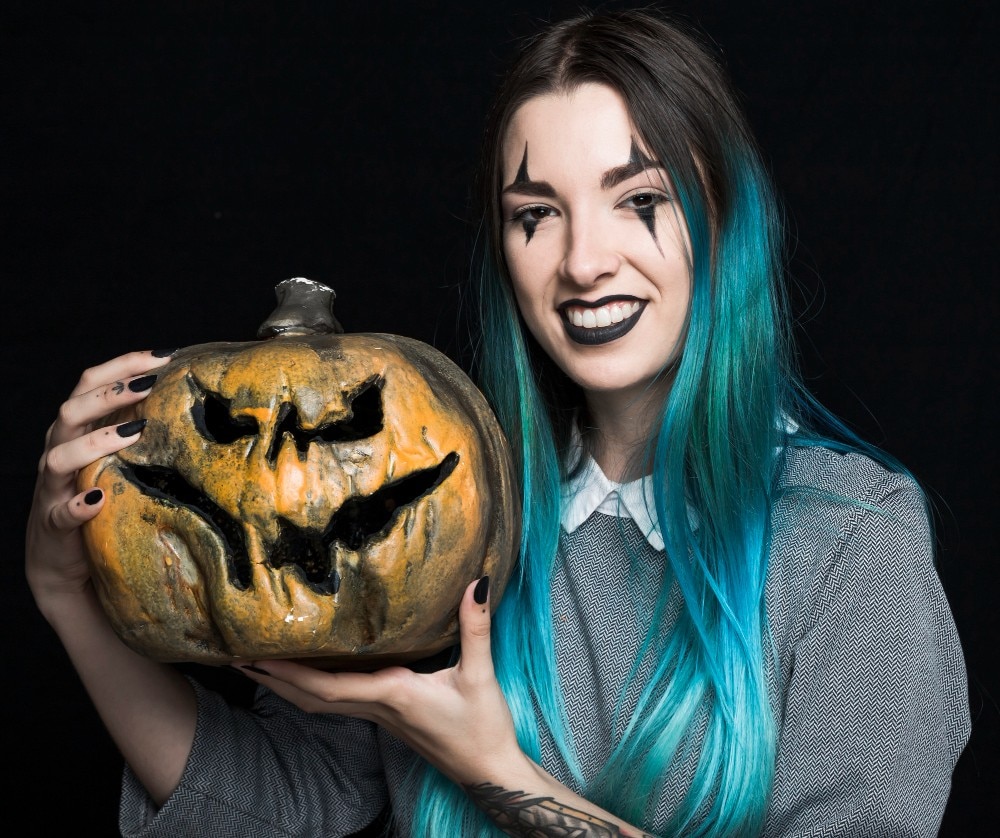
Incorporating Costumes and Props in a Halloween Profile Picture
Adding props like pumpkins, masks, or cobwebs can enhance the Halloween vibe. Even a simple hat or themed accessory makes the picture more authentic and festive. Props and costumes give your photo depth and personality, making it memorable.
Part 4. Add Vintage and Old Film Effects with Filmora – The Easiest Way to Make Videos Look Retro
Among all the aesthetics, vintage has its own charm and attraction. Since this age is not retro, there is only one way you can give a vintage effect to your images. With tools like Wondershare Filmora, users can pick the effects and filters to make their images look old-fashioned. Besides applying the preset filters, you can adjust their intensity to achieve the desired look for your photos.
The Filmora App [iOS/Android] also offers filters and effects that enhance the cute Halloween profile pictures in a single click. Besides using the presets, users can adjust the colors manually. To optimize your profile picture according to the intended social media platform, use the aspect ratio adjustment features of this app. If you want to post a picture without a background, utilize the AI Background Remover offered by Filmora App.
Key Features
- Offers GIFs to add visual elements and attractions to your images.
- Provides options for users to export the picture as a GIF for multiple user applications.
- Enhances the look of your image by offering attractive LUT presets on the PC version.
- Breathes life into your photos by adding customizable preset text templates to them.
- Attracts your followers by offering AI audio that can be added to your GIF dps.
 secure download

Exploring Filmora for Desktop to Make a Halloween Profile Picture:
The desktop version of Filmora provides extensive editing opportunities by offering its advanced tools. The following steps are an elaborate guide on using this version for making an ideal Halloween profile picture scary:
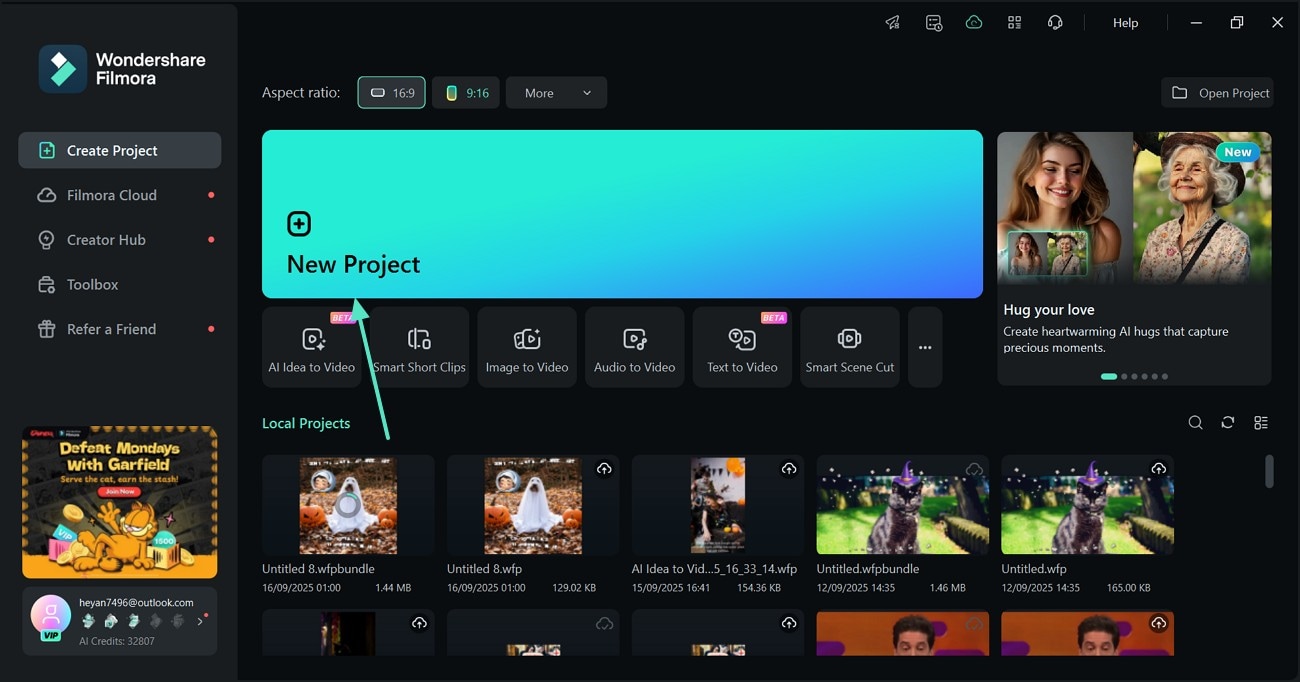
- Step 1. Initiate a New Project to Start. Upon successfully launching the main interface of Filmora, select the "New Project" button. As you are directed to the next window, select the "Import" button to bring an image to the timeline.
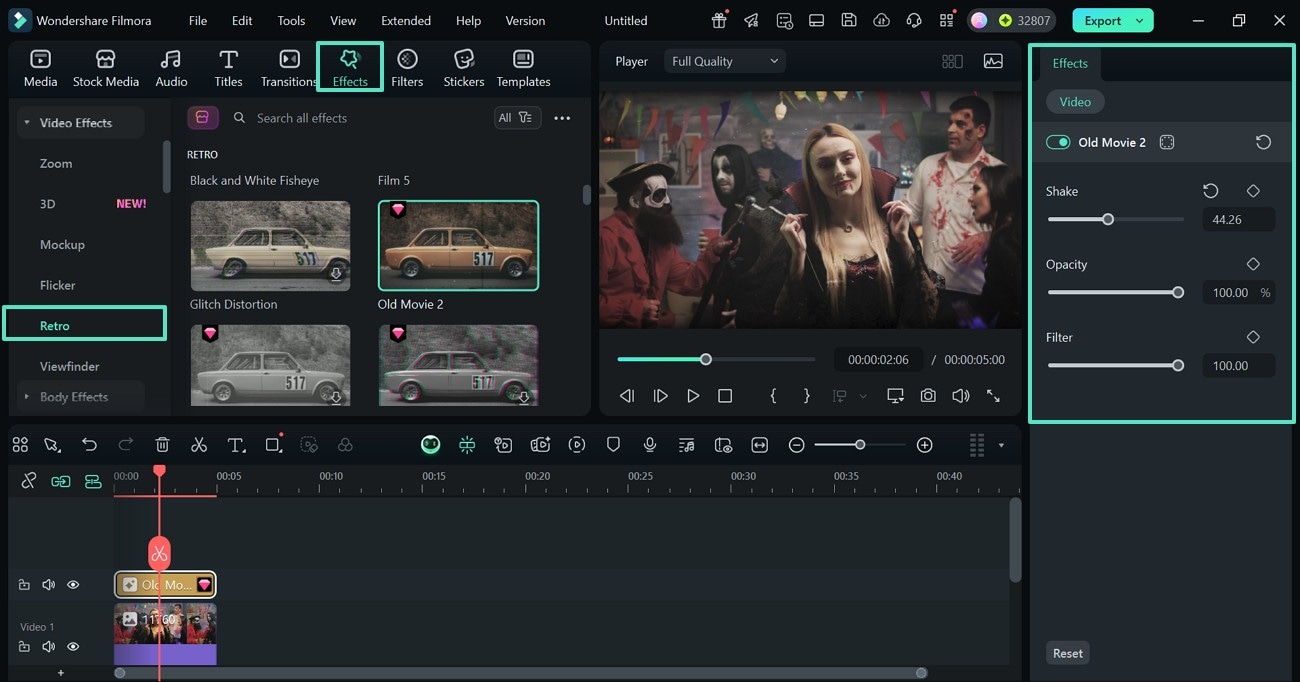
- Step 2. Add and Adjust an Effect. Using the top toolbar of the page, select the "Effects" tab and enter the "Retro" section. Once you find a suitable match, apply that effect and use the right panel to customize it.
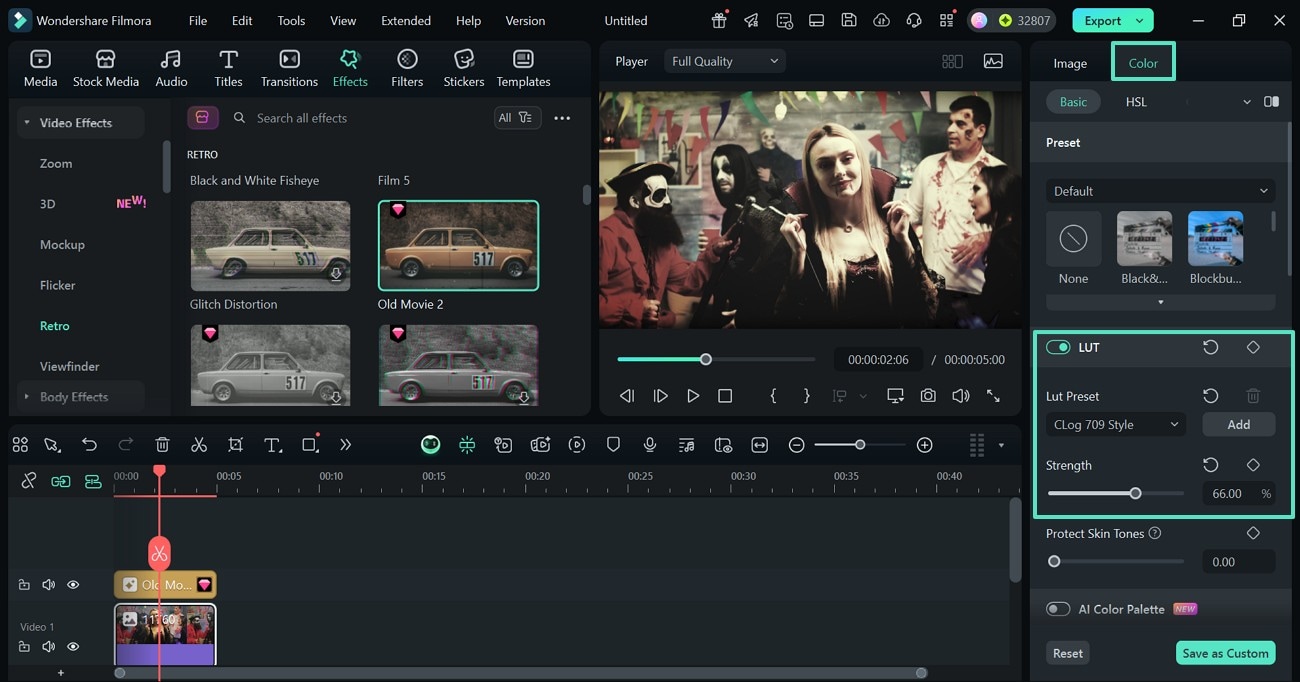
- Step 3. Apply the LUT Presets to Enhance the Color. Upon selecting the added media, access the "Color" section and enable the "LUT" toggle to select the desired vintage preset. You can scroll down and make further manual adjustments to the filter and customize it.
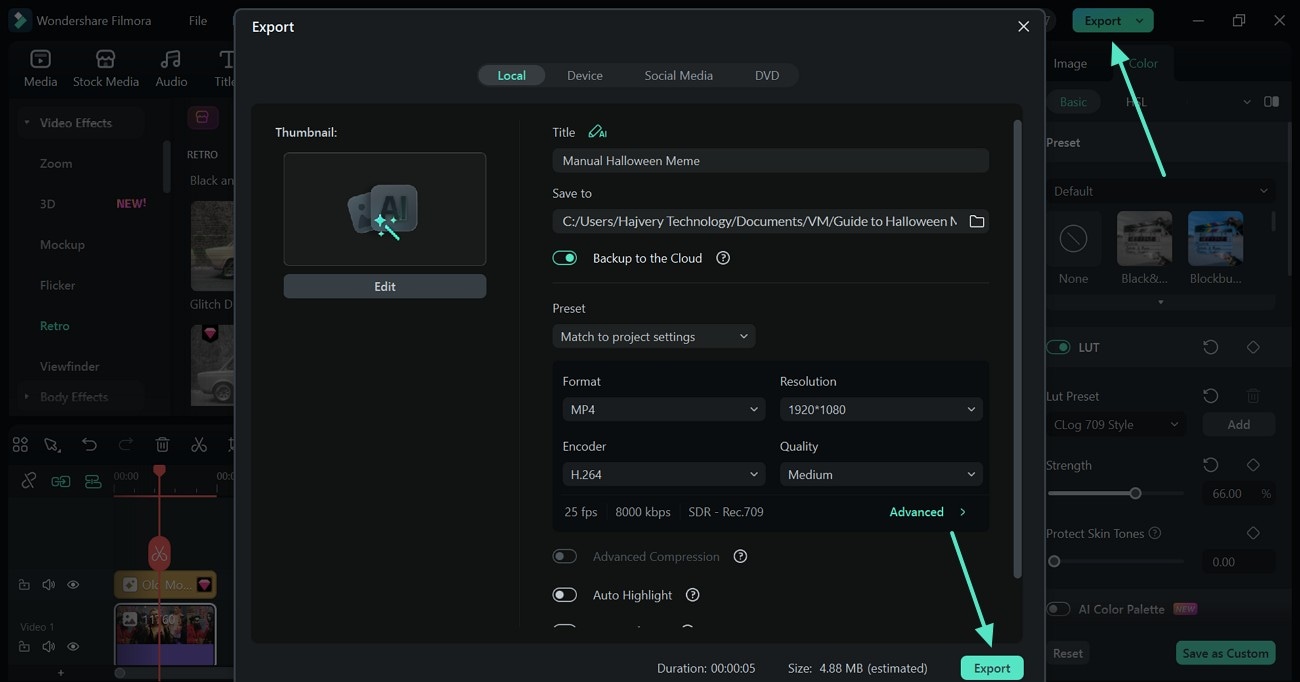
- Step 4. Export the Final Project. Once the image is ready, use the "Export" button at the top right to save the project from the following window.
secure download
Using the Filmora App to Create a Halloween Profile Picture
Users who like to make it quick can follow the steps below to generate a spooky Halloween profile picture using this app:
- Step 1. Start with a New Project. To initiate, open the main interface of the app and select the "Image to Video" feature to proceed.
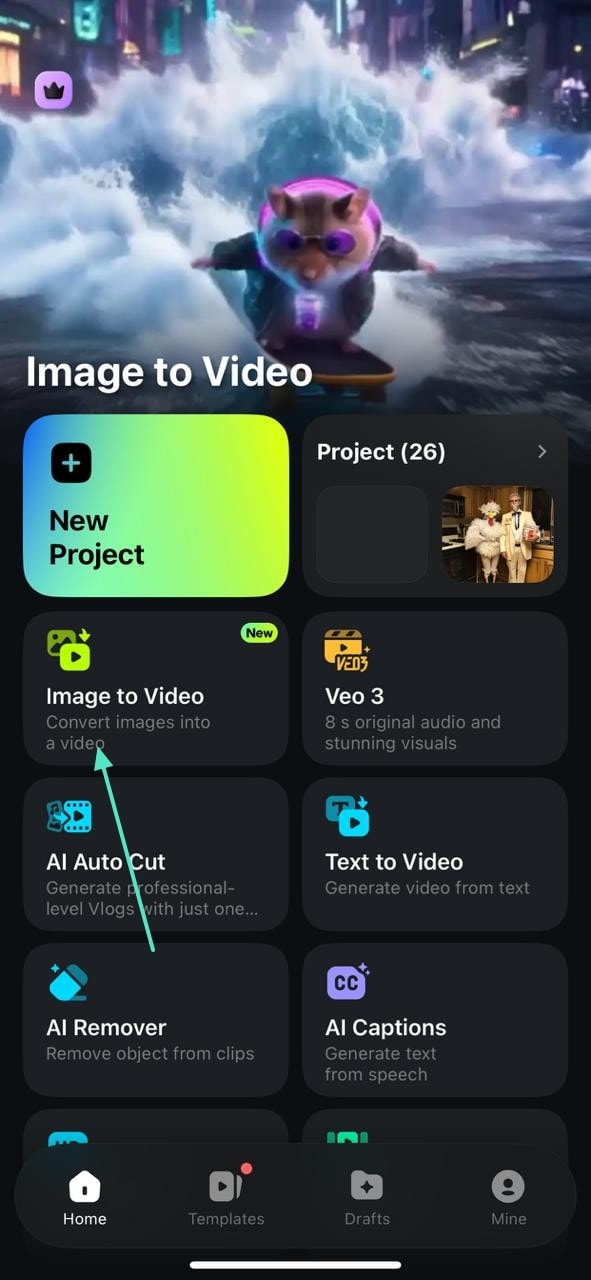
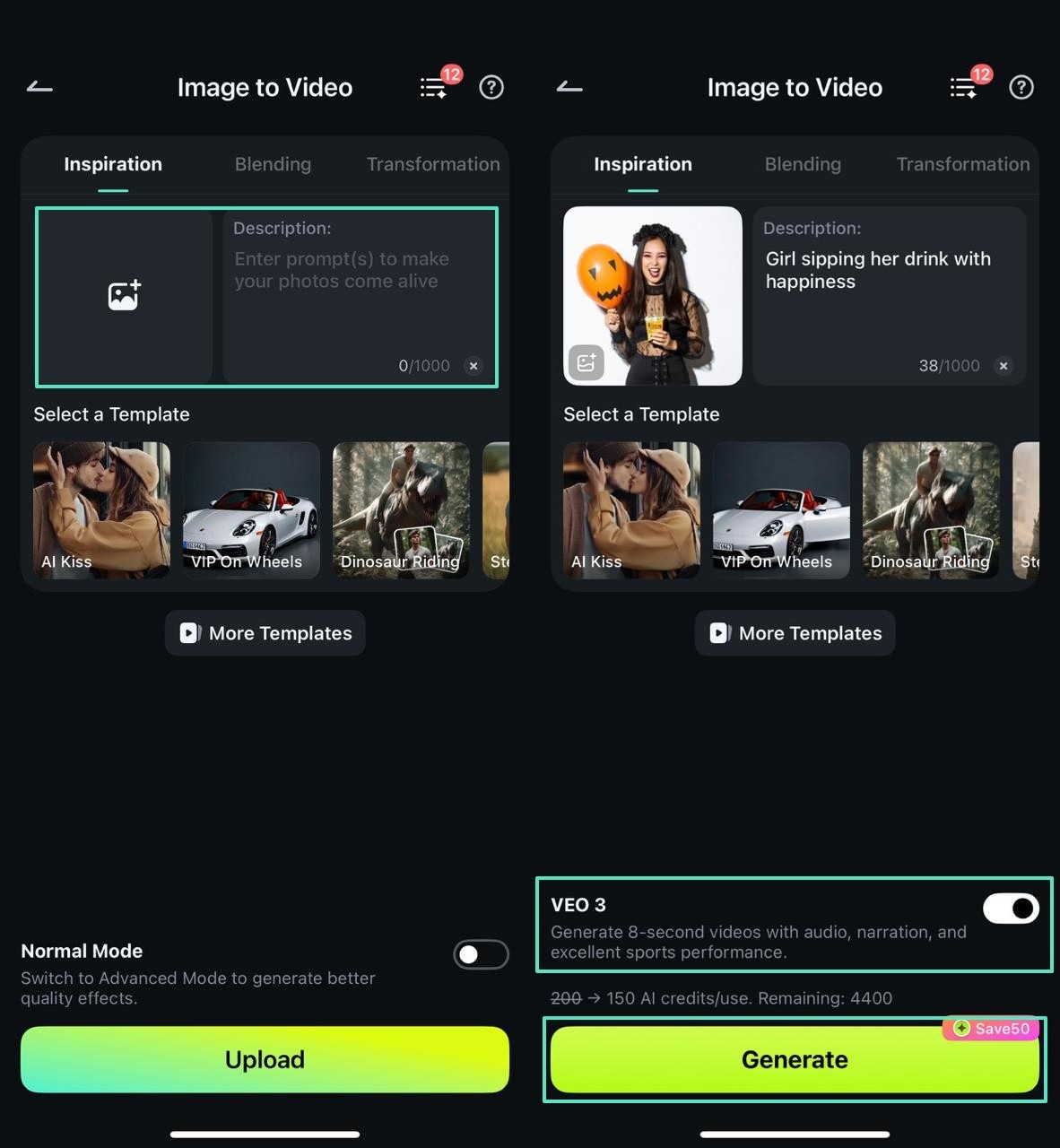
- Step 2. Add a Prompt to Generate a Video. In the following screen, "Import" the image you want to use as your profile picture. Using the relevant field, type the description of the video and hit the "Generate" button to see the progress in the next interface. For better results, enable the "VEO 3" option at the bottom and the generated video will have a narration in the background.
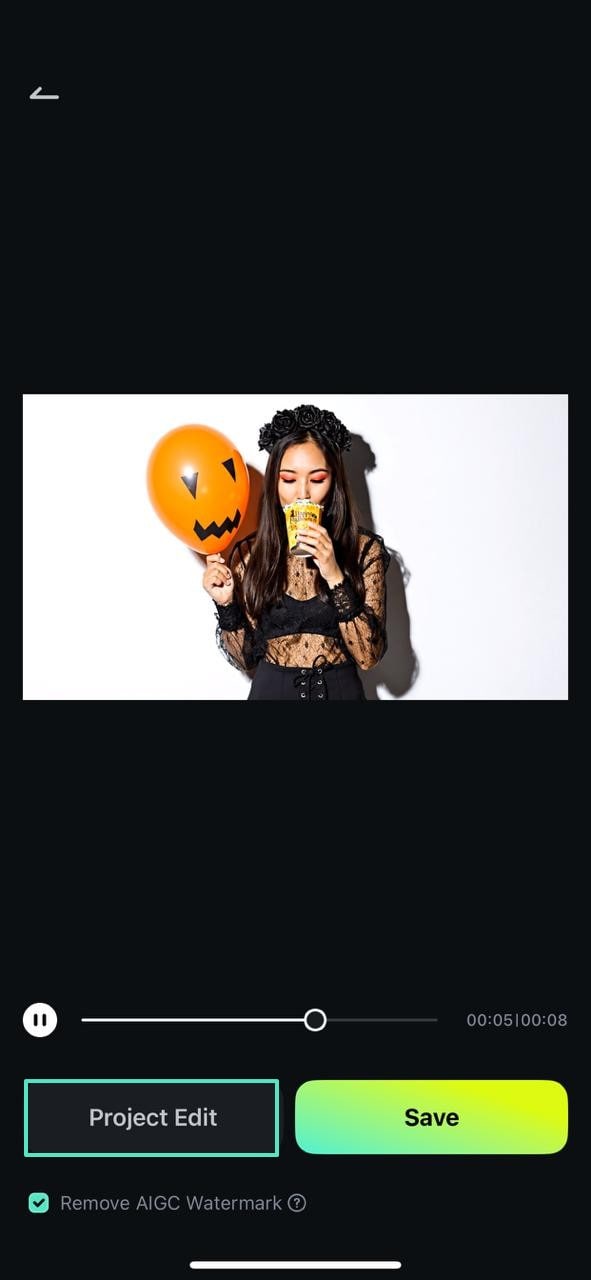
- Step 3. Edit the Project for Customization. Once the generated results appear in the following screen, select the "Project Edit" button at the left and the video will be fetched in the editing interface.
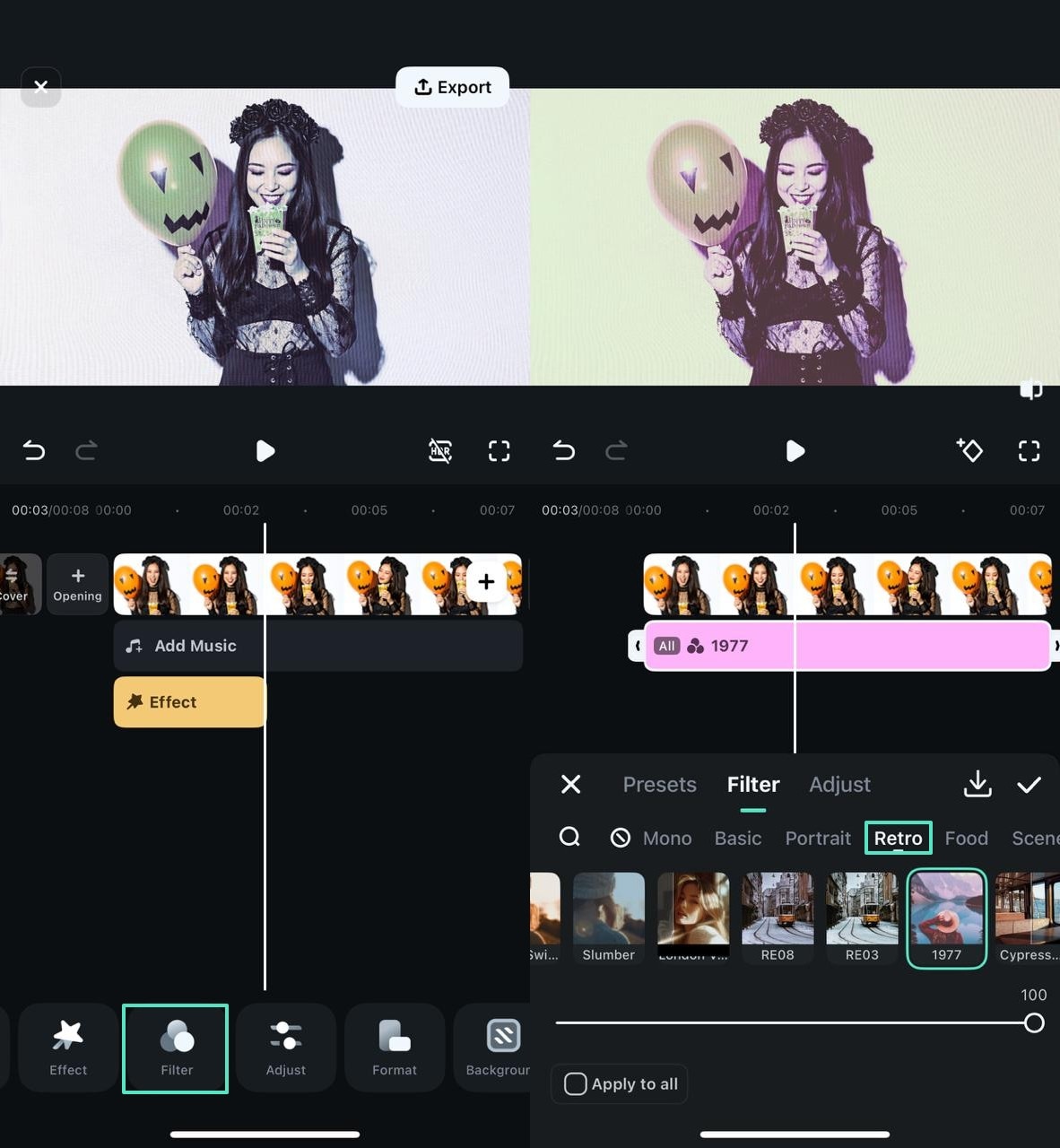
- Step 4. Add a Retro Effect to the Video. Using the bottom toolbar, enter the "Effect" tab and apply a suitable effect from the "Retro" section.
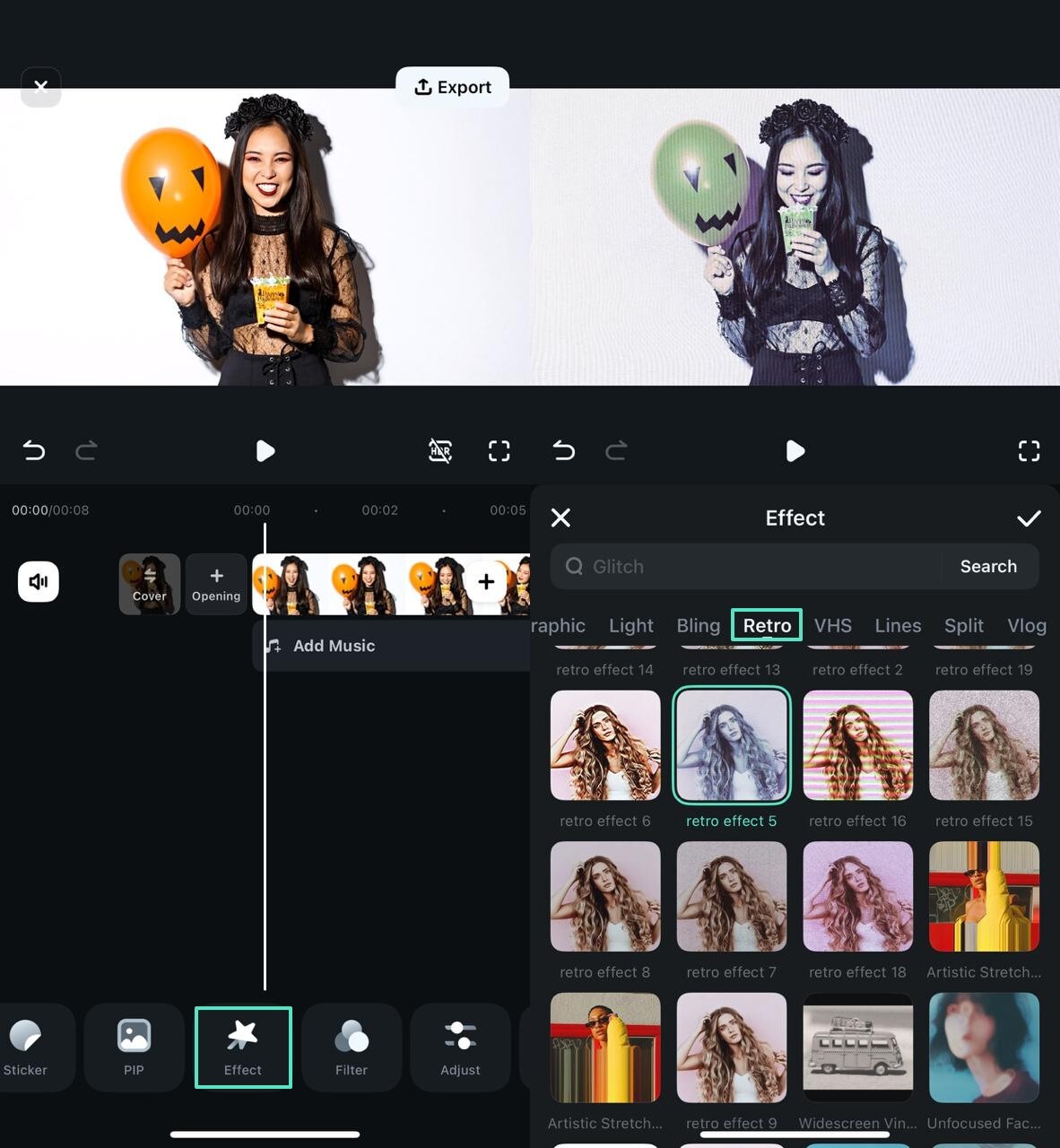
- Step 5. Use a Retro Filter for Enhancement. To enhance the retro vibe of the video, use the "Filter" tab and apply the desired "Retro" asset. You can adjust the intensity of this preset by using the designated slider at the bottom.
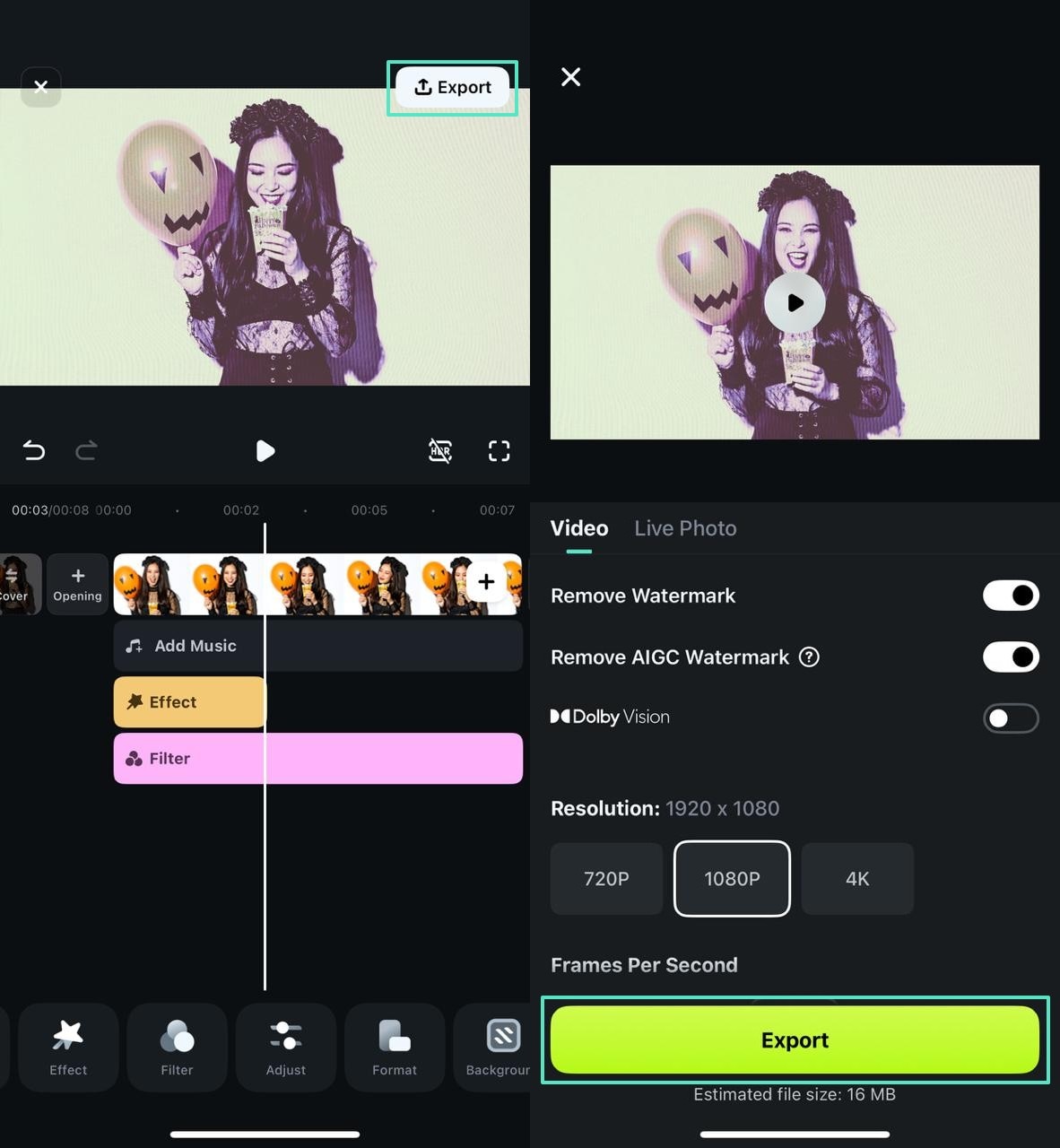
- Step 6. Export the Enhanced Profile Image. As the image is ready to share, select the "Export" button at the top right to save the video in your desired settings.
secure download
Part 5. Safety & Etiquette with Halloween Profile Picture
It may seem that adding a picture as a profile image is a harmless activity, but there are certain requirements that you must remember about this activity. To stay safe and maintain etiquette, the following aspects are to be remembered:
- Usage of Copyright-Free Halloween Profile Picture: You must prefer using images, graphics, or any icons that are either created by yourself or are under a copyright-free license. By using such spooky Halloween profile photos, you can be sure that you are not in trouble or showing disrespect to the original creators.
- Evading Themes of Offensive Halloween Profile Pictures: Certain costumes or themes can even parody cultures and religions or sensitive subjects accidentally. Respect to diversity can be achieved by keeping your Halloween profile picture entertaining and not insulting.
- Concerns on Privacy with Halloween Profile Picture: Be careful of the background details you disclose when it comes to using a personal selfie in costume such as where you live or where you are. Do not share too much about yourself in matters that may put your life at risk.
Conclusion
In essence, this article covered the significance of updating your profile picture this holiday season. We explored the top Halloween profile picture ideas and styles that make your feed relevant and notable. This blog discussed Filmora to create unique DPs for your social media.
With its desktop and mobile app versions, this tool helps you make attractive images. You can put its resources to use and apply effects, filters, and other elements to upgrade your image's visuals.
