

 100% Security Verified | No Subscription Required | No Malware


 ChatGPT
 Perplexity
 Gemini
 Claude
 Grok
Grok
Santa Claus filter is one of the fastest ways to make yourself look like Santa with just a selfie. Once applied, your camera will add that classic red hat, fluffy white beard, and rosy cheeks that move along with your face in real time.
But where can you actually find these filters? The ones that look good on you?
Platforms like TikTok and Snapchat are popular for providing quick Santa Claus face filters. But beyond that, we’ll also share with you another option that lets you really become Santa. Not just with a filter, but through a full AI-generated video that completely changes your whole look!
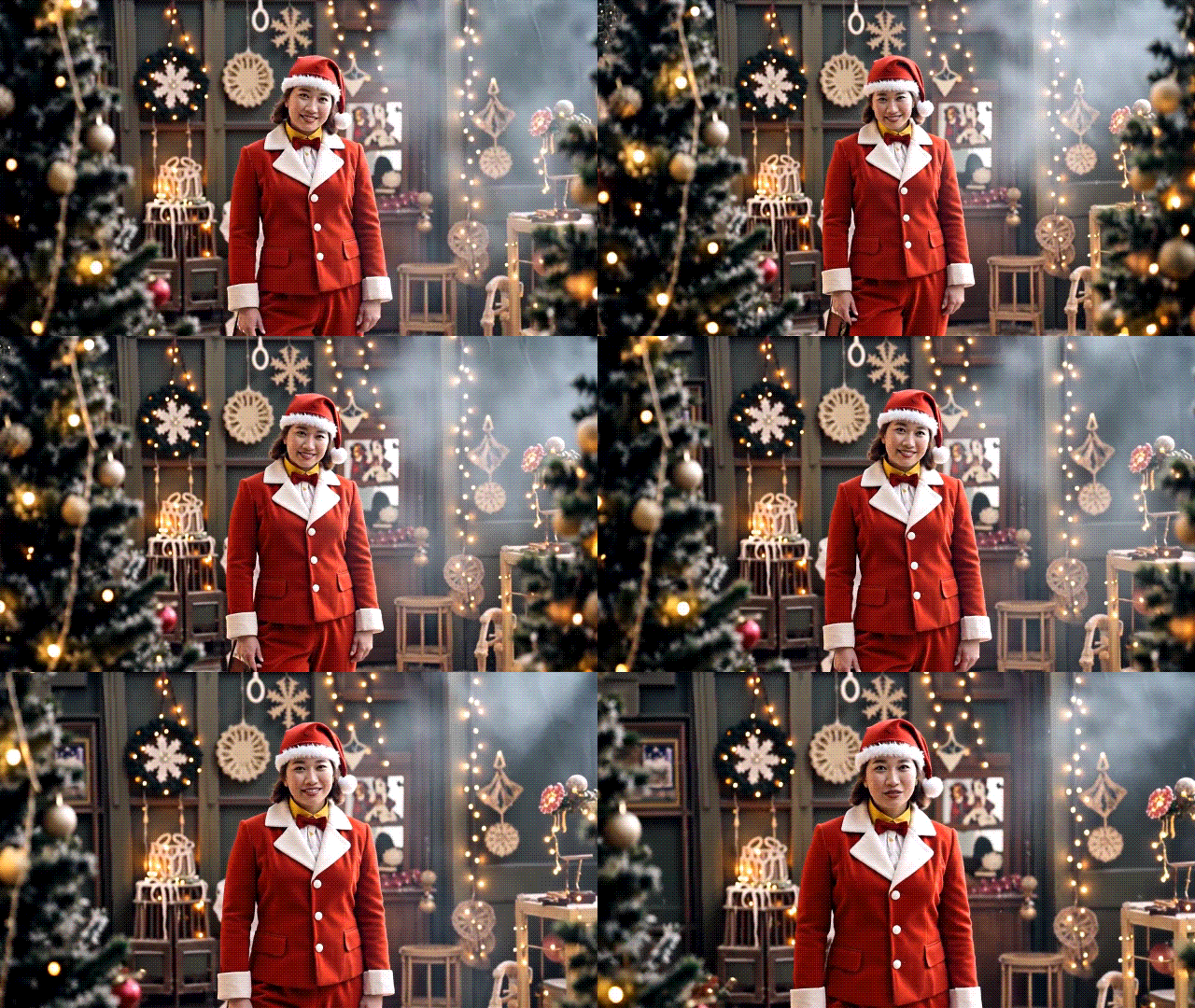
In this article
Part 1. What You Can Do With a Santa Claus Filter
A Santa Claus filter is an AR or face-swap effect that turns your face into Santa the moment you turn it on. Different platforms usually offer different kinds of Santa filters. Some give you a funny Santa selfie, others can even change your outfit, and some even work for couples or group photos.
But one thing’s for sure is that these filters are perfect for welcoming Christmas during the holiday season. You can try them in different ways depending on how creative you want to get:
- Live effects: Use a Santa Claus face filter on apps like TikTok or Snapchat.
- Quick edit: Upload your photo and apply a Santa filter online for an instant transformation.
- Full video creation: Use an AI Santa Claus effect template in an AI editor like Wondershare Filmora.
Before we go through them one by one, the following ideas are what you can use them for.
1. Make a Merry Christmas Video Greeting
Created with: TikTok’s Santa Claus filter.
One of the most common uses of Santa Claus filters is to make a Christmas video greeting. If your current outfit or background doesn’t really hit the Christmas vibe, a Santa filter can instantly fix that. You only need to record yourself using the filter and say your holiday message. Then, save or post your video directly on your social media.
2. Instant Santa Costume Change for Holiday Posts

Created with: Filmora’s AI Image to Video.
No time to shop for a Santa costume? Record yourself in normal clothes, then use a Santa-style filter or animation to switch into a Santa outfit, complete with the hat and red coat. It looks like a planned transition, even though you only spent a few minutes making this clip!
3. Create a Dancing Santas Video

Created with: Filmora’s AI Image to Video.
Christmas parties and office events often give you lots of quick clips that do not feel special on their own. A Santa filter can change that. With an AI-generated Santa template, you can turn yourself into Santa, along with other animated Santas appearing around the scene to dance.
You do not need a perfect choreography. Leave it to the filter to make everything look fun and lively.
4. Turn Your Pets into a Little Santa

Created with: Filmora’s AI Image to Video.
Who says Santa Claus filters can only work on humans? You can also apply it on your pets, and turn them into adorable mini Santas!
Pet videos are popular all year, and nobody can resist pet content with a Santa Claus filter. Take a short clip of your cat or dog, then apply a template like Xmas Cat that turns the environment into a warm, holiday-style background.
5. Short Comedic Skits with Playful Surprises

Created with: Filmora’s AI Image to Video.
If you enjoy making funny content, some Santa Claus filters can be downright absurd, so you can use them as a strong base for quick skits and memes. Take a template like the Santa yoga session, for example. It turns you into Santa attempting a handstand yoga pose and almost tipping over.
You can add a caption like “the secret to staying jolly,” or anything that fits the content and turns the moment into a meme.
Part 2. Fastest Ways to Get a Santa Claus Filter
If you just want to look like Santa in a few seconds, you have two main options:
- Use a real-time Santa Claus face filter inside social apps such as Snapchat or TikTok.
- Use a simple Santa Claus filter online that generates a new Santa-style photo from your upload.
Both are quick, but each works a little differently and has its own strengths and limits.
1. Use a Real-time Santa Claus Face Filter on Snapchat or TikTok
Snapchat and TikTok are often the easiest places to start. They already include built-in AR Santa effects that can turn your face into Santa while you record.
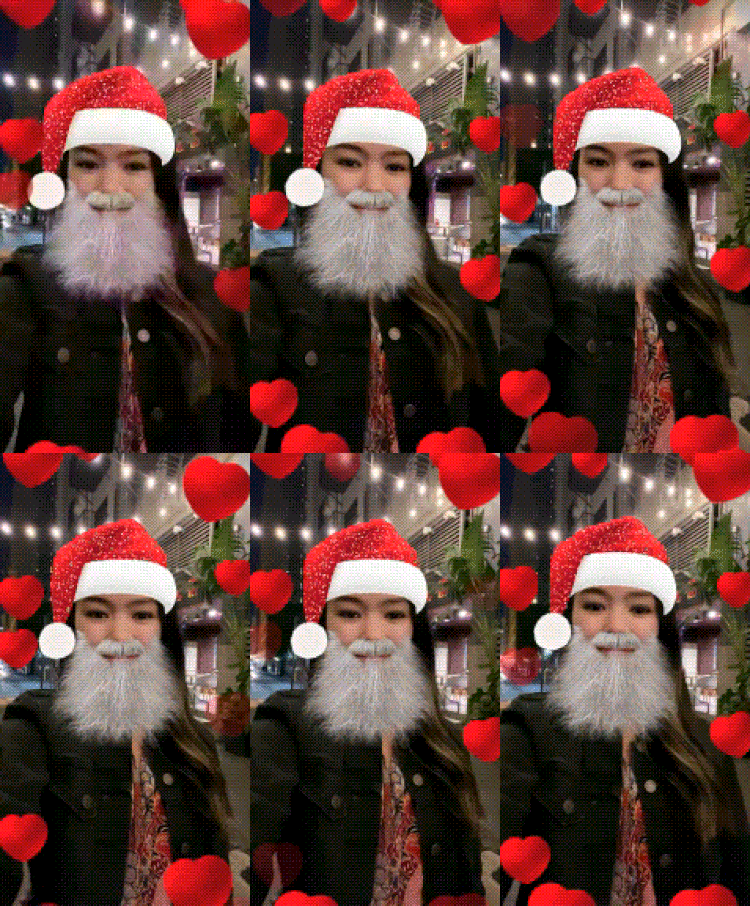
This option is ideal for:
- Quick Stories or short Reels
- Casual Christmas greetings to friends
- Testing how a Santa looks feels before you edit anything
How to use a Santa Claus filter on Snapchat
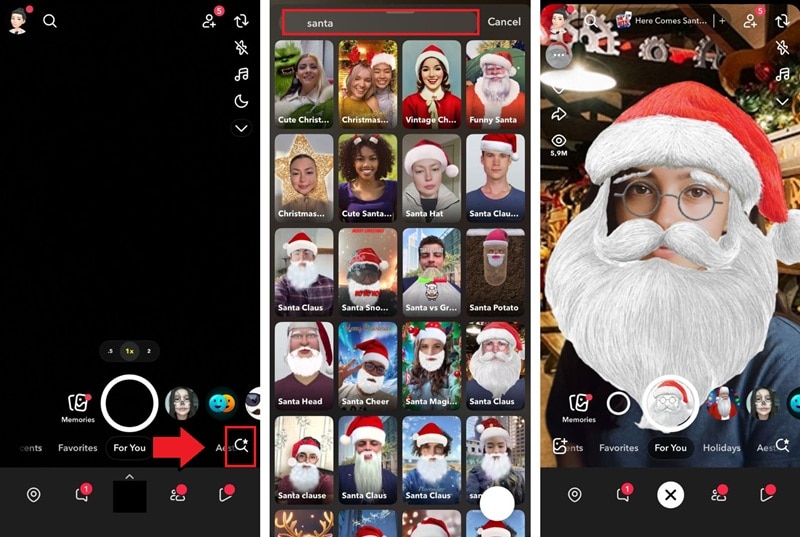
- Open Snapchat, switch to the front camera, then tap the magnifying icon to search for a specific filter.
- Use the search bar and type “Santa Claus filter”, “Santa”, or “Christmas”, then browse and pick a Santa filter lens you like.
- Adjust your position, press and hold the shutter to record a video or tap once for a selfie, add text or stickers if you want, then send it as a Snap or post it to your Story.
How to use a Santa Claus filter on TikTok
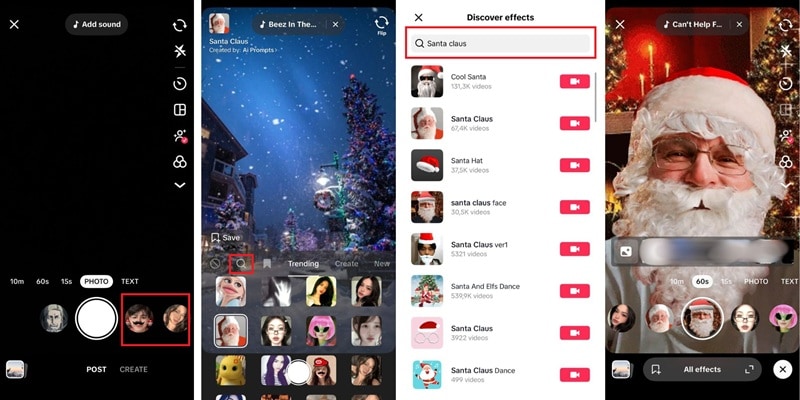
- Open TikTok, tap the plus button to create a new video, then tap any effect beside the record button.
- Tap the search icon, type “Santa Claus filter”, “Santa face”, or “Christmas”, and choose a filter Santa Claus effect that adds a hat, beard, or full Santa look.
- Stand in good lighting, hold the record button to film your clip, then add music, captions, or hashtags before you publish or save the video to your phone.
Limitations of in-app Santa filters
Real-time Santa effects are fun and very convenient, but they have some limits:
- The Santa filters only work inside the app. You cannot always use the same Santa face filter in other camera apps.
- Filters can change, get updated, or disappear when the platform refreshes its effects.
- The style is usually fixed. You cannot fully control details like beard style, color grading, or extra Christmas overlays.
These Santa Claus filters are best for fast Stories, quick greetings, or testing ideas. If you want more control for a full Christmas video, you will still need an editor later.
2. Try a Santa Claus Filter Online
If you prefer a simple Santa photo instead of recording in an app, a Santa Claus filter online is another quick option. Sites such as PhotoFunia and similar tools let you upload a face photo, then automatically apply a Santa-style effect.
Instead of a live AR lens, these tools process your image on the website. They add a Santa hat, beard, and other Christmas details to create a new Santa picture. This can be a good choice if you want a Christmas profile photo or a still image for a digital card.
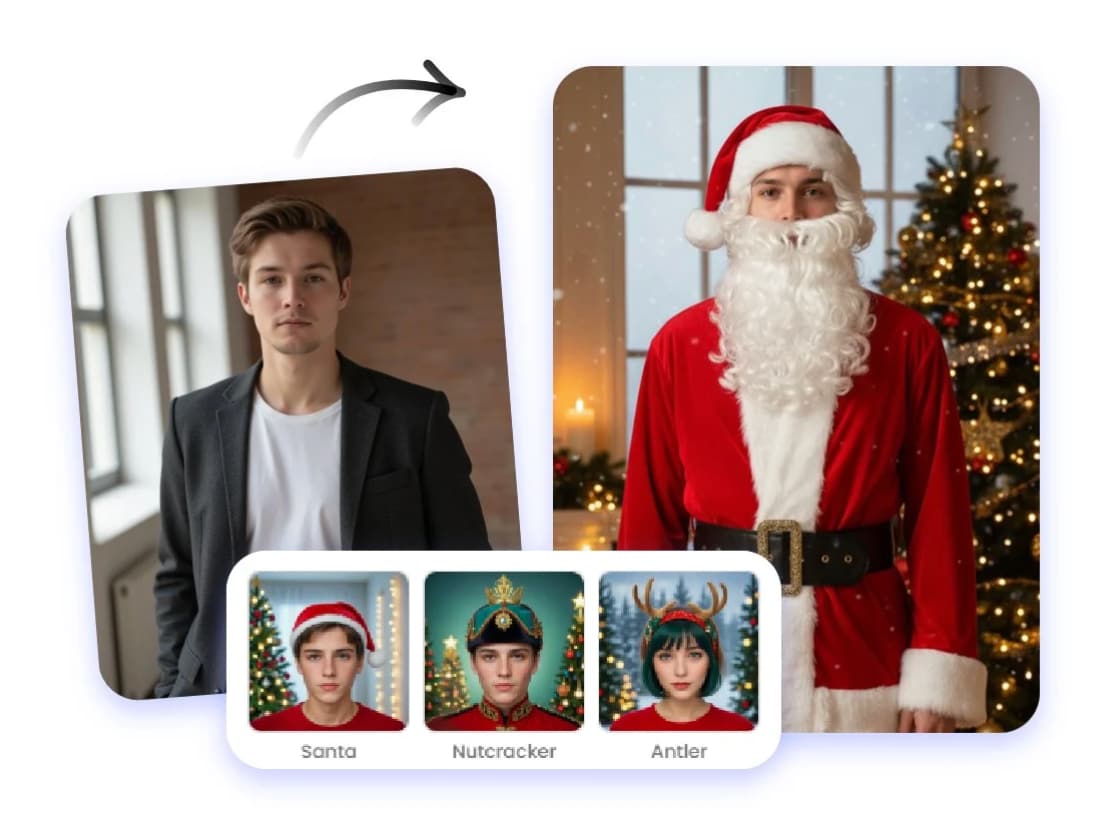
This type of Santa Claus filter works best when you want:
- A quick Christmas profile photo for social platforms
- A simple Santa image for printable or digital cards
- A base Santa picture you can later import into a video editor
However, a Santa Claus filter online works differently from Snapchat or TikTok for several reasons.
|
Feature |
Real-time Santa Claus Filter |
Online Santa Claus Filter |
|
Output Type |
Image and video |
Mostly image only |
|
Tracking |
Real-time face tracking that moves with you |
No facial tracking |
|
Access |
Requires a social media app and account |
Works directly in a browser |
|
Use Cases |
Perfect for Stories, Reels, and short video greetings |
Great for quick profile photos, Christmas cards, or base images for editing |
Limitations of the Santa Claus filter online tools
- The effect can look quite basic, especially around the edges of the face.
- It does not always match your face shape or skin tone perfectly.
- You usually cannot fine-tune details like lighting, color, or extra effects.
If you only need a fun image for one post, this might be enough. But for more polished Christmas content, you will want a more powerful option. In the following part, you will see how to turn yourself into Santa with AI video animation and then build a full holiday video using Wondershare Filmora.
Part 3. Turn Yourself into Santa Claus with AI Video Animation
A regular Santa Claus filter is fun, but sometimes a simple Santa face filter still feels like a sticker on your face. If you want something that looks more like a mini Christmas scene, AI video animation is the answer.
Instead of only adding a beard and hat, Filmora can turn a single photo into a short Santa animation with movement and Christmas-themed backgrounds. You can start with a normal selfie, and then use Filmora’s AI Image-to-Video feature and Christmas templates to animate that image in just a few taps.
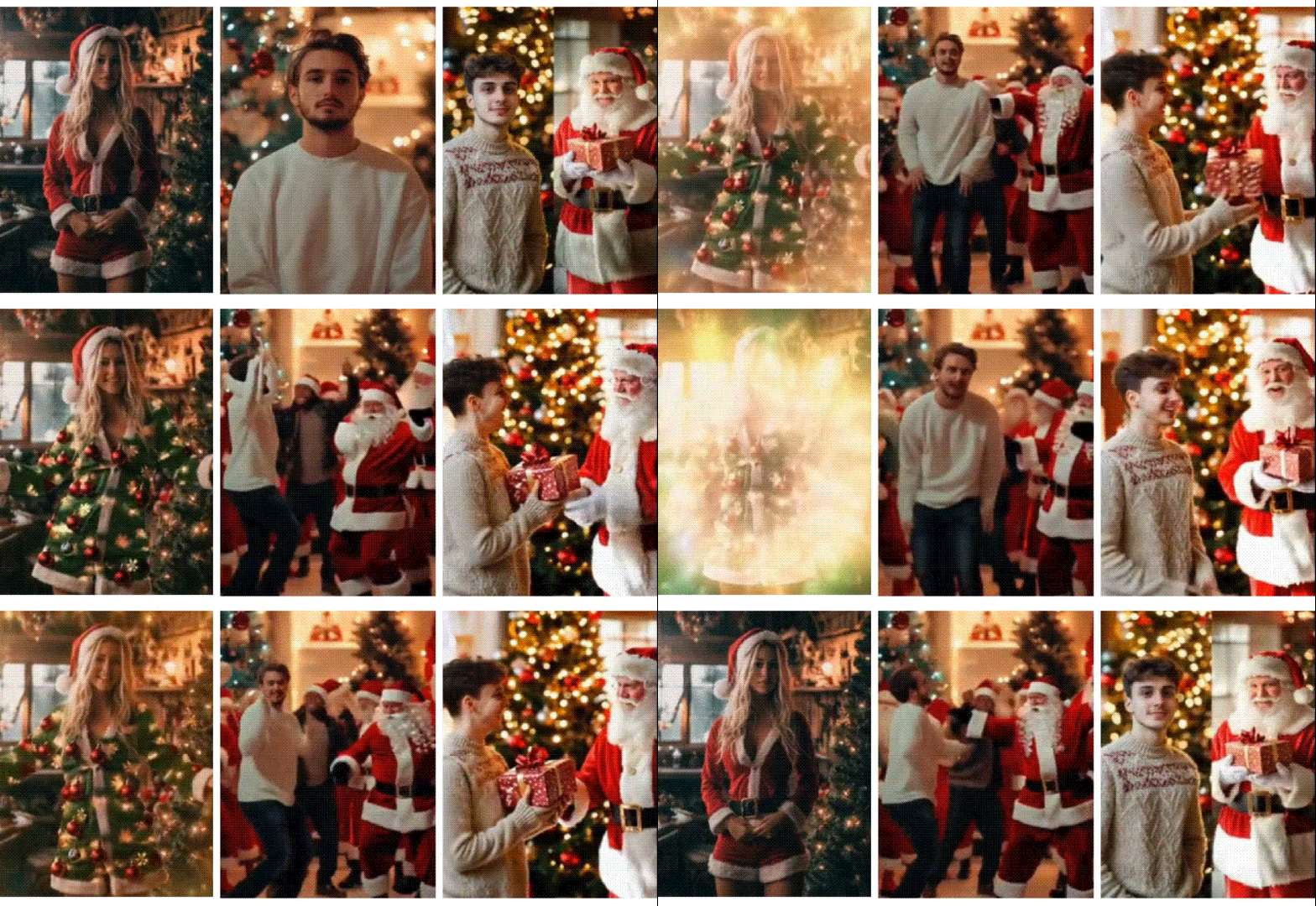
Once your AI Santa clip is ready, you can keep editing in the same app. Filmora gives you the freedom to:
- Trim, merge, and rearrange your video.
- Add snow, sparkles, and other overlays.
- Place Santa stickers and write holiday captions like “Merry Christmas” or “Happy Holidays.”
- Browse and add holiday music from the built-in library.
- Export in vertical format so it fits Reels, TikTok, or Stories.
Filmora is available on both mobile and desktop. The Filmora Mobile app is great for quick edits, but if you want to refine your project for more customization, you can easily move it to Filmora for Desktop and continue editing there.
How to Turn Santa Face Filter Clips Into Reels With Filmora Mobile

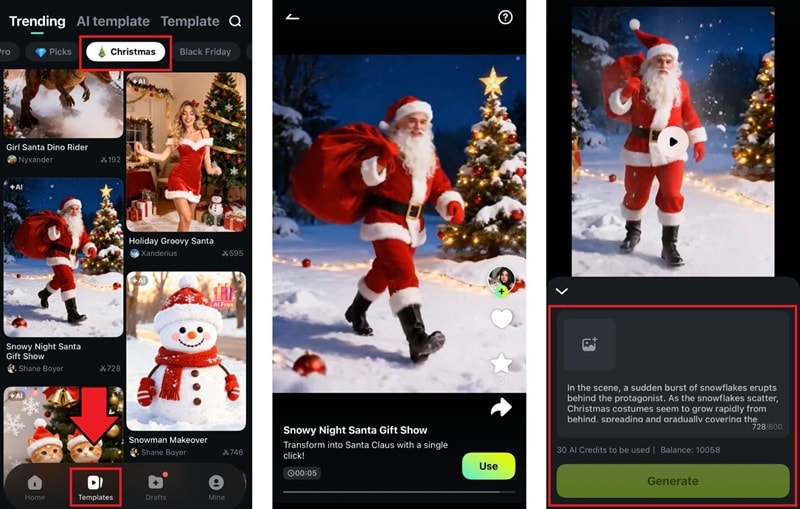
Step 1. Access the Image to Video Template
Open Filmora and go to the Templates tab to browse the available AI options. Switch to the Christmas category to filter the results, then pick any Santa Claus template you like.
 secure download

Step 2. Generate AI clips
Import selfies, pet photos, or images with a Santa Claus filter in Filmora mobile, then let the AI generate a short Santa animation.
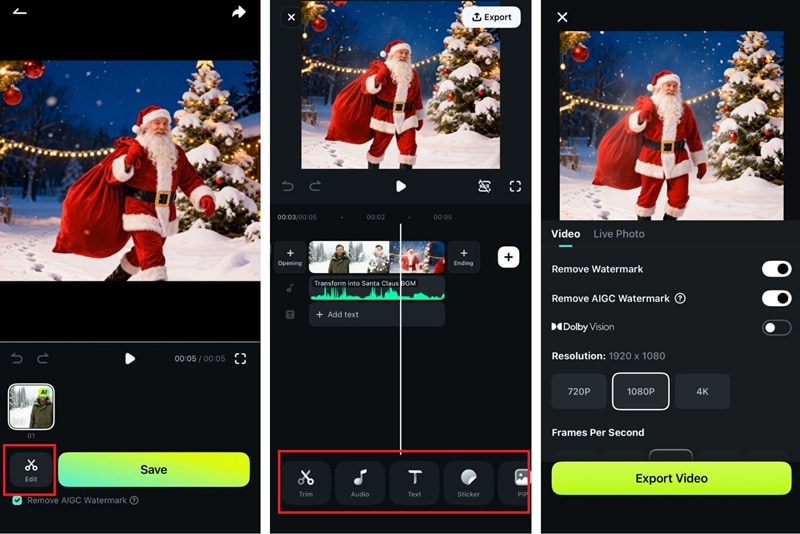
Step 3. Edit the generated Santa Claus video
Once your Santa video finishes generating, you can either download it right away or continue editing it in Filmora. If you choose to edit, use the toolbar to explore Filmora’s effects, stickers, text tools, and holiday overlays to complete the video!
How to Make A Santa Claus Filter Christmas Video
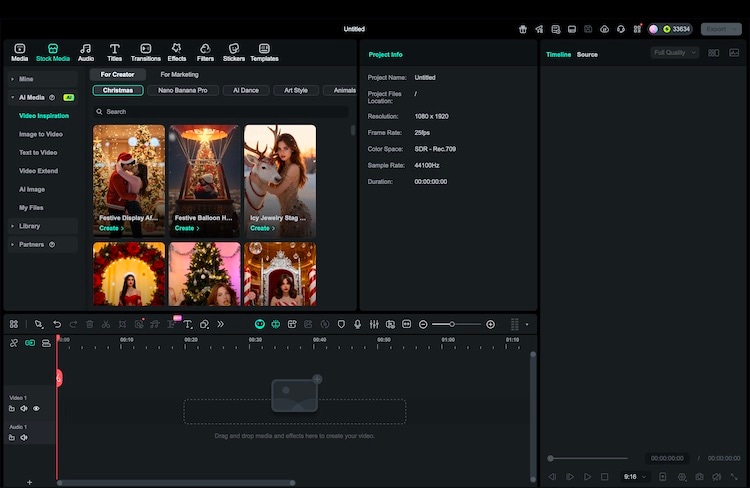
Step 1. Open Filmora Desktop and choose Image to Video
Launch Wondershare Filmora on your computer and look for the Video Inspiration section. Browse the Christmas category and pick a Santa-style design you like.
 secure download
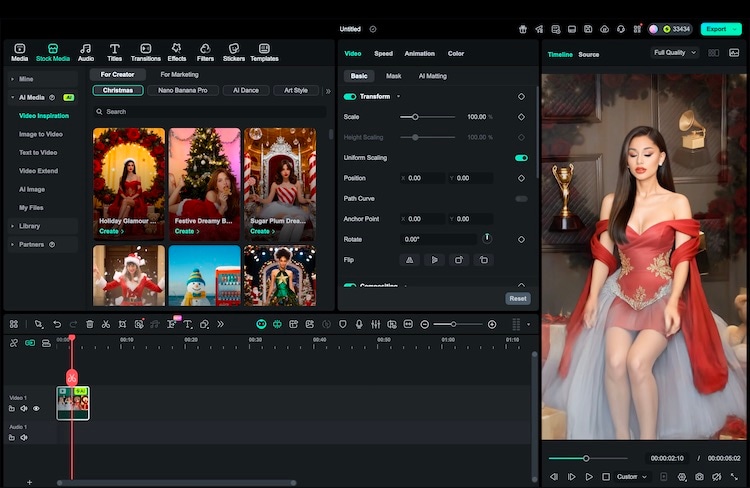
Step 2. Add your photo and generate the animation
Import a clear selfie and make sure your face is visible and not heavily cropped. Confirm your selection and let Filmora’s AI tool create an animated Santa clip from that image.
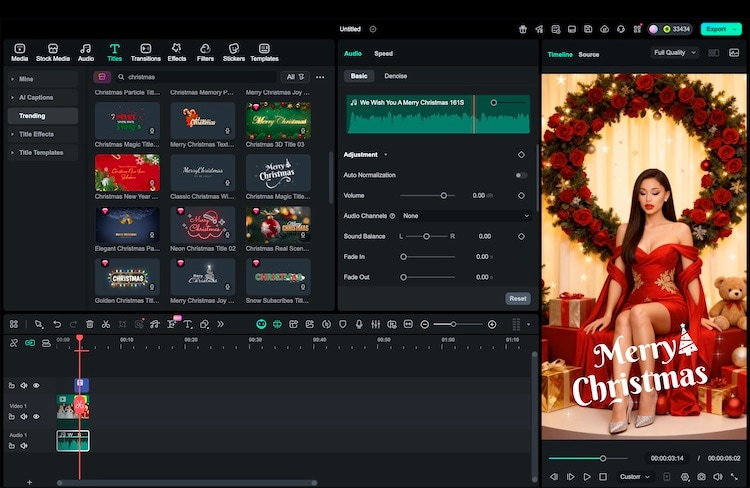
Step 3. Build a full Christmas story around the clip
Add the result to your main timeline to continue editing. You can then include extra footage if you want, then tie everything together with text overlays, captions, music, stickers, and more.
Step 4. Export in the right format and share
When your Santa Claus filter Christmas video feels complete, click Export to save the video. Choose vertical for TikTok and Reels, square or vertical for Instagram, and horizontal if you plan to share on YouTube.
Conclusion
A Santa Claus filter is an easy way to turn normal photos and clips into Christmas moments. You can play with a Santa face filter in social apps, or use a simple Santa Claus filter online to create fun Santa photos in seconds.
But for a more complete result, you can try Wondershare Filmora. With its AI Image-to-Video, music, Christmas-themed overlays, and greeting text, you can turn yourself into a full Santa-themed video that’s perfect for sharing with family and friends!
 secure download
