

 100% Security Verified | No Subscription Required | No Malware


 ChatGPT
 Perplexity
 Gemini
 Claude
 Grok
Grok
Beaver is a warm, medium brown with soft taupe undertones. It feels grounded, dependable, and a little nostalgic, which makes it perfect for cozy storytelling, lifestyle branding, and cinematic vlogs. Unlike harsh blacks or bright primaries, Beaver reads as approachable and human, giving your videos a calm, lived-in atmosphere.
For creators and Filmora users, Beaver color palettes are ideal for YouTube thumbnails, intro cards, lower thirds, and subtle LUT-style grading. Below are 15 Beaver color palettes with HEX codes you can copy directly into your thumbnails, titles, overlays, and color grading to keep your channel visuals consistent and on-brand.
In this article
Cozy Beaver Neutrals
Fireside Beaver Comfort
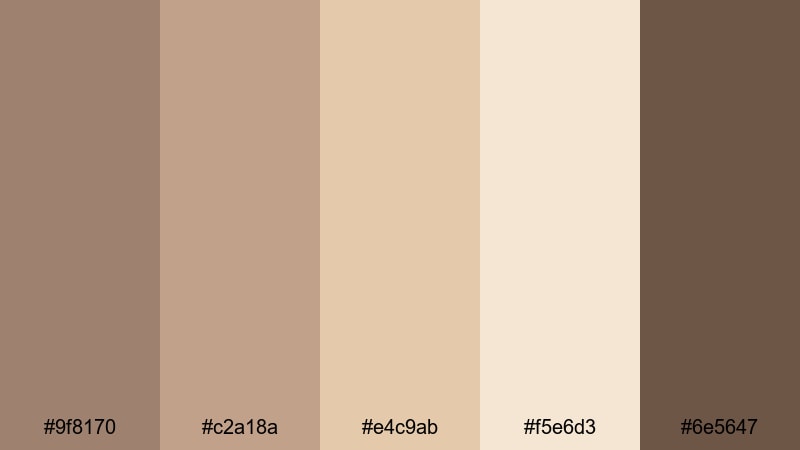
- HEX Codes: #9f8170, #c2a18a, #e4c9ab, #f5e6d3, #6e5647
- Mood: warm, intimate, inviting
- Use for: Ideal for cozy vlog intros, lifestyle b-roll, and family storytelling thumbnails.
This palette feels like a quiet night by the fire. Beaver (#9f8170) and the deeper brown (#6e5647) ground the frame, while the creamy highlights (#e4c9ab and #f5e6d3) add a soft glow that flatters skin and makes text overlays easy to read. It creates an intimate, story-first mood that works beautifully for sit-down chats, family memories, and slow evening vlogs.
Use the darker tones for typography, borders, or lower thirds, and let the lighter shades fill your backgrounds, thumbnails, and intro cards. In Filmora, you can echo these colors in your title presets, end screens, and social cutdowns so every piece of content looks like it belongs to the same cozy channel universe.
Pro Tip: Enhance Your Beaver Visuals With Filmora
When you build a warm, fireside Beaver palette like this, consistency is everything. In Filmora, you can sample the exact HEX values for your titles, shapes, and background mats so your intro, b-roll, and outro all share the same inviting brown-beige mood.
Save a custom title or lower-third template using your Beaver tones, then reuse it across series, playlists, and shorts. This keeps your channel feeling recognizable at a glance, especially on crowded YouTube home pages and mobile feeds.
AI Color Palette
If you already have a thumbnail or reference photo that nails your dream Beaver aesthetic, you can turn it into a grading shortcut. Filmora's AI Color Palette feature analyzes that image and applies the same tones, contrast, and warmth across your whole video.
Simply choose a reference frame with your best Beaver lighting, open the AI Color Palette tool, and match the rest of your clips. Your vlog intro, talking head shots, and B-roll will all share the same cozy look without endless manual tweaks.
 secure download

HSL, Color Wheels & Curves
To push your Beaver palette toward a more cinematic or moody look, use Filmora's HSL, color wheels, and curves. You can gently desaturate oranges for a softer skin tone, warm up midtones to enhance the fireside feeling, or lift shadows so your darker browns do not crush on mobile screens.
For a detailed walkthrough, watch this Filmora color grading tutorial and mirror the steps with your own Beaver neutrals, adjusting highlights and shadows until your footage matches your thumbnail design.
secure download1000+ Video Filters & 3D LUTs
If you want a faster route to a polished Beaver aesthetic, Filmora's video filters and 3D LUTs make it easy to add warmth, fade, or contrast with one click. Start with a filter that matches your mood, then fine-tune the Beaver browns so they still feel natural and not overly stylized.
You can save your favorite filter and curve combo as a preset, then drop it onto every clip in a series. This keeps your Beaver-based thumbnails, end cards, and footage aligned, so viewers instantly recognize your style as they scroll.
secure downloadSoft Studio Latte
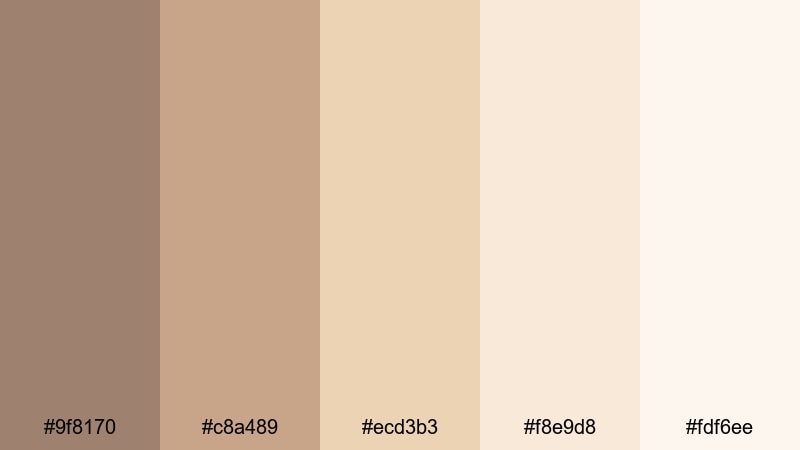
- HEX Codes: #9f8170, #c8a489, #ecd3b3, #f8e9d8, #fdf6ee
- Mood: calm, airy, welcoming
- Use for: Use this palette for talking head setups, tutorial backgrounds, and channel branding that needs a soft neutral base.
Soft Studio Latte is built around Beaver but leans into airy creams and latte tones. The gentle contrast between mid browns and off-whites keeps your frame bright and flattering, especially for skin tones in beauty, productivity, or self-care content.
Use the lighter shades for backgrounds in your thumbnails, info cards, and end screens, while Beaver and #c8a489 handle text, icons, and borders. In a Filmora timeline, this palette gives tutorials and talking-head videos a clean, studio-like presence without feeling cold or clinical.
Cable Knit Morning
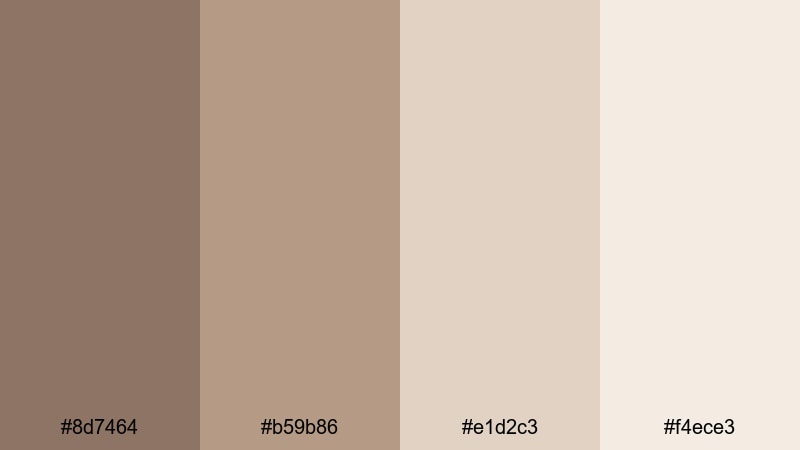
- HEX Codes: #8d7464, #b59b86, #e1d2c3, #f4ece3
- Mood: cozy, slow, reflective
- Use for: Great for morning routines, journal videos, and quiet cinematic b-roll sequences.
Cable Knit Morning blends muted Beaver-inspired browns with pale creams that feel like soft light through a window. It gives your footage a gentle, slow-living character, ideal for morning routines, journaling sessions, or ambient coffee shop b-roll.
Let the darker tones frame your subjects and keep titles legible, while the softer creams fill backgrounds and overlays. Used in thumbnails, this palette signals calm, introspective content that viewers can put on while they ease into their day.
Muted Cocoa Workspace
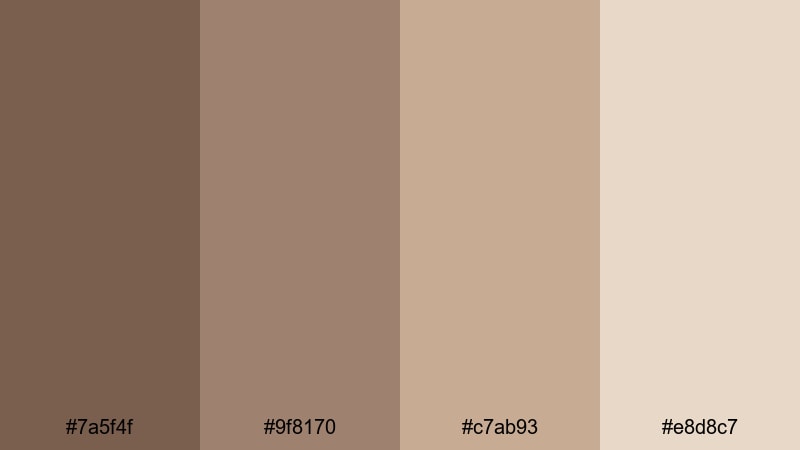
- HEX Codes: #7a5f4f, #9f8170, #c7ab93, #e8d8c7
- Mood: focused, grounded, professional
- Use for: Use this for productivity vlogs, desk tours, and understated channel headers or end screens.
Muted Cocoa Workspace is a grounded mix of cocoa and Beaver tones softened by warm neutrals. It feels productive but not sterile, perfect for study-with-me, desk setup, and remote work content where you want focus without harsh contrast.
Use the deepest brown (#7a5f4f) for key text and call-to-action buttons, keep Beaver as a central accent, and reserve the lighter shades for backgrounds in thumbnails, chapter cards, and lower thirds. Together, they create a cohesive productivity brand that works well on both dark and light interfaces.
Modern Beaver Minimalism
Clean Beaver Monochrome
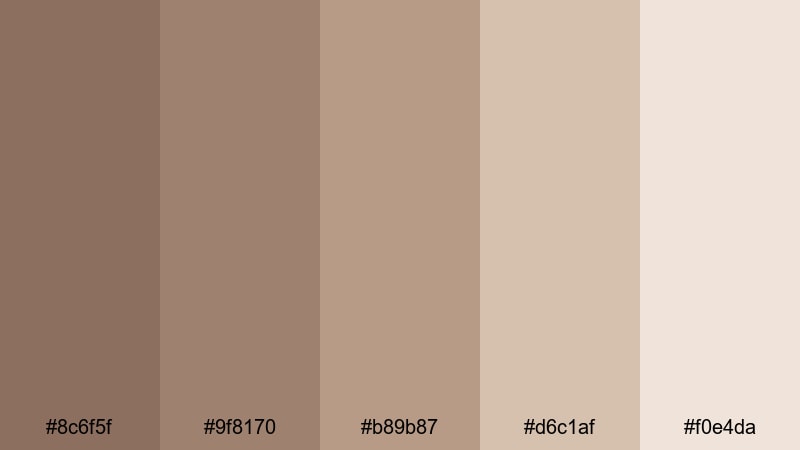
- HEX Codes: #8c6f5f, #9f8170, #b89b87, #d6c1af, #f0e4da
- Mood: minimal, polished, cohesive
- Use for: Ideal for minimalist channel branding, logo animations, and clean lower thirds.
Clean Beaver Monochrome stays within a tight band of warm browns, moving from deeper taupe to light oatmeal. Because all the hues are related, your layouts instantly look intentional and design-forward, even with very simple shapes and text.
This is a strong choice for minimalist channels, tech reviewers, or productivity creators who want neutral branding that does not distract from the content. Use the darker tones for logos and typography, and the lighter ones for subtle gradients behind your Filmora titles and transitions.
Urban Desk Edit
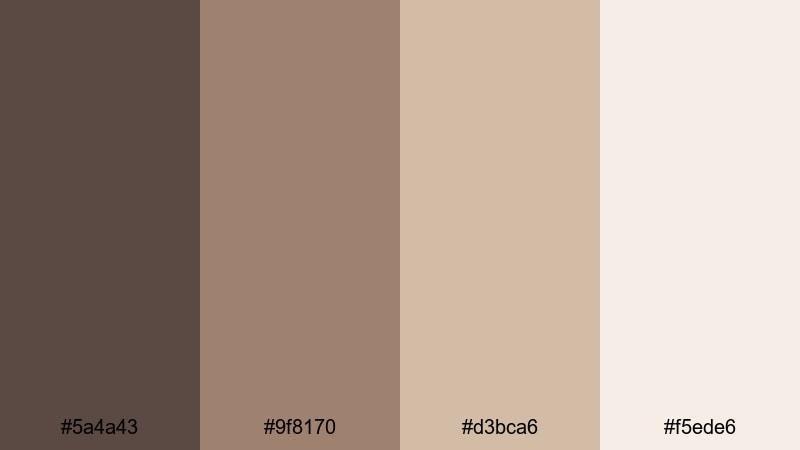
- HEX Codes: #5a4a43, #9f8170, #d3bca6, #f5ede6
- Mood: modern, editorial, stylish
- Use for: Works well for tech reviews, urban lifestyle edits, and sleek thumbnail backgrounds.
Urban Desk Edit adds deep espresso (#5a4a43) to Beaver, plus soft highlights, for a modern studio vibe. It feels like concrete, coffee, and clean lighting all in one, making it great for tech, design, and urban lifestyle channels.
Use the dark base to make product shots and UI overlays pop, while mid and light tones support your thumbnail layouts and title slides. In Filmora, you can mirror this palette in your background plates, motion graphics, and text panels to keep your feed looking like a cohesive editorial grid.
Subtle Brand Neutral
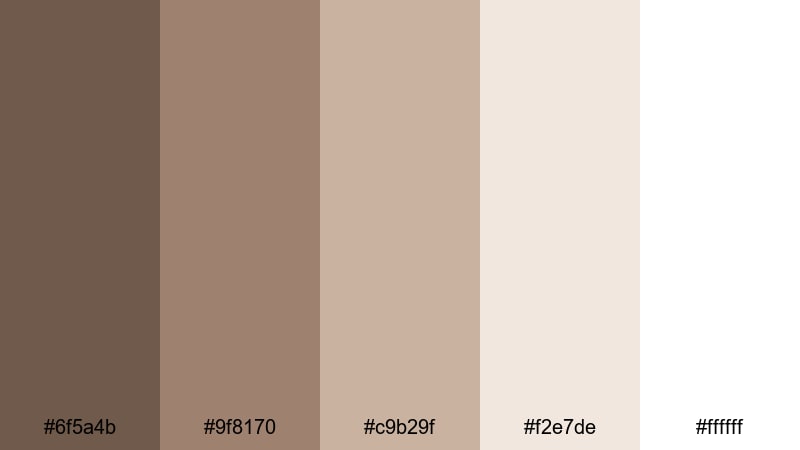
- HEX Codes: #6f5a4b, #9f8170, #c9b29f, #f2e7de, #ffffff
- Mood: clean, trustworthy, brand ready
- Use for: Use this for channel logos, overlays, and UI elements where you need a flexible brand neutral set.
Subtle Brand Neutral runs from charcoal brown through Beaver and into near-white, giving you a full range for branding. It feels calm, premium, and trustworthy, which is ideal for educators, consultants, and SaaS-style channels.
Reserve #6f5a4b for headers and strong CTAs, let Beaver and #c9b29f carry secondary elements like icons or badges, and use #f2e7de and white for clean backgrounds. This palette also works well in Filmora for on-screen UI mockups, course slides, and overlay graphics inside your videos.
Minimal Coffee Break
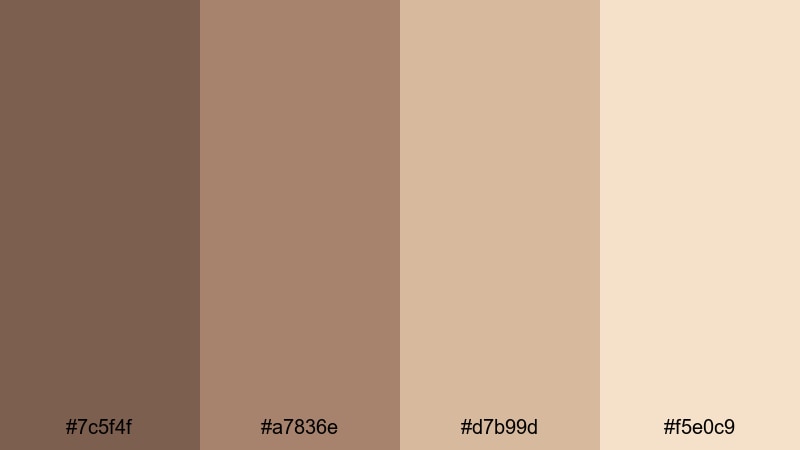
- HEX Codes: #7c5f4f, #a7836e, #d7b99d, #f5e0c9
- Mood: relaxed, modern, lifestyle
- Use for: Great for coffee shop edits, remote work vlogs, and Instagram story templates.
Minimal Coffee Break blends soft coffee browns with creamy accents for a relaxed but curated aesthetic. It feels like a design-conscious cafe: warm, minimal, and slightly aspirational.
Use the midtones (#7c5f4f and #a7836e) to anchor your typography and logo, and keep the lighter colors for backgrounds in vertical stories, reels, and shorts titles. In Filmora, this palette is especially nice for split-screen layouts, chapter markers, and subtle frame borders around your footage.
Rustic Beaver & Earth Tones
Cabin Trail Mix
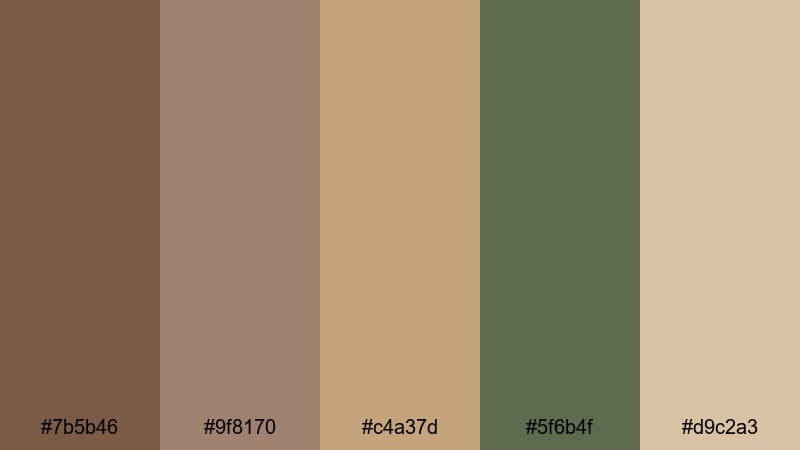
- HEX Codes: #7b5b46, #9f8170, #c4a37d, #5f6b4f, #d9c2a3
- Mood: adventurous, rustic, grounded
- Use for: Perfect for hiking vlogs, camping documentaries, and outdoor gear reviews.
Cabin Trail Mix pairs Beaver with toasted beige and a mossy green (#5f6b4f) to capture the feeling of a cabin in the woods. It is rugged but still warm, ideal for nature-centric edits, camping stories, and hiking gear breakdowns.
Use the green and darker browns for headlines, buttons, and key icons in your thumbnails, while the lighter neutrals fill negative space around your subject. This palette supports footage shot in forests, wooden cabins, and earthy environments, making grading feel natural and cohesive.
Woodland Storytime
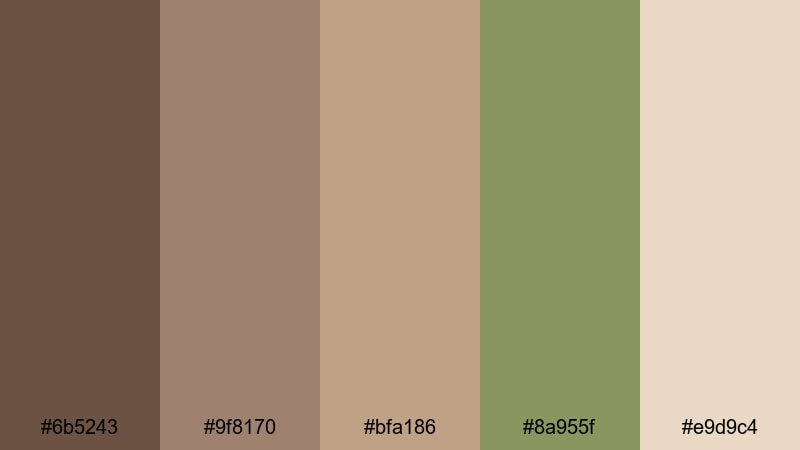
- HEX Codes: #6b5243, #9f8170, #bfa186, #8a955f, #e9d9c4
- Mood: nostalgic, storybook, organic
- Use for: Use this palette for narrative travel films, kids story content, or whimsical outdoor reels.
Woodland Storytime combines earthy browns, Beaver, and a muted green to create a gentle, storybook mood. It works well for narrative travel edits, family adventures, and kids content where you want an organic but friendly color scheme.
Let the greens and darker browns highlight key on-screen text or character names, while the soft beige (#e9d9c4) provides a warm canvas for illustrations, overlays, or animated titles. On platforms like YouTube Kids or Instagram, this palette instantly communicates comfort and light adventure.
Autumn Market Walk

- HEX Codes: #8a5b3d, #b37e5c, #9f8170, #d4b392, #f3e0c8
- Mood: festive, warm, bustling
- Use for: Great for farmers market b-roll, fall lookbooks, and street food vlogs.
Autumn Market Walk brings in spiced terracotta (#8a5b3d, #b37e5c) alongside Beaver and golden beige. It feels like warm streetlights, fall leaves, and busy stalls, perfect for seasonal content and lifestyle campaigns.
Use the richer oranges for titles, price tags, or callouts in your edits, and let the softer tones handle backgrounds and gradients. This palette works especially well in thumbnails and intro cards for fall vlogs, cozy lookbooks, or limited-time promotions.
Campfire Documentary
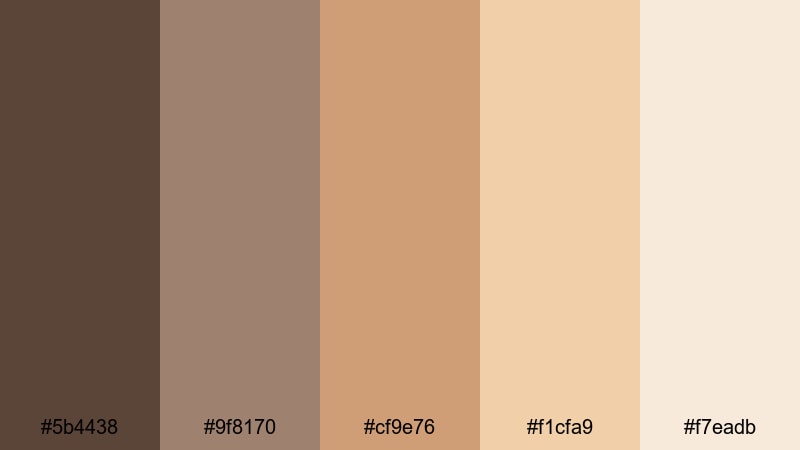
- HEX Codes: #5b4438, #9f8170, #cf9e76, #f1cfa9, #f7eadb
- Mood: cinematic, reflective, rugged
- Use for: Use for travel documentaries, campfire conversations, and moody cinematic edits.
Campfire Documentary mixes smoky browns with ember-like oranges and Beaver midtones for a cinematic, reflective feel. It is a great fit for travel stories, night-time campfire chats, and documentary-style interviews filmed in natural light.
Use the darkest brown for dramatic titles and chapter cards, while the warm mids and highlights add depth to skin tones and firelight. In your Filmora color grading, you can lean into the oranges for a stronger campfire glow or pull them back for a more muted, journalistic style.
Elegant Beaver Highlights
Beaver Rose Highlight
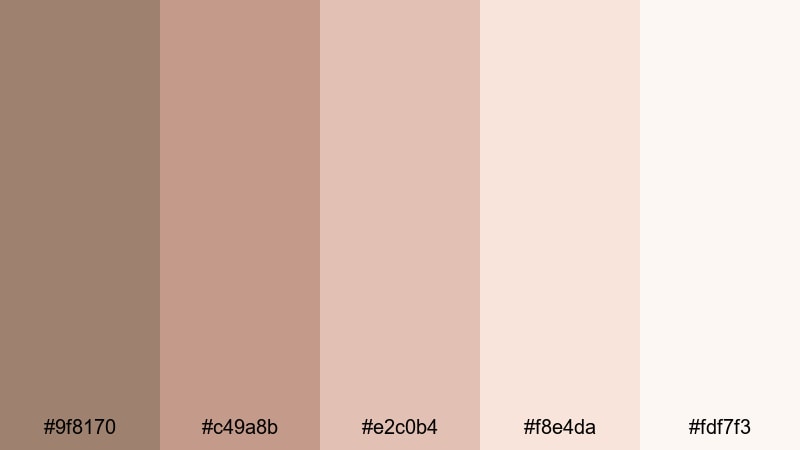
- HEX Codes: #9f8170, #c49a8b, #e2c0b4, #f8e4da, #fdf7f3
- Mood: romantic, soft, elegant
- Use for: Ideal for wedding films, engagement announcements, and feminine brand intros.
Beaver Rose Highlight softens Beaver with dusty rose and blush tones, creating a romantic, neutral palette that does not lean overly pink. It is flattering for skin and fabrics, making it an excellent choice for weddings, engagements, and lifestyle brands with a feminine angle.
Use the mid rose and Beaver for typography and logo marks, and let the lighter blushes fill backgrounds, overlays, and title cards. In thumbnails, this combination instantly communicates softness, intimacy, and elegance.
Cinematic Beaver Gold
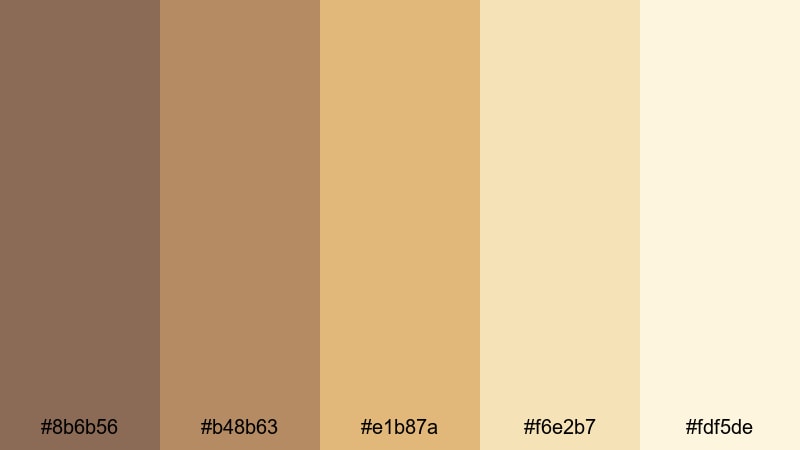
- HEX Codes: #8b6b56, #b48b63, #e1b87a, #f6e2b7, #fdf5de
- Mood: luxurious, cinematic, timeless
- Use for: Great for cinematic titles, premium product spots, and luxe channel trailers.
Cinematic Beaver Gold combines rich Beaver-adjacent browns with golden accents (#e1b87a, #f6e2b7). The result is a timeless, filmic palette that feels high-end without screaming for attention.
Use the deeper browns for logo locks and lower thirds, and the golds for accents, frames, and key call-to-action buttons. This scheme is ideal for luxury products, brand trailers, and cinematic openers created in Filmora.
Evening Beaver Luxe
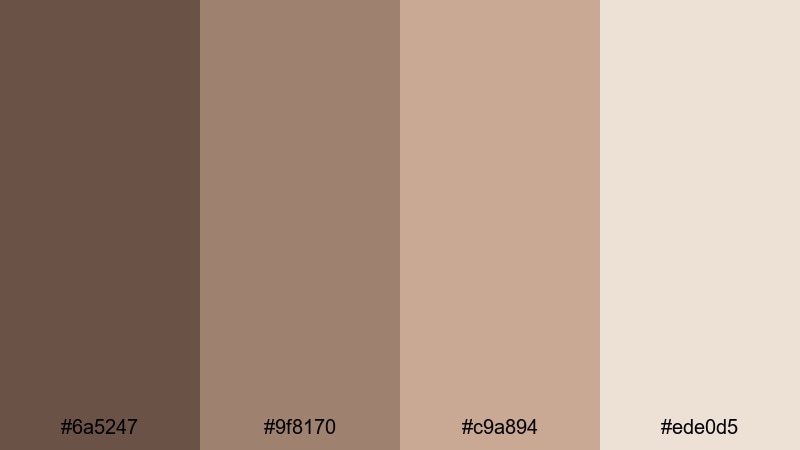
- HEX Codes: #6a5247, #9f8170, #c9a894, #ede0d5
- Mood: moody, refined, intimate
- Use for: Use for night time vlogs, cocktail promos, and moody lifestyle edits.
Evening Beaver Luxe leans into deeper browns and soft highlights to create a refined, lounge-like feel. It suits night-time vlogs, cocktail bars, live music, and moody lifestyle edits where you want intimacy without losing clarity.
Use #6a5247 for bold titles and overlay bars, with Beaver and #c9a894 for secondary elements and UI details. Keep #ede0d5 as your main highlight color for text on dark backgrounds, ensuring your thumbnails and subtitles stay readable even in low-light scenes.
Tips for Creating Beaver Color Palettes
Beaver is a flexible neutral that plays well with creams, greens, roses, and golds. To get the most from it in video and design, think about contrast, readability, and how your color grading interacts with your graphic overlays.
- Use Beaver as a base and add one accent: pair it with either a muted green, a soft rose, or a warm gold, rather than mixing too many accents at once.
- Check text contrast: on Beaver backgrounds, use very light creams or near-white for headlines, and darker browns or charcoal for light backgrounds.
- Match grading to graphics: if your overlays use warm Beaver tones, add a slight warm bias in your Filmora color grading so footage and graphics feel unified.
- Stay consistent across formats: reuse the same Beaver HEX codes for thumbnails, lower thirds, and end cards so your audience instantly recognizes your content.
- Test on mobile: view your thumbnails and titles on a phone screen to ensure Beaver midtones are not too low-contrast or muddy.
- Use neutrals as breathing room: balance Beaver and accent colors with generous patches of cream or white to avoid a heavy, over-brown look.
- Save presets in Filmora: once you dial in a Beaver-based color grade, save it as a preset and apply it to future projects to keep your channel identity consistent.
- Adjust saturation carefully: small changes in saturation can turn Beaver from elegant to flat; tweak slowly and compare before/after on real footage.
Beaver color palettes are powerful tools for shaping mood, from intimate fireside vlogs to modern minimalist branding and cinematic product launches. By choosing a palette and sticking to it, you can give your channel a recognizable visual identity that feels warm, cohesive, and professional.
Try dropping these HEX codes into your next thumbnail, intro card, or Filmora color grade. Experiment with how different Beaver combinations feel against your footage, then lock in your favorites as reusable presets so every video looks on-brand from the first frame.
Whether you create vlogs, documentaries, tutorials, or promos, Filmora makes it easy to apply your chosen Beaver palette across intros, b-roll, and social clips, so your visuals stay as consistent as your storytelling.
secure downloadNext: Contrast Color Palette
