

 100% Security Verified | No Subscription Required | No Malware


 ChatGPT
 Perplexity
 Gemini
 Claude
 Grok
Grok
Black gray color palettes sit in the sweet spot between pure monochrome and full color. Deep blacks suggest power, mystery, and focus, while soft grays bring balance, calm, and clarity. Together they create a versatile base that can feel cinematic, minimalist, moody, or high-contrast depending on how you stack the tones.
For video creators, designers, and Filmora users, black gray is a reliable foundation for thumbnails, intros, logo stings, overlays, and full color grades. Below are 15 black gray color palettes with HEX codes you can copy directly into your branding, video frames, and social content to keep your style consistent and professional.
In this article
Cinematic Black Gray Color Palettes
Noir City Streets
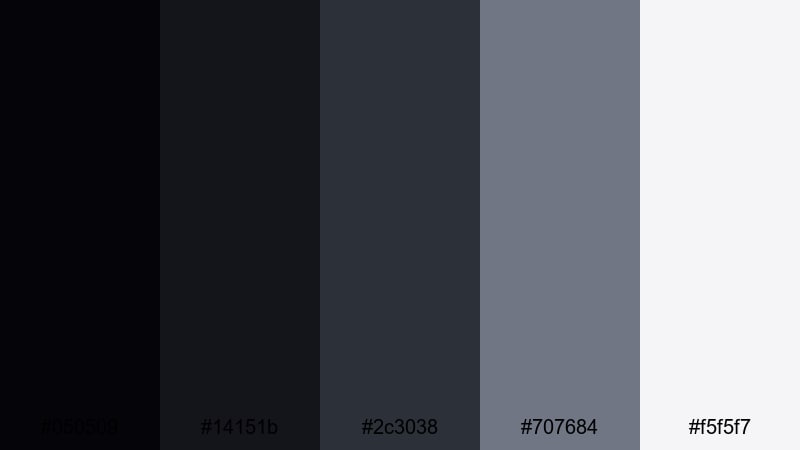
- HEX Codes: #050509, #14151b, #2c3038, #707684, #f5f5f7
- Mood: moody and cinematic with a refined urban edge
- Use for: Great for cinematic vlog intros, city b-roll sequences, and stylish title cards that highlight night-time footage.
Deep blacks and cool grays in Noir City Streets echo the feeling of driving through a city after dark, with streetlights and reflections gliding past. The near-black tones (#050509, #14151b) hold your shadows, while the mid grays (#2c3038, #707684) keep details visible and modern. The soft off-white #f5f5f7 adds just enough highlight to keep text or logos readable.
Use this palette to grade night vlogs, travel reels, and cinematic B-roll so your footage feels consistent from shot to shot. It also works beautifully for title cards, lower thirds, and channel branding where you want a dark, urban aesthetic without crushing everything into pure black.
Pro Tip: Build a Cinematic Black Gray Look in Filmora
To keep a Noir City Streets vibe across an entire edit, start by choosing one hero clip that best represents your night-time look. In Filmora, you can color grade this clip with darker shadows, cool-leaning midtones, and slightly lifted highlights that match the HEX values from this palette. Then reuse that look in intros, B-roll, and even social cutdowns so your visual style always feels like part of the same story.
When designing intros and lower thirds, use the deepest blacks as backgrounds and the lightest gray or off-white for titles. Filmora lets you easily save custom presets, so you can apply the same black gray style to your thumbnails, overlays, and end screens in just a few clicks.
AI Color Palette
You can also build this black gray aesthetic automatically using Filmora's AI-powered tools. Grab a still frame from your favorite noir-style scene or a custom color card based on these HEX codes, and use Filmora's AI Color Palette feature to transfer that look to your entire timeline. The AI analyzes shadows, midtones, and highlights so the black and gray balance stays consistent across every clip.
This is especially useful when you have mixed camera sources or different lighting conditions. With AI Color Palette, your vlog intro, B-roll sequences, and social edits will all share the same cinematic black gray tone, without manually adjusting each shot one by one.
 secure download

HSL, Color Wheels & Curves
To fine-tune a cinematic black gray look, use Filmora's HSL, color wheels, and curves controls. You can gently cool down the shadows, desaturate any stray colors, and slightly lift the darkest blacks so you keep detail in night shots. If your highlights feel too bright, a soft S-curve lets you protect whites while keeping contrast punchy and filmic.
For a step-by-step walkthrough of grading, you can follow a dedicated Filmora color correction guide and apply those techniques to black gray palettes. Use color wheels to balance midtones, curves to sculpt contrast, and HSL to mute or remove distractions so your footage stays monochrome and intentional.
secure download1000+ Video Filters & 3D LUTs
If you want a faster workflow, Filmora's built-in filters and LUTs can push your black gray palette into different cinematic styles. Start with a neutral correction, then browse Filmora's video filters and 3D LUTs to add subtle film grain, soft fades, or high-contrast noir looks without heavy manual tweaking.
You can stack filters for thumbnails and title cards, using one LUT for the footage and another filter for text backgrounds or frames. Save these as presets so every new video, short, and social post instantly matches your signature black gray brand.
secure downloadSilver Screen Drama
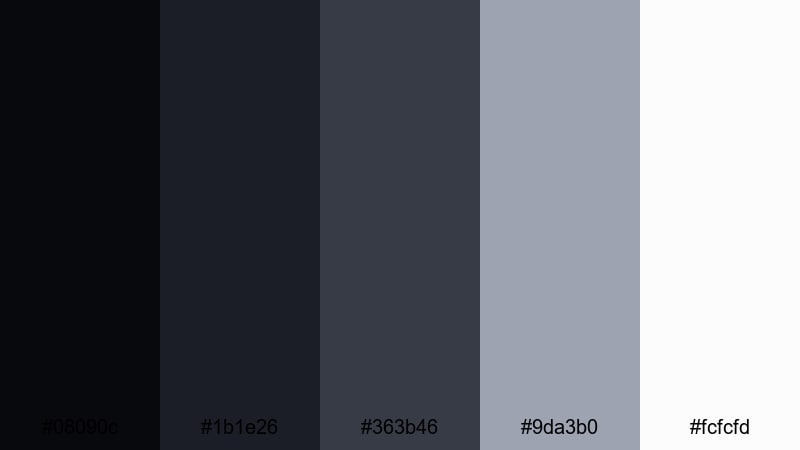
- HEX Codes: #08090c, #1b1e26, #363b46, #9da3b0, #fcfcfd
- Mood: classic, dramatic, and timeless like old Hollywood film
- Use for: Perfect for narrative shorts, film-style credits, and documentary openers needing a timeless monochrome feel.
Silver Screen Drama balances inky blacks with silvery midtones that feel straight out of a vintage cinema. The darker hues (#08090c, #1b1e26) create depth and mystery, while the cooler grays (#363b46, #9da3b0) keep the image crisp and refined. The almost-white #fcfcfd is ideal for titles that need to stand out without feeling harsh.
Use this palette for narrative intros, chapter cards, and end credits when you want an old-Hollywood vibe. It is also strong for documentary-style thumbnails and channel banners, where a timeless black gray look helps your brand feel serious and professional.
Monochrome Spotlight
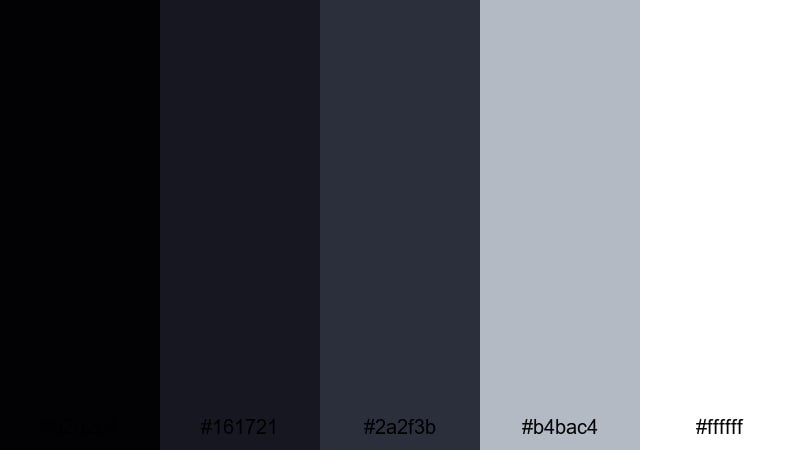
- HEX Codes: #020204, #161721, #2a2f3b, #b4bac4, #ffffff
- Mood: focused, dramatic, and professional with crisp contrast
- Use for: Ideal for product showcases, tech promos, and logo reveals that need sharp, studio-like contrast.
Monochrome Spotlight is all about contrast and clarity. The deep blue-tinted blacks (#020204, #161721) create a studio backdrop, while the midtone #2a2f3b adds structure around your subject. The light gray #b4bac4 and pure white #ffffff bring in sharp highlights, perfect for text, UI elements, or glossy product reflections.
Apply this palette to tech promos, unboxing videos, and app demo intros. Use dark tones for backgrounds, then layer white and light gray for buttons, icons, and logo lockups. In thumbnails, a black base with white titles and subtle gray accents will keep everything clean, readable, and premium.
Midnight Title Sequence
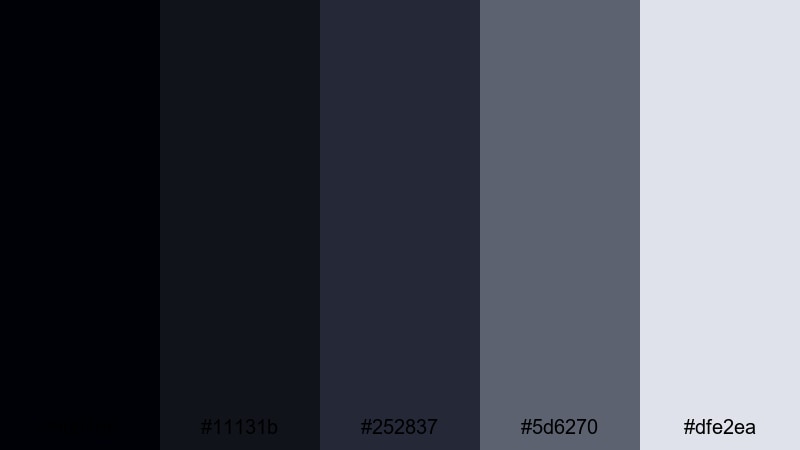
- HEX Codes: #000106, #11131b, #252837, #5d6270, #dfe2ea
- Mood: mysterious, immersive, and cinematic with a subtle cool tint
- Use for: Use in thriller trailers, countdowns, and title sequences that lean into suspense and depth.
Midnight Title Sequence leans into cool, inky blues that sit just above pure black. The darkest tones (#000106, #11131b) give you a deep, immersive background, while #252837 and #5d6270 define shapes and typography without breaking the mood. The pale gray #dfe2ea provides just enough lift for text, logos, or interface elements.
This palette is a strong choice for countdowns, suspenseful trailers, and title cards in crime, thriller, or mystery content. In Filmora, you can pair it with slow camera moves, light leaks, or particle effects so text feels like it is floating in a night sky rather than pasted on top of the footage.
Minimalist Black Gray Color Palettes
Clean Studio Setup
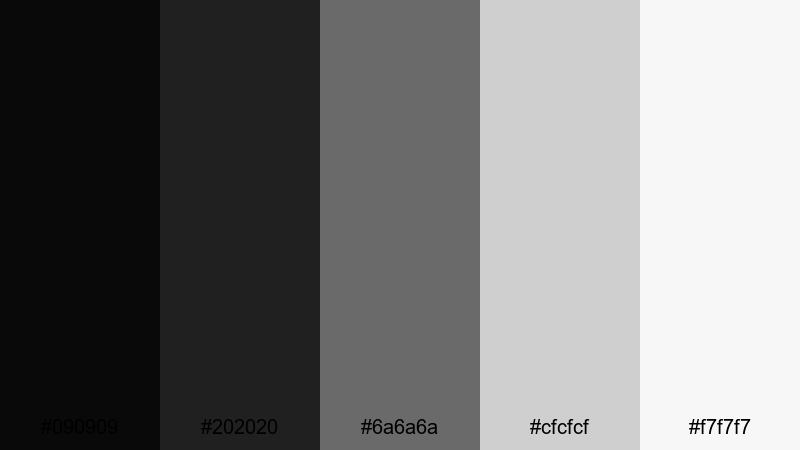
- HEX Codes: #090909, #202020, #6a6a6a, #cfcfcf, #f7f7f7
- Mood: minimal, modern, and polished with a studio aesthetic
- Use for: Great for tutorial backgrounds, talking-head videos, and minimalist channel branding.
Clean Studio Setup uses smooth steps from deep charcoal to near-white, creating a minimalist, controlled space. The darker tones (#090909, #202020) work well as simple backdrops, while #6a6a6a and #cfcfcf help separate panels, shapes, and lower thirds. The soft white #f7f7f7 keeps your layouts airy instead of stark.
Use this palette for education content, productivity tutorials, and personal branding where clarity matters. In thumbnails, pair a dark background with light text and simple icons. For talking-head videos, keep your background muted in these grays so skin tones and key graphics stay in focus.
Concrete Workspace Glow
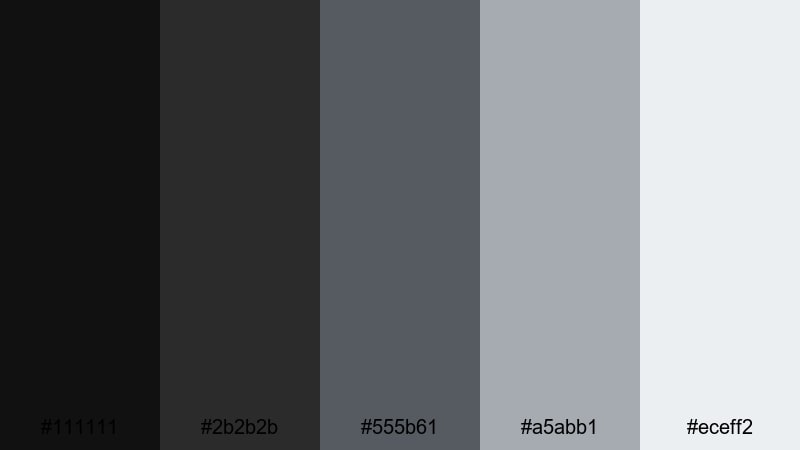
- HEX Codes: #111111, #2b2b2b, #555b61, #a5abb1, #eceff2
- Mood: calm, structured, and contemporary like a modern office
- Use for: Perfect for productivity vlogs, workspace tours, and sleek UI overlays in tutorials.
Concrete Workspace Glow mirrors the tones of a modern desk setup: dark hardware, soft concrete, and a cool white monitor glow. The blacks (#111111, #2b2b2b) anchor your frames, while the grays (#555b61, #a5abb1) feel like brushed metal and polished surfaces. The light #eceff2 is ideal for text and card-style overlays.
This palette is great for workspace tours, Notion or app walkthroughs, and minimalist design content. Use the mid grays for blocks and sidebars, with white panels for step-by-step instructions. It keeps everything calm, organized, and easy to read on both desktop and mobile.
Soft Shadow Interface
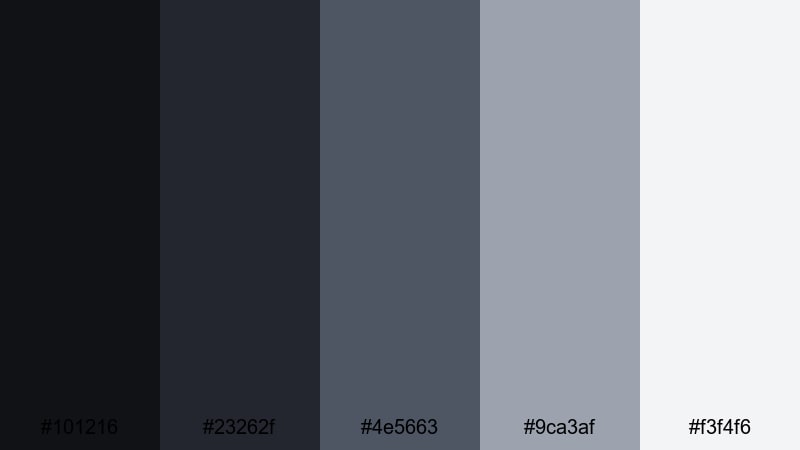
- HEX Codes: #101216, #23262f, #4e5663, #9ca3af, #f3f4f6
- Mood: subtle, techy, and user-friendly with gentle depth
- Use for: Ideal for app demo videos, lower-thirds, and UI mockups that need a modern, neutral base.
Soft Shadow Interface feels like an elegant dark mode UI. The deeper grays (#101216, #23262f) work as base layers, while #4e5663 and #9ca3af form cards, buttons, and hover states. The pale #f3f4f6 is perfect for text, icons, and simple charts that sit clearly on top.
Use this palette in UI and UX demo videos, SaaS explainers, and software walkthroughs. It gives your overlays a professional, app-like look without distracting from the actual screen recordings. In thumbnails, frame your product or device against the darker tones, then highlight key features with light gray tags or callouts.
Graphite Grid Layout
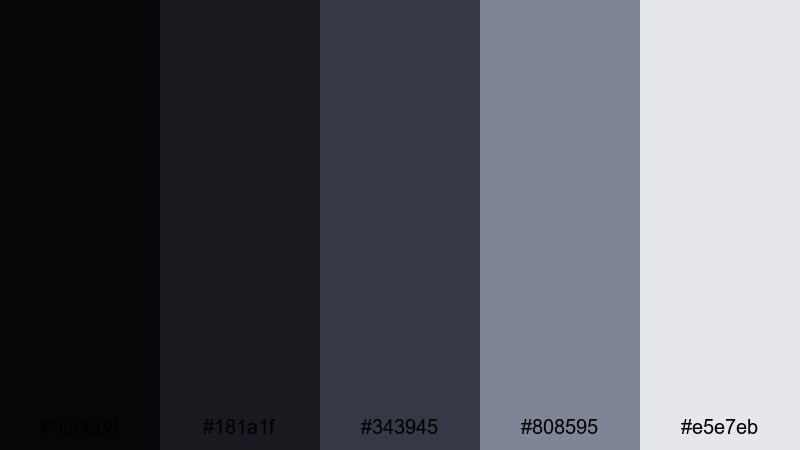
- HEX Codes: #050608, #181a1f, #343945, #808595, #e5e7eb
- Mood: organized, professional, and grid-driven
- Use for: Great for infographic videos, slide-style edits, and channel trailers with structured layouts.
Graphite Grid Layout combines deep graphite blacks with clear mid-grays and a light accent for text. The darkest tones (#050608, #181a1f) create strong frames and borders, while #343945 and #808595 are ideal for content blocks, shapes, and icons. #e5e7eb gives you a clean highlight for labels or statistics.
It works especially well in slide-style videos, infographic explainers, and roadmap visuals. Use it to build grids, timelines, and comparison charts in Filmora, keeping your branding consistent across intros, social snippets, and presentation-style edits.
Moody Black Gray Color Palettes
Stormy Window Light
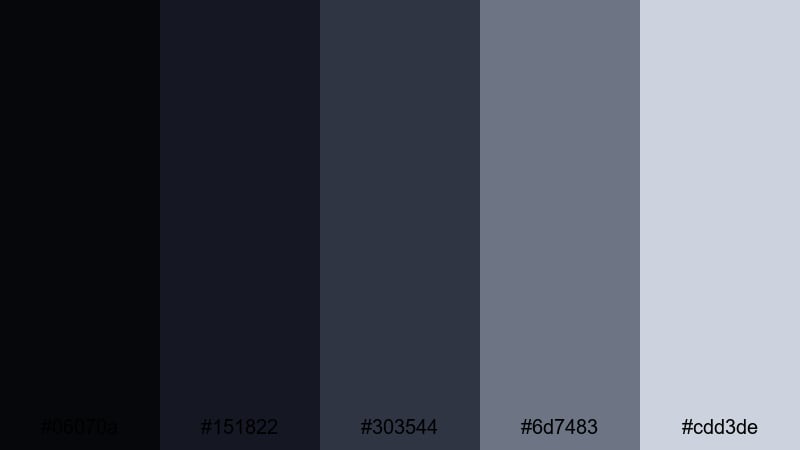
- HEX Codes: #06070a, #151822, #303544, #6d7483, #cdd3de
- Mood: melancholic, reflective, and cinematic like a rainy day
- Use for: Use in emotional vlogs, reflective montages, and moody b-roll sequences.
Stormy Window Light layers deep blacks with raincloud grays to capture the feel of watching the world through wet glass. The dark shades (#06070a, #151822) keep your frames intimate, while the cooler midtones (#303544, #6d7483) add softness and emotional weight. The pale #cdd3de provides gentle highlights that never feel harsh.
Use this palette to grade breakup vlogs, reflective travel moments, or poetic B-roll. In titles and thumbnails, combine dark backgrounds with soft light text to signal a slower, more introspective video. It also works nicely with subtle film grain or slow-motion shots in Filmora to deepen the cinematic mood.
Smoke And Mirrors
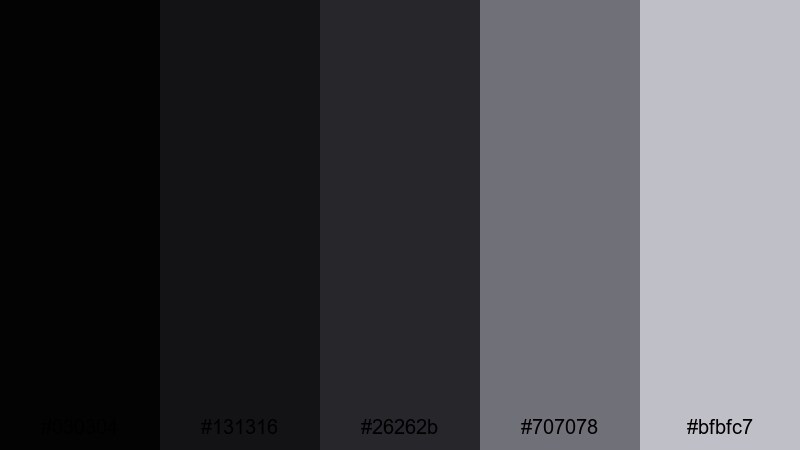
- HEX Codes: #030304, #131316, #26262b, #707078, #bfbfc7
- Mood: mysterious, edgy, and atmospheric
- Use for: Perfect for magic-themed content, mystery teasers, and stylized performance videos.
Smoke And Mirrors blends smoky blacks with hazy mid-grays for an illusion-filled atmosphere. The dark tones (#030304, #131316) are ideal for fading elements in and out, while #26262b and #707078 feel like drifting smoke around your subject. The lighter #bfbfc7 keeps on-screen text readable without breaking the spell.
Use this palette for magic tricks, performance art, stage shows, or mystery hooks. In Filmora, pair it with slow dissolves, double exposures, and light overlays so titles and graphics feel like they are emerging from the smoke instead of sitting flat on the frame.
Overcast Downtown
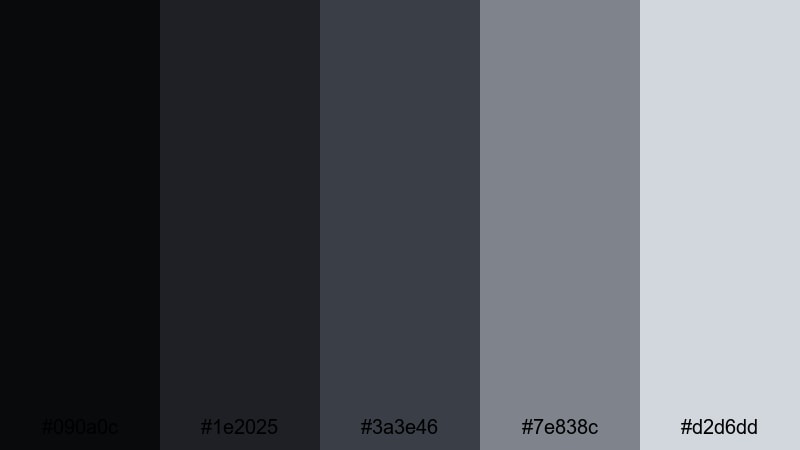
- HEX Codes: #090a0c, #1e2025, #3a3e46, #7e838c, #d2d6dd
- Mood: urban, subdued, and slightly gritty
- Use for: Great for street photography edits, travel vlogs in cloudy weather, and documentary-style footage.
Overcast Downtown captures the look of a city under a cloudy sky. The darker hues (#090a0c, #1e2025) feel like asphalt and wet walls, while #3a3e46 and #7e838c echo concrete, metal, and cloudy reflections. The light #d2d6dd keeps your graphics and titles readable but still muted.
This palette is perfect for urban exploration, street photography compilations, and documentary footage that should feel grounded and real. Use it to keep cloudy-day shots consistent, and pair it with simple, sans-serif typography for grounded, no-nonsense branding.
Silent Night Alley
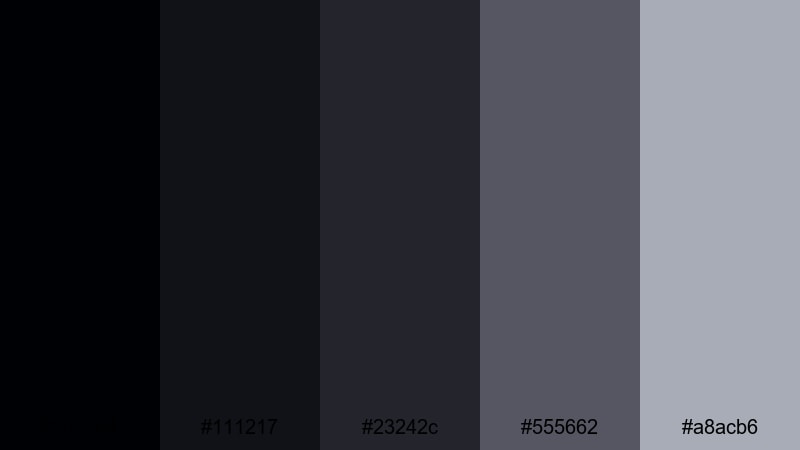
- HEX Codes: #000104, #111217, #23242c, #555662, #a8acb6
- Mood: quiet, suspenseful, and cinematic
- Use for: Use for night walks, slow-motion sequences, and thriller-inspired edits with a subtle edge.
Silent Night Alley leans into inky blacks and narrow alleyway grays. The deepest tones (#000104, #111217) make great full-screen backgrounds and letterboxing, while #23242c and #555662 shape the environment around your subject. The soft #a8acb6 is reserved for subtitles, captions, and delicate interface elements.
Choose this palette for night walks, noir-inspired shorts, and slow-motion city scenes. In thumbnails, a dark frame with softly lit gray text and a single bright subject will immediately signal mood, story, and suspense.
High-Contrast Black Gray Color Palettes
Neon Accent Frame
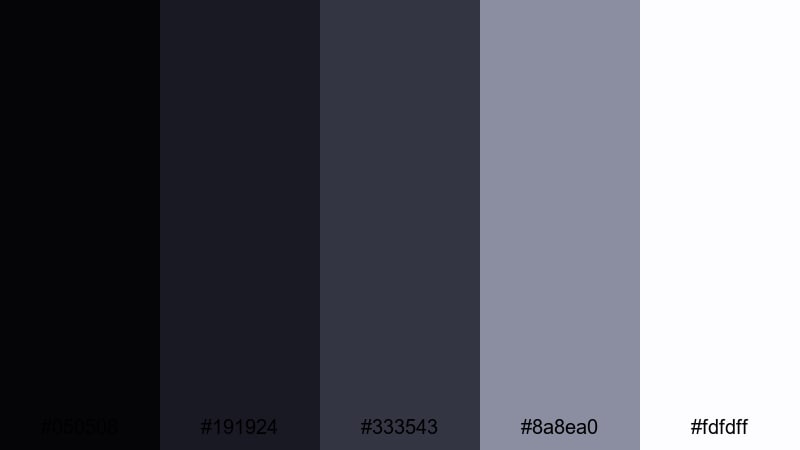
- HEX Codes: #050508, #191924, #333543, #8a8ea0, #fdfdff
- Mood: bold, high-impact, and ready for bright accents
- Use for: Great as a base for adding neon titles, subscribe buttons, and bold callouts in energetic edits.
Neon Accent Frame gives you a strong dark base with enough contrast to make bright colors pop. The blacks and deep grays (#050508, #191924, #333543) work as clean backdrops, while #8a8ea0 and #fdfdff provide lighter zones for legible text. The palette is designed to leave room for intense accent colors like neon pink, green, or blue.
Use it for gaming videos, reaction content, and high-energy edits where overlays and subscribe buttons need to jump off the screen. In Filmora, build your frames, borders, and UI in these grays, then drop neon elements on top to guide the viewer's eye.
Bold Title Card
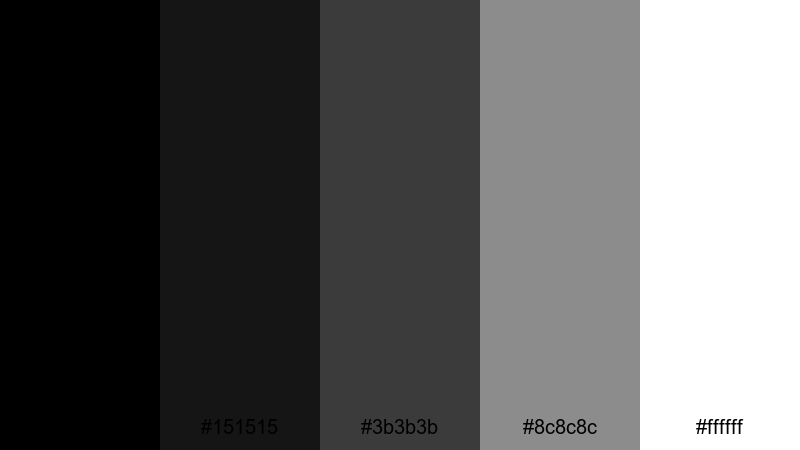
- HEX Codes: #000000, #151515, #3b3b3b, #8c8c8c, #ffffff
- Mood: confident, punchy, and highly legible
- Use for: Perfect for intros, end screens, and thumbnail text where clarity and impact matter.
Bold Title Card is a pure, no-nonsense black gray palette optimized for readability. Pure black #000000 and deep gray #151515 make strong backdrops, while #3b3b3b and #8c8c8c work for secondary panels and outlines. Pure white #ffffff ensures that any headline or logo is instantly visible.
Use this palette for titles, lower thirds, and especially thumbnails where small-screen readability is critical. A simple black background with white text and a hint of mid-gray for borders or shadows will keep your messaging clear on mobile feeds and TV screens alike.
Viral Thumbnail Pop
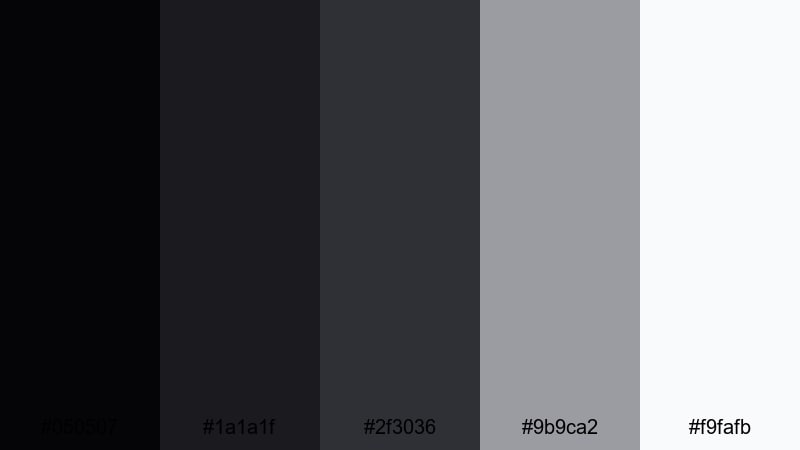
- HEX Codes: #050507, #1a1a1f, #2f3036, #9b9ca2, #f9fafb
- Mood: attention-grabbing yet polished for social visuals
- Use for: Ideal for high-converting thumbnails, quick promo clips, and social ads that need clear layering.
Viral Thumbnail Pop uses strong dark bases with crisp light grays to make faces, emojis, and text stand out. The darker shades (#050507, #1a1a1f, #2f3036) form depth behind your subject, while #9b9ca2 and #f9fafb highlight text, arrows, and UI-style shapes.
Apply this palette to YouTube thumbnails, Reels covers, and short promo clips. In Filmora, use the darker tones for background gradients, place your subject in the brightest zone, and layer big, bold typography in the lightest gray or near-white for maximum click-through on crowded feeds.
Tips for Creating Black Gray Color Palettes
Black gray palettes are powerful on their own and even more effective when you control contrast, readability, and how they interact with accent colors. Here are some practical tips to help you build and use them in video and design.
- Start with purpose: decide if you want a cinematic, minimalist, or high-contrast look before choosing your specific black and gray values.
- Control contrast for text: always check that white or light gray text on dark backgrounds is readable on phones, tablets, and TVs.
- Limit accent colors: if you add neon or brand colors, keep them to one or two shades so the black gray base remains dominant.
- Match your footage: use Filmora's color tools to pull your shadows toward your chosen black HEX code and align midtones with your palette grays.
- Use gradients, not just flats: subtle gradients between two grays can add depth to intros, overlays, and end screens without overwhelming the viewer.
- Separate layers by brightness: keep backgrounds dark, text light, and mid-grays for buttons, boxes, and secondary information.
- Test on thumbnails: export small preview images to confirm that your black gray palette still looks clean and legible at tiny sizes.
- Save presets: once you are happy with a black gray look, save it as a preset or template in Filmora so you can reuse it across your whole channel.
Black gray color palettes are a flexible foundation for cinematic storytelling, minimalist branding, moody vlogs, and high-impact social visuals. By choosing the right mix of deep blacks, mid-grays, and soft highlights, you can control how serious, modern, or dramatic your content feels.
Use the 15 palettes above as ready-made starting points for your intros, thumbnails, overlays, and full video grades. Drop the HEX codes into your design tools, and then match your footage inside Filmora so everything from your channel banner to your latest short feels on-brand.
The more consistently you use a signature black gray palette, the faster viewers will recognize your style. Experiment with a few of these combinations in Filmora, save your favorites as presets, and build a cohesive look that can grow with your channel or creative portfolio.
secure downloadNext: Teal Gray Color Palette
