

 100% Security Verified | No Subscription Required | No Malware


 ChatGPT
 Perplexity
 Gemini
 Claude
 Grok
Grok
Blue green sits between calming blue and refreshing green, so it naturally signals clarity, balance, and modern freshness. In color psychology it often feels trustworthy yet creative, like ocean water over shallow reefs or sleek tech UIs. That makes blue green ideal for brands that want to feel both grounded and innovative, and for videos that should be soothing without looking dull.
In video editing and design, blue green works beautifully for cinematic grading, YouTube intros, thumbnails, lower thirds, and overlay graphics. It creates clean separation from skin tones, supports readable text, and fits travel, lifestyle, tech, gaming, and wellness content. Below are 15 curated blue green color palettes with HEX codes you can plug directly into your designs or apply to your edit in Filmora for consistent, professional visuals.
In this article
Calm & Coastal Blue Green Color Palettes
Tropical Lagoon Drift

- HEX Codes: #004f57, #1b7a7f, #3fbac2, #9be7e8, #f4fbfb
- Mood: serene and tropical with a refreshing ocean breeze feel
- Use for: Great for travel vlogs, beach vacation thumbnails, and relaxing cinematic B-roll sequences.
Tropical Lagoon Drift moves from deep, moody blue green into bright lagoon aqua and finally a soft, airy white. It feels like drifting through clear tropical water where shadows, sun rays, and surface reflections all layer together. In thumbnails and channel banners, the darker tones (#004f57, #1b7a7f) make strong backgrounds for white or light text, while the lighter colors (#3fbac2, #9be7e8, #f4fbfb) are perfect for highlight strokes, icons, and simple overlays.
Use this palette in Filmora for beach B-roll, drone shots, and slow, dreamy edits. Build gradient overlays with the mid and light lagoon hues, then reserve the darkest tone for titles, social handles, and logo reveals. It also works well in lower thirds for travel guides or tropical hotel reviews where you want a relaxed but polished blue green identity.
Pro Tip: Build a Cinematic Blue Green Look in Filmora
To keep a lagoon-inspired blue green look consistent, start by setting one or two of these HEX values as your reference colors for text, shapes, and graphic elements in Filmora. Then, when you color correct your footage, gently push shadows toward the deep teal (#004f57) while letting highlights lean into the lighter aqua tones. This keeps your intros, B-roll, talking head shots, and end screens visually tied together.
You can also save this setup as a custom preset so every new tropical vlog automatically inherits the same blue green vibe. That way your YouTube grid, Shorts, and social teasers all share a recognizably coastal visual brand without needing to rebuild the look from scratch every time.
AI Color Palette
If you already have a thumbnail, logo, or reference photo that nails your dream lagoon colors, you can use Filmora's AI Color Palette feature to spread that look across your entire edit. Import the reference image, let Filmora analyze its blue green palette, and then apply it as a unified color grade to all your selected clips.
This is a fast way to match A-roll, B-roll, stock footage, and even smartphone shots to the same tropical blue green atmosphere. The AI Color Palette feature helps remove jarring color shifts between scenes, so your audience simply experiences one cohesive, cinematic journey.
 secure download

HSL, Color Wheels & Curves
Once your blue green base is in place, use Filmora's HSL and color wheels to refine it. You can deepen the teal in your shadows, slightly desaturate blues in midtones to keep skin tones natural, and give highlights a gentle cyan lift for that airy water sparkle. Tools like these, explained in Filmora's color correction guides, help you push the palette toward either a moody cinematic style or a bright, travel-vlog look.
Curves are especially helpful for blue green work. A subtle S-curve adds contrast without crushing detail, while nudging the blue or green channels in the shadows gives your footage a unified cove-like depth. Combine this with controlled saturation to avoid banding or oversaturated skies.
secure download1000+ Video Filters & 3D LUTs
To stylize your blue green palettes even faster, lean on Filmora's built-in looks. Filmora's video filters and 3D LUTs make it easy to try cinematic, vintage, or stylized color grades, then tweak them to match specific HEX values from this palette.
You can stack a teal-and-orange style LUT with a softening filter, then dial back the orange and push the teal toward your lagoon hues. Saving this as a custom preset means you can apply the same blue green character to intros, outros, Shorts, and even vertical clips for Instagram or TikTok.
secure downloadSeaside Glass Reflections
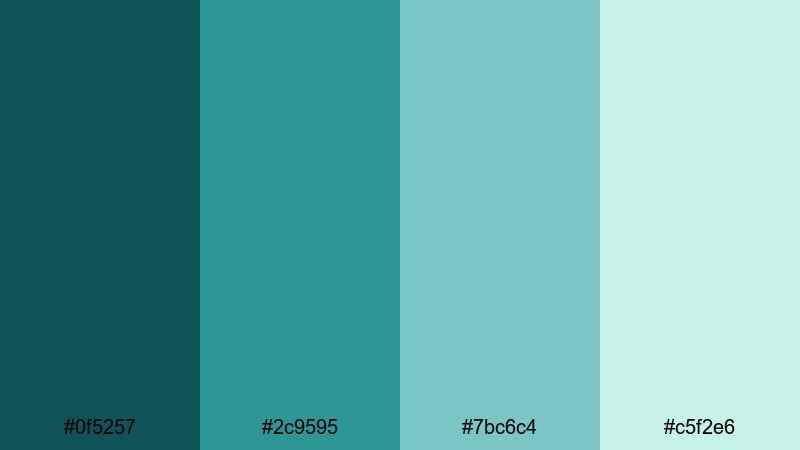
- HEX Codes: #0f5257, #2c9595, #7bc6c4, #c5f2e6
- Mood: cool, airy, and reflective like light on sea glass
- Use for: Ideal for calm lifestyle channels, minimalist product shots, and soft intro screens.
Seaside Glass Reflections captures the look of smooth sea glass and gentle shoreline light. The darker teal (#0f5257) anchors frames for text, while the mid and light hues (#2c9595, #7bc6c4, #c5f2e6) feel polished and spa-like. Use this palette for clean YouTube intros, lifestyle product reviews, or wellness content where you want a subtle, upmarket blue green identity. In Filmora, pair the lightest tone with soft drop shadows so your titles float above footage without feeling harsh.
Misty Harbor Morning

- HEX Codes: #194b4f, #3c7f7b, #8ebfb9, #e0f2ef
- Mood: quiet, misty, and contemplative
- Use for: Use for narrative vlogs, morning routines, and cinematic timelapses with a reflective tone.
Misty Harbor Morning blends deep harbor tones with lifted, foggy blue greens for a gentle, cinematic haze. The palette is perfect when you want scenes to feel introspective rather than bright and tropical. Use the darker hues in your grade to cool down shadows, then layer the lighter colors into titles, progress bars, and chapter markers. It works especially well for sunrise timelapses, journaling vlogs, or study-with-me content where calm focus is the main goal.
Ocean Breeze Minimal
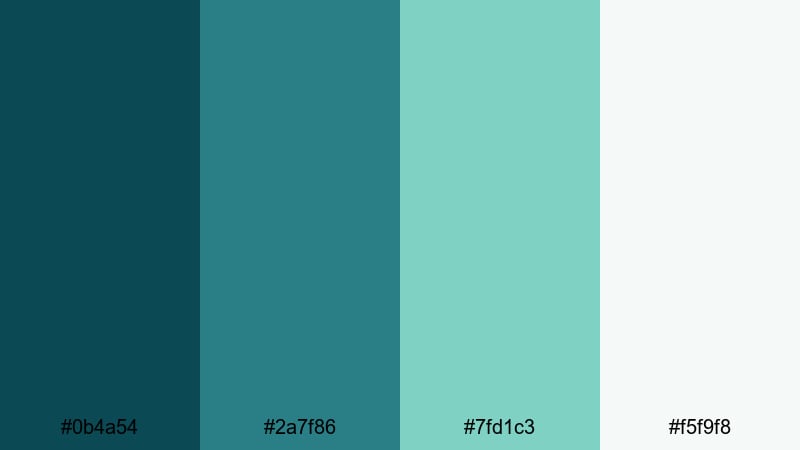
- HEX Codes: #0b4a54, #2a7f86, #7fd1c3, #f5f9f8
- Mood: fresh, minimalist, and gently energizing
- Use for: Perfect for clean channel branding, UI overlays, and modern tutorial layouts.
Ocean Breeze Minimal balances mid-tone blue green accents with clean near-whites, ideal for creators who prefer a modern, clutter-free aesthetic. Use #0b4a54 and #2a7f86 for key text and icons, while #7fd1c3 and #f5f9f8 become your backgrounds and highlight blocks. This palette shines in tutorial layouts, tech explainers, and UI mockups shown on screen, where clear contrast and simple geometry matter more than dramatic color shifts.
Deep Cove Serenity
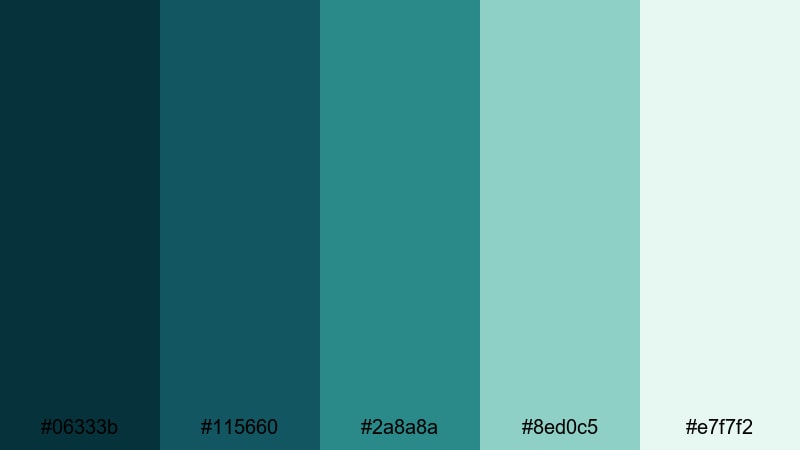
- HEX Codes: #06333b, #115660, #2a8a8a, #8ed0c5, #e7f7f2
- Mood: grounded, soothing, and immersive
- Use for: Strong choice for documentary titles, calm podcast visuals, and cinematic lower thirds.
Deep Cove Serenity moves from very dark teal (#06333b) up to light aqua mist (#e7f7f2), creating a sense of depth like looking into a quiet inlet. It is great for grounded, serious topics that still benefit from a calming edge, such as documentaries, podcasts, or educational pieces. Use the darkest tones for background plates and title bars, and reserve the mid-to-light colors for accent lines, waveform graphics, and data callouts so text remains readable but the screen still feels soft and immersive.
Bold & Futuristic Blue Green Color Palettes
Neon Cyberwave Tide
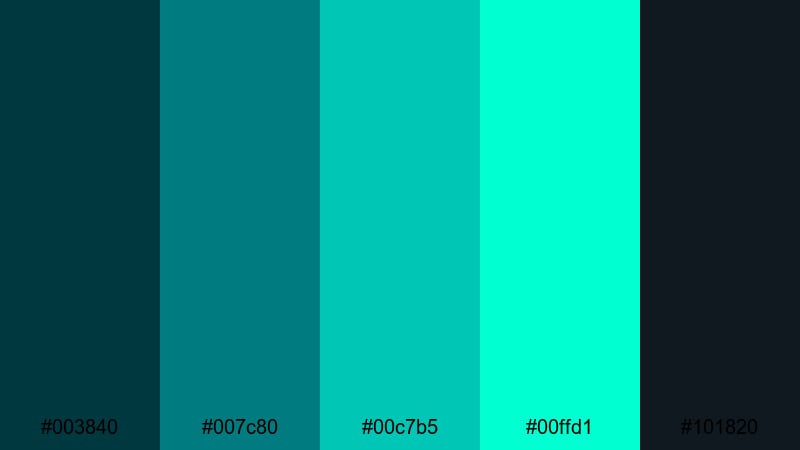
- HEX Codes: #003840, #007c80, #00c7b5, #00ffd1, #101820
- Mood: high-energy, futuristic, and edgy
- Use for: Best for tech intros, gaming highlights, and fast-paced promo edits that need impact.
Neon Cyberwave Tide slams bright aquas (#00c7b5, #00ffd1) against deep digital blues and near-black (#003840, #101820). It instantly gives footage a cyberpunk, synthwave edge that works brilliantly for gaming channels, tech launches, or motion graphics intros. Use the darkest tone as a background for HUD elements, glitch transitions, and bold text, then let the neon hues trace outlines, strokes, and kinetic shapes that move with the beat.
Techno Reef Pulse
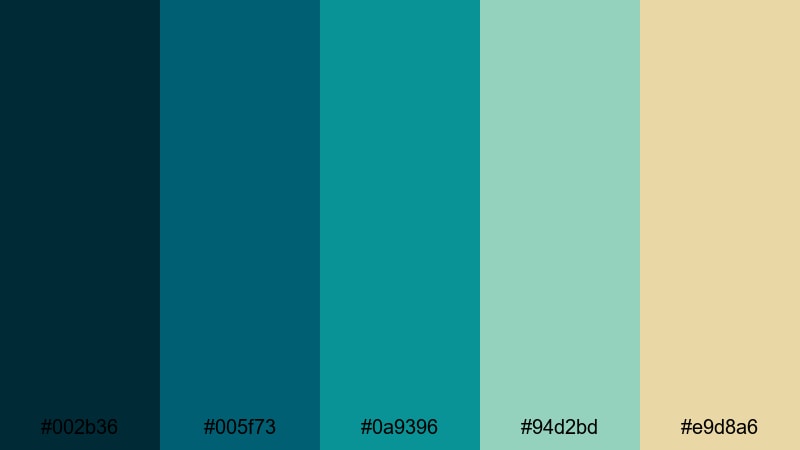
- HEX Codes: #002b36, #005f73, #0a9396, #94d2bd, #e9d8a6
- Mood: vibrant, digital, and slightly mysterious
- Use for: Great for tech reviews, app demos, and sci-fi themed motion graphics.
Techno Reef Pulse mixes deep teal shadows (#002b36, #005f73) with glowing reef greens and a warm accent (#e9d8a6). It feels like a futuristic interface inspired by coral and underwater light beams. Use the pale minty tones (#94d2bd) for UI panels or info cards, while the darker shades shape the backdrop of devices, dashboards, or sci-fi HUDs. This palette is ideal for tech reviews, app explainer screens, and any video that bridges nature and digital design.
Electric Harbor Lights

- HEX Codes: #001f2b, #005f6b, #00a9a5, #25e6c8, #f4f4f6
- Mood: dynamic, cinematic, and city-at-night inspired
- Use for: Use for night city b-roll, glitch transitions, and bold title cards.
Electric Harbor Lights feels like neon signage reflected on dark water. Deep navy and teal (#001f2b, #005f6b) give you a cinematic base for night shots, while bright aquas (#00a9a5, #25e6c8) cut through as eye-catching accents. The soft off-white (#f4f4f6) is perfect for legible text over busy backgrounds. Use this palette for hyperlapse city B-roll, urban vlog intros, or kinetic typography where you want bold contrast without leaving the blue green family.
Digital Aqua Matrix
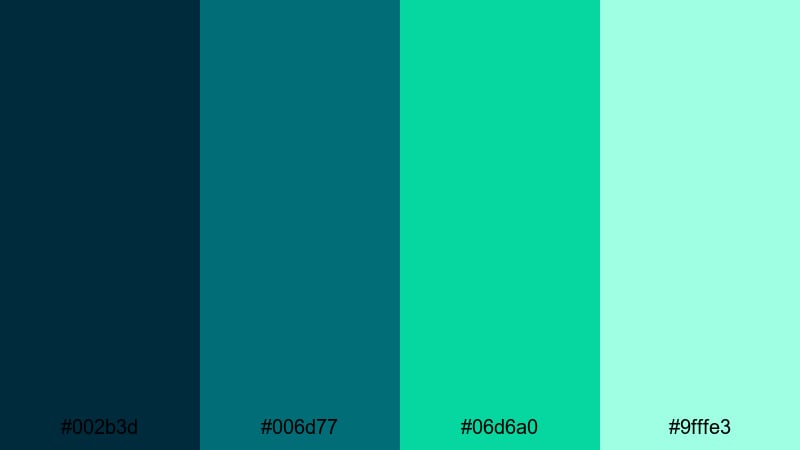
- HEX Codes: #002b3d, #006d77, #06d6a0, #9fffe3
- Mood: sleek, tech-forward, and optimistic
- Use for: Perfect for software explainers, dashboards, and futuristic interface overlays.
Digital Aqua Matrix builds a clean progression from dark bluish teal (#002b3d) to bright signal green (#06d6a0) and almost glowing mint (#9fffe3). It suggests data grids, dashboards, and friendly tech brands. Use the darker tones for UI panels or frame edges, then let the bright aquas highlight buttons, toggles, progress bars, and call-to-action text in your videos. It is a strong match for SaaS explainers, fintech intros, and any interface-heavy story you animate in Filmora.
Gaming Stream Overlay
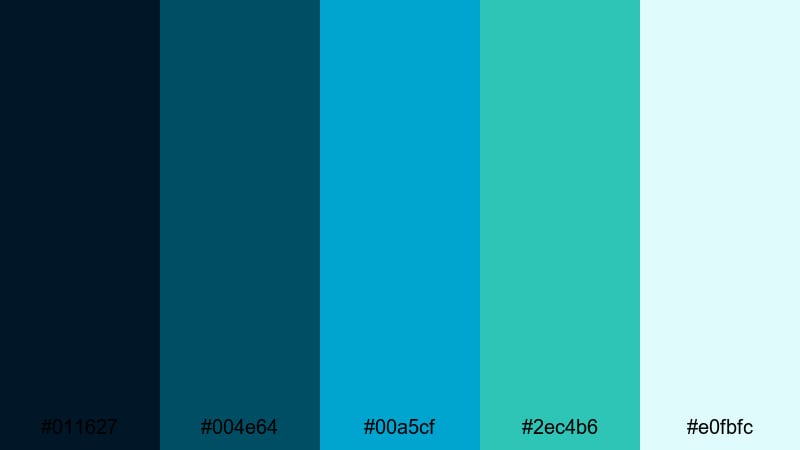
- HEX Codes: #011627, #004e64, #00a5cf, #2ec4b6, #e0fbfc
- Mood: energetic, high-contrast, and streamer-ready
- Use for: Designed for Twitch overlays, YouTube gaming intros, and esports graphics packages.
Gaming Stream Overlay uses deep midnight blues (#011627, #004e64) to frame the action, while vibrant aquas (#00a5cf, #2ec4b6) pop against them for alerts and widgets. The pale background color (#e0fbfc) keeps panels and chat boxes readable even when gameplay is chaotic. Use this palette to design lower thirds, webcam frames, and intermission screens that feel cohesive across intros, highlight reels, and stream overlays, all while keeping blue green as your signature hue.
Soft Pastel Blue Green Color Palettes
Mint Cloud Daydream
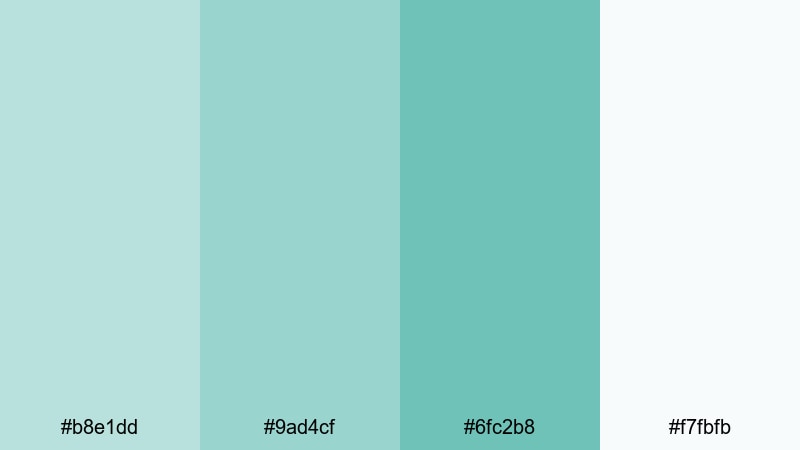
- HEX Codes: #b8e1dd, #9ad4cf, #6fc2b8, #f7fbfb
- Mood: soft, airy, and dreamy
- Use for: Ideal for aesthetic vlogs, self-care content, and light animated titles.
Mint Cloud Daydream is all about gentle, floaty mints and pale blue greens. With no harsh darks, it gives your frames a weightless, comforting feel that suits self-care routines, journaling vlogs, and lo-fi productivity edits. Use the slightly deeper mint (#6fc2b8) for text accents and icons, and float them over #f7fbfb backgrounds. For thumbnails, combine a portrait cutout with these pastel blocks and thin white outlines to create a clean, approachable aesthetic.
Vintage Aqua Film
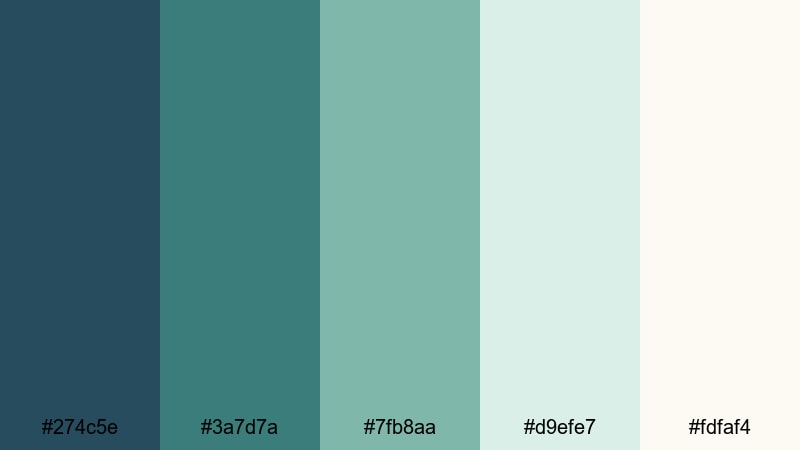
- HEX Codes: #274c5e, #3a7d7a, #7fb8aa, #d9efe7, #fdfaf4
- Mood: nostalgic, cinematic, and slightly muted
- Use for: Use for film-inspired edits, travel diaries, and retro-style title sequences.
Vintage Aqua Film softens blue green into dusty teals and washed-out aquas that resemble old film stock. The darker colors (#274c5e, #3a7d7a) give you room for moody fades and letterboxed frames, while the lighter tones (#d9efe7, #fdfaf4) work as faded paper or postcard-inspired backgrounds. Combine this palette with a little film grain, subtle vignette, and slower cuts in Filmora to give travel diaries or memory-style montages a nostalgic yet modern twist.
Pastel Tide Cinema

- HEX Codes: #a8e6cf, #7fd8be, #4dc2b7, #f1fffb
- Mood: light, friendly, and cinematic yet playful
- Use for: Great for lifestyle channels, family content, and soft branded bumpers.
Pastel Tide Cinema gently transitions from soft seafoam greens to brighter teals, with a nearly white background tone that keeps everything bright. It is especially good for family vlogs, light-hearted lifestyle content, or brands targeting younger audiences. Use #4dc2b7 for key titles and #a8e6cf or #7fd8be for supporting shapes and frames. Because all the colors are friendly and low-stress, they suit intro animations, end screens with subscribe prompts, and mid-roll lower thirds that should blend smoothly into your footage.
Soft Mint Studio
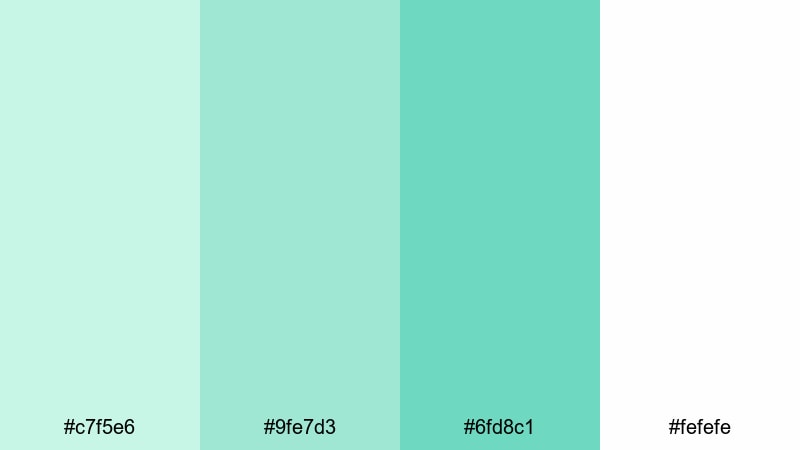
- HEX Codes: #c7f5e6, #9fe7d3, #6fd8c1, #fefefe
- Mood: clean, gentle, and studio-fresh
- Use for: Perfect for DIY tutorials, beauty videos, and bright product showcases.
Soft Mint Studio pairs crisp whites and fresh mints to feel like a bright, hygienic studio space. Use the white (#fefefe) as your primary background in titles or overlays, then bring in #c7f5e6 and #9fe7d3 as accent blocks behind products, tools, or before-and-after comparisons. For beauty and skincare content, this palette communicates cleanliness and trust without slipping into clinical coldness, thanks to the gentle green warmth in the mid-tones.
Gentle Teal Storyboard

- HEX Codes: #85c7c1, #64b3ac, #3e8e8a, #edf7f6
- Mood: balanced, thoughtful, and softly creative
- Use for: Use for explainer videos, storyboard frames, and educational content that should feel calm.
Gentle Teal Storyboard is designed to support storytelling. The mid-teals (#85c7c1, #64b3ac, #3e8e8a) offer enough contrast for charts, icons, and diagrams, while the pale background (#edf7f6) keeps text legible and the overall mood relaxed. Use this palette for educational videos, pitch decks turned into motion graphics, or storyboard-style explainers. In Filmora, you can color-code different sections or steps using the three main teals so viewers instantly understand progression without feeling visually overwhelmed.
Tips for Creating Blue Green Color Palettes
Blue green is flexible enough to fit calm coastal scenes, neon tech, or soft aesthetic edits, but it works best when you plan contrast, hierarchy, and consistency across your whole video or brand system.
- Pick a dominant blue green family: coastal teal, neon aqua, or pastel mint, then keep that range consistent through footage, overlays, and thumbnails.
- Use darkest tones for text or background plates and lightest tones for panels, callouts, and negative space to keep readability high on all screens.
- Add a neutral helper color (white, off-white, charcoal) so your palette has room to breathe and your blue green accents can stand out.
- Check skin tones: when grading with teal blues, protect orange and red channels so people do not look sick or overly cyan.
- Design thumbnails with strong value contrast first (light vs dark), then apply your chosen blue green hues so they still read clearly at small sizes.
- For brand consistency, save your favorite HEX codes as presets and reuse them for titles, lower thirds, and end screens in every Filmora project.
- Match footage from different cameras by nudging all shadows and midtones toward your chosen blue green direction using Filmora color wheels and curves.
- Test your palette on both dark mode and light mode backgrounds if your content will live on multiple platforms or inside apps.
Blue green palettes can completely reshape how your channel feels, from tranquil ocean stories to neon-edged tech edits. By choosing a consistent set of HEX codes and applying them to your grade, titles, overlays, and thumbnails, you build a visual identity that viewers recognize instantly.
Try these 15 palettes as starting points in Filmora: drop the HEX codes into your graphic elements, then refine the look with AI Color Palette, HSL adjustments, and filters until it matches your brand personality. Over time, you can evolve them, but keeping blue green as your core gives your videos a strong, memorable throughline.
Whether you edit travel vlogs, gaming highlights, tutorials, or aesthetic diaries, using Filmora makes it easy to test, tweak, and reuse your favorite blue green combinations across every format from widescreen videos to Shorts and Reels.
secure downloadNext: Neon Green Color Palette
