

 100% Security Verified | No Subscription Required | No Malware


 ChatGPT
 Perplexity
 Gemini
 Claude
 Grok
Grok
Blue, green, and red are three of the most powerful colors in visual storytelling. Blue often feels trustworthy and cinematic, green adds freshness and balance, and red delivers instant energy and emotion. When you combine them in a controlled way, a Blue Green Red color palette can look futuristic, playful, or minimal depending on the tones you choose.
For video creators, this trio works perfectly in YouTube thumbnails, gaming intros, social edits, brand kits, and cinematic color grading. Below you will find ready-made Blue Green Red color palettes with HEX codes, so you can quickly match your titles, overlays, backgrounds, and footage. Every idea here works great in Filmora, whether you are designing a themed intro or building a consistent look for your whole channel.
In this article
Cinematic Blue Green Red Color Palettes
Neon Arcade Rush
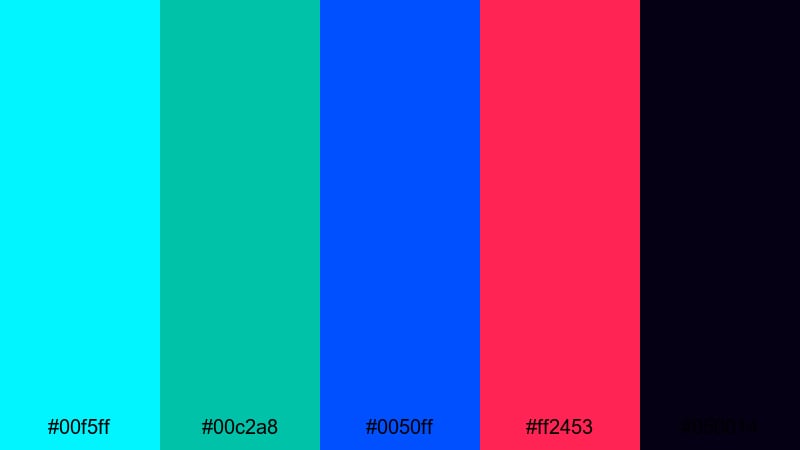
- HEX Codes: #00f5ff, #00c2a8, #0050ff, #ff2453, #050014
- Mood: Electric, high-energy, and futuristic with a retro arcade vibe.
- Use for: Perfect for gaming intros, tech reviews, and fast-paced highlight reels that need instant impact.
This palette feels like stepping into a glowing arcade: hyper-bright cyan and teal, a strong vivid blue, and a hot red accent all sitting on top of deep midnight. The contrast between the neon tones and the almost-black background lets your text, HUD elements, and glitch graphics explode off the screen.
Use Neon Arcade Rush for gaming edits, RGB-style channel branding, or kinetic intros where you want every cut to feel charged. The bright Blue Green Red accents are ideal for YouTube thumbnails, subscribe buttons, and animated overlays that need to stand out even on a dark YouTube or TikTok feed.
Pro Tip: Build a Neon Blue Green Red Look in Filmora
To keep a strong neon Blue Green Red look across your whole edit, design a simple style guide inside Filmora. Lock in your HEX codes for lower thirds, end screens, and transition elements so every asset follows the same color rules. This gives your gaming channel or tech brand a recognizable visual identity.
Combine this palette with Filmoras motion graphics templates for titles, progress bars, and callouts. By swapping their default colors with your neon blue, teal, and red values, you can turn even simple intros and outros into a cohesive, arcade-inspired package.
AI Color Palette
If you already have a reference image for Neon Arcade Rush, such as an RGB keyboard shot or a cyberpunk wallpaper, you can use Filmoras AI tools to transfer that color mood to your footage. Filmora's AI Color Palette feature analyzes your reference colors and applies a similar Blue Green Red balance to your entire video.
This is powerful when you want your b-roll, A-roll, and overlays to share the same neon glow. Instead of grading every clip by hand, you simply pick the style once and let AI match the look across intros, highlight reels, and shorts.
 secure download

HSL, Color Wheels & Curves
Once you match your overall look, use Filmoras HSL, color wheels, and curves to fine-tune the Blue Green Red balance. You can push the blues toward a deeper navy for a darker cyberpunk feel, shift greens into teal for a more cohesive neon vibe, or soften harsh reds in the midtones so skin tones still look natural.
Tools like the color wheels and curves, explained in the Filmora color correction guide, make it easy to separate your highlights, midtones, and shadows. This lets you keep bright RGB accents on UI elements and titles while controlling noise and contrast in your dark backgrounds.
secure download1000+ Video Filters & 3D LUTs
To speed up your workflow, you can also start from ready-made looks. Filmora’s video filters and 3D LUTs make it easy to get a cinematic foundation, then you can nudge the tones toward your neon Blue Green Red scheme.
Apply a sci-fi, cyberpunk, or RGB-style LUT as a base, then adjust the color controls so that your cyan, teal, and red accents align with the HEX codes from Neon Arcade Rush. This lets you finish gaming montages, tech B-roll, and stream overlays much faster while keeping a pro-level finish.
secure downloadUrban Cyber Night
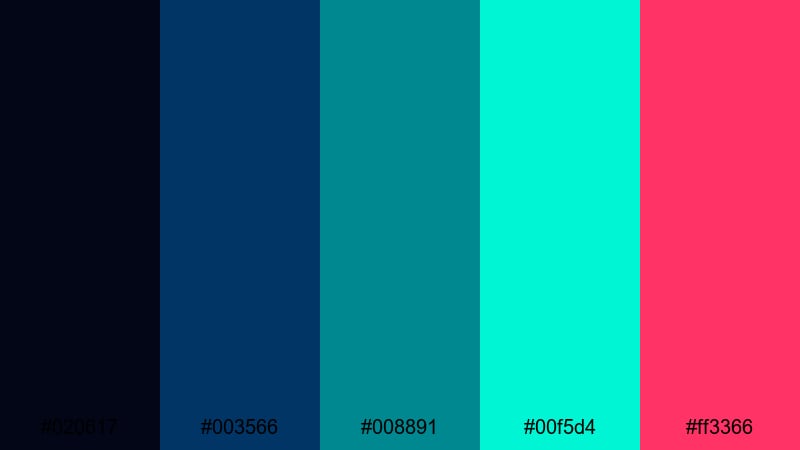
- HEX Codes: #020617, #003566, #008891, #00f5d4, #ff3366
- Mood: Moody and cyberpunk, blending cool tech tones with edgy neon accents.
- Use for: Use in cityscape b roll, tech product launches, or music videos with a futuristic street style.
Urban Cyber Night leans into deep navy and teal shadows with sharp aqua and magenta red highlights. It feels like concrete, rain, and neon signs reflected on wet streets, giving your footage a modern cyber-city edge.
This Blue Green Red combination is great for tech review motion graphics, nighttime city B-roll, and performance shots in low-key music videos. Use the dark base for backgrounds and frames, then let the aqua and magenta tones drive your titles, UI elements, and thumbnail text so everything remains readable against darker footage.
Blockbuster Teal And Crimson
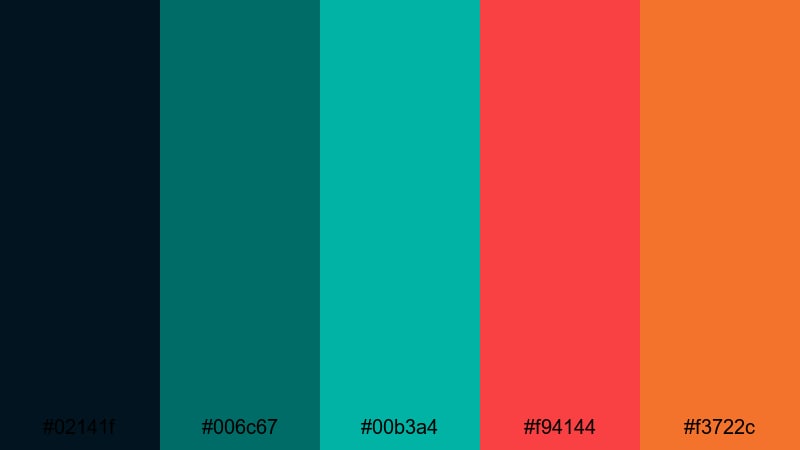
- HEX Codes: #02141f, #006c67, #00b3a4, #f94144, #f3722c
- Mood: Dramatic and cinematic with strong contrast between cool teal and fiery reds.
- Use for: Great for travel films, short documentaries, and cinematic vlog sequences aiming for a movie trailer feel.
This palette delivers the classic teal-and-red blockbuster contrast. Dark teal shadows and aqua highlights create a cool, filmic base, while crimson and orange-red accents inject urgency and warmth.
Use Blockbuster Teal And Crimson for cinematic intros, travel film titles, and storytelling vlogs where you want a trailer-like impact. Grade your footage toward teal in the shadows and use the warm reds for call-to-action buttons, logo stings, and thumbnail elements that need to pop on any platform.
Sci Fi HUD Energy
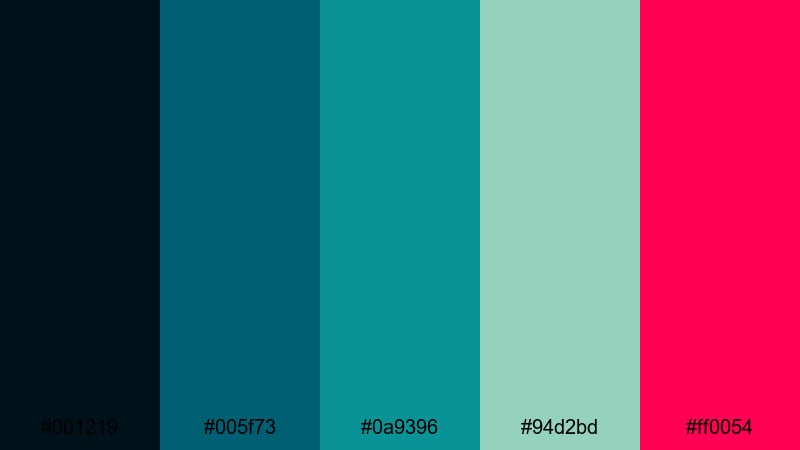
- HEX Codes: #001219, #005f73, #0a9396, #94d2bd, #ff0054
- Mood: Technical, futuristic, and energized like a holographic interface.
- Use for: Ideal for HUD overlays, data visualizations, and sci fi motion graphics in tutorials or explainers.
Sci Fi HUD Energy pairs dark teal blues and aqua greens with soft minty tones, then slices through them with a sharp magenta red. It feels like a holographic interface on a spaceship screen, clean but full of energy.
Use the darker colors as a base for your UI frames and data panels, then deploy the bright magenta red for alerts, progress bars, and key numbers. This palette works especially well in tech explainers, coding tutorials, and futuristic lower thirds where clarity and a strong Blue Green Red logic are crucial.
Soft & Pastel Blue Green Red Color Palettes
Candy Skies Daydream
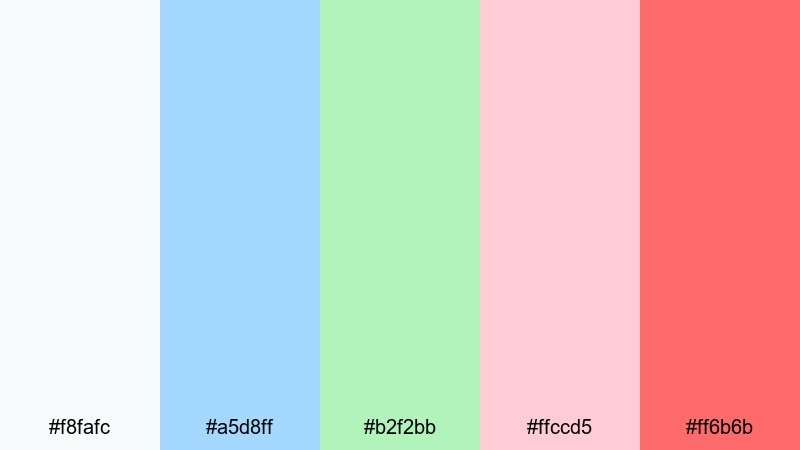
- HEX Codes: #f8fafc, #a5d8ff, #b2f2bb, #ffccd5, #ff6b6b
- Mood: Gentle, dreamy, and optimistic with a cotton candy softness.
- Use for: Perfect for lifestyle vlogs, journaling videos, and soft aesthetic thumbnails that feel light and welcoming.
Candy Skies Daydream wraps your visuals in pale blue, mint green, and blush pink with a slightly stronger coral red accent. It feels airy and calm, like pastel clouds during golden hour.
This palette is ideal for lifestyle channels, bullet journal content, and aesthetic reels. Use the light tones for backgrounds and full-screen cards, while reserving the coral red for key phrases, call-to-action text, and icons in your thumbnails so your Blue Green Red accents stay soft but still noticeable.
Seaside Cotton Candy
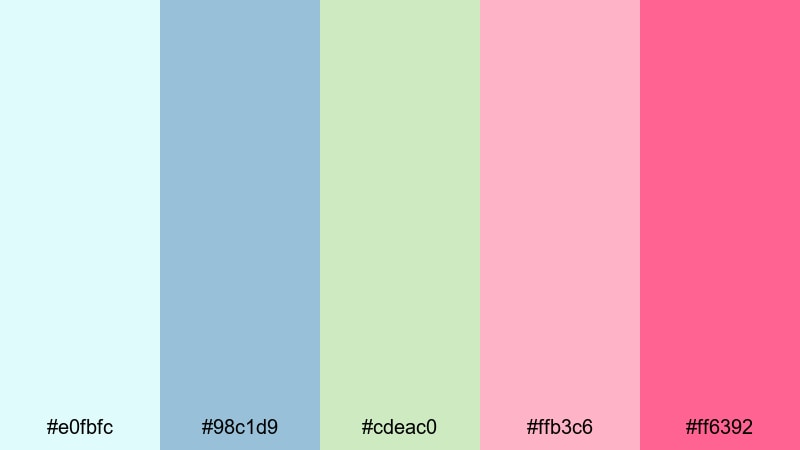
- HEX Codes: #e0fbfc, #98c1d9, #cdeac0, #ffb3c6, #ff6392
- Mood: Playful and breezy like a pastel beach carnival at sunset.
- Use for: Use for travel diaries, summer recap videos, and playful social edits with handwritten titles.
Seaside Cotton Candy combines seafoam blues and gentle greens with strawberry and watermelon reds. It captures the feel of beach days, fairground rides, and soft evening light.
Use the cooler tones as overlays on beach B-roll, water scenes, or sky shots. The pink and red shades are perfect for title cards, stickers, and highlight shapes in your thumbnails. This Blue Green Red pastel mix keeps your summer videos bright and playful without overwhelming the viewer.
Morning Garden Blush
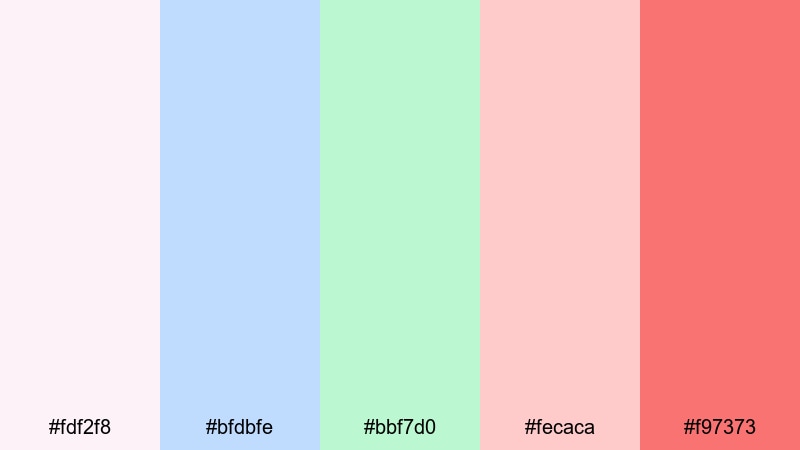
- HEX Codes: #fdf2f8, #bfdbfe, #bbf7d0, #fecaca, #f97373
- Mood: Calm, nurturing, and slightly romantic like an early garden walk.
- Use for: Great for wellness channels, DIY crafts, and gentle talking head videos needing a soft, friendly tone.
Morning Garden Blush layers powdery blues and mint greens with soft rose and warm red. It feels nurturing and peaceful, like early sunlight over a garden path.
Use this palette for wellness content, self-care vlogs, or DIY tutorials where you want viewers to feel relaxed. The lighter pinks and blues work well as background panels behind talking heads, while the stronger warm red is best for subtle emphasis in titles, callouts, and thumbnail frames.
Spring Picnic Film
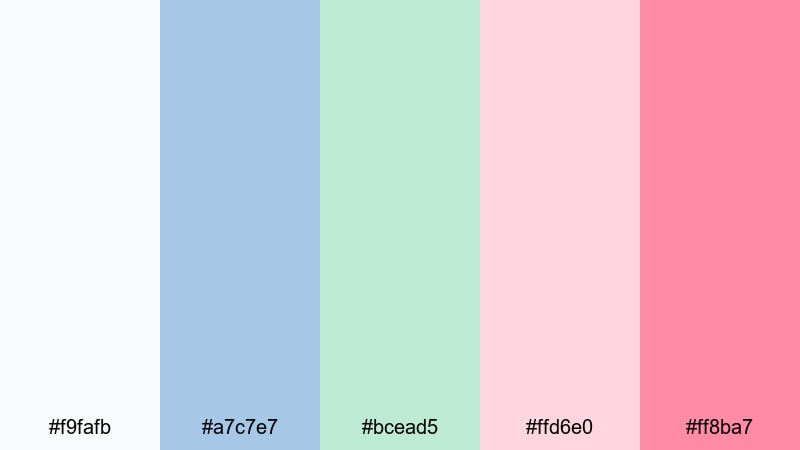
- HEX Codes: #f9fafb, #a7c7e7, #bcead5, #ffd6e0, #ff8ba7
- Mood: Fresh, cheerful, and nostalgic with a filmic pastel wash.
- Use for: Ideal for family moments, picnic montages, and lifestyle b roll with a subtle vintage filter.
Spring Picnic Film mixes light blue and leafy green with raspberry red and pastel pink. The whole palette feels like a soft, slightly faded film photo from a sunny day outdoors.
Apply these tones to family vlogs, brunch recaps, or picnic montages where you want a cozy, nostalgic look. Use the off-white and light blue for backgrounds and lower thirds, and let the raspberry red draw attention to key words, timestamps, and simple illustrated icons in your branding.
Bold & Energetic Blue Green Red Color Palettes
Creator Studio Pop
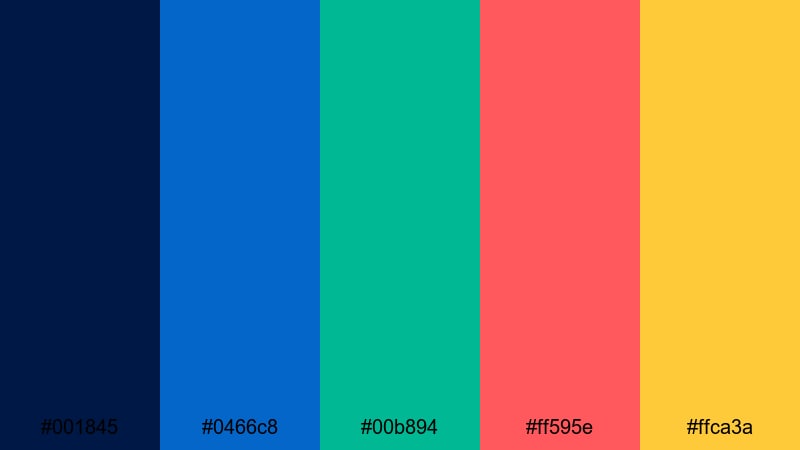
- HEX Codes: #001845, #0466c8, #00b894, #ff595e, #ffca3a
- Mood: Confident, punchy, and modern with strong pops of color.
- Use for: Use for creator brands, channel art, and kinetic typography intros that need to stand out in feeds.
Creator Studio Pop is grounded by deep navy, then amplified by bright blue, vibrant green, zesty red, and a punch of yellow. It feels bold and confident, perfect for creators who want their branding to look professional but still playful.
Use the navy as your main background or frame color, then rotate the Blue Green Red accents for titles, icons, and animated shapes. This palette is excellent for logo reveals, channel headers, and kinetic typography intros that need to grab attention in crowded social feeds.
Esports Inferno Glow
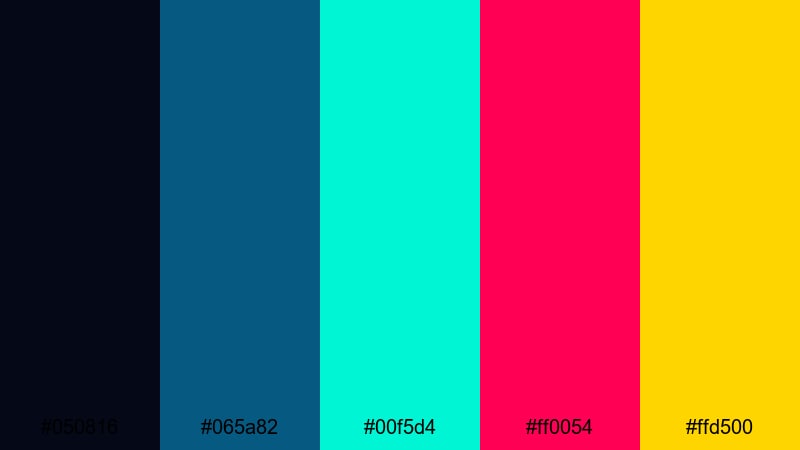
- HEX Codes: #050816, #065a82, #00f5d4, #ff0054, #ffd500
- Mood: Intense, competitive, and electrifying like an arena stage.
- Use for: Perfect for esports intros, stream overlays, and highlight clips with aggressive motion graphics.
Esports Inferno Glow blends inky blue and teal shadows with neon green, blazing red, and a bright gold highlight. It captures the feeling of an arena stage, full of light beams and crowd energy.
Use the dark base for full-screen backgrounds and lower thirds, while letting the neon Blue Green Red accents drive kill feeds, scoreboards, and animated alerts. This palette is ideal for Twitch overlays, YouTube highlight reels, and tournament trailers where intensity and clarity both matter.
Streetwear Splash
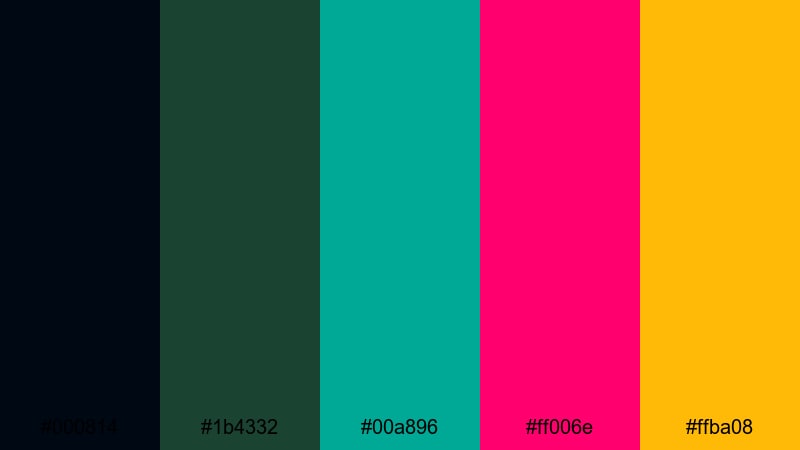
- HEX Codes: #000814, #1b4332, #00a896, #ff006e, #ffba08
- Mood: Trendy and urban with a bold, fashion-forward attitude.
- Use for: Use in lookbooks, outfit reels, and dance edits that lean into edgy, street-style branding.
Streetwear Splash combines inky blues and deep greens with hot pink-red and a punchy yellow. It feels gritty and stylish at the same time, like graffiti colors on dark concrete walls.
Use the darker shades as a base for fashion lookbooks and urban dance edits, then add the red and yellow splashes in text, brush stroke overlays, and sticker-style graphics. This Blue Green Red mix works especially well for social-first content on Reels, Shorts, or TikTok.
Tropical Fireworks
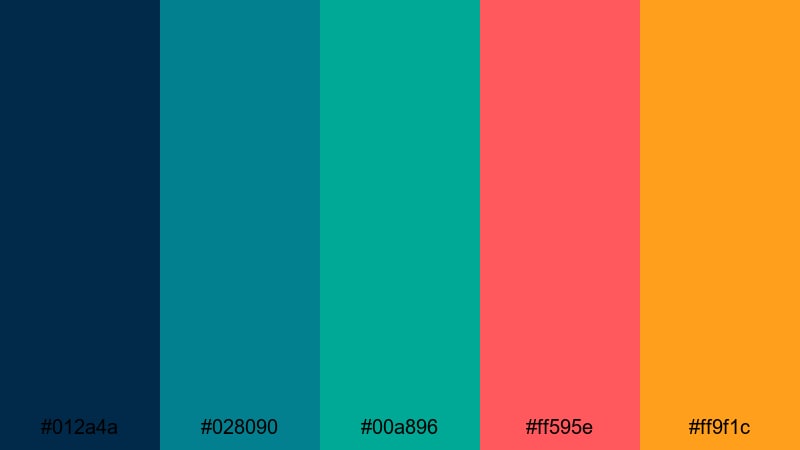
- HEX Codes: #012a4a, #028090, #00a896, #ff595e, #ff9f1c
- Mood: Festive, dynamic, and sun soaked like a beach party at night.
- Use for: Great for festival recaps, summer party promos, and energetic travel edits.
Tropical Fireworks mixes rich ocean blues and teals with punchy coral red and mango orange. It feels like fireworks over a tropical shoreline, full of movement and heat.
Use this palette in festival recap videos, club promos, and high-energy travel edits. Let the blues sit in your backgrounds and shadows, and use the coral red and orange to emphasize beats, transitions, and bold call-to-action text in intros and thumbnails.
Minimal & Modern Blue Green Red Color Palettes
Clean Interface Pulse
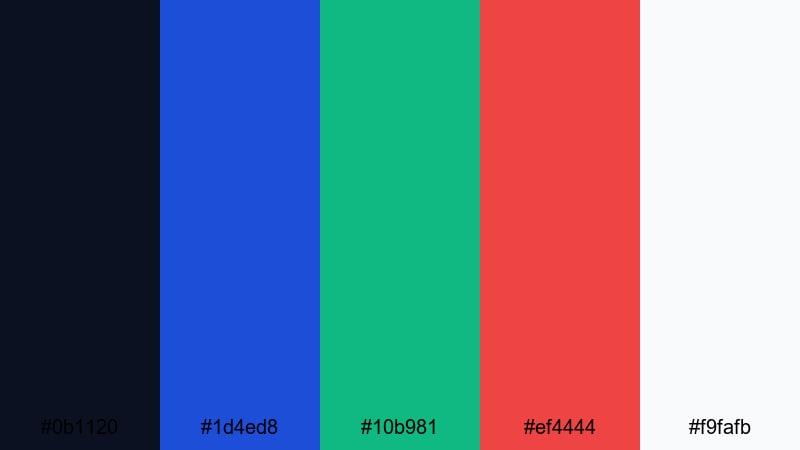
- HEX Codes: #0b1120, #1d4ed8, #10b981, #ef4444, #f9fafb
- Mood: Sleek, focused, and techy with precise color accents.
- Use for: Ideal for app promos, SaaS explainers, and minimal UI overlays in tutorials.
Clean Interface Pulse sets up a charcoal blue and off-white base, then adds crisp blue, green, and red accents. It gives a very modern UI feel, where color is used sparingly and deliberately.
Use the dark and light neutrals for backgrounds and panels, and reserve the Blue Green Red tones for buttons, progress indicators, and important labels. This palette is perfect for software tutorials, dashboard explainers, and landing-page style video intros.
Editorial Tech Accent
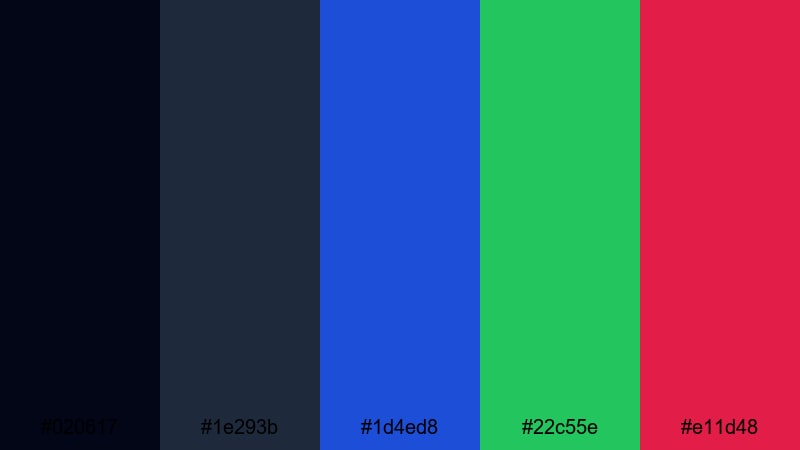
- HEX Codes: #020617, #1e293b, #1d4ed8, #22c55e, #e11d48
- Mood: Serious and polished with controlled, modern pops of color.
- Use for: Use for thought leadership content, interviews, and product explainers that need a professional edge.
Editorial Tech Accent uses muted blue-grays as a neutral canvas, then layers strong blue, green, and crimson accents on top. It feels like a mix between a tech magazine and a corporate keynote.
Use this palette in interview setups, B2B explainers, and thought leadership videos. Keep your backgrounds and typography mainly neutral, while using the Blue Green Red accents for data points, pull quotes, and animated charts so the viewer instantly sees what matters.
Minimal Signal Lights
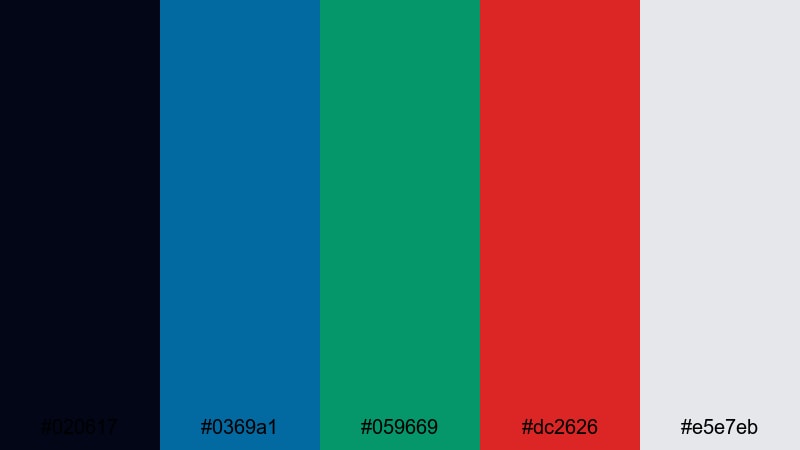
- HEX Codes: #020617, #0369a1, #059669, #dc2626, #e5e7eb
- Mood: Orderly, clear, and direct like modern signal icons.
- Use for: Great for dashboards, explainer overlays, and infographics where clarity and hierarchy matter.
Minimal Signal Lights is built around a nearly black base, straightforward blue and green, a clean red, and a soft gray. It feels like a set of modern signal icons or traffic lights translated into UI design.
Use the dark base as an overlay behind stats and charts, and let the Blue Green Red tones indicate status, categories, or actions. This palette is excellent for tutorial overlays, product dashboards, and infographic-style videos where information hierarchy matters more than decoration.
Tips for Creating Blue Green Red Color Palettes
Blue Green Red combinations can shift from soft and dreamy to bold and cinematic depending on contrast, saturation, and how you use neutrals. These tips will help you build and apply Blue Green Red palettes for video and design without losing readability or brand consistency.
- Decide your mood first: pick softer pastels for lifestyle and wellness, or deep, saturated tones for gaming, esports, and tech branding.
- Use one main color and two support colors: for example, blue as the base, green for secondary elements, and red as a strong accent for CTAs and key numbers.
- Add neutrals to control intensity: dark navy or charcoal can ground neon palettes, while off-white and light gray help pastel Blue Green Red schemes breathe.
- Check text readability: always test white and dark text over your chosen background color, especially in thumbnails and lower thirds that will appear on mobile.
- Match gradients and overlays to footage: use subtle Blue Green Red gradients in Filmora to gently tint skies, shadows, or UI overlays instead of pushing every pixel to pure color.
- Keep branding consistent: reuse the same HEX codes for your logo, titles, and end screens so viewers recognize your channel at a glance.
- Use red sparingly: save strong reds for notifications, buttons, or emotional beats so they keep their impact and do not feel overwhelming.
- Test on multiple screens: export a short clip from Filmora and preview your palette on phone, laptop, and TV to make sure the colors still feel balanced and on-brand.
Thoughtful Blue Green Red color palettes can completely change how people experience your videos, from calm and pastel to intense and cinematic. By choosing the right tones and keeping them consistent across thumbnails, intros, overlays, and color grading, you build a recognizable visual identity around your content.
Use the HEX codes above as starting points, then refine them inside Filmora with AI Color Palette, HSL controls, and LUTs until they match your footage and style. Whether you are editing gaming highlights, travel films, or minimalist explainers, a clear Blue Green Red scheme will help your channel stand out.
Open a new project in Filmora, pick one of these palettes, and try it across your next intro, title cards, and social cutdowns. A few deliberate color choices can make your entire brand feel more polished and professional.
secure downloadNext: Lake Color Palette
