

 100% Security Verified | No Subscription Required | No Malware


 ChatGPT
 Perplexity
 Gemini
 Claude
 Grok
Grok
Blue Tan is a quietly powerful combination that blends the calm confidence of blue with the warmth and approachability of tan. Together, they feel coastal, modern, and cinematic without being loud, which is why you often see this pairing in lifestyle brands, minimalist websites, and soft cinematic grading. Blue brings trust and clarity, while tan adds human warmth and a hint of sun, sand, or cozy interiors.
For video creators, this makes Blue Tan a go-to for vlogs, travel reels, thumbnails, intros, lower thirds, and full channel branding. The palettes below give you ready-made Blue Tan color combinations with HEX codes so you can match your overlays, titles, and filters inside Filmora or any design tool. Whether you want soft coastal vibes, modern minimal branding, vintage film looks, or bold cinematic contrast, you will find a Blue Tan palette to fit your next project.
In this article
Soft Coastal Blue Tan Color Palettes
Seaside Sand Drift
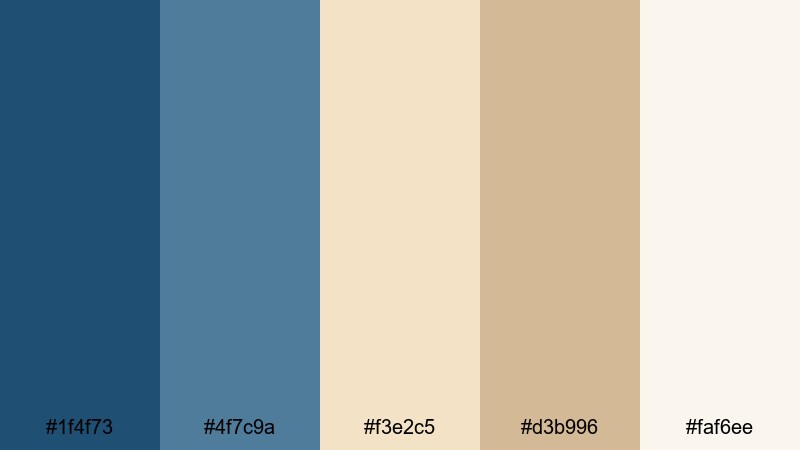
- HEX Codes: #1f4f73, #4f7c9a, #f3e2c5, #d3b996, #faf6ee
- Mood: Calm, breezy, and relaxed like a quiet morning by the shore.
- Use for: Ideal for travel vlogs, beach montages, and soothing lifestyle intros that need a gentle coastal vibe.
Seaside Sand Drift mixes deep and mid ocean blues with soft sand and shell-like tans, finished with a light, almost off-white highlight. It feels coastal and airy, like gentle waves and early sunlight on smooth dunes. The palette is soothing without becoming dull, which makes it perfect for relaxed storytelling and wellness content.
Use this palette to color your video titles, lower thirds, and background cards, then echo the same HEX codes in your YouTube thumbnails or channel banner for a cohesive brand. In Filmora, you can apply the deeper blues (#1f4f73, #4f7c9a) to text or icons and keep the lighter tans (#f3e2c5, #d3b996, #faf6ee) for backgrounds so everything stays readable yet gentle on the eyes.
Pro Tip: Build a Soft Coastal Blue Tan Look in Filmora
To keep this Seaside Sand Drift mood consistent, treat the blues as your anchor and the tans as your canvas. In Filmora, you can use the blues in intro titles, subscribe animations, and end-screen buttons while using the light tan tones as solid or gradient backgrounds behind on-screen text. This avoids harsh white and gives your entire edit a soft, beachy signature.
When you cut between A-roll, B-roll, and overlays, apply the same Blue Tan accent colors to shapes, callouts, and stickers so nothing feels random. A cohesive Blue Tan scheme across thumbnails, opening sequences, and social clips will make your channel look intentional and easy to recognize at a glance.
AI Color Palette
If you already have a reference image of your favorite beach scene or a snapshot of this Blue Tan palette, you can turn it into a full video look with Filmora. Filmora's AI Color Palette feature analyzes the colors in a reference frame and applies that palette across other clips, so your entire timeline shares the same calm coastal tones.
Drop your hero shot with perfect blues and tans into the AI Color Palette tool, select the rest of your clips, and let Filmora match the mood automatically. This saves you from color tweaking every shot by hand while keeping skin tones and sky colors natural and consistent.
 secure download

HSL, Color Wheels & Curves
Once your coastal palette is in place, you can fine-tune it in Filmora with HSL, color wheels, and curves. Slightly desaturate the blues for a misty, cinematic feel, or push the tan highlights warmer for a golden-hour glow. On the color wheels, keep shadows gently blue, midtones neutral, and highlights leaning into soft tan or cream for that airy seaside look.
Curves are great for giving your Blue Tan palette more depth. Add a gentle S-curve to lift contrast without crushing details, and slightly lift the blacks so your dark blues feel velvety instead of harsh. This helps your palette feel premium across intros, overlays, and B-roll.
secure download1000+ Video Filters & 3D LUTs
If you do not want to build a look from scratch, Filmora’s video filters and 3D LUTs make it easy to stylize any Blue Tan palette in one click. Start with a soft filmic or pastel-style LUT to give your footage a base mood, then nudge the colors so your blues and tans match the HEX codes from Seaside Sand Drift.
You can also stack subtle filters like glow, vignette, or light leaks on top of your grading to create dreamy coastal intros and transitions. Save your favorite settings as presets so every new travel vlog or beach montage instantly matches your established Blue Tan style.
secure downloadMorning Tide Lounge
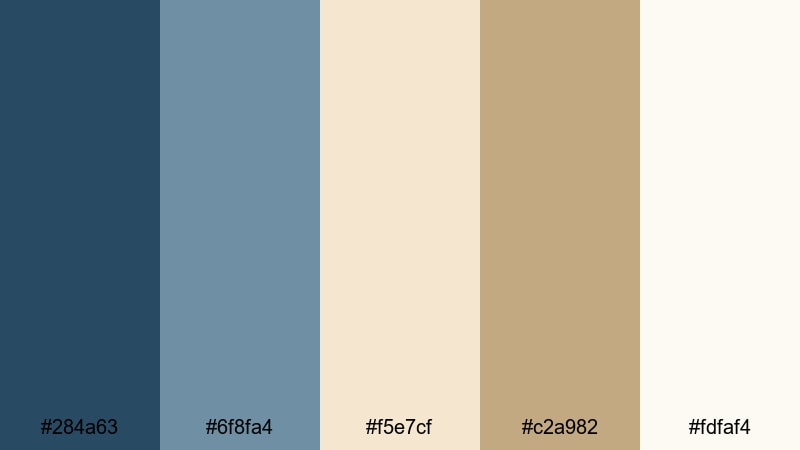
- HEX Codes: #284a63, #6f8fa4, #f5e7cf, #c2a982, #fdfaf4
- Mood: Serene, cozy, and inviting with a subtle sunrise glow.
- Use for: Perfect for calm podcast covers, cozy morning routines, and vlog thumbnails that aim for soft elegance.
Morning Tide Lounge combines cool, muted blues with creamy beige and gentle tan tones, echoing early light hitting a quiet shoreline. It feels like warm coffee by a window, with enough contrast to stay clear but not harsh.
Use the darker blues for text, icons, and accent lines, while the light creams form your background blocks for titles and info cards. This palette works especially well for productivity or morning routine content in Filmora, giving your thumbnails and lower thirds a soft, elegant, and organized vibe.
Dune Breeze Harmony
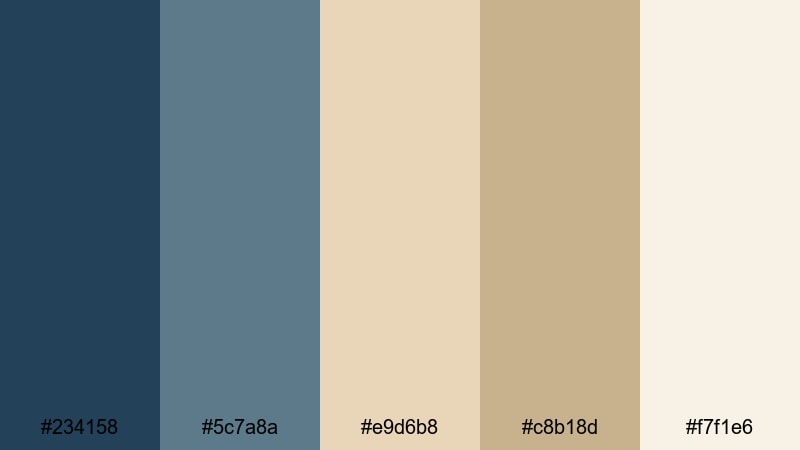
- HEX Codes: #234158, #5c7a8a, #e9d6b8, #c8b18d, #f7f1e6
- Mood: Balanced and soothing, with a gentle desert-meets-sea character.
- Use for: Great for channel branding, lower thirds, and title cards where you want calm professionalism with a natural twist.
Dune Breeze Harmony bridges sea blues with warm dune tans, creating a grounded, slightly earthy aesthetic. It feels stable and professional but still organic, like a brand that values nature and clarity at the same time.
Apply the deeper blue (#234158) to important text and logo elements, and use the mid blue (#5c7a8a) for subtle accents or icons. The tans are perfect for content blocks, backgrounds, and overlays in Filmora, so your explainers and portfolio reels look polished without feeling cold.
Harbor Mist Story
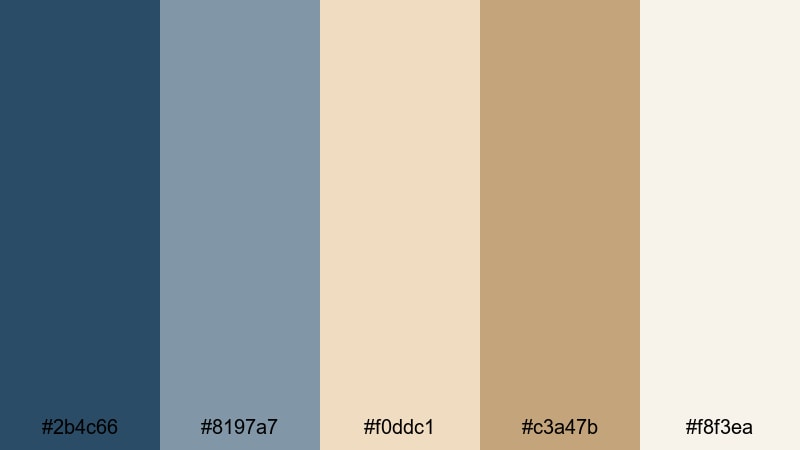
- HEX Codes: #2b4c66, #8197a7, #f0ddc1, #c3a47b, #f8f3ea
- Mood: Dreamy and nostalgic, like a misty harbor at golden hour.
- Use for: Use for cinematic travel diaries, gentle transitions, and end screens that feel intimate and reflective.
Harbor Mist Story pairs soft, hazy blues with misty golden tans, delivering a dreamy harbor-at-dusk atmosphere. It feels nostalgic and slightly romantic, great for visual storytelling that leans into emotion.
Use the lighter blue (#8197a7) and soft tan (#f0ddc1) for lower thirds and chapter titles, and keep the deepest blue (#2b4c66) for key typography or logo marks. In Filmora, this palette works beautifully with slow transitions, crossfades, and light film grain for travel diaries, memory recaps, or reflective talking-head videos.
Modern Minimal Blue Tan Color Palettes
Urban Loft Calm
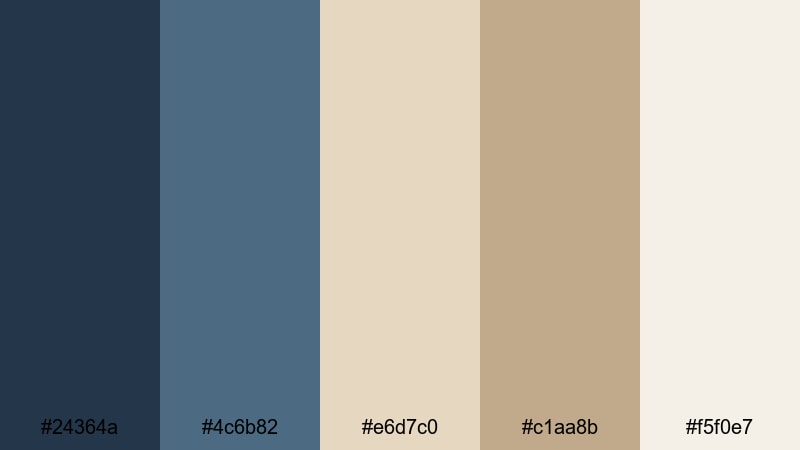
- HEX Codes: #24364a, #4c6b82, #e6d7c0, #c1aa8b, #f5f0e7
- Mood: Clean, contemporary, and quietly confident.
- Use for: Best for modern brand intros, tech explainers, and minimalist product showcases with a warm professional feel.
Urban Loft Calm mixes deep navy-inspired blues with smooth, modern tan neutrals. It feels like a stylish studio or city apartment, professional but still warm and human.
Use the dark blue (#24364a) as your main brand color across intros, title frames, and key text, while the creamy tans create soft backgrounds behind product shots or UI demos. In Filmora, this palette keeps tech explainers, SaaS promos, and portfolio reels looking mature and minimal without sliding into sterile gray.
Studio Desk Neutral
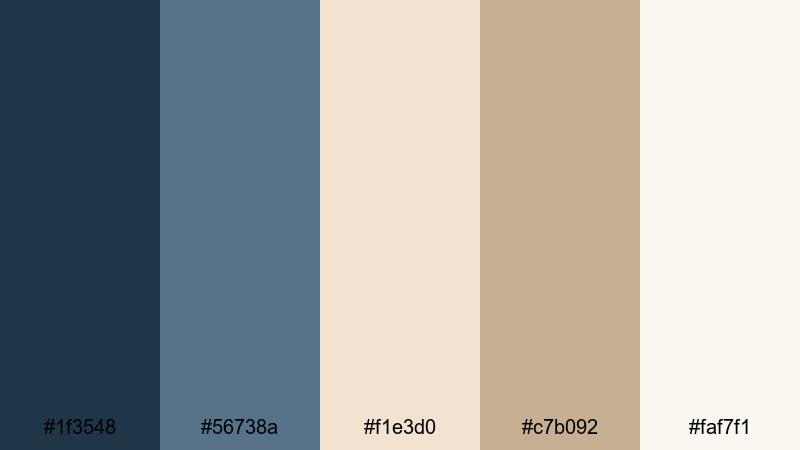
- HEX Codes: #1f3548, #56738a, #f1e3d0, #c7b092, #faf7f1
- Mood: Organized, airy, and productivity-focused.
- Use for: Great for tutorials, productivity channels, and workspace B-roll where clarity and focus matter.
Studio Desk Neutral feels like a tidy workstation: deep muted blues for focus and clean tan surfaces for clarity. The contrast is soft enough for long viewing sessions yet clear enough for charts, lists, and on-screen annotations.
Use the lighter shades (#f1e3d0, #faf7f1) as background blocks under your text or screen captures, and rely on the blues (#1f3548, #56738a) for headings, buttons, and icons. In Filmora, this palette works well for infographics, keyboard overlays, and minimal motion graphics that support the message without distracting from it.
Coastal Office Chic
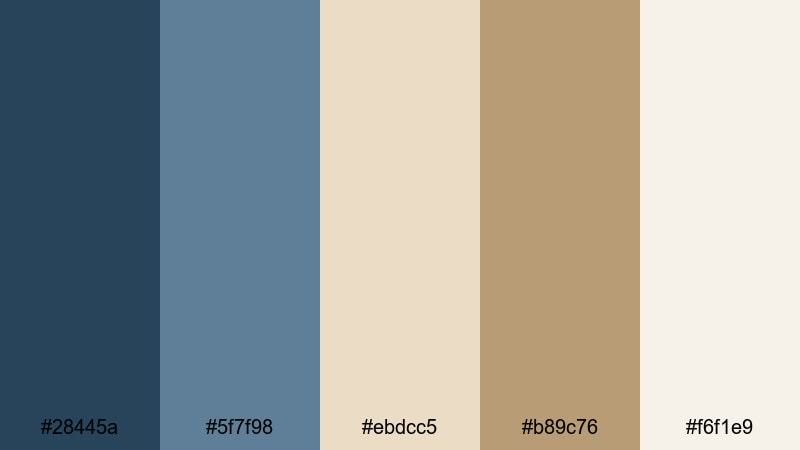
- HEX Codes: #28445a, #5f7f98, #ebdcc5, #b89c76, #f6f1e9
- Mood: Professional yet relaxed, like a beachfront workspace.
- Use for: Use in business presentations, portfolio reels, and LinkedIn video covers that need a calm, premium edge.
Coastal Office Chic blends cool office blues with chic tan neutrals that feel both corporate and coastal. It is ideal if you want your brand to communicate reliability while still giving off a relaxed, approachable energy.
Apply the mid blues (#28445a, #5f7f98) to graphs, icons, and key statements, and lean on the tans for slide backgrounds, profile frames, and lower-thirds. In Filmora, this palette is perfect for vertical LinkedIn videos, case-study clips, and pitch decks exported as video, keeping everything premium but not stiff.
Nordic Shoreline Grid
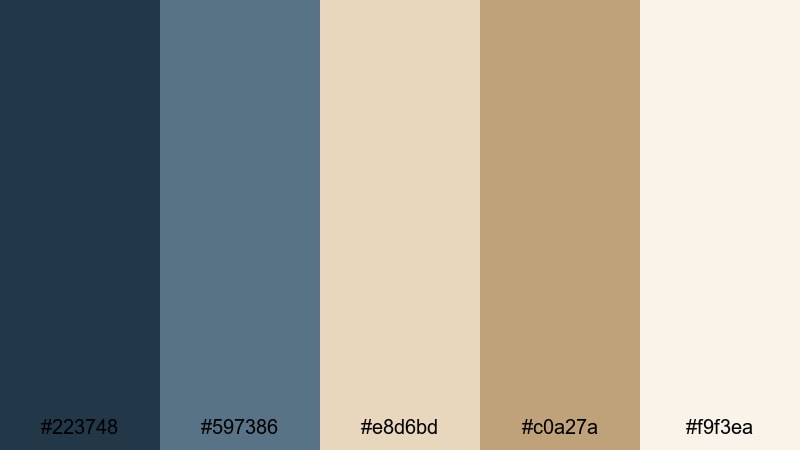
- HEX Codes: #223748, #597386, #e8d6bd, #c0a27a, #f9f3ea
- Mood: Scandinavian simple, airy, and design-forward.
- Use for: Perfect for minimalist channel branding, app previews, and clean social media video templates.
Nordic Shoreline Grid has a Scandinavian design feel: crisp, cool blues and pale tans that keep everything light, structured, and breathable. It works especially well with grid-based layouts, clean typography, and simple iconography.
Use the blues for lines, dividers, and key action text, while the neutrals form cards, panels, and background shapes in your Filmora projects. This palette is great if you want your Instagram Reels, app preview videos, or YouTube channel graphics to look like modern UI design rather than loud, saturated content.
Vintage Film Blue Tan Color Palettes
Dusty Reel Horizon
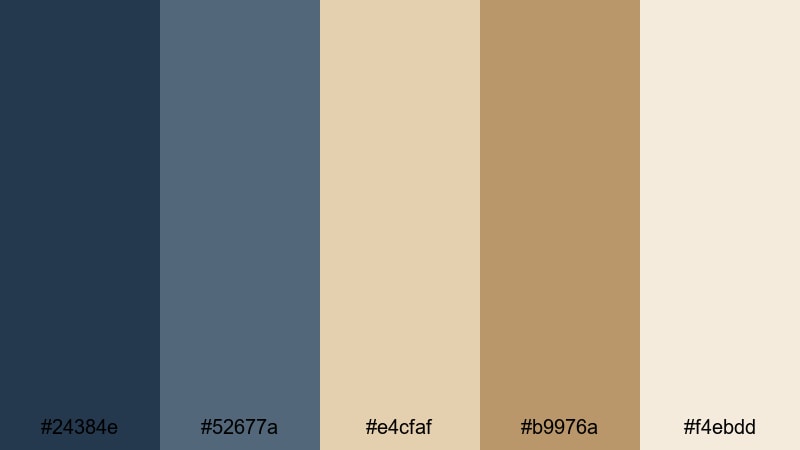
- HEX Codes: #24384e, #52677a, #e4cfaf, #b9976a, #f4ebdd
- Mood: Faded, cinematic, and gently nostalgic.
- Use for: Great for retro travel edits, memory montages, and storytelling projects that lean into a filmic look.
Dusty Reel Horizon wraps muted blues and dusty tans together to mimic the gentle fade of old film stock. It feels nostalgic but not overly stylized, like a slightly sun-worn photograph.
In Filmora, you can pair this palette with subtle grain overlays and slower transitions. Use the blues for typography and key graphics, and rely on the warmer tans for frames, borders, and background plates behind your titles or credits in travel and memory videos.
Old Harbor Postcard
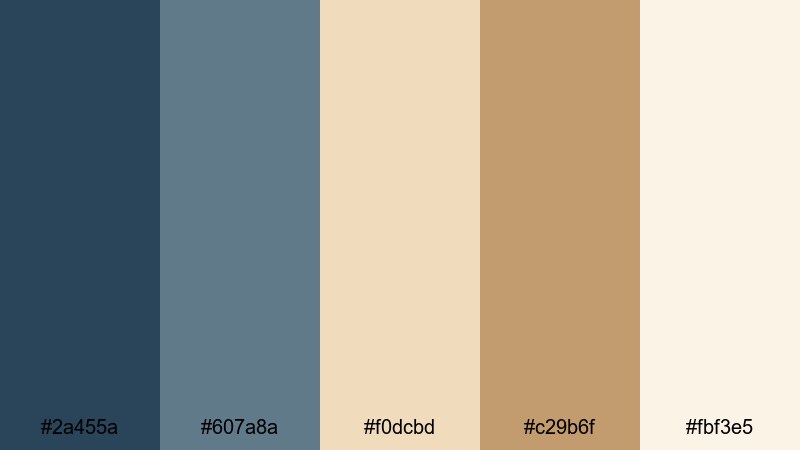
- HEX Codes: #2a455a, #607a8a, #f0dcbd, #c29b6f, #fbf3e5
- Mood: Romantic, sun-worn, and full of seaside nostalgia.
- Use for: Use for travel postcards, storytime videos, and chapter titles that feel like treasured memories.
Old Harbor Postcard feels like a stack of old seaside cards faded by time. The harbor blues and postcard tans are soft and warm, perfect for romantic storytelling or reflective voice-overs.
Use the lighter tan (#f0dcbd) as a frame or border color and the deep blue (#2a455a) for text and shadow accents. In Filmora, you can design postcard-style title cards, chapter breaks, or Polaroid-style overlays that reinforce this nostalgic Blue Tan atmosphere.
Summer Motel Sign
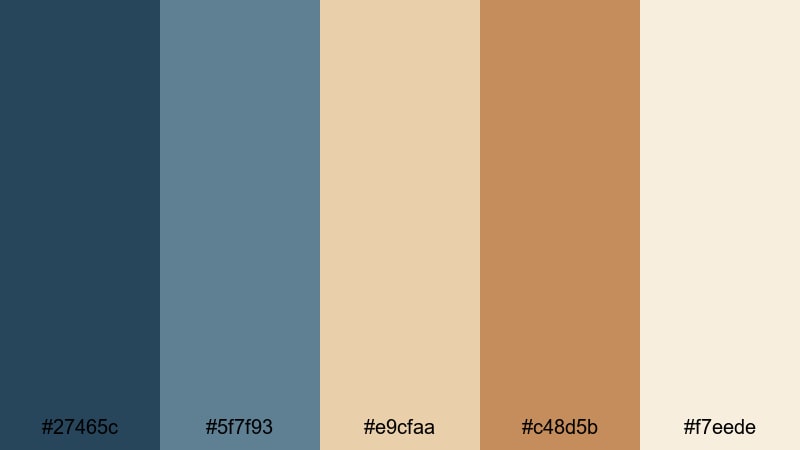
- HEX Codes: #27465c, #5f7f93, #e9cfaa, #c48d5b, #f7eede
- Mood: Road-trip retro with a warm, sun-faded feel.
- Use for: Perfect for vlog road trips, lifestyle B-roll, and playful throwback title sequences.
Summer Motel Sign recreates faded signboard blues and toasted tan tones from old highway motels and gas stations. It has a road-trip retro charm without feeling too heavy or dark.
Use the richer tan (#c48d5b) for big, bold titles or sign-style graphics, and the blues for shadows, outlines, and supporting text. In Filmora, this palette makes great use of bold typography, animated arrows, and stamp-style transitions for vlogs, travel reels, and throwback intros.
Super 8 Sandframes
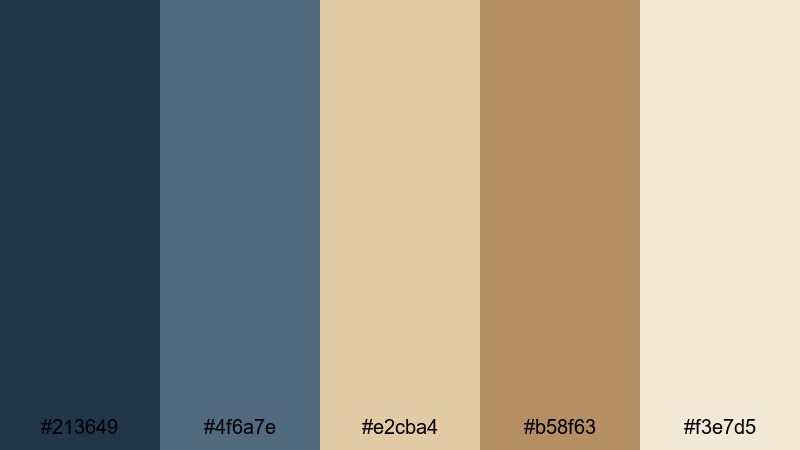
- HEX Codes: #213649, #4f6a7e, #e2cba4, #b58f63, #f3e7d5
- Mood: Warm, grainy, and intimate like old home movies.
- Use for: Great for family recap videos, wedding highlights, and emotional storytelling edits.
Super 8 Sandframes brings together soft blue shadows and buttery tan highlights to mimic classic Super 8 home movies. It feels intimate, warm, and slightly grainy in spirit, ideal for emotional storytelling.
Use the mid blue (#4f6a7e) for gentle accents and subtitles, and rely on the tans (#e2cba4, #b58f63, #f3e7d5) for background cards, frames, or picture-in-picture windows. In Filmora, pair this palette with slow crossfades, film burn overlays, and ambient music for wedding highlights, family recap edits, or any memory-focused video.
Bold Cinematic Blue Tan Color Palettes
Night Dune Contrast
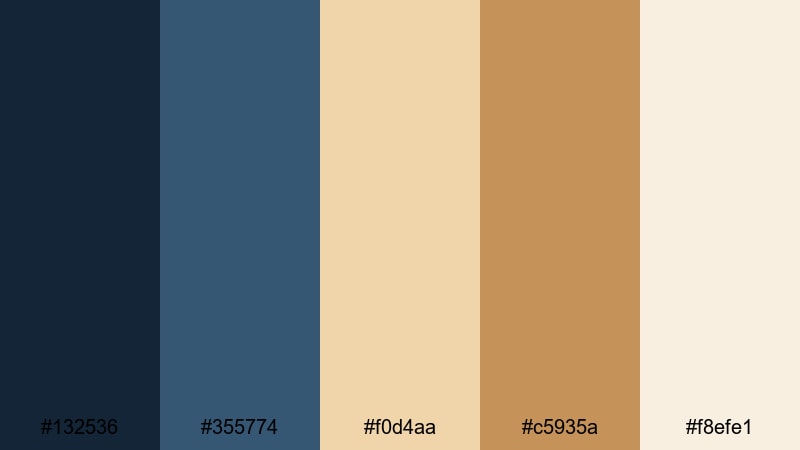
- HEX Codes: #132536, #355774, #f0d4aa, #c5935a, #f8efe1
- Mood: Dramatic, high contrast, and cinematic.
- Use for: Best for trailers, dramatic intros, and thumbnails that need to pop in feeds.
Night Dune Contrast throws inky night blues against glowing dune tans for a strong, cinematic punch. The separation between dark and light makes it ideal for eye-catching thumbnails and dramatic titles.
Use the darkest blue (#132536) as a backdrop for bold tan headlines, or invert it and place blue text over light tan panels. In Filmora, combine this palette with dynamic transitions, lens flares, or slow zooms to create attention-grabbing intros and teaser trailers.
Desert Sky Spotlight
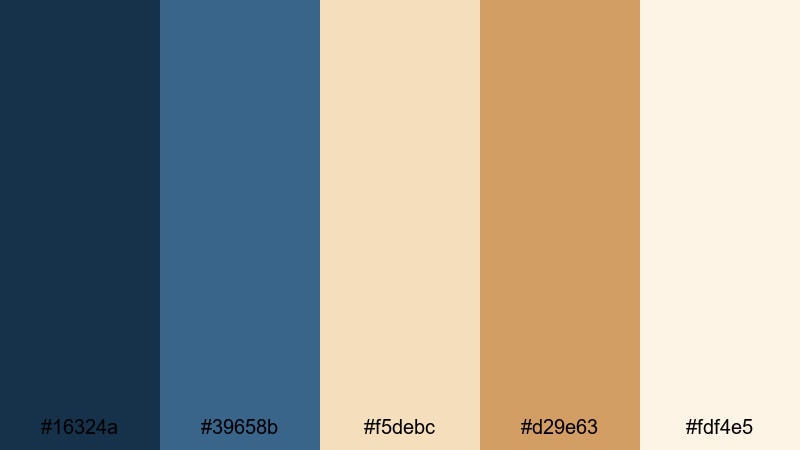
- HEX Codes: #16324a, #39658b, #f5debc, #d29e63, #fdf4e5
- Mood: Expansive and epic, with a blockbuster sky-meets-desert feel.
- Use for: Use for cinematic drone footage, landscape reels, and epic travel openers.
Desert Sky Spotlight pairs rich sky blues with glowing desert tans, giving your visuals a sweeping, blockbuster energy. It feels wide, open, and dramatic, especially when used with aerial or landscape footage.
Use the deeper blue (#16324a) to anchor logos and titles, then let the bright tan and cream tones (#f5debc, #fdf4e5) fill the background for maximum contrast. In Filmora, this palette is perfect for powerful openers, chapter bumpers, and logo stings before your main content starts.
Caffe Latte Nights
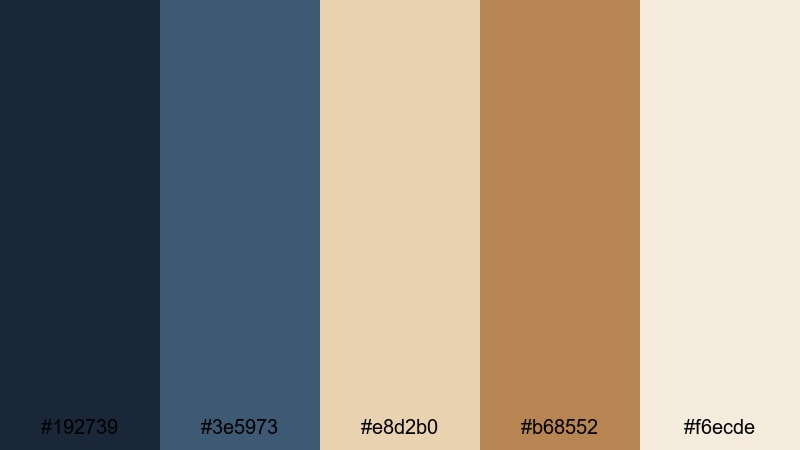
- HEX Codes: #192739, #3e5973, #e8d2b0, #b68552, #f6ecde
- Mood: Moody yet cozy, pairing night tones with cafe warmth.
- Use for: Great for nightlife vlogs, cafe reviews, and moody B-roll edits that stay inviting.
Caffe Latte Nights combines deep night blues with latte and cream tones, balancing moody ambiance with cozy warmth. It feels like a late-night cafe, perfect for city vlogs, date-night content, or atmospheric B-roll.
Use the darkest blue (#192739) as a base layer or background and let the latte tones (#e8d2b0, #b68552) highlight callouts, price tags, or location labels. In Filmora, this palette pairs wonderfully with slow-motion shots, bokeh lights, and soft music for inviting yet cinematic scenes.
Tips for Creating Blue Tan Color Palettes
Blue Tan is versatile, but small decisions about balance, contrast, and saturation will decide whether your video feels soft and coastal, modern and minimal, or bold and cinematic. Use these tips to adapt any Blue Tan palette to your own brand, footage, and platform.
- Decide your main role for blue: Use deep blues for authority and structure (logos, titles) and lighter blues for calming accents and secondary text.
- Keep tans readable: Choose slightly darker or more saturated tan tones for backgrounds so white or pale text does not disappear, especially on mobile screens.
- Balance warm and cool: Let blue handle cool shadows and tan handle warm highlights so your footage feels natural and cohesive across different lighting conditions.
- Limit accent colors: If you add a third color (like coral, yellow, or teal), keep it to small accents (buttons, icons) so the Blue Tan identity stays strong.
- Match footage and graphics: Use color correction in Filmora to gently nudge your footage toward the same Blue Tan family you use in titles and overlays.
- Test on thumbnails: Export a test frame with your palette and check it at small sizes on a phone to ensure text contrast and visual clarity.
- Use consistent HEX codes: Reuse the exact HEX values from your chosen palette for all overlays, lower thirds, and end screens so every video feels on-brand.
- Create presets: Once you dial in a Blue Tan look in Filmora, save it as a custom preset or LUT so future projects instantly match your style.
Blue Tan color palettes are powerful tools for shaping mood, clarity, and brand identity. Soft coastal combinations feel calming and personal, modern minimalist sets look professional and clean, vintage palettes add nostalgia, and bold cinematic schemes help your trailers and thumbnails demand attention.
Try a few of these HEX-based palettes in Filmora, adjust them with HSL and filters, and see which one best fits your channel or project. Once you find your signature Blue Tan look, keep it consistent across intros, overlays, and social clips to build a recognizable visual brand.
Whether you are editing a travel vlog, productivity tutorial, brand promo, or cinematic reel, Filmora gives you the tools to turn these Blue Tan combinations into polished, ready-to-share visuals in just a few steps.
secure download