

 100% Security Verified | No Subscription Required | No Malware


 ChatGPT
 Perplexity
 Gemini
 Claude
 Grok
Grok
Brass sits between gold and bronze on the color spectrum, carrying warmth, depth, and a hint of vintage character. Psychologically it suggests reliability, craftsmanship, and quiet luxury, which is why you see Brass tones in boutique hotels, premium packaging, and cinematic title sequences. It feels more grounded and human than pure gold, yet still instantly reads as special and high value.
For video creators and designers, Brass is a powerful accent for thumbnails, intros, overlays, and branding systems. Used well, it can tie together your YouTube channel art, lower thirds, logo animations, and color grading. Below you will find 15 Brass color palettes with ready to use HEX codes, designed for creators and Filmora users who want consistent, cinematic Brass looks across edits, social posts, and brand assets.
In this article
Elegant & Modern Brass Color Palettes
Urban Loft Brass
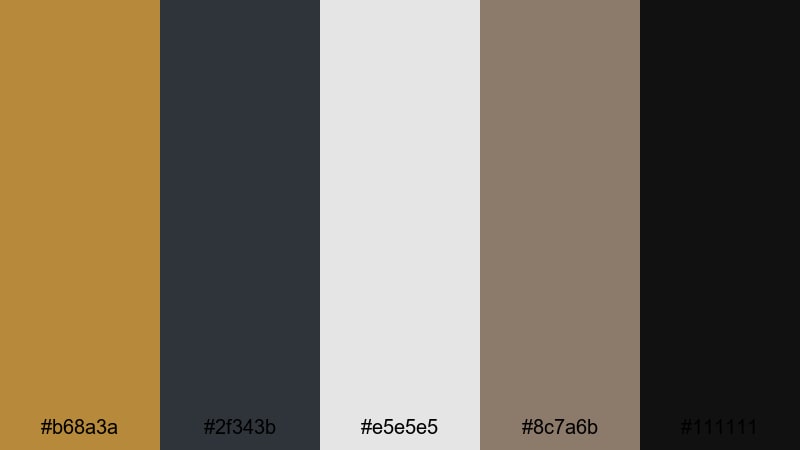
- HEX Codes: #b68a3a, #2f343b, #e5e5e5, #8c7a6b, #111111
- Mood: Sleek, urban, and upscale with a subtle industrial edge.
- Use for: Great for product launch videos, sleek tech promos, and luxury brand intros that need a modern metallic accent.
This palette combines muted Brass with charcoal, soft gray, and deep black for a city loft feeling. It looks modern and expensive without being too flashy, relying on contrast between the warm metal and cool, industrial neutrals.
Use Urban Loft Brass for premium thumbnails, motion graphics, and channel branding where you want Brass to act as a highlight color against darker backgrounds. It works especially well for tech reviews, gadget unboxings, software demos, and clean lower thirds in Filmora.
Pro Tip: Build a Modern Brass Look in Filmora
To keep an Urban Loft Brass mood across an entire edit, let the Brass tone (#b68a3a) be your accent and keep most backgrounds in the charcoal and black range. In Filmora you can apply this logic to titles, shapes, and overlays so your intro, b roll, and end screen all share the same metallic accent.
Create a simple style guide for yourself: Brass for key text or logo strokes, dark neutrals for backgrounds, and light gray for supporting text. Save these as custom presets in Filmora so every new video follows the same sleek Brass identity without rebuilding it from scratch.
AI Color Palette
If you have a reference image that nails this Brass look (a product shot, a brand board, or a still from another video), you can turn it into a grading template. Filmora's AI Color Palette feature lets you sample the color style from that reference and apply it across your timeline.
Import your reference frame, match it to a hero shot in your edit, and let Filmora push the same Brass warmth, charcoal shadows, and soft grays onto the rest of your clips. This keeps your thumbnails, talking head shots, and b roll looking like one cohesive, urban inspired story.
 secure download

HSL, Color Wheels & Curves
Once your basic match is in place, use Filmora's HSL, color wheels, and curves to refine the Brass tones. Slightly desaturate yellows and oranges so the Brass feels brushed and modern, then use the midtone wheel to push skin tones toward natural warmth instead of orange.
If you want more control, follow the step by step color correction tips in Filmora and use curves to deepen shadows without crushing detail. A gentle S curve will add contrast, making the Brass accents and city night backgrounds look more cinematic and polished.
secure download1000+ Video Filters & 3D LUTs
To speed up your workflow, you can layer Brass friendly filters and LUTs on top of this palette. Filmora's video filters and 3D LUTs make it easy to add subtle film grain, soft fade, or high contrast looks that keep your Brass tones intact.
Try a warm cinematic LUT at low intensity for B roll, then a cleaner, neutral filter for screen recordings or UI demos. This way you keep a consistent Brass identity while adapting the mood of each scene with just a few clicks.
secure downloadGilded Studio Lights
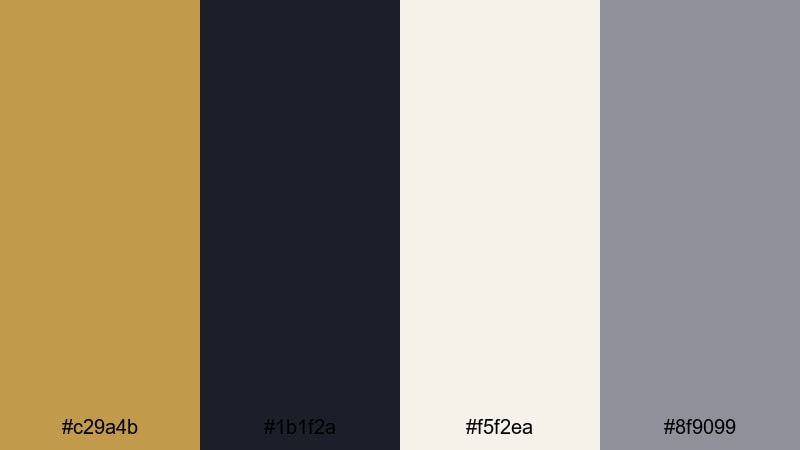
- HEX Codes: #c29a4b, #1b1f2a, #f5f2ea, #8f9099
- Mood: Dramatic and refined, like a spotlight on a dark soundstage.
- Use for: Use for cinematic intros, logo stings, and fashion lookbooks that pair metallic warmth with cool studio shadows.
Gilded Studio Lights balances rich Brass with deep navy shadows and soft ivory highlights. It feels like a fashion shoot under controlled lighting, where metal details catch the light against dark backdrops.
Apply this palette to teaser trailers, runway lookbooks, or premium service promos. Use the Brass tone for logo reveals and button highlights, while the dark blues and grays handle backgrounds, lower thirds, and thumbnail frames in Filmora.
Midnight Brass Accent
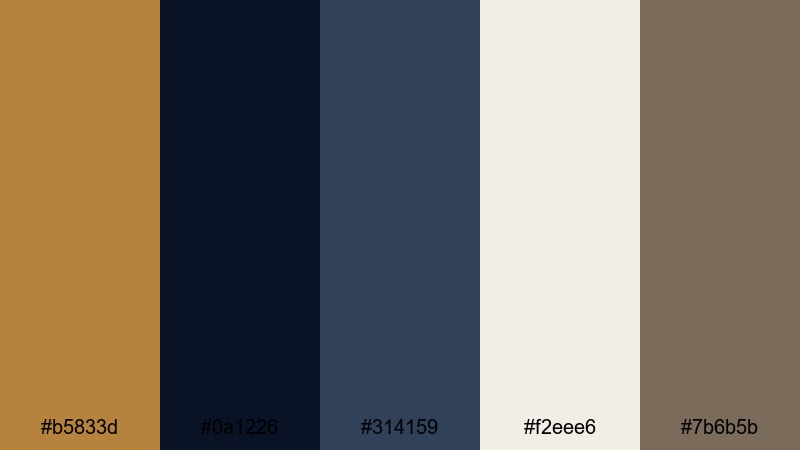
- HEX Codes: #b5833d, #0a1226, #314159, #f2eee6, #7b6b5b
- Mood: Moody and luxurious with a confident, cinematic glow.
- Use for: Great for title cards, credit rolls, and overlays where Brass highlights need to pop against deep blues and neutrals.
Midnight Brass Accent contrasts glowing Brass with near black navy and desaturated neutrals. It has a premium, cinema poster energy that feels confident and bold.
Use it for opening titles, credit sequences, and chapter cards in narrative videos. In thumbnails, let Brass outline your text or frame key subjects while the dark blues create a dramatic, scroll stopping backdrop.
Polished Brass Minimal
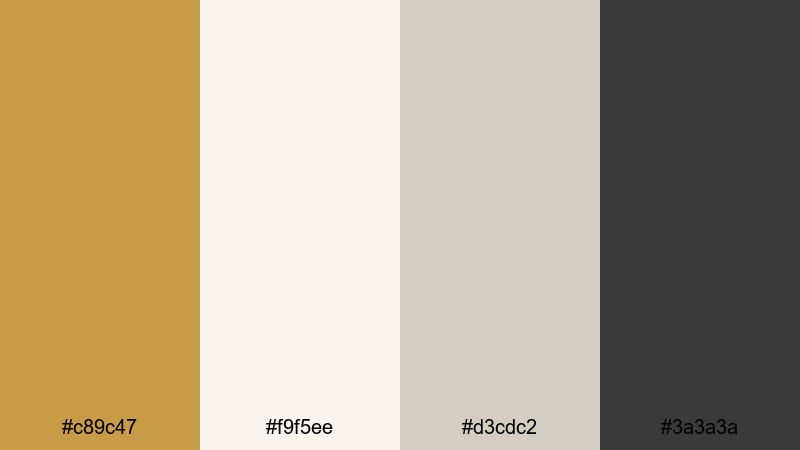
- HEX Codes: #c89c47, #f9f5ee, #d3cdc2, #3a3a3a
- Mood: Clean, minimal, and sophisticated with a warm metallic touch.
- Use for: Best for minimal title screens, UI overlays in tutorials, and branding that leans modern and understated.
Polished Brass Minimal uses soft off whites and gentle grays to spotlight a single Brass accent. The look is airy and refined, ideal when you want warmth without visual clutter.
Use this palette for tutorial overlays, screen record thumbnails, and modern logo animations. Let the Brass color highlight key buttons, subscribe CTAs, or important keywords while the light neutrals keep everything readable and calm.
Vintage & Rustic Brass Color Palettes
Antique Library Brass

- HEX Codes: #b27a30, #3c2a1e, #7d5a3a, #e2c9a3, #5b4b3b
- Mood: Warm, nostalgic, and bookish with an old world charm.
- Use for: Perfect for documentary titles, history content, and storytelling vlogs that need a tactile, library-like warmth.
Antique Library Brass blends aged Brass with deep wood tones and parchment beiges. It feels like stacked books, worn leather, and sunlight through dusty windows.
Use it for history explainers, educational channels, and slow paced storytelling vlogs. In Filmora, style your lower thirds as library labels, use parchment as background cards, and reserve the Brass tone for key headings and timeline markers.
Steampunk Market Glow

- HEX Codes: #c38b3c, #402218, #84624c, #f0e2c1
- Mood: Rustic, imaginative, and slightly gritty with artisan energy.
- Use for: Use for cosplay recaps, maker videos, and creative transitions that blend industrial grit with warm Brass highlights.
Steampunk Market Glow mixes burnished Brass with dark mahogany and sepia light. It captures the feeling of a handmade market filled with gears, leather, and warm bulbs.
This is a strong choice for cosplay conventions, prop building, or maker studio tours. Let Brass highlight gears, frames, and transition elements, while the darker browns give your edits a grounded, handcrafted atmosphere.
Old Harbor Lanterns
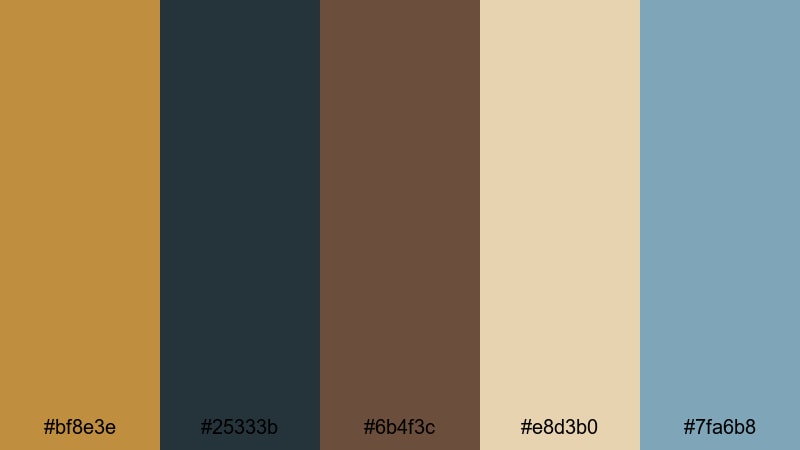
- HEX Codes: #bf8e3e, #25333b, #6b4f3c, #e8d3b0, #7fa6b8
- Mood: Romantic and weathered, like lanterns reflecting on a harbor at dusk.
- Use for: Ideal for travel vlogs, seaside stories, and moody B-roll where Brass warmth plays against deep blues.
Old Harbor Lanterns pairs warm Brass and lantern browns with harbor blues and sandy neutrals. It feels nostalgic and slightly windswept, as if everything has a layer of sea air on it.
Use it when grading coastal B roll, sunset docks, or moody travel transitions. In thumbnails, combine the Brass tone with the teal blue to create complementary color contrast that still feels soft and romantic.
Weathered Workshop Brass
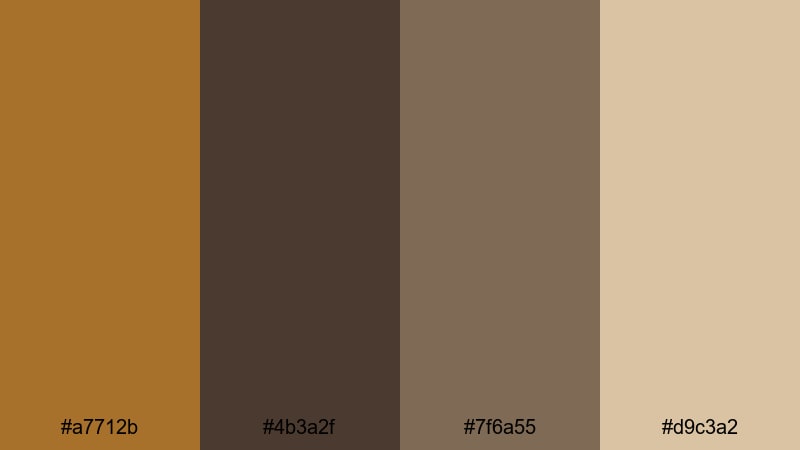
- HEX Codes: #a7712b, #4b3a2f, #7f6a55, #d9c3a2
- Mood: Rugged, hands-on, and grounded like a craftsman workshop.
- Use for: Great for DIY channels, woodworking content, and maker documentaries that lean into tactile, earthy visuals.
Weathered Workshop Brass combines scuffed Brass with worn wood grains and dusty neutrals. It suggests tools, workbenches, and projects that have lived a full life.
Apply this palette to woodworking tutorials, restoration projects, and practical DIY builds. Give your titles a slightly rough, textured feel, and use the lighter beige as a background for measurements, diagrams, and step lists in Filmora overlays.
Warm Cinematic Brass Color Palettes
Golden Hour Brass Fade
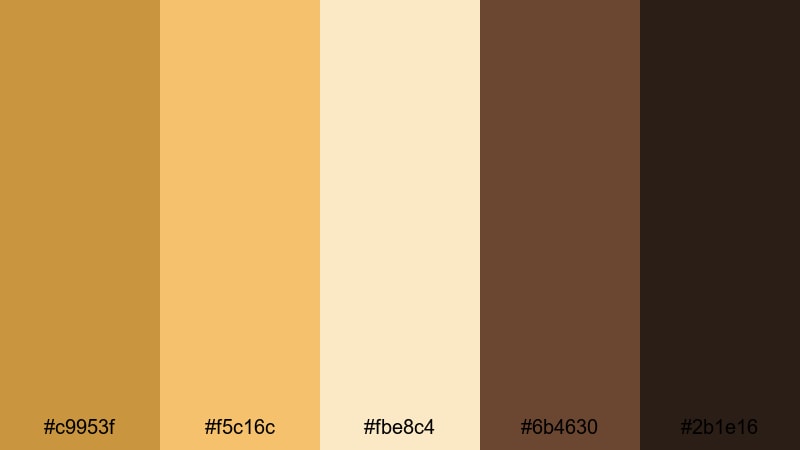
- HEX Codes: #c9953f, #f5c16c, #fbe8c4, #6b4630, #2b1e16
- Mood: Soft, glowing, and cinematic like late afternoon sun flares.
- Use for: Best for travel reels, lifestyle montages, and dreamy transitions that capture golden hour warmth.
Golden Hour Brass Fade layers sunlit Brass with honey tones, creamy highlights, and deep earthy shadows. It feels like lens flares, backlit hair, and glowing horizons.
Use it for travel vlogs, couple sessions, and aesthetic day in the life edits. In Filmora, this palette works beautifully with soft light leaks and slow motion overlays, tying your titles, frames, and grading into one cohesive golden narrative.
Candlelit Brass Drama
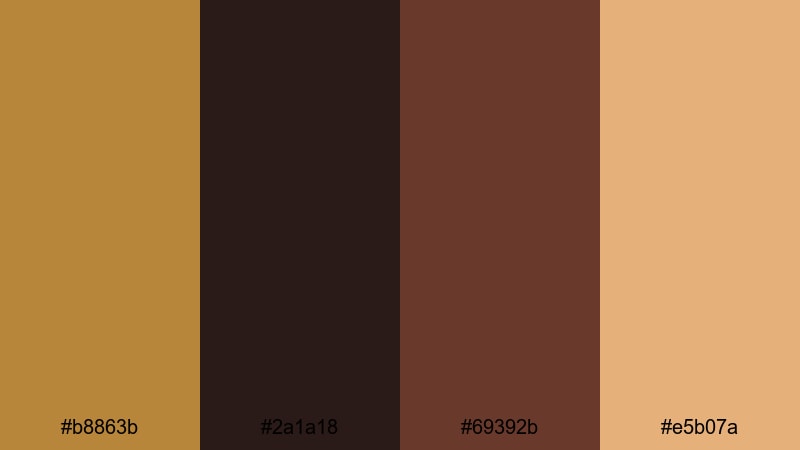
- HEX Codes: #b8863b, #2a1a18, #69392b, #e5b07a
- Mood: Intimate, dramatic, and theatrical like candlelight on velvet.
- Use for: Use for music videos, performance pieces, and narrative shorts that need rich shadows with Brass accents.
Candlelit Brass Drama wraps deep reds and browns around Brass and peach highlights. It evokes late night performances, backstage dressing rooms, and candlelit table scenes.
It is ideal for music videos, spoken word pieces, and dramatic short films. Use the darkest shade for backgrounds and letterbox bars, while the Brass and peach tones guide the eye to faces, instruments, or typography.
Desert Brass Mirage
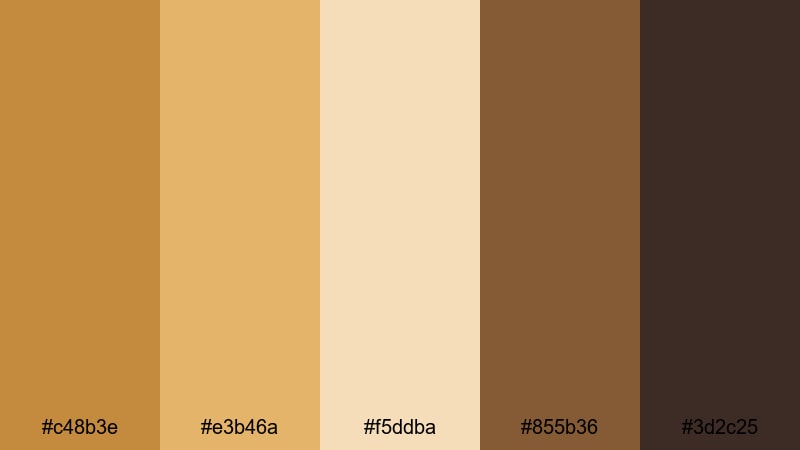
- HEX Codes: #c48b3e, #e3b46a, #f5ddba, #855b36, #3d2c25
- Mood: Sun baked, spacious, and adventurous like a desert road trip.
- Use for: Perfect for travel edits, documentary storytelling, and drone shots over warm landscapes.
Desert Brass Mirage blends sandy beiges, sunlit Brass, and grounded browns. The result is a warm, expansive look that pairs well with wide establishing shots and overhead drone footage.
Use this palette for road trips, desert hikes, and any story that takes place under strong sunlight. In thumbnails, mix the lighter sand with Brass for the text area, and keep imagery in the deeper browns to maintain readability.
Festival Stage Brass
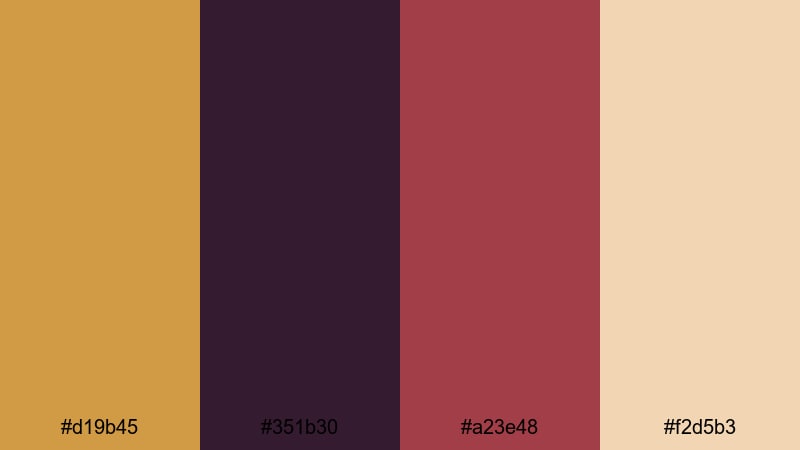
- HEX Codes: #d19b45, #351b30, #a23e48, #f2d5b3
- Mood: Energetic and bold with a touch of nightlife glamour.
- Use for: Great for concert footage, event recaps, and party highlights needing punchy yet cohesive color.
Festival Stage Brass combines vibrant Brass with stage magenta, rich plum, and soft spotlight beige. It has an upbeat, nightlife feel that suits concerts and events.
Use this palette in party highlight reels, club promos, and festival recaps. In Filmora, apply the Brass and magenta to titles, animated shapes, and callouts around performers, while the darker plum shade supports backgrounds and transitions.
Minimal & Neutral Brass Color Palettes
Soft Matte Brass
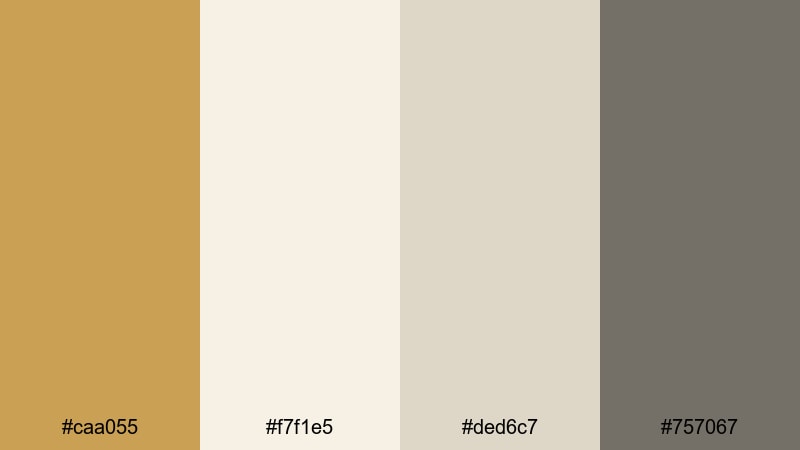
- HEX Codes: #caa055, #f7f1e5, #ded6c7, #757067
- Mood: Calm, airy, and softly luxurious without harsh contrasts.
- Use for: Ideal for tutorials, talking head videos, and minimal thumbnails where clarity and softness matter.
Soft Matte Brass softens the metallic feel into a gentle, powdery warmth. Paired with muted grays and off whites, it suggests quiet confidence and modern comfort.
Use it for tutorial channels, productivity content, and lifestyle sit down videos. Let Brass highlight key words or icons, while the pale neutrals keep text highly legible, even on small mobile screens.
Scandinavian Brass Accent
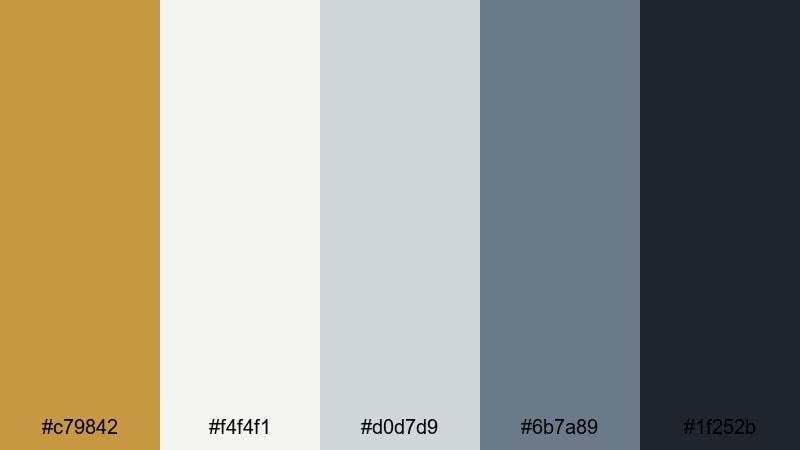
- HEX Codes: #c79842, #f4f4f1, #d0d7d9, #6b7a89, #1f252b
- Mood: Cool, balanced, and contemporary with a warm metallic accent.
- Use for: Use for design explainers, app promos, and branding where a single Brass note adds warmth to cool minimalism.
Scandinavian Brass Accent places one clean Brass shade inside a world of cool grays and slate blues. The result is balanced, fresh, and highly flexible.
It is perfect for SaaS promos, UI walkthroughs, and design case studies. Use the Brass for logos, key buttons, and hover states in your motion graphics, with the cool hues handling background cards, device frames, and text.
Editorial Brass Monochrome
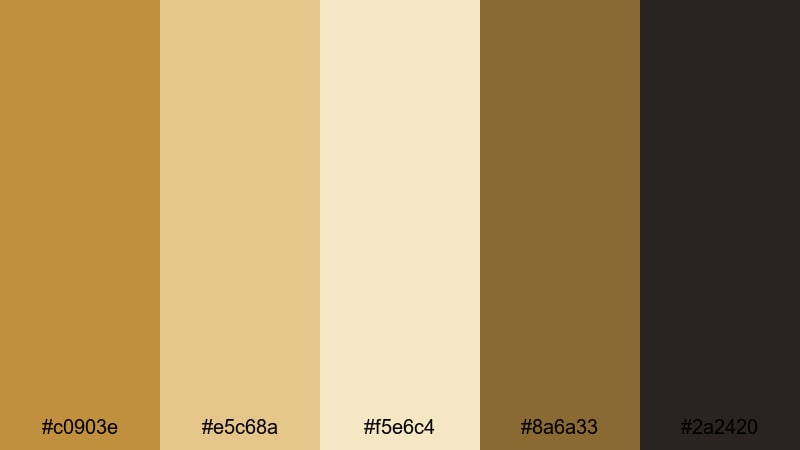
- HEX Codes: #c0903e, #e5c68a, #f5e6c4, #8a6a33, #2a2420
- Mood: Editorial, refined, and cohesive with a monochrome warmth.
- Use for: Perfect for lookbooks, brand films, and channel identities that aim for a timeless, magazine style look.
Editorial Brass Monochrome stays entirely within the Brass and caramel family, from pale cream to deep brown. This creates a highly cohesive, magazine style finish.
Use it to build a timeless brand identity across your intro, end screen, and channel banner. In Filmora, keep footage relatively natural and apply this palette mainly to titles, frames, and graphic elements for a consistent, editorial signature.
Tips for Creating Brass Color Palettes
Brass works best when it has room to shine, supported by thoughtful neutrals and controlled contrast. These tips will help you build Brass palettes that look great on video, in thumbnails, and across branding.
- Pair Brass with deep cool tones (navy, charcoal, teal) to make the metallic warmth stand out without feeling too yellow or orange.
- Keep text readability in mind: use Brass mainly for headings or accents, and rely on white, off white, or very dark tones for body copy.
- Limit your Brass usage to one or two key elements per frame (logo, main title, key button) so it reads as intentional, not overwhelming.
- Use gradients that move from pale beige to deeper Brass to create soft, cinematic backgrounds for titles and lower thirds.
- Match your Brass palette to your footage lighting: warmer shots can handle deeper, richer Brass, while cooler footage benefits from softer, desaturated Brass tones.
- Check your designs on both dark and light themes, since YouTube, phones, and websites may display your thumbnails and graphics against different backgrounds.
- Save your favorite Brass color codes as presets in Filmora so your intros, transitions, and end screens all follow the same brand system.
- Combine Brass with subtle texture (grain, paper, or brushed metal) to make digital graphics feel more tactile and premium.
Conclusion
Brass is a versatile color family that can feel modern, vintage, cinematic, or minimal depending on how you pair it. By choosing a clear Brass palette with defined HEX codes, you make it easier to keep your thumbnails, intros, overlays, and brand assets consistent across every upload.
Whether you favor urban minimalism, rustic storytelling, or warm cinematic travel edits, there is a Brass combination above that can support your style. Use Filmora to lock in your chosen palette, from AI assisted color matching to fine tuned grading and LUTs, so every video looks intentional and on brand.
Test a few of these palettes on your next project, save your favorites as presets, and let Brass become a recognizable part of your visual identity.
secure downloadNext: Aquarium Color Palette
