

 100% Security Verified | No Subscription Required | No Malware


 ChatGPT
 Perplexity
 Gemini
 Claude
 Grok
Grok
Burgundy and teal are a powerful duo: burgundy brings depth, passion, and luxury, while teal adds calm, clarity, and a modern edge. Together, Burgundy Teal color palettes feel cinematic and memorable, making them perfect for creators who want their visuals to look intentional rather than random. The contrast between warm wine tones and cool teal hues is ideal for storytelling, from serious documentaries to stylish brand videos.
In video editing, branding, thumbnails, intros, and social content, a well chosen Burgundy Teal palette instantly sets the mood and makes your channel look professional. Below you will find 15 Burgundy Teal color palettes with HEX codes that you can plug directly into your designs and Filmora projects to keep your look cohesive across intros, B rolls, overlays, and thumbnails.
In this article
Elegant & Modern Burgundy Teal Color Palettes
Midnight Velvet Cinema
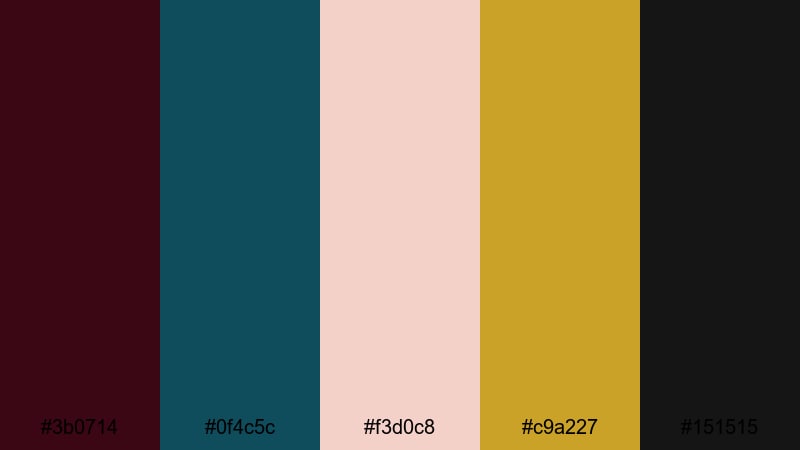
- HEX Codes: #3b0714, #0f4c5c, #f3d0c8, #c9a227, #151515
- Mood: Luxurious, cinematic, and quietly intense.
- Use for: Perfect for premium video intros, title cards, and cinematic trailers that need rich depth.
This palette layers inky burgundy (#3b0714) with deep teal (#0f4c5c), softened by blush highlights and brushed gold accents. The near black charcoal (#151515) anchors everything, giving your visuals the rich contrast you would expect from a high end film poster.
Use Midnight Velvet Cinema for opening titles, logo stings, minimalist thumbnails, or chapter cards where you want luxury without looking loud. In Filmora, combine these colors with clean typography and subtle motion to give brand videos, short films, or portfolio reels a polished, cinematic identity.
Pro Tip: Build a Cinematic Burgundy Teal Look in Filmora
When you commit to a Burgundy Teal palette like Midnight Velvet Cinema, keep those tones consistent across your entire video. In Filmora, set your title colors, lower thirds, and overlay graphics to the same 3 or 4 key HEX codes so every frame feels part of one visual universe.
You can drop burgundy and teal solids on the timeline as background plates, then reuse them for text boxes, shapes, and transitions. Combine them with smooth push or fade animations to create premium style openers, end screens, and playlist covers for YouTube or social media.
AI Color Palette
If you have a screenshot or reference frame that already nails this Burgundy Teal vibe, you can let Filmora match the rest of your footage to it automatically. Filmora's AI Color Palette feature analyzes the reference colors and applies a similar look to other clips on your timeline.
Import one beautifully graded shot that uses burgundy shadows, teal mids, and warm highlights. Then use AI Color Palette to harmonize all your B roll, talking head clips, and cutaways, so your entire edit carries the same velvet like cinematic atmosphere without manual tweaking on every shot.
 secure download

HSL, Color Wheels & Curves
After matching your clips, use Filmora's HSL controls to refine each color range. You can push burgundy slightly toward a wine red, cool down teal into a deeper lagoon shade, or desaturate skin tones so they do not clash with your bold palette. The color wheels let you tint shadows toward burgundy and midtones toward teal, creating a cohesive split tone look.
For even more control, use curves to crush the blacks just a little and lift highlights, giving your Burgundy Teal visuals a cinematic S curve. If you want a walkthrough, try following this Filmora color grading tutorial while experimenting with your own palette.
secure download1000+ Video Filters & 3D LUTs
If you want a polished Burgundy Teal look fast, combine your custom colors with Filmora's built in filters and LUTs. Many cinematic LUTs already emphasize teal shadows and warm highlights, so you can fine tune them to play nicely with your burgundy accents instead of grading from scratch.
Filmora's video filters and 3D LUTs make it easy to test different vibes for the same palette, from clean commercial style to moody, stylized grading. Apply a LUT, then adjust opacity and color controls until your burgundy and teal tones feel unified across every scene.
secure downloadGarnet Glass Loft
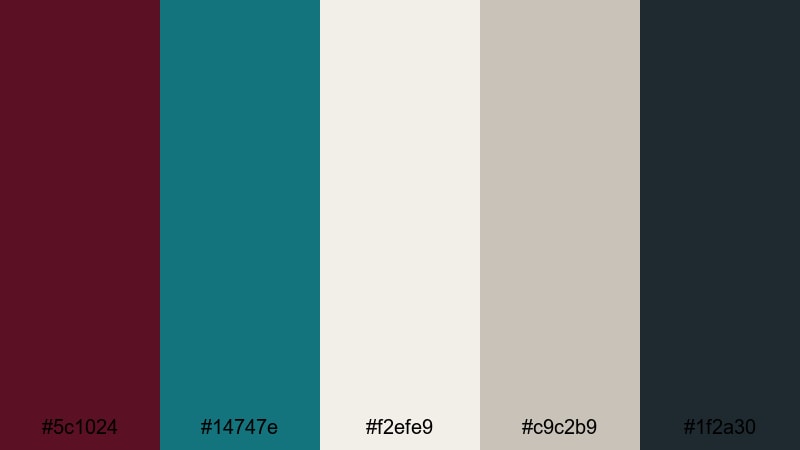
- HEX Codes: #5c1024, #14747e, #f2efe9, #c9c2b9, #1f2a30
- Mood: Sophisticated and urban with a refined edge.
- Use for: Ideal for design-forward channel branding, tech explainers, and sleek product showcases.
Garnet Glass Loft mixes a rich garnet burgundy with a clean, modern teal, then surrounds them with soft off whites and cool grays. It feels like a high rise loft at blue hour, where warm interior light meets cool glass reflections.
Use this palette for tech explainers, app demos, or portfolio videos where you want to look sharp and trustworthy. Lean on the off white and neutrals for backgrounds, then reserve burgundy and teal for key text, buttons, thumbnail borders, and lower thirds so your calls to action stand out clearly.
Teal Bordeaux Minimal
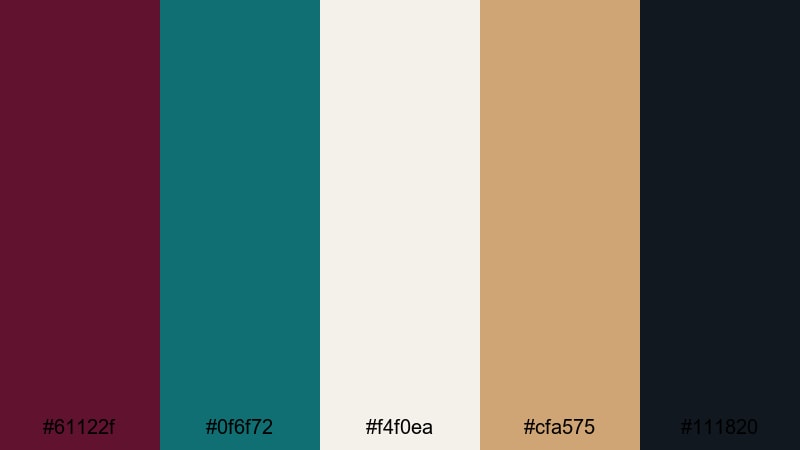
- HEX Codes: #61122f, #0f6f72, #f4f0ea, #cfa575, #111820
- Mood: Minimal, modern, and quietly confident.
- Use for: Great for minimalist lower thirds, logo reveals, and clean UI overlays in tutorials or reviews.
Teal Bordeaux Minimal balances a strong Bordeaux burgundy and ocean teal against airy off white, muted gold, and charcoal. It feels clean and professional, but with just enough color to be memorable.
This palette is excellent when you want a minimal aesthetic for tutorials or SaaS style content. Use the off white as your main background, charcoal for body text, and let burgundy and teal highlight key labels, progress bars, and chapter titles in your Filmora graphics.
Urban Wine Reflections
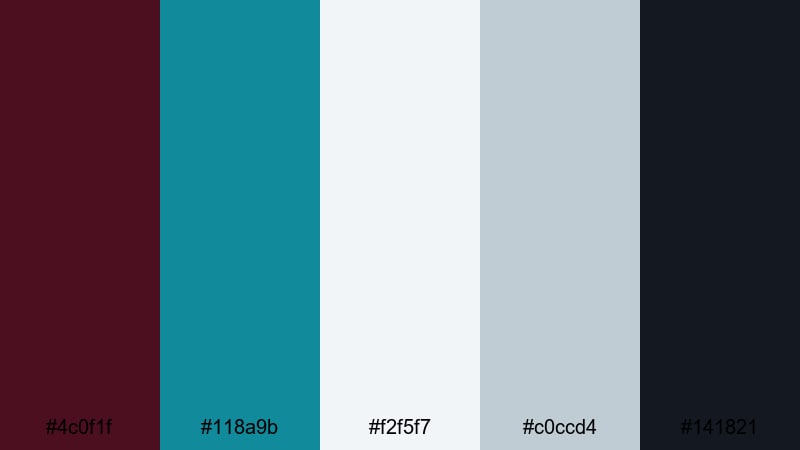
- HEX Codes: #4c0f1f, #118a9b, #f2f5f7, #c0ccd4, #141821
- Mood: Cool, reflective, and metropolitan.
- Use for: Well suited for city vlogs, travel reels, and street photography edits with a polished tone.
Urban Wine Reflections pairs inky burgundy with glassy teal, set against cool grays and a crisp off white. It captures the feeling of city lights bouncing off windows on a clear night.
Try it on travel vlogs, aerial city shots, and street photography slideshows. Use the grays and white for clean frames, then add burgundy and teal titles or shape overlays in Filmora to guide the viewer through locations, timestamps, or chapter names without clutter.
Dusky Jewel Monochrome
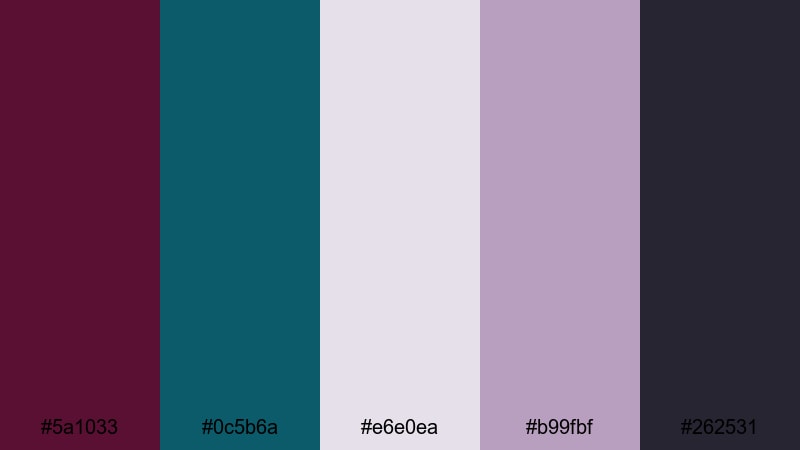
- HEX Codes: #5a1033, #0c5b6a, #e6e0ea, #b99fbf, #262531
- Mood: Refined, moody, and jewel toned.
- Use for: Best for beauty content, fashion lookbooks, and luxury product shots with subtle drama.
Dusky Jewel Monochrome softens burgundy and teal into muted jewel tones, with lilac grays smoothing everything out. The result feels refined and slightly dreamy rather than loud.
Use this palette for beauty tutorials, lookbooks, and jewelry or fragrance promos. Keep product shots or portraits on neutral backgrounds, then add subtitles, brushes, or frames in these muted Burgundy Teal accents to give your Filmora edits a high end editorial look.
Moody & Dramatic Burgundy Teal Color Palettes
Stormlit Cabaret
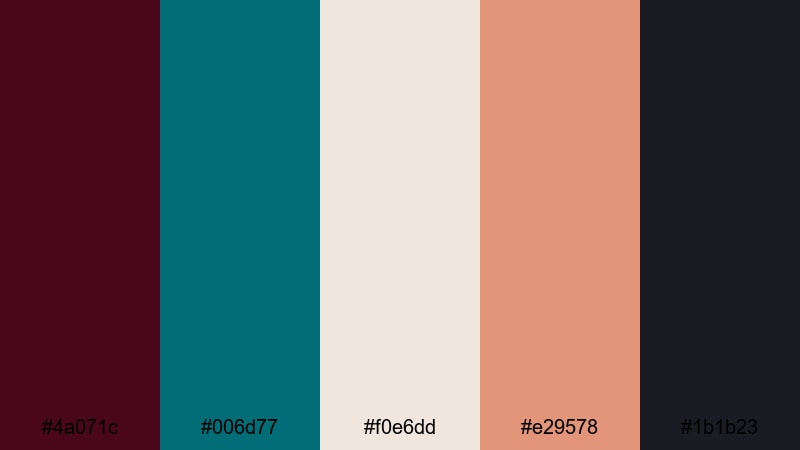
- HEX Codes: #4a071c, #006d77, #f0e6dd, #e29578, #1b1b23
- Mood: Dramatic, theatrical, and stormy.
- Use for: Use for music videos, narrative shorts, or title sequences that need a smoky, stage lit atmosphere.
Stormlit Cabaret contrasts a dark wine burgundy with a stormy teal, warmed up by peachy lights and grounded with deep charcoal. It feels like a smoky club or theater lit by moody spotlights.
Use it in music videos, dance pieces, and dramatic short films. In Filmora, lean on the dark tones for backgrounds, layer light leaks or bokeh in peach and off white, and use teal and burgundy typography for track titles or chapter markers to keep the performance centered in your visual story.
Noir Harbor Lights
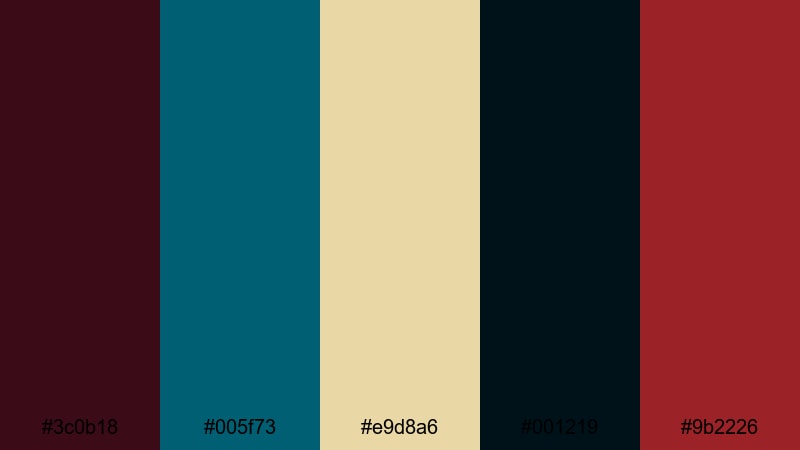
- HEX Codes: #3c0b18, #005f73, #e9d8a6, #001219, #9b2226
- Mood: Dark, mysterious, and sea swept.
- Use for: Perfect for thriller edits, night cityscapes, or moody travel montages with strong shadows.
Noir Harbor Lights mixes deep teal and noir burgundy with pale amber highlights, like harbor lamps shimmering on dark water. The nearly black navy pulls everything into a shadowy, cinematic space.
Use it for night sequences, slow travel montages, or thriller style edits. In thumbnails and title cards, use the amber tone as a subtle glow behind bold teal or burgundy text so key information is readable even on dark backgrounds.
Crimson Tidal Night
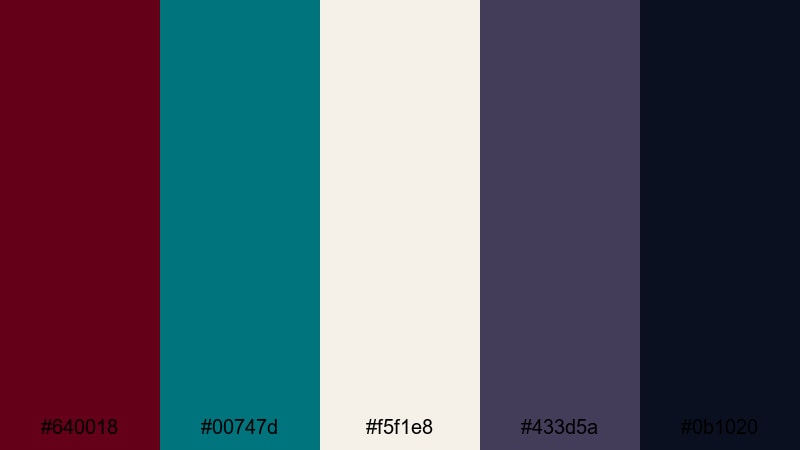
- HEX Codes: #640018, #00747d, #f5f1e8, #433d5a, #0b1020
- Mood: Intense, moody, and slightly surreal.
- Use for: Great for gaming highlights, action trailers, or edgy motion graphics with high contrast grading.
Crimson Tidal Night throws electric teal against dark crimson and deep blue blacks. The pale neutral highlight keeps things from becoming too heavy, adding just enough light for text and UI.
This palette works well for gaming content, action trailers, and edgy glitch style motion graphics. Use the off white for HUD elements or subtitles, while teal and crimson define team colors, health bars, or key stats in your Filmora overlays and thumbnail designs.
Velvet Smoke Alley
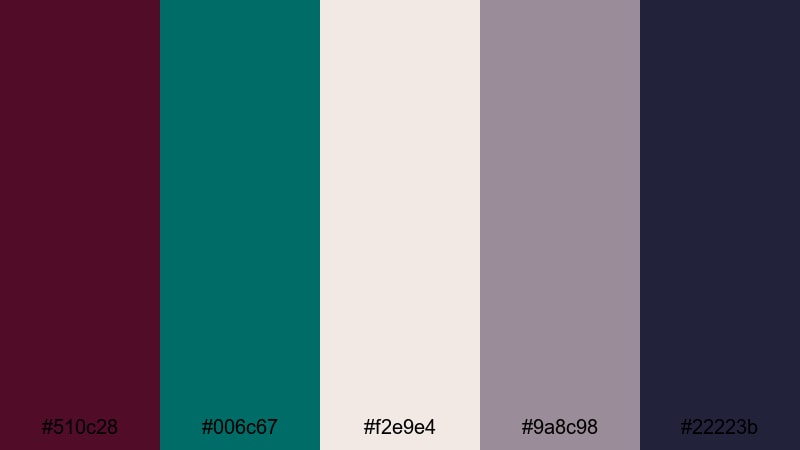
- HEX Codes: #510c28, #006c67, #f2e9e4, #9a8c98, #22223b
- Mood: Smoky, romantic, and cinematic.
- Use for: Ideal for narrative vlogs, dance films, or intimate portrait edits with a soft, hazy feel.
Velvet Smoke Alley combines velvety burgundy and teal with mauve grays and a soft off white, like distant streetlights in a fog. The effect is gentle and cinematic rather than harsh.
Use it for romantic vlogs, couple films, or soft storytelling content. In Filmora, pair these colors with slow motion, light grain, and gentle zooms. Let burgundy and teal appear in wardrobe, props, or text, while the neutrals keep your frames airy and emotionally focused.
Deep Ember Lagoon
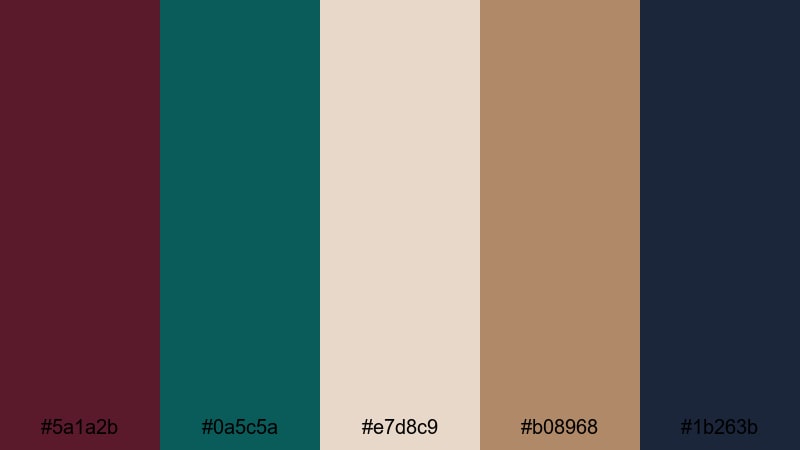
- HEX Codes: #5a1a2b, #0a5c5a, #e7d8c9, #b08968, #1b263b
- Mood: Earthy, dramatic, and immersive.
- Use for: Use for travel documentaries, nature b rolls, and storytelling projects that need grounded richness.
Deep Ember Lagoon pairs ember like burgundy with lagoon teal, supported by warm sand and navy. It feels earthy and grounded, like a campfire near dark water.
Use it on travel documentaries, hiking vlogs, or nature B roll. In Filmora, let your natural footage carry the earth tones, then use burgundy and teal in maps, labels, and chapter cards to add structure and a recognizable Burgundy Teal identity to your whole series.
Playful & Vibrant Burgundy Teal Color Palettes
Candy Harbor Pop
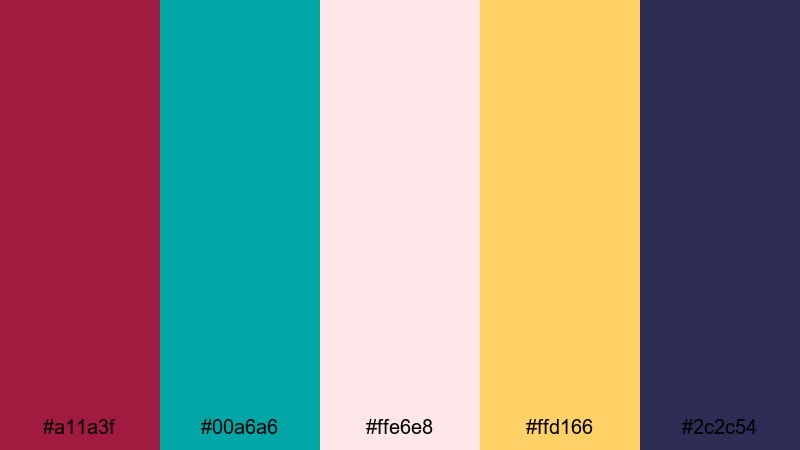
- HEX Codes: #a11a3f, #00a6a6, #ffe6e8, #ffd166, #2c2c54
- Mood: Energetic, playful, and pop inspired.
- Use for: Perfect for YouTube thumbnails, lifestyle vlogs, and upbeat social edits that need to grab attention.
Candy Harbor Pop mixes punchy burgundy and bright teal with pastel pink and sunny yellow, grounded by a deep indigo. It is eye catching and friendly, ideal for content that needs to stand out in crowded feeds.
Use this palette for thumbnails, intro cards, and social templates. In Filmora, combine teal and burgundy for big titles, use yellow as a highlight behind important words, and keep pink for backgrounds or callout boxes that frame your subject in a fun, clickable way.
Festival Confetti Waves
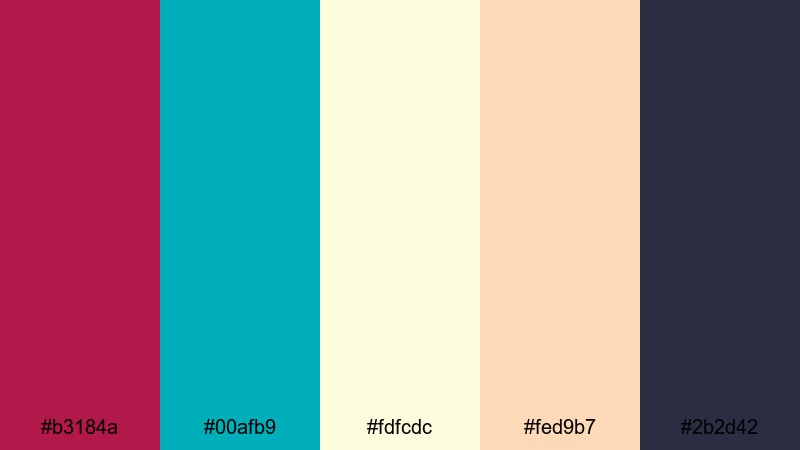
- HEX Codes: #b3184a, #00afb9, #fdfcdc, #fed9b7, #2b2d42
- Mood: Festive, carefree, and beachy.
- Use for: Great for festival recaps, travel vlogs, and party highlight reels with a carefree summer vibe.
Festival Confetti Waves softens vibrant burgundy and teal with creamy sand and peach, over a deep navy accent. It feels like confetti scattered across a bright shoreline.
Use it in summer travel edits, festival recaps, and party highlight reels. Build animated titles or sticker like graphics in Filmora using these tones, so your transitions and overlays feel as joyful as the footage itself.
Retro Neon Tides
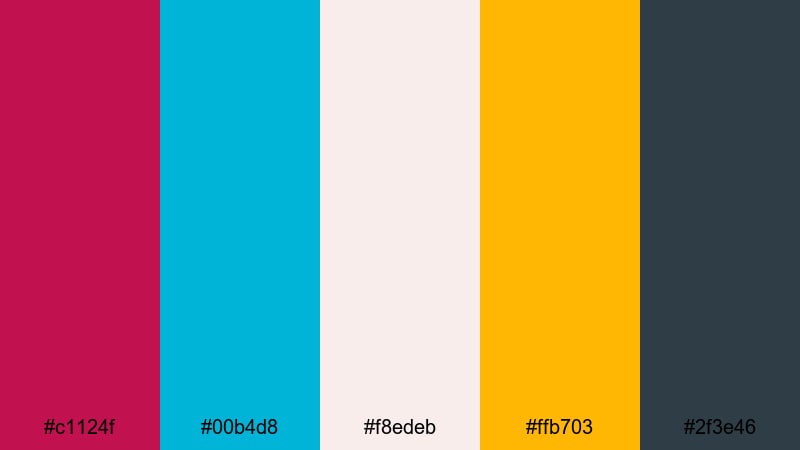
- HEX Codes: #c1124f, #00b4d8, #f8edeb, #ffb703, #2f3e46
- Mood: Retro, bold, and high energy.
- Use for: Ideal for channel art, intros, and kinetic text animations with a nostalgic yet modern punch.
Retro Neon Tides combines hot burgundy and neon teal with creamy white and vivid amber, anchored by a dark teal gray. It hints at arcade lights and seaside neon signs.
Use it for bold intros, channel branding, and kinetic typography in Filmora. Let teal and burgundy drive your main titles, use amber for accent strokes or drop shadows, and keep backgrounds pale so the neon inspired colors feel like they are glowing off the screen.
Merlot Surf Social
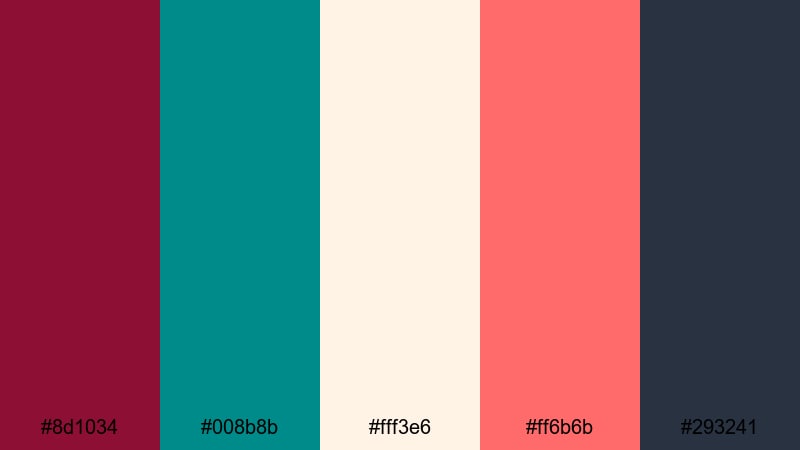
- HEX Codes: #8d1034, #008b8b, #fff3e6, #ff6b6b, #293241
- Mood: Trendy, social, and sun kissed.
- Use for: Perfect for Instagram reels, TikTok edits, and branding for lifestyle or creator channels.
Merlot Surf Social pairs juicy merlot burgundy with surf teal, plus warm cream, coral, and a deep blue gray. It feels trendy and sun kissed, great for lifestyle and creator focused content.
Use this palette for vertical videos, reels, and TikTok edits. In Filmora, create reusable templates for hooks, captions, and end cards using these shades so your audience recognizes your Burgundy Teal brand the moment your video appears.
Playroom Skyline Mix
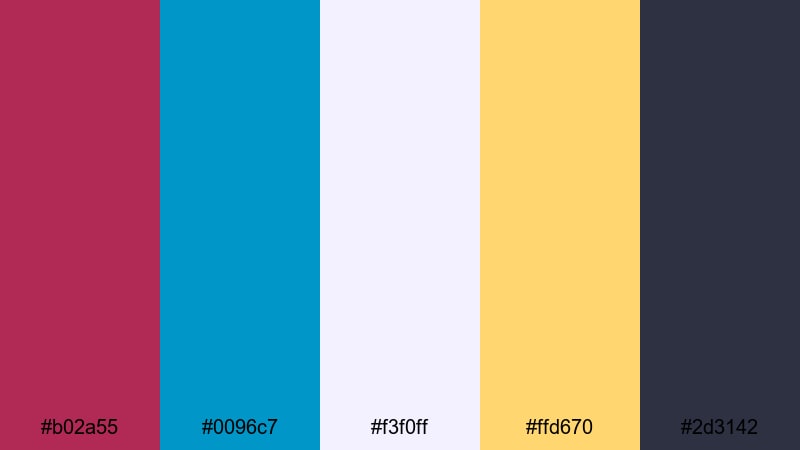
- HEX Codes: #b02a55, #0096c7, #f3f0ff, #ffd670, #2d3142
- Mood: Cheerful, modern, and slightly whimsical.
- Use for: Great for family vlogs, education content, and upbeat motion graphics with friendly contrast.
Playroom Skyline Mix combines berry burgundy and bright teal with soft lilac white, sunny yellow, and a dark slate. It is playful but still polished, ideal for friendly and educational content.
Use it for family vlogs, classroom videos, and animated explainers. In Filmora, color code sections of your content using these hues, such as teal for tips, burgundy for warnings, and yellow for key takeaways, so viewers can follow along visually at a glance.
Tips for Creating Burgundy Teal Color Palettes
Burgundy Teal combinations are versatile, but they work best when carefully balanced with neutrals, contrast, and consistent styling across your videos and designs.
- Balance warm and cool: let burgundy handle warmth and emotion while teal provides calm contrast; avoid adding too many extra bright colors that compete with them.
- Add supportive neutrals: use off white, gray, charcoal, or sand tones as backgrounds so Burgundy Teal accents can stand out without overwhelming the frame.
- Check text readability: always test titles and subtitles on mobile by combining dark text over light backgrounds or vice versa; add subtle shadows or outlines when needed.
- Limit your accent count: pick 2 main colors (burgundy and teal) plus 1 highlight color to keep thumbnails, intros, and lower thirds looking cohesive.
- Match your footage: if your recorded video leans warm or cool, nudge your graphics and color grading in Filmora so the Burgundy Teal palette feels naturally integrated.
- Use color for structure: assign specific colors to recurring elements (for example, teal for tips, burgundy for warnings, gold or yellow for CTAs) so your audience learns your visual system.
- Stay on brand: reuse the same HEX codes in your logo, overlays, end screens, and social banners for an instantly recognizable Burgundy Teal identity.
- Test different moods: push saturation and contrast higher for gaming or pop content, and lower them for cinematic films or luxury branding to fit your niche.
Burgundy Teal color palettes can completely change how your content feels, from moody and cinematic to bright and social friendly. By pairing deep burgundy with teal accents and the right supporting neutrals, you can build a strong visual identity that works across thumbnails, intros, and full edits.
Choose one of these 15 palettes as your base, then refine it in Filmora using AI Color Palette, HSL, curves, filters, and LUTs until it matches your story. Once your look is dialed in, save it as a repeatable style for future videos so your channel feels polished and consistent.
Whether you are editing a travel vlog, a product demo, or a narrative short, trying these Burgundy Teal color combinations inside Filmora is an easy way to elevate your visuals and make your brand unforgettable.
secure download