

 100% Security Verified | No Subscription Required | No Malware


 ChatGPT
 Perplexity
 Gemini
 Claude
 Grok
Grok
Burnt Sienna is a warm, earthy orange-brown that instantly feels human, grounded, and cinematic. It suggests warmth, nostalgia, and authenticity, which is why it shows up so often in movie posters, lifestyle branding, and cozy interiors. On screen, Burnt Sienna hints at golden hour light, aged film, and real-life textures like clay, leather, and wood.
For video creators, this makes Burnt Sienna a powerful anchor color for thumbnails, intros, end screens, overlays, and full color grading looks. Used well, it can pull a channel together visually, make titles more readable, and give footage a filmic glow without looking overprocessed. Below are 15 Burnt Sienna color palettes with HEX codes you can use in Filmora for vlogs, cinematic edits, channel branding, and more.
In this article
Warm & Cinematic Burnt Sienna Color Palettes
Sunset Storyboards
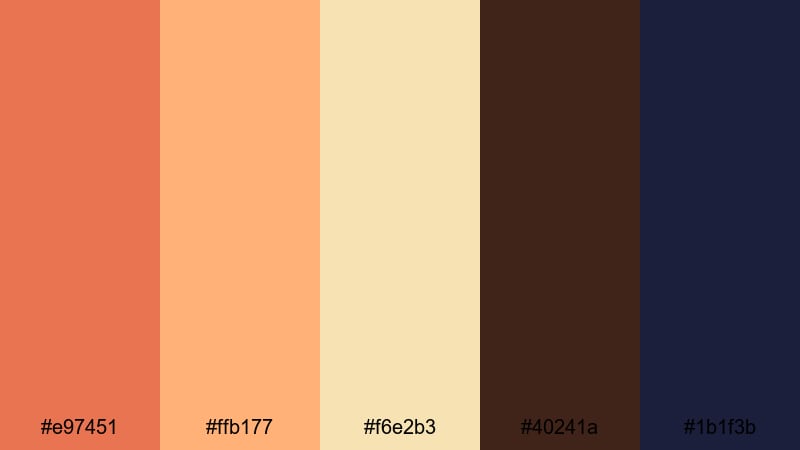
- HEX Codes: #e97451, #ffb177, #f6e2b3, #40241a, #1b1f3b
- Mood: Warm, cinematic, and storytelling focused.
- Use for: Ideal for cinematic vlogs, travel montages, and emotional storytelling thumbnails.
Sunset Storyboards feels like the last light of the day wrapping your frame in warmth. Burnt Sienna (#e97451) and amber (#ffb177) mimic golden hour skin tones, while soft cream (#f6e2b3) keeps titles and UI elements easy to read. The deep brown (#40241a) and inky navy (#1b1f3b) act as natural shadows, giving your shots depth and contrast without harshness.
This palette works beautifully for narrative intros, voiceover stories, and travel vlogs where you want viewers to feel emotionally pulled into the moment. Use the light tones for lower thirds and captions, reserve the deep hues for borders and letterboxing, and let Burnt Sienna be the hero color in your Filmora thumbnails, titles, and transition cards.
Pro Tip: Build a Cinematic Burnt Sienna Look in Filmora
To keep a warm, sunset-driven palette like Sunset Storyboards consistent, grade all your clips toward Burnt Sienna inside Filmora. Start by slightly warming your white balance, then nudge midtones into orange while keeping shadows closer to deep brown or navy. This helps every shot, from A-roll to B-roll, feel like it lives in the same golden hour world.
You can also design a simple visual system: Burnt Sienna for key titles and callouts, cream for subtitles and captions, and dark navy for overlays or background panels. Save this as a custom preset in Filmora so your intros, reels, and shorts all share the same professional Burnt Sienna identity.
AI Color Palette
If you have a favorite sunset photo or a still frame that perfectly captures this Burnt Sienna mood, you can turn it into a full video look with Filmora. Filmora's AI Color Palette feature lets you sample the colors from that image and automatically match them across your clips.
Import your reference frame, apply AI Color Palette to your timeline, and let Filmora push your footage toward those honeyed oranges, soft highlights, and cinematic shadows. This is a fast way to keep your intro, main video, and end screen all sitting in the same rich Burnt Sienna atmosphere.
 secure download

HSL, Color Wheels & Curves
To refine Burnt Sienna tones, use Filmora's HSL, Color Wheels, and Curves controls. You can target oranges and reds in HSL to either deepen the Burnt Sienna for a dramatic, moody vibe or soften it for a lighter lifestyle look. Then, use the Color Wheels to warm midtones while keeping highlights slightly creamy and shadows cool for extra cinematic contrast.
If you want more control, shape your tonal range with Curves: lift the shadows a touch to avoid crushed blacks, then add a gentle S-curve for punch. For more guidance, you can follow Filmora's color correction and grading tutorial to understand how these tools interact with warm palettes like Burnt Sienna.
secure download1000+ Video Filters & 3D LUTs
Once your Burnt Sienna base look is in place, you can speed up styling with Filmora's filter and LUT library. Use subtle film-style LUTs to add grain, fade, or analog contrast to your Sunset Storyboards palette, or combine warm-toned filters with Burnt Sienna overlays for intros, chapter cards, and lower thirds.
Filmora's video filters and 3D LUTs make it easy to experiment: stack a soft vignette, a warm film LUT, and a gentle glow filter to turn ordinary footage into a cohesive, cinematic Burnt Sienna story with just a few clicks.
secure downloadCinematic Ember Glow
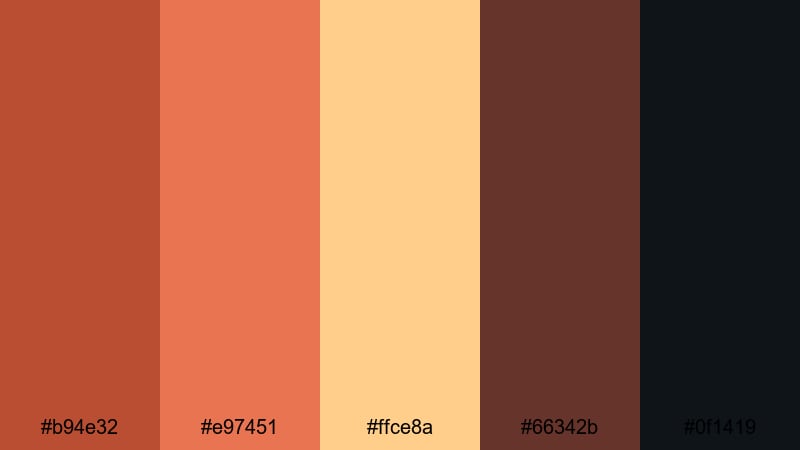
- HEX Codes: #b94e32, #e97451, #ffce8a, #66342b, #0f1419
- Mood: Dramatic, fiery, and intense.
- Use for: Perfect for action trailers, gaming highlights, and bold YouTube title cards.
Cinematic Ember Glow turns Burnt Sienna into a blazing, high-contrast story. Deep ember red (#b94e32) and Burnt Sienna (#e97451) blaze against charcoal browns (#66342b) and near-black (#0f1419), while the bright highlight (#ffce8a) acts like a flame licking through the frame. The result is a palette that feels like sparks in the dark.
Use this for bold gaming thumbnails, creator trailers, or action-heavy B-roll where you want maximum impact. Let the bright amber shade carry your main titles and call-to-action buttons, while the darkest color becomes your background for overlays, lower thirds, or letterbox bars in Filmora.
Studio Spotlight Sienna
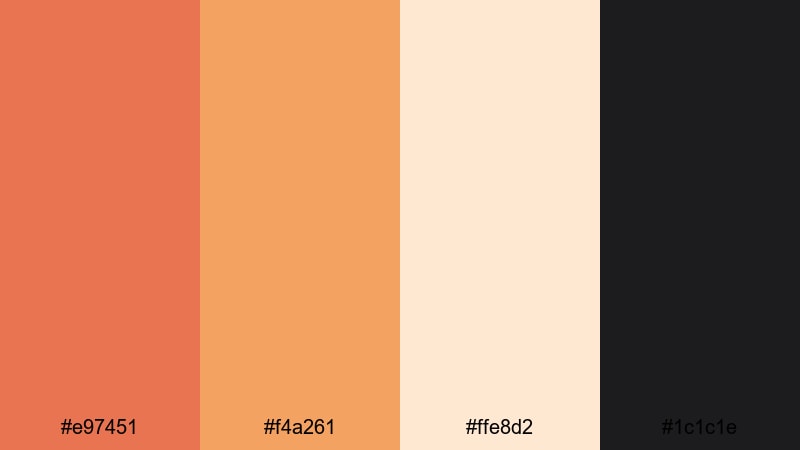
- HEX Codes: #e97451, #f4a261, #ffe8d2, #1c1c1e
- Mood: Polished, professional, and warmly lit.
- Use for: Great for creator intros, talk-show style setups, and polished product demos.
Studio Spotlight Sienna feels like sitting under soft key lights in a modern studio. Burnt Sienna (#e97451) and peachy orange (#f4a261) warm up skin tones, while creamy white (#ffe8d2) keeps text and icons bright and legible. The deep neutral black (#1c1c1e) grounds everything and gives you a perfect base for sleek graphics.
This palette suits talk-show style channels, interviews, podcast visuals, and product explainers. Use Burnt Sienna as your accent for logo stings and subscribe animations, keep your background panels dark, and rely on the lighter shades for clean, professional text treatments in Filmora titles.
Golden Hour Frames
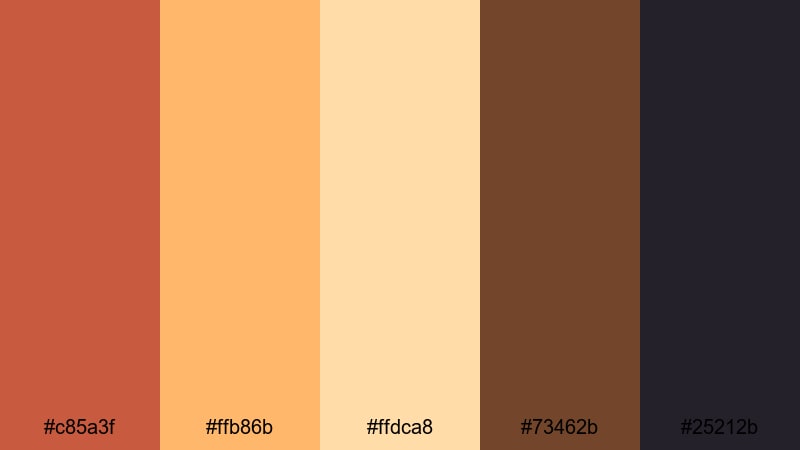
- HEX Codes: #c85a3f, #ffb86b, #ffdca8, #73462b, #25212b
- Mood: Cozy, nostalgic, and softly glowing.
- Use for: Best for lifestyle vlogs, couple shoots, and dreamy B-roll sequences.
Golden Hour Frames bottles up that soft, flattering light loved by photographers and filmmakers. Warm sienna (#c85a3f) and golden orange (#ffb86b) set the tone, supported by pale cream (#ffdca8) for highlights. Rich brown (#73462b) and muted charcoal (#25212b) keep your shadows gentle but defined.
It is a great choice for romantic travel edits, cozy home vlogs, or any thumbnail that needs to feel intimate and dreamy. Color grade your footage toward these hues in Filmora, then echo them in your title cards, end screens, and social clips to create a consistent golden hour brand feel.
Earthy & Organic Burnt Sienna Color Palettes
Terracotta Trails
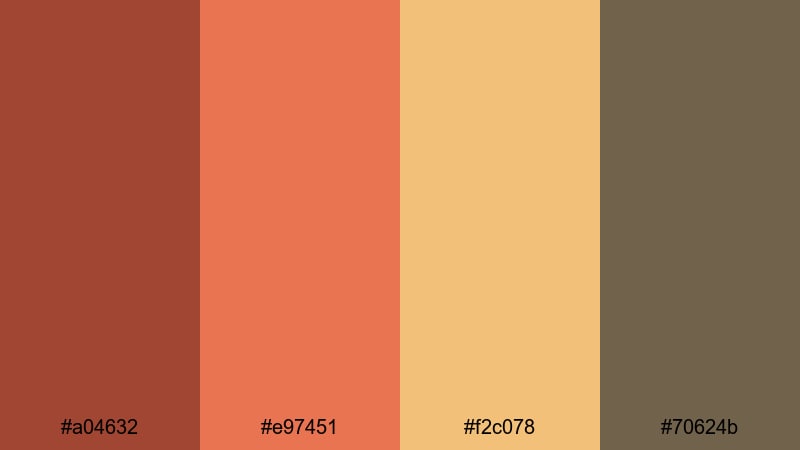
- HEX Codes: #a04632, #e97451, #f2c078, #70624b
- Mood: Grounded, rustic, and outdoorsy.
- Use for: Ideal for hiking vlogs, tiny home tours, and eco-friendly brand visuals.
Terracotta Trails blends clay reds (#a04632), Burnt Sienna (#e97451), and sun-faded ochre (#f2c078) with an earthy neutral brown (#70624b). It feels like dusty roads, canyon walls, and worn leather boots, perfect for brands and channels that want to highlight nature, sustainability, and slow living.
Use this palette for hiking or van-life thumbnails, rustic lower thirds, and eco product showcases. In Filmora, apply these tones to text bars, icons, and background shapes, then nudge your footage toward the same warm terracotta hues for a cohesive outdoor story.
Desert Clay Market
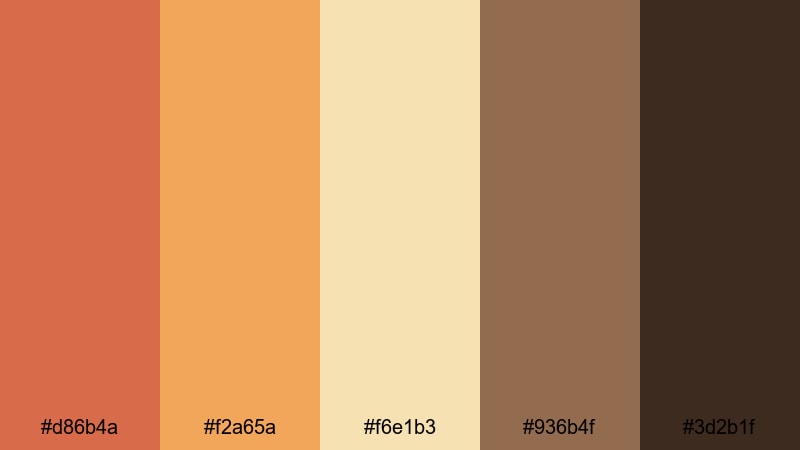
- HEX Codes: #d86b4a, #f2a65a, #f6e1b3, #936b4f, #3d2b1f
- Mood: Sunbaked, artisanal, and warm.
- Use for: Perfect for travel diaries, slow-living content, and handmade product showcases.
Desert Clay Market mixes clay oranges (#d86b4a) and warm golds (#f2a65a) with soft sand tones (#f6e1b3), anchored by weathered browns (#936b4f, #3d2b1f). It evokes pottery stalls, woven baskets, and markets at sunset, making it ideal for artisan and boho-style visuals.
Use the lighter colors for product backgrounds and clean typography, while the deeper browns frame your footage or highlight key sections. In thumbnails and intros edited in Filmora, this palette instantly signals warmth, craftsmanship, and a handcrafted aesthetic.
Forest Campfire Nights
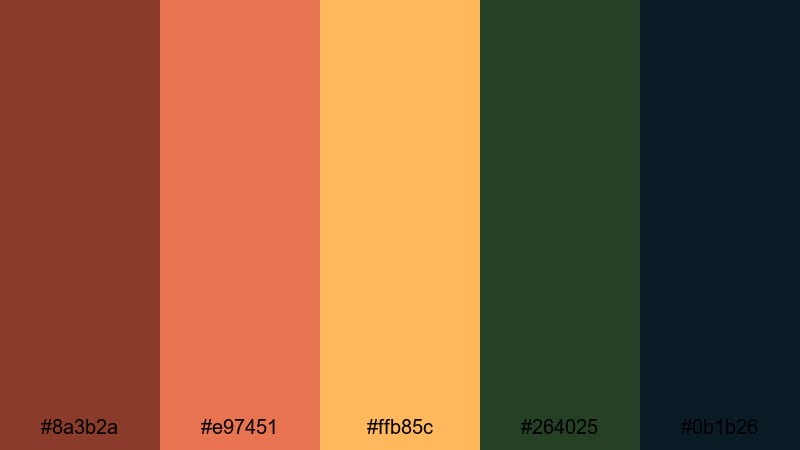
- HEX Codes: #8a3b2a, #e97451, #ffb85c, #264025, #0b1b26
- Mood: Cozy, adventurous, and intimate.
- Use for: Great for camping vlogs, cabin getaways, and campfire storytelling intros.
Forest Campfire Nights sets Burnt Sienna flames (#e97451) and coppery browns (#8a3b2a) against deep forest green (#264025) and midnight blue (#0b1b26). The warm highlight (#ffb85c) acts like sparks and lantern light puncturing the darkness.
This palette is perfect for campfire storytimes, cabin tours, and moody outdoor sequences. In Filmora, you can use the dark green and blue for full-screen overlays or title backgrounds, then let the Burnt Sienna and amber accents draw attention to your text, buttons, and logo.
Harvest Spice Table
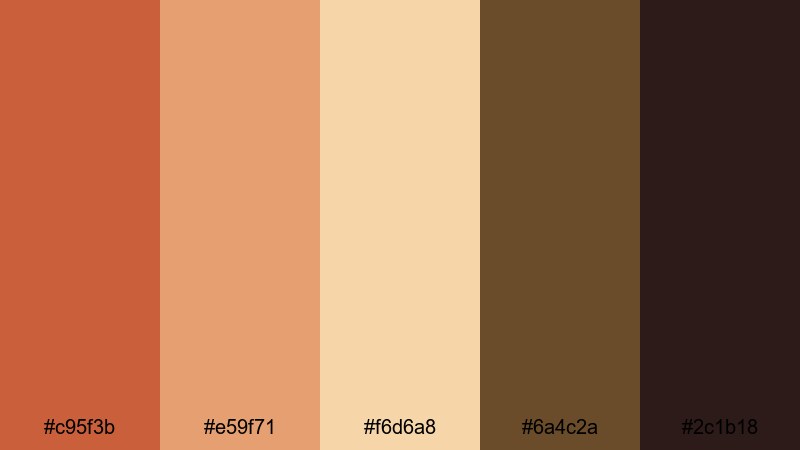
- HEX Codes: #c95f3b, #e59f71, #f6d6a8, #6a4c2a, #2c1b18
- Mood: Inviting, festive, and comforting.
- Use for: Perfect for recipe videos, holiday content, and cozy home decor reels.
Harvest Spice Table is all about shared meals and seasonal comfort. Spiced oranges (#c95f3b) and toasty peaches (#e59f71) sit beside buttery cream (#f6d6a8), grounded by rich browns (#6a4c2a, #2c1b18). It feels like a full table under warm indoor lighting.
Use this palette for cooking channels, holiday decor tours, and cozy lifestyle vlogs. In Filmora, pair creamy backgrounds with dark brown text for menus or recipe cards, and reserve the Burnt Sienna-inspired tones for key highlights and calls to action.
Modern & Minimal Burnt Sienna Color Palettes
Urban Loft Sienna
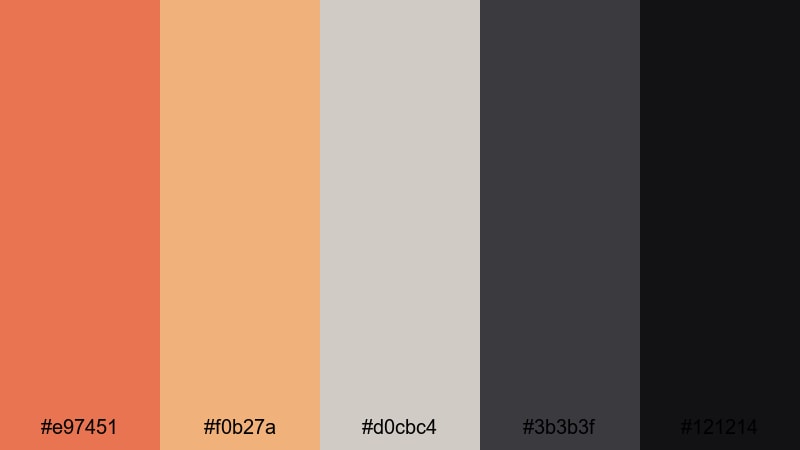
- HEX Codes: #e97451, #f0b27a, #d0cbc4, #3b3b3f, #121214
- Mood: Sleek, creative, and urban.
- Use for: Ideal for channel branding, title screens, and design-forward portfolio videos.
Urban Loft Sienna pairs Burnt Sienna (#e97451) with refined neutrals: warm beige (#f0b27a), soft gray (#d0cbc4), and deep charcoals (#3b3b3f, #121214). It feels like a creative studio loft with exposed brick, concrete floors, and clean furniture.
This palette is great for designers, agencies, and creators who want a modern, editorial look. Use gray and charcoal for your backgrounds, beige for subtle shapes or dividers, and Burnt Sienna as a punchy accent on thumbnails, logo animations, and lower thirds in Filmora.
Sienna Tech Grid
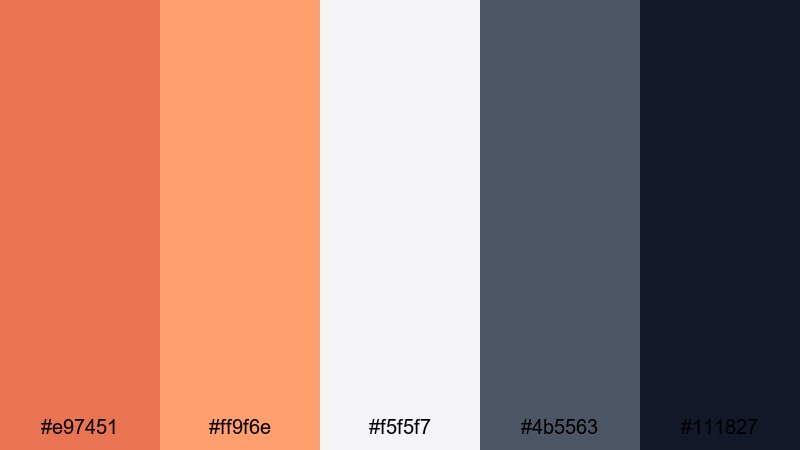
- HEX Codes: #e97451, #ff9f6e, #f5f5f7, #4b5563, #111827
- Mood: Contemporary, energetic, and techy.
- Use for: Great for app promos, tech explainers, and motion graphics lower thirds.
Sienna Tech Grid fuses energetic Burnt Sienna (#e97451) and coral orange (#ff9f6e) with clean off-white (#f5f5f7) and cool grays (#4b5563, #111827). It has a slick UI feel, balancing warmth with a professional tech aesthetic.
Use the light background color for app mockups, dashboards, and on-screen text, then apply Burnt Sienna highlights to buttons, cursor trails, and key icons. In Filmora motion graphics, this palette works well for tutorials, SaaS pitches, and channel branding that needs both friendliness and clarity.
Clean Brand Rust
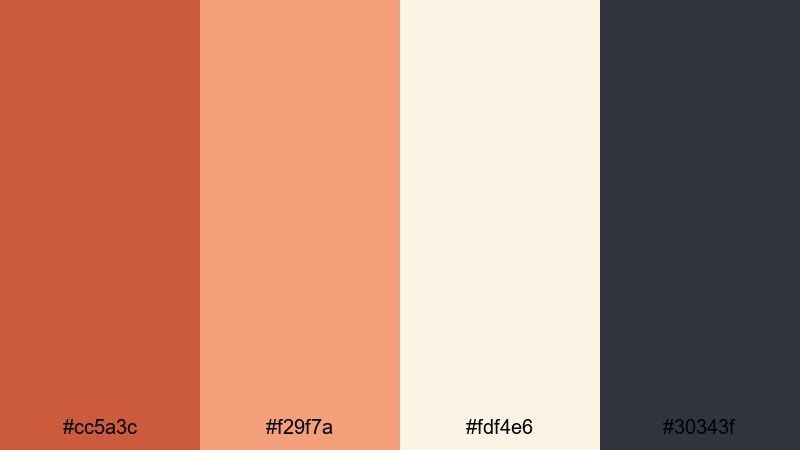
- HEX Codes: #cc5a3c, #f29f7a, #fdf4e6, #30343f
- Mood: Minimal, brandable, and warm.
- Use for: Perfect for logo animations, end screens, and cohesive channel branding.
Clean Brand Rust softens Burnt Sienna into a refined rust (#cc5a3c) and peach (#f29f7a), supported by crisp off-white (#fdf4e6) and deep slate (#30343f). It is minimal and highly brandable, ideal if you want to build a recognizable visual system.
Use off-white as your primary background, slate for text, and rust tones for your logo and accents. In Filmora, create reusable templates for intros, end screens, and title cards using this palette, so every upload automatically looks on-brand.
Muted Interface Copper
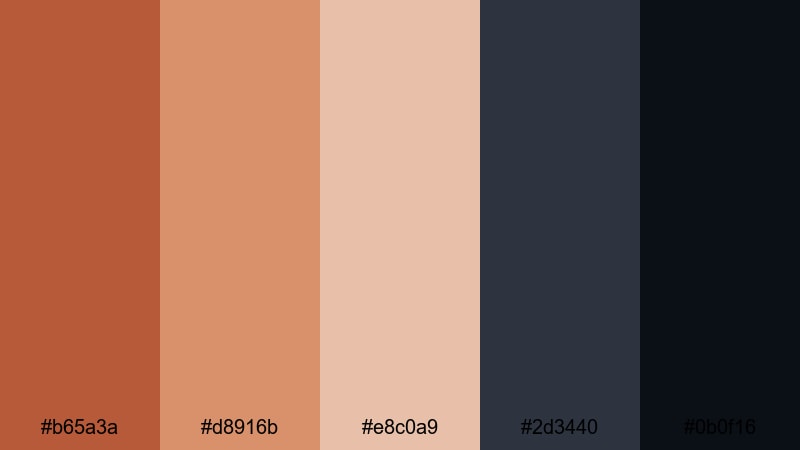
- HEX Codes: #b65a3a, #d8916b, #e8c0a9, #2d3440, #0b0f16
- Mood: Subtle, sophisticated, and UI friendly.
- Use for: Best for overlays, interface mockups, and minimalist titles in tutorials.
Muted Interface Copper dials Burnt Sienna down into coppery rust (#b65a3a) and warm neutrals (#d8916b, #e8c0a9), paired with cool slates (#2d3440, #0b0f16). It is understated but stylish, making it great for minimal overlays and tutorial interfaces.
Use the darker shades for semi-transparent panels over your footage, and let the copper accents guide the viewer to buttons, steps, or chapter labels. In Filmora, this palette keeps your educational content clean, modern, and easy to follow without visual noise.
Vintage & Nostalgic Burnt Sienna Color Palettes
Retro Film Reel Sienna
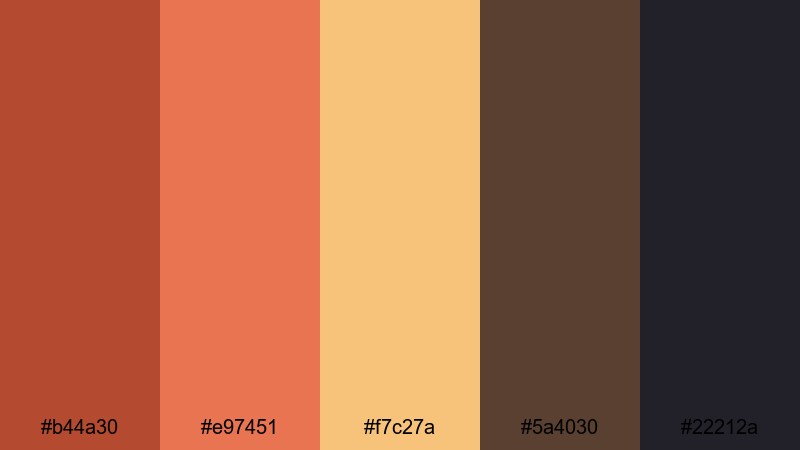
- HEX Codes: #b44a30, #e97451, #f7c27a, #5a4030, #22212a
- Mood: Retro, cinematic, and slightly faded.
- Use for: Great for old-film style edits, retro title cards, and nostalgic montage sequences.
Retro Film Reel Sienna spins Burnt Sienna (#e97451) together with warm sienna red (#b44a30), golden highlight (#f7c27a), and classic sepia browns (#5a4030, #22212a). It feels like vintage film stock with a hint of fade and grain.
Apply this palette to flashback sequences, family history videos, or old-photo style montages. In Filmora, you can add film grain and slight vignette on top of these colors, using the lighter hues for handwritten-style text and the darker ones for letterboxing or time-stamped title cards.
Old Postcard Edges
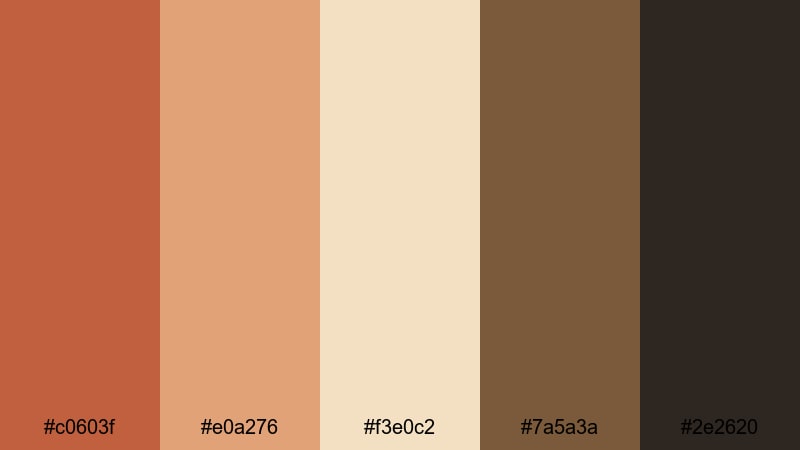
- HEX Codes: #c0603f, #e0a276, #f3e0c2, #7a5a3a, #2e2620
- Mood: Soft, sentimental, and vintage inspired.
- Use for: Ideal for travel memories, family slideshows, and scrapbooking style videos.
Old Postcard Edges combines soft Burnt Sienna oranges (#c0603f) with faded creams (#f3e0c2) and worn browns (#e0a276, #7a5a3a, #2e2620). It feels like a shoebox of postcards and prints that have traveled for years.
Use this palette for gentle travel recaps, family slideshows, and memory-keeping edits. In Filmora, layer subtle paper textures behind your photos, tint the footage toward these hues, and use the light cream for captions or dates along the edges of the frame.
Vintage Coffee Studio
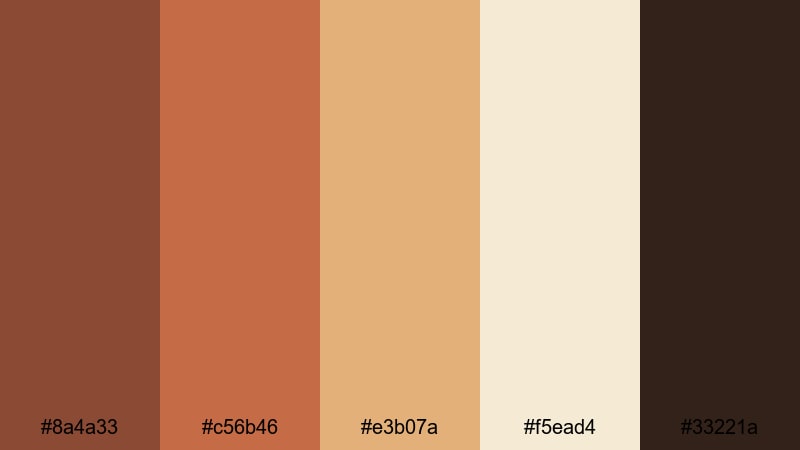
- HEX Codes: #8a4a33, #c56b46, #e3b07a, #f5ead4, #33221a
- Mood: Cozy, artistic, and analog.
- Use for: Perfect for podcast visuals, studio tours, and lo-fi aesthetic vlogs.
Vintage Coffee Studio blends espresso browns (#8a4a33, #33221a) and Burnt Sienna rust (#c56b46) with milky creams (#e3b07a, #f5ead4). It feels like a creative studio tucked inside a coffee shop, with warm lamps and analog gear.
Use this palette for podcast title cards, lo-fi vlogs, and behind-the-scenes studio content. In Filmora, keep your backgrounds soft and creamy, use dark browns for typography, and let the Burnt Sienna tones highlight waveforms, chapter markers, and important callouts.
Tips for Creating Burnt Sienna Color Palettes
Burnt Sienna is flexible enough to feel cinematic, rustic, or modern depending on what you pair it with. When you build or adapt palettes for your own videos and designs, a few practical rules will keep your visuals balanced and on-brand.
- Always choose at least one light neutral (cream, off-white, or pale beige) so text and icons stay readable against Burnt Sienna backgrounds.
- Balance warmth with depth: pair Burnt Sienna with a dark cool shade (navy, charcoal, or forest green) to avoid an overly orange screen.
- Define clear roles for each color in your palette: one for backgrounds, one for main text, one for accents, and one for subtle details.
- Check thumbnails at small size to make sure Burnt Sienna titles and buttons still pop against your chosen background color.
- Match your color grading to your graphics: if your LUT pushes footage warm and earthy, echo those tones in your titles and overlays inside Filmora.
- Use saturation carefully: slightly desaturating Burnt Sienna can make your brand feel more premium and cinematic, while higher saturation feels energetic and bold.
- Keep accessibility in mind by testing contrast between Burnt Sienna elements and text using online contrast checkers before finalizing a palette.
- Create a simple style guide for your channel that locks in HEX codes, font choices, and where Burnt Sienna should or should not be used.
Burnt Sienna palettes can make your content feel warm, cinematic, and human, whether you are telling travel stories, running a cozy lifestyle channel, or promoting a modern brand. By choosing the right combinations of highlights, shadows, and neutrals, you define how viewers emotionally read your thumbnails and frames before they even press play.
Filmora makes it easy to bring these Burnt Sienna palettes to life across everything you publish: intros, lower thirds, color grading, and social clips. Once you find a palette you love, turn it into presets, templates, and LUT-powered looks so your entire channel speaks the same visual language.
Experiment with a few of the palettes above, tweak them for your brand, and test how they feel in Filmora on real footage. With a consistent Burnt Sienna identity, your videos will stand out in feeds and feel instantly recognizable to your audience.
secure download