

 100% Security Verified | No Subscription Required | No Malware


 ChatGPT
 Perplexity
 Gemini
 Claude
 Grok
Grok
Chocolate brown is one of the most comforting and versatile colors you can use in visual storytelling. It feels warm, grounded, and familiar, often linked to chocolate, coffee, wood, and earth. In video thumbnails, intros, and titles, chocolate brown instantly adds a cozy, trustworthy, and premium vibe that works beautifully for vlogs, lifestyle content, branding, and cinematic edits.
This guide collects 15 ready-to-use chocolate brown color palettes with HEX codes, tailored for creators and Filmora users. You can apply these color combinations to color grading, overlays, text, transitions, and thumbnails to keep your visuals consistent from YouTube intros and Instagram reels to full-length films and branding kits.
In this article
Cozy & Rustic Chocolate Brown Color Palettes
Rustic Cabin Firelight
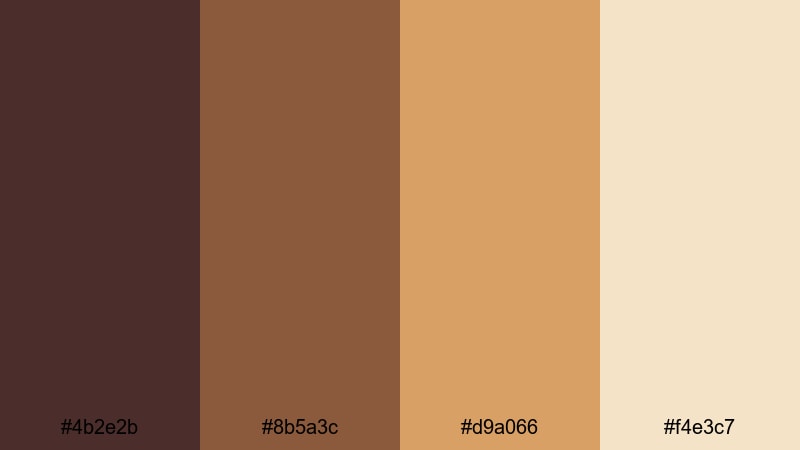
- HEX Codes: #4b2e2b, #8b5a3c, #d9a066, #f4e3c7
- Mood: Warm, nostalgic, and inviting like a log cabin at dusk.
- Use for: Perfect for vlog intros, travel stories, and storytelling thumbnails that need a campfire-cozy feel.
Rustic Cabin Firelight blends deep chocolate brown with amber wood and glowing cream, creating the feeling of sitting by a crackling fireplace. The darker tones (#4b2e2b, #8b5a3c) anchor your frame, while the lighter hues (#d9a066, #f4e3c7) mimic candlelight and soft blankets.
Use this palette in storytelling vlogs, travel diaries, homestead content, or any thumbnail that should feel intimate and nostalgic. In Filmora, you can apply the deeper shades to backgrounds and frames, keep titles in the lighter cream, and use the warm amber as an accent in transitions, overlays, or lower thirds.
Pro Tip: Build Cinematic Chocolate Brown Scenes in Filmora
To keep a cozy chocolate brown look consistent, choose one of the darker HEX codes in this palette as your base for shadows and text outlines. Then, in Filmora, reuse the lighter tones for titles, subtitles, and callout boxes. This makes your entire edit feel like it belongs in the same warm, rustic world, from your intro and b-roll to end screens and shorts.
You can also save a custom color preset inside Filmora and apply it to text, borders, and shapes throughout your timeline. That way, every chapter card, subscribe button, or overlay keeps the same inviting chocolate brown atmosphere.
AI Color Palette
If you have a reference image of a cabin, a campfire, or a mood board built with these HEX codes, you can turn it into a video-wide grade using Filmora's AI Color Palette. Filmora's AI Color Palette feature analyzes your reference frame and automatically transfers its chocolate brown tones to other clips.
Just pick a shot that perfectly captures the Rustic Cabin Firelight look, then use AI Color Palette to match the rest of your footage. This keeps your vlog intro, talking-head shots, b-roll, and cutaway scenes unified in the same cozy brown style with almost no manual tweaking.
 secure download

HSL, Color Wheels & Curves
To refine your chocolate brown look, use Filmora's HSL, color wheels, and curves controls. You can gently shift oranges and yellows toward a toasted, firelit hue, deepen browns in the shadows, and lift the highlights to keep skin tones soft and flattering. A subtle S-curve on the RGB curve adds contrast without making the scene harsh.
If you want more guidance on grading warm, cinematic scenes, watch this Filmora color grading tutorial on YouTube: Filmora color correction and grading walkthrough. Then apply those techniques to push your chocolate brown palette toward either a more moody, dramatic cabin feel or a bright, cozy storytelling style.
secure download1000+ Video Filters & 3D LUTs
If you do not want to build a look from scratch, Filmora's presets can help you stylize your chocolate brown palette quickly. Filmora's video filters and 3D LUTs make it easy to add warmth, fade, film grain, or retro contrast while still keeping your main browns and creams intact.
Apply a warm cinematic LUT, then fine-tune intensity so your #4b2e2b and #8b5a3c tones stay rich but not muddy. Save this as a custom preset to reuse on future cabin vlogs, cozy podcasts, or storytelling series to maintain a consistent brand look.
secure downloadAutumn Cacao Breeze
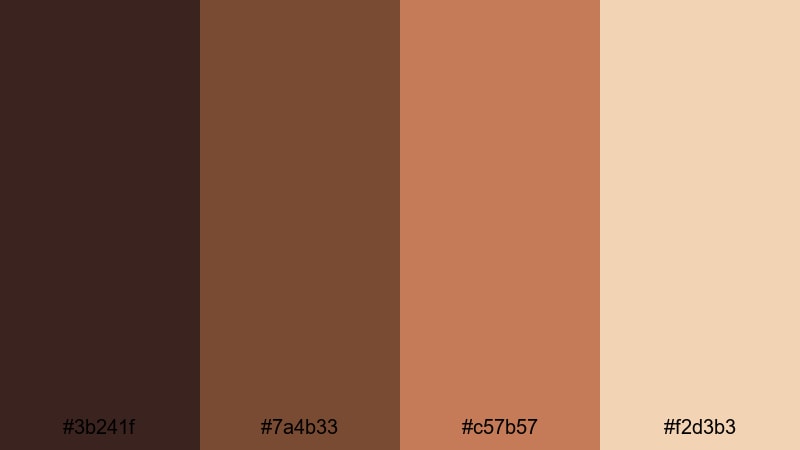
- HEX Codes: #3b241f, #7a4b33, #c57b57, #f2d3b3
- Mood: Crisp, cozy, and earthy like a fall walk with a hot drink.
- Use for: Great for seasonal content, lifestyle vlogs, and cozy background graphics for podcasts or talk shows.
Autumn Cacao Breeze feels like stepping into a park filled with falling leaves and spiced drinks. The deep browns (#3b241f, #7a4b33) echo tree bark and cocoa, while the warm terracotta and beige (#c57b57, #f2d3b3) bring in that soft, golden fall atmosphere.
Use this palette for fall lookbooks, seasonal vlog series, podcast cover art, or YouTube banners. In thumbnails, combine the darker brown as your background, then use the terracotta and cream for large, readable title text and accent shapes around your subject.
Coffee Shop Storytime
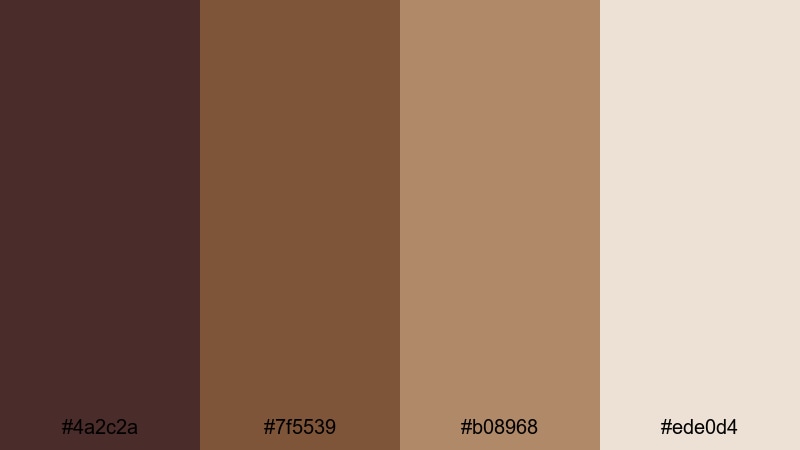
- HEX Codes: #4a2c2a, #7f5539, #b08968, #ede0d4
- Mood: Comforting and intimate, like chatting over lattes in a quiet cafe.
- Use for: Ideal for talking-head videos, book reviews, journaling reels, and channel branding that feels warm and personal.
Coffee Shop Storytime layers espresso, latte foam, and warm wooden tones into one inviting palette. The darker chocolates (#4a2c2a, #7f5539) ground your visuals, while the milkier hues (#b08968, #ede0d4) feel soft and conversational.
Apply this palette to background plates for your talking-head videos, YouTube channel art, or lower thirds in Filmora. Use the lightest tone as your main background for text panels and the mid-tone browns for icons, borders, and subtle overlays to create a calm, bookish aesthetic.
Campfire Marshmallow Night
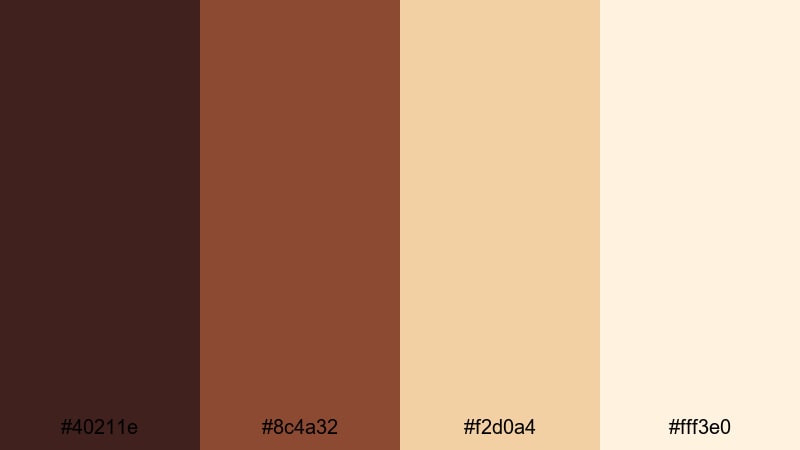
- HEX Codes: #40211e, #8c4a32, #f2d0a4, #fff3e0
- Mood: Playful, nostalgic, and softly glowing like toasted marshmallows over a fire.
- Use for: Use in camping vlogs, family highlight videos, and playful brand intros that need a warm, friendly glow.
Campfire Marshmallow Night combines ember-like browns with golden beige and marshmallow cream. The contrast between #40211e and #fff3e0 gives you plenty of room to design scenes that feel both cozy and bright.
This palette works well for family trips, camping recaps, kids content, or any brand intro that should feel friendly and nostalgic. In Filmora, try using the cream and beige for full-screen title cards, while the darker brown becomes a soft vignette or overlay that pulls the viewer into the frame like a night around the fire.
Elegant & Luxurious Chocolate Brown Color Palettes
Velvet Truffle Gala
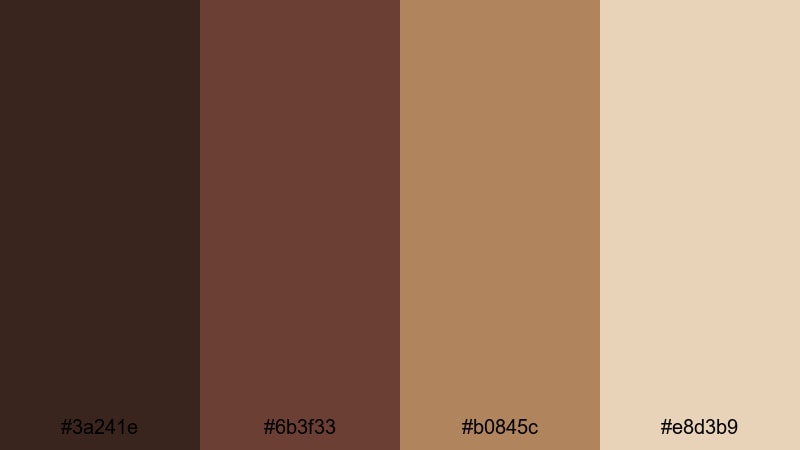
- HEX Codes: #3a241e, #6b3f33, #b0845c, #e8d3b9
- Mood: Rich, refined, and indulgent like a box of artisan chocolates.
- Use for: Perfect for luxury brand intros, beauty product promos, and cinematic title cards.
Velvet Truffle Gala feels plush and indulgent, thanks to its combination of deep chocolate browns and soft caramel-champagne tones. The darker colors provide a velvety backdrop, while #b0845c and #e8d3b9 add a subtle, upscale glow.
Use this palette in Filmora when designing luxury intros, beauty ads, product reveals, or elegant logo animations. Rich browns can dominate the background, with the lighter champagne tones highlighting product edges, logo strokes, and delicate serif typography.
Mocha Champagne Soiree
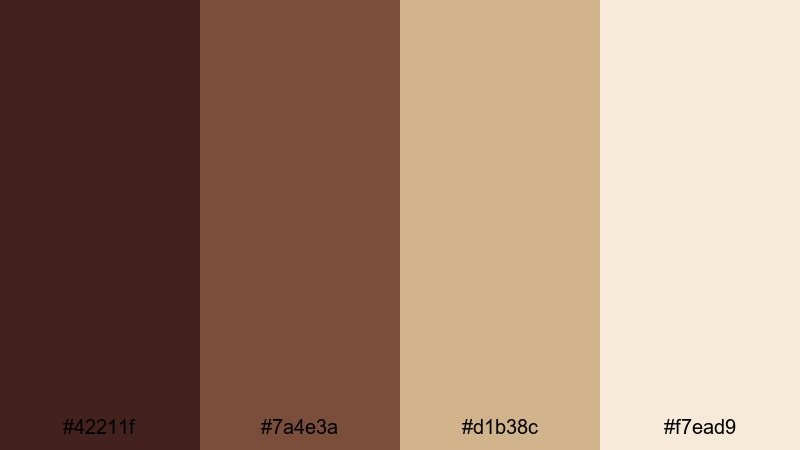
- HEX Codes: #42211f, #7a4e3a, #d1b38c, #f7ead9
- Mood: Softly glamorous with a warm, celebratory sparkle.
- Use for: Great for wedding films, event highlight reels, and elegant slideshow templates.
Mocha Champagne Soiree combines warm mocha browns with champagne gold and ivory, creating a palette that feels like a candlelit reception. The combination of #42211f and #f7ead9 gives you high contrast without losing softness.
Apply this palette to wedding highlight films, anniversary slideshows, or elegant event recaps. In Filmora, let the darkest brown frame your footage with letterboxing, and use the lighter tones for elegant titles, lower thirds, and transitions that shimmer without distracting from your footage.
Dark Ganache Gold
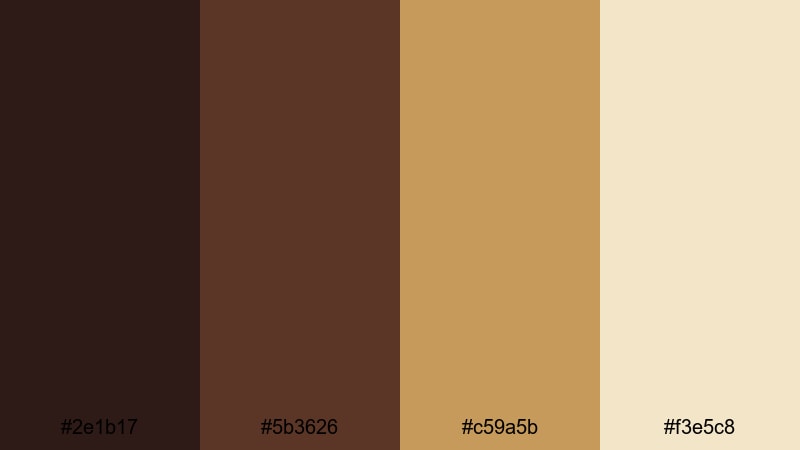
- HEX Codes: #2e1b17, #5b3626, #c59a5b, #f3e5c8
- Mood: Dramatic and opulent with a subtle golden sheen.
- Use for: Ideal for cinematic trailers, luxury product showcases, and bold channel branding.
Dark Ganache Gold leans into rich, inky browns (#2e1b17, #5b3626) contrasted with gold and cream highlights (#c59a5b, #f3e5c8). The result is a bold, dramatic chocolate brown palette that feels expensive and cinematic.
Use it for product hero shots, unboxing videos, jewelry or watch promos, and strong channel branding. In Filmora, pair the darkest tone with sharp, minimal typography in gold for intros or end screens that immediately communicate luxury.
Espresso Rose Bouquet
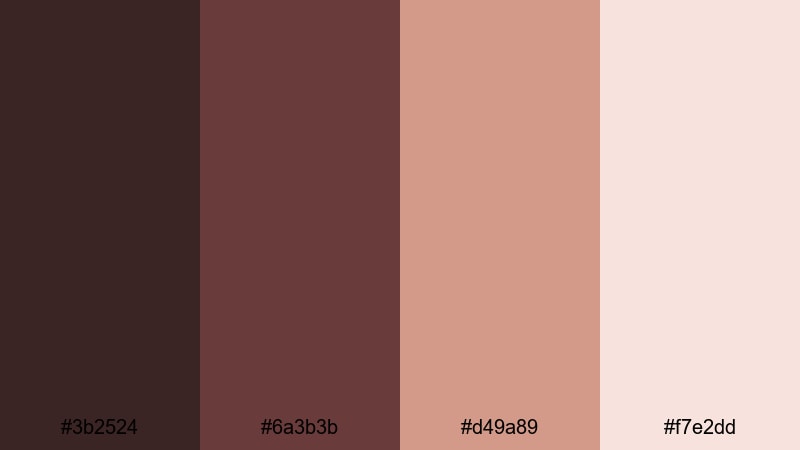
- HEX Codes: #3b2524, #6a3b3b, #d49a89, #f7e2dd
- Mood: Romantic and refined with a hint of floral warmth.
- Use for: Perfect for beauty tutorials, romantic mood boards, and soft cinematic color grading.
Espresso Rose Bouquet merges deep espresso browns with dusty rose and blush. The warm pinkish accents (#d49a89, #f7e2dd) soften the overall palette, making it ideal for romantic or feminine visuals without losing depth.
Apply this palette to beauty tutorials, skincare promos, date-night vlogs, or aesthetic reels. In Filmora, use the browns in shadows and backgrounds, then bring the rose tones into text, overlays, and subtle gradients for a chic, editorial feel.
Modern Minimal Chocolate Brown Color Palettes
Clean Cocoa Contrast

- HEX Codes: #3a2724, #8d6b63, #d2c2bd, #faf5f1
- Mood: Calm, minimal, and contemporary with gentle contrast.
- Use for: Use in tech reviews, productivity content, and minimalist branding where clarity is key.
Clean Cocoa Contrast brings together soft cocoa browns with greige neutrals and near-white. The palette is understated, modern, and easy on the eyes, making it excellent for layouts that need to stay clean and legible.
Use this in productivity channels, UI-inspired overlays, tech explainer videos, or minimal brand kits. In Filmora, keep backgrounds in #faf5f1 or #d2c2bd, while using the darker cocoa tones for buttons, text, and icons to maintain clarity across different screen sizes.
Soft Latte Neutrals

- HEX Codes: #4c332b, #a07c68, #e0c9b5, #f7f1ea
- Mood: Light, airy, and approachable like a morning latte.
- Use for: Great for lifestyle channels, tutorials, and social posts that need a clean yet cozy vibe.
Soft Latte Neutrals balances chocolate and latte shades with pale, creamy neutrals. The result is bright but not stark, ideal for creators who want a friendly, approachable look for their videos and thumbnails.
You can use this palette for lifestyle clips, DIY tutorials, or wellness content. In Filmora, try using #f7f1ea as a base for text cards, with #4c332b for headings and #a07c68 as an accent color on icons, progress bars, or call-to-action buttons.
Urban Chocolate Mono
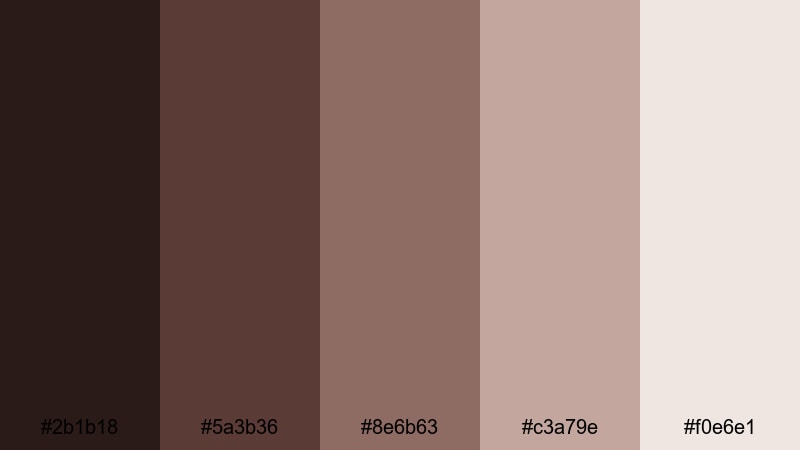
- HEX Codes: #2b1b18, #5a3b36, #8e6b63, #c3a79e, #f0e6e1
- Mood: Sleek and monochromatic with an urban, editorial edge.
- Use for: Perfect for modern brand kits, fashion lookbooks, and clean UI overlays in video.
Urban Chocolate Mono uses a gradient of chocolate browns to pale taupes, making it ideal for a monochrome, editorial aesthetic. There is enough range between #2b1b18 and #f0e6e1 to create depth while staying within one tight color story.
This palette suits fashion content, behind-the-scenes shoots, lookbooks, or city vlogs. In Filmora, treat the darkest brown as your base for text and bars, then stack the lighter tones in panels, shapes, and background layers for elegant, layered compositions.
Muted Cacao Concrete

- HEX Codes: #3c2823, #7a6258, #b8a69a, #e5ded6
- Mood: Understated and cool with a grounded, architectural feel.
- Use for: Use for design portfolios, product mockups, and calm, professional channel aesthetics.
Muted Cacao Concrete mixes cacao browns with concrete-like greys and beiges, creating a grounded, design-forward palette. It feels slightly cooler than other chocolate schemes, making it perfect for architecture, product design, or minimalist portfolios.
In Filmora, use these tones in split screens, mockups, or animated UI frames. Let the darker browns outline frames and titles, while the softer neutrals fill backgrounds, giving your portfolio or product demo a polished, professional presence.
Playful Retro Chocolate Brown Color Palettes
Retro Candy Cocoa
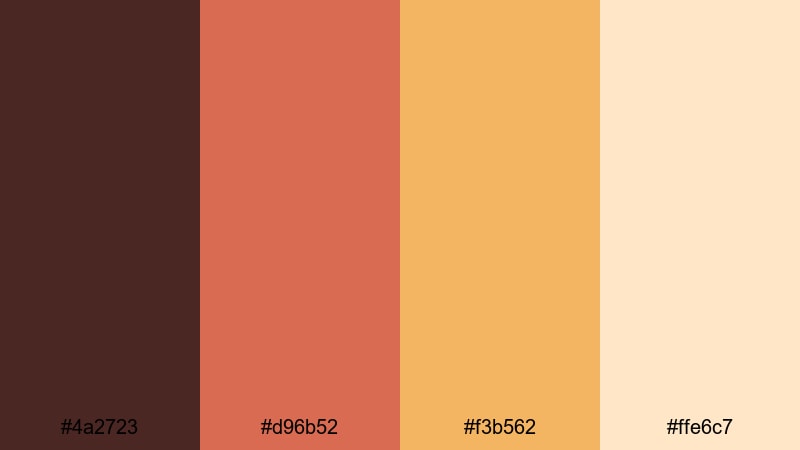
- HEX Codes: #4a2723, #d96b52, #f3b562, #ffe6c7
- Mood: Fun, nostalgic, and a bit quirky with a candy-shop twist.
- Use for: Great for playful intros, retro-themed animations, and vibrant vlog thumbnails.
Retro Candy Cocoa anchors your visuals with rich cocoa brown and lifts them with coral and honey yellow accents. The palette feels like an old candy shop, full of energy and sweetness, without losing the warmth of chocolate brown.
Use this palette for playful intros, throwback edits, or energetic vlog thumbnails. In Filmora, try building animated shapes in #d96b52 and #f3b562 over a dark brown base, and highlight your main text or subscribe buttons with #ffe6c7 for a soft, retro glow.
70s Chocolate Disco
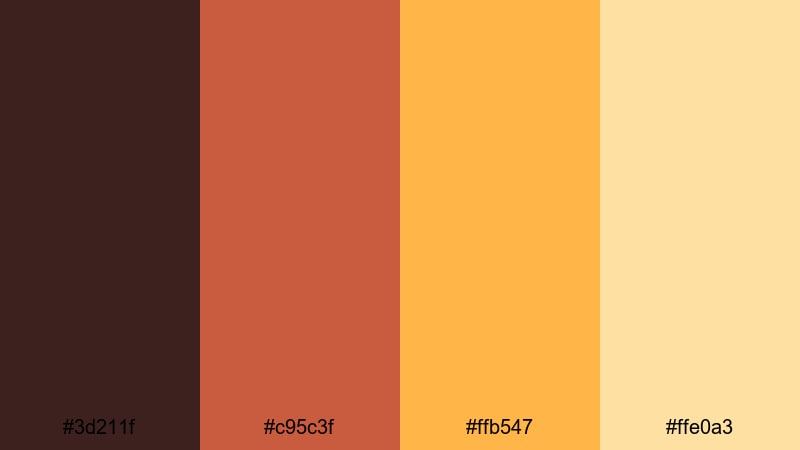
- HEX Codes: #3d211f, #c95c3f, #ffb547, #ffe0a3
- Mood: Bold, funky, and high-energy with vintage flair.
- Use for: Ideal for dance edits, throwback reels, and bold title cards that pop on social feeds.
70s Chocolate Disco mixes deep chocolate with vibrant orange and golden yellow, echoing classic 70s posters and album covers. The strong contrast between #3d211f and #ffb547 makes it perfect for bold, eye-catching layouts.
Use this palette in dance edits, retro transitions, throwback reels, or channel rebrands that need impact. In Filmora, pair animated shapes and text in orange and yellow over a chocolate background, and consider adding film grain or VHS-style filters for extra nostalgia.
Vintage Diner Sundae
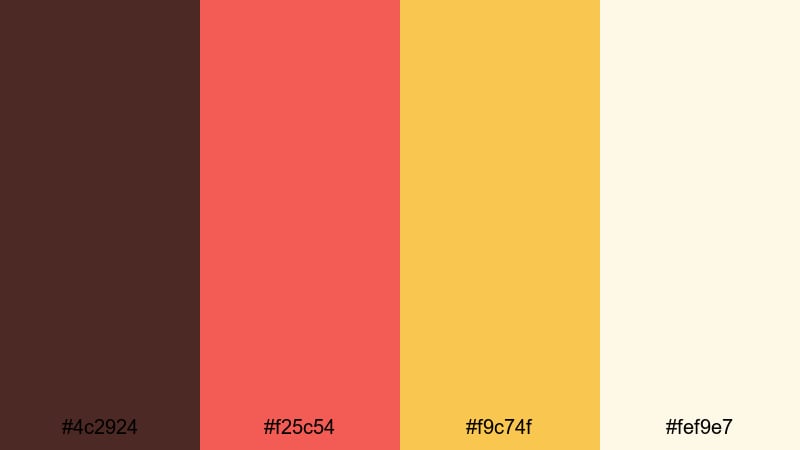
- HEX Codes: #4c2924, #f25c54, #f9c74f, #fef9e7
- Mood: Sweet, nostalgic, and energetic like an old-school dessert bar.
- Use for: Use for food content, cafe promos, and quirky lifestyle edits that need a joyful boost.
Vintage Diner Sundae pairs soda-fountain chocolate brown with cherry red, sunny yellow, and vanilla cream. It feels playful and nostalgic, instantly evoking milkshakes, neon signs, and checkered floors.
Apply this palette to food shorts, cafe promos, recipe videos, or quirky lifestyle edits. In Filmora, use #4c2924 as a base while letting #f25c54 and #f9c74f drive bold titles and animated elements. The pale cream #fef9e7 keeps everything readable and bright.
Tips for Creating Chocolate Brown Color Palettes
Chocolate brown is flexible enough to feel cozy, modern, luxurious, or playful, depending on what you pair it with. When you build your own palettes for video and design, keep these practical tips in mind to get clean, readable, and consistent results.
- Always define a primary brown: pick one chocolate tone as your main brand color for titles, logos, or UI overlays, and use supporting hues sparingly.
- Balance dark and light for readability: pair deep browns with light creams or beiges to ensure text, icons, and buttons stay legible in thumbnails and lower thirds.
- Use warm accents to shift mood: add muted orange, gold, or terracotta for cozy and rustic vibes, or champagne and blush for luxurious and romantic looks.
- Keep 3–5 colors per palette: too many shades can look messy on social feeds; limit yourself to 1–2 browns, 1–2 neutrals, and 1 accent color.
- Test on different devices: export a frame or thumbnail from Filmora and check it on mobile and desktop to make sure your chocolate tones do not appear too dark or muddy.
- Match your footage temperature: if your camera footage is very cool, warm it slightly in Filmora so chocolate browns still look rich and appetizing instead of grey.
- Use overlays instead of solid blocks: semi-transparent chocolate brown overlays on footage can unify clips while keeping texture and detail visible.
- Create reusable presets: once you like a chocolate brown grade or text style in Filmora, save it as a preset so all your future videos share the same visual identity.
Chocolate brown color palettes are powerful tools for shaping mood, from rustic cabin stories and cozy lattes to luxe product reveals and retro disco edits. With the right mix of browns, neutrals, and accents, you can make your channel feel warm, trustworthy, and instantly recognizable.
Use these 15 palettes as plug-and-play options or as inspiration to build your own chocolate brown combinations. In Filmora, you can quickly apply them to titles, filters, overlays, and full color grades so your intros, thumbnails, shorts, and long-form videos all share the same aesthetic.
Experiment with different palettes for different series on your channel, and refine them using Filmora's tools until your visuals match your storytelling style perfectly.
secure download