

 100% Security Verified | No Subscription Required | No Malware


 ChatGPT
 Perplexity
 Gemini
 Claude
 Grok
Grok
Coffee Cream is one of those quietly powerful colors that instantly makes visuals feel warm, safe, and high-end. It sits between beige and latte brown, bringing a cozy, creamy softness that works beautifully for lifestyle vlogs, sit-down videos, branding, and thumbnails. Paired with deeper coffee tones, it can also feel cinematic and mature, perfect for storytellers and creators who want a gentle but polished look.
Below are 15 ready-to-use Coffee Cream color palettes with HEX codes designed for creators and Filmora users. You can plug these palettes directly into your thumbnails, lower thirds, titles, intro animations, LUTs, and overlays, then keep everything consistent across your channel or brand.
In this article
Cozy & Comforting Coffee Cream Color Palettes
Morning Latte Glow
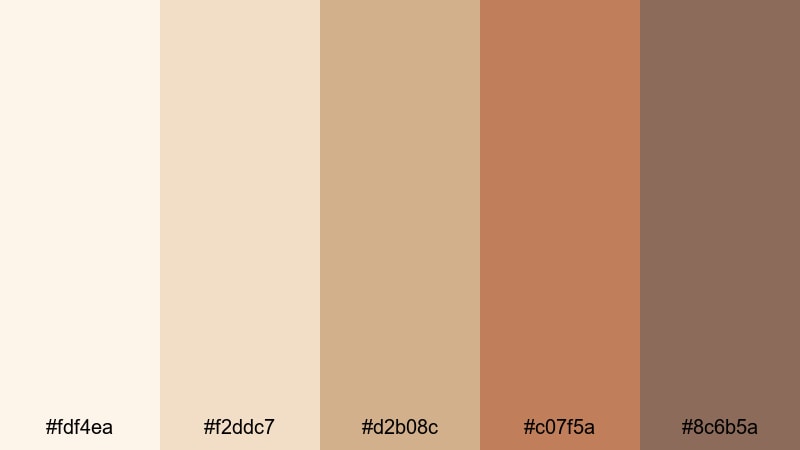
- HEX Codes: #fdf4ea, #f2ddc7, #d2b08c, #c07f5a, #8c6b5a
- Mood: Calm, cozy, and gently uplifting like the first sip of a warm latte.
- Use for: Perfect for vlog intros, lifestyle b-roll, and relaxing study playlist covers.
Morning Latte Glow is a soft gradient from pale cream to warm latte browns. It feels like sunlight on a coffee cup, wrapping your visuals in calm, comfort, and a touch of everyday luxury. The lighter tones are ideal for backgrounds, while the richer browns help titles and key elements stand out without feeling harsh.
Use this palette for lifestyle vlog intros, cozy desk setups, productivity videos, and thumbnails where you want viewers to feel relaxed and welcome. It is also a great base for channel branding elements like end screens, lower thirds, and Instagram stories, giving all your content a gentle Coffee Cream identity.
Pro Tip: Enhance Your Coffee Cream Visuals With Filmora
With a palette as subtle as Morning Latte Glow, consistency matters more than intensity. In Filmora, you can set one clip or graphic as your Coffee Cream reference and then build your entire edit around it. Reuse the same color codes for titles, shapes, callouts, and overlays so your intros, b-roll, and social edits all share the same creamy warmth.
Save your favorite Coffee Cream text and graphic presets in Filmora so every new video can reuse the same typography, drop shadows, and background tones. Over time, viewers will start recognizing your channel from color alone.
AI Color Palette
If you already have a screenshot, moodboard, or brand card using Morning Latte Glow, you can turn it into a video-wide look with Filmora's AI Color Palette feature. Import your reference image, let Filmora analyze the colors, and apply that Coffee Cream style across your clips in just a few clicks.
This is especially helpful for vloggers and small brands who film in different locations and lighting. AI Color Palette keeps skin tones soft, whites slightly creamy, and shadows warm, so your Coffee Cream theme stays intact from intro to outro.
 secure download

HSL, Color Wheels & Curves
Coffee Cream tones can shift quickly with small changes in exposure and white balance. Use Filmora's HSL and color wheels to gently pull yellows toward warm neutrals, soften strong oranges, and keep shadows from going too gray. A slight S-curve on the RGB curves can add contrast while preserving the soft, creamy midtones.
For more detailed ideas on balancing highlights and shadows, you can follow this step-by-step Filmora color correction guide and adapt the techniques to maintain your Coffee Cream look. The goal is to keep whites ivory, not pure blue-white, and give shadows a subtle coffee tint.
secure download1000+ Video Filters & 3D LUTs
Once your Coffee Cream palette is in place, you can push it toward different styles with Filmora's filters and LUTs. Soft film-style LUTs can make Morning Latte Glow feel vintage and dreamy, while clean, modern filters can keep it bright and minimalist for productivity or tech content.
Filmora's video filters and 3D LUTs make it easy to test different moods on the same Coffee Cream base. Apply a LUT to adjustment layers, then fine-tune opacity so your creamy tones stay visible while your footage still feels polished and stylized.
secure downloadCaramel Cinnamon Swirl
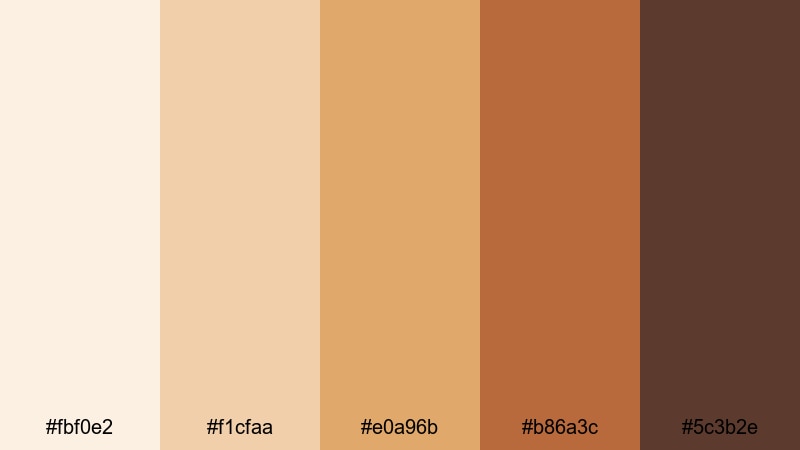
- HEX Codes: #fbf0e2, #f1cfaa, #e0a96b, #b86a3c, #5c3b2e
- Mood: Warm, indulgent, and cozy like a spiced dessert coffee.
- Use for: Great for recipe videos, baking channels, and cozy product promos.
Caramel Cinnamon Swirl leans into rich caramels and spiced browns, adding a delicious, dessert-like feel. The spectrum from pale cream to deep cinnamon gives you plenty of room for layered backgrounds, highlight accents, and bold yet friendly text colors.
This palette is ideal for food and drink thumbnails, recipe videos, ASMR baking, and product promos where flavor and texture are the focus. Use lighter tones behind your subject and the darker browns for call-to-action buttons, price tags, or video titles to make your content feel warm and irresistible.
Soft Cafe Window Light
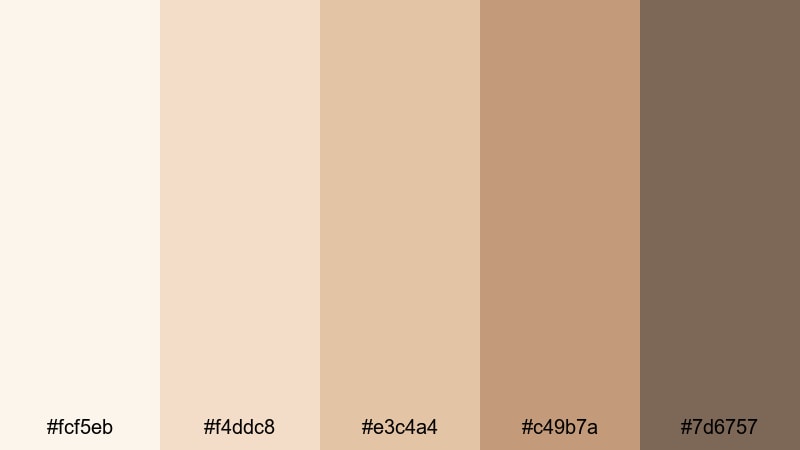
- HEX Codes: #fcf5eb, #f4ddc8, #e3c4a4, #c49b7a, #7d6757
- Mood: Gentle, dreamy, and intimate, like golden hour streaming through a cafe window.
- Use for: Ideal for sit-down chats, storytelling edits, and cinematic vlog sequences.
Soft Cafe Window Light feels like a quiet corner table at golden hour. Muted creams and gentle browns mimic soft daylight and natural shadows, making it a great choice when you want your footage to look intimate and cinematic without going too dark.
Use the lightest shades as background colors for title cards or lower thirds, and the mid browns for text and frames. It works especially well for sit-down talking videos, storytelling sequences, Q&A thumbnails, and any edit where you want viewers to feel like they are right there in the room with you.
Steam And Sugar Haze
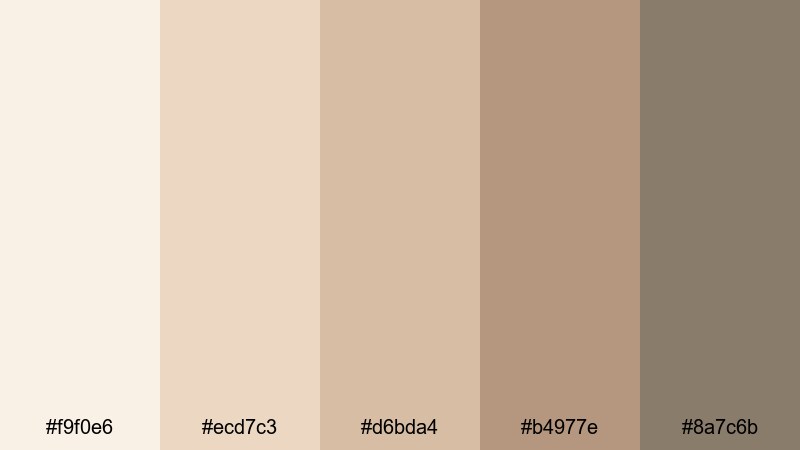
- HEX Codes: #f9f0e6, #ecd7c3, #d6bda4, #b4977e, #8a7c6b
- Mood: Hazy, intimate, and comforting with a hint of sweetness.
- Use for: Use for dreamy montage edits, channel trailers, and calm ambience loops.
Steam And Sugar Haze is all about softness and blur. The muted neutrals and mellow browns create a smooth gradient that never feels too sharp. It is made for dreamy, slow-paced edits where the atmosphere matters more than strong contrast.
Try this Coffee Cream palette for montage sequences, channel trailers, lo-fi or study ambience loops, and relaxing b-roll. Use the lighter colors for overlay shapes and title backgrounds, and let the deeper neutrals support subtitles or logo marks without stealing attention from your footage.
Minimal & Modern Coffee Cream Color Palettes
Urban Roast Minimal
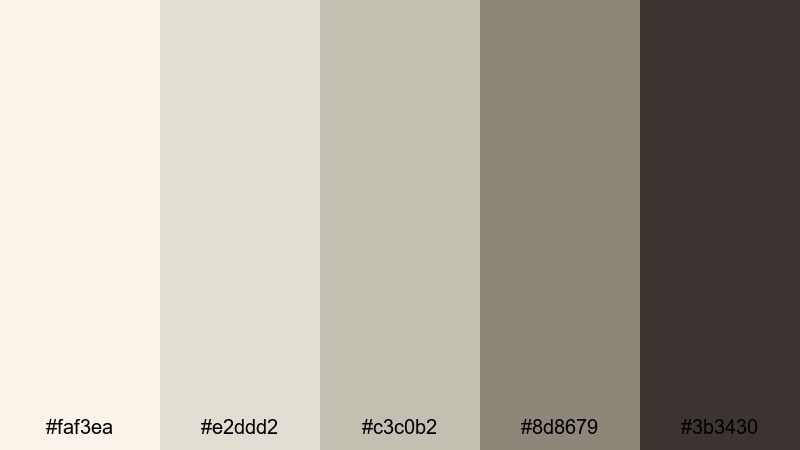
- HEX Codes: #faf3ea, #e2ddd2, #c3c0b2, #8d8679, #3b3430
- Mood: Clean, stylish, and slightly urban with grounded espresso accents.
- Use for: Perfect for tech reviews, modern brand intros, and minimalist lower thirds.
Urban Roast Minimal mixes light creams with cool, stone-like neutrals and deep espresso accents. It feels clean and design-forward, perfect when you want a professional look that is still warm and approachable.
Use the brightest tones as backgrounds for slides, overlays, and end cards, while the darkest color becomes your go-to for high-contrast text and icons. This palette is excellent for tech reviews, productivity tutorials, modern portfolios, and any minimalist YouTube thumbnail or intro sequence.
Clean Countertop Brew
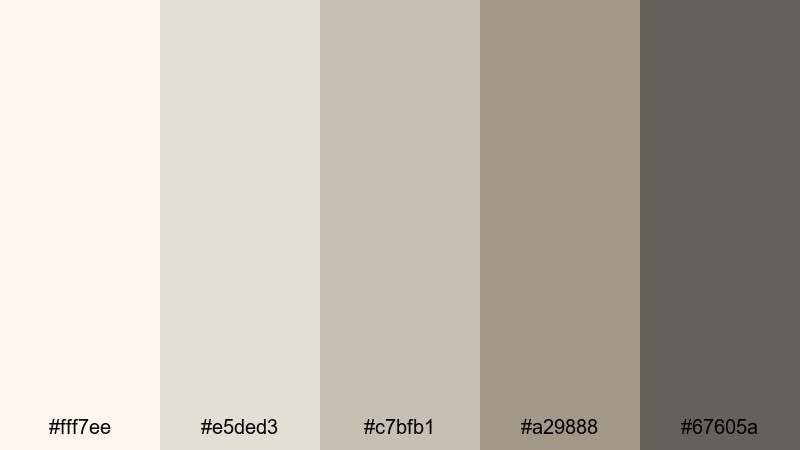
- HEX Codes: #fff7ee, #e5ded3, #c7bfb1, #a29888, #67605a
- Mood: Fresh, tidy, and balanced like a well-styled kitchen shot.
- Use for: Great for product demos, home organization content, and brand explainer videos.
Clean Countertop Brew is bright, tidy, and balanced, echoing the look of a perfectly styled kitchen or studio. The creamy whites and soft taupes keep everything feeling spacious, while the darker gray-browns provide just enough contrast.
Apply this palette to product demos, organization or cleaning content, and brand explainers where clarity is key. Use the lightest shades for clean backgrounds, midtones for subtle dividers and UI shapes, and the darkest color for headings and CTAs in your thumbnails and intro cards.
Smooth Macchiato Interface
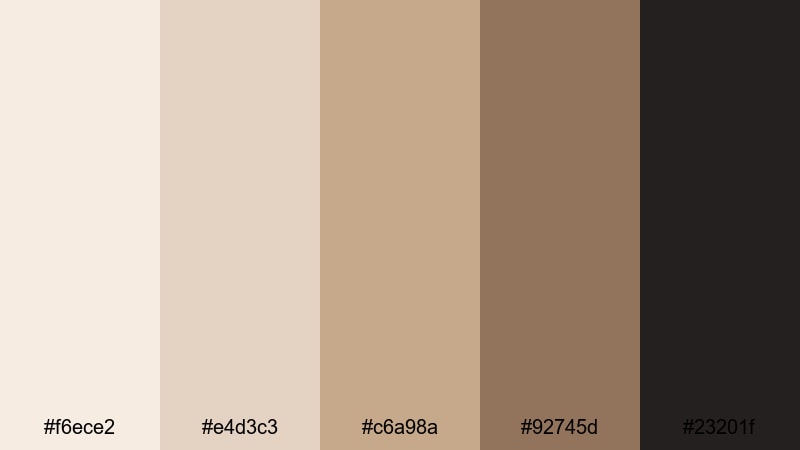
- HEX Codes: #f6ece2, #e4d3c3, #c6a98a, #92745d, #23201f
- Mood: Polished, professional, and smooth with rich UI-friendly contrast.
- Use for: Use for app promos, UI overlays, and sleek motion graphics in Filmora.
Smooth Macchiato Interface combines layered creams and caramels with a strong espresso accent, giving you a UI-friendly palette that looks premium and easy to read. The dark anchor tone is perfect for buttons and key text elements.
Use this Coffee Cream palette for app or SaaS promos, UI walk-throughs, and sleek motion graphics. In Filmora, you can design cohesive overlays, data cards, and callouts using the lighter colors as panels and the deeper shades for icons, numbers, and main headlines.
Ivory Moka Branding
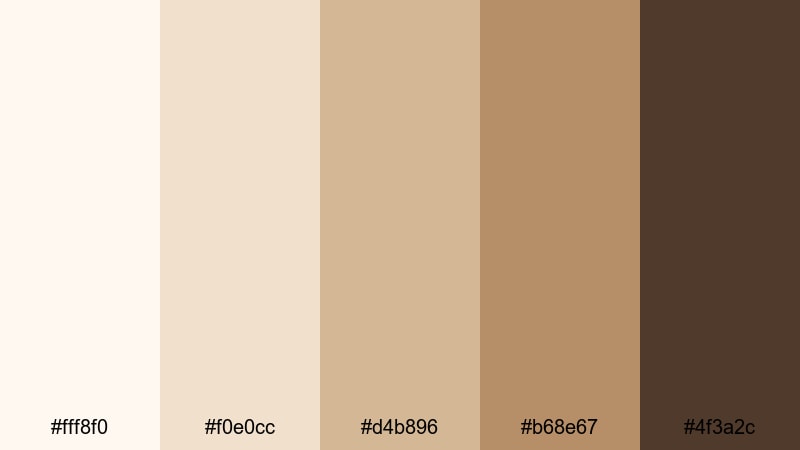
- HEX Codes: #fff8f0, #f0e0cc, #d4b896, #b68e67, #4f3a2c
- Mood: Elegant, brand-ready, and warm with premium coffee shop vibes.
- Use for: Ideal for logo stings, brand kits, and cohesive channel identity packages.
Ivory Moka Branding feels like a high-end coffee shop logo brought to life. Ivory tones blend with golden browns and a deep moka accent, giving your visuals a refined, premium warmth that is perfect for brand identity work.
Use this palette when designing logo stings, channel banners, brand kits, and packaging-style thumbnails. The lightest shades are great for negative space, while the darkest moka color can anchor logos, monograms, and taglines so they stay readable on any platform.
Vintage & Filmic Coffee Cream Color Palettes
Retro Cafe Grain
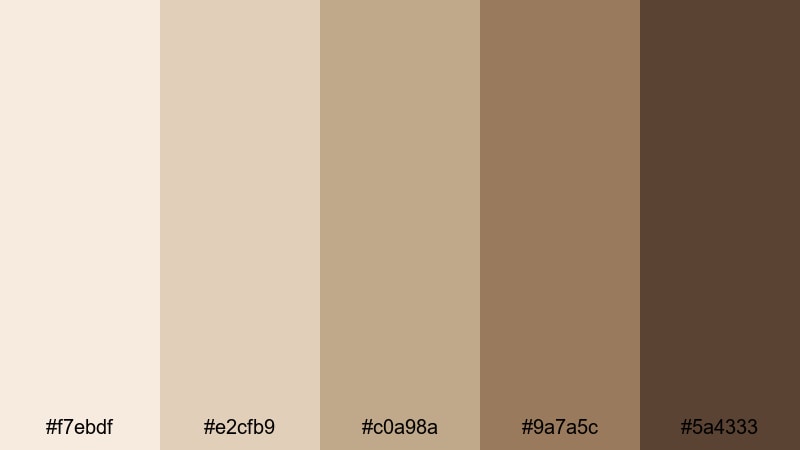
- HEX Codes: #f7ebdf, #e2cfb9, #c0a98a, #9a7a5c, #5a4333
- Mood: Nostalgic and textured, like an old film photo in a corner cafe.
- Use for: Perfect for film emulation LUTs, travel diaries, and retro-inspired edits.
Retro Cafe Grain leans into sepia-tinted creams and warm browns that instantly feel nostalgic. It echoes the look of faded film prints and old coffee shop photos, making it ideal when you want your content to feel timeless and slightly textured.
Apply this palette to travel diaries, memory montages, retro vlog edits, and film emulation LUTs. Use the mid and dark tones for type and frames, then keep backgrounds in the softest creams to mimic aged paper or vintage photo borders.
Sepia Roast Memories
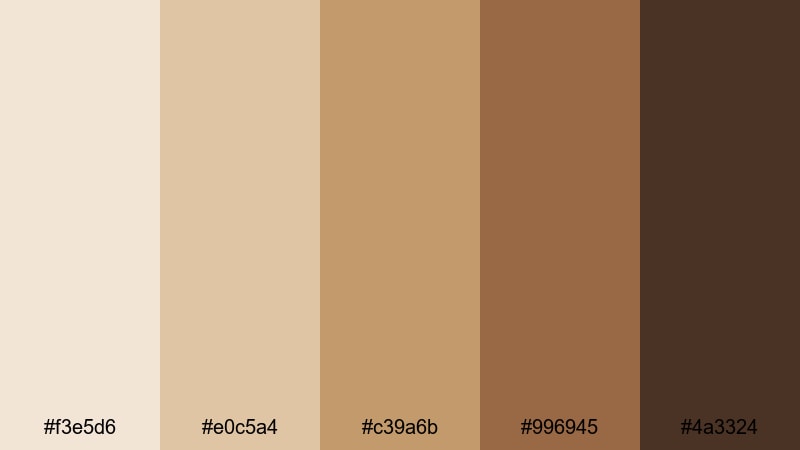
- HEX Codes: #f3e5d6, #e0c5a4, #c39a6b, #996945, #4a3324
- Mood: Warmly nostalgic, cinematic, and slightly dramatic.
- Use for: Great for memory montages, wedding highlight films, and storytelling shorts.
Sepia Roast Memories goes deeper and more dramatic, with strong sepia browns balanced by creamy highlights. It has a cinematic feel that works beautifully for emotional storytelling and romance-focused content.
Use this palette for wedding highlights, anniversary videos, narrative shorts, and personal storytime edits. Let the lighter tones support soft typography or elegant titles, while the darkest shade grounds credits, date stamps, and logo watermarks with a classic film look.
Dusty Espresso Frames
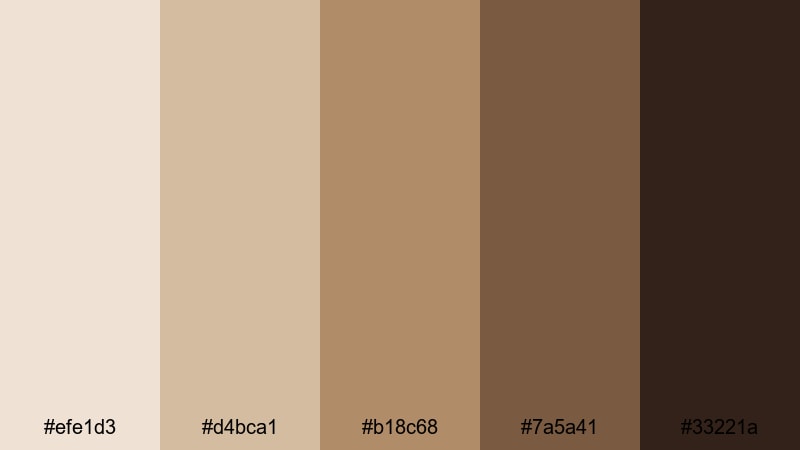
- HEX Codes: #efe1d3, #d4bca1, #b18c68, #7a5a41, #33221a
- Mood: Earthy, cinematic, and slightly moody like a faded postcard.
- Use for: Use for narrative shorts, moody lookbooks, and aesthetic reels.
Dusty Espresso Frames has an earthy, slightly moody tone that feels like a weathered postcard. There is enough contrast for strong compositions, but the overall look stays muted and cinematic.
Try this Coffee Cream palette for fashion lookbooks, moody reels, narrative shorts, and aesthetic edits. The pale creams work as subtle borders or letterbox bars, while the darker browns can frame your footage, highlight key phrases, or create textured shapes behind on-screen text.
Analog Coffee House
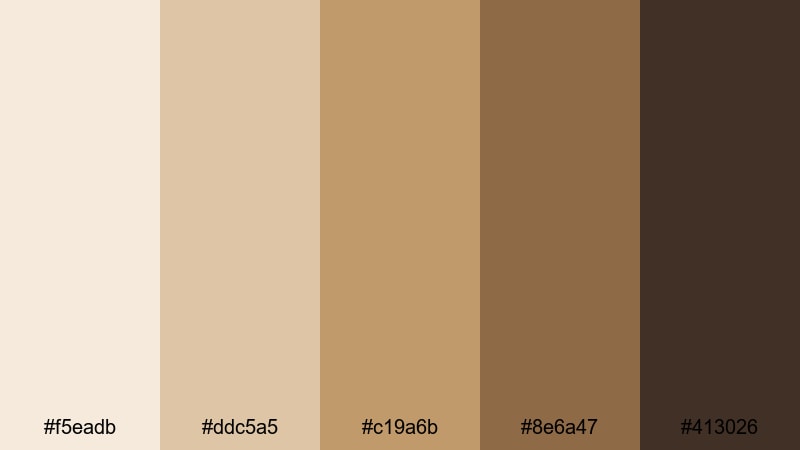
- HEX Codes: #f5eadb, #ddc5a5, #c19a6b, #8e6a47, #413026
- Mood: Cozy, filmic, and intimate, like live music in a tiny coffee bar.
- Use for: Ideal for live session edits, acoustic covers, and analog-style vlogs.
Analog Coffee House captures the feeling of live music in a small, warmly lit cafe. Creams and toasted browns combine into a rich, analog-style palette that flatters skin tones and dark wood interiors.
Use it for acoustic performance videos, studio sessions, interview series, and analog-inspired vlogs. Incorporate the mid-browns into lower thirds and time stamps, and use the darkest tone sparingly for logos, social handles, or channel names so they stand out without breaking the cozy mood.
Fresh & Natural Coffee Cream Color Palettes
Oatmilk Meadow
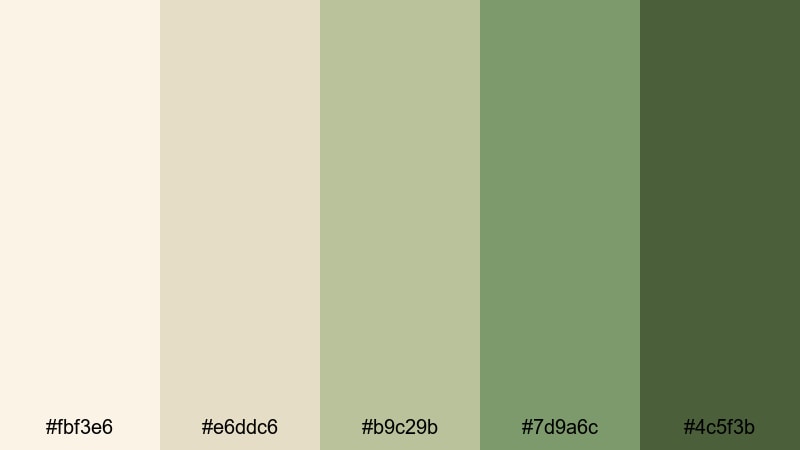
- HEX Codes: #fbf3e6, #e6ddc6, #b9c29b, #7d9a6c, #4c5f3b
- Mood: Fresh, organic, and softly uplifting with creamy earth tones.
- Use for: Perfect for wellness vlogs, sustainable brand spots, and nature b-roll.
Oatmilk Meadow blends creamy oat tones with soft greens, creating a palette that feels fresh, organic, and calming. It is grounded but still airy, making it especially suited to wellness and eco-focused content.
Use this Coffee Cream plus green combination for sustainable brand videos, nature b-roll, slow-living vlogs, and wellness thumbnails. The creams are perfect for text panels and infographics, while the gentle greens can highlight key points, icons, or section titles.
Forest Pour Over
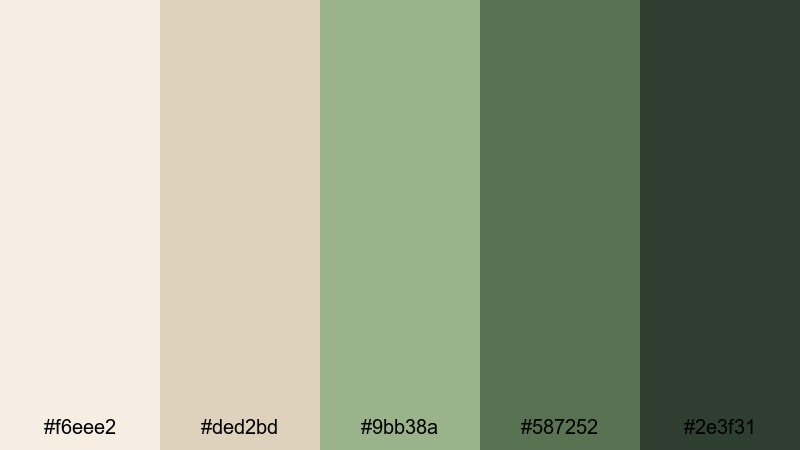
- HEX Codes: #f6eee2, #ded2bd, #9bb38a, #587252, #2e3f31
- Mood: Grounded, natural, and quietly powerful like a hike before coffee.
- Use for: Great for outdoor adventures, cabin vlogs, and slow-living storytelling.
Forest Pour Over mixes soft Coffee Cream neutrals with deeper forest greens for a grounded, nature-forward aesthetic. It feels like early morning in a cabin before the first cup of coffee, calm but quietly powerful.
Apply this palette to outdoor adventures, camping or cabin vlogs, and slow-living storytelling. Use the lighter tones for titles and chapter cards, the mid greens as accent blocks or lines, and the deepest green for bold typography and logo marks so everything stays readable against natural footage.
Coastal Cold Brew
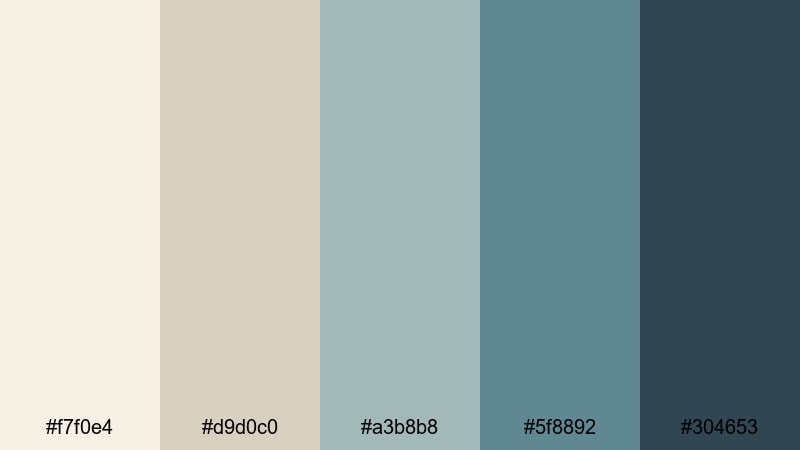
- HEX Codes: #f7f0e4, #d9d0c0, #a3b8b8, #5f8892, #304653
- Mood: Breezy, relaxed, and refreshing like coffee by the sea.
- Use for: Use for travel vlogs, summer lookbooks, and beach cafe promos.
Coastal Cold Brew pairs creamy neutrals with sea-glass blues and deep coastal tones. The result is breezy and relaxed, with just enough Coffee Cream warmth to keep it from feeling cold or clinical.
This palette shines in travel vlogs, summer lookbooks, beach cafe promos, and seaside lifestyle content. Use the creams as your base, the soft blues for overlays and text highlights, and the dark navy-coastal tone for titles, buttons, and social handles on thumbnails and end cards.
Tips for Creating Coffee Cream Color Palettes
When building your own Coffee Cream color combinations for video and design, think about balance, contrast, and how your colors will look on different screens and platforms. Here are some practical tips to guide you.
- Pick a hero Coffee Cream shade and stick to it as your main background or midtone, then build lighter and darker variations around it.
- Always test text readability: pair light creams with deep espresso or dark navy text, and avoid placing midtone text on midtone backgrounds.
- Limit bright accent colors to one or two hues (like soft green or blue) so your palette still feels cohesive and calm.
- Screenshot your video frames and thumbnails on both light and dark mode YouTube or social apps to ensure Coffee Cream areas do not blend into the UI.
- Keep branding consistent by reusing the same HEX codes for logos, lower thirds, and end screens across all your Filmora projects.
- Use adjustment layers in Filmora to match footage exposure and white balance so your Coffee Cream overlays and titles look natural on top.
- For cinematic looks, slightly warm the highlights and cool the shadows, but do not overdo saturation or you will lose the soft Cream feel.
- Create a simple style guide with HEX codes, font choices, and usage notes so you or your team can apply your Coffee Cream palette the same way every time.
Coffee Cream color palettes can completely reshape how your videos and designs feel. From cozy cafe vlogs to minimal tech reviews and natural outdoor stories, these warm neutrals help you build a recognizable visual identity that feels both modern and inviting.
Use the HEX codes above as a starting point, then refine them inside Filmora with AI Color Palette, HSL, and LUTs until they match your exact style. The more consistently you apply your Coffee Cream combinations across intros, thumbnails, overlays, and social clips, the stronger your brand presence will become.
Open a new project in Filmora, drop in one of these palettes, and start experimenting with titles, gradients, and filters. With a few small tweaks, you can turn simple footage into a cohesive Coffee Cream themed video series.
secure downloadNext: Skin Color Palette
