

 100% Security Verified | No Subscription Required | No Malware


 ChatGPT
 Perplexity
 Gemini
 Claude
 Grok
Grok
Forest colors instantly signal nature, balance, and calm. Deep greens and muted earth tones feel grounded and trustworthy, while lighter moss and fern shades suggest freshness and growth. In video, these hues can turn a simple walk in the woods into a cinematic moment, or give your brand intro a soothing, eco-friendly identity that stands out among neon and grayscale feeds.
This guide collects 15 forest color palettes with ready-to-use HEX codes so you can drop them straight into your thumbnails, titles, overlays, and brand kits. Whether you are editing in Filmora or designing supporting graphics, these forest color combinations make it easy to keep your visuals cohesive across vlogs, reels, intros, and channel art.
In this article
Calm & Natural Forest Color Palettes
Morning Pine Mist
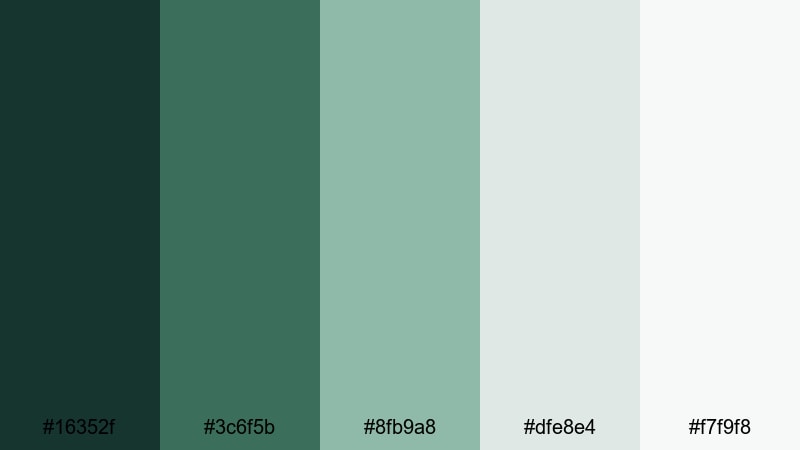
- HEX Codes: #16352f, #3c6f5b, #8fb9a8, #dfe8e4, #f7f9f8
- Mood: Calm, refreshing, and quietly optimistic.
- Use for: Perfect for nature vlogs, travel intros, and soothing montage sequences where you want a gentle, airy feel.
Morning Pine Mist layers deep pine green with soft, misty neutrals for the feeling of a cool walk through the woods just after sunrise. The darker base tones (#16352f and #3c6f5b) anchor your frames, while the pale highlights (#dfe8e4 and #f7f9f8) keep overlays, titles, and lower thirds looking light and breathable.
Use this palette for relaxed forest vlogs, minimalist YouTube banners, and intro cards where you want nature to feel calm instead of dramatic. In Filmora, it works beautifully for clean title templates, soft background shapes, and subtle color grading that keeps skin tones natural while your greens stay pure and gentle.
Pro Tip: Build A Soft Forest Aesthetic In Filmora
To keep a Morning Pine Mist look across a whole edit, design your titles, subtitles, and transition cards around the lighter hues, then use the deeper greens in your frames for clothing, props, or color grading. In Filmora, you can set these HEX values directly in text and background tools so your channel intro, B-roll overlays, and social cutdowns all share the same forest identity.
When you color grade, avoid pushing saturation too far. Instead, lean into gentle contrast and a slightly cooler white balance so your footage feels like real morning air, not a heavy filter. Saving these settings as custom presets in Filmora helps you apply the same calm forest mood in just a few clicks for every new video.
AI Color Palette
If you already have a still frame or moodboard that nails this soft pine-and-mist vibe, you can turn it into a reusable grade. Filmora's AI Color Palette feature analyzes a reference image and transfers its tones to your entire timeline, from A-roll talking shots to wide nature B-roll.
Import your reference, select the clips you want to match, and let AI do the heavy lifting. This is an easy way to make every shot feel like it belongs in the same forest morning, even if you filmed on different days, cameras, or locations.
 secure download

HSL, Color Wheels & Curves
For precise forest tones, use Filmora's HSL and color wheels to gently shift greens toward pine or fern without affecting skin or sky. Fine-tune the green and cyan channels to reduce harsh neon edges, then use curves to lift the shadows slightly so your darker greens stay detailed instead of muddy. If you want a deeper dive, check out Filmora's color correction tools in Filmora to see how HSL, wheels, and curves work together.
You can also use the color wheels to warm up midtones while keeping highlights cooler, mimicking sun filtering through trees. A subtle S-curve increases contrast just enough to look cinematic while keeping that calm, natural forest softness.
secure download1000+ Video Filters & 3D LUTs
If you want a forest look fast, start from Filmora's presets. Filmora's video filters and 3D LUTs make it easy to test different forest moods, from soft matte greens to darker cinematic tones, then you can tweak them with HSL and curves to match the Morning Pine Mist HEX values.
Apply a LUT to your base footage, then adjust opacity to keep it subtle. Combine this with simple overlays in your chosen HEX colors for titles, frames, and callout boxes so your whole video feels like one cohesive forest story.
secure downloadMossy Creek Retreat
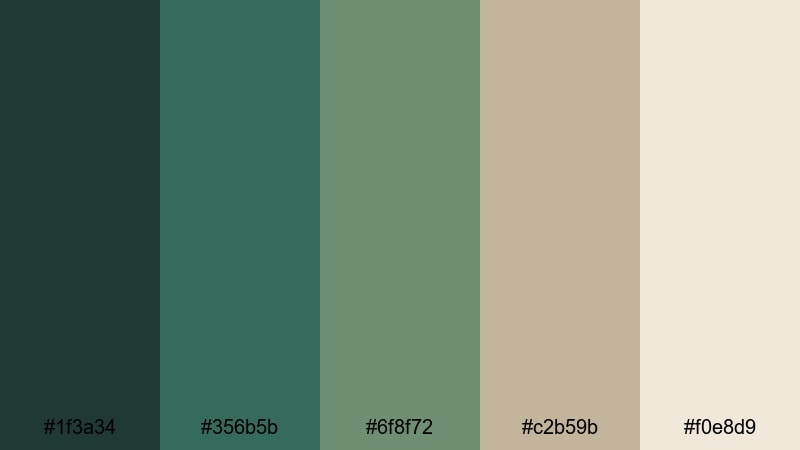
- HEX Codes: #1f3a34, #356b5b, #6f8f72, #c2b59b, #f0e8d9
- Mood: Grounded, cozy, and restorative.
- Use for: Works well for lifestyle channels, cabin getaway videos, and branding that emphasizes slow living and comfort.
Mossy Creek Retreat blends rich greens with stone and cream neutrals to create a grounded, cabin-in-the-woods feeling. The darker tones are ideal for backgrounds and borders, while the warm neutrals keep text and icons readable and welcoming.
Use this palette for slow living vlog series, Airbnb or cabin tour videos, and Instagram stories that highlight warm wood, coffee, and nature. It suits logo locks, channel watermarks, and thumbnail frames where you want rustic charm without losing clarity on small screens.
Fern Trail Whisper

- HEX Codes: #234133, #4e7b58, #9cc69b, #f3f5e7
- Mood: Light, airy, and quietly hopeful.
- Use for: Great for cinematic B-roll, wellness content, and soft brand visuals that focus on clarity and nature.
Fern Trail Whisper leans into fresh, mid-tone greens with a bright, off-white accent that keeps everything feeling open and breathable. It brings the softness of fern fronds and filtered light into your motion graphics and text layouts.
Apply this palette to yoga or meditation videos, airy nature B-roll, and wellness thumbnails. The lighter green is perfect for buttons and callouts, while the off-white background helps text overlays stay clean and easy to read in Filmora and on social platforms.
Evergreen Canopy Light

- HEX Codes: #123526, #1f5b3a, #4a8b61, #a5c9a1, #f2f7ef
- Mood: Serene, balanced, and natural.
- Use for: Ideal for documentary titles, eco brand intros, and lower thirds that need a pure, trustworthy forest tone.
Evergreen Canopy Light moves from deep conifer greens to gentle leaf-tinted whites, giving you a full range from grounding shadows to bright highlights. It feels trustworthy and organic, without sliding into heavy or muddy territory.
Use the darker shades in lower thirds and title bars, then set text in the paler greens or whites for maximum readability. This palette works well for environmental documentaries, NGO content, and eco-brand intros where you need a serious but hopeful forest aesthetic.
Mystic & Moody Forest Color Palettes
Twilight Cedar Shadows

- HEX Codes: #0b1f1a, #14342b, #35544a, #705041, #b88a67
- Mood: Moody, cinematic, and nostalgic.
- Use for: Use in dramatic story edits, short films, or moody travel vlogs that lean into mystery and emotion.
Twilight Cedar Shadows mixes inky greens with warm cedar browns to capture that moment when the forest starts to fade into night. The contrast between cool shadows and warm wood tones adds emotional depth and a sense of nostalgia.
Use this palette for story-driven edits, cinematic travel sequences, and poster-style thumbnails. Dark greens make perfect backgrounds for white or cream titles, while the cedar browns can be used for subtitles, icons, or branding elements that need a subtle, emotional punch.
Moonlit Spruce Silence

- HEX Codes: #050b10, #122025, #234249, #5f7f85, #c7d3d6
- Mood: Quiet, mysterious, and introspective.
- Use for: Strong choice for night scenes, title cards, and ambient music visuals that need a cool, cinematic edge.
Moonlit Spruce Silence focuses on deep blue-greens and silvery highlights, like moonlight brushing over spruce branches. It feels introspective and still, great for late-night edits and ambient visuals.
Use the darkest tones for full-screen title cards and end slates, then bring in the lighter silvers for text and minimal line art. This palette suits lo-fi music channels, slow cinematic montages, and any nighttime forest footage graded in Filmora with a cool, desaturated mood.
Fogbound Hollow Depths
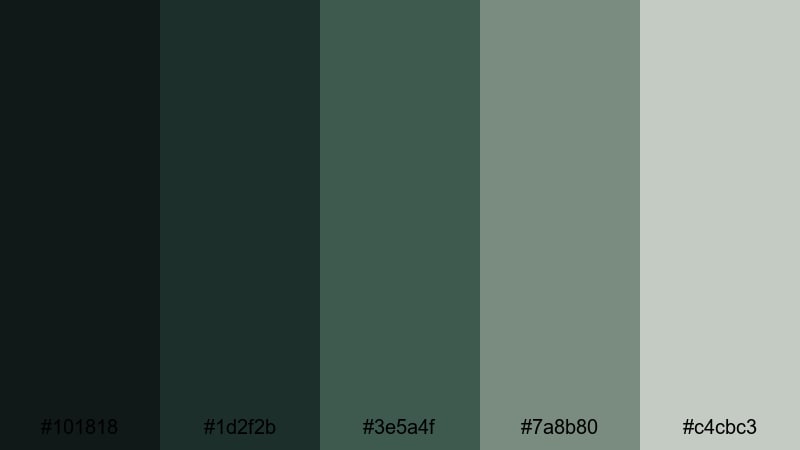
- HEX Codes: #101818, #1d2f2b, #3e5a4f, #7a8b80, #c4cbc3
- Mood: Eerie, grounded, and slightly surreal.
- Use for: Fit for mystery videos, horror shorts, or any sequence where you want a subtle, unsettling forest atmosphere.
Fogbound Hollow Depths layers smoky greens and charcoal grays, echoing a forest hollow filled with rolling fog. It is moody without relying on pure black, which keeps detail in the shadows of your footage.
Choose this palette for mystery or horror shorts, eerie storytimes, and game streams with forest themes. The mid-tone greens hold atmosphere in your footage, while the gray highlights are ideal for understated titles, credit rolls, and UI-style overlays in Filmora.
Stormbound Forest Edge

- HEX Codes: #071720, #14333f, #25635e, #5f8f7f, #f0ebe2
- Mood: Tense, dramatic, and charged with energy.
- Use for: Perfect for action intros, dramatic trailers, and reels that build anticipation against a nature backdrop.
Stormbound Forest Edge brings together brooding teals, dense greens, and a pale, stormy neutral. It feels like standing at the edge of a forest as a storm rolls in, full of contrast and motion.
Use the dark blues and greens behind bold, uppercase typography for trailers, countdown timers, and intense reel intros. The soft neutral works well for small captions and secondary text elements where you still want good contrast on mobile devices.
Bright & Fresh Forest Color Palettes
Sunlit Forest Meadow

- HEX Codes: #1f4b32, #3d7b4f, #8acb6e, #ffd56b, #fff5da
- Mood: Cheerful, energetic, and optimistic.
- Use for: Great for upbeat vlogs, family content, and thumbnails that need to pop in search results without losing a natural feel.
Sunlit Forest Meadow pairs bright, healthy greens with playful yellows for a joyful outdoor vibe. The palette suggests picnics, hikes, and summer adventures, all under warm sunshine.
Use it for family vlogs, travel diaries, and thumbnails that need to stand out against crowded search pages. Greens can carry your backgrounds and overlays, while the yellow accents are perfect for subscribe buttons, arrows, and highlight text in Filmora.
Emerald Spring Burst

- HEX Codes: #0f3b2e, #1f7a4a, #2fbf71, #8df3c0, #f5fff7
- Mood: Crisp, lively, and modern.
- Use for: Perfect for techy nature brands, eco startups, and dynamic motion graphics that highlight growth and innovation.
Emerald Spring Burst pushes forest greens into a more digital, vibrant space, with punchy emeralds and minty highlights. It feels fresh and on-trend, great for brands that mix sustainability with innovation.
Use the deeper emerald hues in logo marks and title bars, and deploy the bright mints for icons, progress bars, and infographics. This palette fits tech explainer videos, startup pitch decks, and animated overlays made in Filmora where you want forest inspiration but a modern, clean edge.
Forest Citrus Splash

- HEX Codes: #114232, #2f6f4f, #f4a259, #f96e46, #ffe9c7
- Mood: Playful, bold, and adventurous.
- Use for: Use this for travel reels, product promos, and title cards that need a lush outdoor base with eye-catching contrast.
Forest Citrus Splash combines lush greens with juicy oranges for maximum contrast and energy. The mix of cool and warm tones gives your visuals a fun, adventurous edge without losing that forest foundation.
Use the oranges sparingly as accent colors for call-to-action buttons, badges, or key words in your titles. The greens remain your main background and branding base, keeping everything rooted in nature while the citrus tones drive attention in thumbnails and promos.
Rainwashed Grove Glow

- HEX Codes: #18493f, #2c7b73, #67b5ad, #bfe5df, #f4fbfa
- Mood: Clean, refreshing, and uplifting.
- Use for: Great for skincare brands, wellness channels, and rainy day montages where you want clarity and lightness.
Rainwashed Grove Glow focuses on teal-tinted greens and soft aquas for a clean, hydrating look. It feels like a forest after rain, when everything looks polished and renewed.
This palette is ideal for skincare product B-roll, spa or wellness content, and rainy day aesthetic edits. Use the lighter aquas in background shapes and text boxes, and lean on the deeper teals for buttons, logos, and accent lines in your Filmora templates.
Elegant & Cinematic Forest Color Palettes
Dark Forest Cinema
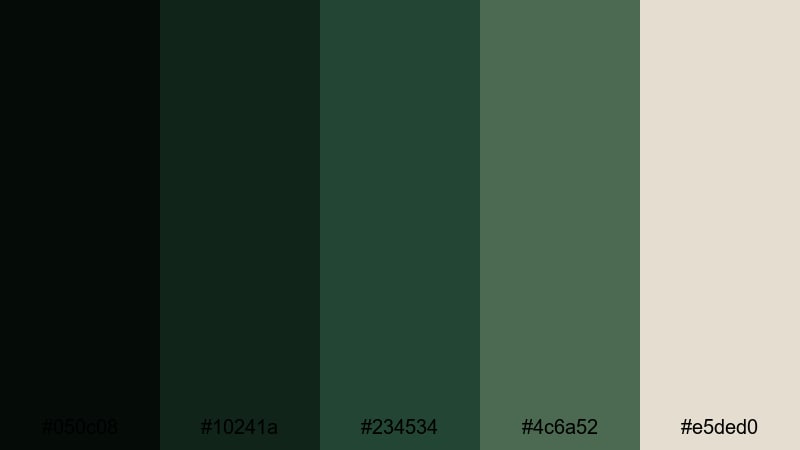
- HEX Codes: #050c08, #10241a, #234534, #4c6a52, #e5ded0
- Mood: Sophisticated, dramatic, and filmic.
- Use for: Ideal for cinematic grading, film title sequences, and serious documentaries that need a refined nature tone.
Dark Forest Cinema dives into near-black greens, supported by muted foliage tones and a soft bone highlight. It instantly gives footage a big-screen feel and works especially well with widescreen letterboxing and subtle grain.
Use the darkest shades for backgrounds, lower thirds, and frames, keeping your typography in the warm, light neutral for legibility. This palette shines in Filmora when you combine it with gentle vignettes, cinematic fonts, and slow transitions for trailers and documentary intros.
Gilded Forest Noir

- HEX Codes: #080d08, #15281c, #265139, #b38b59, #f5e6cf
- Mood: Luxurious, moody, and refined.
- Use for: Perfect for luxury brands, title cards, and fashion lookbooks that mix nature with a golden, high-end accent.
Gilded Forest Noir pairs shadowy greens with rich gold tones, delivering a glamorous twist on the forest theme. It feels premium and dramatic, great for content that wants both nature and luxury.
Reserve the golden hues for logos, key lines, and highlight text, while deep greens dominate backgrounds and frames. This palette works for high-end product spots, fashion lookbooks, and cinematic openers created in Filmora with elegant, slow-moving graphics.
Midnight Evergreen Luxe
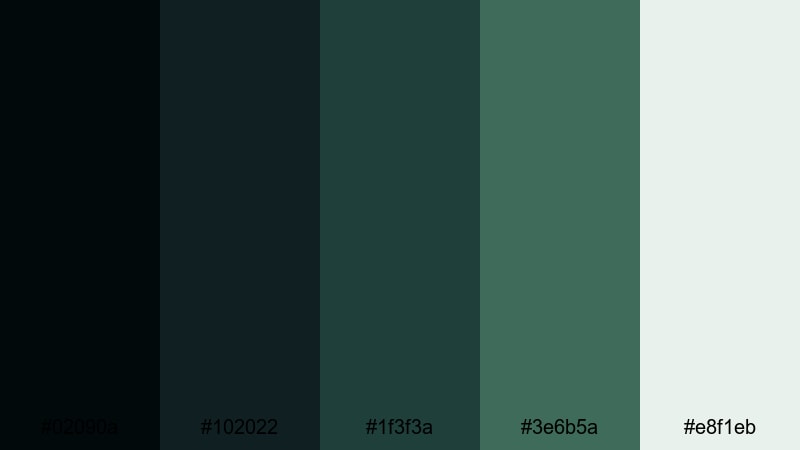
- HEX Codes: #02090a, #102022, #1f3f3a, #3e6b5a, #e8f1eb
- Mood: Cool, sleek, and quietly luxurious.
- Use for: Great for intros, brand kits, and UI where you want a modern, cinematic forest base that still feels clean and professional.
Midnight Evergreen Luxe leans into cool evergreens and midnight blues lifted by a pale, minty highlight. It feels modern and polished, like a premium app or brand that draws inspiration from the forest at night.
Use the darkest tones behind white or light text for sophisticated intros, then apply the mint highlight to buttons, progress bars, or callouts in your UI-style graphics. It is a strong choice for branding your Filmora templates, YouTube overlays, and website visuals in one cohesive, cinematic forest system.
Tips for Creating Forest Color Palettes
When you build your own forest color palette for video or design, aim for a balance between deep grounding greens and lighter supporting tones so your footage feels natural, readable, and on-brand.
- Pick a primary forest green first, then add 1 to 2 supporting greens that are either slightly cooler or warmer to keep the palette from feeling flat.
- Always include at least one light neutral (off white, cream, or pale gray) for text, backgrounds, and UI elements that must stay readable on small screens.
- Use warm accents like gold, cedar brown, or soft yellow sparingly to draw attention to calls to action, key words, and important icons.
- Check contrast on mobile by previewing thumbnails and titles at small sizes; if text blends into the greens, brighten the text color or darken the background.
- Match your palette to your footage by sampling real colors from your forest scenes, then nudging them toward your desired mood using Filmora's color tools.
- Limit yourself to 3 to 5 core colors in overlays and titles so your brand feels consistent across intros, lower thirds, and end cards.
- Test the palette in both light and dark UI contexts (for example, YouTube dark mode) to ensure your greens and accents do not disappear or become too harsh.
- Save your chosen HEX codes and Filmora color presets in a simple style guide so you can reuse the same forest aesthetic in every new upload.
Forest color palettes can shift your entire visual identity, from calm and meditative to moody and cinematic or bright and adventurous. Choosing the right combination of greens, neutrals, and warm accents helps your channel feel intentional and recognizable, no matter what kind of stories you tell outdoors.
Use these 15 palettes as ready-made starting points for your thumbnails, intros, overlays, and brand kits, then adjust them inside Filmora until they match your own footage and style. With HEX codes on hand and powerful color tools, it is easy to keep a consistent forest look across full-length videos, shorts, and social clips.
Open Filmora, drop in your footage, and start experimenting with these forest combinations. Once you have a palette that feels like your brand, save it as a preset so every new edit instantly carries the same grounded, nature-inspired mood.
secure downloadNext: Warm Color Palette
