

 100% Security Verified | No Subscription Required | No Malware


 ChatGPT
 Perplexity
 Gemini
 Claude
 Grok
Grok
Gold brown sits between luxury gold and grounded earth tones. It suggests warmth, reliability, and a hint of vintage glamour, which is why it shows up so often in cinematic grading, lifestyle branding, and cozy interiors. On screen, these shades feel like candlelight on wood, late autumn sunlight, or an old photo with a subtle sepia cast.
For video creators and designers, a solid gold brown color palette is a powerful way to keep thumbnails, intros, titles, and branding consistent. Below you will find 15 ready made gold brown color palettes with HEX codes, plus ideas on how to apply them in Filmora so your edits, overlays, and graphics all share the same warm, cinematic identity.
In this article
Warm & Cinematic Gold Brown Color Palettes
Vintage Amber Studio
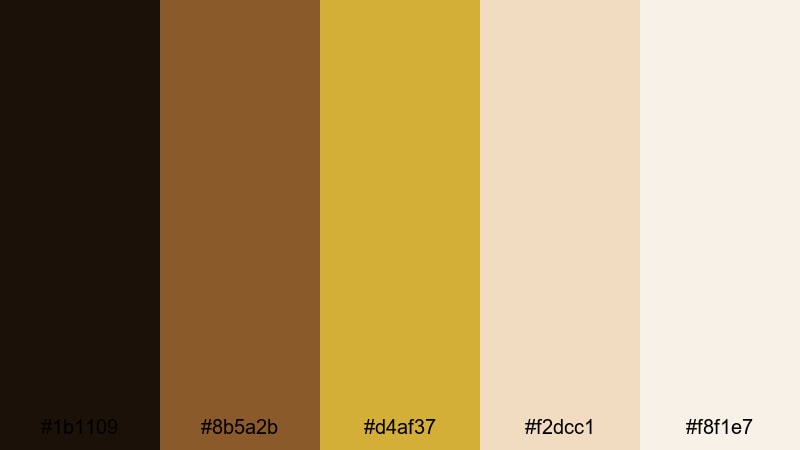
- HEX Codes: #1b1109, #8b5a2b, #d4af37, #f2dcc1, #f8f1e7
- Mood: Warm, nostalgic, and cinematic with a subtle vintage film feel.
- Use for: Ideal for narrative short films, moody vlogs, and retro title cards.
Vintage Amber Studio feels like a glowing studio lamp falling across worn leather and dark wood. The deep near black brown (#1b1109) anchors your frame, while amber gold (#d4af37) and soft creams (#f2dcc1, #f8f1e7) lift the highlights for a classic film look. It is perfect when you want your footage to feel intimate, tactile, and slightly nostalgic.
Use this palette for story driven videos, retro intros, and title cards that sit over grainy footage. In thumbnails, pair the darkest shade as a backdrop with gold text and cream accents. Inside Filmora, you can echo these colors in lower thirds, overlays, and transitions to make your whole edit feel like it belongs in the same vintage studio world.
Pro Tip: Build a Cinematic Gold Brown Look in Filmora
To keep this rich gold brown mood consistent, start by grading one hero clip inside Filmora, then reuse it as your reference. Adjust exposure and contrast so blacks feel deep but not crushed, and push warm tones in the midtones to match the amber accents in this palette. Once your base shot looks right, apply similar settings across intros, b roll, and talking head segments.
For graphics, match text and shape colors to the HEX codes above. Use the darkest tone for backgrounds, the bright gold for titles, and the lighter creams for buttons or chapter labels. This way your color story flows from thumbnail to outro without feeling random.
AI Color Palette
If you have a still frame, moodboard, or color card that captures this Vintage Amber Studio palette, you can use Filmora to spread that exact look through your whole project. Filmora's AI Color Palette feature analyzes the colors in a reference clip and automatically matches other shots to it.
Import your reference clip with the perfect gold brown tones, apply AI Color Palette to a few sample shots, and tweak intensity until skin tones and highlights feel natural. Then batch apply the result to the rest of your timeline so every scene shares the same cinematic warmth.
 secure download

HSL, Color Wheels & Curves
To fine tune a gold brown look, use Filmora's HSL sliders, color wheels, and curves. Nudge the orange and yellow hues slightly towards red for a richer amber, then use the color wheels to warm midtones while keeping highlights just off white. A gentle S curve will deepen shadows like #1b1109 without losing detail in hair and clothing.
If you want even more control, explore Filmora's advanced color correction tools and experiment with separate adjustments for shadows, midtones, and highlights. This helps you protect skin tones while still leaning backgrounds and props into your chosen gold brown palette.
secure download1000+ Video Filters & 3D LUTs
Sometimes the fastest way to lock in a gold brown look is to start from a preset. Filmora's video filters and 3D LUTs make it easy to add warm vintage contrast, soft fades, or subtle film grain in one click. Then you can tweak opacity and color settings so they match the HEX codes in your chosen palette.
Combine a warm cinematic LUT with a gentle vignette and grain for narrative work, or choose softer filters for lifestyle vlogs and product close ups. Apply your favorite combo as a custom preset so every new project can instantly pick up the same gold brown style.
secure downloadGolden Hour Drama
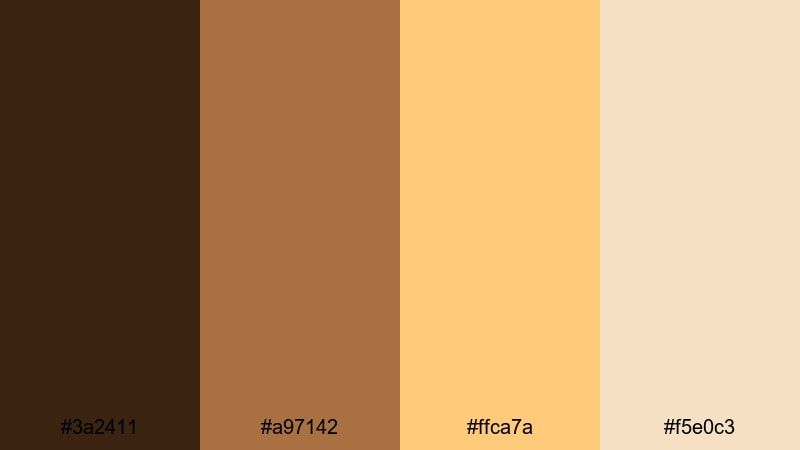
- HEX Codes: #3a2411, #a97142, #ffca7a, #f5e0c3
- Mood: Dramatic yet cozy, echoing late afternoon sunlight.
- Use for: Perfect for travel montages, cinematic b-roll, and emotional highlight reels.
Golden Hour Drama captures that moment when the sun is low and shadows stretch long. Deep brown (#3a2411) gives you contrast for silhouettes, while peachy gold (#ffca7a) and soft beige (#f5e0c3) mimic warm sky and glowing skin. It adds emotion and depth, even to everyday scenes.
Use this palette in Filmora when you want travel footage and b roll to feel cinematic without heavy grading. Try dark brown for text boxes, golden accents for titles, and the softest hue as a subtle overlay or gradient behind your logo. In thumbnails, set your subject against a darker area while text sits on pale beige for readability.
Cacao Film Grain
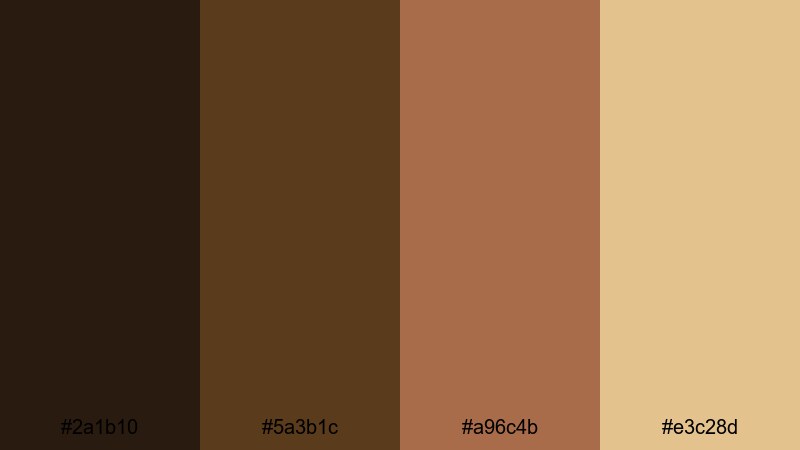
- HEX Codes: #2a1b10, #5a3b1c, #a96c4b, #e3c28d
- Mood: Earthy, grounded, and slightly gritty like 35mm film.
- Use for: Great for documentary-style edits, food content, and coffee shop vlogs.
Cacao Film Grain mixes dark chocolate browns (#2a1b10, #5a3b1c) with milkier highlights (#e3c28d) for a grounded, documentary feel. It is ideal if you want your project to feel tangible and real, like it was shot on slightly textured film stock.
Use it to grade coffee shop clips, food close ups, and behind the scenes footage. In Filmora, combine this palette with a grain overlay and a gentle vignette for docs or brand stories. For titles and lower thirds, lean on the midtone cacao (#a96c4b) for bars and the lightest shade for text, keeping everything warm but still legible.
Brass Spotlight Fade
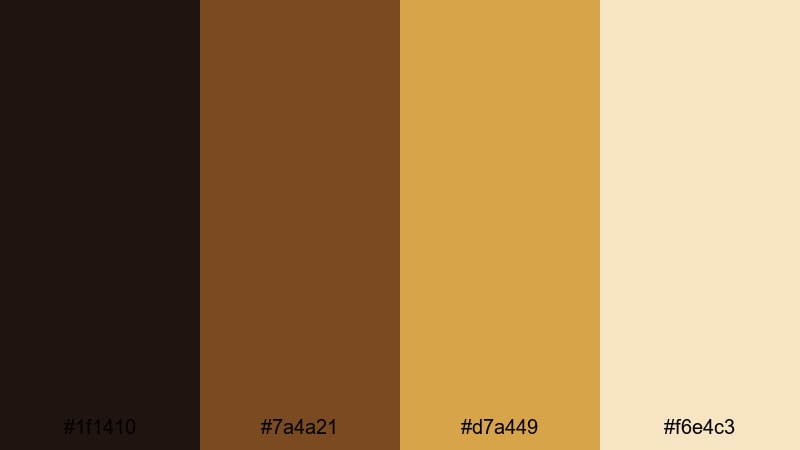
- HEX Codes: #1f1410, #7a4a21, #d7a449, #f6e4c3
- Mood: Theatrical and focused, like a single brass spotlight on a dark stage.
- Use for: Use for dramatic intros, title sequences, and music video visuals.
Brass Spotlight Fade pairs deep stage like shadows (#1f1410) with brassy gold (#d7a449) and creamy highlights. It naturally draws the eye to the brightest areas, just like a spotlight cutting through darkness.
Use this palette for video intros, performance clips, trailers, and music videos where you want text and subjects to pop. In Filmora, let the dark tone be your canvas, add brass gold as animated strokes or outlines around titles, and keep creamy accents for subtle flares or lower third backgrounds.
Soft & Minimal Gold Brown Color Palettes
Muted Honey Workspace
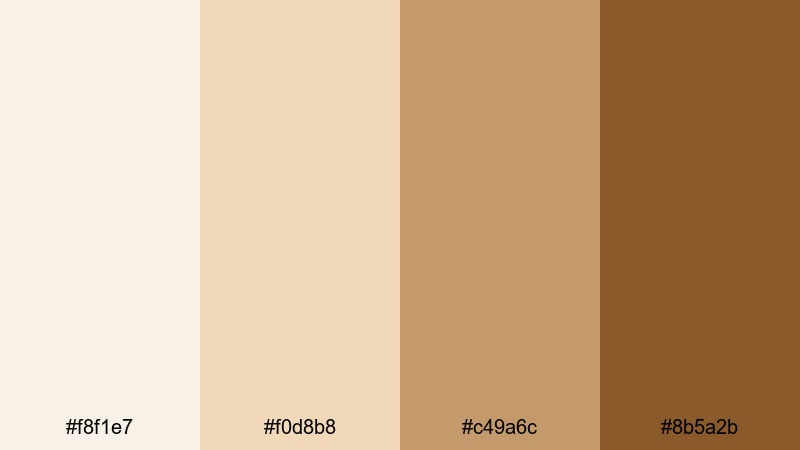
- HEX Codes: #f8f1e7, #f0d8b8, #c49a6c, #8b5a2b
- Mood: Soft, focused, and calm like a sunlit desk setup.
- Use for: Perfect for productivity vlogs, workspace tours, and tutorial thumbnails.
Muted Honey Workspace is all about calm productivity. Light creams (#f8f1e7, #f0d8b8) set a clean background, while honey browns (#c49a6c, #8b5a2b) add just enough warmth to feel inviting without visual clutter.
Use this palette for study with me videos, tech tutorials, and workspace b roll. In Filmora, keep backgrounds pale and neutral, then use the darker honey for text, icons, and callouts. For thumbnails, place your subject against the lightest tone and frame them with soft honey borders or drop shadows to keep everything airy and modern.
Dusty Caramel Stories
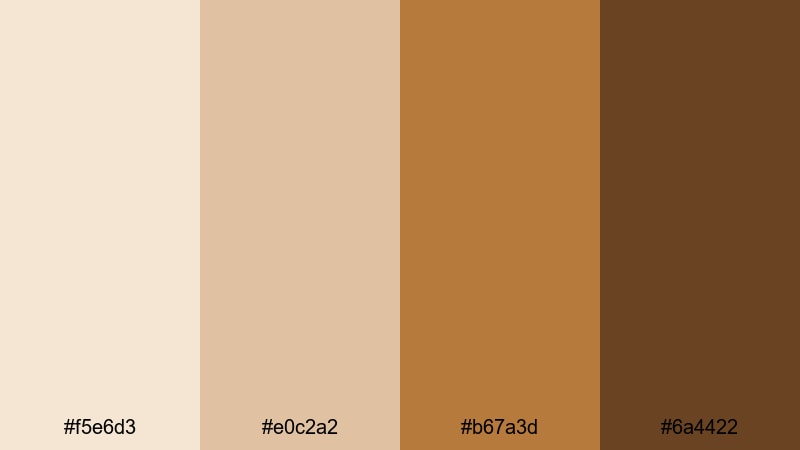
- HEX Codes: #f5e6d3, #e0c2a2, #b67a3d, #6a4422
- Mood: Storytelling and intimate, with a soft editorial touch.
- Use for: Ideal for sit down storytelling videos, podcasts, and lifestyle blogs.
Dusty Caramel Stories blends creamy beige (#f5e6d3) with caramel browns (#b67a3d, #6a4422) for an editorial, magazine style feel. It keeps skin tones warm and flattering, which is perfect for talking head content.
Use this palette to frame podcast episodes, Q&A sessions, and lifestyle sit downs. In Filmora, you can design clean title cards using the lightest tone as background, mid caramel for borders, and the deepest brown for headings. This gives your channel a soft but polished identity that feels cohesive across videos and blog graphics.
Soft Toffee Vlog
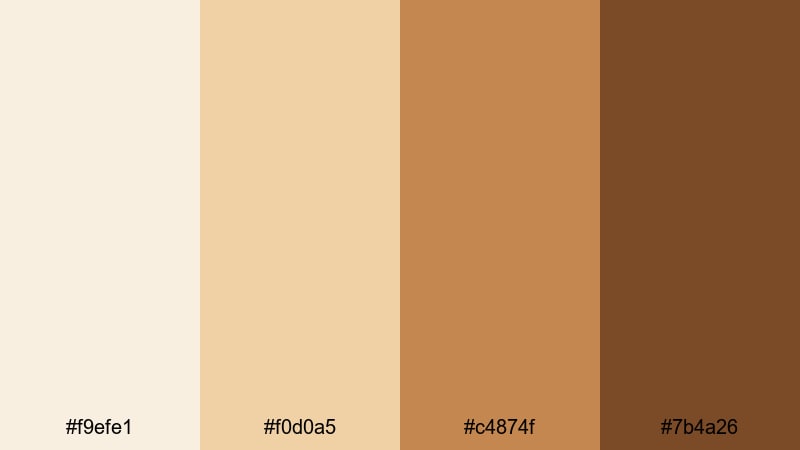
- HEX Codes: #f9efe1, #f0d0a5, #c4874f, #7b4a26
- Mood: Friendly, approachable, and slightly sweet.
- Use for: Great for daily vlogs, family content, and cozy lifestyle channels.
Soft Toffee Vlog uses light toffee tones (#f9efe1, #f0d0a5) with deeper browns (#c4874f, #7b4a26) to create a friendly, homey atmosphere. It is perfect for channels that lean into comfort, routine, and everyday life.
Apply this palette to lower thirds, transition cards, and subtitles in Filmora. Use pale toffee behind captions so they are easy to read, and reserve the darkest brown for key words or channel name lockups. In thumbnails, mix a toffee background with white or dark brown text for a clean, approachable look.
Pale Ochre Minimal
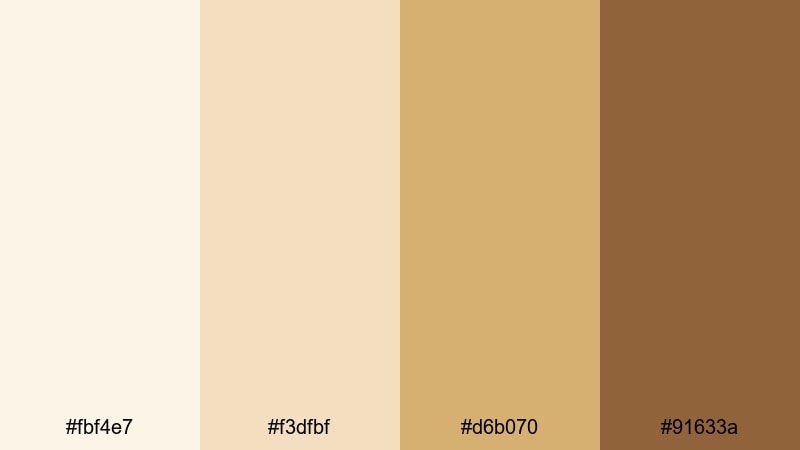
- HEX Codes: #fbf4e7, #f3dfbf, #d6b070, #91633a
- Mood: Airy, refined, and modern with subtle warmth.
- Use for: Use for minimalist intros, clean lower thirds, and app-style UI overlays.
Pale Ochre Minimal is light, modern, and gently warm. Off whites (#fbf4e7) and pale ochre (#f3dfbf) create a neutral canvas, while the deeper browns (#d6b070, #91633a) add just enough structure.
Use this palette when designing UI inspired overlays, chapter markers, or clean openers in Filmora. Place icons and progress bars in the darker ochre, but leave lots of breathing space with the pale background. This keeps your content professional, especially for tech, productivity, or educational videos.
Luxurious Gold Brown Branding Palettes
Royal Mocha Signature
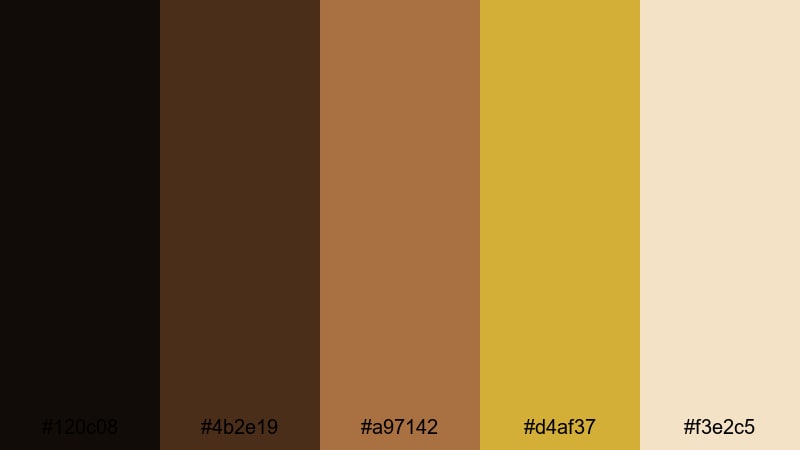
- HEX Codes: #120c08, #4b2e19, #a97142, #d4af37, #f3e2c5
- Mood: Opulent and authoritative with a rich brand feel.
- Use for: Perfect for brand intros, logo reveals, and premium course content.
Royal Mocha Signature leans into deep espresso tones (#120c08, #4b2e19) combined with classic gold (#d4af37) and warm highlights (#f3e2c5). It looks expensive and confident, ideal for creators positioning themselves as premium brands.
Use this palette for logo reveals, course intros, and high ticket product trailers. In Filmora, animate your logo in bright gold over a dark mocha background, then use the lightest cream tone for supportive text. Keep motion smooth and restrained so the luxurious colors stay center stage.
Gilded Logo Reveal
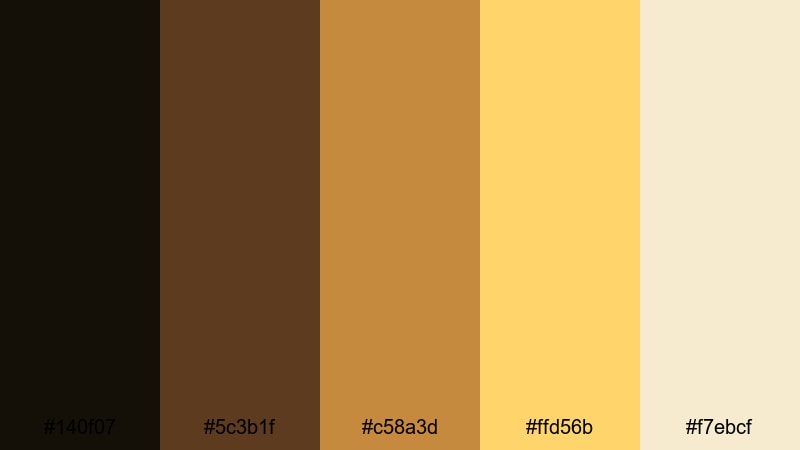
- HEX Codes: #140f07, #5c3b1f, #c58a3d, #ffd56b, #f7ebcf
- Mood: Shiny, polished, and attention grabbing.
- Use for: Ideal for animated logo stings, product trailers, and channel bumpers.
Gilded Logo Reveal combines rich shadows (#140f07), bronzy midtones (#5c3b1f, #c58a3d), and bright gold highlights (#ffd56b). It is bold and eye catching, designed to make any logo or tagline feel instantly premium.
In Filmora, use the darkest tone as a fade in background, then introduce gold strokes or flares that reveal your logo in #ffd56b. Use the soft cream (#f7ebcf) behind taglines or CTAs so they stay readable while still fitting the gilded theme.
Champagne Sepia Luxe
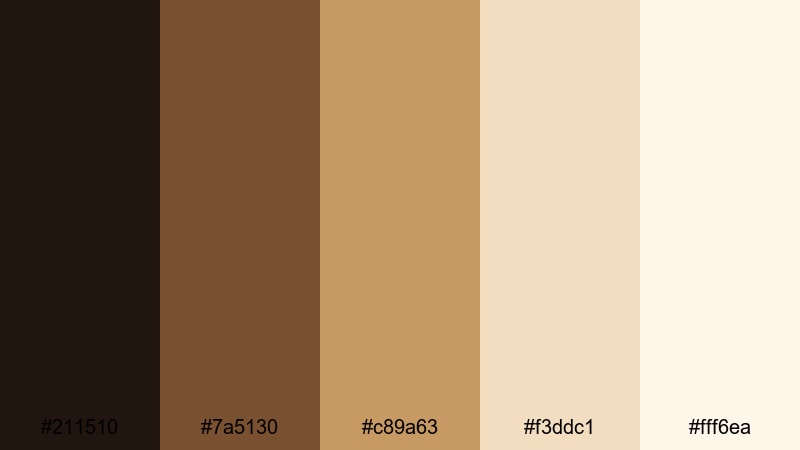
- HEX Codes: #211510, #7a5130, #c89a63, #f3ddc1, #fff6ea
- Mood: Elegant, soft, and slightly nostalgic.
- Use for: Great for wedding films, luxury product promos, and beauty content.
Champagne Sepia Luxe brings together deep sepia (#211510), warm browns, and delicate champagne tones (#f3ddc1, #fff6ea). It feels like a high end wedding invitation or perfume ad, romantic but not overly saturated.
Use it in Filmora for wedding highlight reels, jewelry promos, or soft glam beauty edits. Let the lightest shade fill most of the frame, then add accents and typography in the mid and dark browns. Subtle blur, slow motion, and gentle lens flares will emphasize the luxurious champagne aesthetic.
Cinematic Bronze Crest
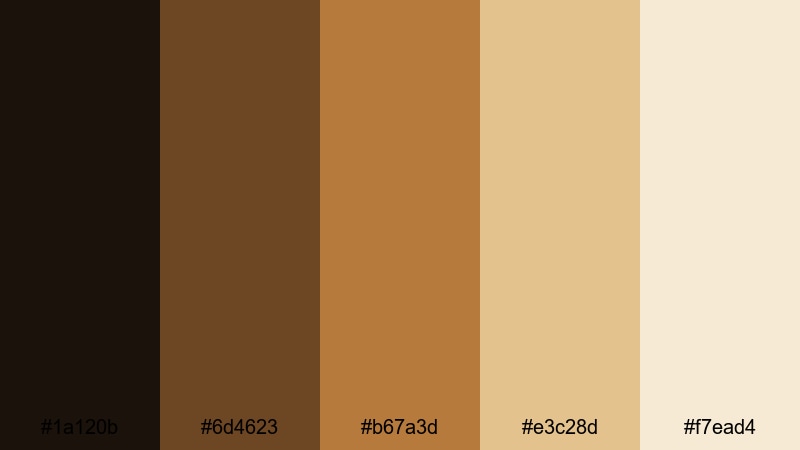
- HEX Codes: #1a120b, #6d4623, #b67a3d, #e3c28d, #f7ead4
- Mood: Strong and cinematic with a refined bronze sheen.
- Use for: Use for documentary title cards, historical content, and brand hero shots.
Cinematic Bronze Crest blends dark, serious browns (#1a120b, #6d4623) with bronze highlights (#b67a3d, #e3c28d) and soft cream. The result is a powerful yet refined look that works well for serious or historical themes.
Use it for documentary openings, educational series branding, or brand hero shots where you want gravitas. In Filmora, design title cards with the darkest tone as background, bronze for decorative lines or emblems, and cream for text. Slow zooms and subtle film grain will enhance the cinematic quality.
Earthy Gold Brown Lifestyle Palettes
Autumn Latte Travel
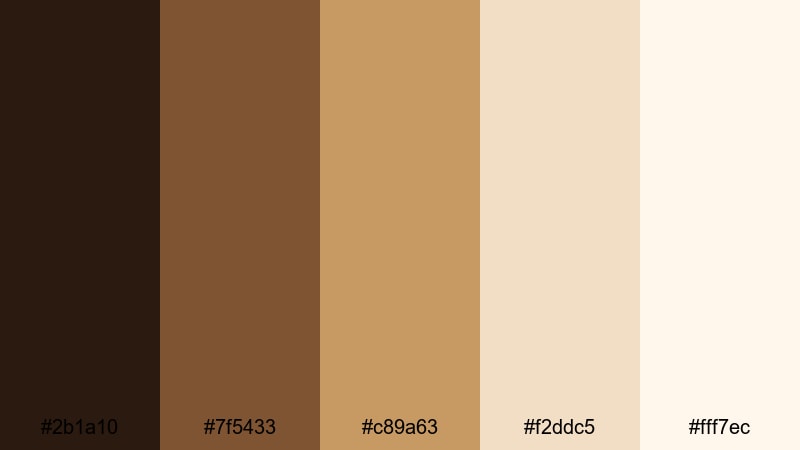
- HEX Codes: #2b1a10, #7f5433, #c89a63, #f2ddc5, #fff7ec
- Mood: Cozy, adventurous, and seasonal like a fall city walk.
- Use for: Perfect for travel vlogs, cafe hopping reels, and autumn lookbooks.
Autumn Latte Travel pairs latte creams (#f2ddc5, #fff7ec) with warm browns and golds (#7f5433, #c89a63). It feels like wandering through a city in fall, coffee in hand, leaves on the ground.
Use this palette to grade cityscape b roll, cafe interiors, and outfit shots in Filmora. Let lighter tones fill the frame for thumbnails and end cards, then bring in the darker shade for text and frames. It keeps your seasonal content cozy, cohesive, and instantly recognizable.
Desert Sand Nomad
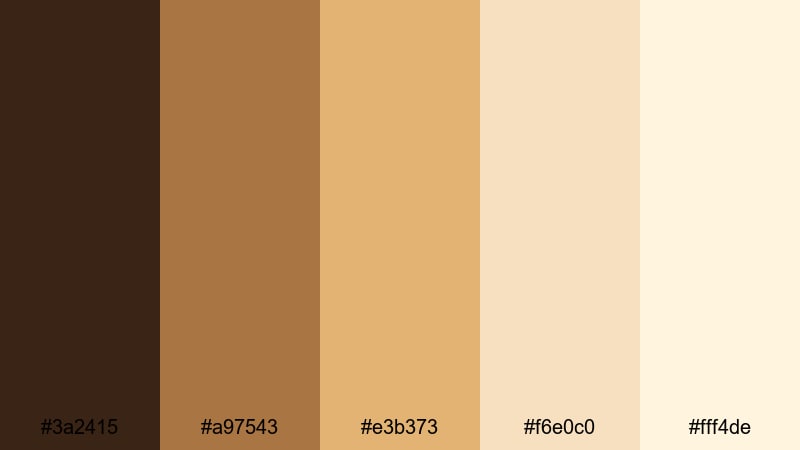
- HEX Codes: #3a2415, #a97543, #e3b373, #f6e0c0, #fff4de
- Mood: Sun baked, free spirited, and wanderlust filled.
- Use for: Great for outdoor adventures, desert trips, and slow travel videos.
Desert Sand Nomad is built from sand toned golds (#e3b373, #f6e0c0) and sun warmed browns (#3a2415, #a97543). It captures the sense of open landscapes, road trips, and long, bright days.
Use it to grade hiking, camping, and road trip footage in Filmora. Keep skies and distant hills in the lighter tones while pushing rocks, skin, and clothing slightly warmer. For overlays and maps, use the mid sand gold as a base and the darkest brown for route lines and labels.
Rustic Bakery Morning
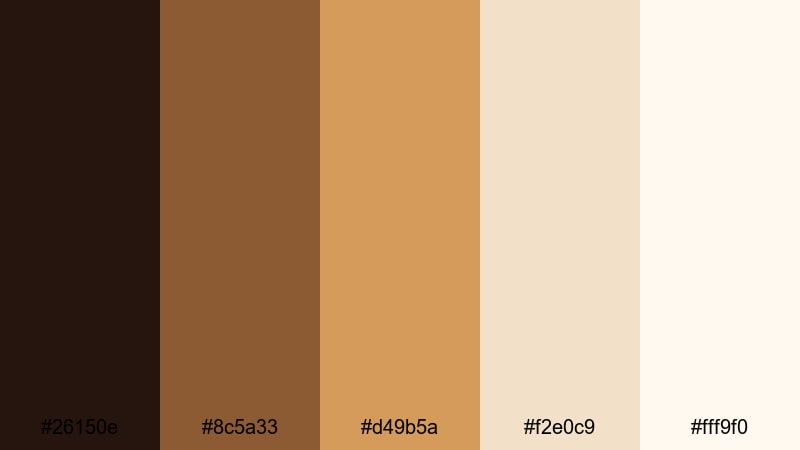
- HEX Codes: #26150e, #8c5a33, #d49b5a, #f2e0c9, #fff9f0
- Mood: Inviting, homemade, and comforting like fresh bread.
- Use for: Perfect for cooking channels, small business promos, and morning routines.
Rustic Bakery Morning combines golden crust browns (#8c5a33, #d49b5a) with floury creams (#f2e0c9, #fff9f0). It is warm, approachable, and feels handmade, just like a small bakery at sunrise.
Use this palette for recipes, behind the scenes bakery videos, or small business promos. In Filmora, let the lightest shades dominate backgrounds and table surfaces, then use mid browns for labels, ingredient lists, and product prices. This keeps everything readable while reinforcing the cozy, artisan mood.
Tips for Creating Gold Brown Color Palettes
When you build your own gold brown palettes for video and design, focus on balance: rich warmth, clear contrast, and enough neutrality so your visuals stay readable across thumbnails, intros, and full edits.
- Always include at least one very dark and one very light tone so titles, captions, and logos can stand out clearly in Filmora.
- Keep skin tones in mind: avoid pushing gold and brown too far into orange; use HSL tools to protect natural complexions while warming backgrounds.
- Limit your main palette to 3 to 5 colors and reuse them for text, shapes, and overlays; this creates instant brand recognition.
- Use gold or light beige for highlights and accents, and reserve the deepest brown for key text, outlines, or drop shadows.
- Test your palette on both dark and light thumbnails to make sure important elements stay readable at small sizes.
- Combine gold brown with a subtle accent color (like teal, forest green, or muted burgundy) if you need contrast, but keep the accent usage minimal.
- Save custom color presets and LUTs in Filmora once you are happy with a look, so future videos on your channel automatically share the same style.
- Check your colors on different screens and in both light and dark mode YouTube interfaces to ensure your palette still feels balanced.
Gold brown color palettes can make your videos feel cinematic, cozy, or luxurious while keeping your channel identity consistent. From vintage inspired grading to clean educational overlays, these 15 palettes give you ready made HEX codes you can plug directly into Filmora for titles, graphics, and color grading.
Experiment with a few palettes, save your favorites as presets, and adjust them with Filmora's tools until they match your brand or story. Whether you create vlogs, documentaries, tutorials, or promos, a well chosen gold brown palette will help your visuals feel intentional and memorable.
Open your next project in Filmora, drop in one of these palettes, and start shaping your own warm, cinematic look from the first frame to the final outro.
secure download