

 100% Security Verified | No Subscription Required | No Malware


 ChatGPT
 Perplexity
 Gemini
 Claude
 Grok
Grok
Goldenrod is a warm, optimistic yellow-gold that instantly feels cinematic. It suggests sunlight, comfort, and creativity, making it perfect for scenes that should feel welcoming, nostalgic, or luxurious. In thumbnails and intros, goldenrod pulls the eye without being as aggressive as pure yellow, so it is ideal for creators who want energy and warmth without losing elegance.
In video branding, goldenrod works across logos, titles, lower-thirds, and overlays, giving channels a recognizable visual signature. Below you will find curated goldenrod color palettes with HEX codes designed for YouTube thumbnails, vlogs, cinematic edits, and branded graphics, all ideal for creators and Filmora users who want consistent, professional color.
In this article
Warm Cinematic Goldenrod Color Palettes
Sunset Reel Glow
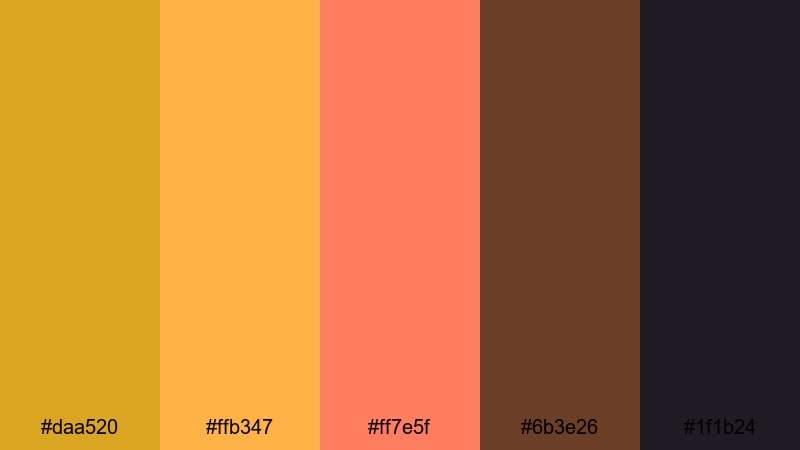
- HEX Codes: #daa520, #ffb347, #ff7e5f, #6b3e26, #1f1b24
- Mood: Radiant, cinematic, and nostalgic like a sunlit travel montage.
- Use for: Great for travel vlogs, cinematic B-roll sequences, and warm YouTube thumbnails that need an eye-catching sunset feel.
Sunset Reel Glow captures the magic of golden hour: glowing goldenrod, peachy highlights, and deep, inky shadows. The combination of #daa520 and #ffb347 evokes warmth and optimism, while #ff7e5f adds a romantic, soft flare. The darker browns and near-black tones (#6b3e26 and #1f1b24) keep everything grounded and cinematic.
Use this palette when you want your travel vlogs, reels, or lifestyle edits to feel cozy and adventurous at the same time. It works beautifully on title cards, location tags, and chapter screens, as well as in custom gradients for thumbnails and end screens. Brand elements like logos, subscribe buttons, and lower-thirds will stand out clearly against the rich, moody background tones.
Pro Tip: Build a Cinematic Goldenrod Glow in Filmora
To keep a golden-hour look consistent, pick one or two of these goldenrod HEX codes for your titles and overlays, then grade your footage toward the same warm tones. In Filmora, you can color-correct your clips so skin tones lean into soft gold while shadows stay deep and clean, matching the contrast of Sunset Reel Glow from your intro through to your end screen.
Design your graphic elements directly inside Filmora using the same hex values for text, shapes, and callouts. That way, your thumbnail, opener, lower-thirds, and B-roll captions all share one cohesive goldenrod identity instead of feeling like separate, disconnected pieces.
AI Color Palette
If you have a still frame or thumbnail design that already nails your ideal sunset look, you can use that as a reference for the rest of your video. Filmora's AI Color Palette feature analyzes that reference image and applies the same goldenrod tones, warmth, and contrast across other clips.
Import a frame graded with this palette, open AI Color Palette, and let Filmora automatically match the color mood for your whole sequence. This is perfect for travel montages, lookbooks, and reels where you want every shot to feel like it was filmed under the same glowing evening sky.
 secure download

HSL, Color Wheels & Curves
To refine a goldenrod look even further, adjust your footage with HSL, color wheels, and curves. You can push yellows toward a richer golden tone, tame oversaturated oranges, or cool down shadows slightly to preserve contrast without losing warmth. Filmora's color correction tools give you precise control over highlights, midtones, and shadows so every clip fits your chosen palette.
Use curves to deepen the blacks (#1f1b24) and protect detail in the highlights, while color wheels let you nudge midtones toward goldenrod for consistent, flattering skin tones. HSL sliders are ideal for fine-tuning grass, sky, and wardrobe so they do not clash with your sunset-focused branding.
secure download1000+ Video Filters & 3D LUTs
Once your goldenrod base is set, you can quickly experiment with different moods using Filmora's built-in effects. Filmora's video filters and 3D LUTs make it easy to add subtle film grain, vintage fades, or bold, stylized looks while still preserving your core color palette.
Apply a warm cinematic LUT to instantly intensify golden highlights, or stack a gentle vignette and glow filter to push the sunset feeling even further. This helps you deliver polished, on-brand visuals for intros, outros, shorts, and long-form videos without having to rebuild the look from scratch every time.
secure downloadHarvest Documentary Frame
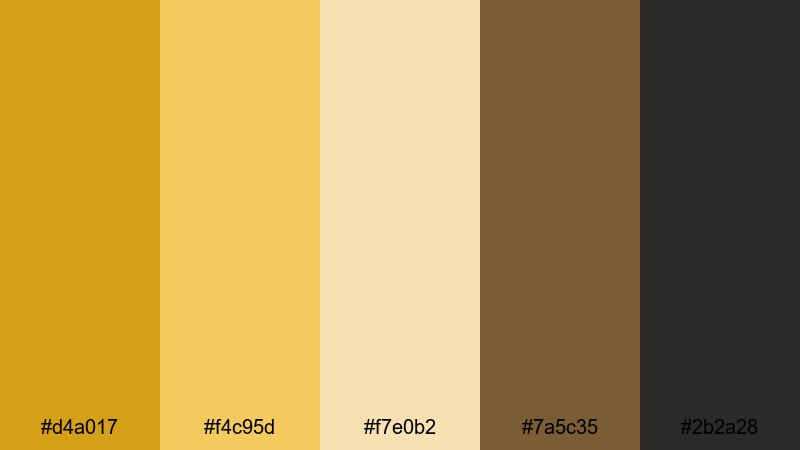
- HEX Codes: #d4a017, #f4c95d, #f7e0b2, #7a5c35, #2b2a28
- Mood: Earthy, grounded, and story-driven with a warm editorial vibe.
- Use for: Perfect for documentaries, food content, and lifestyle storytelling where you want a rich, natural tone.
Harvest Documentary Frame leans into organic goldenrod and soft creams, balanced by earthy browns. It feels like late-afternoon light falling across wood, fields, and kitchen tables, ideal for content that is intimate and real. The muted contrast keeps attention on faces, hands, and textures rather than flashy effects.
Use this palette for doc-style interviews, recipe videos, studio tours, and slow-paced lifestyle pieces. Apply the light shades to backgrounds and title cards, with the darker tones for text and framing elements. Thumbnails using this palette feel trustworthy and editorial, which works especially well for channels focused on craftsmanship, food, or sustainable living.
Golden Hour Travel Vlog

- HEX Codes: #e1b12c, #ffd07b, #ffe9c4, #3f5673, #111827
- Mood: Adventurous, dreamy, and lightly romantic with coastal undertones.
- Use for: Use for travel vlogs, cinematic trip recaps, and thumbnails that balance warm subject shots with cool skies or oceans.
Golden Hour Travel Vlog pairs rich goldenrod and vanilla highlights with cool marine blues. This contrast mimics sun on skin against deep blue oceans or city skylines after sunset. The dark navy and charcoal anchor your visuals, preventing the warm tones from feeling too soft or washed out.
Use warm tones for titles, accent shapes, and key callouts, and let the blues dominate backgrounds and drop shadows. This palette is excellent for location cards, animated map lines, or story chapters in a travel series, and also for cover images where you layer bold text over coastal scenery.
Festival Lights Montage
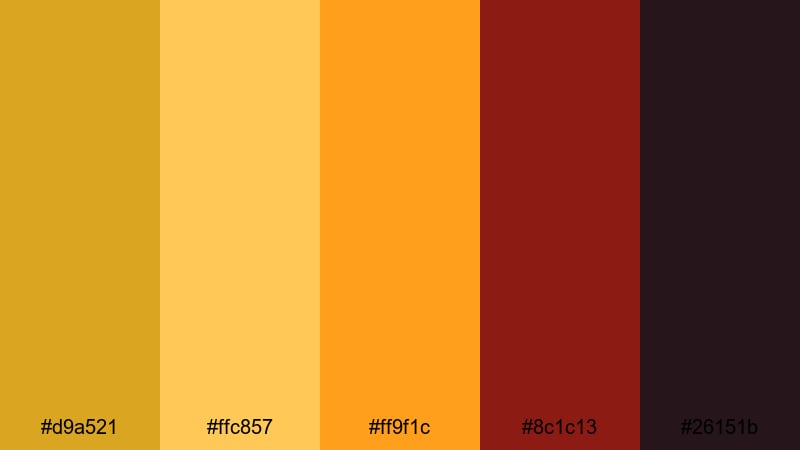
- HEX Codes: #d9a521, #ffc857, #ff9f1c, #8c1c13, #26151b
- Mood: Energetic, lively, and packed with night-life excitement.
- Use for: Ideal for concert edits, event aftermovies, and social clips that need glowing titles and animated overlays.
Festival Lights Montage cranks up saturation and contrast for a bold, high-energy look. Goldenrod and bright orange mimic stage lights and lanterns, while deep red and near-black give the feeling of crowded venues and night skies. It screams music festivals, clubs, and street parties.
Use the brightest hues for outlines around performers, animated transitions, and kinetic typography. The darkest shades are perfect for backgrounds on lower-thirds, logos, and social handles, making text glow like neon over a dark crowd shot. This palette works especially well in fast cuts set to music or highlight reels from live events.
Soft Vintage Goldenrod Color Palettes
Sepia Storybook Goldenrod

- HEX Codes: #c9991c, #f0d08a, #f6e7c1, #b08a7b, #4a3b34
- Mood: Soft, nostalgic, and gentle like an old family album.
- Use for: Best for memoir-style videos, vintage intro cards, and storytelling shorts with a warm, retro filter.
Sepia Storybook Goldenrod takes goldenrod into a muted, memory-soaked direction. Creams, soft browns, and a hint of dusty pink make your footage feel like it was pulled from an old book or box of family photos. The tones are kind to skin and flatter natural light.
Use this palette for reflective voiceovers, journaling vlogs, heritage stories, or cozy bookish content. It is great for title cards that mimic printed pages, subtle overlays that look like aged paper, and thumbnail backgrounds for channels with a nostalgic or slow-living theme.
Dusty Film Archive
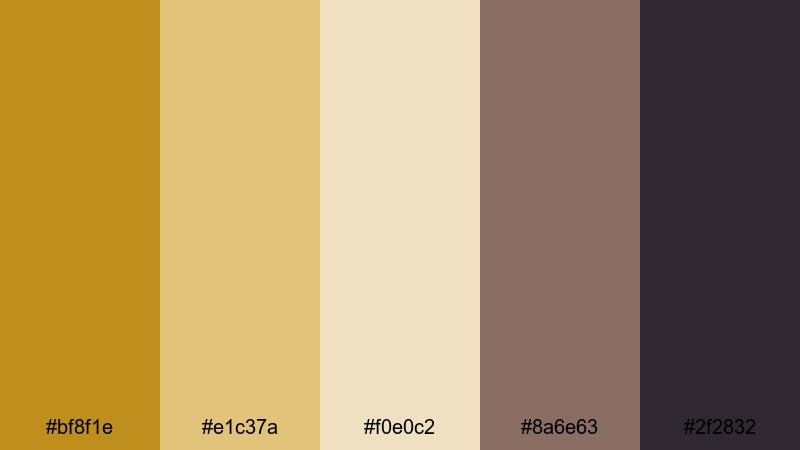
- HEX Codes: #bf8f1e, #e1c37a, #f0e0c2, #8a6e63, #2f2832
- Mood: Weathered, cinematic, and slightly moody with analog charm.
- Use for: Great for film essay channels, historic recaps, and title cards that should feel archival and curated.
Dusty Film Archive recreates the patina of aged celluloid: muted goldenrod, beige, and smoky browns with a deep, inky accent. It feels curated and intellectual, perfect for essays, analysis, and history-focused content.
Apply it to essay-style motion graphics, lower-thirds for quotes and dates, and overlays that reference old projectors or film strips. On thumbnails, combine the lighter tones for background with the darkest hue for bold, legible titles that suggest authority and depth.
Retro Postcard Journey
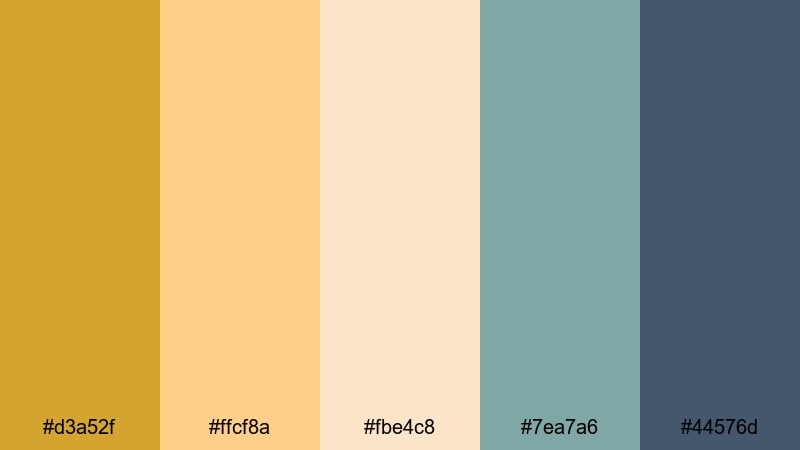
- HEX Codes: #d3a52f, #ffcf8a, #fbe4c8, #7ea7a6, #44576d
- Mood: Playful, nostalgic, and a bit coastal with postcard-style charm.
- Use for: Use for travel diaries, animated map sequences, and chapter cards that call back to mid-century print design.
Retro Postcard Journey mixes sunny goldenrod with pastel teal and navy, echoing vintage travel posters. It feels light, playful, and slightly coastal, ideal for storytelling that jumps from city to city or country to country.
Use the warm tones on stamps, titles, and markers for locations, while the teals and blues frame maps, lower-thirds, or sidebars. This palette strengthens channel branding for travel and adventure niches by giving intros, story chapters, and thumbnails a unified mid-century postcard aesthetic.
Antique Studio Warmth
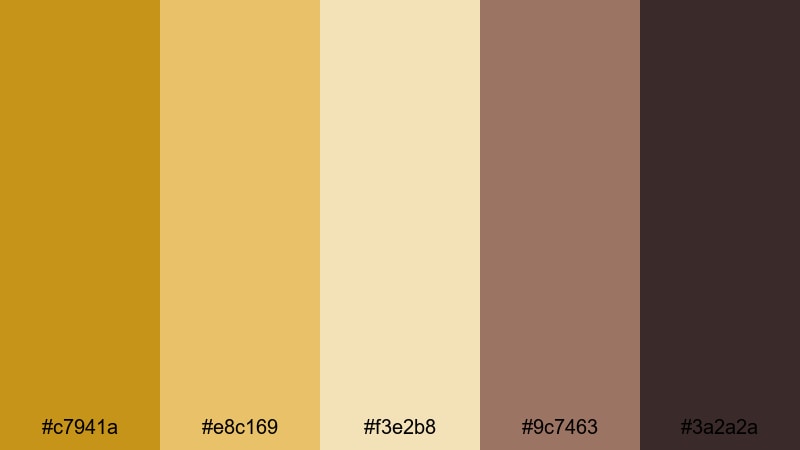
- HEX Codes: #c7941a, #e8c169, #f3e2b8, #9c7463, #3a2a2a
- Mood: Intimate, artsy, and warmly lit like an old photo studio.
- Use for: Perfect for portrait sessions, behind-the-scenes reels, and cozy studio tours with soft, flattering tones.
Antique Studio Warmth wraps your visuals in creamy gold and rose-brown, with deep chocolate accents. It feels like tungsten bulbs bouncing off canvas backdrops and wooden floors, flattering faces and textures in close-up shots.
Use it for portrait sessions, art process videos, and behind-the-scenes studio content. Apply lighter tones to name cards and social handles, and use the darkest hue for frames, borders, and title text to create a premium, intimate look on both videos and thumbnails.
Bold Modern Goldenrod Color Palettes
Creator Spotlight Burst
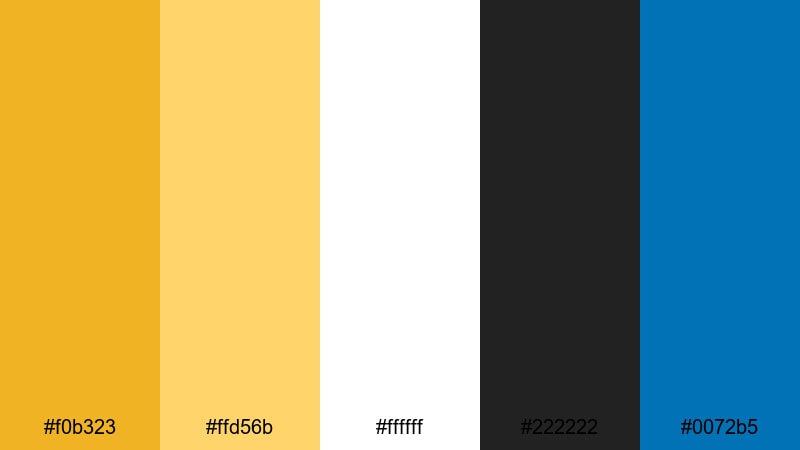
- HEX Codes: #f0b323, #ffd56b, #ffffff, #222222, #0072b5
- Mood: Bold, confident, and high-contrast with a polished creator aesthetic.
- Use for: Great for channel branding, title screens, and thumbnails where you want your face or logo to pop instantly.
Creator Spotlight Burst is built for personal brands. Bright goldenrod and clean white are set against charcoal and a punchy blue, giving everything a sharp, professional edge. It feels modern, confident, and easy to read even at small sizes.
Use goldenrod and white for text and main shapes, the blue for accents or call-to-action buttons, and the dark gray as a background that makes your subject and logo jump forward. It is particularly strong for YouTube channel art, intro animations, and face-focused thumbnails that need impact on crowded feeds.
Cyber Neon Goldenrod
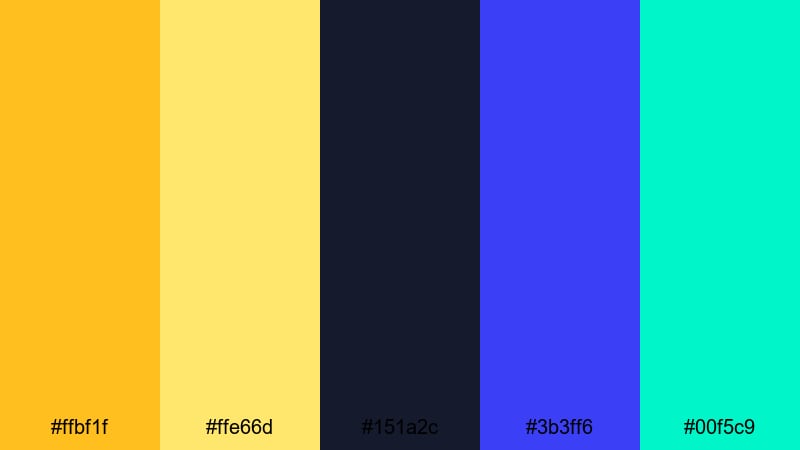
- HEX Codes: #ffbf1f, #ffe66d, #151a2c, #3b3ff6, #00f5c9
- Mood: Futuristic, electric, and edgy like a tech-inspired city at night.
- Use for: Use for motion graphics, esports intros, and glitch transitions that need a neon glow anchored by warm gold.
Cyber Neon Goldenrod fuses warm goldenrod with electric blues and teals on a deep navy base. It feels like a neon skyline, blending tech, gaming, and futuristic aesthetics in a single palette.
Use the golden tones for logos and hero text, and let the vibrant blue and teal light up borders, scans, HUD elements, and glitch transitions. This palette is perfect for esports intros, tech channel branding, and shorts that feature digital effects or fast motion graphics.
Gaming Highlight Streaks
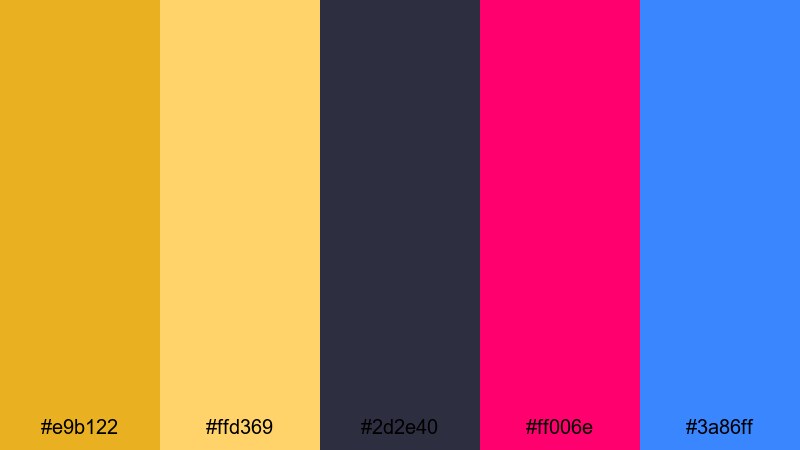
- HEX Codes: #e9b122, #ffd369, #2d2e40, #ff006e, #3a86ff
- Mood: Hyped, competitive, and punchy with esports-level intensity.
- Use for: Perfect for gaming overlays, kill highlights, and animated lower-thirds that track scores or chat.
Gaming Highlight Streaks combines warm goldenrod with neon magenta and electric blue over a dark slate backdrop. It is designed for fast-paced, competitive visuals where information has to stay clear while the action goes wild.
Use the dark base for facecam frames and gameplay crop borders, with goldenrod for key text like scores, streaks, and player names. The neon colors are perfect for animated arrows, streaks, and transitions that draw viewers to critical moments, thumbnails, and highlight reels.
Streetwear Edit Energy

- HEX Codes: #d7a321, #ffcc4c, #101010, #f5f5f5, #ff4e00
- Mood: Urban, stylish, and punchy with a fashion-forward edge.
- Use for: Great for lookbooks, street dance edits, and reel-style promos where bold titles meet minimal backdrops.
Streetwear Edit Energy uses goldenrod and bright yellow against crisp black and white, with a hot orange accent. It looks like a fashion campaign pasted over city walls, giving your edits a bold, editorial feel.
Use black and white for negative space and clean layouts, with goldenrod for titles and key shapes. The orange accent is ideal for sale tags, drop dates, or subscribe prompts. This palette shines in lookbooks, outfit breakdowns, street dance edits, and short-form promos on social platforms.
Minimal Elegant Goldenrod Color Palettes
Brand Title Monoline

- HEX Codes: #cfa021, #f4d37b, #ffffff, #1e293b
- Mood: Clean, professional, and quietly luxurious.
- Use for: Best for logo reveals, clean title cards, and UI elements in tutorial or business videos.
Brand Title Monoline keeps things simple but sophisticated. Goldenrod accents sit on top of white and deep navy, giving a subtle luxury feel without clutter. The palette is highly readable and works especially well for text-heavy content.
Use goldenrod for logos, lines, and icons, keep most backgrounds white or off-white, and reserve navy for text and key headers. It is ideal for business explainers, tutorials, software demos, and any channel that wants a tidy, premium identity with a touch of warmth.
Studio Portfolio Clean
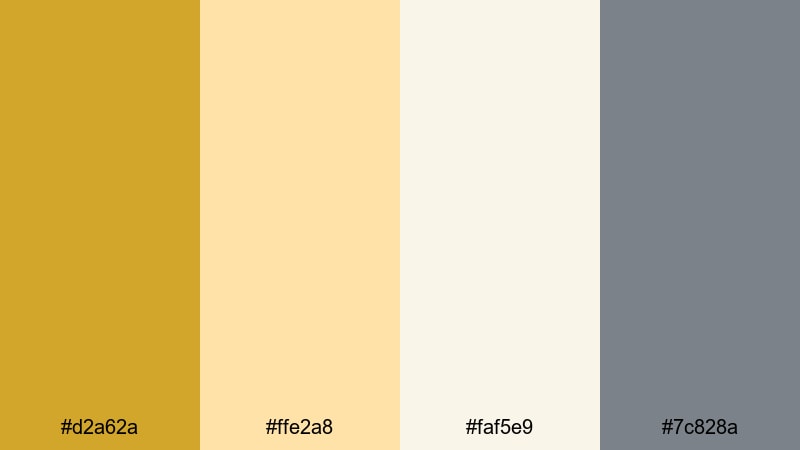
- HEX Codes: #d2a62a, #ffe2a8, #faf5e9, #7c828a
- Mood: Refined, airy, and design-forward with a creative studio vibe.
- Use for: Use for portfolio reels, case-study videos, and slide-style explainers where clarity and elegance matter.
Studio Portfolio Clean centers on soft goldenrod, pale neutrals, and cool gray accents. It feels like a carefully lit design studio: minimal, airy, and modern, with enough warmth to avoid feeling sterile.
Use the palest shades as your canvas for text and screenshots, goldenrod for subtle highlights and key numbers, and gray for secondary text. This palette suits case studies, portfolio reels, slideshow-style explainers, and any branding that should feel thoughtful and design-conscious.
Luxury Product Teaser
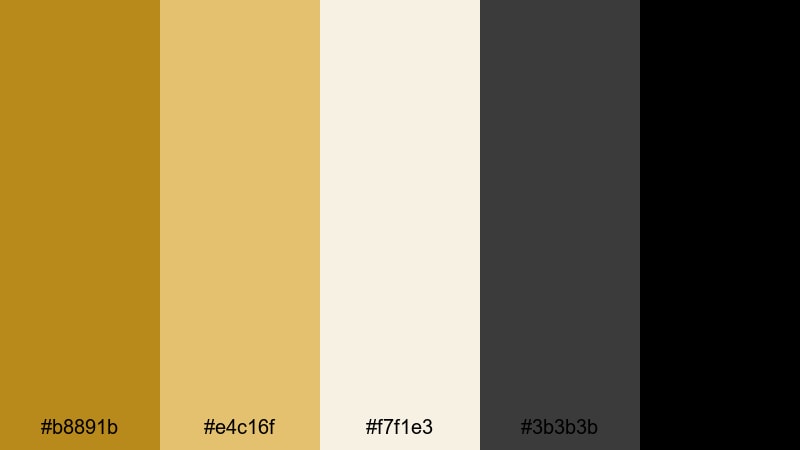
- HEX Codes: #b8891b, #e4c16f, #f7f1e3, #3b3b3b, #000000
- Mood: Opulent, dramatic, and high-end with a boutique feel.
- Use for: Perfect for product teasers, jewelry or tech promos, and cinematic ads that lean into premium branding.
Luxury Product Teaser combines deep goldenrod and champagne tones with charcoal and pure black. It instantly suggests exclusivity and luxury, making it a strong choice for high-ticket products, launches, and premium services.
Use black and charcoal as dramatic backdrops, reserve goldenrod for logos, borders, and key title words, and bring in champagne and cream for detail shots or elegant lower-thirds. This palette is built for slow-motion close-ups, teaser trailers, and spotlight ads where every frame should feel expensive and intentional.
Tips for Creating Goldenrod Color Palettes
Goldenrod is flexible enough to feel cozy, bold, or luxurious depending on what you pair it with. These tips will help you combine goldenrod with other colors in ways that work for video, thumbnails, and brand design.
- Use dark neutrals (navy, charcoal, or black) behind goldenrod text to guarantee readability on small mobile screens and packed feeds.
- Balance warmth with a cooler accent (blue, teal, or slate) so your visuals do not feel overly yellow or washed out, especially in long videos.
- Pick one main goldenrod HEX value as your brand anchor and repeat it across logos, lower-thirds, end cards, and thumbnails for instant recognition.
- Test your palette on real footage by adding text and shapes over different scenes (daylight, indoor, night) to check contrast and legibility.
- Keep supporting colors slightly desaturated if your footage is already warm; this prevents the overall image from looking too intense or cheap.
- Use lighter goldenrod tints for backgrounds or highlight boxes and reserve the deepest shades or dark neutrals for main titles and key stats.
- Create separate versions of your palette for light and dark modes so your titles and overlays look good on both bright and moody edits.
- Save your palettes as reusable presets or style guides so new thumbnails, intros, and reels automatically match your established goldenrod branding.
Goldenrod color palettes are powerful tools for shaping mood, from soft vintage nostalgia to bold modern branding. By choosing a palette that fits your story and sticking to it across titles, overlays, and thumbnails, you can build a recognizable visual identity that feels polished and intentional.
Use these 15 palettes as starting points, then refine them as you experiment with footage, lighting, and typography. In Filmora, you can turn your favorite goldenrod combinations into consistent color grades, reusable title templates, and stylish effects that carry across your whole channel.
Whether you film travel vlogs, gaming highlights, or product teasers, bringing a focused goldenrod palette into your workflow will help your videos stand out and feel more cinematic from the very first frame.
secure download