

 100% Security Verified | No Subscription Required | No Malware

Give your videos the polished, big-screen treatment with a Hollywood movie color grading LUT filter set designed for content creators who want instant cinematic impact.
These Filmora filters emulate classic and modern Hollywood looks so you can quickly balance tones, shape mood, and create story-driven visuals without spending hours on manual color work.
In this article
Golden Hour Hollywood Dramas
Sunset Amber Glow
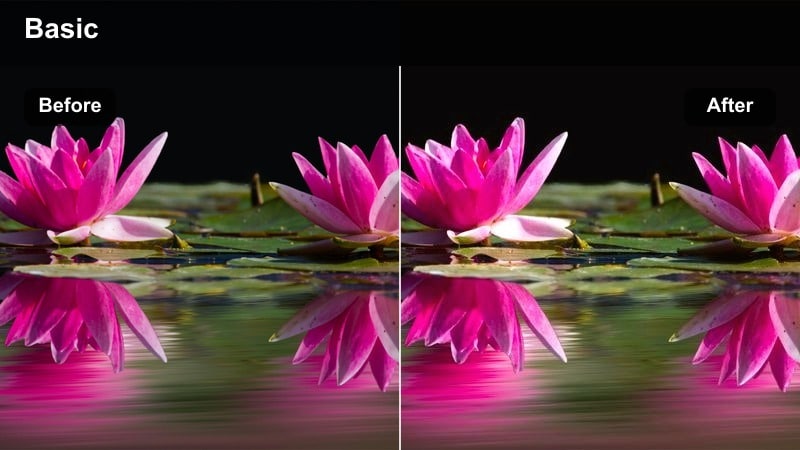
- Effect look: Warm, amber-soaked highlights with softened contrast for a classic Hollywood sunset drama feel.
- Best for: Emotional vlogs, dialogue scenes, outdoor love stories shot around golden hour or early evening.
- Editing tip: Lower saturation on greens and slightly lift the shadows to keep skin tones flattering and cinematic.
Sunset Amber Glow wraps your footage in a rich, golden wash that instantly suggests nostalgia, romance, and reflection. In Filmora, this Hollywood movie color grading LUT adds warmth to highlights and midtones while smoothing contrast so faces look soft and flattering, even if you shot in harsh light.
Apply this cinematic LUT to outdoor conversations, proposals, or reflective solo walks to make the sky feel like a painted backdrop without losing detail in your subject. For best results, lightly raise shadow detail with Filmoras color tools and fine-tune white balance so the warmth feels intentional rather than overly orange.
Match Hollywood Color in One Click with AI
Filmoras AI-powered color tools can analyze your clip and automatically suggest settings that align with the Hollywood Movie Color Grading LUT filters in this pack. You get a fast, accurate starting point that already feels cinematic before you even start tweaking.
Once AI has matched your tones, you can refine the look with simple sliders for exposure, contrast, and saturation, locking in a Hollywood-ready grade in just a few clicks.
 secure download

Preview Every Hollywood Filter in Real Time
With Filmora, you can quickly preview each Hollywood movie color grading LUT filter on your own clips in real time. Scrub through your timeline while hovering over different presets to see how warm dramas, neon thrillers, or punchy daylight looks change the mood.
This makes it easy to compare options side by side and lock in a cohesive visual style for your entire project before you commit to detailed edits.
secure download1000+ Video Filters and 3D LUTs
Beyond this Hollywood movie color grading LUT pack, Filmora includes hundreds of additional filters, looks, and 3D LUTs so you can build a truly custom aesthetic. Stack cinematic LUTs with film grain, light leaks, or HSL tweaks to dial in the exact mood you want.
This layered workflow mirrors how professional colorists work on studio features, giving you deep control without needing advanced color grading experience.
secure downloadDusky Romance
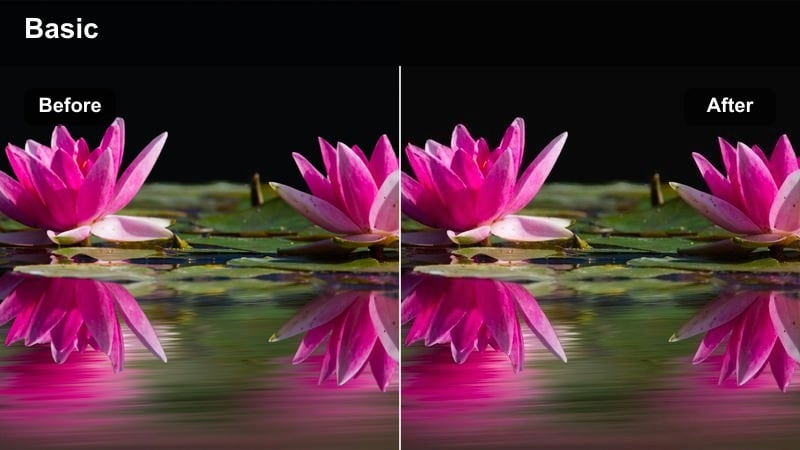
- Effect look: Soft, low-contrast shadows with gentle magenta highlights for intimate dusk sequences.
- Best for: Dialogue-heavy scenes, street walks, and character closeness moments shot just after sunset.
- Editing tip: Dial down sharpness and add a slight blur or glow effect on highlights to enhance the dreamy, romantic vibe.
Dusky Romance leans into the soft, pastel quality of blue hour, adding subtle magenta to highlights for a dreamy, intimate feel. In Filmora, this LUT helps you tame harsh edges, lower contrast, and give faces a gentle glow that suggests closeness and vulnerability.
Use it on slow walks, long conversations, and reflective b-roll where the story depends on emotion instead of action. Combine the LUT with a light blur or glow effect on bright sources in Filmora to make street lamps and signage feel like soft, cinematic accents instead of distractions.
Hollywood Golden Epic
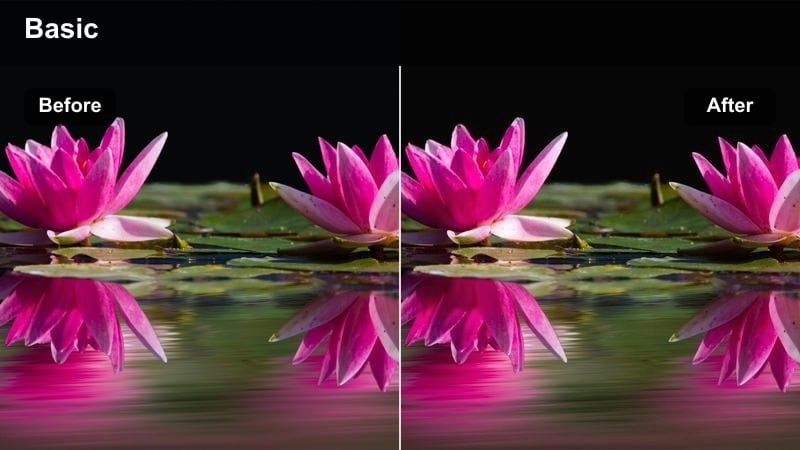
- Effect look: Rich golden midtones with strong contrast and deep cinematic blacks inspired by epic studio features.
- Best for: Hero shots, trailers, travel sequences, and establishing shots needing a premium studio finish.
- Editing tip: Increase local contrast slightly and add a gentle film grain overlay to sell the big-budget movie aesthetic.
Hollywood Golden Epic pushes your footage toward a bold, high-contrast studio look with deep blacks and glowing golden midtones. It is ideal in Filmora for hero reveals, title cards, and big establishing shots where you want maximum impact and a clear sense of scale.
Apply the LUT to wide vistas, balcony shots, or travel montages, then layer Filmoras film grain and subtle vignettes to enhance the blockbuster mood. Keep an eye on exposure using scopes so skin stays around the midtone range and does not get crushed as you boost contrast.
Neon Nights and Urban Thrillers
Neon Noir
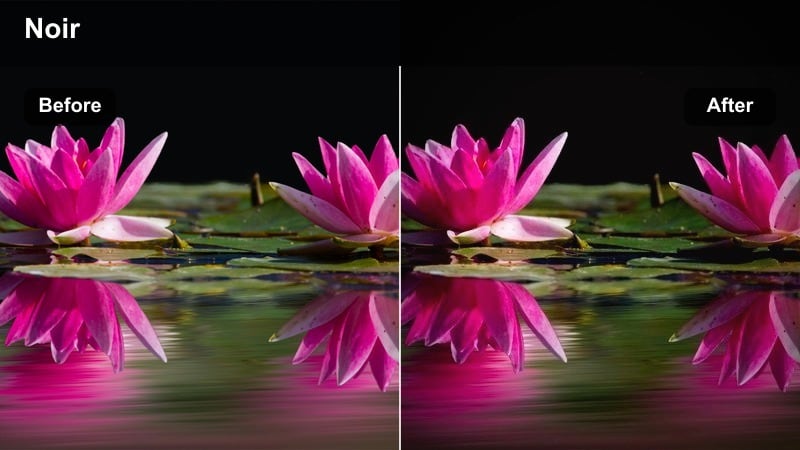
- Effect look: Cool teal shadows with vibrant neon reds and pinks for a stylized crime-thriller atmosphere.
- Best for: Night street scenes, car chases, club entrances, and moody character intros in urban locations.
- Editing tip: Crush the blacks slightly and boost contrast in the red and blue channels to make neon signs pop without blowing highlights.
Neon Noir brings a stylized, graphic feel to your night footage by shifting shadows toward teal and letting neon reds and magentas slice through the frame. In Filmora, this LUT quickly turns simple alleys or street corners into frames that feel pulled from a glossy crime thriller.
Use it with footage that already includes colored signage, LED lights, or reflections on wet surfaces to maximize the effect. After applying the LUT, deepen blacks and fine-tune saturation so your subject remains visible while neon accents stay bold but not clipped.
Midnight Chase
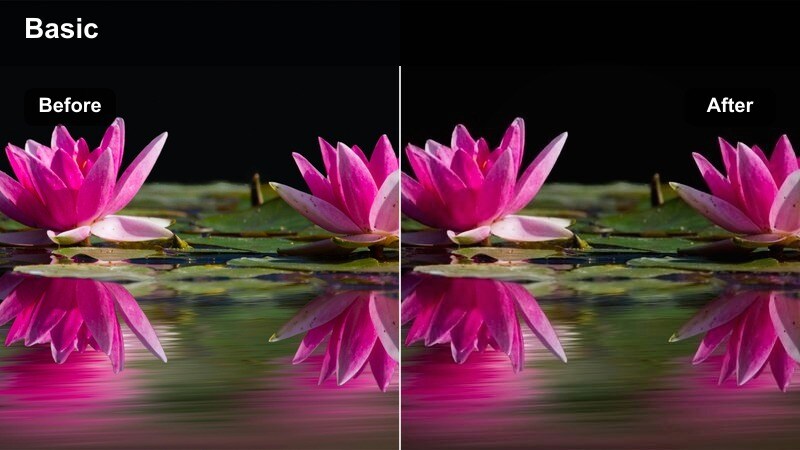
- Effect look: High-contrast blue-toned grade with punchy highlights for tense action sequences at night.
- Best for: Car chases, parkour, rooftop pursuits, and handheld run-and-gun scenes shot in city streets.
- Editing tip: Stabilize your footage first, then add a touch of motion blur to fast cuts so the contrasty look stays readable.
Midnight Chase cools your footage into deep blues, amplifying tension and speed for action-heavy night scenes. The LUT boosts contrast and highlight punch, making street lamps, headlights, and specular reflections feel sharp and energetic inside Filmora.
Apply it to chase sequences, rapid-fire montages, and any handheld night coverage where clarity still matters. Stabilize your clips, then add Filmoras motion blur to fast cuts so movement feels dynamic without losing detail inside those strong, cool shadows.
City Sinister
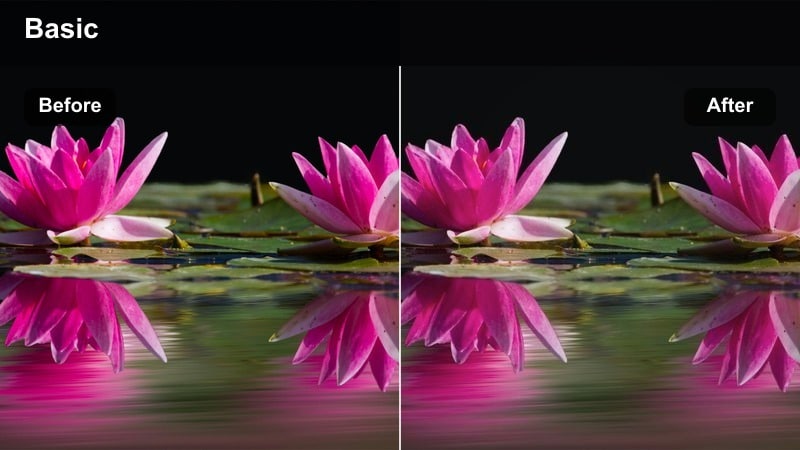
- Effect look: Muted color palette with green-tinted shadows and slightly desaturated skin for a paranoid thriller mood.
- Best for: Conspiracy plots, secret meetings, parking garage scenes, and tense office corridors at night.
- Editing tip: Reduce saturation selectively in yellows and cyans while keeping red channels intact to preserve emotional cues.
City Sinister pulls saturation back and nudges shadows toward a subtle green, immediately suggesting unease and hidden danger. In Filmora, this LUT is perfect for cramped interiors, garages, and long, empty hallways where you want the environment to feel slightly off.
Use selective color controls to keep reds a bit stronger so faces and critical props stand out against the cold background. Pair the LUT with minimal camera motion, longer takes, and quieter sound design to build a slow-burn, paranoid thriller atmosphere.
Bright Daylight Blockbusters
Studio Pop Daylight
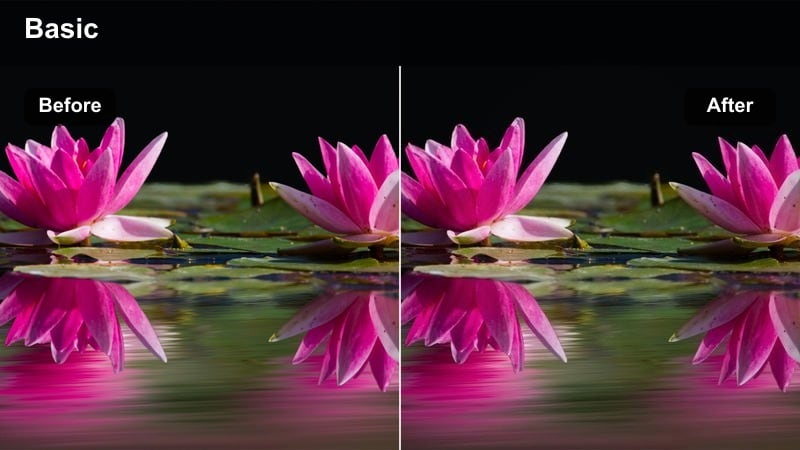
- Effect look: Clean, high-saturation daylight look with crisp contrast and neutral whites for mainstream Hollywood appeal.
- Best for: YouTube intros, commercial-style promos, travel montages, and family adventure sequences.
- Editing tip: Boost saturation slightly but limit it in reds and oranges to keep skin from looking cartoonish under strong sun.
Studio Pop Daylight gives bright outdoor footage a polished, commercial-ready shine with punchy colors and clean, neutral whites. In Filmora, it is an ideal LUT for creators who want their content to look like glossy big-budget trailers or upbeat brand spots.
Apply it to intros, travel hops, family days out, and any content where energy and clarity matter. Balance saturation so skies and wardrobes stay vibrant while skin tones remain natural, and consider using Filmoras highlight controls to keep midday sun from clipping.
Hero Daylight Contrast
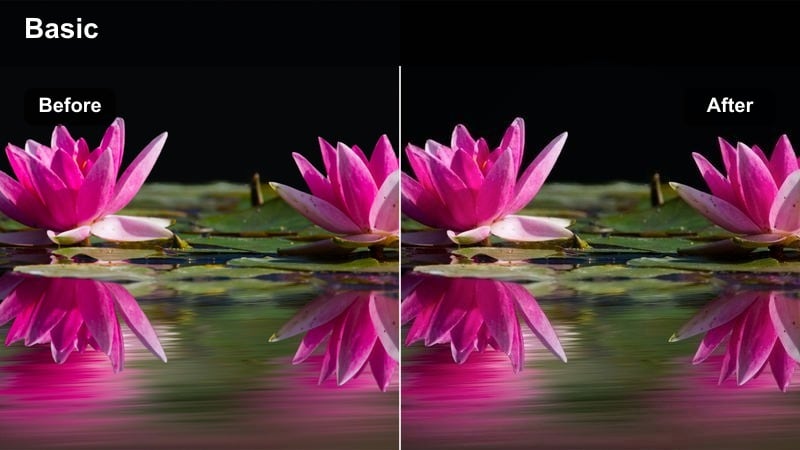
- Effect look: Strong, cinematic contrast with slightly cooled shadows while preserving natural skin tones in bright scenes.
- Best for: Hero walk-ins, training montages, product hero shots, and wide establishing scenes in open daylight.
- Editing tip: Lower blacks just a touch and add a gentle vignette to keep eyes locked on your main character or subject.
Hero Daylight Contrast is built to carve your subject out of a bright environment with bold, cinematic depth. The LUT cools shadows slightly while keeping skin tones believable, which makes it powerful for hero entrances, training sequences, and product reveals in Filmora.
Use it on wide exteriors, rooftop scenes, or any daylight setup where you want your subject to feel iconic. Dial in a modest vignette and adjust black levels carefully so the frame feels dramatic without losing important detail in darker areas.
Sunlit Streets
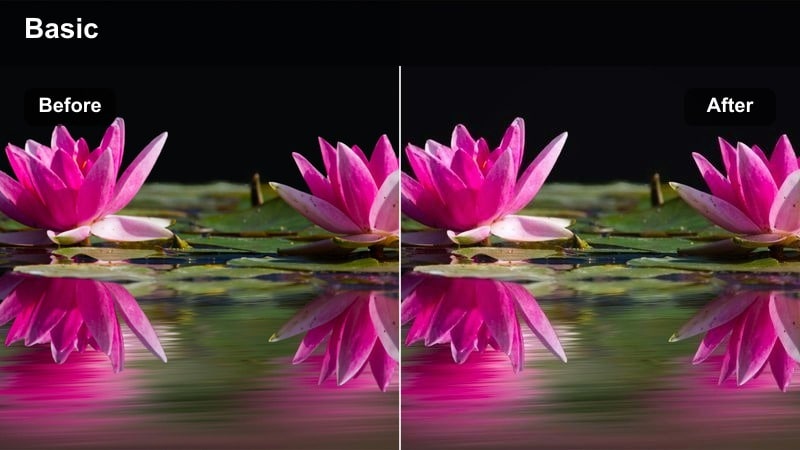
- Effect look: Soft warm highlights with gentle contrast and subtle filmic halation around bright areas.
- Best for: Street documentaries, lifestyle b-roll, walking and talking scenes in bright neighborhoods.
- Editing tip: Reduce clarity slightly and add a small amount of film grain to complete the soft, cinematic street look.
Sunlit Streets gives your daytime city footage a relaxed, filmic texture with warm highlights and forgiving contrast. In Filmora, this LUT is ideal for vlogs, lifestyle segments, and casual documentary coverage where you want images to feel inviting yet subtly cinematic.
Apply it to walking and talking clips, storefront b-roll, or street cutaways, then add gentle grain and lower clarity for a softer, more analog feel. Keep movement natural and avoid over-sharpening so the grade can do the heavy lifting on mood and character.
Moody Interiors and Character Moments
Living Room Drama
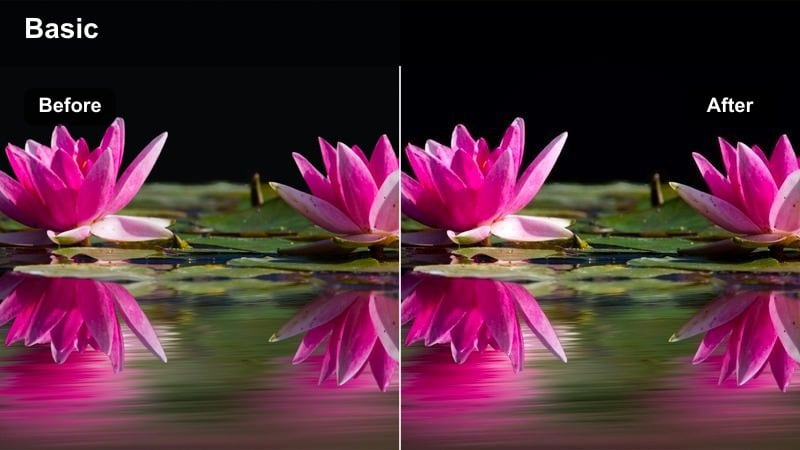
- Effect look: Subtle warm midtones with lowered saturation and controlled contrast for grounded dialogue scenes.
- Best for: Domestic dramas, emotional confessions, podcast setups, and talking-head interviews indoors.
- Editing tip: Balance your white balance to be slightly warm, then use this filter to refine skin tones and soften backgrounds.
Living Room Drama is tuned for grounded, human-scale storytelling, warming midtones while keeping saturation and contrast under control. In Filmora, this LUT helps small interiors feel crafted and cinematic without distracting from dialogue or performance.
Use it for podcasts, interviews, and scenes set in homes or small studios where emotional nuance matters. Start with a slightly warm white balance in your color correction, then apply the LUT and fine-tune exposure so faces sit comfortably in the midtones with soft, unobtrusive backgrounds.
Editorial Office Mood
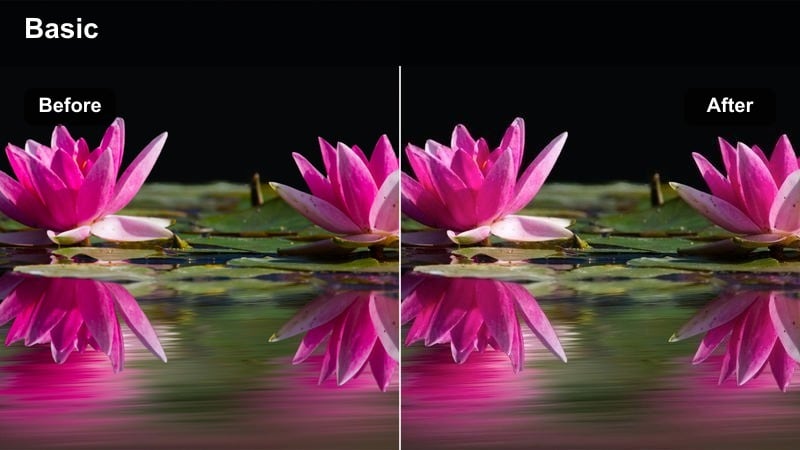
- Effect look: Cool neutral tones with slightly lowered saturation and gentle contrast for corporate or newsroom style interiors.
- Best for: Office scenes, workspace b-roll, tech reviews, and startup documentaries shot inside modern buildings.
- Editing tip: Trim saturation in blues so computer screens and LED panels do not overpower faces or draw unwanted attention.
Editorial Office Mood cools and cleans your interior footage, making modern workspaces feel sleek and professional. In Filmora, this LUT is a strong fit for tech reviews, startup stories, or corporate explainers where you want a calm, trustworthy visual tone.
Apply it to desk setups, conference rooms, and open-plan offices, then tame blue saturation so monitors and LEDs do not steal focus. Combine the LUT with simple lighting and a tidy color palette on set for a high-end, editorial finish across your business content.
Intimate Spotlight
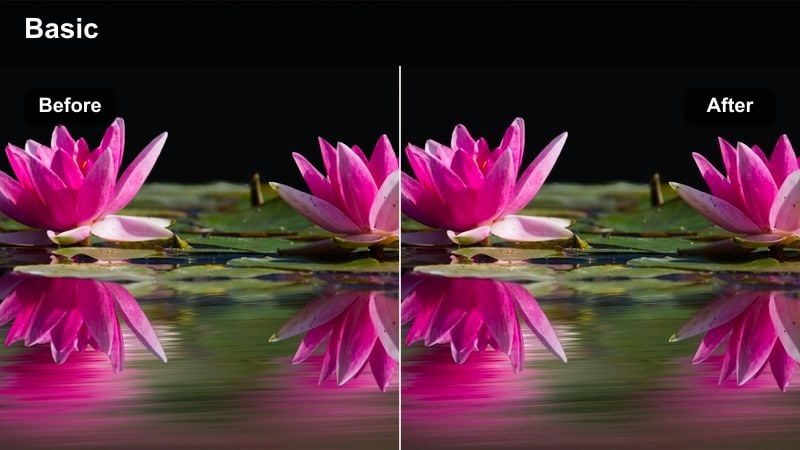
- Effect look: High-contrast interior grade that pools light on the subject and deepens surrounding shadows for a theatrical feel.
- Best for: Monologues, podcast close-ups, cinematic reaction shots, and performance scenes on small stages.
- Editing tip: Use masks or vignettes to emphasize the subject's face, then let this filter deepen the rest into rich shadows.
Intimate Spotlight is designed to make a single subject feel like they are standing in a pool of light, with deep, theatrical shadows around them. In Filmora, this LUT accentuates existing contrast, which works beautifully for monologues, close-ups, and performance-driven moments.
Use vignettes and masking to subtly darken the environment while keeping your subjects face bright and expressive. With the LUT applied, fine-tune exposure and black levels until the background falls away, leaving your audience locked into the performance at the center of the frame.
Tips for Using Hollywood Movie Color Grading Lut Filters in Filmora
- Shoot in a flat or neutral picture profile whenever possible to give the Hollywood movie color grading LUT filters more latitude for shaping contrast and color.
- Match white balance and overall exposure across all shots in a scene before applying LUTs to avoid jarring shifts when you cut between angles.
- Choose one primary Hollywood-style LUT per scene and stay consistent so your project feels cohesive from start to finish.
- Use Filmoras opacity or intensity controls on each LUT layer instead of leaving it at 100 percent, blending the effect to suit your footage.
- Combine LUTs with small on-set lighting adjustments, like turning off mixed color temperatures, to keep skin tones clean and cinematic.
- Always check scopes in Filmora when using contrasty LUTs to ensure you are not clipping highlights or crushing important shadow detail.
- Stack a Hollywood LUT with gentle film grain or a vignette in Filmora to add texture and depth without overwhelming your original image.
The Hollywood Movie Color Grading LUT filter set in Filmora gives content creators a fast, reliable way to turn everyday footage into polished, cinematic scenes that echo big-screen productions.
Apply the look that matches your story, tweak intensity and exposure, and then move on to shaping performance and pacing, knowing your color already feels Hollywood-ready.
secure download