

 100% Security Verified | No Subscription Required | No Malware


 ChatGPT
 Perplexity
 Gemini
 Claude
 Grok
Grok
Industrial color palettes are built from concrete greys, steel blues, rusted oranges, and workshop neutrals that feel solid, gritty, and reliable. They hint at factories, city skylines, rail yards, and clean modern studios, which makes them perfect for content that wants to look strong, technical, or urban. Psychologically, these colors can suggest durability, focus, efficiency, and a grounded, no-nonsense mood.
For video creators and designers, Industrial tones work beautifully in YouTube thumbnails, channel intros, lower thirds, brand kits, and color grades for vlogs or documentaries. Below you will find 15 carefully crafted Industrial color palettes with HEX codes you can plug directly into your branding, motion graphics, and Filmora color grading to keep your entire visual identity consistent.
In this article
Concrete And Steel Industrial Color Palettes
Urban Concrete Fade

- HEX Codes: #f2f2f2, #c4c7cc, #8a8f98, #4c4f55, #1f2227
- Mood: Cool, restrained, and quietly cinematic.
- Use for: Great for tech reviews, architecture vlogs, and minimalist B-roll where you want a clean yet gritty city feel.
Urban Concrete Fade runs from misty concrete white down into deep charcoal, like a city street after rain. It feels calm but tough, with enough contrast to keep frames structured without loud color distractions. The palette works well when you want your subject or product to pop against a grounded, realistic environment.
Use these tones for tech review backgrounds, architecture vlogs, B-roll montages of city details, or stripped-back YouTube thumbnails and titles. In Filmora, you can grade your footage into these greys and charcoals, then match your lower thirds, channel logo, and end screens to the same Industrial look for a unified brand presence.
Pro Tip: Build a Cinematic Industrial Look in Filmora
To keep an Industrial palette like Urban Concrete Fade consistent, start by picking one mid-grey and one dark charcoal as your base UI colors in Filmora. Use them for text boxes, lower thirds, and simple shapes in your intro and outro. Then nudge your footage toward the same cool greys with Filmora color correction, so your talking head, B-roll, and titles all share the same Industrial atmosphere.
When cutting between A-roll, close-ups of gear, and city B-roll, reuse the same grey overlays and subtle vignettes. This keeps your channel looking cinematic and deliberate instead of random, especially in playlists for product reviews or minimal urban lifestyle content.
AI Color Palette
If you have a still frame or mood board that nails this Industrial grey atmosphere, you can use Filmora's AI Color Palette feature to spread that exact look across an entire edit. Grab a reference shot of wet concrete and metal railings, then let Filmora analyze it and apply the same tonality to every clip in your timeline.
This is perfect when you shoot in slightly different lighting conditions or on multiple cameras. AI Color Palette helps normalize exposure and color temperature, so your tech intro, comparison shots, and B-roll all feel like they came from the same cool urban world.
 secure download

HSL, Color Wheels & Curves
To refine an Industrial palette like this, use Filmora's HSL sliders to gently desaturate warm tones and cool down your blues, while keeping skin tones natural. Then use the color wheels to push midtones slightly toward blue-grey and shadows toward charcoal, giving your video a premium urban finish. A simple S-curve in the curves panel adds contrast and depth without crushing details.
If you want to go deeper, follow Filmora's color correction and grading guide and save your favorite Industrial tweaks as presets. That way you can apply the same cool concrete look to every new upload in just a few clicks.
secure download1000+ Video Filters & 3D LUTs
Once you have your Industrial base, you can stylize it instantly with Filmora's video filters and 3D LUTs. Add a subtle matte filter to soften highlights, or choose a gritty urban LUT to push your greys into a more dramatic, cinematic space while keeping your palette cohesive.
This is especially helpful when you want matching looks across shorts, full-length videos, and social teasers. Save your favorite Industrial combination of filter plus LUT, and you can apply it to every new edit to maintain a recognizable channel style.
secure downloadFactory Loft Neutrals
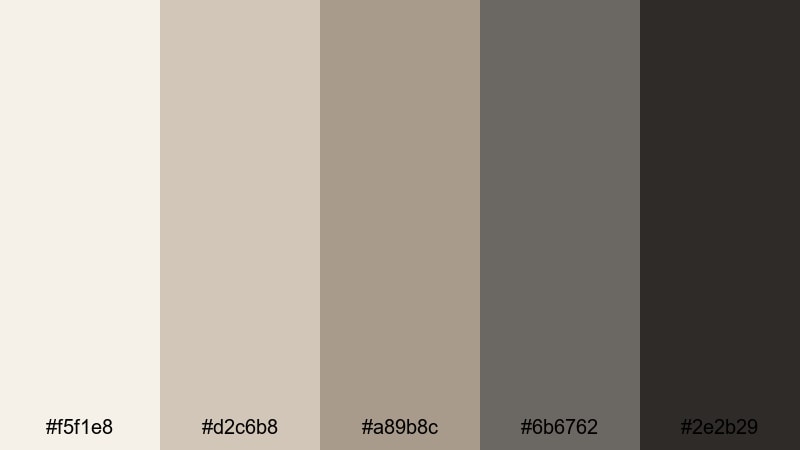
- HEX Codes: #f5f1e8, #d2c6b8, #a89b8c, #6b6762, #2e2b29
- Mood: Warm, lived-in, and creative.
- Use for: Perfect for studio tours, maker channels, and lifestyle intros that mix industrial spaces with cozy storytelling.
Factory Loft Neutrals blends soft plaster creams with worn leather browns and subtle greys, evoking old beams, paint splatters, and natural light. It is Industrial, but with a human, lived-in twist that feels welcoming instead of harsh.
Use this palette for studio tour videos, maker or DIY tutorials, and lifestyle thumbnails where tools, plants, and decor all share the frame. In your branding, pick one mid-brown for logo accents and a pale cream for backgrounds, and echo them in Filmora titles, chapter cards, and end screens to keep everything feeling cohesive and warm.
Steel Beam Skyline
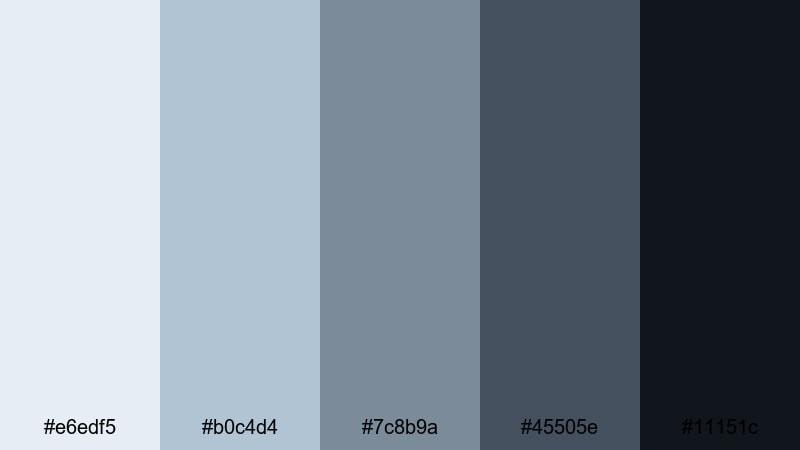
- HEX Codes: #e6edf5, #b0c4d4, #7c8b9a, #45505e, #11151c
- Mood: Crisp, structured, and professional.
- Use for: Strong for corporate explainers, product demos, and motion graphics that need a sharp industrial tech vibe.
Steel Beam Skyline pulls from glass towers, steel structures, and pale blue mornings. The lighter tones are perfect for clean backgrounds and whiteboard-style graphics, while the darker navy and near-black provide strong anchors for text and UI elements.
Apply this palette to SaaS explainers, product walkthroughs, or pitch decks turned into video. In Filmora, use the lighter blues as panel backgrounds and the darkest tone for subtitles and bold headings. Your thumbnails can mix a bright blue sky band with a deep steel accent to signal a polished, high-tech brand.
Overcast Warehouse Light

- HEX Codes: #f7f7f7, #dedfdf, #b0b3b6, #7a7e82
- Mood: Soft, muted, and atmospheric.
- Use for: Use in cinematic B-roll, slow urban montages, or UI overlays that need a low-contrast, airy industrial base.
Overcast Warehouse Light is built from soft greys, like daylight drifting through dirty factory windows. It is low contrast and gentle, which helps subjects and typography stand out without feeling aggressive.
Use this palette for cinematic B-roll sequences, slow travel or urban montages, and UI overlays that need a neutral Industrial base. In Filmora, design semi-transparent grey panels for lower thirds, progress bars, and callouts, and grade your footage slightly cooler to match the subtle warehouse atmosphere.
Rusted Warm Industrial Color Palettes
Rust Belt Sunrise

- HEX Codes: #fff2e2, #f2c392, #c97a4a, #8a4b2b, #3b2317
- Mood: Warm, nostalgic, and gritty-romantic.
- Use for: Ideal for travel vlogs, documentary titles, or brand stories set in factories, rail yards, or old towns.
Rust Belt Sunrise blends soft peach light with deep rust and oil-brown shadows, like the first sun hitting an old bridge. It feels nostalgic and cinematic, perfect when you want Industrial grit without losing emotional warmth.
Use the pale peach and mid rust for titles and thumbnail backgrounds, and keep the darkest brown for text and outlines. In Filmora, combine this palette with gentle grain or vignette effects to create documentary-style intros, travel sequences in historic districts, or brand stories rooted in heritage and craft.
Burnt Metal Patina
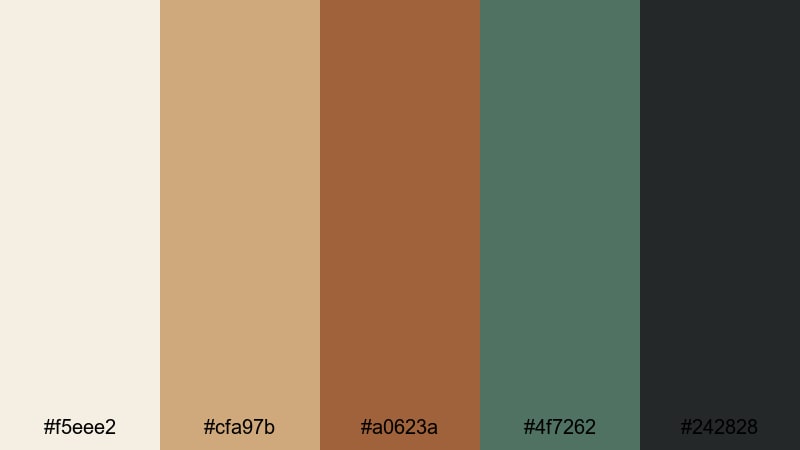
- HEX Codes: #f5eee2, #cfa97b, #a0623a, #4f7262, #242828
- Mood: Artful, rugged, and cinematic.
- Use for: Great for title cards, poster frames, and thumbnails that need an artisanal industrial mood.
Burnt Metal Patina mixes toasted copper and bronze browns with a greenish patina and dark metal. It recalls aged machinery, sculptural metalwork, and surfaces that tell a story of use and time.
This palette is excellent for artisanal brands, metalwork channels, restoration projects, or cinematic short films. Use the warmer browns for headline text and key icons, reserve the patina green for accents or highlights, and keep the deep charcoal for overlays. In Filmora, build poster-style title cards and cinematic thumbnails that echo this palette for a strong, handcrafted identity.
Cargo Dock Sunset

- HEX Codes: #ffe6cf, #f4a261, #e76f51, #264653, #1b252d
- Mood: Energetic, bold, and adventurous.
- Use for: Perfect for travel intros, sports edits, and cinematic trailers that move from grit to drama.
Cargo Dock Sunset throws warm container oranges and sunset peach against deep teal shadows. The result is a punchy Industrial palette with strong complementary contrast, ideal for high-energy edits.
Use the oranges for call-to-action buttons, dynamic titles, and key frames in YouTube thumbnails. The teal and navy tones are perfect for backgrounds, drop shadows, and frame bars. In Filmora, apply a teal-and-orange style grade to your footage, then match your fonts and graphics to the same HEX codes for trailers, adventure vlogs, or sports highlight reels.
Oxidized Machinery Glow
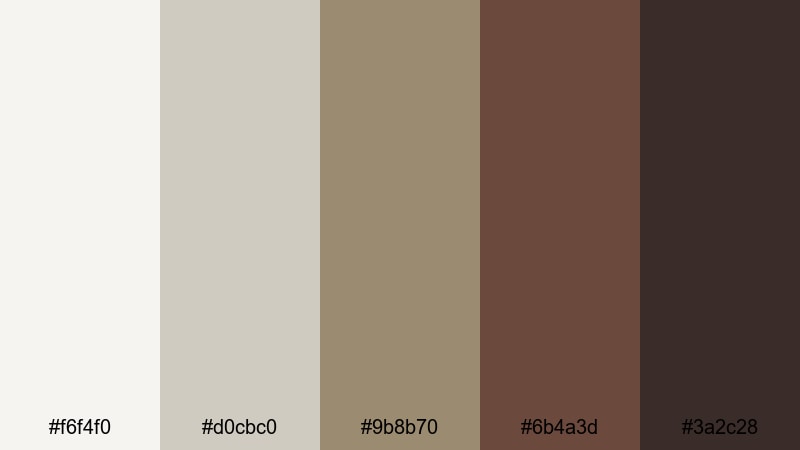
- HEX Codes: #f6f4f0, #d0cbc0, #9b8b70, #6b4a3d, #3a2c28
- Mood: Earthy, vintage, and grounded.
- Use for: Use for maker channels, repair tutorials, and product stories about tools, craftsmanship, and hardware.
Oxidized Machinery Glow leans into dusty creams, oil-stained browns, and tarnished metal tones. It feels solid and tactile, with a vintage edge that suits videos about tools, repairs, and traditional craft.
Apply the light tones to background panels and workspace shots, and use the darker browns for logo marks, lower thirds, and measurement overlays. In Filmora, combine this palette with subtle noise or vignette filters to make repair tutorials, workshop tours, and hardware product stories feel authentic and grounded.
Moody Nighttime Industrial Color Palettes
Midnight Rail Yard
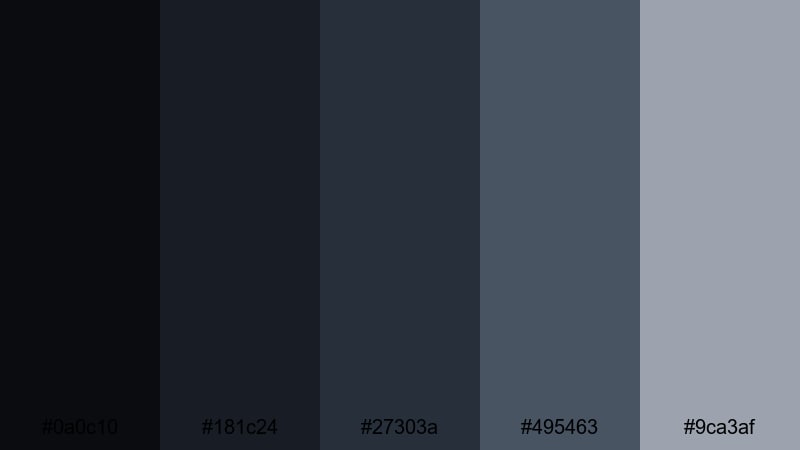
- HEX Codes: #0a0c10, #181c24, #27303a, #495463, #9ca3af
- Mood: Dark, suspenseful, and cinematic.
- Use for: Great for night sequences, urban explorations, and music videos with a moody industrial edge.
Midnight Rail Yard is built from inky blacks and layered steel blues, like tracks stretching into the dark under distant signals. It sets a tense, immersive mood while still leaving room for highlights and detail.
Use the deepest tones for full-bleed backgrounds, letterbox bars, and title cards. The mid blues and grey highlight are ideal for glowing text, HUD-style overlays, or lyric graphics in music videos. In Filmora, combine this palette with light leaks, slow zooms, and subtle noise to create atmospheric night explorations or moody performance edits.
Vapor Trail Neon

- HEX Codes: #050712, #101826, #1f2937, #14b8a6, #facc15
- Mood: Edgy, futuristic, and high-contrast.
- Use for: Perfect for cyberpunk edits, tech promos, and gaming intros mixing industrial backdrops with neon highlights.
Vapor Trail Neon pairs deep steel navies with sharp teal and yellow neon, like warning lights cutting through industrial haze. It has a strong cyberpunk edge but still feels grounded in metal and machinery.
Use the dark blues for your base frames and UI panels, and reserve the neon teal and yellow for key text, icons, and animated accents. In Filmora, create gaming intros, tech promos, or sci-fi shorts by combining this palette with glow effects, glitch transitions, and fast, rhythmic cuts.
Smoked Steel Shadows

- HEX Codes: #121418, #23252b, #3b3f46, #6b7078, #9fa4ad
- Mood: Subtle, atmospheric, and sophisticated.
- Use for: Strong for intros, lower thirds, and overlays where you want depth without bright color distractions.
Smoked Steel Shadows uses layered charcoals and soft steel blues to mimic smoke drifting through an empty plant. It is moody but controlled, with just enough variation to keep frames from feeling flat.
This palette is ideal for understated intros, talking-head explainers with a serious tone, or premium brand content. Use the mid greys for overlay panels and timelines, and the lightest grey-blue for secondary text. In Filmora, build subtle gradients and soft drop shadows using these colors to add depth without pulling focus from your message.
Clean Modern Industrial Color Palettes
Polished Chrome Studio
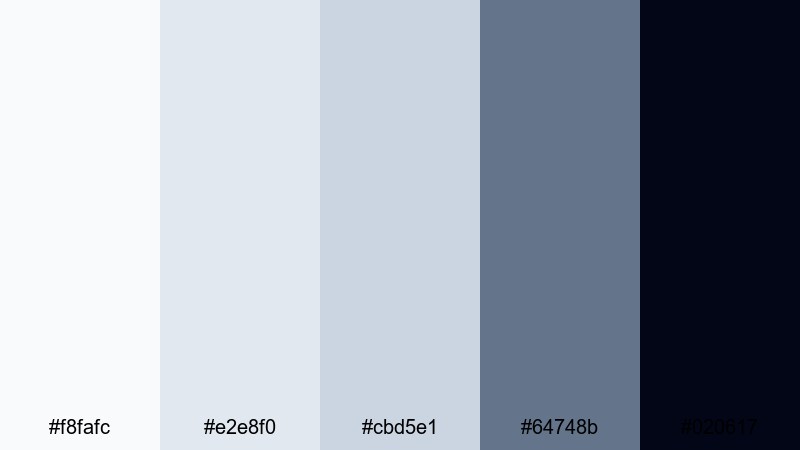
- HEX Codes: #f8fafc, #e2e8f0, #cbd5e1, #64748b, #020617
- Mood: Sleek, professional, and high-tech.
- Use for: Ideal for software demos, gear reviews, and minimalist channel branding with an industrial studio feel.
Polished Chrome Studio mixes bright whites and soft steel blues with a deep anchor tone, like chrome fixtures lit by softboxes in a modern studio. It feels crisp, airy, and highly professional.
Use the lightest shades for clean backgrounds in screen recordings, app walkthroughs, and UI mockups, while keeping the darkest tone for titles, captions, and logo marks. In Filmora, pair this palette with simple transitions and minimal motion graphics to give your tech or gear-focused channel a refined Industrial identity.
Minimal Workshop Grey

- HEX Codes: #fafafa, #e5e5e5, #c4c4c4, #8d8d8d, #404040
- Mood: Neutral, balanced, and versatile.
- Use for: Use as a base palette for tutorials, UI mockups, and text-heavy explainers that need clarity over color drama.
Minimal Workshop Grey offers a stepped gradient from primer-light to tool-handle dark. It is extremely flexible and designed to stay out of the way, giving your content and typography center stage.
Use the lighter tones for backgrounds and the darker tones for text, icons, and timeline markers. In Filmora, build your lower thirds, subtitles, and info panels entirely from this grey set, then layer in bolder accent colors from other palettes when needed. It is a great Industrial base for channels that value clarity and readability.
Industrial Office Daylight
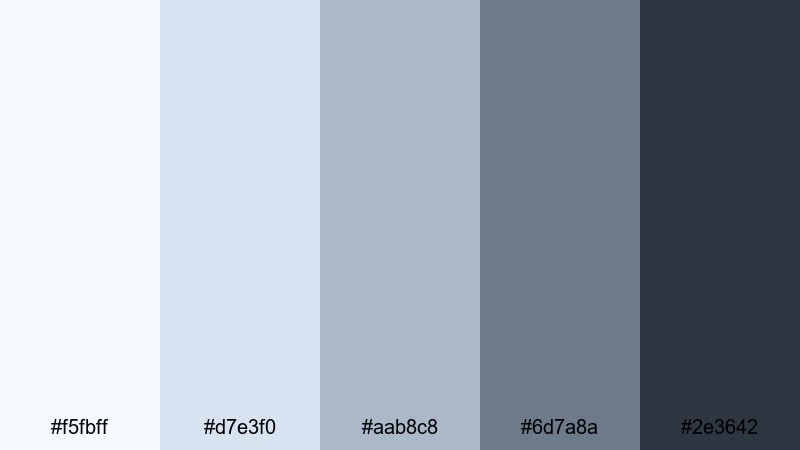
- HEX Codes: #f5fbff, #d7e3f0, #aab8c8, #6d7a8a, #2e3642
- Mood: Calm, contemporary, and corporate-ready.
- Use for: Great for office vlogs, productivity channels, and SaaS promos filmed in industrial-inspired workspaces.
Industrial Office Daylight captures the feel of cool daylight on concrete floors and metal desk frames. Soft blues and cool greys create a calm, focused environment that fits modern office and productivity content.
Use the light tones for backgrounds and slide-style frames, and the darker navy for headers, charts, and callouts. In Filmora, you can build consistent office B-roll sequences, tutorial overlays, and SaaS promo graphics using this palette so your brand always feels clean, contemporary, and business-ready.
Concrete Grid UI

- HEX Codes: #f4f4f5, #e4e4e7, #d4d4d8, #a1a1aa, #27272a
- Mood: Orderly, minimal, and design-forward.
- Use for: Perfect for motion graphics, app walkthroughs, and channel overlays built around clean industrial UI design.
Concrete Grid UI stacks subtle light greys with a strong dark anchor, mimicking tiled concrete and dark metal frames. It feels structured and minimal, like a carefully designed dashboard.
Use these greys for grids, cards, progress bars, and infographics in your videos. In Filmora, design on-screen UI elements, feature highlights, and chapter markers with this palette so your viewers can follow complex information easily while staying in a sleek Industrial aesthetic.
Tips for Creating Industrial Color Palettes
When you build your own Industrial color combinations, you balance cool steel tones, warm rusts, and neutral greys so your videos look intentional instead of dull. A few practical guidelines help keep your branding and color grading strong and consistent.
- Pick one main grey or steel blue as your base and use it across backgrounds, overlays, and frames so your channel has a recognizable Industrial foundation.
- Add one accent color (rust orange, neon teal, or deep burgundy) for buttons, CTAs, and key titles to guide the viewer's eye without overwhelming the frame.
- Check text readability by testing your lightest background color with your darkest text color; adjust contrast until subtitles and titles are easy to read on small screens.
- Match your color grade to your graphics: if your overlays are cool and blue-grey, shift your footage slightly cooler in Filmora so the image and UI feel like one design.
- Limit yourself to 4 or 5 core HEX codes per project and reuse them in thumbnails, intros, lower thirds, and end screens for a strong, unified brand identity.
- Plan for dark mode and light mode: create a light Industrial variation and a dark one so your thumbnails and overlays work on different platforms and backgrounds.
- Use Filmora features like AI Color Palette, HSL, and LUTs to save your favorite Industrial looks as presets, which keeps color consistent across series and seasons.
- When mixing Industrial with brighter colors, keep the bright hues in small areas (icons, highlights) and let greys, steels, and rusts occupy most of the frame to maintain the Industrial mood.
Industrial color palettes let you control mood with precision, from cool concrete calm to rusted warmth or neon-tinted nightscapes. By choosing a clear set of HEX codes and applying them to your footage, titles, and thumbnails, you can shape how professional, gritty, or futuristic your brand feels at a glance.
Filmora makes it easy to turn these palettes into complete looks for your intros, B-roll, explainers, and social cutdowns. With AI Color Palette, HSL, color wheels, filters, and LUTs, you can test several Industrial styles quickly and lock in the one that fits your channel.
Experiment with the 15 palettes above, save your favorites as presets, and refine them over time. A consistent Industrial aesthetic will make your videos instantly recognizable, whether viewers find you through a search result, a suggested video, or a short on social media.
secure download