

 100% Security Verified | No Subscription Required | No Malware


 ChatGPT
 Perplexity
 Gemini
 Claude
 Grok
Grok
Orange Brown is one of those rare color families that feels both cinematic and comforting. It blends the energy of orange with the stability of brown, creating visuals that feel warm, grounded, and a little nostalgic. In thumbnails, intros, overlays, and titles, Orange Brown instantly suggests coziness, storytelling, and real-life texture.
For video creators and designers, Orange Brown works beautifully for vlogs, travel diaries, coffee shop edits, studio tours, and vintage aesthetics. Below you will find 15 Orange Brown color palettes with HEX codes, ready to use in branding, thumbnails, overlays, and especially inside Filmora for consistent color grading across your entire project.
In this article
Warm Cinematic Orange Brown Color Palettes
Autumn Coffee Bokeh

- HEX Codes: #fff2e3, #f0b27a, #d27a3f, #8a4b2b, #2b1a12
- Mood: Cozy, cinematic, and nostalgic like a slow autumn afternoon.
- Use for: Perfect for cinematic vlog sequences, coffee shop b-roll, and lifestyle thumbnails that need a warm story feel.
Autumn Coffee Bokeh wraps your visuals in soft cream highlights, mid-tone caramels, and deep coffee shadows. It feels like sitting by a window with a latte, watching bokeh lights blur in the background while the story unfolds.
This palette works especially well for vlog scenes in cafes, desk setups, or bookish corners. Use it for YouTube thumbnails, intro cards, and lower thirds to give your channel a cozy, cinematic Orange Brown signature that feels consistent across every upload.
Pro Tip: Build a Cinematic Orange Brown Look in Filmora
To keep the Autumn Coffee Bokeh look consistent from intro to end screen, set up a simple color workflow in Filmora. Start by correcting exposure and white balance, then gently warm your footage so the oranges and browns move toward these HEX values instead of pure yellow or red.
Save this look as a custom preset in Filmora so you can apply the same Orange Brown mood to coffee b-roll, talking head shots, cutaways, and short-form social edits without rebuilding your grade every time.
AI Color Palette
If you have a screenshot, thumbnail, or reference image with your ideal Orange Brown tones, you can use it directly in Filmora. Filmora's AI Color Palette feature lets you pick that reference and automatically transfer the same color style to other clips in your timeline.
This is perfect for matching A-roll and B-roll, or for keeping your main video, YouTube Shorts, and Reels in the same warm cinematic style. You get the rich coffee shadows and creamy highlights of Autumn Coffee Bokeh across your whole project in just a few clicks.
 secure download

HSL, Color Wheels & Curves
Once the base match is done, refine your Orange Brown look with Filmora's HSL, color wheels, and curves controls. Push orange and red hues slightly toward caramel, deepen the browns in the shadows, and gently lift mid-tones so skin still looks natural and flattering. Tools like these, often highlighted in Filmora's color correction tutorials, help you keep things cinematic instead of muddy.
Use the curves panel to add a soft S-curve for contrast, then nudge the color wheels so shadows skew toward rich coffee browns while highlights pick up that creamy, off-white warmth. This keeps your footage moody yet still bright enough for modern social platforms.
secure download1000+ Video Filters & 3D LUTs
To speed things up even more, combine your Orange Brown palette with ready-made looks. Filmora’s video filters and 3D LUTs make it easy to add vintage warmth, cinematic contrast, or film-inspired grain on top of your base colors.
Try layering soft film-style filters over Autumn Coffee Bokeh for nostalgic vlogs, or add a subtle LUT to push your oranges toward a more dramatic, movie-like tone. You can always dial back the intensity so the HEX palette still feels natural and not overprocessed.
secure downloadGolden Hour Ember Glow

- HEX Codes: #ffe7c4, #f5b26b, #e0793c, #b0552a, #3a1e12
- Mood: Radiant, glowing, and dramatic like golden hour light.
- Use for: Use for travel intros, sunset reels, and title cards that need a glowing cinematic punch.
Golden Hour Ember Glow captures the exact feeling of sun flares and warm skies just before sunset. The lighter creams suggest soft, hazy highlights, while the deeper embers and browns ground your footage with rich contrast.
This palette is ideal for outdoor travel vlogs, destination reels, and dramatic title cards. Apply it to your opening sequence, then echo the HEX colors in text, icons, and lower thirds for a unified golden hour Orange Brown identity.
Caramel Cinema Frames
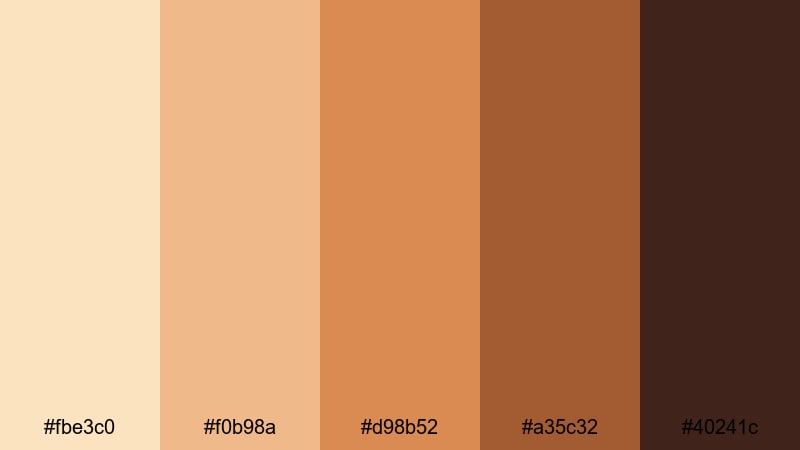
- HEX Codes: #fbe3c0, #f0b98a, #d98b52, #a35c32, #40241c
- Mood: Smooth, narrative, and filmic, like caramel poured over old film reels.
- Use for: Great for narrative short films, documentary lower thirds, and YouTube branding that leans warm and cinematic.
Caramel Cinema Frames mixes creamy highlights with mid-tone caramels and rich chocolate shadows for a refined, film-inspired Orange Brown look. It does not shout; it quietly feels like a well-crafted story.
Use it for docu-style videos, storytelling channels, or editorial-style YouTube branding. Pair the lighter HEX values with on-screen text and overlays, and reserve the darker tones for backgrounds, frames, or bars to keep everything legible.
Toasted Maple Storyline
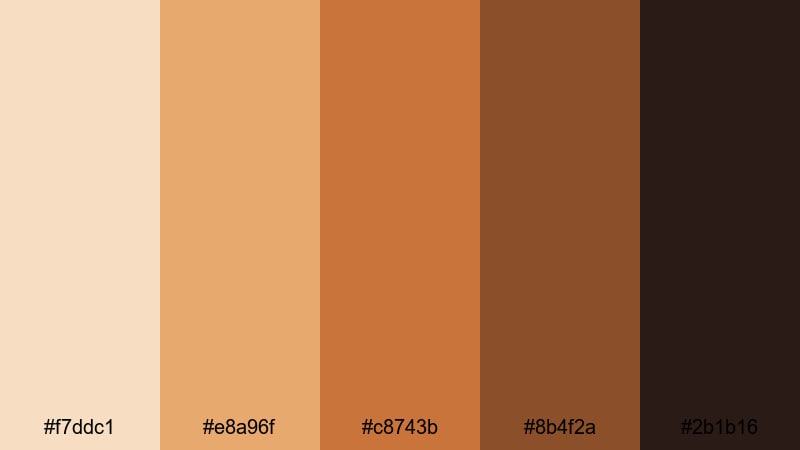
- HEX Codes: #f7ddc1, #e8a96f, #c8743b, #8b4f2a, #2b1b16
- Mood: Grounded, warm, and narrative-focused like pages of a worn journal.
- Use for: Ideal for travel diaries, talking-head commentary, and chapter cards in long-form videos.
Toasted Maple Storyline feels like flipping through a worn travel journal. Soft beige notes sit on top, with maple oranges and dark wood browns adding depth and seriousness to the frame.
This palette is perfect for chapter cards, video essays, and narrative vlogs. Use the lighter tones for backgrounds behind text, and the deeper shades for titles, icons, and borders so your Orange Brown design stays readable and focused on the story.
Soft & Vintage Orange Brown Color Palettes
Sepia Letters and Lattes

- HEX Codes: #f9f0e5, #e7cbb0, #d09a6e, #a06a46, #59352a
- Mood: Soft, nostalgic, and tender like handwritten letters and latte foam.
- Use for: Perfect for nostalgic edits, journaling channels, and intro cards with a vintage aesthetic.
Sepia Letters and Lattes leans into creamy whites, muted sepias, and gentle latte browns that instantly give footage an analog charm. It feels fragile and handwritten, like notes kept in a box under the bed.
Use this palette for journaling channels, daily diaries, study vlogs, or memory montages. It is great for intro sequences, text overlays, and thumbnail backgrounds that want a warm, vintage Orange Brown feel without going too dark or heavy.
Rustic Film Grain
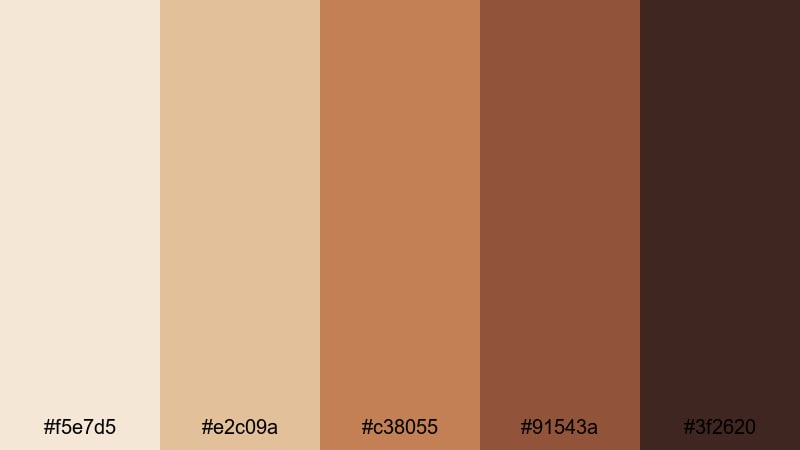
- HEX Codes: #f5e7d5, #e2c09a, #c38055, #91543a, #3f2620
- Mood: Textured, rustic, and slightly moody like an old film strip.
- Use for: Use for retro-inspired intros, photo slideshows, or vlog series that lean into a rustic aesthetic.
Rustic Film Grain balances muted creams with weathered browns, creating a patina that feels like a found film reel. The darker tones bring a subtle moody edge while the lighter hues keep everything approachable.
Use it in retro intros, nostalgic photo slideshows, or lifestyle vlogs themed around cabins, crafts, or countryside scenes. Add grain and slightly faded contrast in Filmora to make the Orange Brown palette feel even more analog and tactile.
Dusty Terracotta Memories
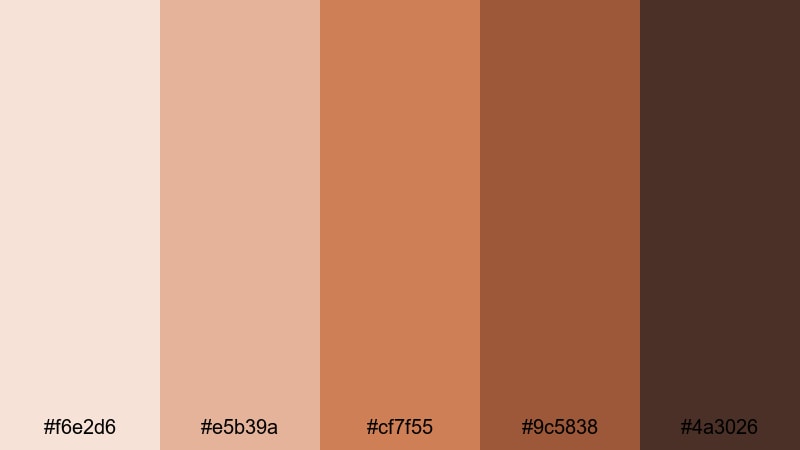
- HEX Codes: #f6e2d6, #e5b39a, #cf7f55, #9c5838, #4a3026
- Mood: Dreamy, sun-washed, and quietly emotional.
- Use for: Great for memory montages, family videos, and vintage-style reels with handwritten overlays.
Dusty Terracotta Memories brings together sun-washed pinkish creams, soft terracotta oranges, and deep clay browns. The palette feels emotional but not dramatic, like looking at old prints that have gently faded over time.
It suits family compilations, nostalgic reels, or highlight edits from trips and celebrations. Use the lighter HEX shades behind handwritten-style fonts and the deeper browns for titles, date stamps, or subtle frames around your footage.
Soft Clay Portraits

- HEX Codes: #f9e4d6, #edb9a0, #d18a5d, #9b5a3a, #3b2521
- Mood: Intimate, flattering, and warm like soft studio lights on skin.
- Use for: Ideal for portrait edits, beauty content, and lifestyle branding where skin tones must look warm and natural.
Soft Clay Portraits is built around flattering clay oranges and gentle browns that make skin tones glow. The highlights are soft and creamy, while the shadows stay warm instead of going cold or gray.
This palette is a strong choice for beauty channels, lifestyle portraits, and social ads featuring people. Use the mid-tone oranges and browns in your backgrounds, text accents, and overlays so skin stays at the center of attention with a cohesive Orange Brown ambiance.
Bold & Modern Orange Brown Color Palettes
Neon Amber Contrast
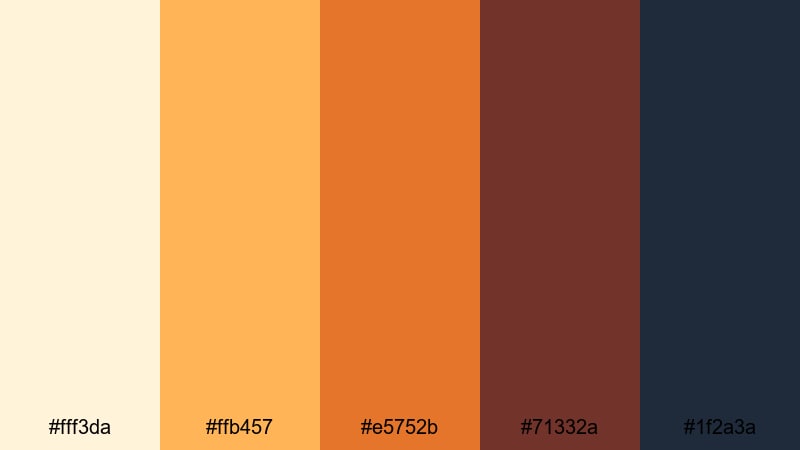
- HEX Codes: #fff3da, #ffb457, #e5752b, #71332a, #1f2a3a
- Mood: Energetic, modern, and high contrast with a bold edge.
- Use for: Use for striking YouTube thumbnails, energetic channel intros, and social ads that must pop on mobile screens.
Neon Amber Contrast takes warm ambers and slams them up against deep navy and espresso, creating a bold, high-energy palette. The lighter yellows and oranges carry attention, while the dark navy and brown give you instant contrast.
It is perfect for bold thumbnails, gaming channel branding, or dynamic intros that need to stand out on crowded feeds. Use bright ambers for buttons and key text, with the navy or dark brown as background blocks for maximum readability.
Burnt Citrus Title Card

- HEX Codes: #ffe3c0, #ff9d4a, #d65b1f, #7a3324, #16232c
- Mood: Punchy, confident, and slightly dramatic.
- Use for: Perfect for title cards, lower thirds, and logo animations that need a bold burnt-orange accent.
Burnt Citrus Title Card layers soft peach with searing orange, burnt sienna, and a nearly black teal. The result is a confident palette that feels bold but still rooted in warm Orange Brown tones.
Use the bright citrus hex codes for key headlines or animated logo strokes, and lean on the darker tones for backgrounds and drop shadows. This combination gives your title cards and lower thirds an assertive, cinematic presence.
Urban Copper Highlights
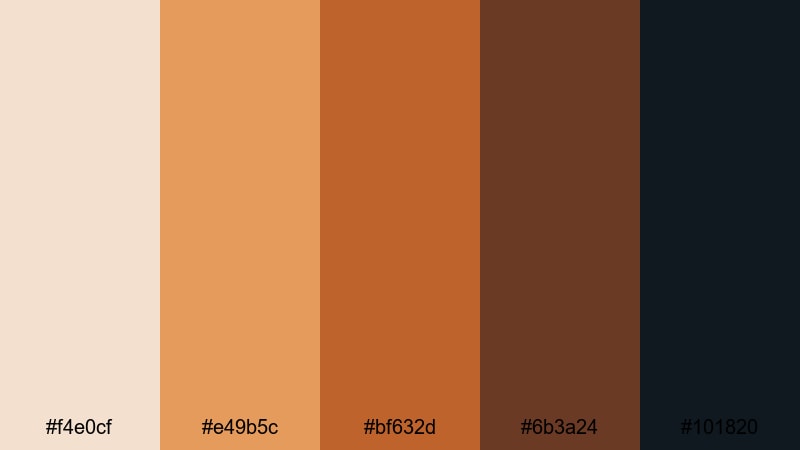
- HEX Codes: #f4e0cf, #e49b5c, #bf632d, #6b3a24, #101820
- Mood: Stylish, urban, and sophisticated like copper against asphalt.
- Use for: Great for tech reviews, city vlogs, and motion graphics where you want a sleek but warm style.
Urban Copper Highlights pairs elegant copper oranges with inky charcoal, echoing city lights reflected on asphalt. The palette feels modern and design-forward while keeping a pleasant Orange Brown warmth.
It is ideal for tech reviews, urban b-roll, and motion graphics. Use the lighter copper tones for icons and progress bars, keep the charcoals and near-black tones for backgrounds, and add subtle glows or gradients for a polished, professional result.
Spiced Tech Interface
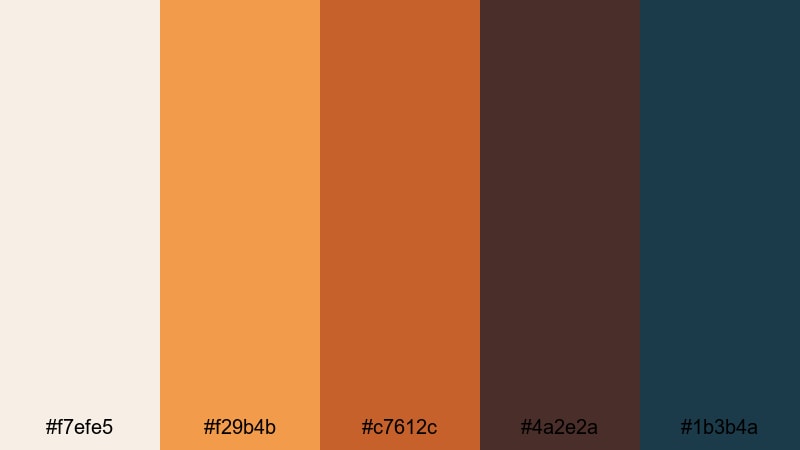
- HEX Codes: #f7efe5, #f29b4b, #c7612c, #4a2e2a, #1b3b4a
- Mood: Warm yet digital, blending spice tones with tech blues.
- Use for: Ideal for UI mockups, app promos, and animated overlays that mix cozy warmth with a tech-savvy edge.
Spiced Tech Interface blends warm spice oranges and browns with a confident tech blue. It feels like a user interface that invites you in instead of feeling sterile or cold.
Use this palette for app promo videos, dashboard animations, and overlay graphics. Let the oranges highlight buttons, charts, and calls to action, while the deep blue and dark brown anchor sidebars, panels, and backgrounds for a balanced, readable layout.
Earthy Lifestyle Orange Brown Color Palettes
Campfire Weekend Vlog
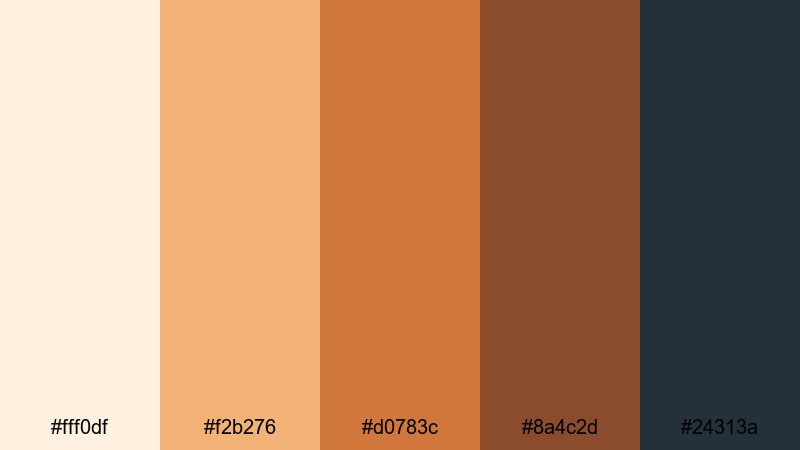
- HEX Codes: #fff0df, #f2b276, #d0783c, #8a4c2d, #24313a
- Mood: Adventurous, cozy, and campfire-warm.
- Use for: Use for camping vlogs, outdoor intros, and travel stories that capture tents, trails, and night skies.
Campfire Weekend Vlog combines soft, firelit oranges with deep night-sky blue. It is equal parts adventure and comfort, evoking both the warmth of the flames and the cool air around the campsite.
Apply this palette to camping intros, outdoor b-roll, and title sequences. Use the brighter oranges for fire, tents, and highlights, while the blue and darker browns are great for text, overlays, and transitions that move from day into night.
Cinnamon Home Studio
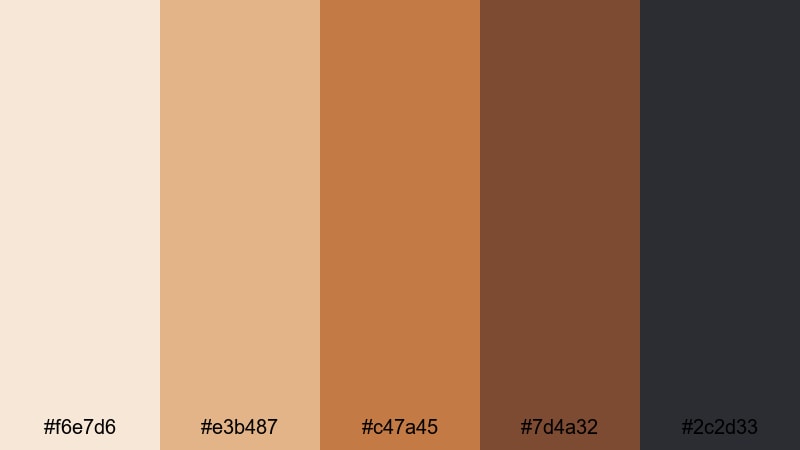
- HEX Codes: #f6e7d6, #e3b487, #c47a45, #7d4a32, #2c2d33
- Mood: Cozy, homely, and grounded like a cinnamon-scented studio corner.
- Use for: Perfect for home studio tours, productivity setups, and creator branding that feels warm and approachable.
Cinnamon Home Studio feels like a tidy but inviting creative corner: warm cinnamon tones, soft creams, and a grounding charcoal accent. The palette is calm enough for productivity content but still visually rich.
Use it in desk setup videos, home office tours, or branding for productivity and creator channels. The lighter hues make great backgrounds for text or overlays, while the deep brown and charcoal work well for typography, icons, and subtle dividers in your layouts.
Harvest Market Banners
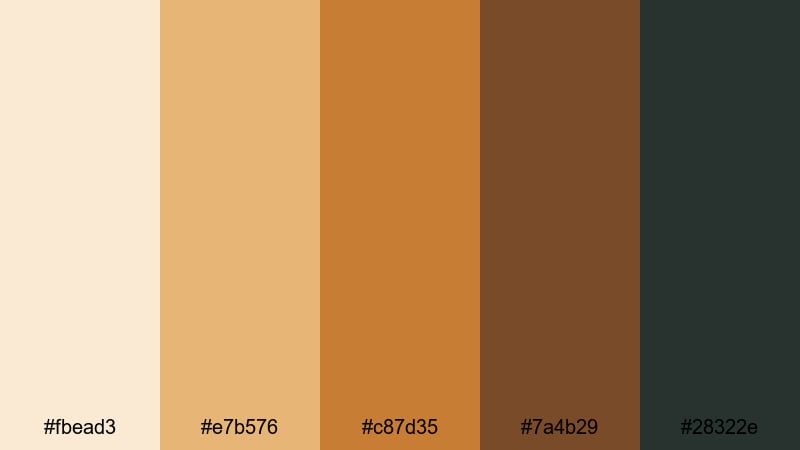
- HEX Codes: #fbead3, #e7b576, #c87d35, #7a4b29, #28322e
- Mood: Organic, artisanal, and community-focused.
- Use for: Great for farmers market promos, small business branding, and food channel graphics.
Harvest Market Banners echoes fresh produce, wood crates, and hand-painted signs. Warm harvest oranges blend with rustic browns and a muted green-black accent, giving everything an artisanal, small-business vibe.
This palette is perfect for food channels, farmers market promos, or branding for local cafes and bakeries. Use the lighter oranges and creams in banners and social posts, with the darker browns and green-black for logos, price tags, and on-screen labels.
Tips for Creating Orange Brown Color Palettes
When you start building your own Orange Brown color palettes for video and design, balancing warmth, contrast, and readability is key. Here are practical tips to help you get the most out of this cozy color family in Filmora and beyond.
- Always pair light and dark tones: include at least one very light shade and one deep shade so text, icons, and overlays stay readable on any background.
- Avoid oversaturating oranges: slightly desaturated oranges and browns feel more cinematic and less cartoonish, especially in long-form videos.
- Protect skin tones: when using Orange Brown palettes with people on screen, keep skin in a natural range and use your palette mainly in backgrounds, titles, and graphics.
- Add a contrasting accent: a deep navy, charcoal, or muted teal can anchor Orange Brown and give you strong contrast for buttons, CTAs, and key titles.
- Match footage and graphics: in Filmora, nudge your footage colors toward the HEX values you choose for your thumbnails and titles so everything feels part of one brand.
- Test on mobile first: preview thumbnails and lower thirds on a small screen to make sure your Orange Brown contrasts are strong enough to read at a glance.
- Use gradients carefully: subtle gradients between two adjacent Orange Brown shades can add depth to titles and backgrounds without becoming distracting.
- Save presets: once you dial in an Orange Brown look you love, save color and effect presets in Filmora so future videos instantly match your established style.
Orange Brown color palettes can quietly transform how your videos feel. From vintage-style diaries to bold tech intros, this color family adds warmth, depth, and personality that viewers remember. With the 15 palettes above and their HEX codes, you can quickly test different moods until you find the one that fits your channel or brand identity.
Filmora makes it easy to turn any of these palettes into a repeatable look across intros, b-roll, overlays, and social cutdowns. Combine AI tools, manual color controls, and filters to keep your Orange Brown aesthetic consistent from video to video.
Try a few palettes on your next project, save your favorite settings as presets, and let Orange Brown become a recognizable part of your visual style.
secure download