

 100% Security Verified | No Subscription Required | No Malware


 ChatGPT
 Perplexity
 Gemini
 Claude
 Grok
Grok
Pacific Blue sits between teal and sky, bringing the calm of the ocean with a hint of energy and clarity. It feels refreshing, trustworthy, and modern, which makes it perfect for YouTube branding, coaching channels, tech content, and travel vlogs. On screen, this shade instantly suggests fresh air, clean water, and a focused mindset without feeling cold or sterile.
Because of that balance, Pacific Blue works beautifully in thumbnails, intros, lower thirds, and UI-style graphics inside your videos. To save you time, this guide collects ready-made Pacific Blue color palettes with HEX codes you can plug straight into Filmora or your favorite design tool. Use them for cohesive intros, channel art, overlays, and social cuts that all share the same Pacific Blue look.
In this article
Calm And Coastal Pacific Blue Color Palettes
Tropical Reef Drift
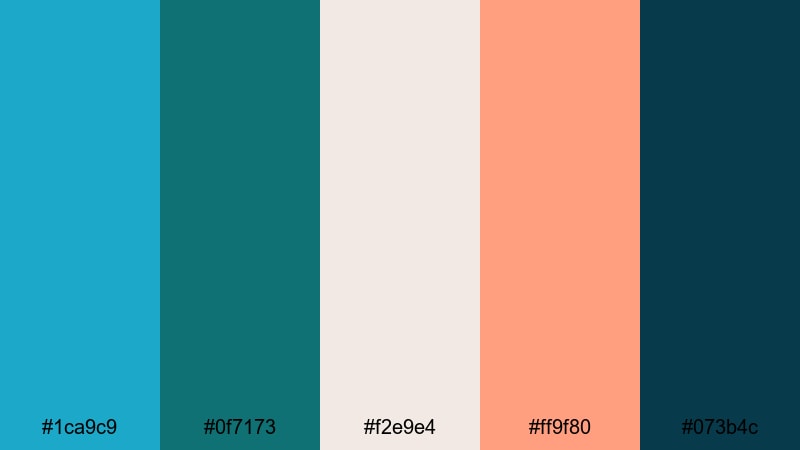
- HEX Codes: #1ca9c9, #0f7173, #f2e9e4, #ff9f80, #073b4c
- Mood: Refreshing, coastal, and laid-back like a slow day by the sea.
- Use for: Perfect for travel vlogs, lifestyle intros, and channel art that needs a breezy, beachy vibe.
Tropical Reef Drift blends bright Pacific Blue with deep teal, sunlit coral, and soft sand neutrals. It feels like snorkelling in clear water, then drying off under a warm sunset. The palette balances cool and warm tones, so your visuals stay relaxed but never dull.
Use this set for travel vlog thumbnails, opening title cards, and lower thirds that need a gentle oceanic mood. It also works well for lifestyle channels that want a soft, beach-club identity across intros, end screens, and Instagram Reels covers.
Pro Tip: Enhance Your Pacific Blue Beach Visuals in Filmora
When you build a coastal look around Pacific Blue, consistency is everything. In Filmora, you can save your favorite color settings and reuse them across intros, talking-head shots, B-roll, and shorts so every frame feels like it belongs to the same tropical world.
Use adjustment layers in Filmora to apply your Pacific Blue look over entire sequences. That way, your sky, water, and overlay graphics all keep the same tone, whether you are cutting a long-form travel vlog or a 15-second vertical highlight.
AI Color Palette
If you have a screenshot, mood board, or photo that nails your Pacific Blue beach look, you can turn it into a reference for your whole video. Filmora's AI Color Palette feature analyzes the colors in one clip and applies that palette to the rest of your timeline with just a few clicks.
That means your drone shots, close-ups, and overlays can all share the same Tropical Reef Drift mood without manual color grading on every single clip. It is an easy way to keep Pacific Blue consistent from your intro animation to your final outro card.
 secure download

HSL, Color Wheels & Curves
To make your Pacific Blue look even more cinematic, fine-tune it with HSL, color wheels, and curves in Filmora. You can deepen the teal in the shadows, warm up midtones for skin, or add a gentle S-curve to boost contrast while keeping highlights from clipping. A quick pass with these color correction tools in Filmora can turn a flat travel clip into a polished beach sequence.
Adjust the blue and cyan channels in HSL to shift your water from greenish to clean Pacific Blue, then use color wheels to add a subtle complementary tint in the highlights. This keeps your palette stylish and cohesive without making the footage look over-edited.
secure download1000+ Video Filters & 3D LUTs
If you want your Pacific Blue palette ready in seconds, Filmora's video filters and 3D LUTs make it easy to stylize your footage. You can start with a cinematic teal-and-orange LUT, then tweak it to match the exact HEX codes from Tropical Reef Drift.
Apply filters to intros, titles, and overlays so everything shares the same soft coastal mood. Once you find a combination you love, save it as a preset and reuse it on future beach trips, pool parties, or summer recap videos.
secure downloadHarbor Sunrise Mist
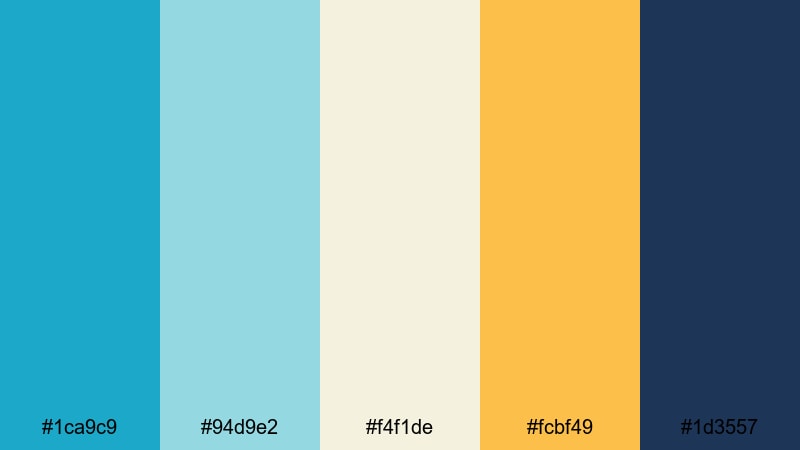
- HEX Codes: #1ca9c9, #94d9e2, #f4f1de, #fcbf49, #1d3557
- Mood: Gentle, hopeful, and cinematic like a sunrise over a quiet harbor.
- Use for: Ideal for travel montages, morning routines, and cinematic b-roll sequences.
Harbor Sunrise Mist layers soft blues and creamy neutrals with a golden accent, echoing the first light over calm water. The combination feels peaceful, reflective, and slightly cinematic, making it perfect when you want your visuals to feel like the start of a new day.
Use this palette for morning routine videos, slow travel montages, and title screens that introduce a new series or season. The gentle contrast also works well for YouTube thumbnails where you want warm highlights on faces and text sitting on calm Pacific Blue backgrounds.
Oceanfront Escape
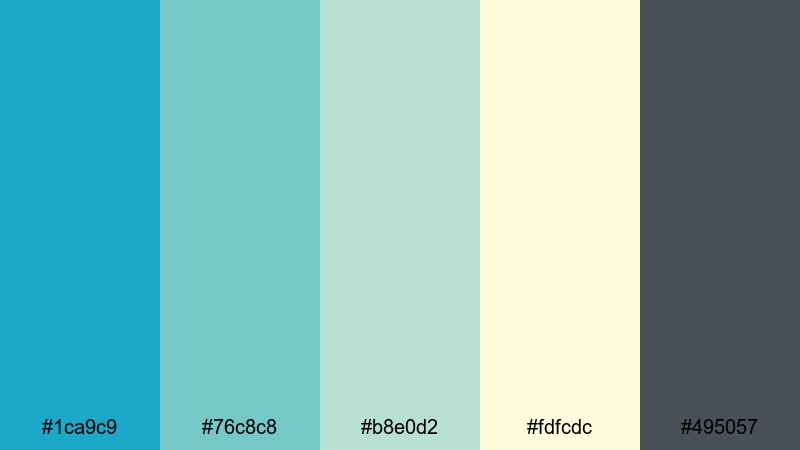
- HEX Codes: #1ca9c9, #76c8c8, #b8e0d2, #fdfcdc, #495057
- Mood: Airy, restorative, and spa-like with a modern coastal flair.
- Use for: Great for wellness content, relaxation edits, and product showcases with a fresh, clean feel.
Oceanfront Escape uses layered aquas and soft neutrals to mimic a chic seaside resort. It feels balanced and restorative, with Pacific Blue as a bright accent against pale, almost weightless background tones.
This palette is ideal for wellness channels, skincare B-roll, spa-style ASMR, and minimal product shots. Use the light hues for backgrounds in lower thirds or Instagram story covers, while Pacific Blue and charcoal gray highlight buttons, CTAs, and logo marks.
Seabreeze Storyboard
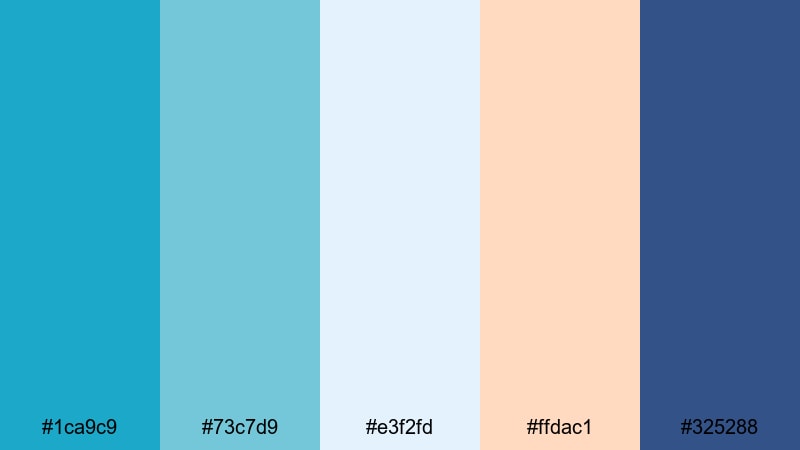
- HEX Codes: #1ca9c9, #73c7d9, #e3f2fd, #ffdac1, #325288
- Mood: Light, optimistic, and gently cinematic with a coastal breeze feel.
- Use for: Use for channel intros, soft travel logs, and brand kits that balance playfulness and calm.
Seabreeze Storyboard combines bright Pacific Blue with pale sky tones and a touch of peach for an inviting, story-first atmosphere. The palette feels optimistic and friendly, like a sunny day at a quiet seaside town.
Use it when you want your thumbnails, chapter cards, and intro sequences to feel approachable without being too bold. It works especially well for narrative-heavy channels, family travel vlogs, or educational content with a calm yet upbeat look.
Lagoon Chill Vlog

- HEX Codes: #1ca9c9, #00b4d8, #caf0f8, #ffd6ff, #2b2d42
- Mood: Cool, playful, and youthful like a poolside afternoon.
- Use for: Perfect for daily vlogs, summer recaps, and friendly channel branding.
Lagoon Chill Vlog mixes crisp lagoon blues with soft pastels and a dark anchor tone. The result is playful and youthful, with enough contrast for bold titles and overlay graphics.
Try this palette for summer recap videos, daily vlogs, GRWMs, or any bubbly lifestyle content. Use the light blues and pinks for backgrounds in your end screens and story highlights, and reserve the dark navy for text, icons, and logo outlines so everything stays readable.
Bold And Cinematic Pacific Blue Color Palettes
Neon Surf Energy
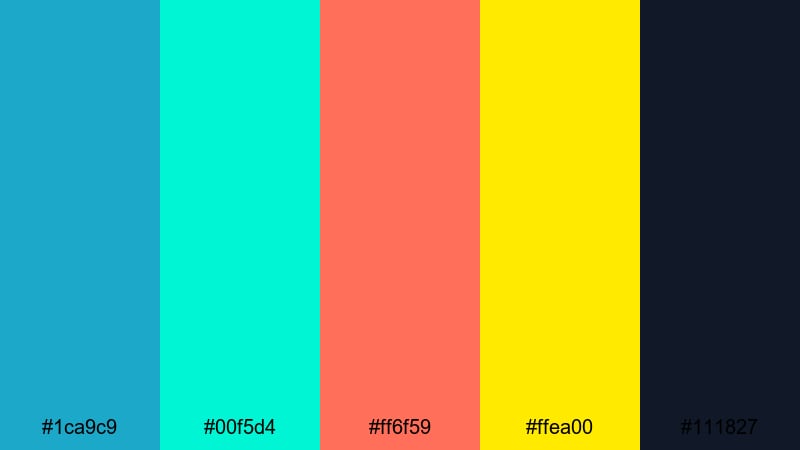
- HEX Codes: #1ca9c9, #00f5d4, #ff6f59, #ffea00, #111827
- Mood: High-energy, bold, and electric with a neon surf aesthetic.
- Use for: Great for fast-paced edits, gaming intros, music videos, and hype trailers.
Neon Surf Energy is all about impact: punchy aqua, neon green, hot coral, and bright yellow set against deep charcoal. It feels like neon lights reflecting on waves, with Pacific Blue tying the palette to the ocean theme.
Use it when you want your thumbnails and intros to explode with color. It is perfect for gaming channels, sports edits, festival teasers, or energetic B-roll sequences. Keep text in the darker tones and use neon colors for streaks, glows, and animated graphics so your design stays readable.
Deep Current Cinema

- HEX Codes: #1ca9c9, #005f73, #0b132b, #1f4068, #f8f9fa
- Mood: Moody, cinematic, and dramatic like deep ocean waters at night.
- Use for: Ideal for cinematic trailers, documentary titles, and dramatic storytelling videos.
Deep Current Cinema wraps bright Pacific Blue in inky blues and teal shadows. The dark tones create a strong cinematic base, while the light off-white keeps your titles and UI elements easy to read.
Use this palette for trailers, docu-style intros, or story-driven series with a serious or mysterious tone. It works well for title cards, cold opens, and credit sequences where you want to suggest depth, tension, or nighttime cityscapes over water.
Tech Wave Intro
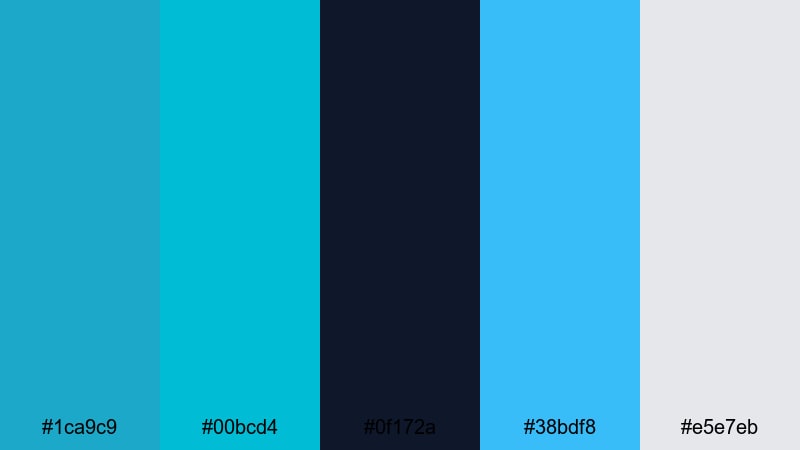
- HEX Codes: #1ca9c9, #00bcd4, #0f172a, #38bdf8, #e5e7eb
- Mood: Futuristic, sleek, and confident with a tech-forward vibe.
- Use for: Use for channel intros, SaaS promos, product explainers, and digital branding.
Tech Wave Intro keeps things cool and precise: sharp cyans, deep navy, and clean light neutrals. It feels like a tech dashboard or startup website, with Pacific Blue acting as a hero accent color.
Use this palette in motion graphics, HUD overlays, explainer videos, and UI mockups shown on screen. The darker navy works well for backgrounds in lower thirds, while the bright blues highlight buttons, charts, and logo reveals on both horizontal and vertical content.
Electric Harbor Night
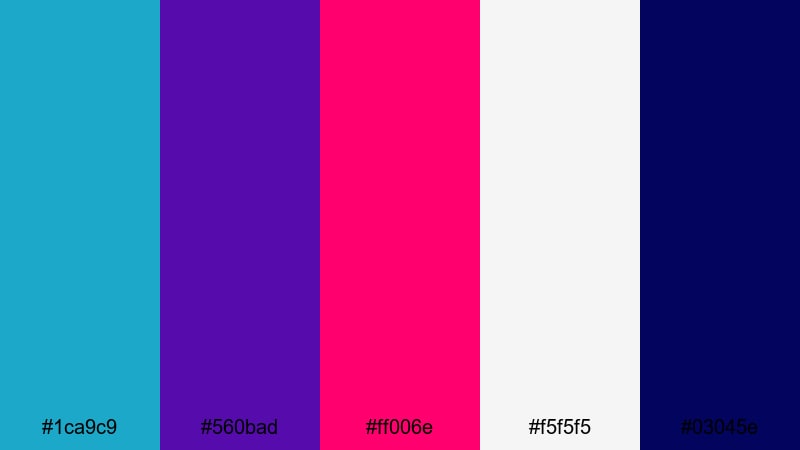
- HEX Codes: #1ca9c9, #560bad, #ff006e, #f5f5f5, #03045e
- Mood: Vibrant, urban, and edgy like neon lights over dark water.
- Use for: Great for nightlife reels, festival recaps, and edgy brand visuals.
Electric Harbor Night combines Pacific Blue with vivid magenta, deep indigo, and crisp white to create an intense nightlife atmosphere. It feels urban and modern, like reflections of neon signage on wet streets and harbor waves.
Use this palette for concert recaps, club promos, or city-night edits. Let the dark blues and purples handle your backgrounds and gradients, then punch through with Pacific Blue and magenta for titles, glitch transitions, and social graphics.
Aqua Action Trailer
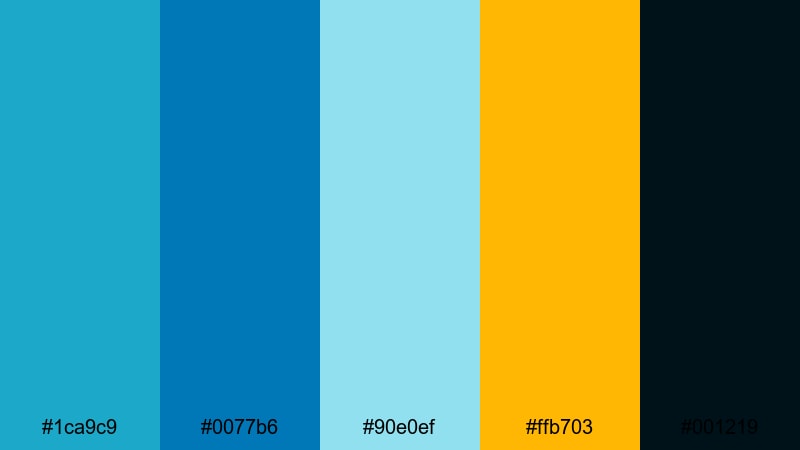
- HEX Codes: #1ca9c9, #0077b6, #90e0ef, #ffb703, #001219
- Mood: Adventurous, intense, and cinematic with blockbuster energy.
- Use for: Perfect for trailers, sports edits, drone footage, and high-impact intros.
Aqua Action Trailer uses dynamic ocean blues with a punchy golden accent and near-black shadows. It feels like a movie poster for a surf or action film, with Pacific Blue flashing as the main highlight.
Use it for sports montages, drone flyovers, or high-stakes storytelling. The deep navy and black are ideal for building dramatic gradients behind white or yellow text, while the mid blues tie your footage and graphics into a unified, trailer-ready style.
Soft And Minimalist Pacific Blue Color Palettes
Studio Desk Calm
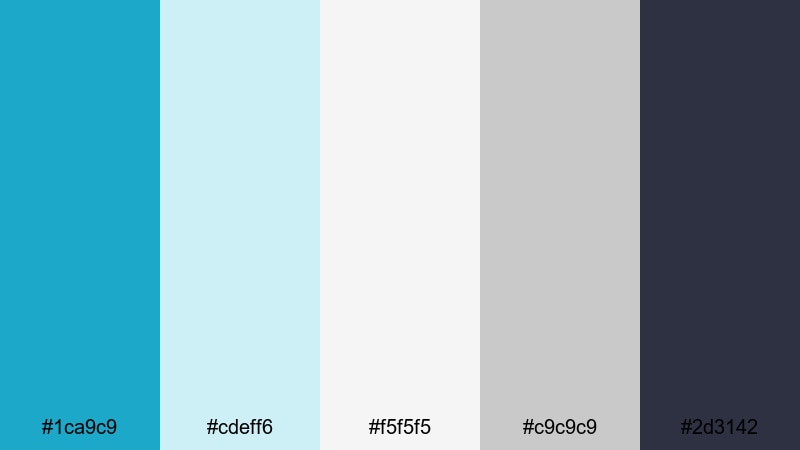
- HEX Codes: #1ca9c9, #cdeff6, #f5f5f5, #c9c9c9, #2d3142
- Mood: Focused, calm, and tidy like a perfectly organized workspace.
- Use for: Great for productivity channels, desk setups, tutorials, and talking-head videos.
Studio Desk Calm pairs Pacific Blue accents with cool grays and clean whites. It feels organized and professional, like a well-lit desk setup with minimal clutter.
Use this palette for tutorial intros, course slides, productivity thumbnails, or channel branding where clarity and focus matter. Keep your backgrounds light and neutral, and let Pacific Blue highlight buttons, progress bars, and key callouts on screen.
Minimal Tide UI
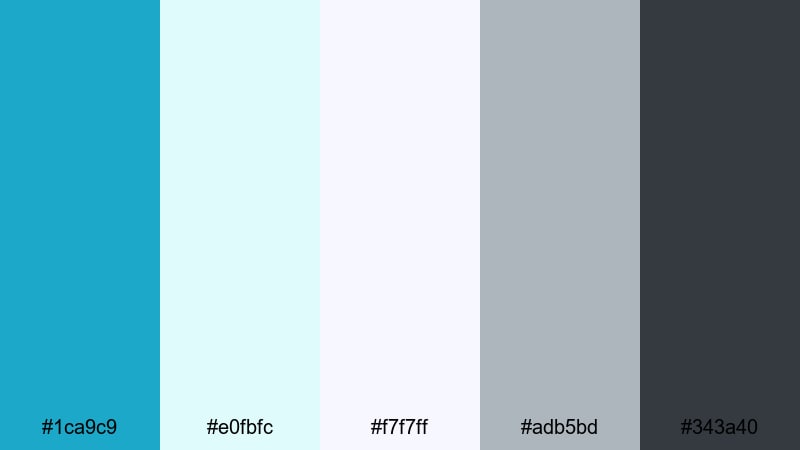
- HEX Codes: #1ca9c9, #e0fbfc, #f7f7ff, #adb5bd, #343a40
- Mood: Lightweight, modern, and user-friendly with a gentle tidal flow.
- Use for: Ideal for app UI mockups, tutorial overlays, and clean motion graphics.
Minimal Tide UI leans into subtle off-whites and soft grays so Pacific Blue can stand out as a clear accent color. The palette feels light, modern, and easy to navigate.
It is a strong fit for UX walkthroughs, SaaS demos, and interface overlays you add on top of screen recordings. Use the darker grays for body text and Pacific Blue for clickable elements, icons, or progress indicators in your videos and thumbnails.
Soft Pacific Pastels

- HEX Codes: #1ca9c9, #bde0fe, #ffc8dd, #ffe5ec, #9381ff
- Mood: Dreamy, gentle, and whimsical with a pastel twist.
- Use for: Perfect for aesthetic vlogs, journaling videos, and soft brand identities.
Soft Pacific Pastels wraps Pacific Blue in clouds of pastel blue, pink, and lilac. The result is dreamy and cozy, but still has a clear hero shade to build your brand around.
Use this palette for aesthetic study vlogs, digital journaling content, or channels focused on self-care and creativity. Pastels make great backgrounds for story highlight covers, YouTube banners, and title cards, while Pacific Blue frames important text or logos so they stay sharp.
Cloudline Travel Vlog
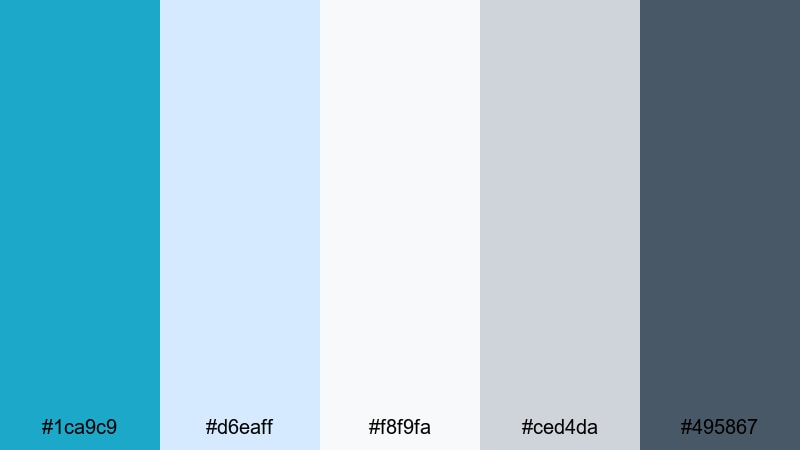
- HEX Codes: #1ca9c9, #d6eaff, #f8f9fa, #ced4da, #495867
- Mood: Airy, reflective, and gentle like watching clouds from a plane window.
- Use for: Use for travel diaries, cinematic day-in-the-life edits, and slow B-roll sequences.
Cloudline Travel Vlog mimics the feeling of looking down on clouds: light blues, misty grays, and a clean white base, anchored by Pacific Blue. It feels reflective and calm, great for more thoughtful or introspective content.
Use it for travel diaries, day-in-the-life edits, and slow B-roll of trains, planes, and city walks. Turn the light neutrals into background cards for text, while Pacific Blue handles map icons, subtitles, and section headers throughout your edit.
Clean Creator Workspace
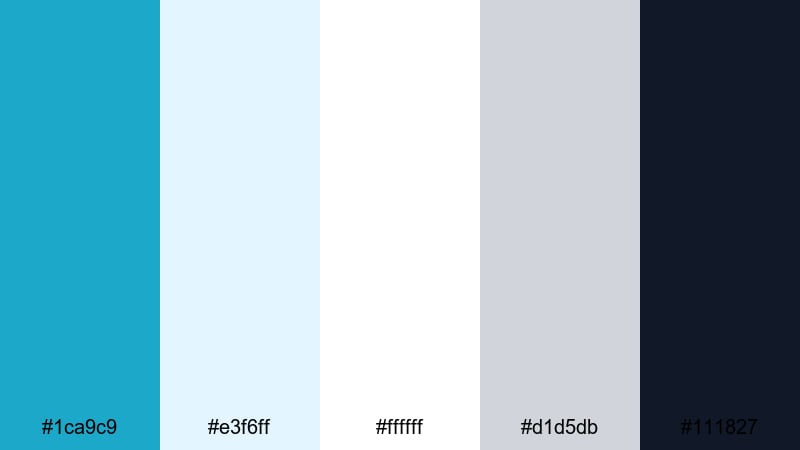
- HEX Codes: #1ca9c9, #e3f6ff, #ffffff, #d1d5db, #111827
- Mood: Fresh, professional, and minimal with a content-creator edge.
- Use for: Great for tutorials, course content, branding for agencies, and channel rebrands.
Clean Creator Workspace uses bright whites, cool grays, and deep text tones with Pacific Blue as a crisp accent. It feels professional and modern, ideal if you want your channel to look like a polished brand.
Use this palette for online courses, agency showreels, or any creator rebrand. Let the white and light blue handle backgrounds in your slides and lower thirds, and use dark gray or black for body text with Pacific Blue reserved for key highlights, CTAs, and logo elements.
Tips for Creating Pacific Blue Color Palettes
Pacific Blue is versatile enough to feel calm, energetic, or minimal depending on what you pair it with. Keep these practical guidelines in mind when building your own palettes for video, thumbnails, and brand assets.
- Decide on the mood first: pair Pacific Blue with warm corals and golds for tropical energy, or with cool grays and whites for a clean, minimal look.
- Watch contrast for readability: place white or very light text on dark blues, and use deep navy or charcoal for text over light Pacific Blue backgrounds.
- Limit accent colors: keep one or two strong accent shades (like coral or yellow) so Pacific Blue remains the hero of your palette.
- Match footage and graphics: color-correct your clips so skies, water, and clothing echo your chosen Pacific Blue rather than fighting against it.
- Use neutrals to give eyes a rest: combine Pacific Blue with off-whites and soft grays to avoid overwhelming viewers in longer videos.
- Stay consistent across platforms: reuse the same HEX codes in your channel banner, thumbnails, lower thirds, and Instagram covers so your brand is instantly recognizable.
- Test on mobile: check that your Pacific Blue combinations still look clear and high-contrast on small screens and in dark mode interfaces.
- Build palette presets: in Filmora, save your favorite color settings or LUT combinations so you can apply your signature Pacific Blue look to future projects quickly.
Used well, Pacific Blue can make your channel feel refreshing, trustworthy, and modern all at once. Whether you lean into calm coastal moods, bold cinematic contrasts, or soft minimalist setups, a clear palette keeps your videos instantly recognizable in the feed.
Try these ready-made HEX combinations inside Filmora and tweak them to match your footage and niche. Once you dial in a Pacific Blue look you love, turn it into your personal visual signature across intros, thumbnails, and every new upload.
Over time, that consistent Pacific Blue aesthetic will not only make your content look better, it will also help build a strong visual identity your audience remembers.
secure download