

 100% Security Verified | No Subscription Required | No Malware


 ChatGPT
 Perplexity
 Gemini
 Claude
 Grok
Grok
Phthalo Green is a deep, saturated green with a cool, teal undertone that instantly feels modern and cinematic. It suggests growth, technology, and depth all at once, which is why it works so well for creators who want visuals that feel both natural and futuristic. In color psychology, it can read as stable and calming in softer palettes or bold and electric in high-contrast combinations.
For video editors, thumbnail designers, and brand builders, Phthalo Green is a powerful accent or base tone for intros, overlays, lower-thirds, and channel branding. Below you will find ready-made Phthalo Green color palettes with HEX codes you can plug straight into your design tools or apply in Filmora to keep your edit, thumbnails, and social clips perfectly on-brand.
In this article
Bold & Cinematic Phthalo Green Color Palettes
Neon Nightfall Depths
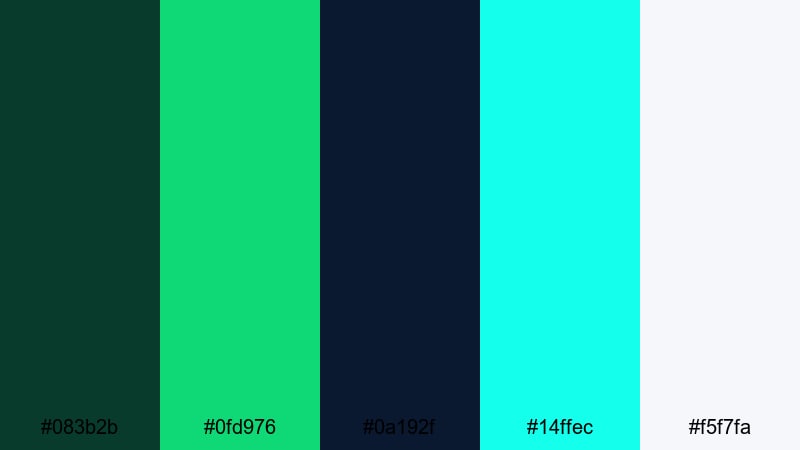
- HEX Codes: #083b2b, #0fd976, #0a192f, #14ffec, #f5f7fa
- Mood: Electric, high-contrast, and dramatic with a futuristic edge.
- Use for: Use for bold gaming intros, cyberpunk-style film titles, or high-energy music video graphics.
Neon Nightfall Depths throws deep Phthalo Green into a clash with neon aqua and cyan for instant cyberpunk energy. The near-black navy gives your frames a moody base, while the bright highlights cut through like holographic UI elements or neon signs.
Use this palette for gaming intros, techy countdown screens, glitchy title cards, or YouTube thumbnails that need to pop in a crowded feed. It also works well for motion graphic overlays in Filmora, such as animated HUDs, waveform visuals, or stylized lower-thirds that lean into a futuristic, high-impact aesthetic.
Pro Tip: Build a Futuristic Phthalo Green Look in Filmora
To keep this neon Phthalo Green mood consistent across your whole edit, start by picking one or two key HEX codes from the palette for your titles, shapes, and overlay graphics. In Filmora, you can save these colors in the custom palette and reuse them for text, elements, and transitions, so your opening sequence, b-roll captions, and end screens all share the same electric vibe.
Layer glow, blend modes, and subtle blur on cyan and mint accents to make them feel like futuristic lights against the deep green and navy background. This works especially well for gaming highlights, tech explainers, or music visualizers where the color story needs to feel tight and intentional from start to finish.
AI Color Palette
If you have a reference frame or artwork that already nails this Neon Nightfall Depths look, you can turn it into a full video style with Filmora's AI Color Palette feature. Import your reference image, let Filmora analyze the colors, and then match that palette to your entire timeline or selected clips.
This is a fast way to unify footage from different cameras or lighting setups under a single Phthalo Green and neon scheme. Your intros, main content, and outro graphics will instantly feel like they belong to the same futuristic world without spending hours manually tweaking every shot.
 secure download

HSL, Color Wheels & Curves
Once your Phthalo Green base is in place, use Filmora's HSL controls, color wheels, and curves to fine-tune the look. Slightly desaturate the darkest greens to avoid banding, then push the cyan and aqua hues toward a cooler tint for a more high-tech, futuristic feel. You can also use Filmora's color correction tools to adjust shadows and highlights so neon accents glow without clipping.
Lifting the shadows with curves gives you more detail in dark areas, while adding contrast in the midtones helps titles and UI elements stay crisp. Use the color wheels to give shadows a green-teal push and highlights a subtle cyan tint, which keeps the entire frame aligned with your Neon Nightfall Depths palette.
secure download1000+ Video Filters & 3D LUTs
To push this Phthalo Green palette even further, explore Filmora's video filters and 3D LUTs. Start with a teal-and-orange or cyberpunk-inspired LUT to stylize your base footage, then tweak saturation and contrast so the Phthalo Green and neon accents remain the heroes of the frame.
Stack subtle glow, VHS, or glitch filters on top to create futuristic transitions, music video looks, or stylized gaming montages in a few clicks. This approach keeps the palette cohesive while still giving each scene its own unique flair.
secure downloadEmerald City Skyline
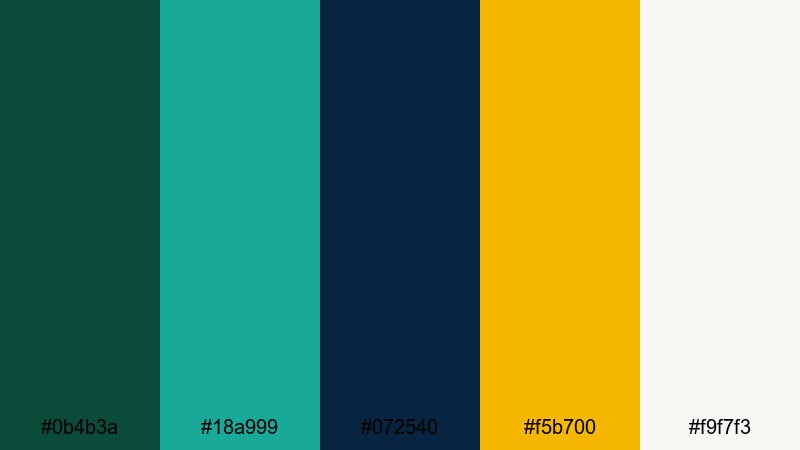
- HEX Codes: #0b4b3a, #18a999, #072540, #f5b700, #f9f7f3
- Mood: Sophisticated and urban with a cinematic, big-city glow.
- Use for: Best for tech brand bumpers, skyline overlays, and documentary title cards.
Emerald City Skyline blends grounded Phthalo Green with teal and deep navy, then adds a clean golden accent for that city-at-night glow. It feels polished and professional, ideal for tech brands, fintech explainers, or sleek documentary intros.
Use the dark green and navy as backgrounds for lower-thirds, while the golden yellow becomes your call-to-action or logo highlight. On thumbnails, this palette creates a premium, cinematic feel that works well for startup stories, city guides, or modern lifestyle vlogs.
Tropical Storm Surge
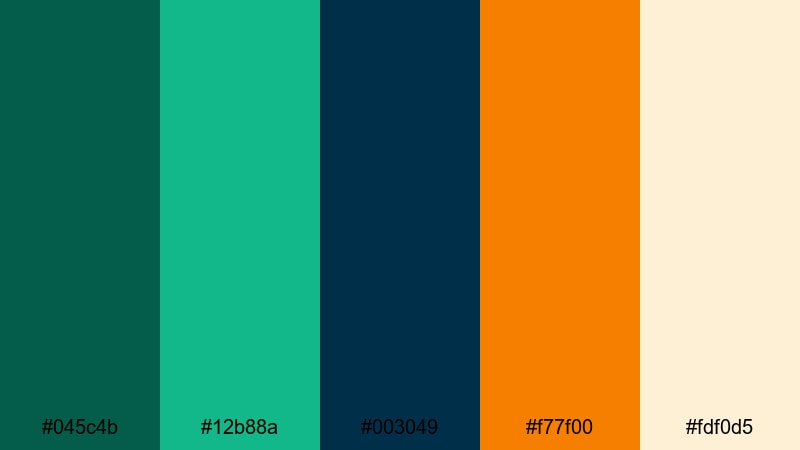
- HEX Codes: #045c4b, #12b88a, #003049, #f77f00, #fdf0d5
- Mood: Energetic and adventurous with stormy drama and warm highlights.
- Use for: Perfect for travel vlogs, surf edits, and festival recap videos needing vibrant contrast.
Tropical Storm Surge combines deep Phthalo Green and bright aqua with navy shadows and a punchy orange accent. It feels like a stormy coastline lit by a fiery sunset, full of motion and contrast.
Use the warm orange for callouts, transitions, and key text, while the greens and navy carry your main backgrounds. This palette is great for action thumbnails, festival recaps, surf or skate edits, and any dynamic montage where you want energy without losing structure.
Cyber Noir Jungle
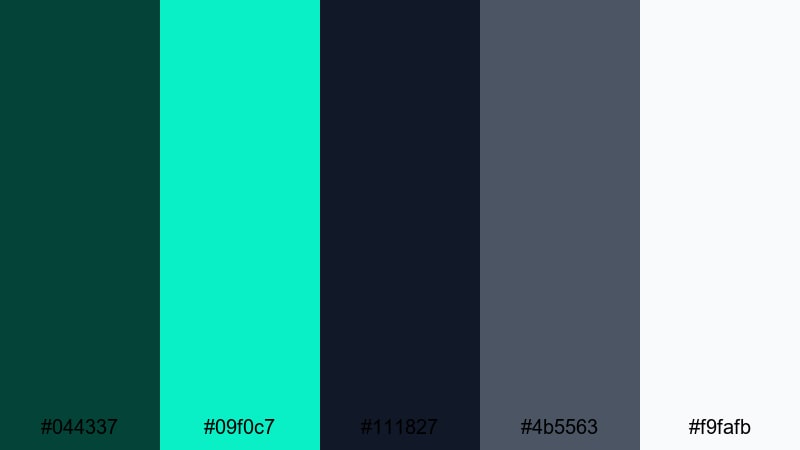
- HEX Codes: #044337, #09f0c7, #111827, #4b5563, #f9fafb
- Mood: Moody and tech-forward with a neon sci-fi twist.
- Use for: Use in sci-fi short films, hacker-themed visuals, or tech product promos.
Cyber Noir Jungle pairs inky Phthalo Greens and charcoal grays with a sharp neon cyan accent. It feels like a digital rainforest lit by holographic screens and code streams.
Use the dark tones for backgrounds and vignettes, then deploy the neon cyan sparingly for UI elements, tracking lines, and key typography. This palette suits hacker visuals, cybersecurity explainers, device launches, or any content that needs a dark, futuristic, but still readable look.
Nature Inspired Phthalo Green Color Palettes
Rainforest Canopy Mist
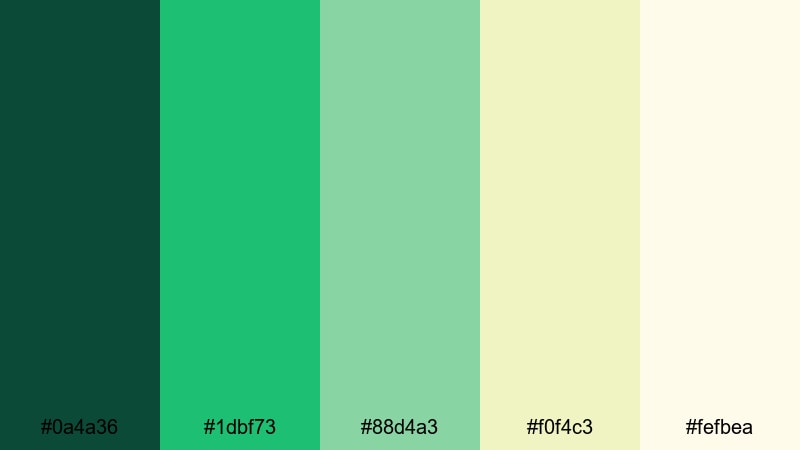
- HEX Codes: #0a4a36, #1dbf73, #88d4a3, #f0f4c3, #fefbea
- Mood: Lush, refreshing, and grounded in serene natural light.
- Use for: Ideal for eco-brand videos, nature documentaries, and calming lifestyle content.
Rainforest Canopy Mist moves from rich Phthalo Green foliage to soft mints and warm, misty off-whites. It feels like early morning in a rainforest, with filtered light and gentle air.
Use the deep greens for lower-thirds and logo marks, while the pale mints and creams become your backgrounds and title cards. This palette is perfect for eco brands, nature docs, sustainable product promos, or calm lifestyle vlogs where you want a natural yet polished look.
Mountain Lake Reflection

- HEX Codes: #0f5246, #1e847f, #79c2d0, #f4e8c1, #f9f7f1
- Mood: Calm, expansive, and contemplative like a still alpine lake.
- Use for: Use for travel films, meditative b-roll, or branding tied to wellness and retreats.
Mountain Lake Reflection blends cool Phthalo Green with teal blues and soft sand neutrals, mirroring the surface of an alpine lake. It feels contemplative and cinematic without being harsh.
Use darker greens and teals for frame edges or gradients, and let the light neutrals hold text and UI. This palette suits slow travel films, meditation channels, wellness retreat promos, and any content that needs a calm, expansive atmosphere.
Herbal Garden Dawn
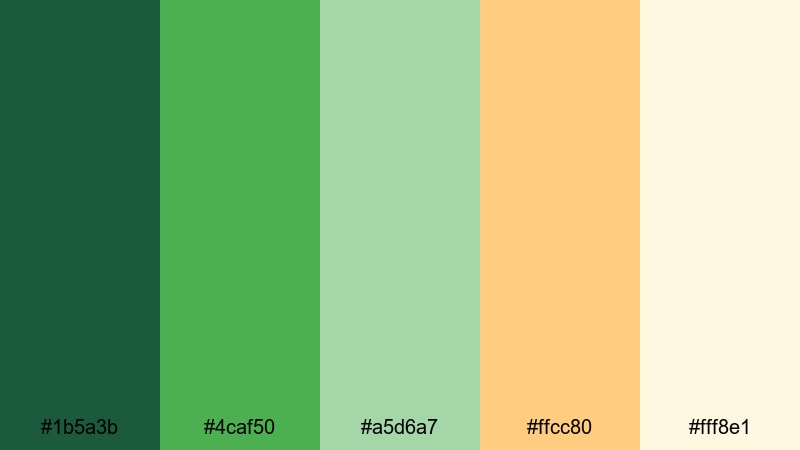
- HEX Codes: #1b5a3b, #4caf50, #a5d6a7, #ffcc80, #fff8e1
- Mood: Fresh and optimistic with a sunlit organic warmth.
- Use for: Great for cooking channels, garden vlogs, and sustainable product explainers.
Herbal Garden Dawn mixes garden Phthalo Greens with soft herb tones and peachy sunrise accents. It feels friendly and wholesome, like early morning in a backyard garden.
Use the greens as your core brand shades, while the peach and cream support thumbnail text, callouts, and recipe titles. This palette is ideal for cooking and garden channels, DIY tutorials, and sustainable product explainers that want a warm, approachable identity.
Deep Sea Kelp Forest
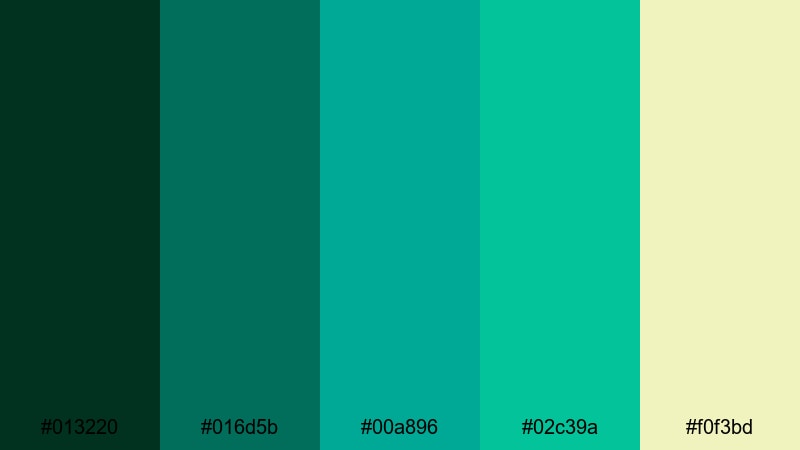
- HEX Codes: #013220, #016d5b, #00a896, #02c39a, #f0f3bd
- Mood: Immersive and mysterious with bright currents of life.
- Use for: Best for underwater footage, ocean conservation pieces, or dreamy ambient loops.
Deep Sea Kelp Forest dives into very dark Phthalo Greens layered with turquoise currents and pale foam tones. It feels immersive and slightly mysterious, like sinking into an underwater forest.
Use the darkest shades as a frame or vignette, then highlight coral, fish, or text with the brighter turquoise and soft yellow-green. This palette works perfectly for ocean documentaries, conservation campaigns, aquarium content, and ambient or lo-fi visuals with a marine theme.
Minimal & Modern Phthalo Green Color Palettes
Phthalo Grid Interface
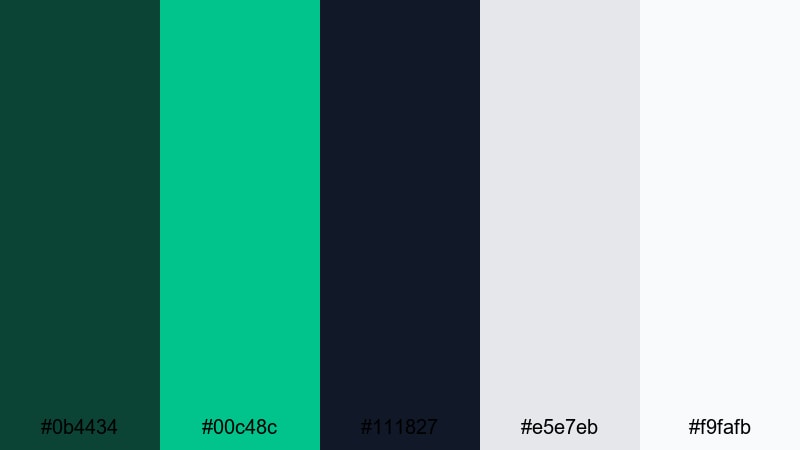
- HEX Codes: #0b4434, #00c48c, #111827, #e5e7eb, #f9fafb
- Mood: Clean, digital, and confident with a tech-savvy feel.
- Use for: Great for app UI mockups, dashboard animations, and SaaS product explainer videos.
Phthalo Grid Interface keeps things crisp: a strong Phthalo Green core, a bright mint accent, and neutral grays on almost-white backgrounds. It feels like a modern dashboard or app interface.
Use the dark green and navy as header bars or key UI blocks, while the mint highlights buttons and icons. This palette is ideal for SaaS explainers, UI mockup reels, data dashboards, and any minimalist tech branding where readability and structure matter.
Urban Concrete Green
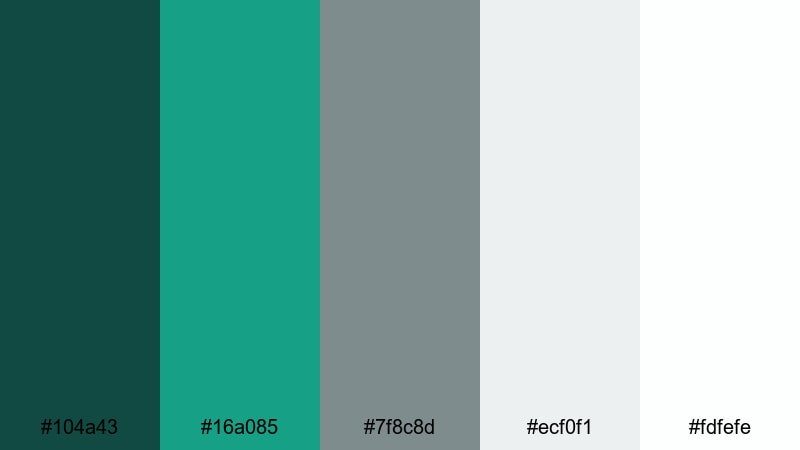
- HEX Codes: #104a43, #16a085, #7f8c8d, #ecf0f1, #fdfefe
- Mood: Chic and understated with a city-cool, startup-ready vibe.
- Use for: Use for brand refresh videos, minimalist logo stings, and portfolio reels.
Urban Concrete Green places Phthalo Green and teal against soft concrete grays and bright whites. It feels urban and minimal, like a clean coworking space or design studio.
Use the greens sparingly as logo and accent tones, letting the grays and whites dominate backgrounds and frames. This is a strong choice for brand refreshes, portfolio reels, agency intros, and minimalist corporate videos where you want personality without clutter.
Graphite Mint Circuit
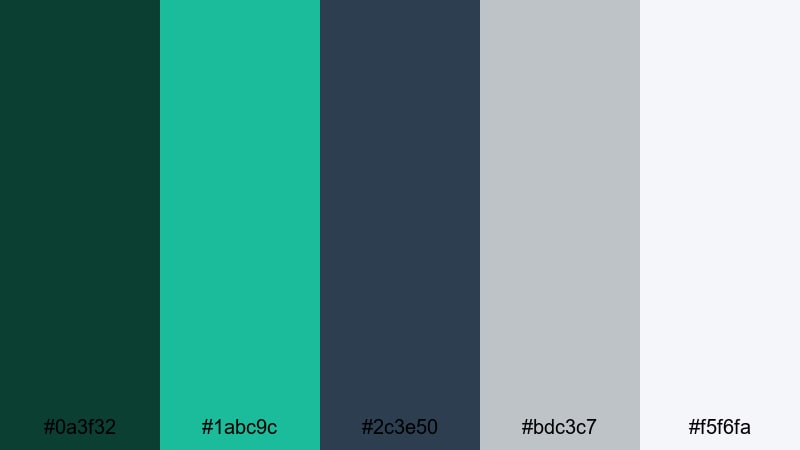
- HEX Codes: #0a3f32, #1abc9c, #2c3e50, #bdc3c7, #f5f6fa
- Mood: Cool, precise, and slightly futuristic with a professional tone.
- Use for: Ideal for tech explainers, product UI previews, and sleek lower-thirds.
Graphite Mint Circuit mixes Phthalo Green with minty teal, dark graphite blues, and soft metallic grays. The result feels precise and tech-forward, but still approachable.
Use the dark graphite and green as your base for titles and overlays, and bring in the mint accent for data highlights, progress bars, or call-to-action buttons. This palette works well for hardware or software demos, clean tutorial graphics, and professional yet futuristic YouTube channel branding.
Soft & Dreamy Phthalo Green Color Palettes
Seafoam Storybook

- HEX Codes: #0e5a4a, #2ec4b6, #cbf3f0, #ffddd2, #fffff3
- Mood: Gentle and whimsical with a seaside fairytale softness.
- Use for: Perfect for lifestyle vlogs, cozy intros, and kid-friendly channels.
Seafoam Storybook grounds airy seafoam, blush, and cream in a deeper Phthalo Green. The balance feels gentle and whimsical, like an illustrated seaside story.
Use the darker green sparingly for outlines, icons, or logo marks, while the pastel tones handle backgrounds and text blocks. This palette is great for cozy vlogs, home decor content, kids content, and soft intro sequences where you want clarity without harsh contrast.
Aurora Studio Glow

- HEX Codes: #0b3d33, #2ec4b6, #9be7ff, #fcbf49, #fff7e6
- Mood: Magical and uplifting like soft northern lights in a studio space.
- Use for: Use for channel branding, intro animations, and dreamy tutorial backgrounds.
Aurora Studio Glow sets deep Phthalo Green shadows under aqua, pale blue, and a warm golden highlight. It feels like a soft aurora inside a studio, magical but controlled.
Use the cooler tones for gradients, light streaks, or bokeh overlays, and reserve the golden shade for key buttons, CTAs, and logo glows. This palette fits beauty channels, creative tutorials, studio vlogs, and intro animations where you want a dreamy but still professional look.
Vintage Teal Postcard
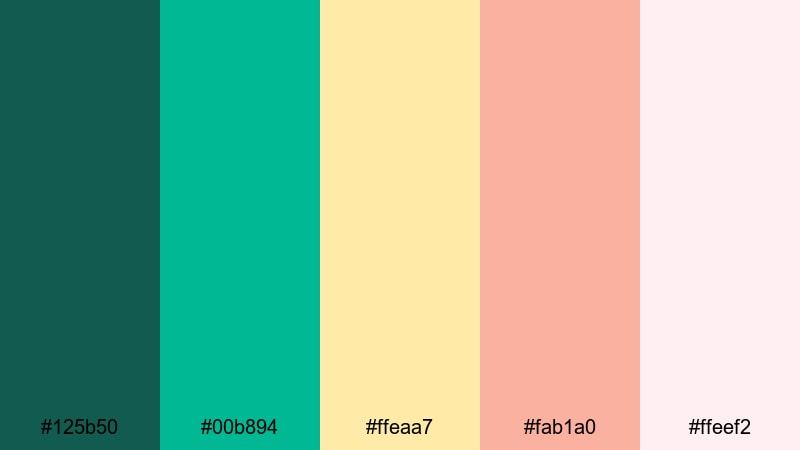
- HEX Codes: #125b50, #00b894, #ffeaa7, #fab1a0, #ffeef2
- Mood: Nostalgic and sun-faded with a retro travel charm.
- Use for: Great for travel montage titles, retro filters, and vlog episode covers.
Vintage Teal Postcard leans Phthalo Green toward teal, matching it with warm creams and soft coral. It feels like an old travel postcard, slightly sun-faded and nostalgic.
Use teal and green for borders, frames, and map-style graphics, with the warm tones holding titles and captions. This palette is ideal for travel vlogs, city guides, retro-styled episode covers, and any series where you want a consistent, nostalgic identity.
Boho Lagoon Breeze
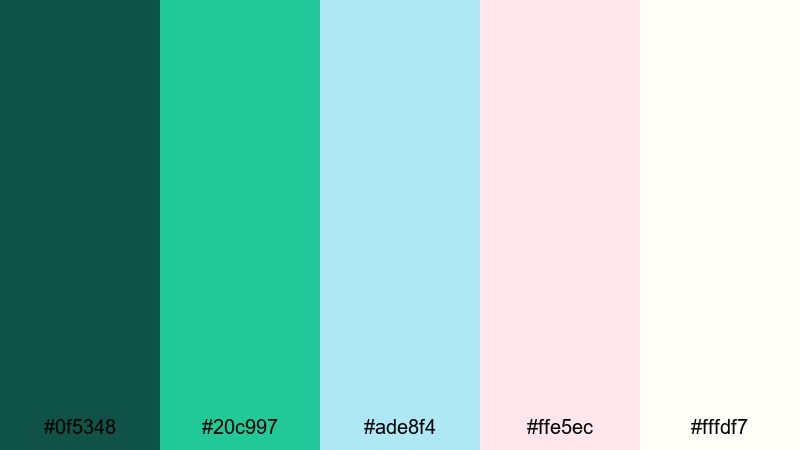
- HEX Codes: #0f5348, #20c997, #ade8f4, #ffe5ec, #fffdf7
- Mood: Airy, relaxed, and bohemian with a sunlit lagoon feel.
- Use for: Ideal for boho wedding videos, wellness reels, and soft product showcases.
Boho Lagoon Breeze pairs lagoon-tinted Phthalo Green with breezy mints, blush, and ivory. It feels airy, relaxed, and slightly bohemian, like a styled beach shoot or boutique retreat.
Use the deeper green to anchor your logo and key headings, allowing the pastel mints and blush to carry backgrounds, frames, and lower-thirds. This palette suits wedding highlights, wellness reels, soft product showcases, and Instagram-friendly edits that need a cohesive, dreamy tone.
Tips for Creating Phthalo Green Color Palettes
Phthalo Green is flexible enough to feel natural, cinematic, or futuristic depending on what you pair it with. Use these tips to design palettes and apply them consistently in your videos and designs.
- Decide the mood first: combine Phthalo Green with neon cyan for futuristic energy, soft creams for calm nature vibes, or warm oranges for cinematic contrast.
- Control contrast for readability: keep text on very dark Phthalo Green either pure white or a light warm neutral so titles and lower-thirds stay legible on mobile.
- Limit accent colors: choose one main accent (gold, orange, coral, or mint) so your thumbnails and overlays do not look chaotic.
- Use neutrals as breathing space: mix in grays, off-whites, or sand tones so Phthalo Green can shine without overwhelming the frame.
- Match footage with grading: in Filmora, use HSL or LUTs to gently nudge your footage greens toward your chosen Phthalo Green hue for a more branded look.
- Keep branding consistent: reuse the same 3 to 5 HEX codes across intros, end screens, channel banners, and social cuts to build instant recognition.
- Test on small screens: preview your palettes on a phone to be sure text over Phthalo Green backgrounds is still clear in YouTube and TikTok feeds.
- Balance warm and cool: add a single warm highlight color to cool Phthalo Greens when you need emotional warmth in faces or product shots.
Phthalo Green can be earthy, elegant, or futuristic depending on how you combine it, making it a powerful anchor for video branding, thumbnails, and intros. With the 15 palettes above, you have ready-made HEX codes that cover gaming, travel, nature, tech, lifestyle, and more.
Try dropping these palettes into Filmora to style your titles, overlays, and color grading. Once you lock in a signature Phthalo Green look, you can reuse it across episodes and platforms so your audience instantly recognizes your content.
Experiment with different combinations, save your favorite settings, and let Filmora handle the heavy lifting while you focus on storytelling and creative direction.
secure downloadNext: Futuristic Color Palette
