

 100% Security Verified | No Subscription Required | No Malware


 ChatGPT
 Perplexity
 Gemini
 Claude
 Grok
Grok
Futuristic color palettes are all about high contrast, neon energy, and clean digital tones that feel one step ahead of the present. Think electric cyan, holographic violet, and cool tech grays that instantly signal sci fi, AI, cyber cities, and advanced interfaces. These colors are often associated with innovation, speed, data, and virtual worlds, which makes them ideal for creators who want their visuals to feel cutting edge and forward looking.
In video content, futuristic colors work brilliantly for YouTube thumbnails, gaming intros, tech explainers, cyberpunk edits, and bold brand packages. In this guide, you will find 15 carefully curated futuristic color palettes with HEX codes that you can apply across thumbnails, overlays, motion graphics, and full edits. Every palette is ready for Filmora users, so you can quickly translate these colors into LUTs, filters, and AI powered color grading workflows.
In this article
Neon Futuristic Color Palettes
Neon Grid Horizon
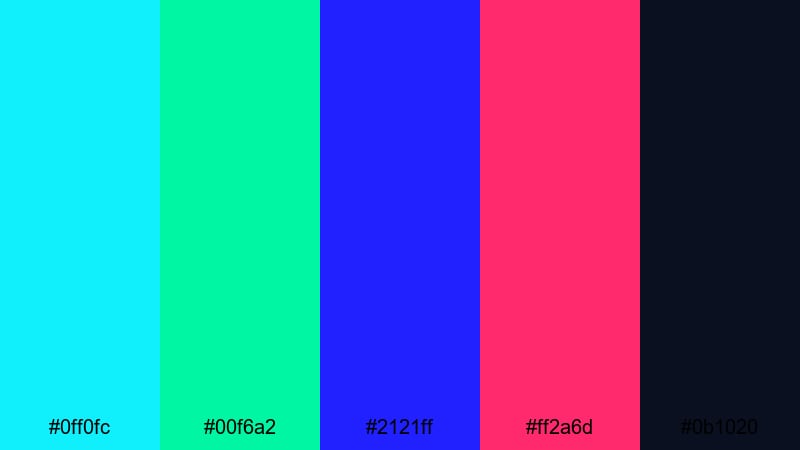
- HEX Codes: #0ff0fc, #00f6a2, #2121ff, #ff2a6d, #0b1020
- Mood: Hyper-energetic and electric, like speeding through a digital skyline at night.
- Use for: Perfect for gaming intros, fast-paced tech promos, and high-impact YouTube thumbnails.
This palette combines sharp cyan, neon lime, electric blue, and hot magenta against a deep navy base. It feels like a glowing grid rushing past you in a futuristic racing game or an LED city built purely from data. The contrast between the bright neons and the dark background instantly grabs attention on crowded feeds.
Use Neon Grid Horizon for esports highlight reels, TikTok edits packed with motion, and bold logo reveals. In thumbnails and channel banners, let the dark navy act as the canvas while the cyan and magenta form outlines, glows, and streaks around your subject. Titles, lower thirds, and animated HUD elements can all use one neon as the main accent to keep the look consistent across your Filmora timeline.
Pro Tip: Enhance Your Futuristic Visuals with Filmora
To keep a high-energy neon palette like Neon Grid Horizon consistent, build a simple visual system inside Filmora. Use the dark navy tone as your background in titles or shapes, then lock in one main neon (for example #0ff0fc) for text, and another neon (like #ff2a6d) for outlines, glows, and accent details. Once you set these in a few templates, you can reuse them across intros, outros, and b-roll overlays.
Filmora makes it easy to duplicate this look for shorts, trailers, and full-length videos. Save your favorite title style with these futuristic colors, then drag and drop it onto new clips so every thumbnail, lower third, and end screen feels like part of the same neon universe.
AI Color Palette
If you design a Neon Grid Horizon reference card or grab a still frame with these colors, you can apply that look to an entire edit using Filmora's AI driven tools. Filmora's AI Color Palette feature analyzes a reference shot and automatically transfers its tones to other clips, so your entire sequence keeps that cyan-magenta-futuristic glow.
This is ideal when you mix camera sources or stock footage. Import your clips, pick a frame with your ideal futuristic colors, and let AI Color Palette match the rest. It saves you from manual tweaking and helps avoid distracting color mismatches between scenes.
 secure download

HSL, Color Wheels & Curves
Once your futuristic base is in place, you can fine tune the mood using Filmora's color controls. Adjusting HSL lets you push cyans towards teal or blue, and shift magentas toward warmer pinks or cooler purples. With color wheels, you can cool down shadows into deep navy while keeping highlights warm for more stylized contrast. For a deeper breakdown of grading techniques, you can explore Filmora's guide to advanced color correction tools and apply the same logic to your futuristic schemes.
Curves are perfect for making neons pop without blowing out skin tones. Add a gentle S-curve to increase contrast, then slightly lift the blacks to keep your dark areas rich instead of crushed. Small adjustments here can turn a basic neon palette into a cinematic, glossy sci fi look.
secure download1000+ Video Filters & 3D LUTs
To speed up your futuristic styling, start with Filmora's built in filters and LUTs, then tweak them to match your chosen HEX codes. Filmora's video filters and 3D LUTs make it easy to add neon contrast, sci fi glows, or cyberpunk shadows in a single drag and drop.
You can stack filters for a more complex vibe: for example, add a glow or light leak filter to emphasize neon edges, then use a teal and magenta LUT to lock in that high-tech color split. Once you like the result, save it as a custom preset and reuse it across gaming intros, tech reviews, and cinematic B-roll.
secure downloadSynthwave Night Drive
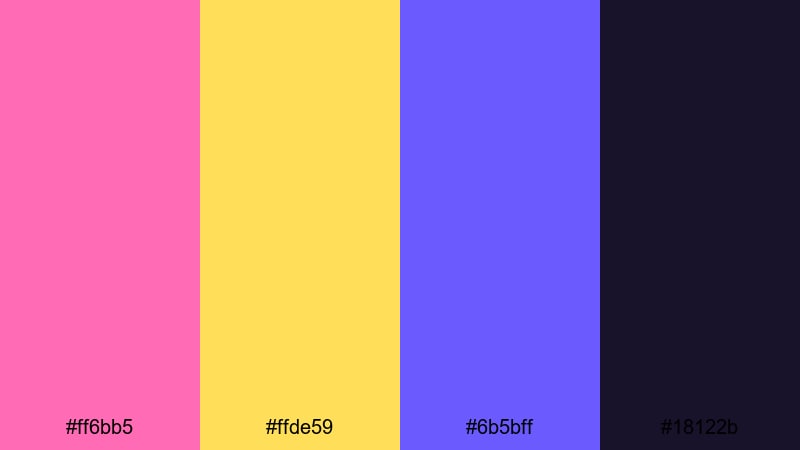
- HEX Codes: #ff6bb5, #ffde59, #6b5bff, #18122b
- Mood: Nostalgic yet futuristic, blending retro synthwave vibes with modern polish.
- Use for: Great for music visualizers, lyric videos, and retro-futuristic vlog aesthetics.
Synthwave Night Drive mixes warm pink, glowing gold, and rich violet against a deep indigo night. It feels like cruising through a neon city with a retro soundtrack playing in the background. The palette balances nostalgia with modern sharpness, making it perfect for visuals that nod to the 80s while still looking fresh.
Apply this palette to animated equalizers, track titles, and cover art in your music videos. In Filmora, use the darker tones for backgrounds and gradients, then pick pink or gold for title fonts and waveform accents. For vlogs, this palette works beautifully in intros, end screens, and lower thirds that give your channel a consistent synthwave identity.
Laser Arcade Burst
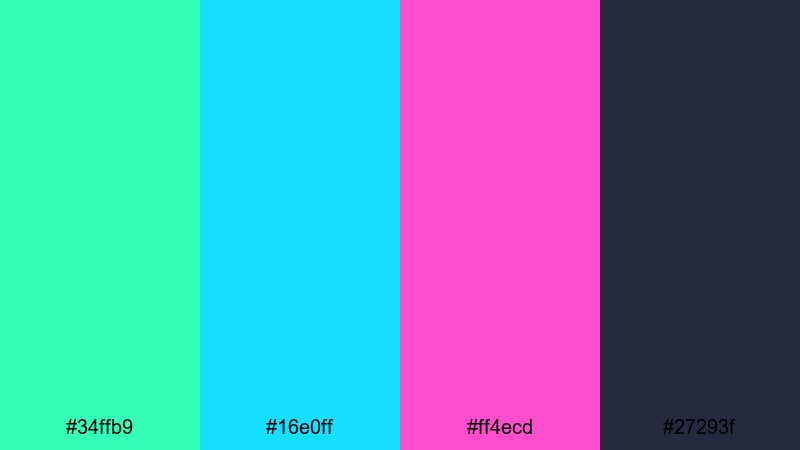
- HEX Codes: #34ffb9, #16e0ff, #ff4ecd, #27293f
- Mood: Playful and competitive, like the glow of a futuristic arcade in full action.
- Use for: Use for esports branding, highlight reels, and dynamic lower-thirds graphics.
Laser Arcade Burst feels like a room filled with glowing game cabinets and animated scoreboards. Punchy teal, neon aqua, and hot pink streak across a dark slate base, giving you high visibility for text and HUD elements even on small screens.
Use the dark #27293f for overlays and frame graphics, then add teal or aqua accents to track scores, combo counters, or usernames in your gameplay edits. In thumbnails, let the hot pink draw attention to your main call to action or episode title while the cooler tones keep the rest of the image organized.
Digital City Lights
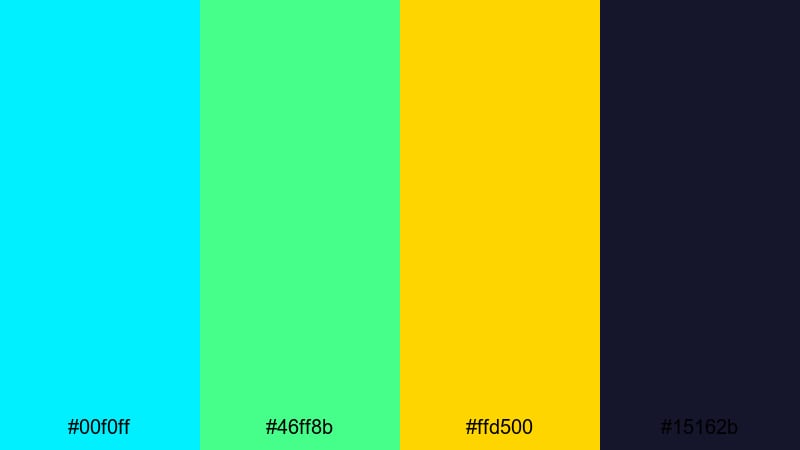
- HEX Codes: #00f0ff, #46ff8b, #ffd500, #15162b
- Mood: Vibrant and bustling, evoking skyscraper billboards and holographic ads at midnight.
- Use for: Ideal for city b-roll edits, tech event trailers, and animated titles.
Digital City Lights fuses cyan, neon green, and vivid yellow over a deep midnight blue. It captures the feeling of a futuristic downtown packed with billboards, screens, and holograms. The palette is vivid without feeling chaotic, which makes it strong for storytelling around innovation, nightlife, or city travel.
Use the midnight tone as a base for your title cards and background shapes, then pick either cyan or neon green as your primary accent. The yellow works well as a highlight for key words, buttons, or icons. In tech promos or conference recaps, this palette helps you frame speakers, stats, and product shots within a cohesive digital city atmosphere.
Minimal Futuristic Color Palettes
Chrome Interface Clean
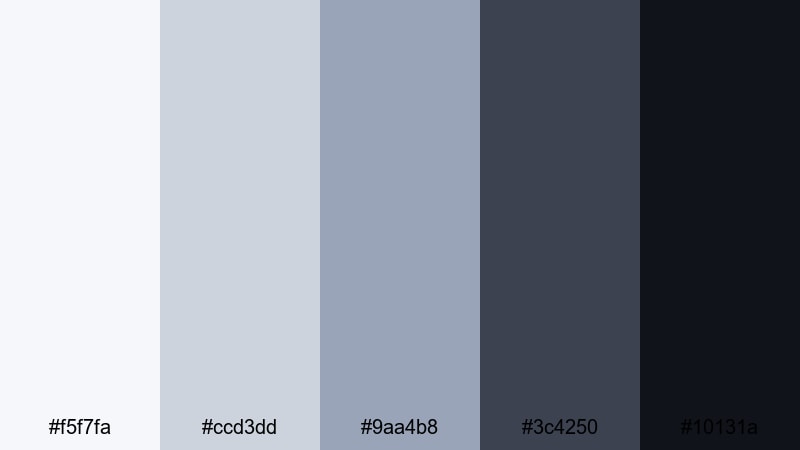
- HEX Codes: #f5f7fa, #ccd3dd, #9aa4b8, #3c4250, #10131a
- Mood: Calm, precise, and professional, like a high-end operating system UI.
- Use for: Perfect for SaaS explainers, interface mockups, and sleek product demos.
Chrome Interface Clean delivers a cool, minimal tech aesthetic built from soft whites and layered grays. It feels like a polished dashboard or OS where every detail is deliberate and uncluttered. There is still enough contrast between the lighter grays and the deep slate to keep text and icons highly readable.
This palette is ideal when you want your information or product features to be the star. Use the lightest tones as backgrounds, mid grays for panels and cards, and the darkest shades for titles and text. In Filmora, combine this palette with subtle animations and thin line graphics for UI walkthroughs, tutorial videos, and professional pitch decks.
Soft Circuit Mist
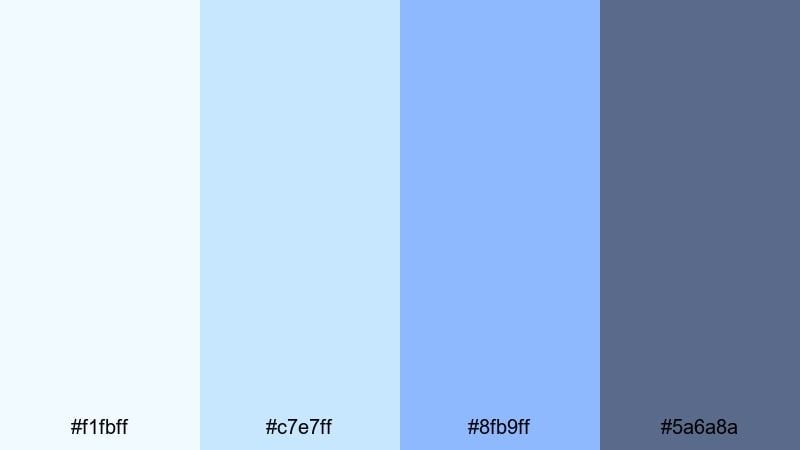
- HEX Codes: #f1fbff, #c7e7ff, #8fb9ff, #5a6a8a
- Mood: Gentle and airy with a subtle tech edge, like morning fog over a digital city.
- Use for: Use in tech startup intros, UX walkthroughs, and minimalist vlog branding.
Soft Circuit Mist relies on pale blues and periwinkle tones to create a calm, approachable futuristic feel. It suggests innovation without shouting, making it ideal for startups, educational content, and creators who want a friendly yet modern style.
Use the lighter shades for clean backgrounds and safe space around your content. The deeper blue gray works well for icons, UI outlines, and body text. In Filmora, this palette pairs nicely with smooth transitions, thin lines, and simple charts, giving your videos a subtle digital flavor without overwhelming viewers.
Midnight Dashboard
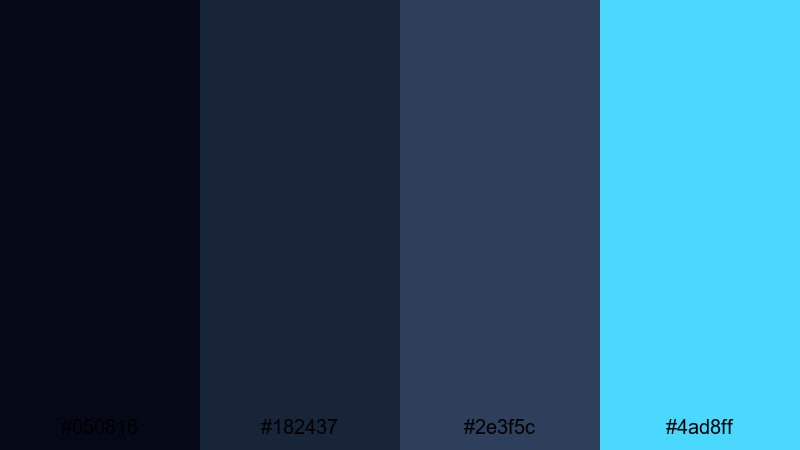
- HEX Codes: #050816, #182437, #2e3f5c, #4ad8ff
- Mood: Focused and analytical, like a data-rich control center glowing in the dark.
- Use for: Great for analytics dashboards, finance explainers, and cybersecurity content.
Midnight Dashboard is built from layers of deep navy with a single sharp cyan accent. It feels like a command center or security console, full of graphs and maps glimmering in a dark room. The restrained use of color makes every cyan element feel important.
In your edits, reserve the cyan for key data points, callouts, and headline text. Let the darker blues form your charts, boxes, and HUD frames. This palette works especially well with motion graphics in Filmora where data flows across the screen or highlights sync with beats in a tech narration.
Quantum White Space
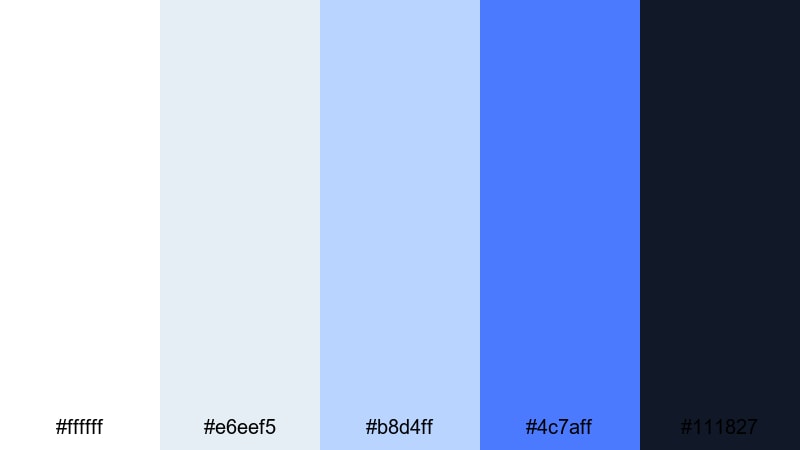
- HEX Codes: #ffffff, #e6eef5, #b8d4ff, #4c7aff, #111827
- Mood: Open, innovative, and optimistic, evoking clean lab spaces and advanced R and D.
- Use for: Ideal for brand refresh reels, app promos, and minimalist educational content.
Quantum White Space uses bright whites and gentle blues with one bold accent blue plus a dark anchor shade. It feels like a futuristic lab or clean creative studio where everything is light, airy, and efficient. The palette is great for brands that want to appear trustworthy, modern, and optimistic.
Use the pure white and light gray blue for backgrounds and negative space, then rely on the accent blue for logos, key lines, buttons, and section headers. In thumbnails and intros, this combination keeps your visuals uncluttered while still clearly futuristic, especially when paired with simple geometric shapes and smooth animations in Filmora.
Cyberpunk Futuristic Color Palettes
Neon Alley Rain
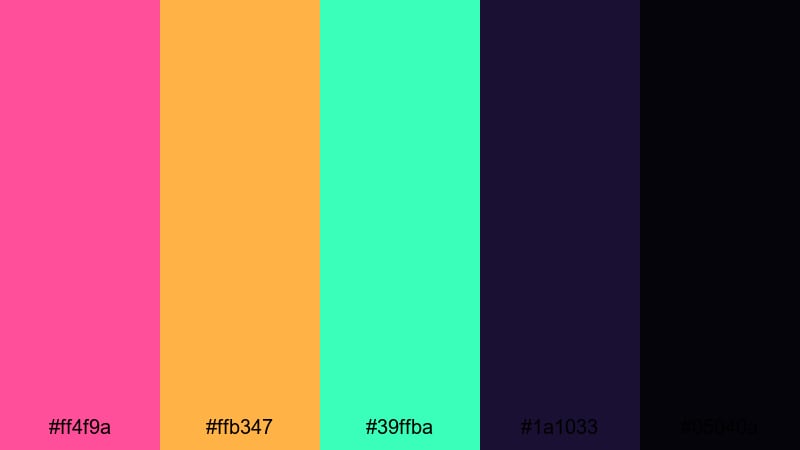
- HEX Codes: #ff4f9a, #ffb347, #39ffba, #1a1033, #05040a
- Mood: Moody and cinematic, like rain-slick streets lit by flickering neon signs.
- Use for: Use for story-driven edits, short films, and cyberpunk trailer sequences.
Neon Alley Rain blends hot pink, amber, and toxic green with inky purples and blacks. It feels like a neon drenched backstreet in a cyberpunk film, where every reflection on wet pavement adds to the drama. The bright colors are intense, but the deep shadows keep everything grounded and cinematic.
Use the darkest shades for backgrounds, vignettes, and contrast, then let one neon tone lead your titles while another highlights UI graphics or subtitles. In Filmora, pairing this palette with lens flares, rain overlays, and glitch transitions can instantly push your edit into a gritty sci fi mood.
Glitch Terminal Glow
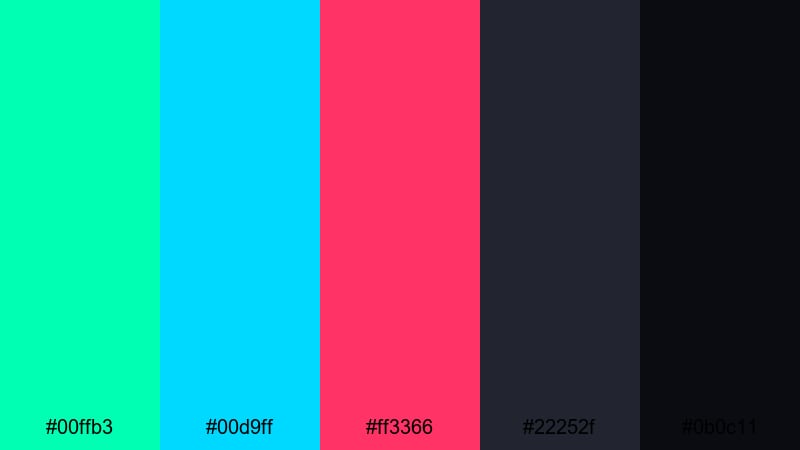
- HEX Codes: #00ffb3, #00d9ff, #ff3366, #22252f, #0b0c11
- Mood: Glitchy and rebellious, with a hacker den energy and underground attitude.
- Use for: Great for glitch transitions, hacking overlays, and tech culture shorts.
Glitch Terminal Glow combines acid teal, bright aqua, and glitch magenta over dark charcoal. It feels raw and digital, like a command prompt gone wild or distorted VR overlay. The palette is perfect when you want your visuals to look hacked, glitched, or underground.
Use the darker grays as your base for consoles or code screens, then drop in teal and aqua for code lines, error messages, and data streams. The magenta can emphasize warnings, titles, or key timestamps. In social edits, this palette instantly gives your content a rebellious, tech culture edge.
Urban Hologram Skies
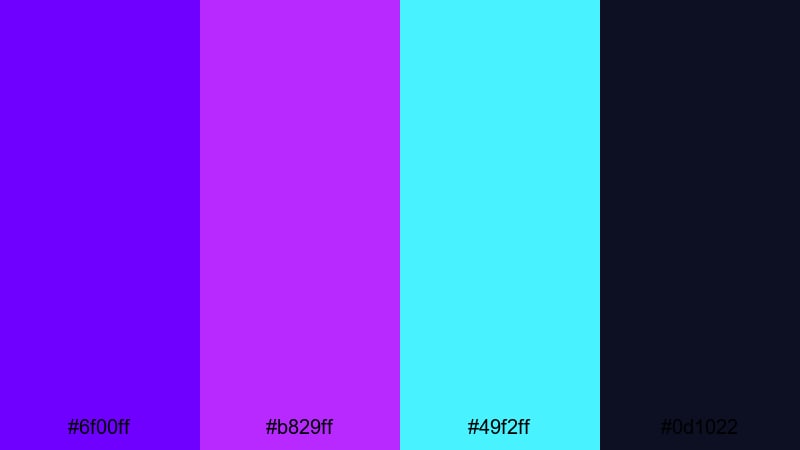
- HEX Codes: #6f00ff, #b829ff, #49f2ff, #0d1022
- Mood: Surreal and dreamy, like holographic billboards fading into a digital twilight.
- Use for: Ideal for title cards, sci fi travel vlogs, and stylized city montages.
Urban Hologram Skies layers rich violet, neon magenta, and bright cyan over a deep midnight base. It feels like watching holographic skies or augmented reality ads suspended over skyscrapers. The palette is both dreamy and electric, which makes it ideal for stylized montages and title sequences.
Use the midnight tone for backgrounds, then blend violet and magenta in gradients behind your titles. Cyan works well as a highlight for borders, cursor trails, or map routes. In Filmora, create soft animated gradients with these colors to sit behind text or UI designs, adding a subtle holographic depth to intros and transitions.
Neon Noir Surveillance
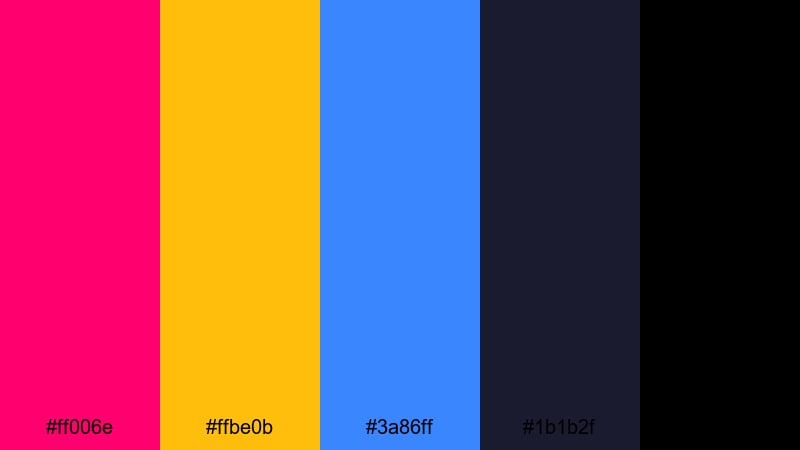
- HEX Codes: #ff006e, #ffbe0b, #3a86ff, #1b1b2f, #000000
- Mood: Tense and dramatic, mixing noir shadows with bold, suspicious neon highlights.
- Use for: Use in thriller trailers, tech conspiracy edits, and dramatic channel branding.
Neon Noir Surveillance contrasts intense pink, amber, and cobalt blue with deep indigo and pure black. It feels like a world of security cameras, encrypted files, and shadowy alleys. The palette delivers a thriller mood with a tech twist, great for narrative content or investigative themes.
Use black and indigo for silhouettes, masks, and dark framing, then introduce neon accents on screens, crosshairs, or tracking overlays. In thumbnails, center your subject in shadow and use neon color blocks or borders to spotlight the video title. This contrast helps your content stand out even with small mobile previews.
Holographic Futuristic Color Palettes
Iridescent Data Stream
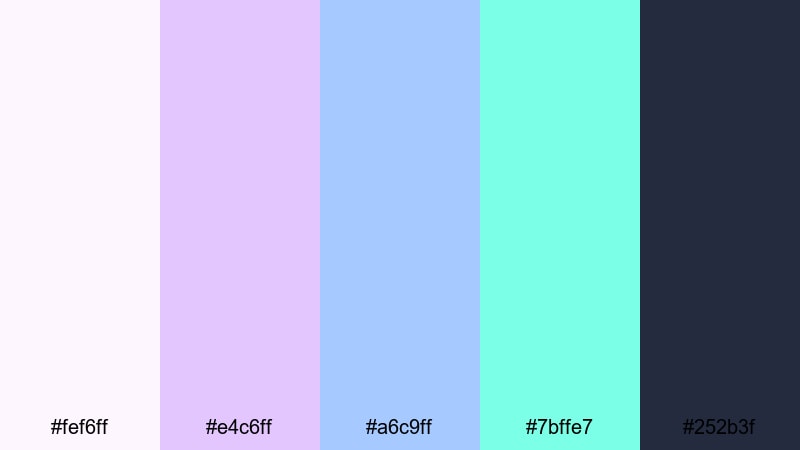
- HEX Codes: #fef6ff, #e4c6ff, #a6c9ff, #7bffe7, #252b3f
- Mood: Ethereal and fluid, like shimmering data waves flowing across a screen.
- Use for: Perfect for overlays, logo reveals, and dreamy motion backgrounds.
Iridescent Data Stream uses soft lavender, periwinkle, and minty teal floating over muted navy. It has a light, holographic quality that feels dreamy but still clearly digital. This palette is great for airy, futuristic branding or intros where you want gentle motion and glowing gradients.
Use the lighter shades in particle effects, wave patterns, or streaked backgrounds, while the deeper navy frames logos and text. In Filmora, this palette works beautifully with slow-moving overlays, bokeh, or swirl effects behind your titles and animated logos.
Prismatic HUD Overlay
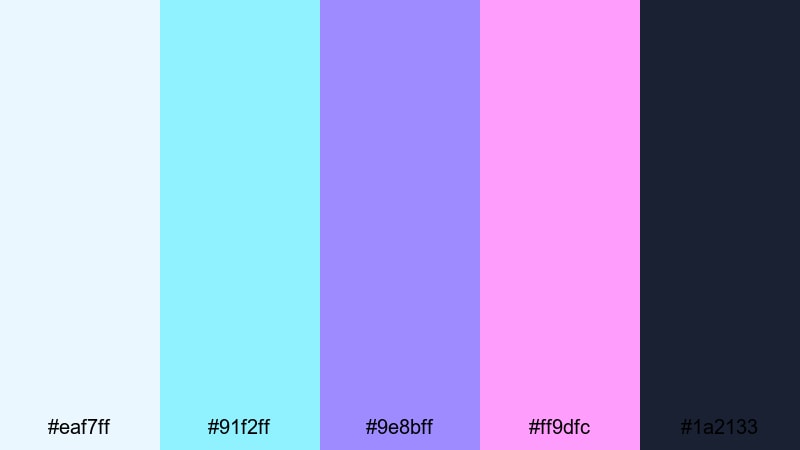
- HEX Codes: #eaf7ff, #91f2ff, #9e8bff, #ff9dfc, #1a2133
- Mood: Techy yet playful, like a colorful HUD projected onto a dark visor.
- Use for: Great for AR graphics, UI callouts, and futuristic tutorial overlays.
Prismatic HUD Overlay blends cool cyan and lilac with soft magenta on a deep blue background. It feels like a colorful augmented reality display or game HUD that sits just above the real world. The tones are bright but not harsh, keeping the overall look polished and fun.
Use the darker blue for the base layer of your overlays, then draw connecting lines, icons, and boxes with cyan and lilac. Magenta can highlight active states or important labels. In Filmora, layer these colors into shape elements and motion titles when you want your tutorials, reviews, or explainer videos to feel interactive and advanced.
Aurora Server Cloud
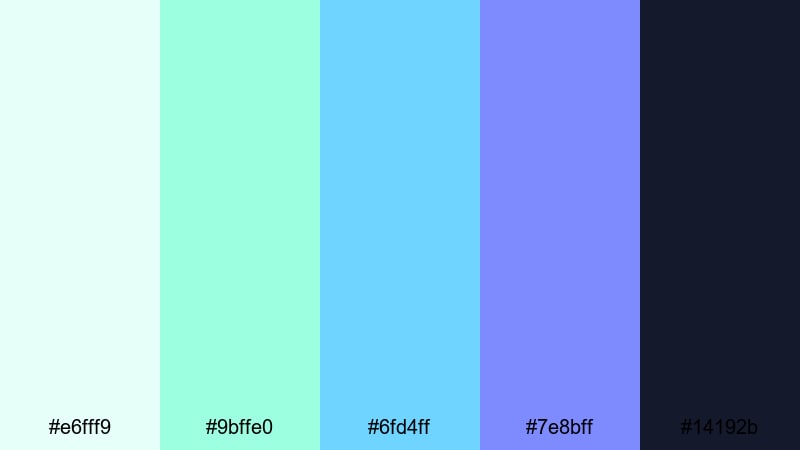
- HEX Codes: #e6fff9, #9bffe0, #6fd4ff, #7e8bff, #14192b
- Mood: Calm and expansive, like an aurora shimmering above endless data centers.
- Use for: Ideal for cloud computing promos, ai explainers, and smooth ambient loops.
Aurora Server Cloud combines mint, aqua, sky blue, and soft indigo over deep navy. It feels like watching an aurora stretch over a futuristic data farm or cloud infrastructure. The palette is calming and advanced at the same time, which makes it ideal for topics around AI, cloud systems, and automation.
Use the deepest navy for backgrounds, then build soft gradients that move from mint to blue to indigo behind your titles. In Filmora, this palette works well with ambient loops, data visualizations, and slow-moving infographics, giving a relaxed but clearly high-tech impression.
Tips for Creating Futuristic Color Palettes
Futuristic color palettes work best when they balance contrast, readability, and a clear visual hierarchy. Whether you are creating thumbnails, intros, or full edits, use these ideas to combine futuristic tones with your existing brand colors and footage.
- Choose one dominant accent color and 1 to 2 supporting accents, then anchor them with dark or light neutrals to avoid visual noise.
- Use high contrast for text over neon backgrounds; pair bright tones with deep navy, charcoal, or pure black so titles remain readable on mobile.
- Keep skin tones natural when possible; use HSL and masks in Filmora so futuristic colors affect backgrounds and overlays more than faces.
- Build gradients from related hues (for example cyan to blue to violet) for smooth sci fi transitions rather than random rainbow mixes.
- Reuse the same HEX codes for titles, lower thirds, and end screens so your channel or brand feels consistent across every upload.
- Test your palette on both light and dark UIs; some colors that pop on black may look dull on white, and you may need a secondary scheme.
- Match your palette to your story: data heavy or UI driven content suits cooler blues and teals, while narrative cyberpunk edits can use stronger magentas and pinks.
- Create a simple style guide with 5 swatches and save presets inside Filmora so you can apply your futuristic look in just a few clicks.
Futuristic color palettes can instantly shift how your content feels, from clean and clinical to neon and rebellious. With the right mix of accents and neutrals, your thumbnails, intros, and motion graphics start to look like they are coming from a more advanced, high tech world.
Try these 15 palettes as starting points and adapt the HEX codes to suit your niche, whether you create gaming highlights, tech reviews, sci fi shorts, or startup explainers. Inside Filmora, combine AI Color Palette, manual grading, and filters to keep your futuristic colors consistent across every scene.
The more you work with a focused palette, the stronger your visual identity becomes. Experiment, save your favorite looks as presets, and keep refining until your viewers can recognize your futuristic style at a glance.
secure downloadNext: Medical Color Palette
