

 100% Security Verified | No Subscription Required | No Malware


 ChatGPT
 Perplexity
 Gemini
 Claude
 Grok
Grok
Russet is a rich, earthy brown-orange that instantly feels warm, grounded, and cinematic. It sits between brown and burnt orange, which makes it perfect for storytelling: cozy vlogs, rustic branding, and emotional title cards all benefit from its nostalgic, autumn-like mood. In color psychology, russet suggests reliability, comfort, and authenticity, so it is a powerful choice for creators who want their audience to feel safe, calm, and connected.
In video and design, a thoughtful russet color palette can unify your YouTube thumbnails, intros, lower-thirds, and channel branding. Paired with the right neutrals and accents, it works beautifully for aesthetic vlogs, podcast covers, cinematic B-roll, and rustic logos. Below you will find 15 russet color palettes with HEX codes, ready for Filmora users and other creators who want consistent, professional-looking visuals across every piece of content.
In this article
Warm & Cozy Russet Color Palettes
Fireside Coffee Glow
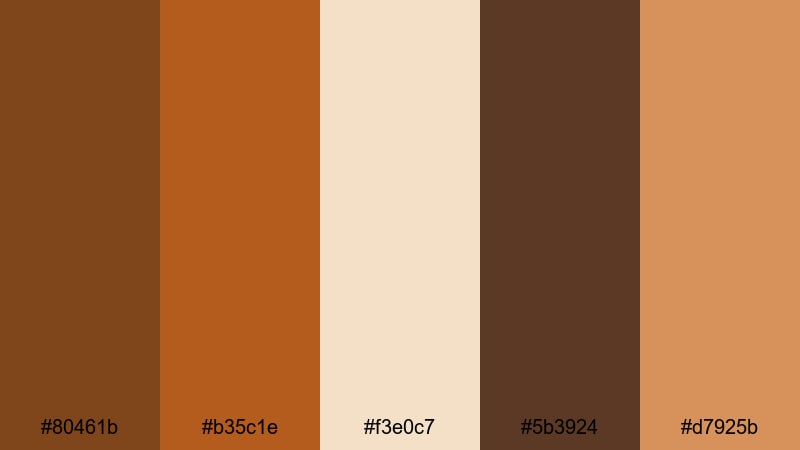
- HEX Codes: #80461b, #b35c1e, #f3e0c7, #5b3924, #d7925b
- Mood: warm, comforting, and intimate
- Use for: Perfect for vlog intros, cozy storytime videos, and podcast covers that need a relaxed, fireside feel.
Fireside Coffee Glow is a toasty mix of russet brown, caramel, and light cream that feels like wrapping your audience in a blanket. The deeper browns (#80461b and #5b3924) hold the frame together, while the lighter beige and caramel tones (#f3e0c7 and #d7925b) keep thumbnails and titles soft and approachable.
Use this russet color palette for calm storytime videos, talking-head podcasts, and any content where you want viewers to settle in and stay. Try using the light cream as a background for text, with russet for bold headlines and caramel for buttons, subscribe prompts, and lower-third bars to keep your branding consistent across YouTube, shorts, and social clips.
Pro Tip: Build A Cozy Russet Look In Filmora
To keep that warm Fireside Coffee Glow feeling across an entire edit, set up a simple style system in Filmora. Use the same russet HEX codes for your title templates, lower-thirds, and callouts, then save them as custom presets so future vlogs and podcast episodes instantly match.
Balance your frames by placing deeper russets in corners, frames, or borders and letting the lighter creams carry text and UI elements. In Filmora, you can quickly duplicate these text styles between intros, B-roll captions, and end screens so every video feels like it belongs to the same cozy channel brand.
AI Color Palette
If you already have a thumbnail or reference image with your favorite russet look, you can turn it into a full video style in just a few clicks. Filmora's AI Color Palette feature analyzes your reference colors and applies the same mood to other clips, so your talking-head shots, B-roll, and cutaways share one unified warmth.
Import a still frame with this Fireside Coffee Glow palette, select it as the reference, and let AI Color Palette harmonize your other clips. This is especially helpful when your original footage was shot under different lighting conditions, but you still want everything to feel like it was filmed next to the same russet-toned fireplace.
 secure download

HSL, Color Wheels & Curves
Once your russet palette is in place, use Filmora's HSL, color wheels, and curves to fine-tune the mood. Slightly deepen the oranges and reds to make shadows feel more cinematic, or lift the midtones to keep skin tones natural against those warm browns. Tools like the color correction tools in Filmora help you nudge hues until your thumbnail and footage match the same russet aesthetic.
In the color wheels, push shadows toward deep brown while maintaining neutral highlights so your text and bright elements remain readable. Then, with curves, add a gentle S-curve to bring contrast and make the russet tones pop without crushing detail in darker areas.
secure download1000+ Video Filters & 3D LUTs
To speed up your russet grading, start from Filmora's built-in filters and LUTs, then tweak from there. Filmora's video filters and 3D LUTs make it easy to apply warm, filmic looks to your clips and then adjust intensity so they sit perfectly with your Fireside Coffee Glow palette.
Choose a warm film LUT to instantly get cozy orange-brown shadows, then layer subtle vignette or glow filters for thumbnails, intros, and B-roll. This keeps your channel feeling cinematic and cohesive even when you edit on a tight schedule.
secure downloadAutumn Market Stroll
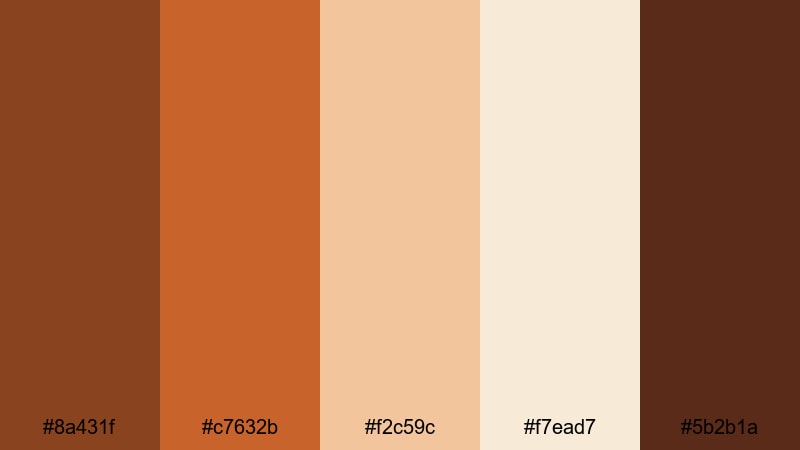
- HEX Codes: #8a431f, #c7632b, #f2c59c, #f7ead7, #5b2b1a
- Mood: festive, nostalgic, and welcoming
- Use for: Ideal for fall travel vlogs, lifestyle reels, and seasonal promo graphics.
Autumn Market Stroll blends rich russet oranges with soft creams to capture the feel of outdoor markets, string lights, and golden-hour walks. The mid-tone russet (#8a431f) and brighter orange (#c7632b) give energy, while the light neutrals (#f2c59c and #f7ead7) soften the frame for easy readability.
Use this palette for seasonal campaigns, fall-themed Instagram Reels, and YouTube thumbnails about travel, cozy routines, or market hauls. Keep text in the darker brown (#5b2b1a) over the cream background for high contrast, and reserve the brightest orange for buttons, subscribe badges, or chapter titles so viewers immediately notice your calls to action.
Spiced Cider Afternoon
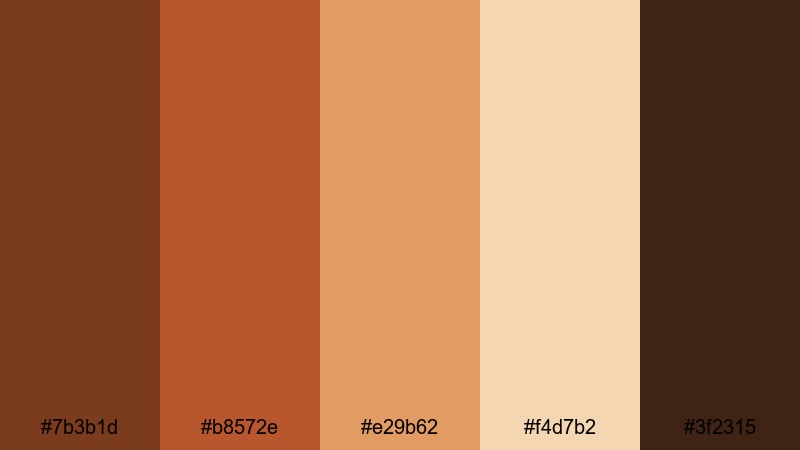
- HEX Codes: #7b3b1d, #b8572e, #e29b62, #f4d7b2, #3f2315
- Mood: comforting, homely, and relaxed
- Use for: Works well for recipe videos, baking shorts, and any content centered on home, family, and comfort.
Spiced Cider Afternoon layers deep russet (#7b3b1d) with amber and soft beige to mirror the glow of a warm drink on a slow day. The palette feels inviting without being loud, which makes it ideal for everyday lifestyle content and family-friendly videos.
Use the deeper brown (#3f2315) for text and icons, the amber tones for overlays and highlight boxes, and the pale beige (#f4d7b2) as a gentle background. In Filmora, this palette is especially lovely for lower-thirds in recipe videos, screen titles for step-by-step cooking, or end-screen layouts that feel like a cozy kitchen scene.
Terra Cotta Storytime
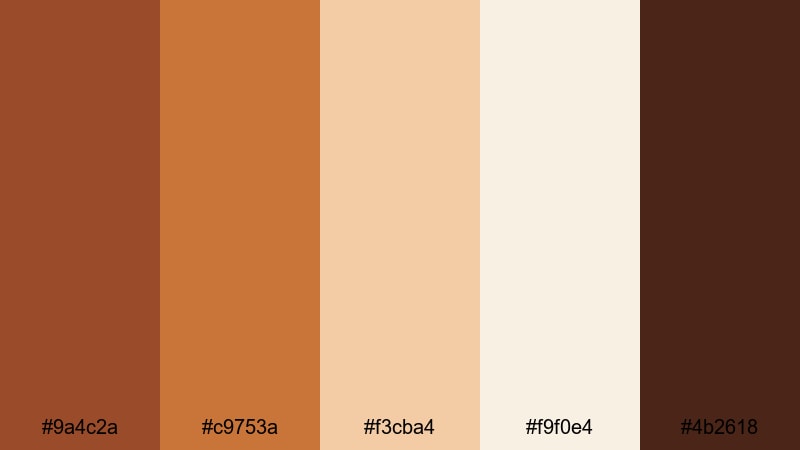
- HEX Codes: #9a4c2a, #c9753a, #f3cba4, #f9f0e4, #4b2618
- Mood: gentle, soothing, and story-driven
- Use for: Great for educational creators, narration-heavy videos, and friendly explainer thumbnails.
Terra Cotta Storytime pairs clay-like russet tones with airy creams to create a calm, approachable atmosphere. The mid-tone terra cotta (#9a4c2a) feels warm enough to be engaging, while the near-white cream (#f9f0e4) keeps everything clean and easy to read.
For educational channels, use the darker brown (#4b2618) for headlines and the terra cotta orange for icons, arrows, or highlighted keywords. This russet color combination is perfect for explainer animations, chapter cards in Filmora, and podcast clips where you want the visuals to feel friendly yet professional.
Elegant & Modern Russet Color Palettes
Urban Loft Russet
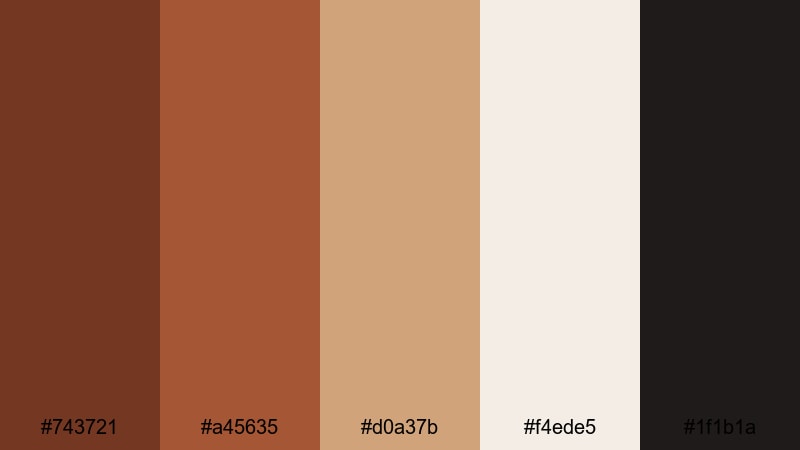
- HEX Codes: #743721, #a45635, #d0a37b, #f4ede5, #1f1b1a
- Mood: sleek, stylish, and grown-up
- Use for: Ideal for tech reviews, design portfolios, and modern brand intros with an earthy twist.
Urban Loft Russet blends smooth neutrals with a strong russet accent to create a polished, editorial vibe. The nearly-black charcoal (#1f1b1a) and soft beige (#f4ede5) make a strong base, while the russet tones (#743721 and #a45635) add warmth without sacrificing a modern look.
This palette suits tech reviewers, designers, and creative agencies who want their thumbnails and intros to feel premium but not cold. Use beige as the main background, charcoal for text, and russet for buttons, logo highlights, and accent lines in Filmora transitions or title cards.
Minimal Copper Accent
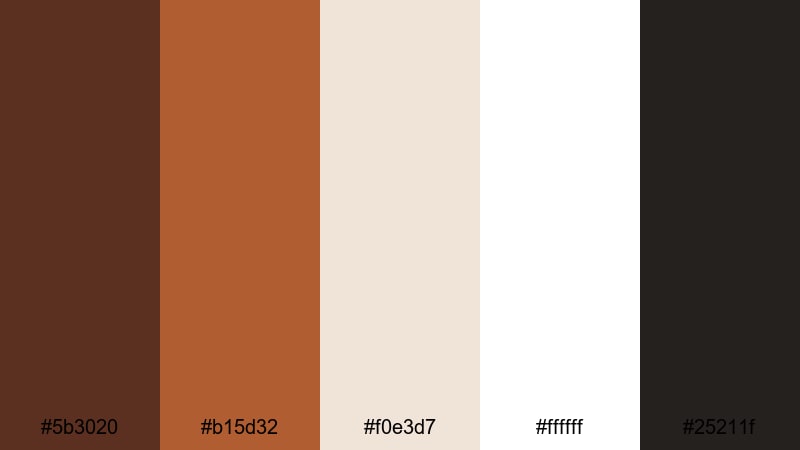
- HEX Codes: #5b3020, #b15d32, #f0e3d7, #ffffff, #25211f
- Mood: clean, minimal, and premium
- Use for: Perfect for minimalist titles, sleek UI overlays, and premium product promos.
Minimal Copper Accent centers on white and soft off-white with a restrained hit of coppery russet (#b15d32). The deep brown (#5b3020) and charcoal (#25211f) ground the palette, ensuring that minimal compositions still feel strong and intentional.
Use this for premium product launches, SaaS promos, or minimal channel rebrands. Let white and off-white handle most of the frame, then apply the copper accent to progress bars, subscribe buttons, or simple shapes in Filmora to guide the viewer's eye without overwhelming them.
Russet Marble Finesse
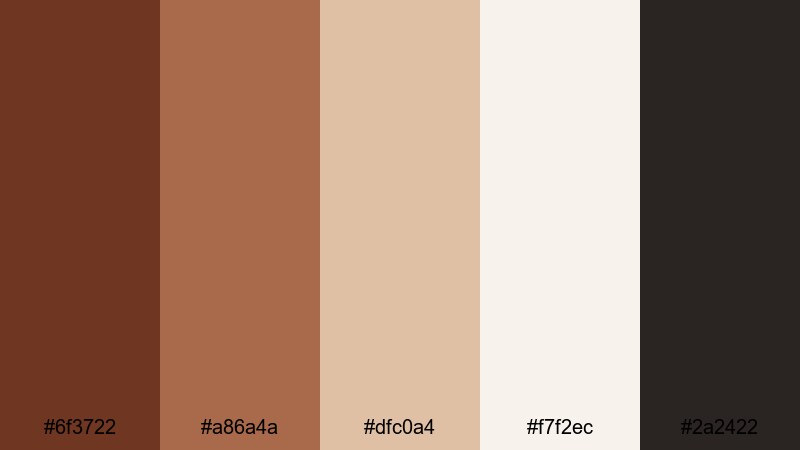
- HEX Codes: #6f3722, #a86a4a, #dfc0a4, #f7f2ec, #2a2422
- Mood: luxurious, calm, and polished
- Use for: Great for luxury branding, portfolio reels, and beauty or skincare content that leans editorial.
Russet Marble Finesse combines creamy marble tones (#dfc0a4 and #f7f2ec) with deep russet browns to create a soft luxury effect. It feels editorial and high-end without being flashy, which suits beauty, skincare, and design portfolios.
Use the light marble tones as background plates for product shots and testimonials, while the darker browns (#6f3722 and #2a2422) frame your footage in borders or typography. In Filmora, this palette is ideal for elegant lower-thirds, logo reveals, and muted cinematic thumbnails.
Rose Gold Russet Shine
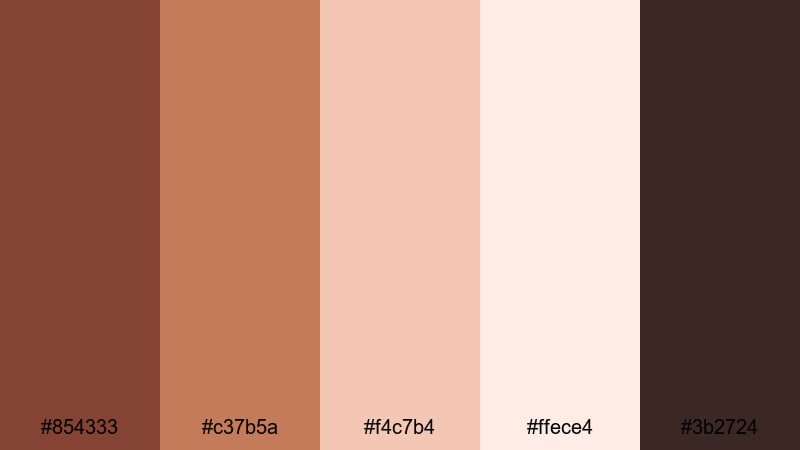
- HEX Codes: #854333, #c37b5a, #f4c7b4, #ffece4, #3b2724
- Mood: romantic, chic, and aspirational
- Use for: Ideal for fashion lookbooks, wedding highlight films, and romantic brand promos.
Rose Gold Russet Shine wraps soft rose gold tones and blush creams around a russet base to create a dreamy, aspirational mood. The blush shades (#f4c7b4 and #ffece4) are flattering for skin tones, making this a strong choice for beauty and wedding content.
Use the deep brown (#3b2724) sparingly for text and small graphic accents so the palette stays light and romantic. In Filmora, pair this palette with gentle fade transitions and slow zooms for lookbooks, highlight reels, and social ads that feel elegant and emotional.
Nature Inspired Russet Color Palettes
Canyon Trail Sunrise

- HEX Codes: #8b4526, #c76f3b, #f3b373, #fbe5c9, #334248
- Mood: adventurous, optimistic, and expansive
- Use for: Great for travel vlogs, hiking montages, and outdoor lifestyle channels.
Canyon Trail Sunrise captures the warmth of sunlit rock faces paired with soft sandstone creams and a cool slate accent (#334248). The russet oranges and golden hues suggest adventure and optimism, perfect for open landscapes and travel storytelling.
Use the warm tones for overlays and graphic frames, while the slate blue-gray adds contrast for text or navigation elements. In Filmora, apply this palette to maps, chapter markers, and lower-thirds in hiking vlogs or destination guides so your graphics echo the natural colors of your footage.
Rustic Forest Ember
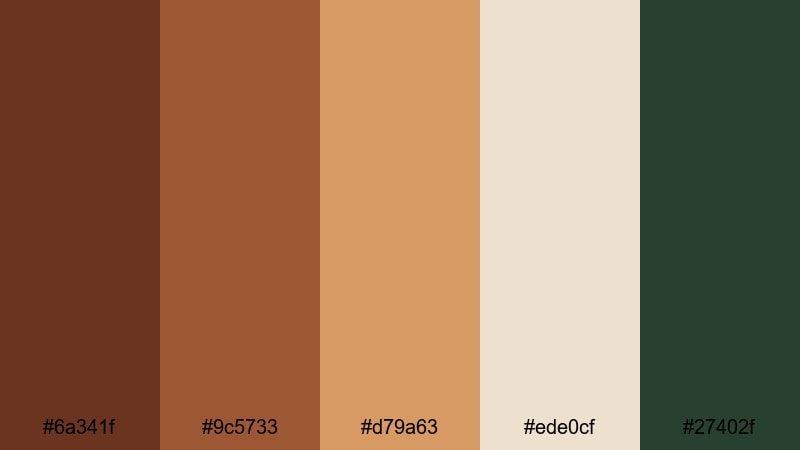
- HEX Codes: #6a341f, #9c5733, #d79a63, #ede0cf, #27402f
- Mood: earthy, grounded, and calm
- Use for: Perfect for nature documentaries, cabin retreats, and eco-focused branding.
Rustic Forest Ember weaves together ember-like russet tones with forest green (#27402f) and soft beige. It feels grounded and organic, a natural fit for outdoor cabins, slow-living content, and eco-conscious brands.
Use the green and deepest russet (#6a341f) for logos, badges, and icons, and let the beige (#ede0cf) keep titles readable. In Filmora, this palette works well for chapter titles in nature documentaries, rustic channel intro animations, or branded overlays for hiking and camping series.
Desert Clay Horizon
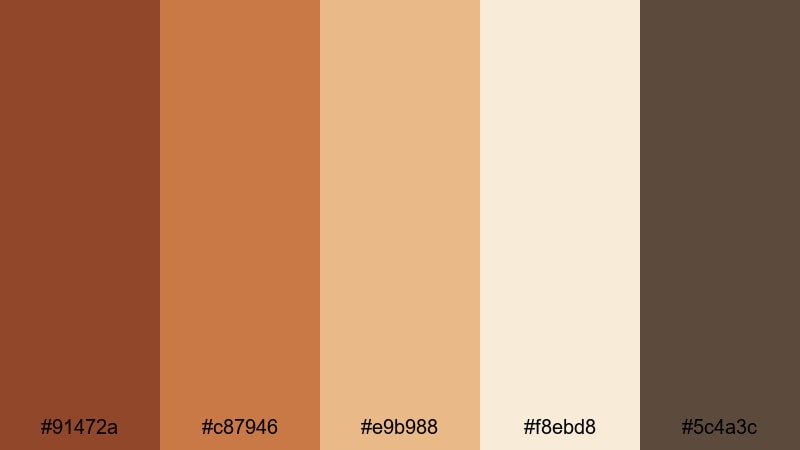
- HEX Codes: #91472a, #c87946, #e9b988, #f8ebd8, #5c4a3c
- Mood: serene, sun-soaked, and cinematic
- Use for: Works well for travel edits, aerial footage, and dreamy B-roll sequences.
Desert Clay Horizon brings together soft desert clays, warm sand tones, and a grounded brown accent (#5c4a3c). The result is a wide, open, cinematic feeling that suits slow drone shots, road trips, and reflective travel monologues.
Use the lighter shades (#e9b988 and #f8ebd8) as backgrounds for map graphics, subtitles, or overlay text, with russet and brown for key highlights. In Filmora, pair this palette with slower cuts and gentle crossfades to maintain the calm, expansive atmosphere of your desert or coastal footage.
Vintage & Cinematic Russet Color Palettes
Old Film Sepia Russet

- HEX Codes: #5a2f1d, #8b5434, #c497f, #ead9c1, #2e231d
- Mood: nostalgic, moody, and cinematic
- Use for: Ideal for short films, memory sequences, and retro-styled vlogs.
Old Film Sepia Russet surrounds your visuals with a gentle, aged-film vibe using sepia browns and faded creams. The deep browns (#5a2f1d and #2e231d) create moody shadows, while the mid and light tones soften edges like an old photograph.
Use this russet palette for memory sequences, retro B-roll, or full short films that nod to analog cinema. In Filmora, apply the palette to title cards, intertitles, and frames around your footage to reinforce the vintage storytelling style.
Retro Studio Brick
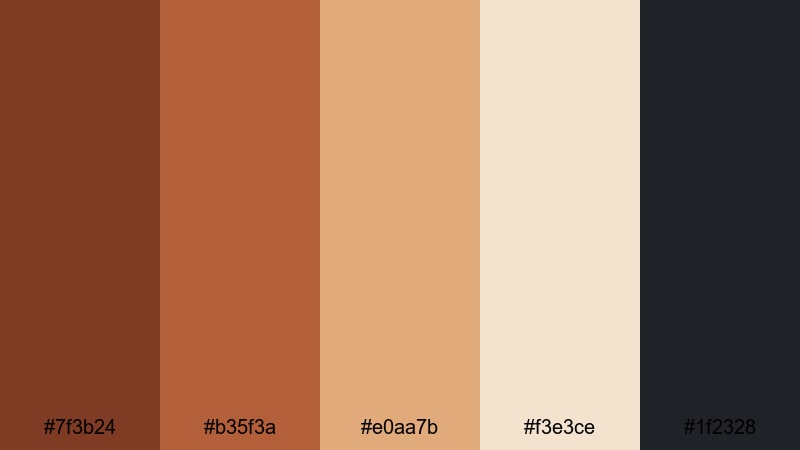
- HEX Codes: #7f3b24, #b35f3a, #e0aa7b, #f3e3ce, #1f2328
- Mood: bold, creative, and slightly gritty
- Use for: Great for studio talk shows, creative workspaces, and cinematic YouTube sets.
Retro Studio Brick combines brick-wall russet with soft studio neutrals and a dark accent (#1f2328). It feels bold and creative, with just enough grit to suit behind-the-scenes content, studio chats, and creator workspaces.
Use the brick tones for background elements, boxes, and wipes in Filmora, and keep text in off-white or pale beige for clarity. This palette is perfect for podcast thumbnails, channel headers, and scene transitions that mimic warm studio lighting against exposed brick.
Classic Western Frame
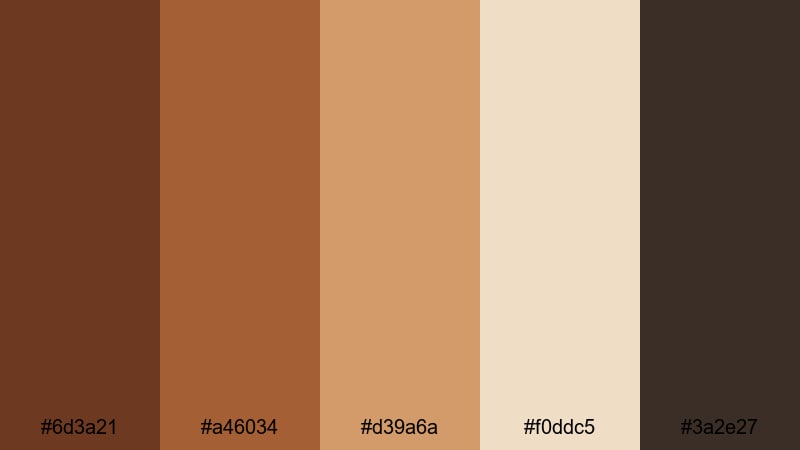
- HEX Codes: #6d3a21, #a46034, #d39a6a, #f0ddc5, #3a2e27
- Mood: rugged, story-heavy, and dramatic
- Use for: Perfect for narrative shorts, title cards, and documentary intros with a Western or rustic angle.
Classic Western Frame evokes saddle leather, dusty roads, and parchment titles. The russet and brown tones create a rugged base, while the parchment cream (#f0ddc5) is ideal for old-map style backgrounds and title screens.
Use this palette for documentaries with rustic themes, Western-inspired shorts, or any video that leans on strong narrative. In Filmora, pair it with serif fonts and frame-style overlays to echo classic Western movie posters.
Dusty Theater Velvet
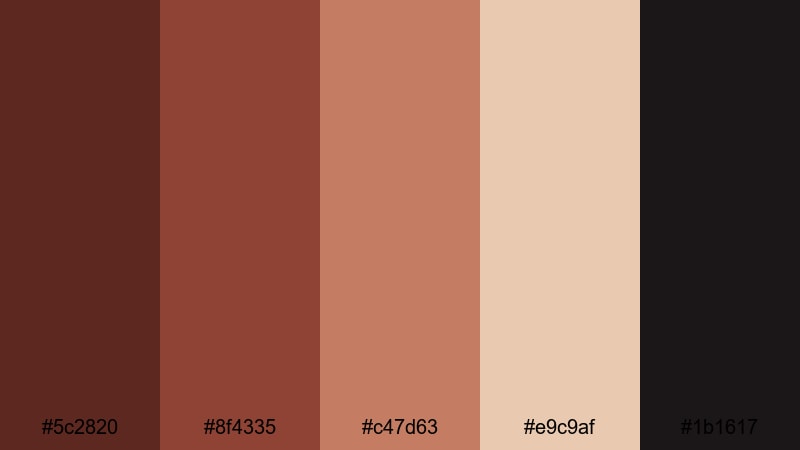
- HEX Codes: #5c2820, #8f4335, #c47d63, #e9c9af, #1b1617
- Mood: dramatic, theatrical, and intimate
- Use for: Ideal for music videos, performance promos, and any content that needs a moody stage feel.
Dusty Theater Velvet mixes deep velvet russet (#5c2820), rich mid-tones, and spotlight-like neutrals (#e9c9af) against a near-black background (#1b1617). It feels like old theater curtains, backstage shadows, and pools of light on a small stage.
Use it for music videos, performance reels, and teasers for live shows. Let the darkest tone frame your footage, place text on the lighter neutral, and reserve the brighter russet for key accents such as track titles or artist names in Filmora titles and motion graphics.
Tips for Creating Russet Color Palettes
Russet works best when it is balanced with thoughtful neutrals, contrast, and clear typography. Here are practical ways to combine russet with other colors for video, thumbnails, and branding that stay consistent across Filmora projects.
- Pair russet with soft creams or light beiges for clean backgrounds; this keeps your text readable and your frame from feeling too heavy.
- Use darker browns or charcoal, not pure black, for text over warm russet backgrounds to maintain a softer, cinematic look.
- Limit bright accent colors to one or two shades (such as copper or slate blue) so your russet color palette stays cohesive in thumbnails and intros.
- Check contrast on mobile: zoom out on your Filmora preview to ensure titles and subtitles remain legible against russet tones on small screens.
- Reuse the same HEX codes for titles, lower-thirds, and end screens to build strong branding; save them as presets or templates inside Filmora.
- Match your grade to your graphics: if your overlays are warm russet, nudge your footage slightly warmer in Filmora so the whole frame feels unified.
- Reserve the brightest russet or copper shade for CTAs (subscribe, follow, next episode) so viewers immediately know where to look.
- Test both light and dark modes: try a version with pale russet backgrounds and one with deep russet frames to see which better suits your channel identity.
Russet color palettes can shift your entire visual identity toward warmth, trust, and cinematic storytelling. Whether you lean into cozy fireside browns, modern copper accents, or vintage theater tones, these combinations help your audience instantly recognize your style.
Experiment with a few of these palettes in Filmora: build thumbnail templates, adjust your color grading, and synchronize titles, overlays, and B-roll until the whole edit feels consistent. Once your russet look is set, you can reuse it across vlogs, shorts, intros, and promos to create a strong, memorable brand.
Start with one palette that fits your niche, plug the HEX codes into your Filmora titles and color tools, and refine from there. Over time, your russet aesthetic will become a visual signature that makes every new upload feel instantly like yours.
secure downloadNext: Peacock Color Palette
