

 100% Security Verified | No Subscription Required | No Malware


 ChatGPT
 Perplexity
 Gemini
 Claude
 Grok
Grok
Teal Copper is a powerful combination of cool oceanic greens and warm metallic oranges. Together they create a look that feels modern, cinematic, and slightly luxurious. Teal brings calm, clarity, and focus, while copper adds energy, warmth, and a hint of vintage richness. When balanced well, this palette catches the eye without feeling loud, which is why so many creators love it for thumbnails, intros, and brand visuals.
Below you will find ready-to-use Teal Copper color palettes with precise HEX codes, designed for video creators, designers, and Filmora users. Use them to style YouTube thumbnails, vlogs, cinematic edits, motion graphics, logos, channel branding, and more while keeping a consistent, recognizable aesthetic.
In this article
Modern Teal Copper Branding Palettes
Urban Loft Contrast
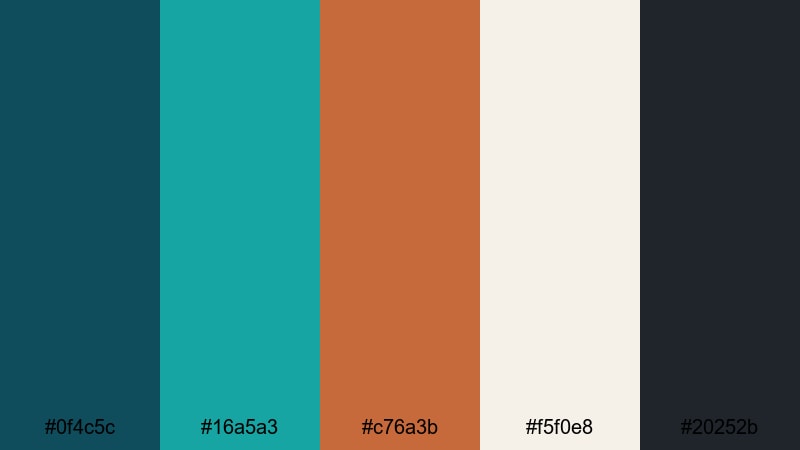
- HEX Codes: #0f4c5c, #16a5a3, #c76a3b, #f5f0e8, #20252b
- Mood: Confident, urban, and design-forward.
- Use for: Use for tech brand intros, minimalist logo reveals, and edgy YouTube channel art.
Urban Loft Contrast mixes deep teal, polished copper, and charcoal accents with a soft ivory base. It feels like a thoughtfully styled city apartment: clean, modern, and a little bit luxurious. The darker teal and charcoal tones give your visuals weight and professionalism, while the copper accent becomes a striking highlight for buttons, key text, and icons.
This palette works beautifully for tech channels, productivity brands, and minimalist creators who want a premium look. Use the ivory or light background for titles and thumbnail layouts, then add teal blocks for frames and copper for CTAs, subscribe buttons, or logo marks. In Filmora, you can carry this palette through your intro animation, lower thirds, and end screen so your brand looks consistent everywhere.
Pro Tip: Enhance Your Teal Copper Visuals With Filmora
Once you pick a Teal Copper palette like Urban Loft Contrast, the next step is consistency. In Filmora, you can sample these HEX values and apply them to titles, shapes, overlays, and elements so every scene feels like part of the same brand system. Use teal for backgrounds and frames, then reserve the copper shade for moments that matter most, such as calls to action or important stats.
Save your favorite text styles, transitions, and overlays that use these colors as custom presets in Filmora. That way, every time you create a new intro, B-roll sequence, or short-form edit, you can apply your Teal Copper look in a few clicks instead of rebuilding it from scratch.
AI Color Palette
If you already have a photo, logo, or brand deck that shows your ideal Teal Copper combination, you can use Filmora's AI Color Palette feature to transfer that style across your footage. Import a reference frame that captures the look you want, then match your other clips so shadows, midtones, and highlights share the same Teal Copper mood.
This is especially useful for vlogs or brand videos shot in different locations or lighting. AI Color Palette helps keep teal tones cohesive and copper highlights consistent, so your thumbnails, intros, and social cutdowns all feel like one unified visual identity.
 secure download

HSL, Color Wheels & Curves
Even with a strong Teal Copper base, your footage may need fine-tuning to feel truly cinematic. Use HSL controls in Filmora to target specific color ranges: deepen cyan and teal in the shadows, push copper highlights slightly warmer, or mute background greens that distract from your palette. Color wheels let you nudge shadows towards teal and push highlights toward a soft copper-ivory blend, creating that classic blockbuster contrast.
With curves and advanced color correction tools, you can gently lift the midtones for a polished, commercial look or crush the blacks for a bolder, urban feel. Small adjustments across your timeline ensure your Teal Copper aesthetic stays balanced in every shot, from talking-head clips to B-roll details.
secure download1000+ Video Filters & 3D LUTs
To speed up your workflow, you can start from ready-made looks instead of grading from zero. Filmora's video filters and 3D LUTs make it easy to find styles that amplify Teal Copper tones, from subtle cinematic fades to bold, high-contrast grading. Apply a LUT, then tweak saturation and contrast until teal and copper feel balanced for your project.
Once you find a combination that fits your channel, save it as a custom preset. You can then apply that preset across intros, main videos, Shorts, and even promo edits, making sure your Teal Copper color story stays instantly recognizable wherever your content appears.
secure downloadDigital Horizon Glow
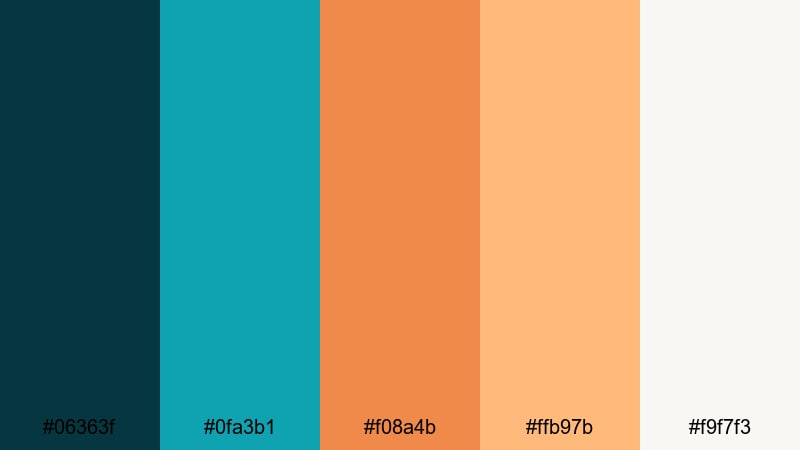
- HEX Codes: #06363f, #0fa3b1, #f08a4b, #ffb97b, #f9f7f3
- Mood: Optimistic, futuristic, and energetic.
- Use for: Use for animated lower thirds, startup pitch decks, and bright app promo videos.
Digital Horizon Glow captures the feeling of a sunrise over calm water, with rich teal shadows and glowing copper oranges. The bright accent tones bring a sense of movement and innovation that suits tech startups, SaaS products, and channels focused on creativity or future trends.
Use the deep teal as your base color for backgrounds or gradient overlays, then layer in the warm copper for icons, progress bars, and important tags in thumbnails. In Filmora, this palette works perfectly for animated lower thirds, pitch deck cutscenes, and announcements that need to look fresh yet professional.
Startup Studio Edge
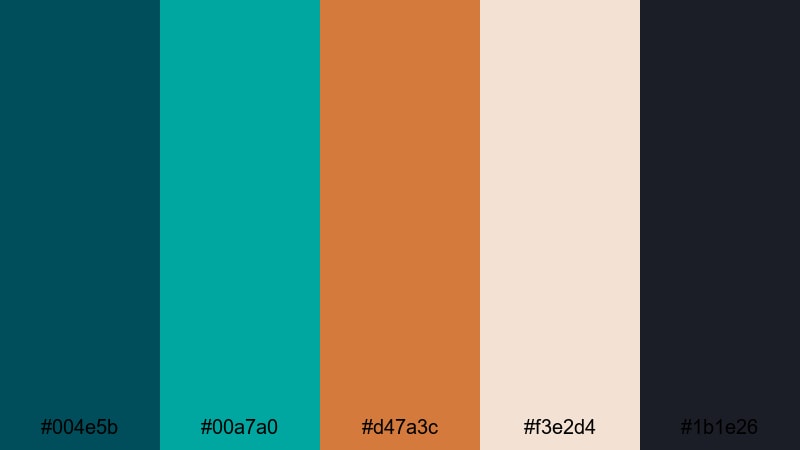
- HEX Codes: #004e5b, #00a7a0, #d47a3c, #f3e2d4, #1b1e26
- Mood: Ambitious, clean, and entrepreneurial.
- Use for: Use for founder story videos, pitch animations, and modern website hero banners.
Startup Studio Edge blends crisp teal, bright copper, and a sophisticated ink-black navy with a clay-tinted beige. The result feels like a polished studio environment: modern but not cold, serious but still energetic. It communicates ambition without coming off as flashy.
This palette is ideal for founder interviews, product explainers, and investor decks. In thumbnails, let the beige or off-white be your canvas, add teal panels for structure, and use copper for metrics, timelines, and key phrases. Inside Filmora, you can customize titles, shape layers, and callouts in these exact shades to build a strong visual brand story across your entire series.
Minimal Alloy Accent
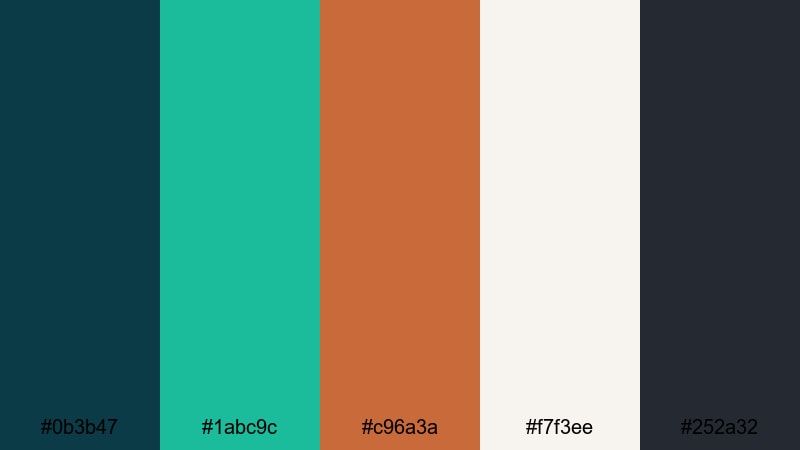
- HEX Codes: #0b3b47, #1abc9c, #c96a3a, #f7f3ee, #252a32
- Mood: Sleek, minimal, and sophisticated.
- Use for: Use for clean motion graphics, UI walkthroughs, and product explainer videos.
Minimal Alloy Accent keeps things restrained: a cool teal base, a single copper accent, and plenty of soft off-white. The palette is built for minimal layouts where whitespace and typography do most of the work. The dark gray anchor shade ensures contrast without overwhelming the frame.
It is perfect for UI or app demos, tutorials, and explainer videos where clarity matters. Use off-white backgrounds, dark typography, and inject teal and copper only where you want viewers to focus. In Filmora, pair this palette with simple transitions and subtle motion graphics to keep the attention on your product or message.
Cinematic Teal Copper Color Palettes
Neon Noir Alley
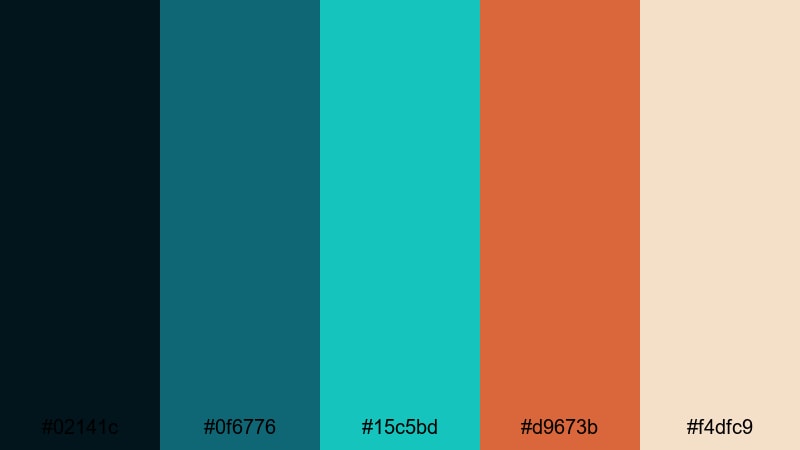
- HEX Codes: #02141c, #0f6776, #15c5bd, #d9673b, #f4dfc9
- Mood: Moody, cinematic, and dramatic.
- Use for: Use for title sequences, thriller-style trailers, and atmospheric B-roll grading references.
Neon Noir Alley dives into inky blues and teals punctuated by sharp neon copper highlights. It feels like a wet city street lit by signs and car lights, with deep shadows and a sense of mystery. The brighter teal and copper tones cut through the darkness and guide the viewer's eye.
This palette is ideal for cinematic edits, thriller-style trailers, music videos, or stylized gaming content. Grade your footage so shadows lean into deep teal, then use copper in titles, glitches, or light leaks. In Filmora, layer glow effects and subtle film grain over this palette to complete the modern noir atmosphere.
Retro Title Sequence
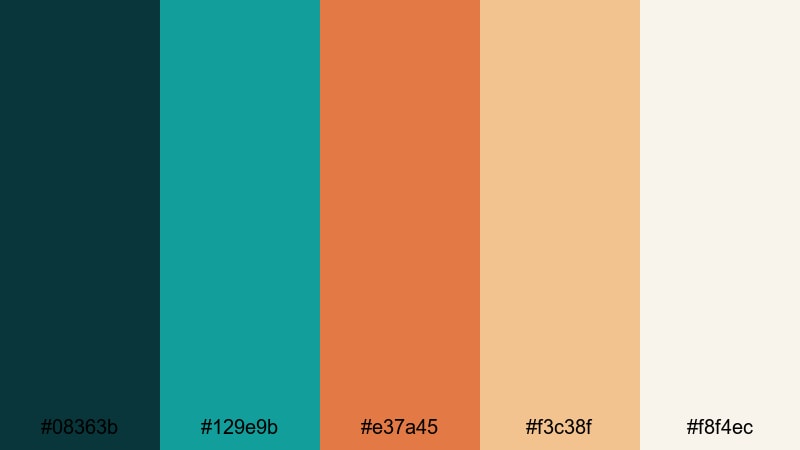
- HEX Codes: #08363b, #129e9b, #e37a45, #f3c38f, #f8f4ec
- Mood: Nostalgic, cinematic, and warm.
- Use for: Use for retro-inspired opening titles, film essay graphics, and vintage vlog intros.
Retro Title Sequence echoes classic movie posters and analog graphics, with teal shadows, warm copper, and creamy highlights. The palette feels nostalgic without looking old-fashioned thanks to its clean, slightly desaturated tones.
Use it for film essays, cinematic vlogs, or any project where you reference movie history or old media. In your thumbnails and opening cards, try bold teal blocks, copper typography, and off-white frames. Within Filmora, combine this palette with subtle film burn overlays, vignette, and slower transitions to create a vintage but polished look.
Rainy City Reflections
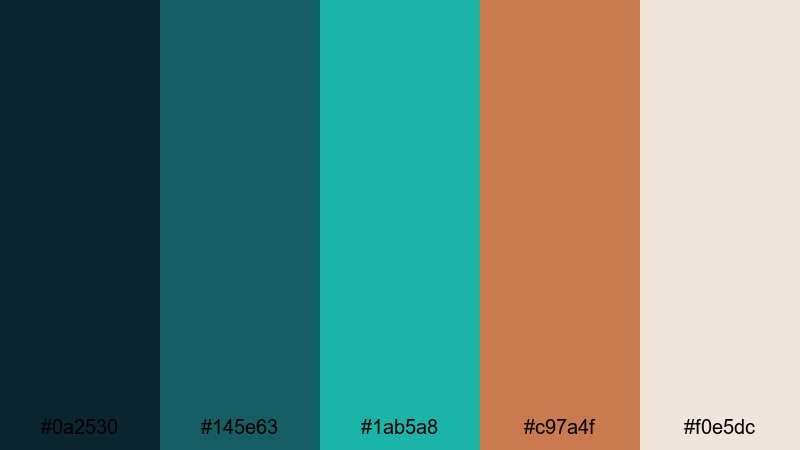
- HEX Codes: #0a2530, #145e63, #1ab5a8, #c97a4f, #f0e5dc
- Mood: Reflective, atmospheric, and emotional.
- Use for: Use for travel montages, city vlogs in low light, and emotional storytelling edits.
Rainy City Reflections pairs cool, rainy teals with the soft glow of copper streetlights and gentle stone neutrals. It suggests quiet evenings, reflective walks, and thoughtful moments in an urban setting. The contrast is present but not harsh, making the palette perfect for emotional storytelling.
Apply it to travel diaries, reflective voiceovers, and city B-roll. In Filmora, push your shadows toward blue-teal and let warm highlights sit in the copper range, then overlay subtle rain or bokeh elements. Use the neutral tones for subtitles and lower thirds so everything remains readable in low-light scenes.
Midnight Premiere Lights
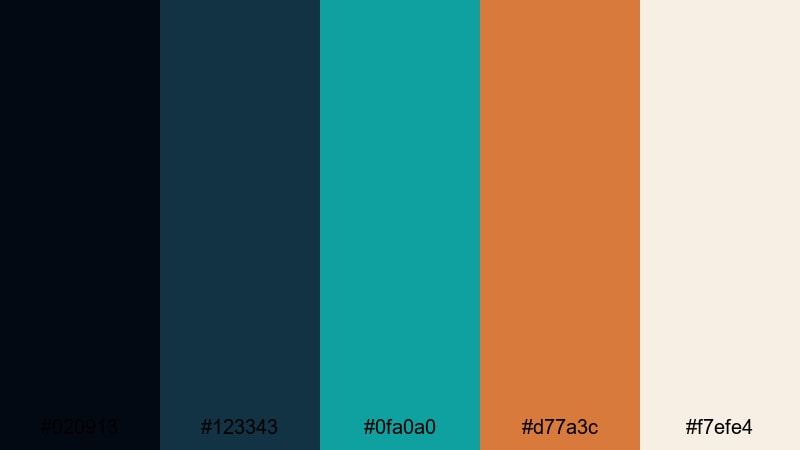
- HEX Codes: #020913, #123343, #0fa0a0, #d77a3c, #f7efe4
- Mood: Glamorous, high-contrast, and event-ready.
- Use for: Use for premiere announcements, event highlight reels, and red-carpet style intros.
Midnight Premiere Lights leans into deep midnight blues, glossy teals, and spotlight copper set against champagne ivory. It feels like an exclusive screening or awards night, with rich contrast and a touch of glamour.
Use this palette for festival recaps, premiere countdowns, and sponsor reels. In Filmora, design animated titles with ivory backgrounds, teal frames, and copper accents for names and logos. Add light flares or particle effects on top to amplify the event-ready, red-carpet energy.
Soft & Elegant Teal Copper Palettes
Velvet Cafe Morning
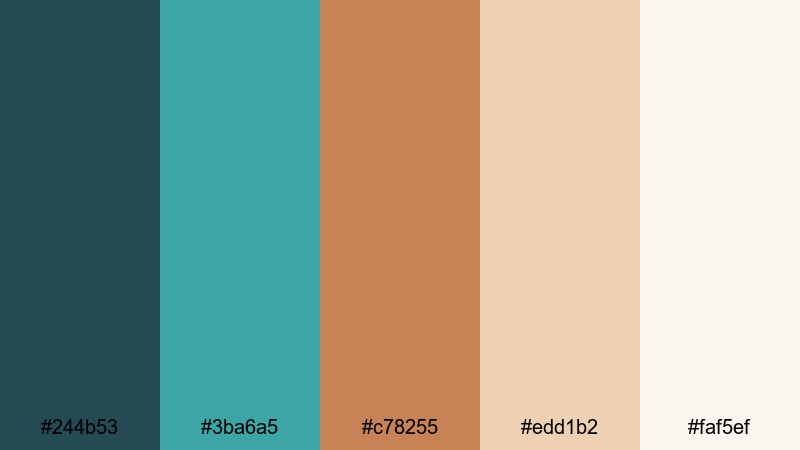
- HEX Codes: #244b53, #3ba6a5, #c78255, #edd1b2, #faf5ef
- Mood: Cozy, refined, and welcoming.
- Use for: Use for lifestyle vlogs, cafe reviews, and soft-spoken commentary channels.
Velvet Cafe Morning brings together gentle teals, latte-like copper browns, and creamy neutrals. It feels like a slow brunch in a stylish cafe, warm but airy. The colors are soft enough not to compete with detailed shots of food, decor, or faces.
This palette is ideal for lifestyle vlogs, journaling channels, and calm sit-down content. In thumbnails, use the light background with rounded teal panels and copper script or accent text. Inside Filmora, pair these hues with slower zooms, soft focus, and gentle background music to reinforce the cozy, conversational mood.
Spa Serenity Blend
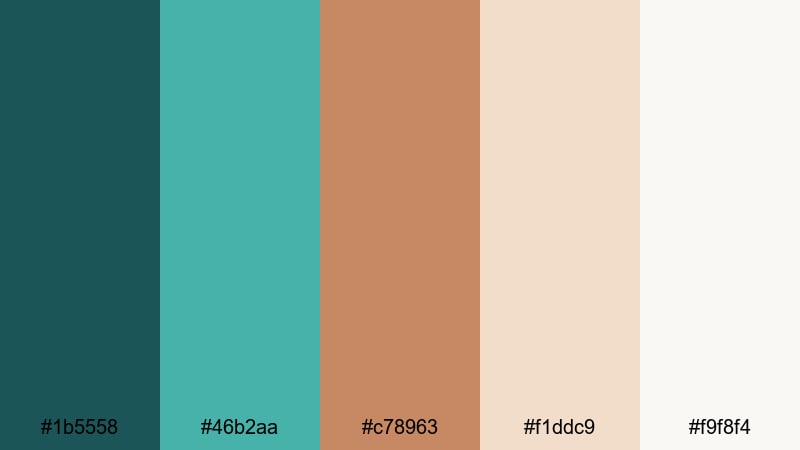
- HEX Codes: #1b5558, #46b2aa, #c78963, #f1ddc9, #f9f8f4
- Mood: Calming, luxurious, and restorative.
- Use for: Use for wellness tutorials, ASMR channels, and beauty brand intros.
Spa Serenity Blend combines cool spa teals with softly glowing copper and creamy neutrals. It feels high-end but gentle, the visual equivalent of relaxing music and aromatherapy. The bright teals keep everything feeling fresh, while the copper and cream add warmth and softness.
Use this palette for self-care routines, skincare demos, or ASMR and relaxation content. In Filmora, apply these colors to lower thirds, intro cards, and minimal line icons. Add slow fades and minimal camera movement so the palette has room to breathe and calm your viewer.
Coastal Wedding Mist
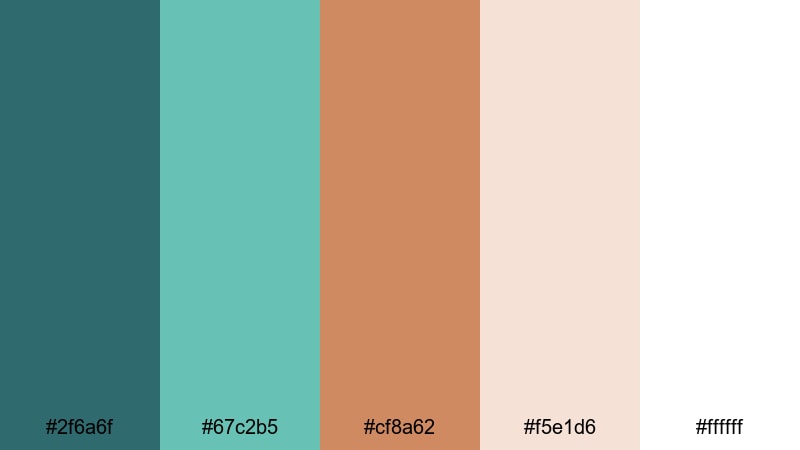
- HEX Codes: #2f6a6f, #67c2b5, #cf8a62, #f5e1d6, #ffffff
- Mood: Romantic, airy, and timeless.
- Use for: Use for wedding highlight films, engagement announcements, and elegant slideshow videos.
Coastal Wedding Mist uses seafoam teals, rosy copper tones, and soft blush neutrals to create a romantic, light-filled mood. It feels like a seaside ceremony or an intimate elopement captured at golden hour.
This palette is perfect for wedding editors, engagement highlights, and anniversary slideshows. In Filmora, combine white or blush backgrounds with teal frames and copper accents for names and dates. Use gentle transitions like cross dissolves and light leaks to keep the visual language soft and dreamy.
Muted Heritage Tones
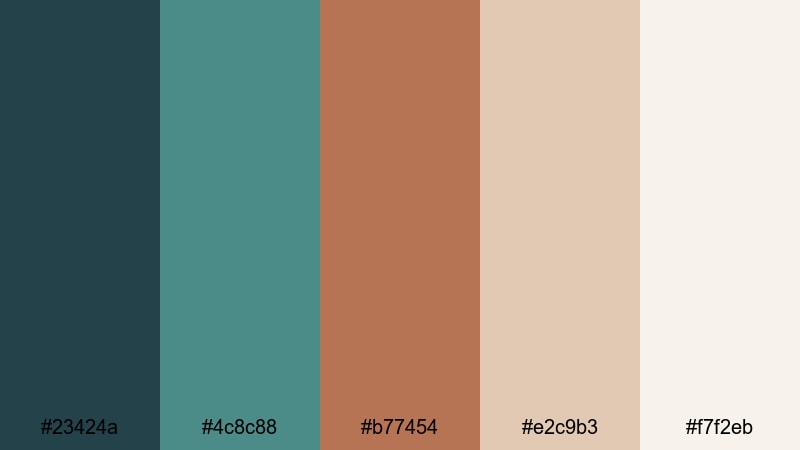
- HEX Codes: #23424a, #4c8c88, #b77454, #e2c9b3, #f7f2eb
- Mood: Classic, grounded, and editorial.
- Use for: Use for documentary lower thirds, brand story films, and thoughtful sit-down videos.
Muted Heritage Tones features dusty teals and softened copper browns paired with warm, paper-like neutrals. It has a timeless, editorial feel reminiscent of archival prints and carefully curated interiors.
Use it when you want to communicate trust, depth, and history: brand story films, documentaries, or reflective commentary. In Filmora, design understated lower thirds and chapter cards in these colors, and combine them with clean typography and steady framing to support a serious, credible tone.
Bold & Vibrant Teal Copper Palettes
Festival Lantern Burst
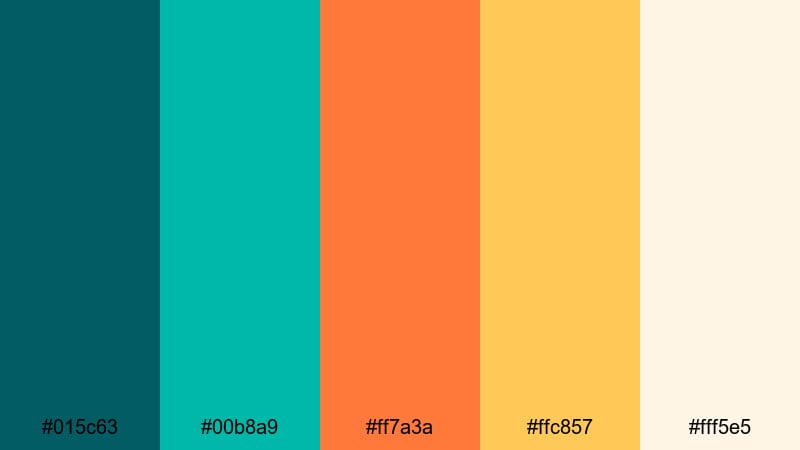
- HEX Codes: #015c63, #00b8a9, #ff7a3a, #ffc857, #fff5e5
- Mood: Festive, high-energy, and playful.
- Use for: Use for event promos, festival recaps, and upbeat travel vlogs.
Festival Lantern Burst is bursting with color: punchy teals, blazing copper-orange, sunny yellow, and a light cream base. It feels like string lights, street food, and music all at once. The contrast is strong and perfect for grabbing attention on crowded feeds.
Use this palette for events, celebrations, and upbeat travel edits. In thumbnails, place bold teal backgrounds with copper and yellow text or stickers. In Filmora, combine these colors with fast cuts, rhythmic transitions, and animated elements like confetti or bursts to match the energy of your footage.
Streetwear Splash
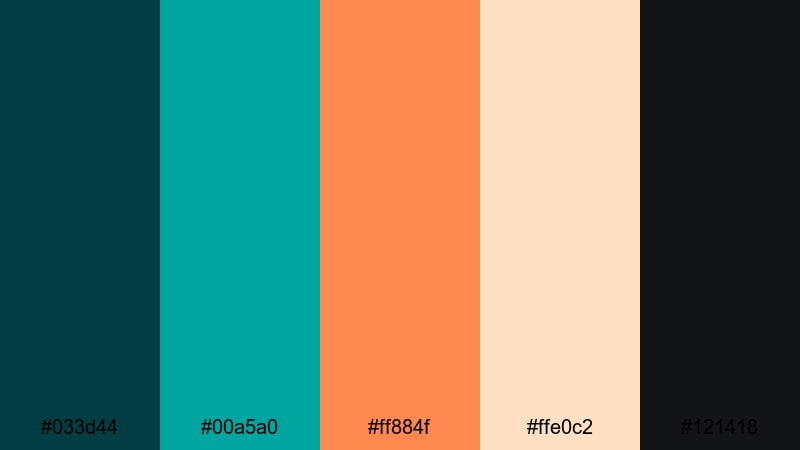
- HEX Codes: #033d44, #00a5a0, #ff884f, #ffe0c2, #121418
- Mood: Bold, youthful, and trend-driven.
- Use for: Use for fashion lookbooks, reel covers, and energetic TikTok or Shorts overlays.
Streetwear Splash layers electric teal and saturated copper against near-black and pale peach tones. It feels edgy, urban, and trend-aware, like a graphic-heavy fashion editorial or sneaker drop campaign.
Use it for lookbooks, outfit transitions, and brand collabs. In Filmora, design strong, blocky titles and split-screen layouts using teal and copper, while the dark shade frames your subject. Add bold wipes, speed ramps, and sound-synced cuts to highlight the streetwear aesthetic.
Gaming HUD Circuit
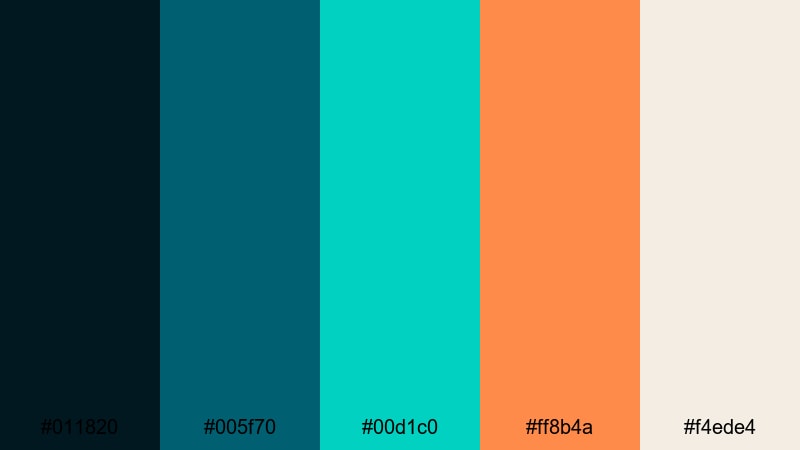
- HEX Codes: #011820, #005f70, #00d1c0, #ff8b4a, #f4ede4
- Mood: Techy, intense, and immersive.
- Use for: Use for gaming overlays, esports intros, and motion-graphics heavy explainers.
Gaming HUD Circuit is all about glowing teal and neon copper on a dark interface background. It feels like a futuristic HUD, perfect for gaming, tech reviews, and sci-fi themed content. The bright accents stand out clearly against the deep teal-blue base.
Use this palette for streaming overlays, kill-feed animations, and esports intros. In Filmora, design HUD-style frames, stat panels, and animated shapes using the neon teal and copper, then let the off-white support text and icons. Combine with glitch effects and dynamic transitions to complete the immersive, tech-driven feeling.
Tips for Creating Teal Copper Color Palettes
Teal Copper palettes work best when you balance cool depth with warm highlights and keep readability in mind for every frame, from long-form videos to tiny mobile thumbnails.
- Decide your hero: choose teal or copper as the main color, then let the other act as an accent so the palette does not feel chaotic.
- Always test contrast: place your text color over both dark teal and mid-tone copper backgrounds to make sure titles are easy to read on phones.
- Use neutrals generously: ivory, cream, or charcoal help your Teal Copper accents stand out and keep designs from feeling too saturated.
- Match footage lighting: if your scene is already warm, lean into teal in the shadows; if your scene is cool, push highlights toward copper to keep balance.
- Keep brand elements consistent: lock in a small set of HEX codes for logo, titles, and buttons so your channel looks unified across intros, end screens, and social posts.
- Vary saturation by content type: use louder, more saturated Teal Copper tones for thumbnails and promos, and softer, muted versions for long videos to avoid eye fatigue.
- Use overlays to blend: add teal or copper gradient overlays at low opacity in Filmora to gently pull mixed footage into your chosen palette.
- Create preset styles: save title templates, color-correct presets, and overlay styles in Filmora using the same HEX values so you can apply your Teal Copper look in seconds.
Teal Copper color palettes can instantly shape how viewers feel about your videos and your brand. Cool teals suggest clarity, trust, and modernity, while warm copper adds emotion, energy, and a hint of luxury. Together they create a memorable aesthetic that works for everything from cinematic edits to tech explainers and cozy vlogs.
Use the palettes above as ready-made starting points, then fine-tune them in Filmora to match your own footage, lighting, and style. Whether you are designing thumbnails, opening titles, or entire series looks, consistent Teal Copper tones will help your channel stand out and feel professionally curated.
The more you experiment with color grading, titles, and overlays, the faster you will find your signature combination. Load up these HEX codes in Filmora, try them on your next edit, and refine until your visuals match the mood you want your audience to remember.
secure downloadNext: Celadon Color Palette
