

 100% Security Verified | No Subscription Required | No Malware


 ChatGPT
 Perplexity
 Gemini
 Claude
 Grok
Grok
White and green together create a clean, refreshing palette that signals growth, clarity, and balance. White gives you space and simplicity, while green adds a sense of nature, health, and calm focus. In video and design, white green color palettes are perfect for brands that want to feel modern and trustworthy without looking cold or overly corporate.
From YouTube intros and thumbnails to logo reveals, lower thirds, and Instagram Reels covers, this combination stays readable and soothing on screen. Below you will find 15 white green color palettes with ready-to-use HEX codes that work beautifully in Filmora for vlogs, tutorials, wedding films, promos, and more.
In this article
Soft & Minimal White Green Color Palettes
Morning Studio Glow
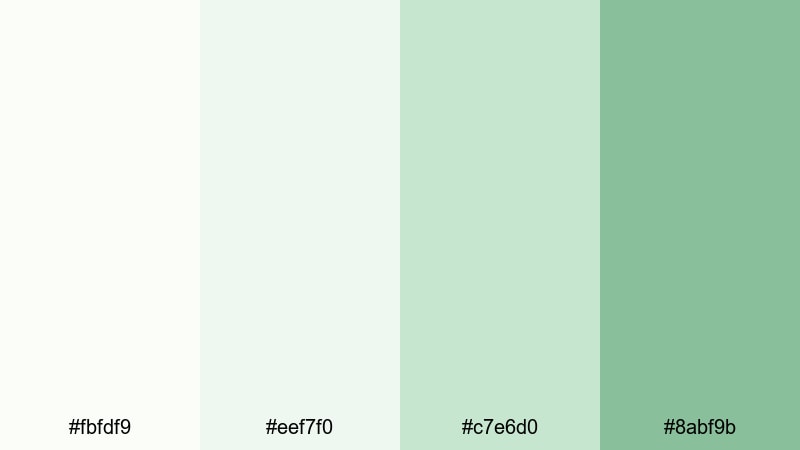
- HEX Codes: #fbfdf9, #eef7f0, #c7e6d0, #8abf9b
- Mood: calm, airy, and optimistic
- Use for: Perfect for soft lifestyle vlogs, morning routine intros, and minimalist title cards that need a fresh yet gentle feel.
Morning Studio Glow feels like the first light streaming into a white loft. The whites are soft, not stark, and the muted greens create a mellow glow that keeps your frame bright without blinding your audience. It is ideal when you want a clean look that still feels human and cozy.
Use this palette for YouTube morning routines, productivity B-roll, and soft overlays on vertical content. The lighter greens make great accent colors for subscribe buttons, lower thirds, and icons, while the off-whites work as safe backgrounds for text in Filmora titles.
Pro Tip: Keep Your White Green Aesthetic Consistent in Filmora
When you find a white green palette you love, the key to a professional look is repeating it across your whole edit. In Filmora, you can store these HEX codes and reuse them in titles, subtitles, overlays, and graphics so your intro, B-roll, and end screen all feel like one cohesive brand.
Try picking one green as your main accent for buttons and highlight words, a softer green for background panels, and your lightest white as the base for text cards. Save those styles as custom presets in Filmora so every new video instantly matches your Morning Studio Glow look.
AI Color Palette
If you have a screenshot of a white green mood board or a frame from your favorite clip, you can turn it into a video-wide look with Filmora's color tools. Filmora's AI Color Palette feature lets you sample colors from a reference image and apply that vibe to the rest of your footage in just a few clicks.
Import one shot that nails the Morning Studio Glow feeling, then use AI Color Palette to harmonize other clips to it. This helps you fix mismatched lighting or camera colors so every scene keeps the same soft, airy white green tone.
 secure download

HSL, Color Wheels & Curves
To dial in a white green look, small adjustments in HSL and color wheels go a long way. In Filmora, you can desaturate yellows so skin tones stay natural while your greens remain fresh, or slightly lift the midtone greens to avoid a muddy, grayish feel. The highlight wheel lets you keep whites bright and neutral so your interface and titles look crisp.
For more control, use RGB curves to gently lift the shadows and avoid heavy contrast that fights against a soft aesthetic. The Filmora color correction tools help you test different white green balances until your footage matches your thumbnails, overlays, and branding.
secure download1000+ Video Filters & 3D LUTs
Once your base colors are set, you can quickly test different moods on top of your white green palette using Filmora effects. Filmora's video filters and 3D LUTs make it easy to go from airy lifestyle to more cinematic, or to add a soft matte finish that reinforces the minimalist vibe.
Apply a subtle pastel or filmic LUT to unify clips from different cameras, then fine-tune opacity so your whites stay clean and your greens do not shift too far into neon or teal. This lets you keep the Morning Studio Glow identity while giving each video its own unique twist.
secure downloadCloudlight Workspace

- HEX Codes: #ffffff, #f3faf5, #d0efe0, #7fba96, #2f5b47
- Mood: clean, productive, and focused
- Use for: Ideal for tech explainers, productivity channel graphics, and UI-inspired lower thirds.
Cloudlight Workspace feels like a spotless desktop with a plant by the window. Bright whites and gentle pastel greens keep the frame uncluttered, while the deeper green gives you a strong accent for important elements like CTAs or chapter markers.
Use the softer tones as backgrounds for on-screen text, app mockups, and tutorial overlays, and reserve the darkest green for icons, progress bars, or subscribe prompts. In Filmora, this palette works especially well for channels that mix screencasts with talking head segments and want a consistent UI-driven look.
Whispering Leaves

- HEX Codes: #f8fcf8, #e4f4e6, #b7ddc2, #6da67a
- Mood: peaceful, organic, and soothing
- Use for: Great for wellness content, quiet timelapses, and subtle text overlays on nature footage.
Whispering Leaves flows from soft white into pale botanical greens, creating a spa-like calm. Nothing feels too saturated or harsh, which helps your viewers relax and stay with slower, more reflective content.
Apply this palette to meditation intros, journaling vlogs, or plant-care tutorials. Light greens make ideal lower-third panels that do not steal focus from your footage, while the slightly deeper green gives enough contrast for titles, quotes, and prompts in Filmora.
Nordic Herb Air

- HEX Codes: #f5f9f5, #e3f0e8, #b6d4c2, #7ba58f, #425953
- Mood: minimal, refined, and gently natural
- Use for: Use for aesthetic desk setups, talking-head backgrounds, and minimalist YouTube channel branding.
Nordic Herb Air borrows from Scandinavian interiors: airy off-whites, herbal greens, and a slightly deeper, slate-like tone that grounds everything. It feels curated and intentional, great for creators who want to look stylish without loud colors.
Use the paler greens for background blocks behind your name tags, comment highlights, or chapter titles, and keep the darkest tone for body text or logo marks. In Filmora, combine this palette with simple, sans-serif fonts to get that crisp, Pinterest-ready aesthetic.
Fresh & Natural White Green Color Palettes
Botanical Brand Fresh

- HEX Codes: #f9fdf8, #e7f6ea, #c0e8c9, #7dc68c, #447a53
- Mood: fresh, confident, and eco-forward
- Use for: Perfect for eco brands, small business promos, and product demo videos featuring natural or sustainable items.
Botanical Brand Fresh mixes clean whites with botanical greens that feel both professional and down-to-earth. The contrast between the light background tones and the richer foliage green gives your visuals structure while keeping the vibe natural.
Use this palette for product showcases, packaging reveals, and brand explainers where you want to highlight sustainability. In Filmora, add soft gradient backgrounds using the lighter greens, and then use the darkest green in logos, price tags, and on-screen callouts so your brand story stays clear and consistent.
Mint Garden Picnic

- HEX Codes: #fdfefb, #f1fbf2, #d6f5dd, #9ee3b4, #4a9c6b
- Mood: playful, lively, and outdoorsy
- Use for: Great for travel vlogs, picnic or food content, and upbeat Instagram Reels covers.
Mint Garden Picnic feels like a picnic blanket on fresh grass: light, playful, and full of air. The brighter mint greens add energy without going neon, so your visuals stay friendly and approachable.
Use this palette in summer vlogs, food videos, and family content. In Filmora thumbnails, combine pale backgrounds with pops of brighter mint for arrows, frames, and text highlights. On the timeline, color-code important clips or overlays with these greens to keep your storytelling organized and on brand.
Dewy Forest Window

- HEX Codes: #f7fbf7, #e0f1e4, #a9d4b5, #5f9f73, #264431
- Mood: grounded, refreshing, and slightly cinematic
- Use for: Ideal for nature B-roll, camping recaps, and moody outdoor sequences with text overlays.
Dewy Forest Window layers misty whites over deeper, woodland greens, like looking through a fogged window into a forest. It feels grounded but not heavy, making it great for outdoor content that still needs clean, readable graphics.
Use the darker greens for title bars and location labels over your B-roll, while the softer tones can sit behind text blocks without hiding the scenery. In Filmora, this palette works well with slow-motion shots, drone footage, and gentle transitions like dissolves or wipes.
Serene Spa Retreat

- HEX Codes: #f6fbf8, #e3f3ec, #b8dfcd, #86c0a1, #567a65
- Mood: tranquil, restorative, and balanced
- Use for: Perfect for spa promos, meditation channels, yoga intros, and self-care social content.
Serene Spa Retreat blends cool whites with sage and seafoam greens, creating a quiet, restorative mood. The colors never shout, which is exactly what you want for wellness and self-care visuals.
Use this palette for yoga intro animations, guided meditation lower thirds, or minimal promo cards for spa services. In Filmora, combine slow crossfades, soft background music, and these colors in simple title templates to build an instantly relaxing brand identity.
Elegant & Modern White Green Color Palettes
Polished Marble Mint

- HEX Codes: #ffffff, #f4f8f6, #d6e7dd, #9ac9ad, #3f6b55
- Mood: sleek, upscale, and confident
- Use for: Use for brand openers, logo reveals, and premium product showcases that aim for a high-end look.
Polished Marble Mint combines bright whites with marble-soft grays and a refined mint accent, giving your video a glossy, editorial feel. The contrast between crisp white and deep green provides a strong framework for typography and motion graphics.
Use this palette for luxury product ads, SaaS promos, or portfolio reels where you want to look polished but not cold. In Filmora, add subtle motion to white panels and let the mint accent draw attention to your logo, taglines, and key benefits.
Metro Loft Green

- HEX Codes: #f9fbfa, #e7f0ec, #c1ddd0, #79b595, #234739
- Mood: urban, sophisticated, and creative
- Use for: Ideal for design portfolios, agency reels, and urban lifestyle channels that mix city shots with studio footage.
Metro Loft Green mixes soft, industrial whites with concrete-like tints and saturated plant greens. It feels like a modern loft studio filled with artwork and greenery, perfect for creative professionals and agencies.
Use the lighter shades for clean case-study slides or portfolio grids, and bring in the rich green for call-to-action panels and logo stings. In Filmora, this palette pairs nicely with split-screen layouts and kinetic typography for a stylish, city-ready look.
Glass Panel Studio

- HEX Codes: #f7faf8, #e6f1ec, #c7ded2, #8cbda1, #355c48
- Mood: crisp, professional, and contemporary
- Use for: Great for software promos, tutorial overlays, and sleek on-screen graphics in Filmora templates.
Glass Panel Studio feels like daylight streaming through tall windows onto indoor plants and laptops. The greens are modern and not too earthy, which makes this palette work well for tech, startups, and online courses.
Use the mid-tone greens as header bars for chapters, and apply the darkest green for buttons, arrows, and key stats. In Filmora, stack translucent shapes using the lighter tones to mimic glass panes behind your text and screen recordings.
Ivory Gala Greenery

- HEX Codes: #fffdf8, #f5f7f0, #dae6d2, #9bbc8f, #4c6b3d
- Mood: romantic, refined, and celebratory
- Use for: Perfect for wedding films, event highlight reels, and elegant slideshow templates.
Ivory Gala Greenery pairs warm ivory whites with soft foliage greens, echoing modern wedding and event decor. It feels romantic and timeless, ideal for emotional storytelling where you want elegance rather than flash.
Use the ivory tones as backgrounds for vows, quotes, and schedule cards, and reserve the deeper greens for names, titles, and accent borders. In Filmora, this palette works beautifully with slow fades, light leaks, and gentle zooms on photos and video clips.
Bold & Cinematic White Green Color Palettes
Neon Title Mist

- HEX Codes: #fbfffe, #e3faf2, #b0f0d0, #39c18a, #123f33
- Mood: energetic, futuristic, and eye-catching
- Use for: Ideal for bold title cards, gaming intros, and dynamic motion graphics that need strong contrast on dark or gradient backgrounds.
Neon Title Mist wraps sharp mint accents in a soft white glow and deep green shadows. It is bright enough to feel futuristic, yet still clean and focused, which is great for hooks, countdowns, and title sequences.
Use the darkest green as your background or shadow color, and let the neon-like mint highlight text outlines, glitch effects, and UI elements in Filmora. On thumbnails, this palette immediately stands out in a feed, especially against darker imagery.
Deep Focus Canopy

- HEX Codes: #f3f7f5, #dce7df, #9abdaa, #4d7b5b, #142620
- Mood: dramatic, moody, and immersive
- Use for: Great for cinematic travel edits, documentary openers, and storytelling with rich shadows and light leaks.
Deep Focus Canopy brings together misty highlights, layered forest greens, and inky shadows to create a sense of depth. It feels immersive and cinematic, like walking under tall trees with pockets of light breaking through.
Use this palette when you want to tell more serious or reflective stories. In Filmora, combine this color scheme with slow push-ins, lens flares, and sound design to make your titles and chapter cards feel like part of the forest environment rather than pasted on top.
Night Market Signage

- HEX Codes: #f8fbfa, #e1f1eb, #a6d4c0, #3f8a63, #0b2a1f
- Mood: vibrant, urban, and slightly mysterious
- Use for: Perfect for city-night montages, street food vlogs, and energetic scene transitions with bold typography.
Night Market Signage contrasts soft whites and cool greens against a deep teal-black, like glowing signs in a busy street market. It delivers atmosphere and punch without becoming chaotic.
Use the darkest shade as your main background for titles or end screens, and let the brighter greens outline text, frame shots, or animate as light streaks in Filmora. This palette works especially well for night city B-roll, food and travel content, and energetic transitions between scenes.
Tips for Creating White Green Color Palettes
White green color palettes are flexible, but a few practical rules will help you keep them clean, readable, and on brand in both video and design.
- Pick one base white and one main green first, then add no more than three supporting shades to avoid visual clutter.
- Check text contrast by testing white text on dark green and dark text on light green so titles and subtitles stay readable on phones.
- Use warmer whites and slightly yellow greens for lifestyle, food, and wedding content; cooler whites and blue-leaning greens for tech or productivity videos.
- Assign roles to each color: one for backgrounds, one for text, one for highlights or buttons, and keep those roles consistent across your channel graphics.
- Match your palette to your footage by adjusting saturation and luminance in Filmora so your greens do not clash with real plants, clothes, or props on screen.
- Limit other accent colors; if you add one more hue (like gold or soft beige), keep it subtle so the white green pairing remains the hero.
- Test your palette in thumbnails, titles, and full-screen overlays to ensure it works in both small and large formats.
- Save presets in Filmora for titles, lower thirds, and filters using your chosen HEX codes so every video you publish looks instantly recognizable.
White green color palettes are a powerful way to signal freshness, calm, and modern clarity in your content. Whether you prefer soft, minimal tones or bold cinematic contrasts, these combinations can shape how viewers feel about your brand in just a few frames.
Try a few of the palettes above directly in Filmora: add the HEX codes to your titles and overlays, then refine the mood with color grading, filters, and LUTs. Once you lock in a signature white green look, your intros, thumbnails, and social edits will all tell the same visual story.
Experiment, save your favorite setups as presets, and keep iterating until your videos feel exactly as clean, fresh, or dramatic as you imagined.
secure downloadNext: Gold Brown Color Palette
