

 100% Security Verified | No Subscription Required | No Malware


 ChatGPT
 Perplexity
 Gemini
 Claude
 Grok
Grok
Yellow, orange, and green sit side by side on the color wheel, so they naturally blend into warm, energetic, and organic visuals. Yellow brings optimism and attention, orange adds excitement and friendliness, and green feels grounded, natural, and trustworthy. Together, a Yellow Orange Green palette can feel like sunlight over leaves, neon street lights, or even a cozy autumn evening depending on how you balance the tones.
In video editing, branding, YouTube thumbnails, and intro animations, these colors are perfect for travel vlogs, lifestyle channels, food content, and upbeat promos. Below you will find 15 ready-to-use Yellow Orange Green color palettes with HEX codes that you can plug straight into your Filmora projects to keep your thumbnails, titles, overlays, and color grading on-brand and consistent.
In this article
Warm Cinematic Yellow Orange Green Palettes
These Yellow Orange Green combinations feel like film stills from golden hour: soft highlights, glowing oranges, and deep, grounded greens. They work especially well for travel vlogs, emotional storytelling, and any edit where you want warmth and nostalgia.
Sunset Grove Fusion
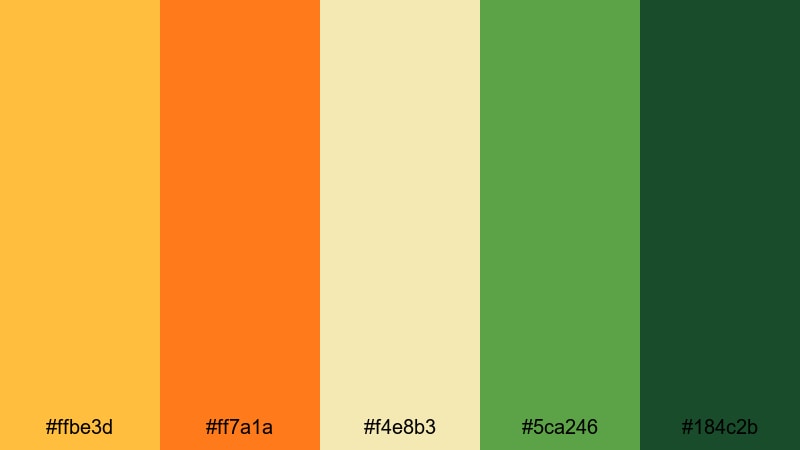
- HEX Codes: #ffbe3d, #ff7a1a, #f4e8b3, #5ca246, #184c2b
- Mood: Warm, nostalgic, and cinematic with a cozy glow.
- Use for: Perfect for cinematic travel reels, sunset timelapses, and emotional story-driven vlogs in Filmora.
Sunset Grove Fusion layers golden yellow and ember orange over soft, creamy highlights and rich forest greens. It feels like watching the sun sink behind tree lines, giving your footage a gentle, storybook warmth without looking too saturated.
Use this palette for travel vlogs, relationship stories, and reflective monologues. Apply the yellows and oranges to titles, lower thirds, and thumbnail text, while the mid to dark greens can guide your backgrounds, overlays, and end screens. Together, they create a cinematic, cohesive look across your whole Filmora project, from intro to final frame.
Pro Tip: Build A Cinematic Yellow Orange Green Look In Filmora
To keep this warm, sunset-inspired palette consistent, start by choosing one dominant yellow or orange as your brand accent color in Filmora. Use it for your intro title, subscribe lower third, and key call-to-action text. Then let the deep greens appear in backgrounds, frames, and overlays so your video feels rich without being overwhelming.
When you edit in Filmora, save your favorite color settings as presets and reuse them across different clips, shorts, and thumbnails. This way, every upload from your channel carries the same Yellow Orange Green identity, even if you shoot in different locations or lighting conditions.
AI Color Palette
If you have a favorite sunset photo or a designed color card of Sunset Grove Fusion, you can turn it into a full video look. Filmora's AI Color Palette feature lets you sample colors from a reference image and apply that grading style across your timeline.
Import your reference, choose it as the source, and let AI push your footage toward those warm yellows, glowing oranges, and grounded greens. This is ideal for keeping your main video, B-roll, and even vertical cuts for TikTok or Reels visually unified without manual tweaking on every clip.
 secure download

HSL, Color Wheels & Curves
Once your base Yellow Orange Green grade is in place, use Filmora's HSL controls to fine-tune each color range. You can deepen the greens to feel more forest-like, add a soft amber tint to highlights, or desaturate the brightest yellows to keep skin tones natural. The color wheels let you warm your midtones while keeping shadows slightly cooler for a cinematic contrast.
Curves are perfect for shaping contrast so your sunsets do not blow out: gently lift the shadows for a filmic fade, or add an S-curve for more punch. For a full walkthrough, you can follow Filmora's color correction tutorial and adapt each step to your chosen Yellow Orange Green palette.
secure download1000+ Video Filters & 3D LUTs
If you want a quick cinematic boost, Filmora's video filters and 3D LUTs make it easy to stylize your Yellow Orange Green palette. Start with a warm film LUT to add gentle contrast and color depth, then adjust opacity so your original yellows, oranges, and greens still feel natural.
You can stack filters for subtle glow, vignette, or grain to make your footage feel like a polished movie trailer. Save your favorite combination as a preset and apply it to intros, outros, and social cutdowns so everything from long-form YouTube videos to vertical shorts shares the same warm cinematic identity.
secure downloadGolden Citrus Fade
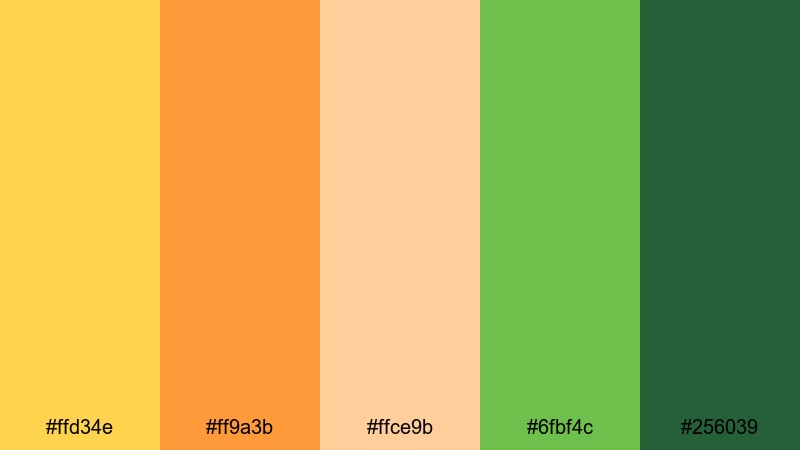
- HEX Codes: #ffd34e, #ff9a3b, #ffce9b, #6fbf4c, #256039
- Mood: Energetic yet smooth, like a golden-hour commercial.
- Use for: Use for lifestyle product promos, food videos, and upbeat brand intros that need a polished glow.
Golden Citrus Fade pairs bright lemon and tangerine tones with creamy highlights and crisp greens. It feels clean and commercial, like a polished juice or skincare ad shot during golden hour.
Apply the lighter yellows to background panels, buttons, and icons in your intros, while using the deeper greens for logos, CTA text, and price tags. In Filmora, this palette works beautifully for product close-ups, recipe shots, and thumbnail designs that need to look both fresh and professional.
Harvest Lantern Glow
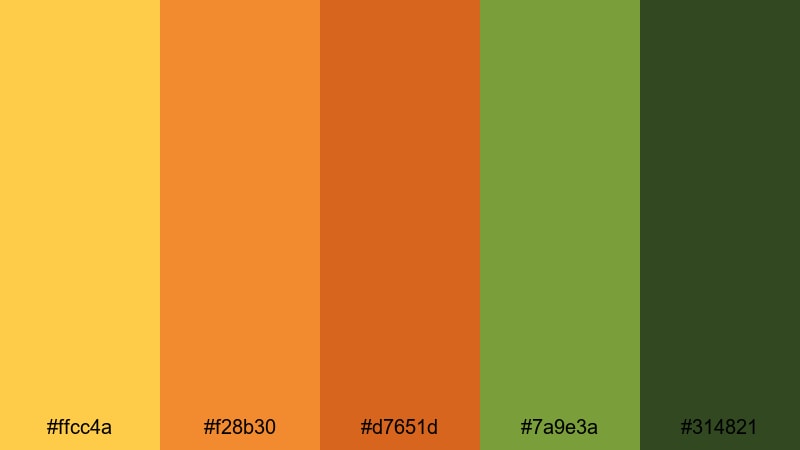
- HEX Codes: #ffcc4a, #f28b30, #d7651d, #7a9e3a, #314821
- Mood: Cozy, rustic, and cinematic with autumn warmth.
- Use for: Ideal for seasonal promos, family event recaps, and documentary-style storytelling with a warm grade.
Harvest Lantern Glow combines lantern golds and pumpkin oranges with muted greens that feel earthy and grounded. It instantly suggests fall, campfires, and homemade food.
Use this palette for Thanksgiving vlogs, autumn lookbooks, or cozy family montages. Let the oranges drive accent text and transitions, while the darker green (#314821) anchors lower thirds, frames, and outro cards inside Filmora.
Tropical Dusk Horizon

- HEX Codes: #ffe46a, #ff9b45, #ff6a2a, #64b96a, #1f5b3b
- Mood: Exotic, cinematic, and slightly dramatic like a beach sunset.
- Use for: Great for travel montages, surf edits, and destination teasers that need a tropical but grounded look.
Tropical Dusk Horizon balances sandy yellows and molten oranges with lush mid and dark greens. It looks like the sky slowly melting into a palm-covered hillside as the sun drops.
Apply it to travel vlogs, destination teasers, and hotel or resort promos. Highlight titles and map graphics with the bright yellows, and keep overlays, frames, and gradient backgrounds in the deeper greens for a dramatic, cinematic finish in Filmora.
Campfire Canopy

- HEX Codes: #ffd05a, #ff8b3a, #e06322, #7fb34e, #2f4f28
- Mood: Intimate, adventurous, and story-rich.
- Use for: Use for camping vlogs, outdoor adventures, and slow storytelling sequences with a warm cinematic grade.
Campfire Canopy mixes glowing ember oranges with tent-lit yellows and deep woodland greens. The palette feels like huddling around a fire under a dense forest canopy, perfect for storytelling and adventure content.
Use the brighter hues in on-screen text, chapter cards, and map animations, and rely on the dark green (#2f4f28) for subtle backgrounds, subtle vignette tints, and lower thirds in Filmora timelines. It helps your adventure footage feel intimate and unified without losing detail in the shadows.
Fresh Natural Yellow Orange Green Palettes
These palettes lean into organic, daylight tones that feel fresh, breathable, and calm. They are ideal for wellness channels, nature B-roll, eco brands, and any content where you want your viewer to feel relaxed and refreshed.
Orchard Morning Mist

- HEX Codes: #ffe87a, #ffb856, #f5e3c1, #7fcf6a, #3c7846
- Mood: Fresh, calm, and optimistic like a sunrise in an orchard.
- Use for: Perfect for wellness content, nature b-roll, and soft lifestyle intros that need a breathable, airy look.
Orchard Morning Mist blends soft sunlight yellow and mellow orange with dew-like light greens and a deeper forest accent. It has a gentle, hopeful feel that suits slow-motion shots and gentle camera moves.
Use this palette for mindfulness content, garden tours, slow living vlogs, and brand videos about sustainability. Keep your title cards pale and airy with #f5e3c1 as a base and add subtle accents of yellow and green to icons, lower thirds, and thumbnail borders to signal freshness at a glance.
Citrus Herb Market

- HEX Codes: #ffe263, #ffab40, #fbd19b, #8bcf7a, #3b6b3d
- Mood: Bright, wholesome, and inviting with a market-fresh vibe.
- Use for: Use for cooking channels, farmers market reels, and food reviews that highlight freshness and flavor.
Citrus Herb Market pairs zesty yellows and ripe oranges with leafy greens and a soft beige highlight. It looks like stacked fruit crates and herb bundles under a striped market awning.
Apply it to recipe shorts, shop tours, or food review thumbnails. Use the bright yellows and oranges for price tags, labels, and ingredient callouts, while the greens frame your footage in panels, dividers, or animated borders inside Filmora.
Spring Meadow Story
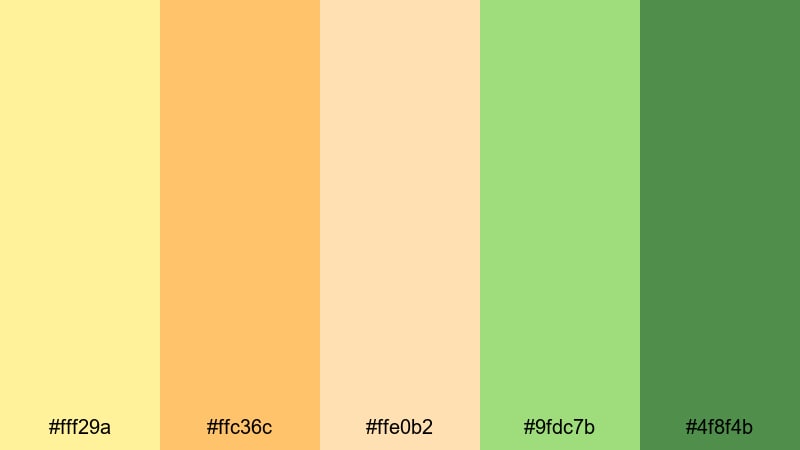
- HEX Codes: #fff29a, #ffc36c, #ffe0b2, #9fdc7b, #4f8f4b
- Mood: Gentle, hopeful, and storybook soft.
- Use for: Ideal for family vlogs, kids content, and feel-good brand intros that lean into friendliness and lightness.
Spring Meadow Story uses pale butter yellow, pastel orange, and tender greens to create a dreamy, soft-focus world. It is playful but not loud, perfect for family-friendly visuals.
Use this palette for birthday montages, kindergarten or school projects, and wholesome lifestyle intros. Keep typography simple and rounded, using the deeper green (#4f8f4b) for readable text and the lighter shades as backgrounds and accent blocks in your Filmora layouts.
Olive Orchard Noon

- HEX Codes: #f9dd6c, #f6a544, #f2c47d, #9abf65, #556b3b
- Mood: Grounded, Mediterranean, and gourmet.
- Use for: Great for recipe shorts, wine and cheese features, and boutique brand openers with a refined natural vibe.
Olive Orchard Noon brings together sunlit yellows, baked oranges, and olive-toned greens. It feels rustic and gourmet, like a long lunch under vineyard trees.
Use this palette in food cinematography, wine tastings, or travel guides around Mediterranean destinations. Let the darker green (#556b3b) anchor your logo and key titles, and use the warm mid tones as subtle overlays or gradient bands in Filmora to echo natural sunlight on your scenes.
Sunlit Forest Trail
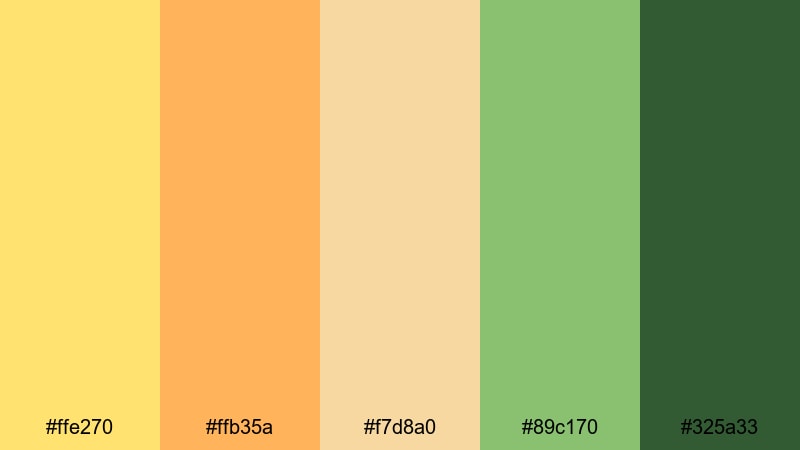
- HEX Codes: #ffe270, #ffb35a, #f7d8a0, #89c170, #325a33
- Mood: Adventurous, calm, and grounded in nature.
- Use for: Use for hiking recaps, drone shots over forests, and outdoor brand stories needing a cohesive natural grade.
Sunlit Forest Trail mixes dusty trail oranges and filtered sun yellows with layered forest greens. It strikes a balance between adventure and calm, ideal for hiking, camping, and nature storytelling.
Apply the lighter tones to overlay panels, location tags, and animated arrows, while the deep green (#325a33) gives stability to your text boxes, logo reveals, and end screens. It keeps your outdoor footage feeling cohesive whether you are cutting wide drone shots or handheld close-ups in Filmora.
Playful Neon Yellow Orange Green Palettes
These palettes crank up saturation and contrast for bold, punchy visuals that stand out in crowded feeds. They are perfect for gaming, dance, tech, fashion, and any content where you want instant energy and scroll-stopping thumbnails.
Neon Citrus Pop
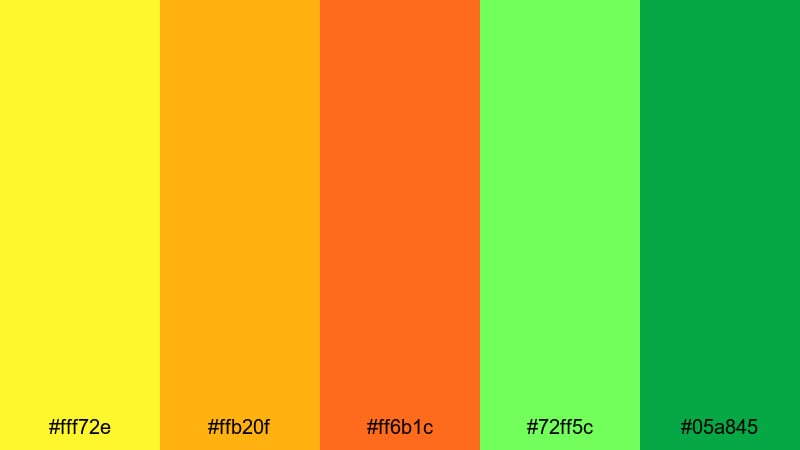
- HEX Codes: #fff72e, #ffb20f, #ff6b1c, #72ff5c, #05a845
- Mood: Bold, electric, and high-energy.
- Use for: Perfect for eye-catching YouTube thumbnails, gaming highlights, and punchy TikTok edits that must stand out in feeds.
Neon Citrus Pop slams hyper-bright yellows and fiery oranges against glowing lime greens. It feels electric and slightly retro, made for high-impact designs that grab attention in under a second.
Use this palette for stream highlight edits, challenge videos, and bold promo banners. In Filmora, combine these colors with sharp transitions, zooms, and glitch effects for titles, HUD graphics, and emojis. Just keep main text on darker accents like #05a845 to preserve readability.
Arcade Jungle Lights
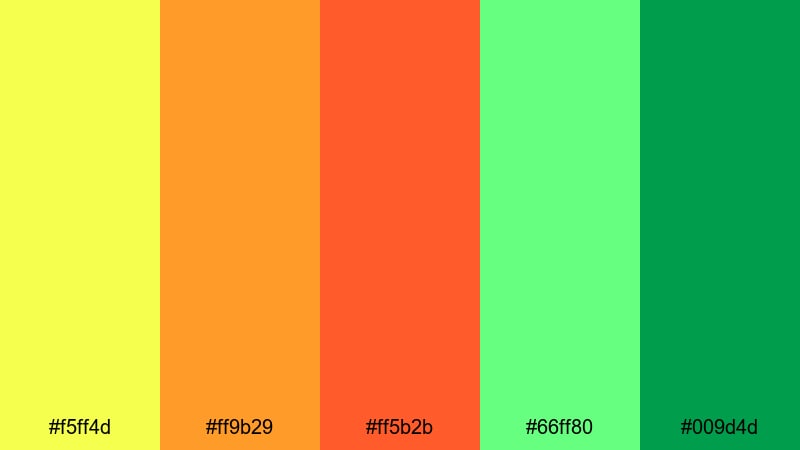
- HEX Codes: #f5ff4d, #ff9b29, #ff5b2b, #66ff80, #009d4d
- Mood: Retro, playful, and urban with a digital twist.
- Use for: Use for gaming intros, tech reviews, and motion graphics that blend retro arcade vibes with modern flair.
Arcade Jungle Lights layers luminous yellow and orange highlights over intense neon greens, like arcade screens glowing in a dark room. It combines techy brightness with jungle energy.
Use this palette for countdowns, glitch transitions, and kinetic typography inside Filmora. Let the neon greens outline characters or UI elements in your frame, and reserve the hot oranges for key stats, scores, and call-to-action text in overlays and thumbnails.
Lime Soda Splash
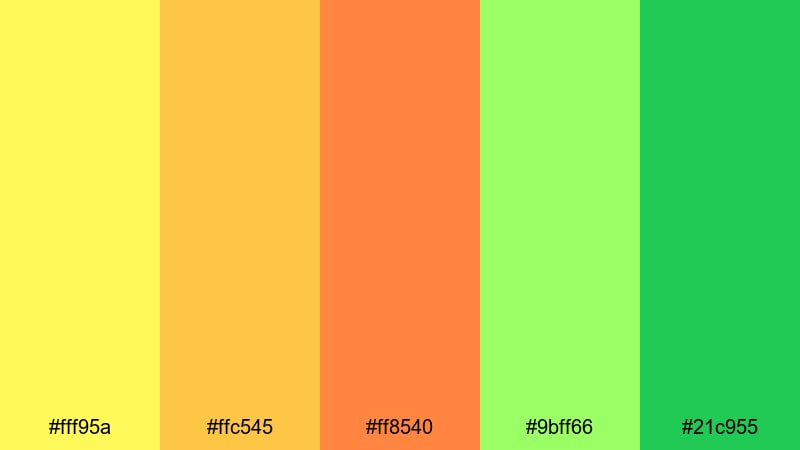
- HEX Codes: #fff95a, #ffc545, #ff8540, #9bff66, #21c955
- Mood: Fizzy, youthful, and refreshing.
- Use for: Ideal for beverage promos, fun unboxings, and upbeat vlog intros that need a fizzy, energetic feel.
Lime Soda Splash mixes soda-pop yellows and oranges with juicy lime greens. It feels carbonated and playful, like a sugar rush in color form.
Apply this palette to bright kinetic intros, trending product unboxings, and social ads. In Filmora, pair these hues with fast cuts, bounce animations, and playful text presets. Use the softer yellow (#fff95a) for background gradients and the green (#21c955) for bold CTAs and subscribe buttons.
Streetwear Solar Beat

- HEX Codes: #ffe93d, #ff9f22, #ff5a24, #7fff4b, #198b3b
- Mood: Trendy, bold, and confident with urban attitude.
- Use for: Use for fashion lookbooks, dance edits, and short-form content synced to music trends.
Streetwear Solar Beat clashes sunburst yellows and street-sign oranges with punchy greens. The colors feel like graffiti walls, sneakers, and festival stages all at once.
Use this palette for dance challenges, outfit transitions, and music-synced reels. In Filmora, combine it with split screens, freeze frames, and beat-synced cuts. Make accent elements like stroke outlines, drop shadows, and sticker-style graphics match the palette for a strong visual brand.
Festival Confetti Burst

- HEX Codes: #fff448, #ffb93c, #ff6f35, #8cff72, #2fb85a
- Mood: Celebratory, loud, and full of movement.
- Use for: Perfect for event recaps, party highlight reels, and announcement posts that celebrate milestones.
Festival Confetti Burst throws confetti-bright yellows and oranges together with vivid greens. It instantly says celebration, perfect for big announcements and hype edits.
Use this palette on event highlight reels, milestone videos, and subscriber celebrations. Pair it with confetti overlays, light leaks, and quick zoom transitions in Filmora. Use the darker green (#2fb85a) sparingly for text and logos so your message stays readable over the party of colors behind it.
Tips for Creating Yellow Orange Green Color Palettes
Yellow Orange Green color palettes can range from soft and natural to neon and loud. A few simple guidelines will help you combine these hues with other colors, keep your visuals clear, and make your videos feel polished and on-brand.
- Pick a hero color: decide whether yellow, orange, or green is the primary brand color, and let the other two act as supporting accents.
- Balance brightness: pair bright yellows and neons with at least one darker shade (such as deep green or charcoal) to maintain contrast and text readability.
- Protect skin tones: when grading footage, avoid pushing midtones too far into green; warm with orange or yellow instead to keep people looking natural.
- Use neutrals wisely: add touches of white, off-white, or charcoal gray in backgrounds and typography so the Yellow Orange Green accents have space to breathe.
- Check thumbnails at small sizes: zoom out or preview on mobile to see if text in your color choices is still legible against the background.
- Match palette to content: choose softer, desaturated combinations for wellness and documentary content, and reserve neon palettes for gaming, fashion, or high-energy edits.
- Stay consistent across platforms: use the same HEX codes in Filmora, your channel banner, and social posts so viewers instantly recognize your brand.
- Save presets: once you dial in a look in Filmora (colors, filters, LUTs), save it as a preset so you can apply your Yellow Orange Green style to new projects in seconds.
Yellow Orange Green color palettes are flexible enough to feel cinematic, natural, or neon. By choosing the right balance of warmth and saturation, you can shape how viewers feel about your videos and build a recognizable visual identity for your channel or brand.
Use the HEX codes above as starting points in Filmora. Apply them to text, overlays, and color grading, then refine with AI Color Palette, HSL, and LUTs until your footage, thumbnails, and intros all tell the same visual story.
The more consistently you use your chosen palette, the easier it becomes for viewers to recognize your work at a glance, whether they see it in a YouTube feed, an Instagram Reel, or a TikTok For You page.
secure downloadNext: Charcoal Color Palette
