

 100% Security Verified | No Subscription Required | No Malware


 ChatGPT
 Perplexity
 Gemini
 Claude
 Grok
Grok
Yellow Turquoise sits between sunny yellow and refreshing teal, combining the optimism of daylight with the calm of clear water. It feels playful yet clean, making it perfect for creators who want a look that is bright, modern, and a little bit tropical without being overwhelming.
On screen, Yellow Turquoise color palettes work beautifully for YouTube thumbnails, vlog intros, lower thirds, titles, and overall video color grading. Below you will find 15 ready-to-use Yellow Turquoise color combinations with HEX codes, designed for Filmora users and other creators who want consistent, aesthetic visuals for branding, travel content, lifestyle edits, and more.
In this article
Soft & Relaxed Yellow Turquoise Color Palettes
Sunlit Lagoon Breeze
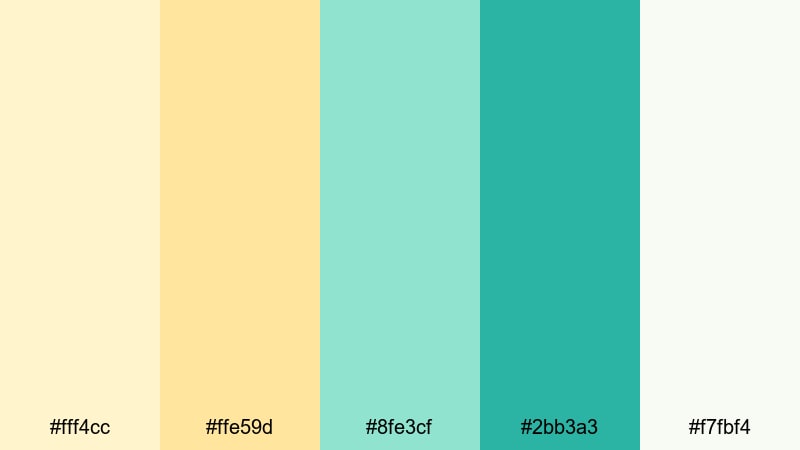
- HEX Codes: #fff4cc, #ffe59d, #8fe3cf, #2bb3a3, #f7fbf4
- Mood: Gentle, airy, and optimistic like a late morning by a quiet beach.
- Use for: Perfect for lifestyle vlogs, day-in-the-life videos, and soft travel montages that need a calm but sunny look.
Sunlit Lagoon Breeze feels like a warm breeze over shallow water. The pastel yellows add a soft glow, while the minty turquoise tones keep everything looking fresh and coastal. The off-white ties the palette together so it never feels too strong on the eyes.
This is a great choice for friendly, approachable channels that focus on slow mornings, study days, or lighthearted travel. Use the brighter yellow for titles and subscribe buttons, the mid turquoise for lower thirds and icons, and the soft cream for backgrounds in thumbnails or end screens. In Filmora, you can echo these tones in your color grading so your footage and graphic elements share the same relaxed Yellow Turquoise atmosphere.
Pro Tip: Build a Soft Yellow Turquoise Aesthetic in Filmora
To keep this gentle Yellow Turquoise vibe consistent across an edit, start by designing your thumbnail, intro, and title cards with the same HEX values: use #fff4cc or #f7fbf4 as the base, then accent with #8fe3cf and #2bb3a3 for buttons or text outlines. In Filmora, you can reuse these colors in text presets, shapes, and motion graphics so every scene feels part of the same sunny beach story.
When you grade your footage in Filmora, nudge your highlights slightly warmer to echo the pastel yellow and cool your midtones toward turquoise. This helps your b-roll, talking-head shots, and b-roll cutaways all match your graphic design and channel branding.
AI Color Palette
If you already have a reference image that captures this Sunlit Lagoon Breeze look, Filmora's AI Color Palette feature lets you transfer that color mood to your entire timeline. Import a frame with your ideal Yellow Turquoise aesthetic, and use it as the style source for other clips.
AI Color Palette automatically analyzes the color balance and tone, then applies a similar grade to your footage. This is perfect for matching A-roll and B-roll, or keeping shorts, reels, and long-form videos visually consistent without manually tweaking every single clip.
 secure download

HSL, Color Wheels & Curves
For more control over your Yellow Turquoise tones, use Filmora's HSL sliders to selectively adjust yellows and teals. You can make yellows a bit creamier for soft vlogs, or push turquoise slightly greener to feel more tropical. Then refine overall contrast with the color wheels and curves, boosting highlight warmth and gently lifting shadows so the palette stays light and airy.
If you want a deeper dive into grading, Filmora's color correction tools in Filmora make it easier to understand how each control shapes your final look. Combine a subtle S-curve with balanced midtone adjustments and your Yellow Turquoise footage will look polished, cinematic, and cohesive.
secure download1000+ Video Filters & 3D LUTs
To speed up your workflow, you can start from Filmora's presets and then nudge them toward your Yellow Turquoise palette. Filmora's video filters and 3D LUTs make it easy to give your footage a cohesive base look, which you can then adjust using HSL and color wheels to match your chosen HEX colors.
Apply a soft cinematic or pastel LUT, then fine-tune saturation so yellows and turquoises stay vibrant without clipping. Save this as a custom preset in Filmora, and you will be able to apply your signature Yellow Turquoise look to intros, vlogs, travel reels, and Shorts in just a few clicks.
secure downloadMorning Mimosa Shore
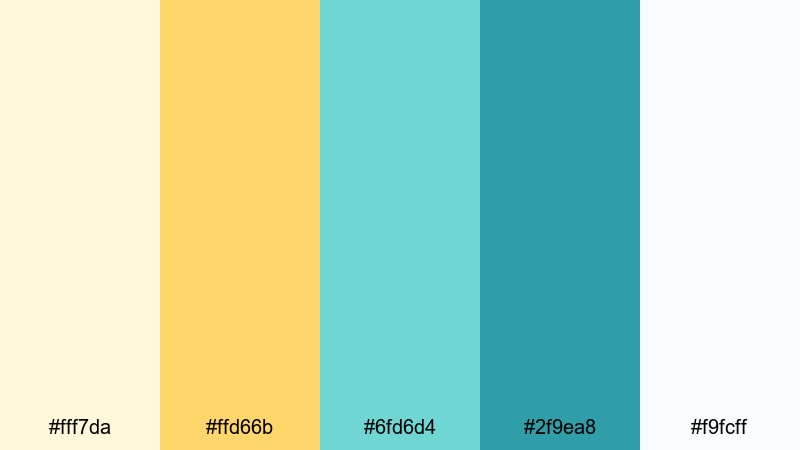
- HEX Codes: #fff7da, #ffd66b, #6fd6d4, #2f9ea8, #f9fcff
- Mood: Fresh and uplifting, like brunch by the sea with soft waves in the background.
- Use for: Use this palette for upbeat morning routines, wellness intros, and bright channel branding.
Morning Mimosa Shore combines soft lemon and mimosa yellows with seafoam turquoise, giving your visuals a clean, just-woke-up energy. The near-white background shade keeps everything light and open, ideal for channels that want to feel positive and health-focused.
Use the deeper turquoise #2f9ea8 for key text, call-to-action buttons, or borders around your thumbnails, and let #ffd66b highlight important words or timestamps. This palette works especially well for wellness vlogs, morning routines, journaling content, and productivity intros made in Filmora.
Pastel Citrus Tide
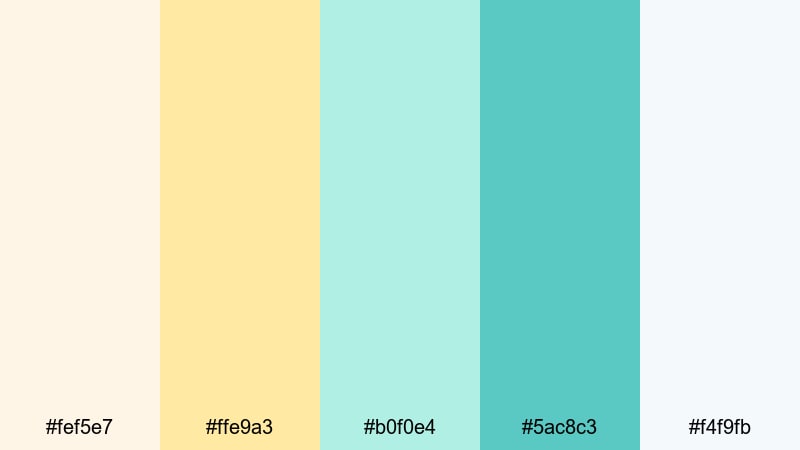
- HEX Codes: #fef5e7, #ffe9a3, #b0f0e4, #5ac8c3, #f4f9fb
- Mood: Dreamy and light, with a softly sparkling, pastel seaside feel.
- Use for: Great for aesthetic montages, gentle unboxings, and feminine travel diaries needing soft contrast.
Pastel Citrus Tide is all about delicate, dreamy color. Creamy citrus yellow blends with pale aqua and pastel turquoise, creating a palette that feels like sunlight through sheer curtains. The whites are not harsh, so your designs will look smooth and Instagram-ready.
This set of colors is perfect for aesthetic unboxings, stationery hauls, and soft-focus travel diaries. In Filmora, use #ffe9a3 and #b0f0e4 for gradient overlays on your footage, or build title cards that fade gently from citrus to aqua for a romantic, pastel Yellow Turquoise look.
Calm Island Hammock
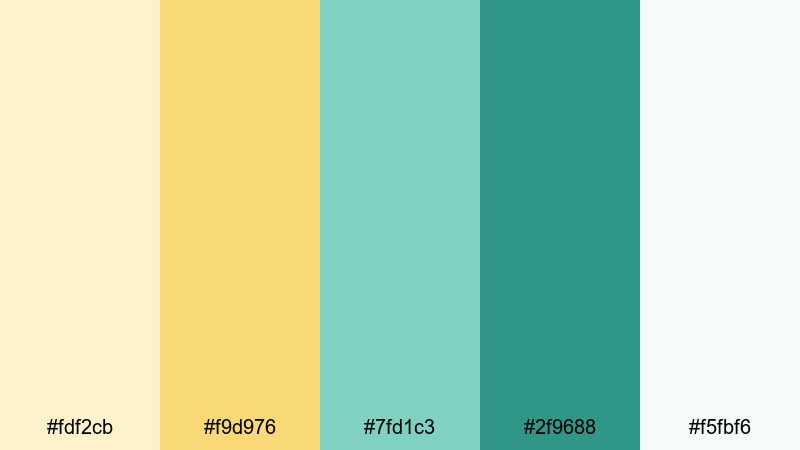
- HEX Codes: #fdf2cb, #f9d976, #7fd1c3, #2f9688, #f5fbf6
- Mood: Relaxed and cozy, like a nap in a hammock under warm island light.
- Use for: Ideal for slow living content, study-with-me videos, and relaxed talking-head scenes.
Calm Island Hammock blends muted sunshine with mellow turquoise for a gently tropical mood. The yellows are rich but not neon, and the deeper turquoise adds just enough contrast to keep titles and graphics readable.
Use this palette when you want your video to feel cozy but still bright, like calm study sessions, journaling, or island slow-living content. In thumbnails, let #2f9688 frame your subject and rely on #fdf2cb as a background color that feels warm without being too intense.
Bold & Tropical Yellow Turquoise Color Palettes
Neon Reef Carnival
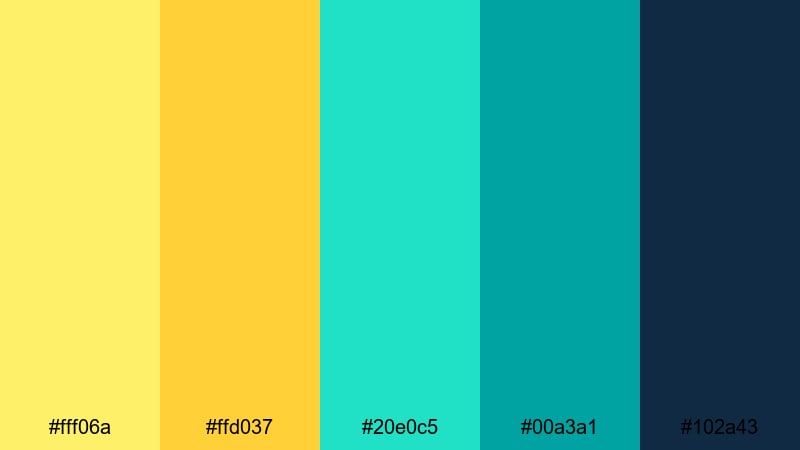
- HEX Codes: #fff06a, #ffd037, #20e0c5, #00a3a1, #102a43
- Mood: High-energy and electric, like neon lights over a tropical reef party.
- Use for: Perfect for party recaps, festival edits, travel highlight reels, and bold gaming thumbnails.
Neon Reef Carnival takes Yellow Turquoise to the extreme, with punchy yellows and bright aqua balanced by a deep navy shadow. It is eye-catching and electric, designed to stand out even on a crowded homepage or social feed.
Use the dark #102a43 for outlines, shadows, and backgrounds, so your neon yellow and turquoise text pops. This palette is ideal for festival recaps, EDM or nightlife content, and high-energy gaming channels that want a loud, tropical identity.
Tropical Surf Splash
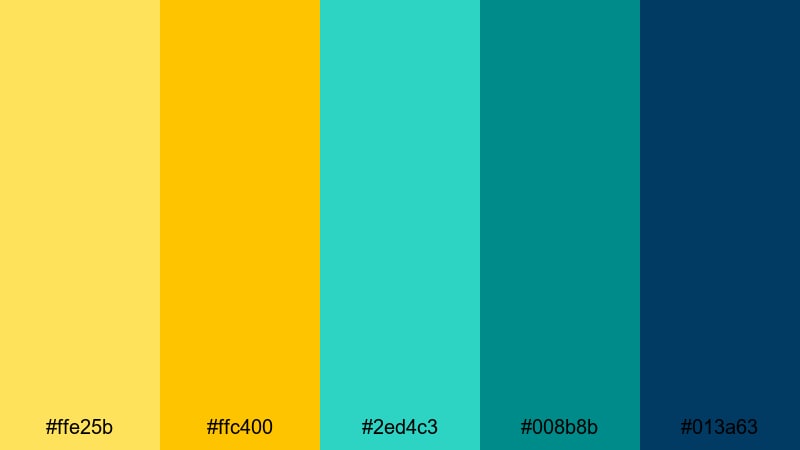
- HEX Codes: #ffe25b, #ffc400, #2ed4c3, #008b8b, #013a63
- Mood: Adventure-ready and sun-soaked, like surfing at golden hour.
- Use for: Use this for action sports edits, beach travel vlogs, and energetic intros or lower thirds.
Tropical Surf Splash captures that golden-hour surf feeling with strong yellow highlights and rich turquoise shadows. The deep teal and navy tones give you enough darkness for bold text or logo marks.
Use #ffe25b and #ffc400 for sun flares, title glows, or highlight strokes in Filmora, and lean on #013a63 behind text to guarantee legibility. This is perfect for surf, skate, and adventure creators who want to push a bold Yellow Turquoise signature across their thumbnails and lower thirds.
Electric Citrus Wave
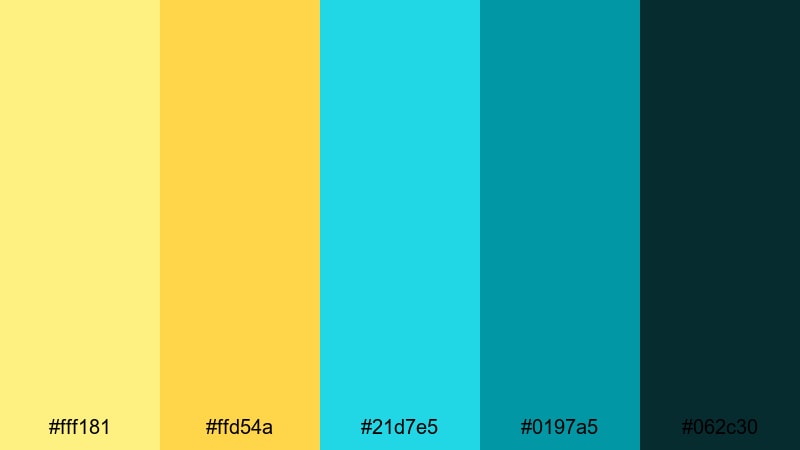
- HEX Codes: #fff181, #ffd54a, #21d7e5, #0197a5, #062c30
- Mood: Alive and zesty, capturing the shock of cold waves and bright sun.
- Use for: Great for edgy channel rebrands, high-energy shorts, and modern product promos.
Electric Citrus Wave mixes zesty citrus yellow with electric turquoise and deep teal-black, creating a dynamic, modern style. It feels sharp and energetic, making it great for attention-grabbing hooks and quick cuts.
Try this palette for product launches, tech promos, or short-form content where you want maximum impact in just a few seconds. Let #062c30 act as a solid base, then use #21d7e5 and #fff181 for kinetic text, shapes, and transitions in Filmora.
Festival Beach Sunset
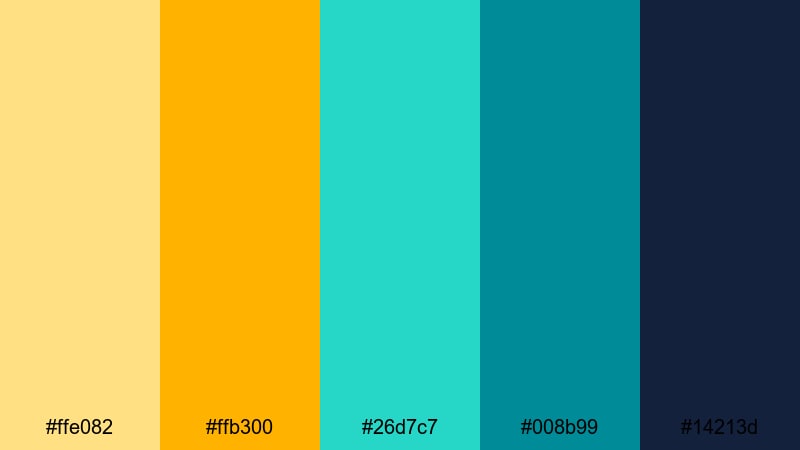
- HEX Codes: #ffe082, #ffb300, #26d7c7, #008b99, #14213d
- Mood: Joyful and colorful, like a seaside music festival at dusk.
- Use for: Ideal for event recaps, travel teasers, and creator intros that need festival vibes.
Festival Beach Sunset balances rich sunrise yellows with saturated turquoise and inky navy, giving you strong contrast and a party-ready feel. It is bright without losing depth, thanks to the dark blue #14213d.
Use this palette for highlight reels, recap videos, or channel trailers that lean into festival and travel culture. Place key titles on #14213d overlays and accent them with #ffb300 and #26d7c7 to create exciting, clickable thumbnails and animated intros.
Elegant & Modern Yellow Turquoise Color Palettes
Urban Aqua Accent
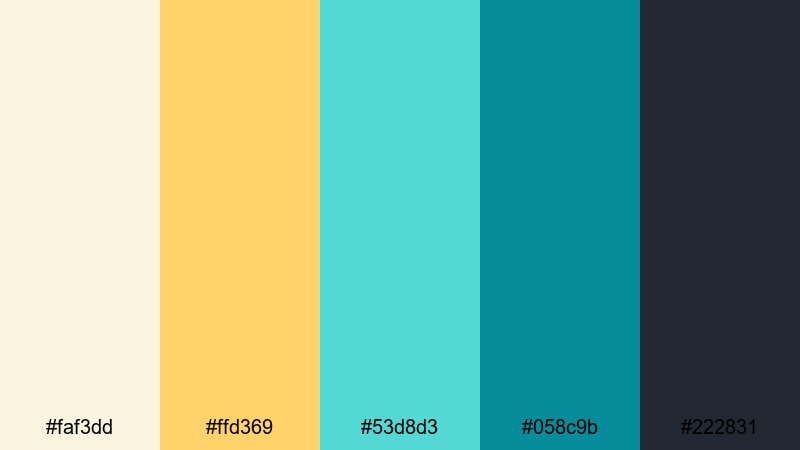
- HEX Codes: #faf3dd, #ffd369, #53d8d3, #058c9b, #222831
- Mood: Polished and confident, balancing warmth with sleek urban cool.
- Use for: Great for brand films, tech explainers, and portfolio reels that need a modern yet approachable feel.
Urban Aqua Accent uses soft cream and refined yellow for warmth, then adds clean turquoise accents and charcoal for structure. The result is a modern, brand-friendly Yellow Turquoise palette that feels professional, not childish.
Use #222831 as your main background for explainers and case studies, then highlight key stats, icons, or buttons with #ffd369 and #53d8d3. This combination reads clearly on screens and works well for startups, agencies, and creators polishing their Filmora portfolio reels.
Minimalist Hotel Pool
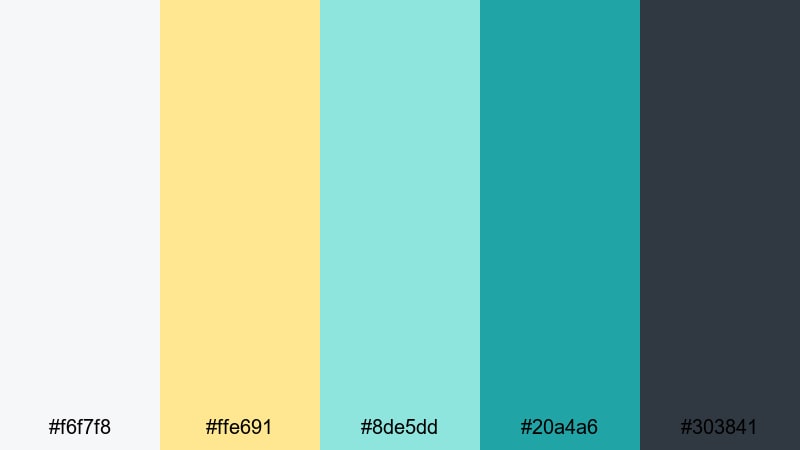
- HEX Codes: #f6f7f8, #ffe691, #8de5dd, #20a4a6, #303841
- Mood: Chic and airy, inspired by boutique hotel lobbies and rooftop pools.
- Use for: Use this palette for travel reviews, design-focused content, and stylish Instagram reels.
Minimalist Hotel Pool is all about clean neutrals and soft poolside color. Nearly white grays keep your layouts minimal, while buttery yellow and crystal turquoise add just enough personality.
For thumbnails and title cards, try a pale #f6f7f8 background with #ffe691 for subtle highlights and #20a4a6 for key lines and text. It is ideal for hotel reviews, architecture tours, and design vlogs that want an upscale, editorial Yellow Turquoise look.
Studio Glow Branding
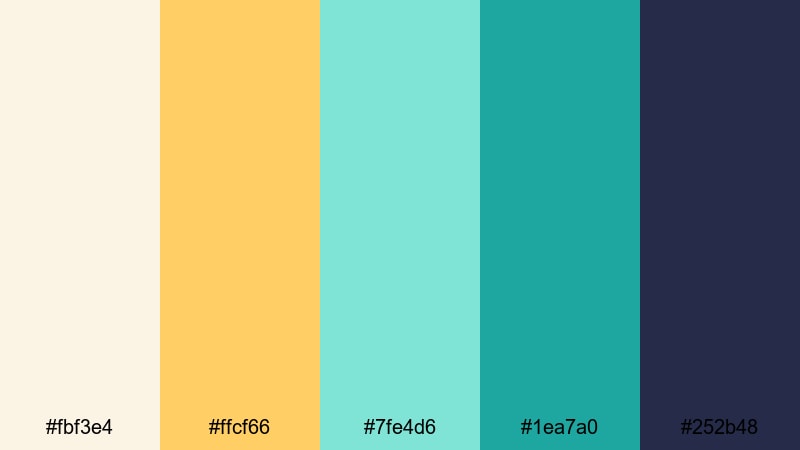
- HEX Codes: #fbf3e4, #ffcf66, #7fe4d6, #1ea7a0, #252b48
- Mood: Warm, creative, and polished like a sunlit studio set.
- Use for: Ideal for channel branding, logo animations, and sponsored content that need a premium but friendly look.
Studio Glow Branding combines golden studio light tones with smooth turquoise gradients and deep slate blue. It feels like a creative workspace where everything is tidy but still playful.
Use #fbf3e4 and #ffcf66 for soft background washes and light flares, and use #7fe4d6 or #1ea7a0 for logo accents, subscriber buttons, and transitions in Filmora. This palette makes sponsored content, brand deals, and YouTube intros feel high-quality but welcoming.
Chic Riviera Edit
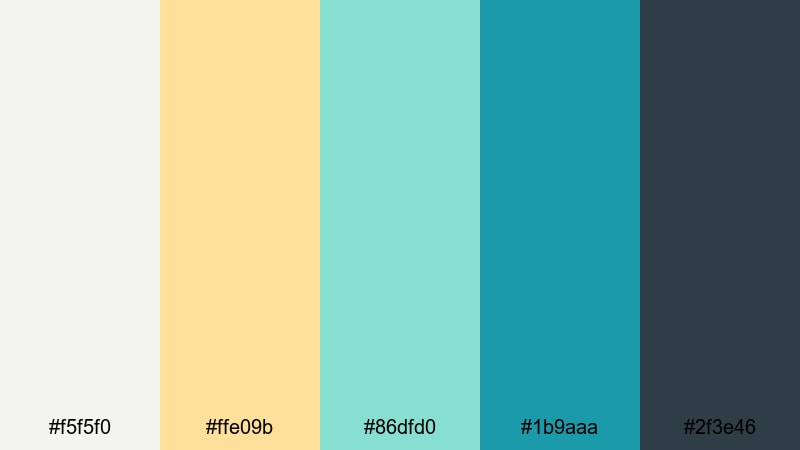
- HEX Codes: #f5f5f0, #ffe09b, #86dfd0, #1b9aaa, #2f3e46
- Mood: Sophisticated and relaxed, like a yacht day on the Riviera.
- Use for: Great for travel documentaries, hotel promos, and cinematic lifestyle edits.
Chic Riviera Edit feels like luxury vacations and long lunches by the sea. Sand neutrals and refined yellow meet cool turquoise seas and deep coastal blues, making this perfect for more cinematic work.
Use #2f3e46 for elegant frames or letterbox bars, and pair it with #ffe09b and #86dfd0 in lower thirds and location tags. In Filmora, this palette fits well with slow pans, drone shots, and soft overlays for refined travel vlogs and tourism promos.
Retro & Playful Yellow Turquoise Color Palettes
Retro Poolside Motel
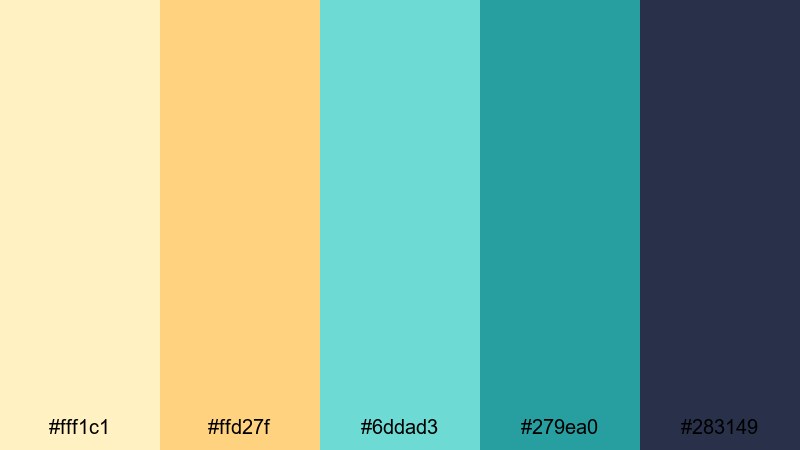
- HEX Codes: #fff1c1, #ffd27f, #6ddad3, #279ea0, #283149
- Mood: Nostalgic and fun, channeling vintage postcards and roadside motels.
- Use for: Perfect for travel throwbacks, retro title cards, and playful montage sequences.
Retro Poolside Motel brings back the charm of vintage vacation postcards. Buttery yellows sit next to aqua pool blues and deep signboard navy, instantly giving your visuals a retro, sun-faded character.
Use #283149 behind text for an old-school sign look, and accent with #ffd27f and #6ddad3 in badges, badges, and overlays. This works well for nostalgic travel stories, family footage, and playful montage sequences edited in Filmora.
Summer Arcade Splash
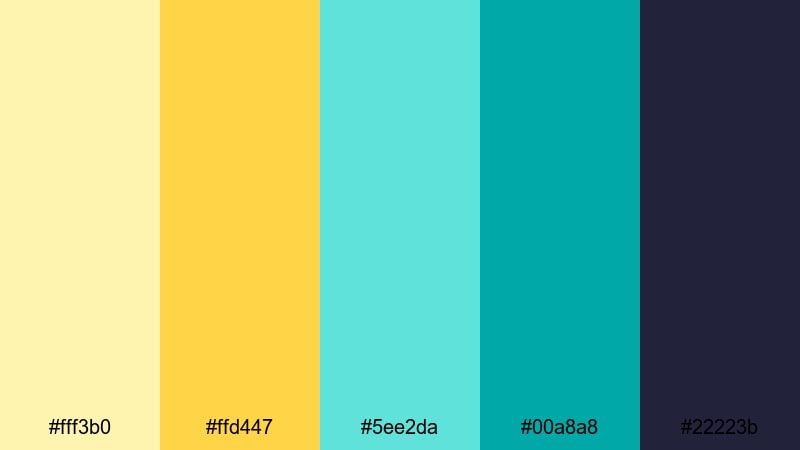
- HEX Codes: #fff3b0, #ffd447, #5ee2da, #00a8a8, #22223b
- Mood: Playful and bright, like arcade lights on a hot summer day.
- Use for: Use for gaming content, summer challenges, and energetic channel intros aimed at younger audiences.
Summer Arcade Splash feels like a mix of sunshine and neon arcade glow. Sunny yellows and saturated turquoise sit on top of deep indigo, giving you great contrast for bold, playful designs.
For gaming thumbnails or challenge videos, let #22223b carry your main background while #ffd447 and #5ee2da highlight scores, titles, and reaction shots. In Filmora, animated text and fun transitions in these colors can instantly make your channel feel more youthful and active.
Vintage Surf Poster
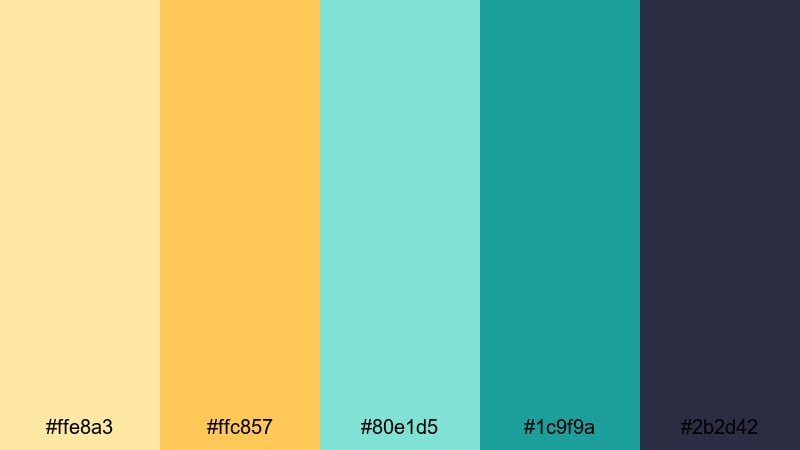
- HEX Codes: #ffe8a3, #ffc857, #80e1d5, #1c9f9a, #2b2d42
- Mood: Cool and nostalgic, inspired by classic surf and skate posters.
- Use for: Great for travel channels, skate edits, title cards, and merch mockups with a throwback vibe.
Vintage Surf Poster is a mellow, nostalgic Yellow Turquoise palette that channels classic surf and skate artwork. Faded sand yellows and soft turquoise sit next to a rich navy, giving everything a slightly worn, poster-like charm.
Use #2b2d42 as your deep anchor color for frames and typography, while #ffc857 and #80e1d5 bring retro warmth and coolness to stickers, logo marks, and titles. It is ideal for longboard edits, coastal travel series, or merch mockups where you want a relaxed, throwback aesthetic.
Tips for Creating Yellow Turquoise Color Palettes
Whether you are designing thumbnails, intros, or full color grades, these tips will help you mix Yellow Turquoise shades with supporting colors in a way that looks intentional and easy to watch.
- Pick a role for each color: use one Yellow Turquoise tone as your main accent, one as a background/support color, and one dark shade for text and outlines.
- Check contrast for readability: always test white or dark text on your chosen yellow and turquoise swatches to ensure titles stay readable on mobile screens.
- Limit the brights: if both your yellow and turquoise are very saturated, balance them with neutrals (cream, soft gray, or navy) so the frame does not feel too busy.
- Match graphics and grade: in Filmora, adjust your footage so the warm and cool tones echo your chosen palette instead of fighting against it.
- Use turquoise for trust, yellow for energy: let turquoise carry informational elements (lower thirds, data, subtitles) and use yellow for calls to action and focus points.
- Keep branding consistent: reuse the same 3 to 5 HEX codes in your logo, overlays, and color grading presets to build a recognizable Yellow Turquoise identity.
- Test on different devices: export short clips and thumbnails and preview them on phone, tablet, and desktop to make sure your colors do not appear too dull or too neon.
- Create a reusable preset: once you are happy with your Yellow Turquoise look in Filmora, save it as a custom preset so you can apply it quickly to new projects.
Yellow Turquoise color palettes can make your channel feel sunny, modern, and memorable, whether you lean into soft pastels or bold tropical contrasts. With the right combinations of yellow, turquoise, neutrals, and deep anchor tones, you can shape how viewers feel about your brand from the very first frame.
Use these 15 palettes as ready-made recipes, then refine them in Filmora using AI Color Palette, HSL controls, and LUTs to match your footage. The more consistently you apply your chosen Yellow Turquoise scheme across thumbnails, intros, and full edits, the stronger and more recognizable your visual identity will become.
Open a new project in Filmora, drop in one of these HEX sets, and start experimenting with titles, overlays, and color grading until your videos fully reflect your ideal Yellow Turquoise style.
secure downloadNext: Blue Peach Color Palette
