

 100% Security Verified | No Subscription Required | No Malware


 ChatGPT
 Perplexity
 Gemini
 Claude
 Grok
Grok
Zombie Apocalypse color palettes lean into murky greens, bruised reds, and lifeless neutrals that instantly signal danger, decay, and survival. These tones tap into color psychology by mixing sickly greens (infection and rot), rusty oranges (abandoned metal and fire), and bone-like neutrals (desaturated skin and concrete) to build tension before anything even moves on screen.
For video creators, editors, and designers, a Zombie Apocalypse color palette is a fast way to style horror intros, gaming edits, survival vlogs, and thumbnails with a consistent cinematic mood. Below you will find 15 Zombie Apocalypse color combinations with HEX codes you can drop straight into Filmora, your branding, overlays, and UI designs to keep your entire project visually cohesive.
In this article
Gritty Zombie Apocalypse Survival Palettes
Rotting City Alley
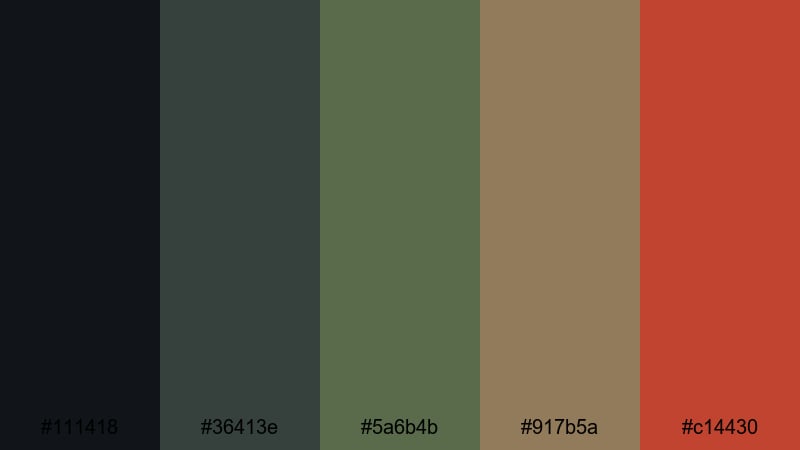
- HEX Codes: #111418, #36413e, #5a6b4b, #917b5a, #c14430
- Mood: tense and grim, with a sickly urban decay feel
- Use for: Perfect for gritty survival vlog intros, abandoned city B-roll, or game trailers set in ruined streets.
Rotting City Alley mixes asphalt black, grime-stained green, and rusted brick tones to create a claustrophobic, rotten-city vibe. The palette feels like damp concrete, moldy walls, and dried blood left behind after a panicked escape.
Use this combination to grade footage of empty streets, add distressed overlays to survival vlogs, or design thumbnails and channel art for post-apocalyptic content. The muted greens and browns keep faces readable while the rust accent color (#c14430) is ideal for titles, warning icons, and UI highlights in your videos or game-inspired graphics.
Pro Tip: Build a Gritty Zombie Apocalypse Look in Filmora
For a consistent Rotting City Alley feel, pick your main tones (deep gray, grimy green, and rust) and echo them across your whole edit in Filmora. Use the dark shades for backgrounds, lower thirds, and letterboxing, while saving the rust orange for titles, kill counters, and alert graphics.
When you cut between B-roll, talking head shots, and gameplay captures, keep those same accent colors on your transitions, overlays, and subtitles. This way every scene feels like it belongs to one infected city, even if the footage comes from different sources or days.
AI Color Palette
If you have a reference frame that nails this decayed alley look, you can turn it into a master style for your whole video. Filmora's AI Color Palette feature analyzes your reference shot and automatically transfers its Zombie Apocalypse tones to the rest of your clips.
Import your footage, choose the most atmospheric alley shot as the source, then apply the AI Color Palette to your timeline. The dark shadows, dirty greens, and rusty highlights will be matched across scenes, saving you from manually grading each clip to fit the same horror aesthetic.
 secure download

HSL, Color Wheels & Curves
To refine your Zombie Apocalypse visuals, use Filmora's color tools to push specific tones without breaking the palette. In HSL, you can desaturate blues and boost greens to make the environment feel sicker, then nudge the orange and red hues toward rust for more convincing decay.
With color wheels and curves, deepen the shadows while keeping some detail in midtones so viewers can still see your characters. Tools like Filmora's advanced color correction controls let you cool down highlights, warm up skin slightly, and create a subtle green cast in the shadows for a cinematic infected-city finish.
secure download1000+ Video Filters & 3D LUTs
If you want the Rotting City Alley atmosphere without heavy manual grading, start with Filmora's presets. Filmora's video filters and 3D LUTs make it easy to dial in washed-out contrast, dirty greens, and gritty textures that match your chosen HEX palette.
Layer a muted cinematic LUT over your footage, then add film grain or vignette filters to reinforce that claustrophobic alley feel. You can save your combination as a custom preset, so every future horror intro, cinematic B-roll montage, or stream highlight reel can instantly match your Zombie Apocalypse brand.
secure downloadAbandoned Safehouse Glow
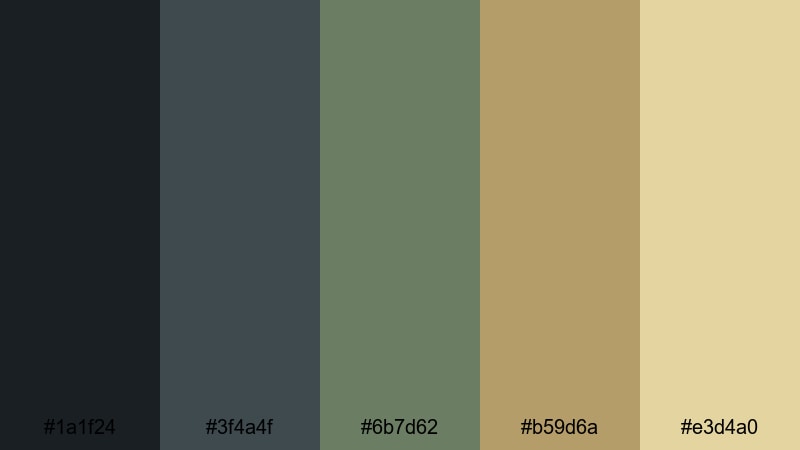
- HEX Codes: #1a1f24, #3f4a4f, #6b7d62, #b59d6a, #e3d4a0
- Mood: moody yet hopeful, like a dimly lit refuge after chaos
- Use for: Use this palette in cinematic story recaps, shelter discovery scenes, or thumbnail frames that hint at fragile safety.
Abandoned Safehouse Glow balances cold, smoky grays with muted greens and a soft lantern-like yellow. It feels like stepping into an almost-safe room where the lights are low, shadows are long, and the noise of the outside world finally fades.
Apply this palette when you want your titles, overlays, and lower thirds to feel calmer without losing the apocalyptic mood. The darker tones work well for letterboxing and backgrounds, while the warm highlights are perfect for call-to-action text, episode titles, and subtle UI elements hinting at a rare sanctuary.
Makeshift Campfire Night
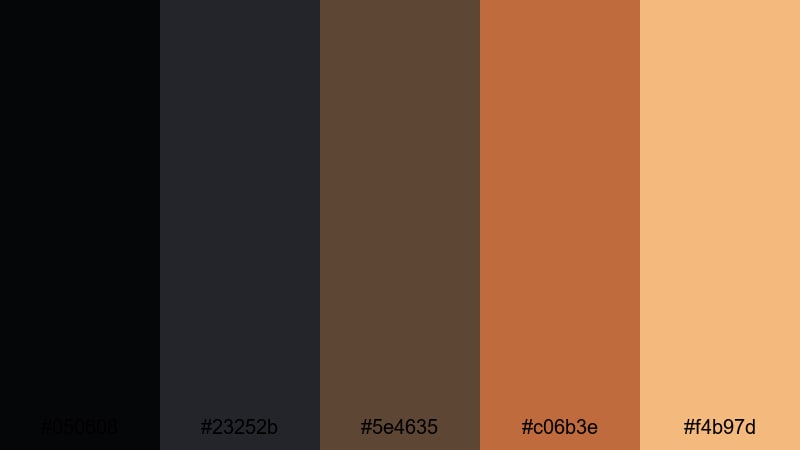
- HEX Codes: #050608, #23252b, #5e4635, #c06b3e, #f4b97d
- Mood: intimate, anxious warmth surrounded by darkness
- Use for: Great for storytelling sequences, campfire narration, or ending cards that balance danger with human connection.
Makeshift Campfire Night surrounds your frame with deep charcoal and blue-gray, then cuts through the dark with ember orange and firelight beige. It feels like survivors whispering around a campfire while the rest of the world stays pitch black.
Use it to grade late-night dialogue scenes, storytime segments, or podcast-style videos where the focus is on faces and emotion. The warm hues bring skin tones to life, while the dark base colors are ideal for end screens, credit rolls, and motion graphics that float over the darkness.
Overrun Suburb Streets
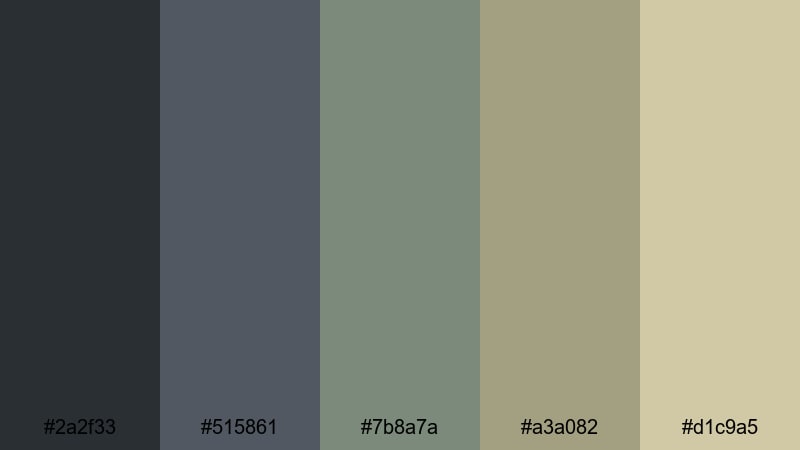
- HEX Codes: #2a2f33, #515861, #7b8a7a, #a3a082, #d1c9a5
- Mood: bleak and resigned, like a neighborhood long since lost
- Use for: Ideal for desaturated color grading, environment breakdowns, or montage sequences of destroyed suburbs.
Overrun Suburb Streets combines cool asphalt grays with faded greens and sun-bleached neutrals. The palette feels like houses and driveways left untouched for months, with nature and dust slowly taking over.
It is a strong choice for environmental B-roll, montage sequences, or breakdown videos where you analyze locations, routes, or survival strategies. Use the lighter neutrals for readable titles and subtitles, while the mid grays and greens sit comfortably behind maps, diagrams, and UI overlays without stealing attention.
Cinematic Zombie Apocalypse Horror Palettes
Last Broadcast Signal
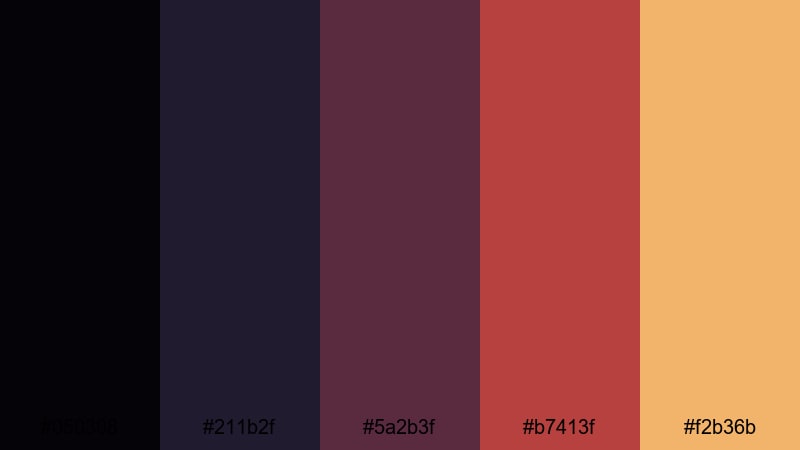
- HEX Codes: #050308, #211b2f, #5a2b3f, #b7413f, #f2b36b
- Mood: urgent and cinematic, with a broadcast-in-crisis energy
- Use for: Use for intros, glitchy lower thirds, and titles on news-style or found-footage horror edits.
Last Broadcast Signal leans into inky violets, dark maroons, and warning ambers to suggest a final emergency transmission. It feels like a TV network barely staying online while the world collapses outside.
Use the deep purples as background plates for lower thirds and news tickers, then hit viewers with the hot red and amber accents for warnings, timestamps, and glitch effects. This palette is perfect for found-footage edits, ARG-style series, or any opening titles that mimic breaking news in a doomed world.
Blood Moon Over Ruins
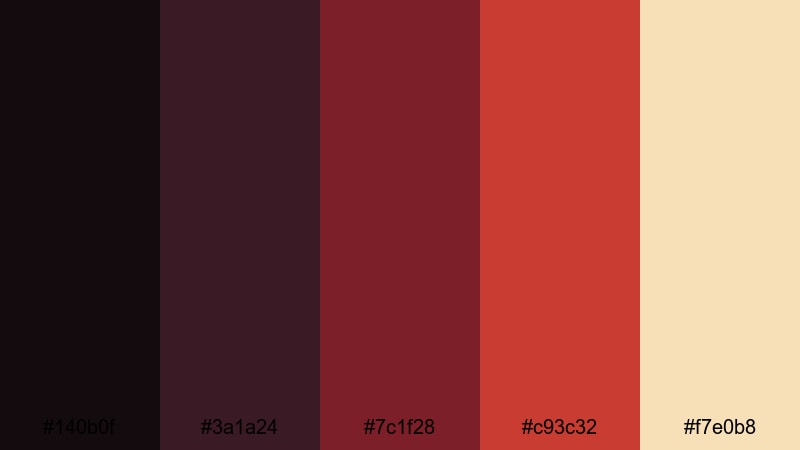
- HEX Codes: #140b0f, #3a1a24, #7c1f28, #c93c32, #f7e0b8
- Mood: dramatic and ominous, steeped in red-tinted dread
- Use for: Great for horror trailers, episode bumpers, or music videos that lean into dramatic red color grading.
Blood Moon Over Ruins is stacked with deep wine reds, arterial crimson, and pale bone light. It feels theatrical and intense, as if the entire sky has turned red over collapsed buildings and howling crowds.
Use this palette for dramatic logo stings, title cards, and music video sequences when you want red to dominate the frame. The almost-black reds are excellent for backgrounds and vignettes, while the brightest crimson and bone tones drive attention to key text, symbols, and transitions.
Contagion Lab Escape
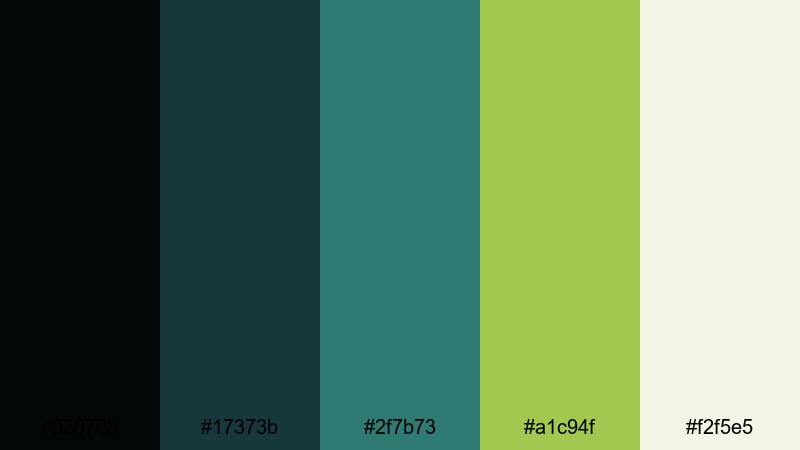
- HEX Codes: #030708, #17373b, #2f7b73, #a1c94f, #f2f5e5
- Mood: clinical, toxic, and high-tension sci-fi horror
- Use for: Perfect for techy HUDs, outbreak explainers, and motion graphics in science lab or biohazard themed videos.
Contagion Lab Escape mixes sterile dark blues and teals with toxic chartreuse and almost-white lab light. The combination feels like blinking warning lights over stainless steel, with dangerous chemicals just offscreen.
Deploy this palette for on-screen HUDs, medical diagrams, animated explainers, or sci-fi transitions. The neon yellow-green (#a1c94f) becomes a perfect color for hazard icons, progress bars, and scan lines, while the off-white is ideal for legible text over darker backgrounds.
Silent Hospital Corridor
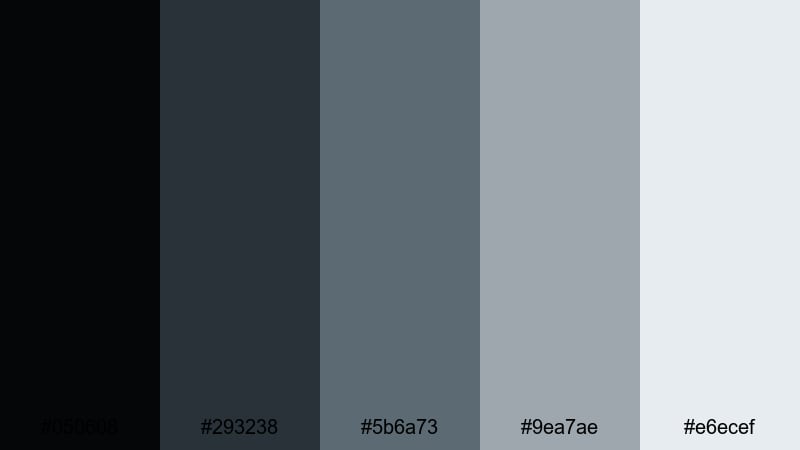
- HEX Codes: #050608, #293238, #5b6a73, #9ea7ae, #e6ecef
- Mood: cold, clinical fear with an empty-institution vibe
- Use for: Use in long-take walkthroughs, eerie reveal shots, and minimalist horror title cards.
Silent Hospital Corridor is built from cool steel blues and desaturated hospital whites. It feels like walking down a too-quiet hallway where every fluorescent light hums and every closed door hides something.
This palette is great for slow, suspenseful sequences and minimal motion graphics. Use the darker blues in your shadows and backgrounds, and the palest tone (#e6ecef) for clean typography and UI panels. It also works nicely for horror documentary thumbnails and channel branding that favor subtle dread over jump scares.
Muted Zombie Apocalypse Atmosphere Palettes
Fog Over Dead Highway
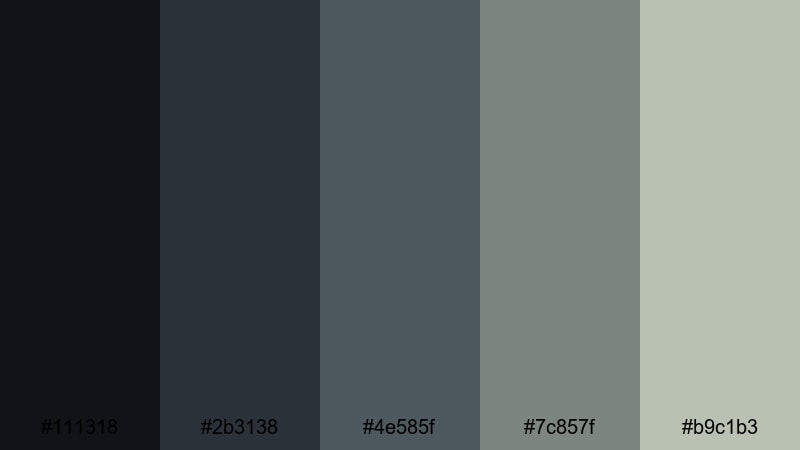
- HEX Codes: #111318, #2b3138, #4e585f, #7c857f, #b9c1b3
- Mood: slow, creeping dread under a heavy sky
- Use for: Great for road-trip-gone-wrong sequences, drone shots over empty highways, or melancholic travel vlogs with a dark twist.
Fog Over Dead Highway layers charcoal, slate, and misty green-gray to mimic endless fog above an abandoned freeway. It feels slow, heavy, and tired, like a journey that stopped making sense a long time ago.
Use this muted palette to grade wide establishing shots, drone passes, or moody travel footage. The mid grays are subtle enough for background graphics and captions, while the lightest tone softens titles and lower thirds so they match the overcast, washed-out world.
Ashfall Morning Trudge
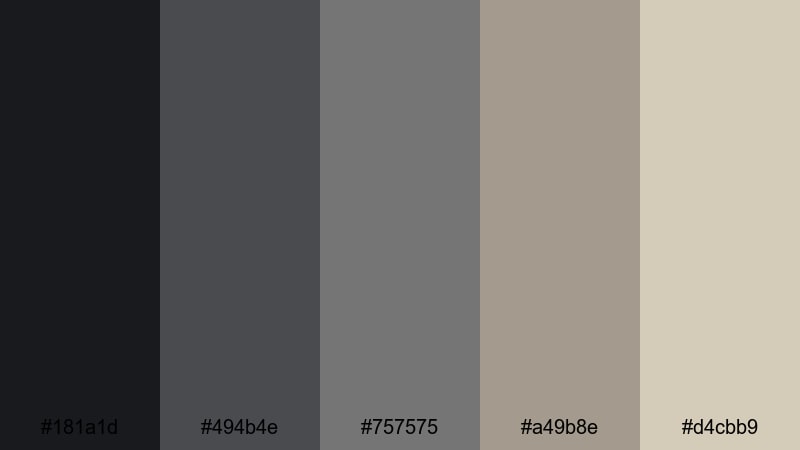
- HEX Codes: #181a1d, #494b4e, #757575, #a49b8e, #d4cbb9
- Mood: weary and overcast, with a sense of long-term survival
- Use for: Use in day-after montages, character journeys, or minimalist thumbnails focused on mood over shock.
Ashfall Morning Trudge blends soft charcoals and mid grays with ashy tans, evoking streets coated in dust and debris at daybreak. It feels like the survivors have been walking for days, not hours.
This is an excellent palette when you want a realistic, documentary-style Zombie Apocalypse look instead of neon or extreme reds. The low contrast makes it ideal for longer edits, travel-style journals, and character-centric montages, while the pale beige is gentle enough for readable text and simple branding.
Quarantined City Block
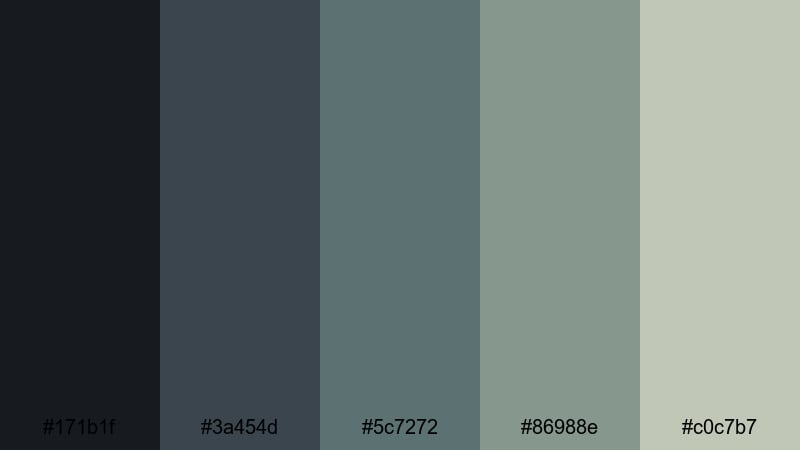
- HEX Codes: #171b1f, #3a454d, #5c7272, #86988e, #c0c7b7
- Mood: contained tension, sterile yet suffocating
- Use for: Great for map graphics, city establishing shots, and informational overlays about lockdown or outbreak zones.
Quarantined City Block uses blue-gray bricks, faded teal, and muted concrete neutrals to suggest streets cut off by barricades and tape. The palette feels controlled and sterile, but also trapped and airless.
It is particularly strong for infographics, city maps, and interface elements in your videos. Use the darker tones as the base for minimaps and data panels, and the lighter neutrals for labels and statistics. The subtle teal adds just enough color to highlight zones, danger levels, or different territories without breaking the muted look.
Underground Bunker Dim
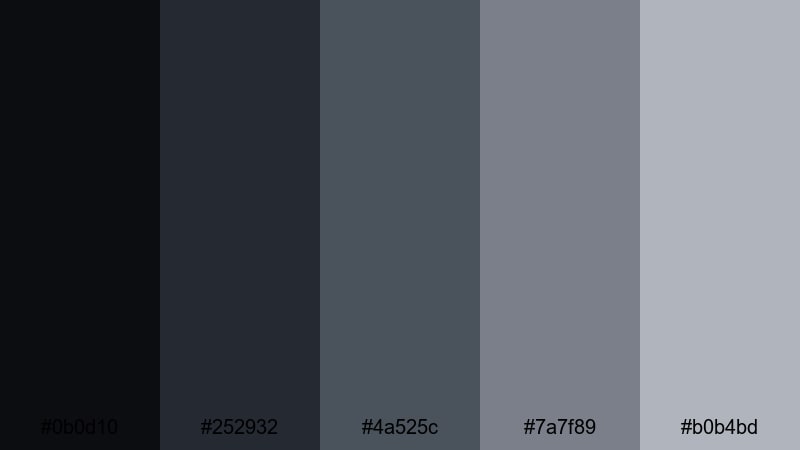
- HEX Codes: #0b0d10, #252932, #4a525c, #7a7f89, #b0b4bd
- Mood: enclosed, cautious calm in a hidden shelter
- Use for: Ideal for dialogue-heavy scenes, podcast video backdrops, or bunker life montages with restrained color.
Underground Bunker Dim leans on deep graphite, muted steel, and low-light blues to capture the feel of a cramped shelter under the surface. It is calm but uneasy, like time has slowed down under flickering lights.
Use this palette for indoor survival sequences, video podcasts, and talking-head content framed as bunker broadcasts. The darker shades work well for backgrounds behind webcams or gameplay, while the lighter gray-blue tones help titles and interface elements remain clear without adding bright, immersion-breaking colors.
Neon Zombie Apocalypse Gamer Palettes
Toxic Night Raid
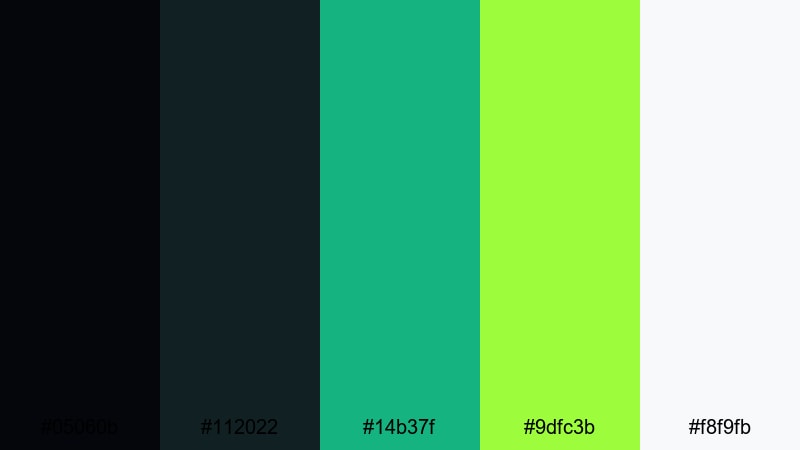
- HEX Codes: #05060b, #112022, #14b37f, #9dfc3b, #f8f9fb
- Mood: high-energy, toxic neon against dense shadows
- Use for: Perfect for zombie shooter game intros, livestream overlays, and cyberpunk survival titles.
Toxic Night Raid throws radioactive greens and bright white highlights against almost-black shadows. It feels like a stealth raid through infected streets lit only by HUDs, scopes, and chemical spills.
This palette is perfect for gaming intros, kill montage edits, and stream overlays. Use the super dark tones as your canvas, then apply the neon greens to highlight scores, health bars, and alerts. The crisp white keeps text readable in thumbnails, lower thirds, and logo lockups while still fitting the toxic-futuristic vibe.
Radioactive Alley Lights
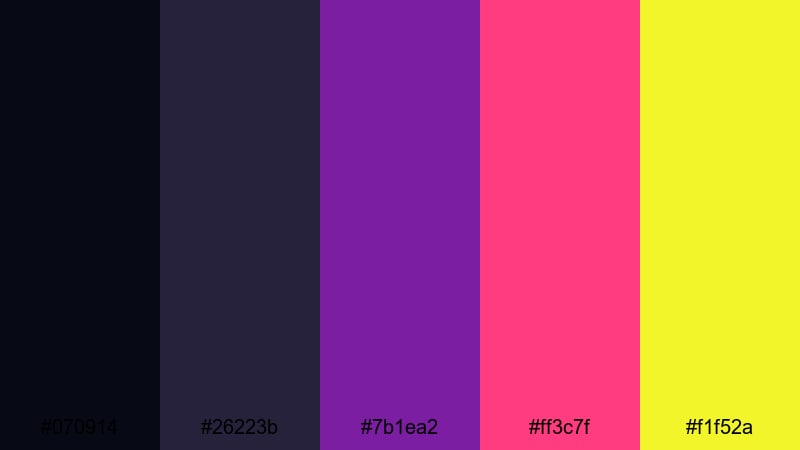
- HEX Codes: #070914, #26223b, #7b1ea2, #ff3c7f, #f1f52a
- Mood: glitchy, chaotic, and club-like in the middle of ruin
- Use for: Use for EDM horror edits, stylized game highlight reels, and bold thumbnails that need to pop on crowded feeds.
Radioactive Alley Lights crushes deep indigo and alleyway violet together with hot magenta and nuclear yellow. It feels like a broken nightclub or arcade still flashing in a wrecked city.
Use this palette when you want your Zombie Apocalypse edits to be stylish, loud, and modern. The neon accents are ideal for text glows, particle effects, and UI elements in highlights reels, while the dark base colors keep the frame readable and cinematic.
Glitched Outbreak HUD
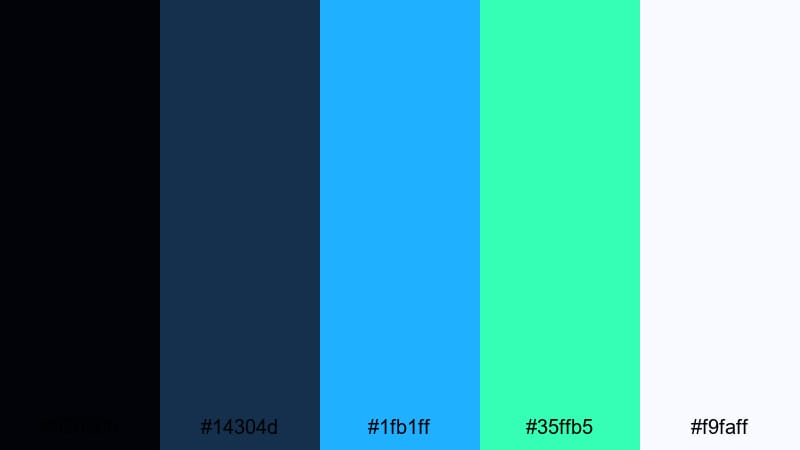
- HEX Codes: #020308, #14304d, #1fb1ff, #35ffb5, #f9faff
- Mood: techy, frantic, and data-driven under crisis
- Use for: Great for motion graphics, streaming overlays, and sci-fi outbreak dashboards in tutorials or gameplay breakdowns.
Glitched Outbreak HUD combines dark navy with bright cyan, mint, and clean screen white to deliver a holographic, data-heavy look. It feels like an emergency operations center tracking infection spread in real time.
Use this palette for dashboards, stat panels, and overlay packs in your edits. The saturated blues and mints work perfectly for progress rings, minimaps, and glitch transitions, while the off-white keeps dense information, subtitles, and labels clear and readable even on mobile screens.
Tips for Creating Zombie Apocalypse Color Palettes
When you build your own Zombie Apocalypse color combinations, focus on mood first, then choose supporting colors that keep your titles, UI, and footage readable across different screens and platforms.
- Pick one dominant tone (toxic green, rusty red, or polluted gray) and build the rest of your palette around it with 2–4 supporting colors.
- Keep at least one light neutral HEX code in every palette for legible text and UI, especially on thumbnails and mobile.
- Use contrast wisely: dark backgrounds with bright accents help horror titles, health bars, and warnings pop without feeling cartoony.
- Match your color grade to your graphics: if your footage is green and desaturated, avoid bright, mismatched overlays that break immersion.
- Limit neon accents to small areas (icons, highlights, key words) so the overall frame still reads as gritty and cinematic.
- Test your palette on both dark-mode and light-mode interfaces to ensure critical information stays readable everywhere.
- Create separate variations of the same palette for night, day, and interior scenes so your series stays consistent but never flat.
- Save your favorite Zombie Apocalypse looks as presets in Filmora so future videos, shorts, and livestream assets maintain the same visual identity.
Zombie Apocalypse color palettes are a powerful way to control how your story feels before a single line is spoken. From grim alleyways to neon-infected rooftops, these HEX combinations can define your channel, series, or game brand with a clear, recognizable aesthetic.
Experiment with these 15 palettes as starting points in Filmora, then tweak saturation, contrast, and accents until they fit your footage, logo, and audience. Whether you are cutting a cinematic short, a gameplay montage, or a survival vlog, a consistent palette will make your project look more professional and more memorable.
Save your favorite looks as presets, and keep reusing them across intros, transitions, overlays, and social clips. Over time, your viewers will recognize your signature Zombie Apocalypse style the moment your videos appear in their feed.
secure download