



 100% Security Verified | No Subscription Required | No Malware


 ChatGPT
 Perplexity
 Gemini
 Claude
 Grok
Grok
Many musicians spend hours trying to figure out the exact key, BPM, or subtle vibe of a song when building a set or producing a track. It's such a hassle, and that's the gap an AI music analyzer is built to close.
AI music analysis is also useful for a wider crowd than you'd think: musicians studying composition, producers double-checking their work, DJs building sets, content creators matching visuals to sound, and music researchers who just want data instead of guesswork. So, to help you find the right fit, we'll recommend top AI analyze music tools worth your time in 2026.

In this article
Part 1. Best AI Tools to Analyze Music / Songs
Now, let's get into the details. But you need to understand that not every AI music analyzer approaches a song in the same way. To make the differences easier to spot, we'll use the same format for each tool below.
1. Remusic
Best For: Independent artists, songwriters, and beatmakers wanting quick music theory breakdowns.
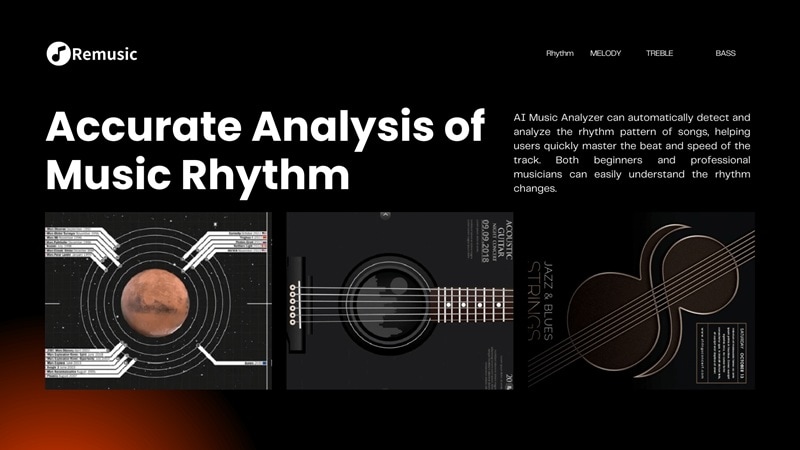
To kick off our AI music analyzer lineup, Remusic gives creators an accessible way to study songs. Its Song Analyzer breaks a track into rhythm, beat pattern, melody direction, chord progression, and treble/bass balance, then hands you a visual waveform plus a downloadable report. So, it's very useful if you're trying to understand a song rather than simply label it.
Key Features:
- Rhythm, beat, and BPM detection alongside melody direction and pitch-level detail.
- Chord progression extraction with MIDI export for reuse in your own DAW.
- Vocal, bass, drum, guitar, and piano stem separation built into the same platform.
- Downloadable analysis report you can revisit whenever you need it.
Pros:
- No sign-up needed to try the core analyzer features.
- Doubles as a full music creation suite if you want to build on what you find.
Cons:
- Upload limit is 20 MB.
- Some of the deeper analysis settings take a minute to figure out.
Pricing: Free tier is available with daily credits. Paid plans start at $4.90 per month.
2. Fylmio
Best For: Video creators and social media editors matching music to visual projects.
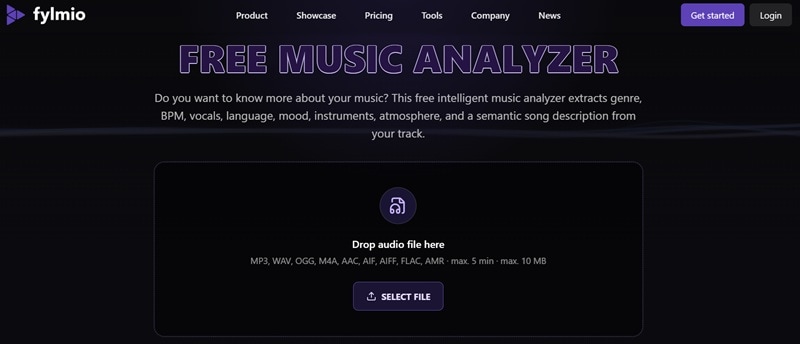
If your question isn't just "What genre is this?" but also "What kind of visuals would fit this song?", Fylmio is worth a look. Its free AI music analyzer extracts genre, BPM, vocals, language, mood, atmosphere, instruments, duration, and a semantic description of the track. It's one of the few tools here that connects analysis directly to a creative next step instead of leaving you with a page of numbers.
Key Features:
- Genre, BPM, and vocal detection in a single free scan.
- Language detection, handy for multilingual channels or international audiences.
- Instrument identification for a fuller picture of the arrangement.
- AI-generated music video concept suggestions based on the analysis.
Pros:
- Completely free to use for the core analysis.
- Straightforward interface built for creators, not audio engineers.
Cons:
- No verse/chorus structure breakdown as part of the analysis.
- 10 MB upload limit and 5-minutes song only.
Pricing: Free version available with 500 credits. Paid plans start from $29 per month.
3. Cyanite.ai
Best For: Music supervisors, sync agencies, and labels tagging and searching huge catalogs.
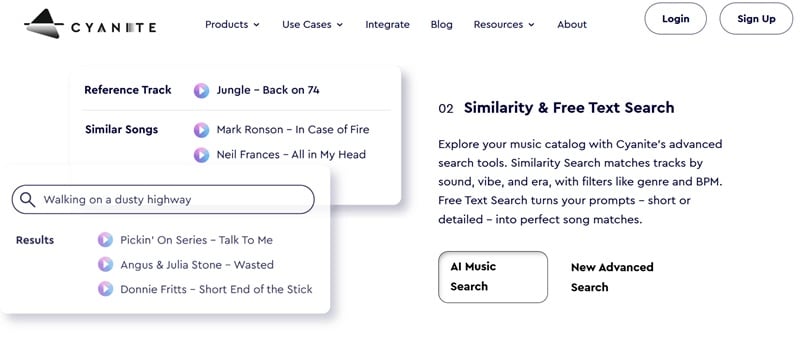
Another strong AI song analyzer contender built for music industry pros is Cyanite.ai. This platform handles deep catalog auto-tagging, helping teams organize huge audio libraries so supervisor teams can find sync tracks instantly. That makes Cyanite particularly useful when you're working with hundreds or thousands of tracks rather than just one song.
Key Features:
- Deep 100+ tag generation for genre, mood, and instrumentation.
- Similarity search to find tracks with matching sound profiles.
- Visualization maps for emotional intensity.
- Full API integration for custom catalog setups.
Pros:
- Tagging depth is aimed at real discoverability, not surface-level labels.
- Useful for teams coordinating on a shared library, not just solo users.
Cons:
- Requires a structured account onboarding process.
- Focused on metadata and discovery, not mix quality or production feedback.
Pricing: Enterprise pricing based on catalog size and API usage; not really aimed at individual producers.
4. BeMusic AI
Best For: Creators who want analysis bundled with a full AI music generation toolkit, rather than a standalone analyzer.
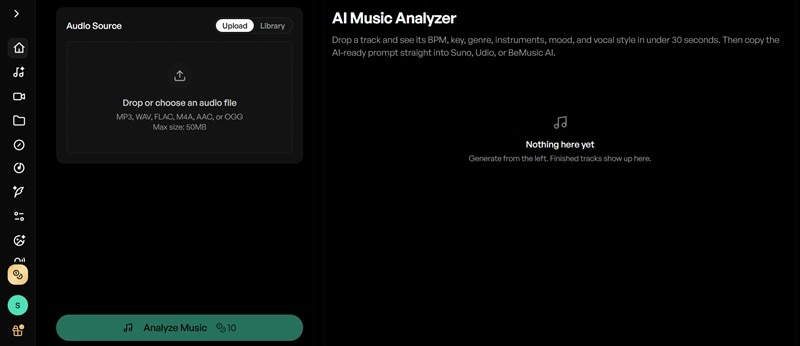
If you want to run an AI music analysis on reference tracks to see how they are built, BeMusic AI gives you a deep lookup that converts track characteristics into usable prompts. Its analyzer looks at seven areas, including BPM, key, genre, instruments, vocal techniques, production style, and mood.
Key Features:
- Genre, mood, and tempo characteristics feed directly into the generation tools.
- Built-in vocal remover and stem splitter alongside the analysis side.
- AI lyrics generator and instrumental generator in the same suite.
- Outputs downloadable in MP3 or lossless WAV.
Pros:
- 40 free credits on sign-up, enough to properly test the toolkit.
- Handles files up to 50 MB.
Cons:
- Less depth on pure analysis metrics like chord progressions or structure.
- Independent reviews are mixed, so results can vary.
Pricing: Free to start with 40 credits (about 4 songs). Lite plans start from $14.99 per month, with higher Pro tiers unlocking a full commercial license.
5. SONOTELLER
Best For: Content reviewers, lyricists, and playlist curators analyzing complete track context.
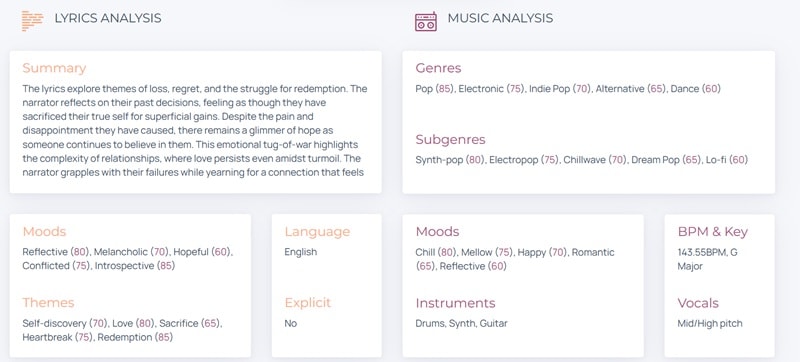
For creators who want to run a complete AI song analyzer pass on both sound and words, SONOTELLER stands out. It listens to the audio and reads the lyrics to give you a full summary of what a song is really about. Plus, it can identify genres, subgenres, moods, instruments, BPM, key, vocals, language, lyrical themes, and explicit-content information.
Key Features:
- Dual analysis of vocal lyrics and instrumental backing.
- Summary generator for core themes and artistic narrative.
- Explicit content and mood flag warnings.
- Identify dominant instruments and vocal styles.
Pros:
- No file upload needed.
- “Golden minute” feature is genuinely useful for playlist and highlight decisions.
Cons:
- It may miss subtleties in non-English lyrics.
- Fewer detailed chord diagrams for instrumentalists.
Pricing: Free version is available with daily analysis limits. API pricing available via RapidAPI, with a 50% discount for labels.
6. AI Music Analyzer
Best For: Producers, artists, A&R teams, and labels that want feedback beyond basic song metadata.
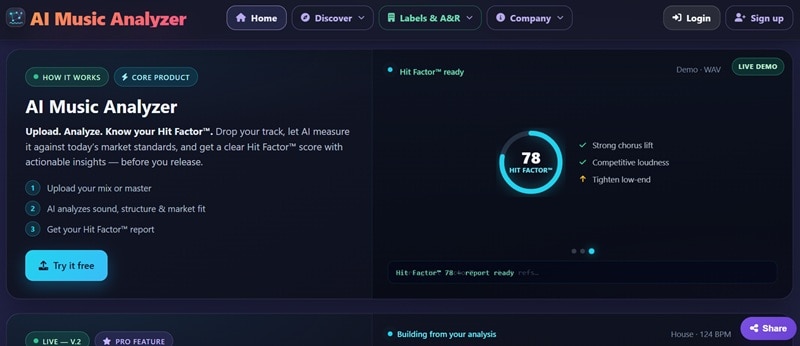
For a straight-to-the-point AI music analysis option, AI Music Analyzer does exactly what its name promises. Alongside familiar information such as BPM, key, loudness, and genre, it generates a Hit Factor score and looks at signals such as chorus lift, loudness, and low-end balance. Basic analysis is free, which makes it an easy entry point if you're a student or hobbyist trying to understand music theory concepts.
Key Features:
- High-precision BPM detection with decimal points.
- Camelot wheel key notation display for DJs.
- Loudness (LUFS) and dynamic headroom readout.
- Waveform spectral view highlighting track sections.
Pros:
- For labels, there's also batch analysis for up to 10 tracks at once.
- MIDI export is a nice bonus for studying or reusing a melody.
Cons:
- Does not generate text descriptions or summaries.
- Genre detection isn't as strongly emphasized as rhythm and chord analysis.
Pricing: There's a one-day free trial with five tokens. After that, the service uses HitCoins rather than a conventional recurring subscription.
7. Bridge
Best For: Labels, publishers, and sync agencies managing large catalogs that need consistent, automated tagging.
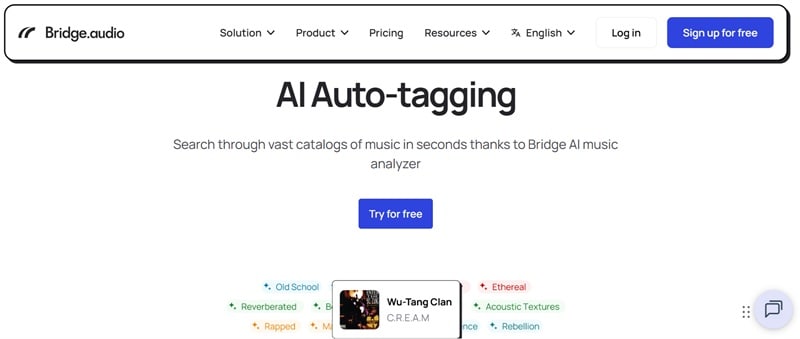
Rounding out our AI music analyzer recommendation, there's Bridge. Rather than analyzing a single song for you to read through, it auto-tags entire libraries of tracks with vocal type, instruments, mood, genre, structure, and tempo. It also runs a sync marketplace with 0% commission on placements, which is a meaningful bonus if discoverability and licensing are the real goal here.
Key Features:
- Auto-tagging for mood, instrumentation, and speed.
- Integrated audio player with embedded metadata.
- Smart search filters built across workspace folders.
- Custom pitch page creation for agencies.
Pros:
- Structure tagging is more detailed than several competitors on this list.
- Free tier available for smaller catalogs, so it's not enterprise-only.
Cons:
- Not designed for casual, single-song analysis.
- Not aimed at mix or production feedback, only metadata and tagging.
Pricing: Free version is available with up to 50 tracks in a private workspace and up to three members. Paid plans start from $5.83 per month.
Part 2. Comparing the Best AI Music Analyzer for You
Reading seven AI music analysis tool breakdowns back to back can blur together, but the differences become much clearer when you put them next to each other. To help you out a little, use this cheat sheet that lines up all seven side by side across the six things people usually care about most when picking an AI music analyzer.
|
Genre Detection |
BPM / Tempo |
Key & Chords |
Mood Analysis |
Song Structure |
Audio Support |
|
|
Remusic |
Basic |
High Accuracy |
Chords + partial key |
Moderate |
Partial |
File upload, stems + MIDI export |
|
Fylmio |
Basic |
Energy-based |
Key Only |
High |
Intensity Map |
File Upload (MP3, WAV, etc) |
|
Cyanite.ai |
Advanced |
High Accuracy |
Key Only |
Deep Mood Tags |
Detailed |
Catalog-scale ingestion |
|
BeMusic AI |
Basic |
Basic |
Key Only |
Acoustic Scores |
Energy Map |
File Upload (MP3, WAV, etc) |
|
SONOTELLER |
Basic |
Basic |
Key Only |
Deep Narrative |
Partial |
YouTube link or search (no upload) |
|
AI Music Analyzer |
Basic |
High Accuracy |
Chords + key data |
Basic |
Partial |
File upload + MIDI export |
|
Bridge |
Professional |
High Accuracy |
Unavailable |
Professional Tags |
Unavailable |
Catalog-scale ingestion |
Quick Verdict
As you can see, every tool we recommend here brings something to the table, so there isn't one winner for every situation. Instead, you can use this as a guide:
- For DJs and Live Performers: AI Music Analyzer gives you speed and direct Camelot key maps.
- For Publishers and Sync Reps: Cyanite.ai and Bridge offer best-in-class catalog search and auto-tagging.
- For Songwriters and Beatmakers: Remusic delivers clear chord progressions for study.
Bonus: Use AI to Analyze Music Videos in Filmora
All of these AI music analyzer tools cover the audio side of a project, but if you're actually making a music video, the footage matters just as much as the track. You also need to know which footage you have, what appears in each clip, which shots are worth keeping, and where the strongest moments are.
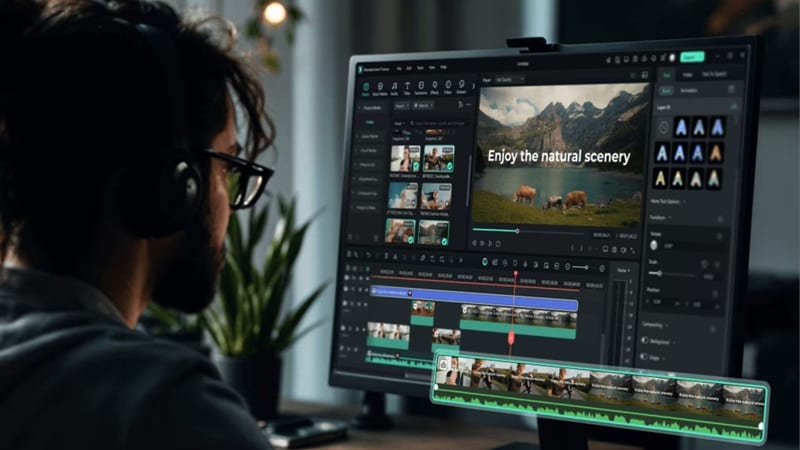
For the visual side of your project, Wondershare Filmora offers an automated organizing assistant built for high-volume edits. In the upcoming Filmora 16 release, it will introduce the AI Media Analysis feature. Using a Qwen3.7 Flash AI model, it scans imported footage and categorizes it across several structured dimensions, including keywords, main subject, scene/location, description, editing suggestions, and score.
Here are some of its key features worth mentioning:
- Find Useful Footage Faster: Flags highlight-worthy vs. weaker clips with scores/confidence levels.
- Identify Your Footage: One-click analysis auto-identifies characters, scenes, locations, actions, and key moments.
- Keep the Analysis Connected to Editing: Generates content tags and editing suggestions, and lets you refine the edit based on that feedback.
Analyze Your Clip in Filmora: A Quick Tutorial
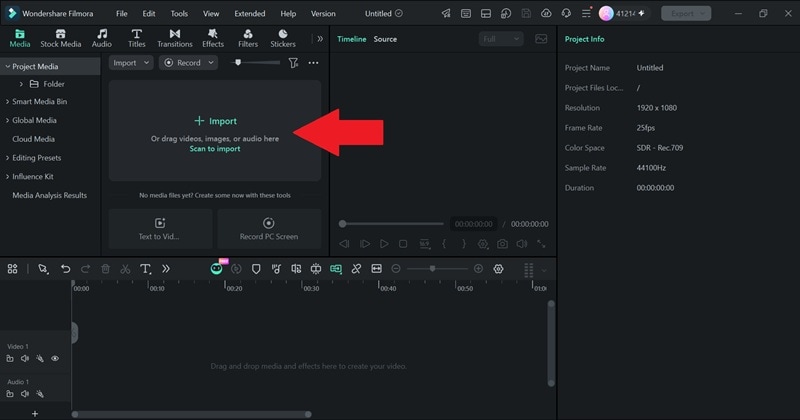
- Step 1. Import Your Footage
Launch Filmora on your computer and open a New Project. Hit the Import button to bring in the footage you plan to work on.
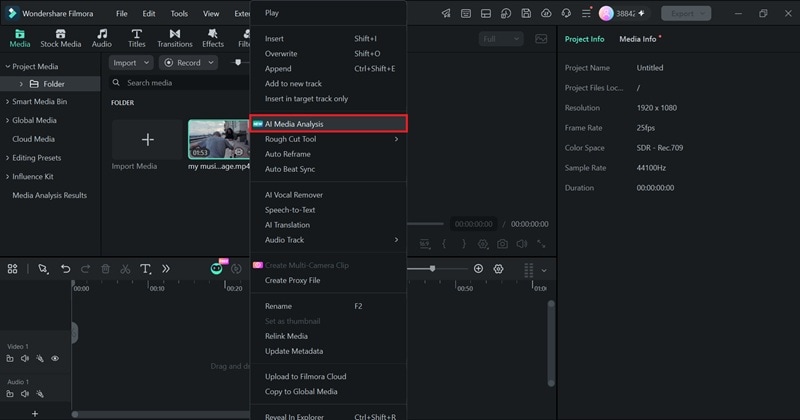
- Step 2. Run AI Media Analysis
Right-click the imported clip and select AI Media Analysis.
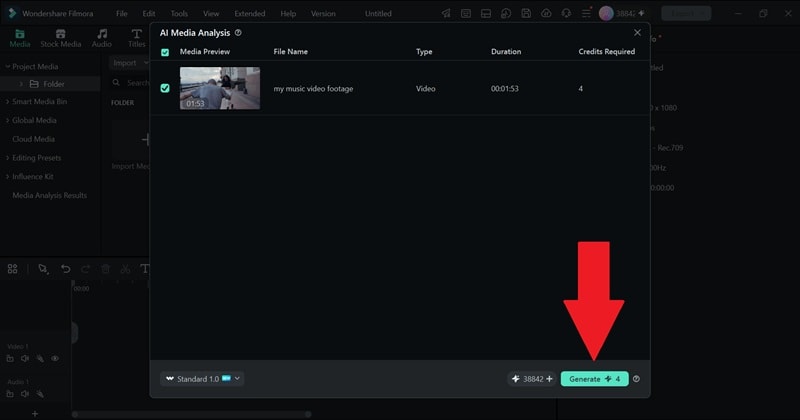
In the next window, click Generate to start the analysis.
- Step 3. Review the Analysis Results
Once the analysis is complete, check the results under Media Analysis Results.
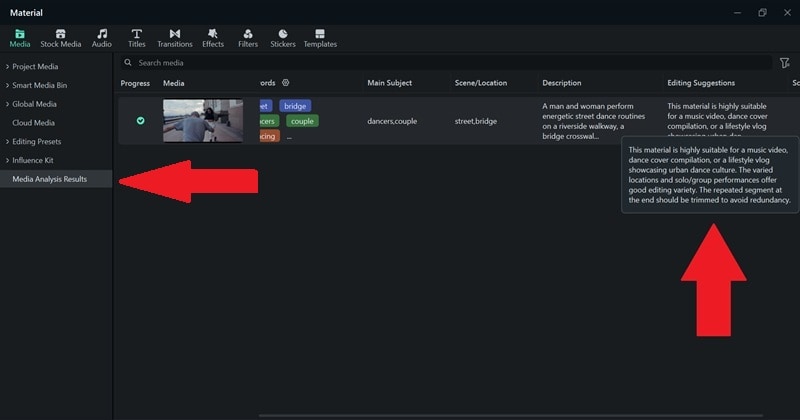
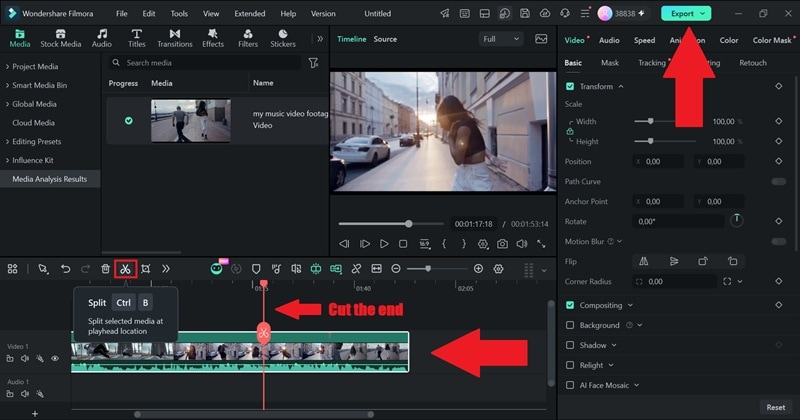
Drop your video onto the timeline and tweak your edit based on the AI’s feedback. In this case, it was suggested that the repeated segment at the end should be cut. When you're satisfied with the result, click Export to save the finished video to your device.
Conclusion
An AI music analyzer can save you from manually figuring out every detail of a track. Depending on the tool, you can get everything from BPM, genre, and key to chords, lyrics, mood, instruments, song sections, production feedback, and catalog tags. But finding the best AI song analyzer really depends on whether you're chasing chords and MIDI data, tagging a whole catalog, or just trying to figure out what to film next.
If your next step after analyzing the audio is putting together the actual video, it's worth pairing whichever analyzer you pick with Filmora. Its AI Media Analysis handles the visual side the same way these music analyzer tools handle the sound, such as tagging, scoring, and organizing your clips so you spend less time scrubbing through raw footage and more time actually editing.
