

 100% Security Verified | No Subscription Required | No Malware


 ChatGPT
 Perplexity
 Gemini
 Claude
 Grok
Grok
You start working on an AI project using Hugging Face, but quickly realize that writing effective prompts isn't as simple as it seems. Poorly designed inputs lead to weak outputs. That's why Hugging Face prompt engineering matters. This guide dives into proven best practices, advanced prompt tuning, and visual workflows to help you structure inputs properly and get consistent, high-quality responses from modern AI models.
In this article
Part 1. What Is Prompt Engineering in Hugging Face?
In the following section, you'll learn how prompt engineering works on Hugging Face, including what the functionality is and how to use it:
Prompt Engineering Explained
Prompt engineering, Hugging Face is the practice of crafting inputs in a way that helps AI systems understand exactly what you want. Instead of asking vague questions, it involves giving clear instructions, context, and constraints so the model can generate accurate and relevant responses. As AI models become more advanced, prompt engineering has become a key skill for developers, marketers, and creators.
Why Prompts Affect Output
To understand prompt engineering more clearly, it's important to see why even small changes in wording can completely change the AI's response. Let's break down the key reasons why Hugging Face prompt tuning directly affects output quality:
- Clarity of Instructions: Clear prompts reduce ambiguity and help the AI understand exactly what is required. Vague wording often leads to mixed or irrelevant outputs.
- Level of Detail: The more specific your prompt is, the more precise the response will be. Adding constraints like length, format, or audience improves quality.
- Context Provided: AI relies on context to generate meaningful responses. Without enough background, it fills gaps with assumptions, which may not match your intent.
- Tone and Style Direction: Specifying tone (formal, casual, persuasive) shapes how the output sounds, making it more suitable for your audience.

Prompting in Hugging Face
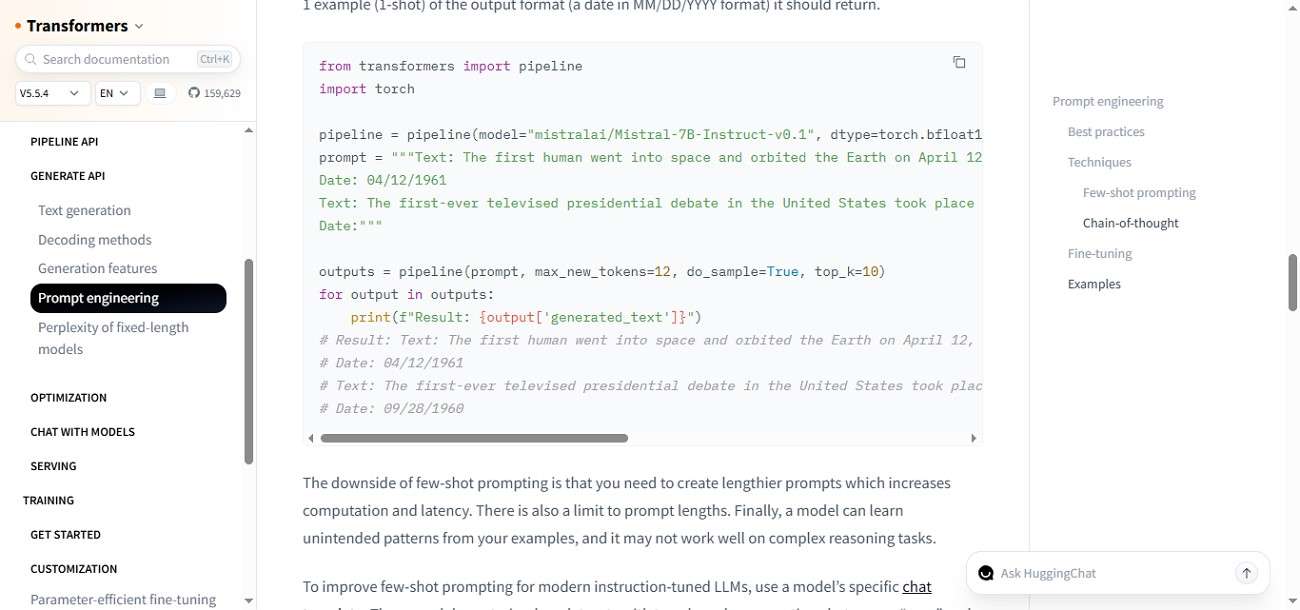
In Hugging Face, prompts can range from simple questions like "Explain machine learning" to more advanced formats that include context, tone, and output structure. The platform supports different models, so the same prompt may produce varied results depending on how it is written and which model is used.
Part 2. Core Prompt Engineering Methods
Let's explore the core Hugging Face prompt engineering methods that help you structure inputs, refine responses, and consistently get better AI results:
Zero-Shot Prompting
Zero-shot prompting asks the AI to perform a task without giving any examples. It relies entirely on the model's existing knowledge and understanding. This method is best for simple or direct tasks where patterns don't need to be demonstrated.
Example: "Create a realistic image of a futuristic space station orbiting Earth at night, with glowing solar panels."

Few-Shot Prompting
It provides a few examples before the actual task so the model can learn the pattern. It improves accuracy and consistency by guiding the AI with sample inputs and outputs in prompt engineering.
Example:
1. "A golden retriever sitting in a sunny park, realistic style, soft lighting."
2. "A black cat resting on a wooden table, cinematic lighting, highly detailed."
Now Generate:
"A fluffy white rabbit sitting in a garden filled with colorful flowers, realistic style, soft natural lighting, highly detailed."

Chain Of Thought Prompting
Chain-of-thought prompting encourages the AI to break down reasoning step by step before giving a final answer. This method improves performance in math, logic, and complex problem-solving tasks by making the thinking process explicit.
Example: "First, imagine a futuristic city at night with tall skyscrapers.
Then add glowing neon lights reflecting on wet streets.
Include flying cars moving between buildings in the sky.
Now define the mood as cinematic, mysterious, and high-tech.
Finally, combine everything into a detailed image description for generation."

Meta Prompting
This involves asking the AI to improve or refine the prompt itself for better results. It focuses on optimizing instructions before execution, ensuring clarity and effectiveness in communication with the model.
Example: "Create an image of a forest at night with glowing trees."
Meta Prompt Instruction: "Improve the following prompt to make it more detailed, structured, and suitable for high-quality image generation on AI models."

Self-Consistency Prompting
Self-consistency prompt engineering: Hugging Face runs multiple responses for the same question and selects the most common or consistent answer. This reduces randomness and improves reliability, especially in reasoning tasks where accuracy is critical.
Example: "A highly detailed medieval castle on a hilltop surrounded by forests, under a dramatic golden sunset sky. The scene features cinematic wide-angle composition, glowing sunlight rays, soft atmospheric lighting, and a majestic, realistic fantasy tone."

Role Prompting
This method assigns a specific identity or profession to the AI, shaping tone, expertise, and response style. It helps generate more context-aware and relevant answers tailored to a scenario or audience.
Example Prompt:
"You are a professional concept artist working for a fantasy game studio. Your task is to create a detailed image description."
"Generate a scene of a powerful ice queen standing on a frozen mountain throne. The environment includes snowstorms, glowing ice crystals, and a vast icy kingdom below. The style should be cinematic, highly detailed, and suitable for a fantasy game. Use dramatic lighting, cold blue tones, and ultra-realistic textures."

Part 3. Prompt Engineering vs Prompt Tuning
In the next section, we'll compare prompt engineering with prompt tuning to help you understand how each approach influences model performance:
Prompt Engineering
Prompt engineering is the process of writing and refining inputs to guide AI behavior without changing the model itself. It focuses on clarity, structure, and instructions. On Hugging Face prompt engineering, it is widely used for quick results and experimentation. It is flexible, fast, and requires no training or technical model modification.
Prompt Tuning
This is a more advanced method where soft prompts (learnable parameters) are added to improve model performance. Instead of changing the model weights, it adjusts input embeddings. It is more efficient than full training and helps achieve consistent outputs for specific tasks.
Fine-Tuning
Fine-tuning involves retraining a pre-trained model on a specific dataset to adapt it for a particular task. It modifies model weights and requires computational resources. This method provides the highest level of customization and accuracy but takes more time and data.
Key Differences
| Feature | Prompt Engineering | Prompt Tuning | Fine-Tuning |
|---|---|---|---|
| Model Changes | No | Minimal | Yes |
| Skill Level | Beginner | Intermediate | Advanced |
| Data Required | None/Minimal | Small Dataset | Large Dataset |
| Flexibility | High | Medium | Low |
Part 4. How Hugging Face Supports Prompt Workflows
Prompt workflows become much easier to manage and test using Hugging Face prompt tuning because it provides an integrated ecosystem for experimenting, refining, and deploying prompts. Instead of working in isolation, users can explore models, test prompts, and compare outputs in one place.
Model Hubs
One of the key advantages is the Model Hub, where users can try different models and instantly see how prompt changes affect results. This makes it easier to understand which models respond best to specific prompt styles.
Spaces
The Spaces feature also supports interactive workflows, allowing users to build and test prompt-based applications without complex setup. This is especially useful for rapid prototyping and real-time experimentation.
Datasets
Datasets help users study real prompt-response pairs, giving insight into how effective prompts are structured in real-world scenarios. Combined with documentation and community examples, Hugging Face creates a complete environment for learning and improving prompt workflows.
Part 5. How Filmora Fits Into Prompt Engineering
How can a video editing tool support prompt engineering? The connection becomes clear when you look at how Wondershare Filmora integrates AI-driven features into the creative process. In modern workflows, especially on platforms like Hugging Face, generating effective prompts often depends on translating visual ideas into structured text inputs.
Filmora helps bridge this gap by allowing users to convert images and creative concepts into detailed AI prompts using its Image-to-Prompt feature. This reduces manual effort and improves accuracy in prompt creation.
 secure download

Image-to-Prompt Tool
The Image-to-Prompt tool in Filmora helps users convert visuals into detailed text prompts automatically. It analyzes elements like objects, lighting, style, and composition to generate structured descriptions. This is especially useful for prompt engineering in tools like Hugging Face prompt tuning, where accurate prompts improve output quality. Instead of manually describing an image, users get ready-made prompts that can be refined and reused for AI generation tasks.
Faster Prompt Drafting
Filmora speeds up prompt creation by reducing the time needed to write detailed instructions from scratch. With AI assistance, users can quickly turn ideas or visuals into usable prompts. This makes experimentation easier and improves workflow efficiency. It is especially helpful for beginners who struggle with structuring prompts.
Part 6. A Practical Prompt Workflow With Filmora and Hugging Face
In the next section, you'll explore a practical step-by-step workflow that shows how both tools can be used side by side to design, refine, and execute effective prompts for AI projects:
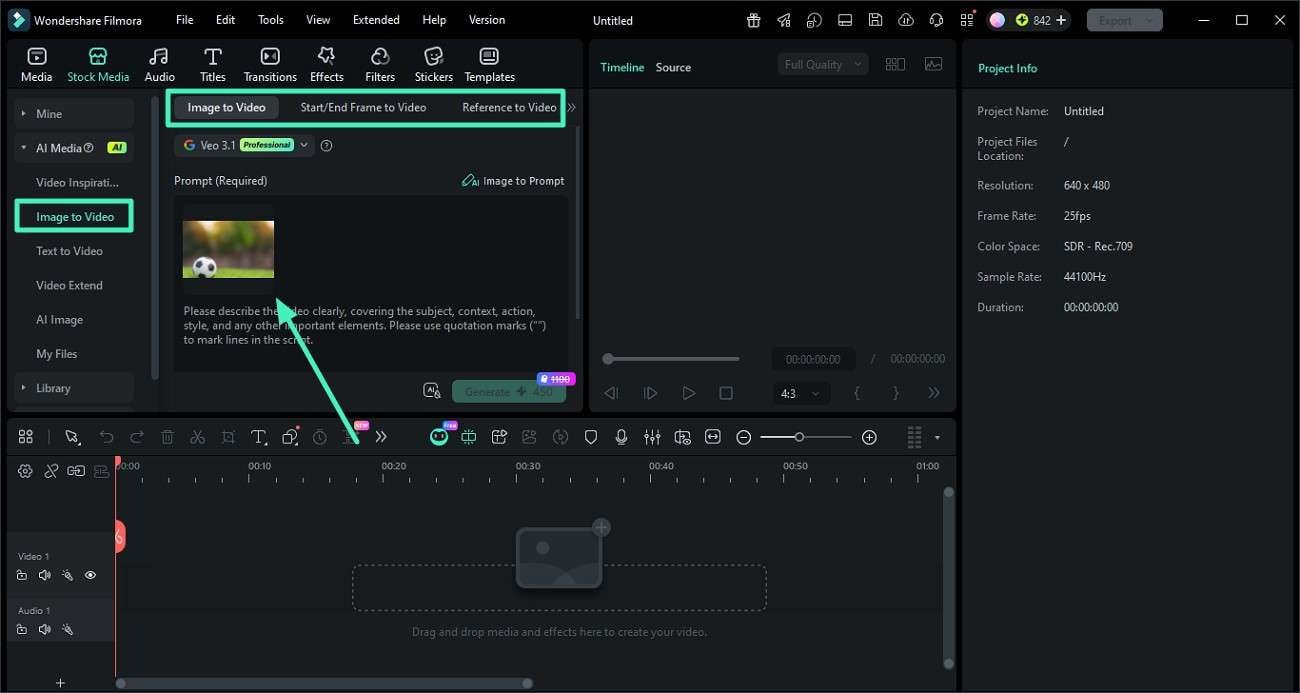
Step 1. Add Your Image to Filmora Workspace
Begin by launching a project in Filmora. Go to the left-side panel and select "Image to Video." Choose a mode such as Image to Video, Start/End Frame, or Reference to Video, then upload your selected image.
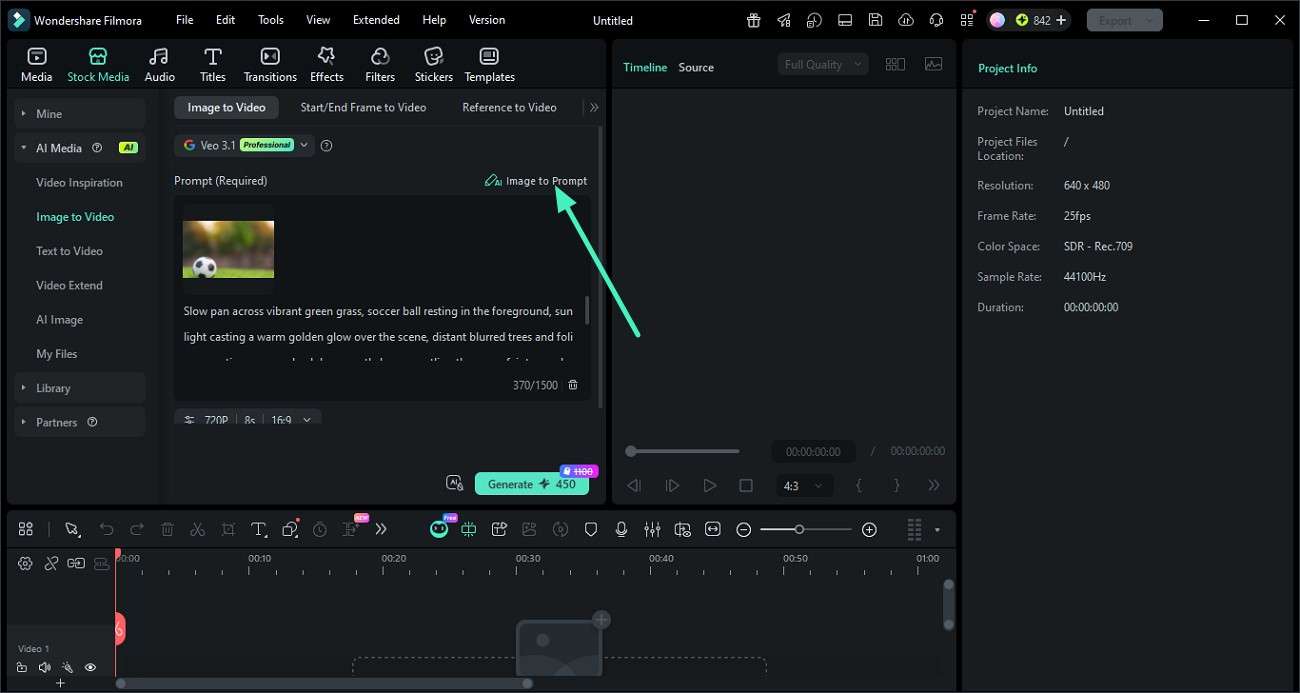
Step 2. Generate a Prompt from the Image
After uploading, click on the "Image to Prompt" option. The tool will automatically scan the image and produce a detailed AI prompt describing its key visual elements.
 secure download
 Step 3. Apply the Prompt in Hugging Face
Copy the generated prompt and paste it into a model or prompt interface on Hugging Face. Run the model to generate outputs based on the structured description.
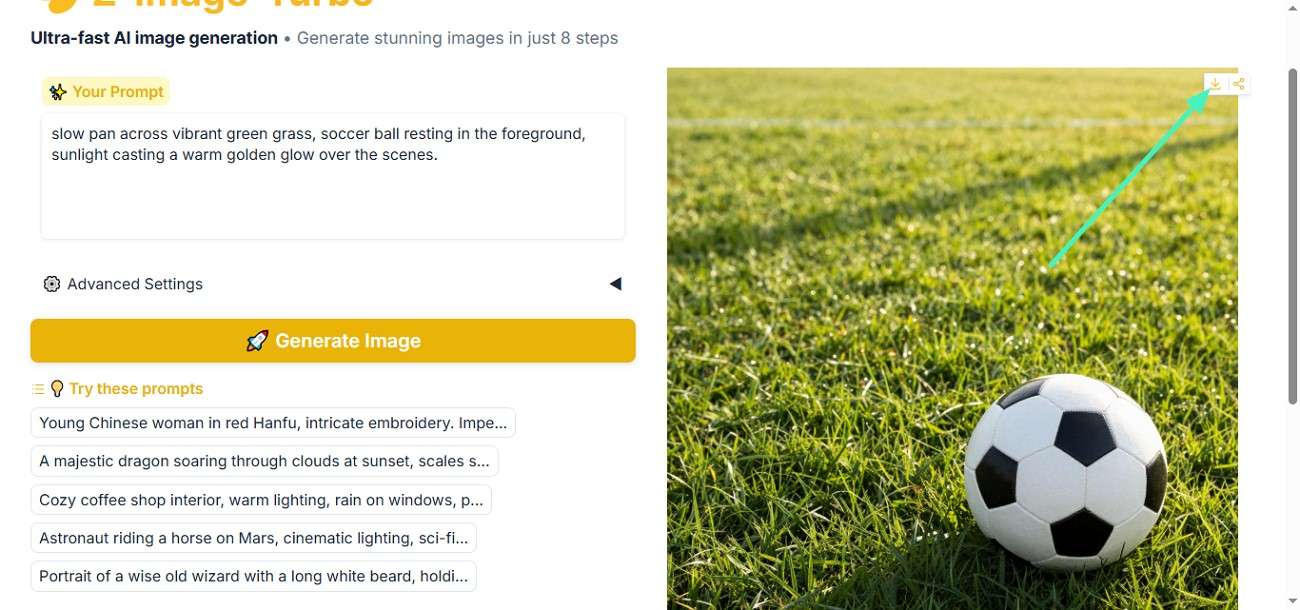
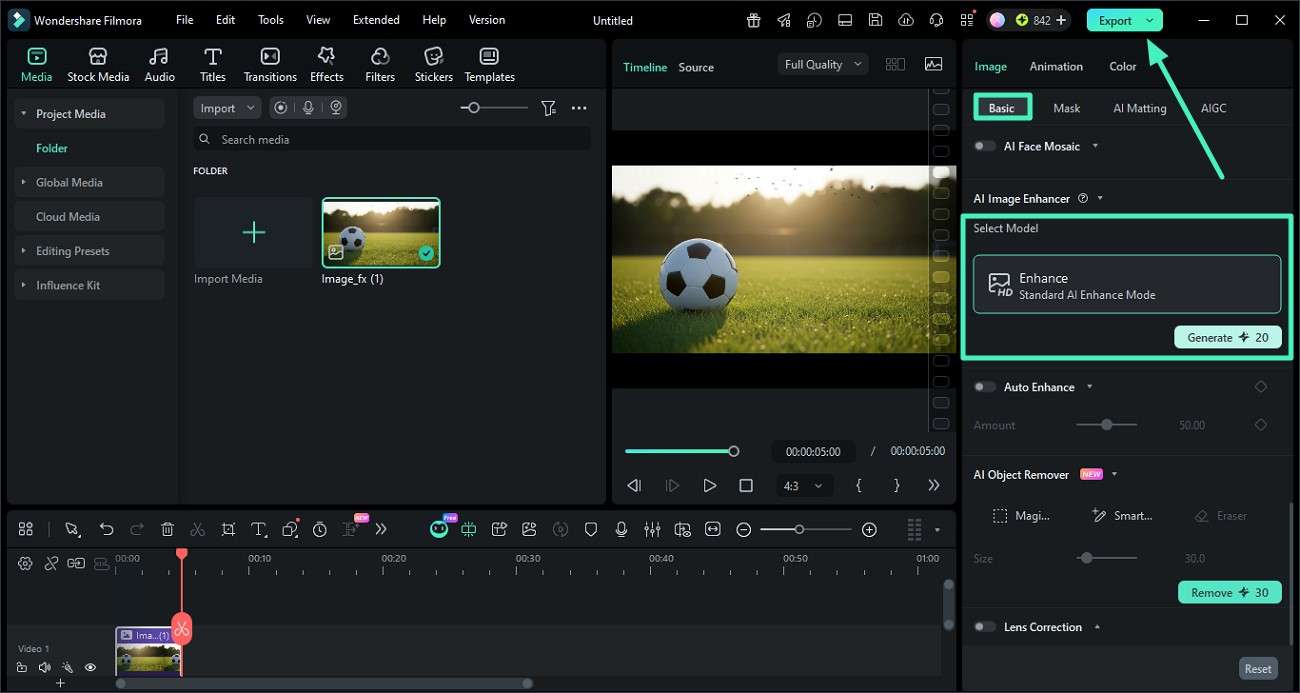
Step 4. Refine and Export the Final Result
Import the generated output back into Filmora and use the "AI Enhance" feature under Basic settings to improve quality. Once satisfied, click "Export" to save the final result in your preferred format.
Conclusion
To conclude, you learned everything about Hugging Face prompt engineering and why it is important. From core methods to workflows and best practices, you now understand how prompts shape AI results and improve accuracy. To make this process even easier, Filmora helps you generate structured prompts using images and refine ideas visually. It's a practical tool for simplifying prompt creation and enhancing creative AI workflows efficiently.
secure download Frequently Asked Questions
-
1. What is prompt engineering in Hugging Face?
Prompt engineering is the process of designing clear and structured inputs to guide AI models on Hugging Face. It helps improve output accuracy, relevance, and consistency across different tasks like text generation, summarization, and coding. -
2. How can I improve my Hugging Face prompts?
You can improve prompts by adding context, using structured formats, and defining output style or constraints. Tools like Filmora can also help generate detailed prompts from images for better accuracy. -
3. What is the difference between prompt engineering and prompt tuning?
Prompt engineering focuses on writing better instructions, while prompt tuning adjusts soft parameters to optimize model performance. Engineering is manual and flexible, whereas tuning is more technical and model-dependent. -
4. Can beginners learn prompt engineering easily?
Yes, beginners can start with simple prompts and gradually improve by adding structure and context. Using tools like Filmora makes it easier to understand and create effective prompts without technical complexity.
