

 100% Security Verified | No Subscription Required | No Malware


 ChatGPT
 Perplexity
 Gemini
 Claude
 Grok
Grok
Gold Yellow sits between sunshine yellow and soft amber, carrying warmth, optimism, and a touch of luxury. It feels friendly and energizing without being too harsh, which makes it perfect for drawing attention in thumbnails, lower thirds, and on-screen text while still looking polished and professional. It can read as cozy and nostalgic in muted tones, or bold and modern when paired with deep charcoals, navy, or neon accents.
For video creators, designers, and Filmora users, a well chosen Gold Yellow color palette can unify intros, B-roll, titles, and branding across every platform. Below you will find 15 Gold Yellow color palettes with HEX codes, plus ideas on how to use them for vlogs, cinematic edits, overlays, logos, and channel artwork.
In this article
Warm Cinematic Gold Yellow Color Palettes
Sunlit Studio Glow
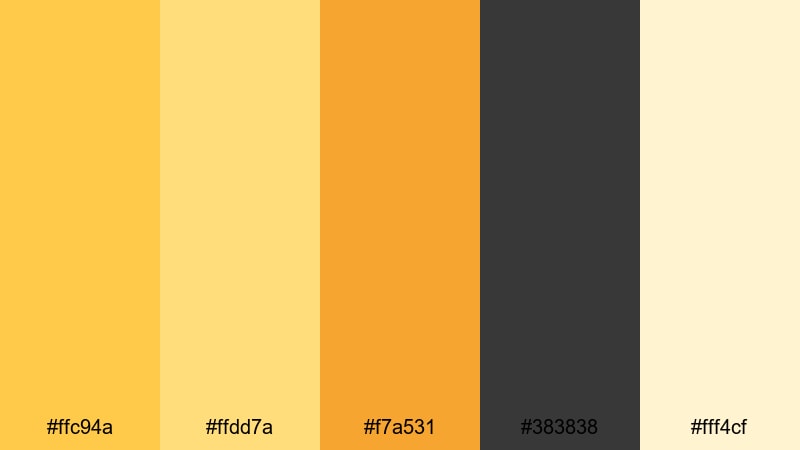
- HEX Codes: #ffc94a, #ffdd7a, #f7a531, #383838, #fff4cf
- Mood: Warm, cinematic, and inviting with a hint of drama.
- Use for: Ideal for cinematic intros, lifestyle vlogs, and documentary-style title cards.
Sunlit Studio Glow mixes a bright Gold Yellow highlight with softer amber and cream against deep charcoal. It feels like late afternoon light pouring into a studio, adding warmth and depth without losing clarity. The dark gray (#383838) anchors your frames, while #ffc94a and #f7a531 provide that glowing focal point for titles and icons.
Use this palette for storytelling edits, channel branding, and thumbnails where you want your subject to feel approachable yet cinematic. In Filmora, you can apply the Gold Yellow tones to your titles, lower thirds, and overlays, while using the charcoal for backgrounds, borders, and drop shadows so that text stays readable even on bright footage.
Pro Tip: Build a Cinematic Gold Yellow Look in Filmora
To keep a cohesive Sunlit Studio Glow look across your whole edit, decide which tones play which roles. Use the strongest Gold Yellow (#ffc94a) for key calls to action like Subscribe buttons or important chapter titles, and reserve the soft cream (#fff4cf) for backgrounds, frames, and subtle motion graphics.
Inside Filmora, you can store this palette in your custom color presets and reuse it for intros, end screens, and social cutdowns. Apply the yellows to your text and shape layers, then use the charcoal gray for overlay bars, sidebar labels, and cinematic letterbox strips so your warm visuals always feel polished and intentional.
AI Color Palette
If you have a reference image with this Gold Yellow mood (for example a sunny studio photo or the palette card itself), Filmora's AI Color Palette feature can transfer that look to your entire video. The tool analyzes the color distribution of your reference and matches contrast, warmth, and saturation across all selected clips.
Simply import your reference, pick it as the source, and apply the AI Color Palette to your timeline shots. This keeps skin tones, highlights, and shadows consistent so every scene in your vlog, intro sequence, or B-roll feels like it lives in the same golden studio environment.
 secure download

HSL, Color Wheels & Curves
Once you have a base Gold Yellow look, use Filmora's HSL sliders to isolate yellow and orange ranges and nudge them warmer or cooler. The color wheels help you tint highlights toward soft cream while keeping shadows in rich charcoal, giving your video that cinematic Gold Yellow contrast without crushing detail. For a deeper dive into grading, explore Filmora's color correction tools to fine tune every tone.
Curves are ideal for shaping the overall mood: lift the midtones slightly to keep faces bright and inviting, and gently pull down the shadows so your dark accents stay rich but not muddy. Small adjustments like these keep your Sunlit Studio Glow palette consistent across different lighting conditions and camera sources.
secure download1000+ Video Filters & 3D LUTs
If you want to stylize your Gold Yellow visuals more quickly, Filmora's video filters and 3D LUTs make it easy to add cinematic contrast, grain, or stylized warmth. You can stack a soft film LUT on top of your Sunlit Studio Glow palette, then lower the opacity so your core brand yellows and creams remain recognizable.
Browse the filter library for warm cinematic looks, retro film, or lifestyle presets, then fine tune intensity until your yellows still feel rich but not oversaturated. This workflow is perfect for creators who want a signature Gold Yellow style that is fast to apply on every video, short, or thumbnail background.
secure downloadGolden Hour Lens Flare
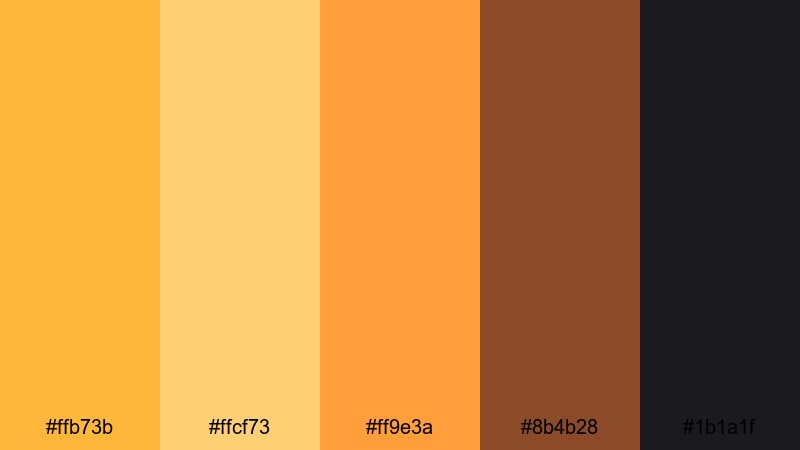
- HEX Codes: #ffb73b, #ffcf73, #ff9e3a, #8b4b28, #1b1a1f
- Mood: Moody sunset warmth with cinematic contrast.
- Use for: Perfect for travel vlogs, cinematic b roll sequences, and atmospheric title frames.
Golden Hour Lens Flare captures the look of sun hitting the lens right before sunset. Radiant Gold Yellow tones sit alongside deep browns and near black, creating a dramatic but still hopeful feeling. It works especially well when your footage already includes natural sunlight, reflections, or silhouettes.
Use the lighter yellows for accent text, logo marks, and subtle flares, while #8b4b28 and #1b1a1f make strong backgrounds for titles, end cards, and lower thirds. In thumbnails, placing a bright yellow gradient against a dark corner instantly draws attention to your subject or headline.
Amber Spotlight Stage
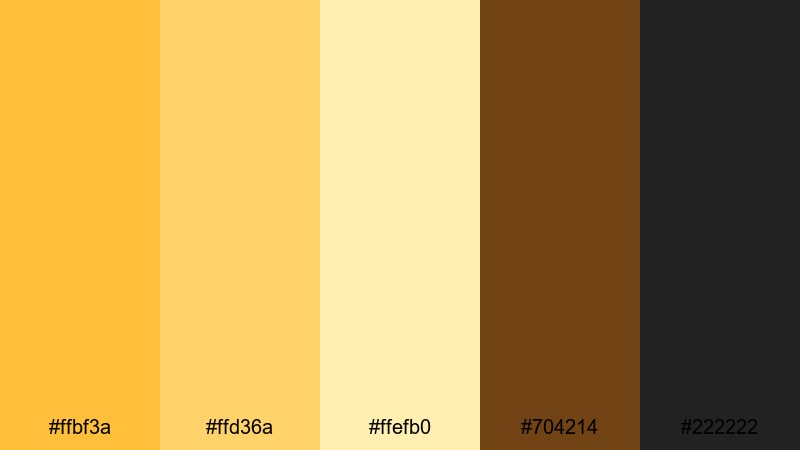
- HEX Codes: #ffbf3a, #ffd36a, #ffefb0, #704214, #222222
- Mood: Theatrical, focused, and professional.
- Use for: Use for event highlight reels, stage performance edits, and bold lower thirds.
Amber Spotlight Stage mimics stage lights hitting performers in a dark venue. Bright Gold Yellow highlights sit on a base of rich brown and almost-black charcoal, delivering a strong sense of focus and professionalism. It feels like a live show captured in a cinematic trailer.
This palette suits performance videos, conference recaps, and any content where you want the viewer locked on your subject. Use #ffbf3a for headline text, #ffefb0 for secondary labels or subtitles, and the darker tones for bars, frames, and full-screen title backgrounds in Filmora.
Cinematic Desert Mirage
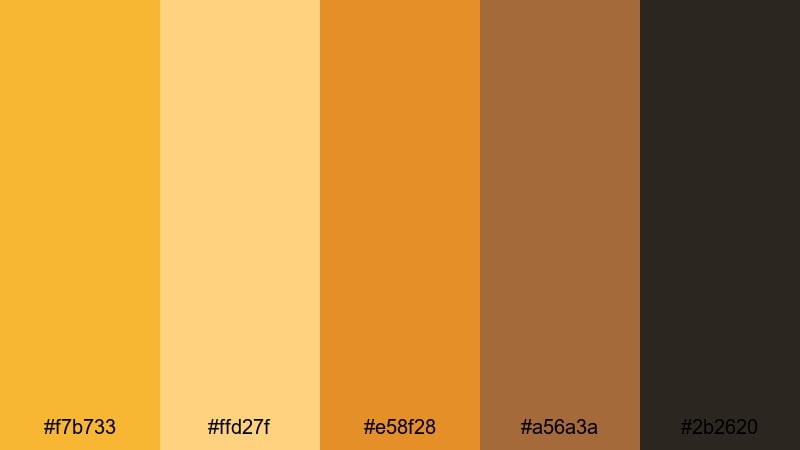
- HEX Codes: #f7b733, #ffd27f, #e58f28, #a56a3a, #2b2620
- Mood: Expansive, adventurous, and sun drenched.
- Use for: Best for travel films, outdoor brand stories, and landscape montage color grading references.
Cinematic Desert Mirage brings together sun drenched Gold Yellows with earthy browns and deep shadow tones. It feels wide open, dusty, and adventurous, like a long road trip or a hike through canyons at golden hour.
Use the lighter yellows (#f7b733, #ffd27f) to warm up landscapes or overlay gradients on top of wide shots, while the darker hues build contrast in titles, maps, and location labels. This palette is a strong choice for travel intros, outdoor brand bumpers, and cinematic reels graded in Filmora.
Soft Pastel Gold Yellow Color Palettes
Lemon Chiffon Daydream

- HEX Codes: #ffe89a, #fff4c7, #ffd86a, #f7c8d9, #fafafa
- Mood: Soft, dreamy, and uplifting.
- Use for: Lovely for beauty channels, morning routines, and calm educational explainers.
Lemon Chiffon Daydream softens Gold Yellow into chiffon light, balanced with blush pink and off white. The overall feel is airy and gentle, like sunlight through sheer curtains. It keeps your visuals bright but never blinding, ideal when you want your content to feel kind and soothing.
Use #ffe89a and #ffd86a for headings and icons, #f7c8d9 for accent shapes or progress bars, and #fafafa or #fff4c7 for backgrounds behind text. This palette works especially well for intro cards, how-to slides, and chapter markers in Filmora that support friendly voiceovers or ASMR-style content.
Honey Milk Aesthetic
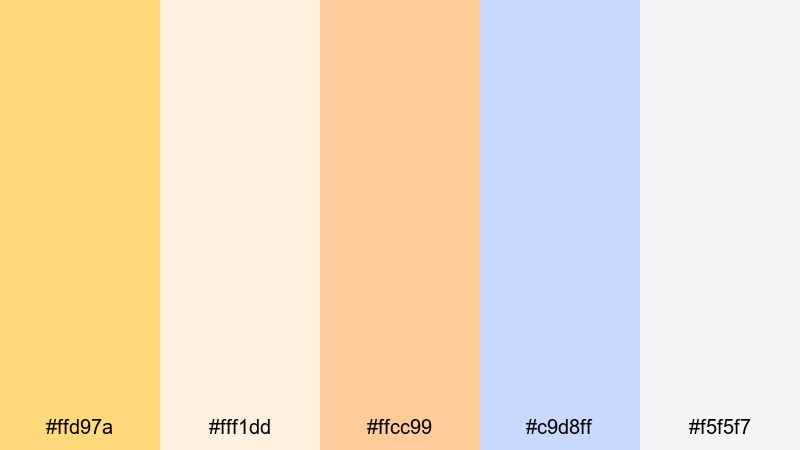
- HEX Codes: #ffd97a, #fff1dd, #ffcc99, #c9d8ff, #f5f5f7
- Mood: Comforting, minimalist, and aesthetic friendly.
- Use for: Great for desk setup videos, minimal lifestyle content, and clean UI elements in overlays.
Honey Milk Aesthetic feels like a cozy latte on a tidy desk. Creamy Gold Yellow pairs with soft peach and powder blue, creating a minimal and welcoming palette that does not overpower your footage. It supports neutral home or workspace visuals very well.
Use #ffd97a to highlight key text or subscribe prompts, #fff1dd for cards and background blocks, and #c9d8ff as a subtle contrasting accent in icons, checklists, or timers. In Filmora overlays and lower thirds, this palette helps maintain a clean aesthetic while still giving your brand a recognizable warm character.
Soft Marigold Morning

- HEX Codes: #ffd15c, #ffe9a9, #ffe2c2, #c6e3ff, #ffffff
- Mood: Fresh, optimistic, and gentle.
- Use for: Use for morning routine intros, productivity reels, and channel banners that need a bright but soft mood.
Soft Marigold Morning blends a light marigold Gold Yellow with pastel peach and sky blue. The combination suggests early morning light, slow coffee, and fresh starts. It is bright enough to feel motivating but muted enough not to distract from on-screen text or demonstrations.
Apply #ffd15c to key words in your titles and thumbnails, reserve #ffe9a9 and #ffe2c2 for panels, shape layers, and highlight boxes, and use #c6e3ff for gentle contrast in charts or overlayed buttons. This is a great palette for productivity content, planners, or habit trackers edited with Filmora text templates.
Buttercup Cloud Skies
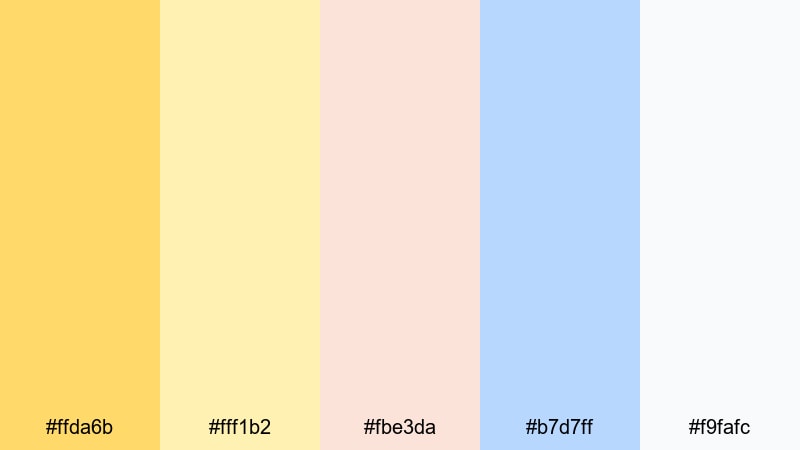
- HEX Codes: #ffda6b, #fff1b2, #fbe3da, #b7d7ff, #f9fafc
- Mood: Airy, whimsical, and playful.
- Use for: Nice for kids content, lighthearted shorts, and approachable app UI mockups in videos.
Buttercup Cloud Skies floats buttercup Gold Yellow with pastel coral and light sky blue. It feels whimsical and soft, like doodles in a kids notebook or a friendly mobile game interface. The light tones keep the palette playful without tipping into overly childish neon.
Use #ffda6b for main icons and headline text, #fbe3da and #b7d7ff for decorative shapes around your footage, and #f9fafc or #fff1b2 as clean backgrounds. In Filmora, this palette is perfect for adding friendly overlays to kids content, tutorials, or app UI walk-throughs while keeping everything readable.
Bold & Modern Gold Yellow Color Palettes
Digital Neon Gold

- HEX Codes: #ffbe0b, #ff006e, #3a86ff, #000814, #ffd500
- Mood: High energy, modern, and edgy.
- Use for: Perfect for gaming intros, tech channels, and hype reels needing strong impact in thumbnails.
Digital Neon Gold is pure energy: electric Gold Yellow collides with neon magenta, vivid blue, and deep navy. This palette screams modern and digital, ideal for content that needs to stand out on crowded feeds like gaming highlights, esports reels, or tech reviews.
Use #ffbe0b and #ffd500 for bold text and glow effects, #ff006e and #3a86ff as secondary accents in glitch graphics, and #000814 for full contrast backdrops. In Filmora, combine this palette with motion graphics, speed ramps, and strobe style transitions to amplify hype and click-through in your thumbnails.
Urban Streetlight Contrast

- HEX Codes: #f5b400, #ffdd5e, #111827, #4b5563, #f9fafb
- Mood: Urban, confident, and contemporary.
- Use for: Use for street style lookbooks, fashion edits, and bold title screens.
Urban Streetlight Contrast frames Gold Yellow against deep navy and cool gray, echoing city streetlights at night. The result is urban and confident, but still clean enough for professional branding and fashion content.
Use #f5b400 for striking overlay titles and logo accents, #ffdd5e for softer highlights, and #111827 or #4b5563 for solid color backgrounds behind text and product shots. This palette is a strong choice for lookbooks, sneaker edits, cityscape B-roll, and any channel wanting a sleek but bold Gold Yellow identity.
Minimal Gold Accent

- HEX Codes: #f2b21b, #facc6b, #111111, #4a4a4a, #f4f4f4
- Mood: Minimal, premium, and sharp.
- Use for: Ideal for logo reveals, tech product promos, and sleek social ads.
Minimal Gold Accent treats Gold Yellow as a precise highlight against black, gray, and off white. It feels premium and sharp, perfect for tech brands, SaaS products, and luxury inspired content that still needs to feel modern and uncluttered.
Use #f2b21b sparingly for logos, key icons, or CTA buttons, while #111111 and #4a4a4a form the backbone of your overlays and full screen titles. #f4f4f4 works well as a neutral background for app demos and screen recordings. In Filmora, this palette keeps your interface overlays clean and your brand elements instantly recognizable.
Creator Brand Pop
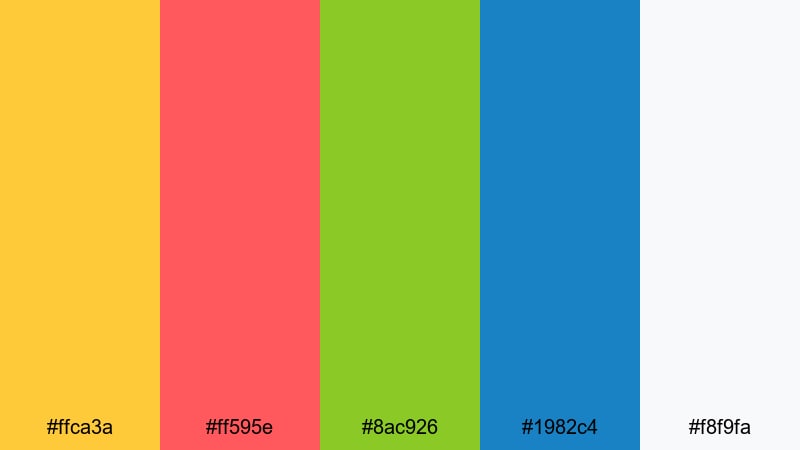
- HEX Codes: #ffca3a, #ff595e, #8ac926, #1982c4, #f8f9fa
- Mood: Playful, confident, and creator focused.
- Use for: Great for variety channels, educational creators, and energetic intro slates.
Creator Brand Pop uses a punchy Gold Yellow as the anchor for a lineup of bright accent colors. It is playful and bold, making it ideal for variety channels, education content, or any creator who switches topics but still wants a unified, fun brand look.
Let #ffca3a be your main brand color for titles and badges, then rotate #ff595e, #8ac926, and #1982c4 for charts, bullet markers, or content category tags. #f8f9fa is a great base for cards and background panels. In Filmora, this palette makes it easy to color code sections of your video while keeping your Gold Yellow core consistent everywhere.
Vintage & Earthy Gold Yellow Color Palettes
Retro Mustard Reel
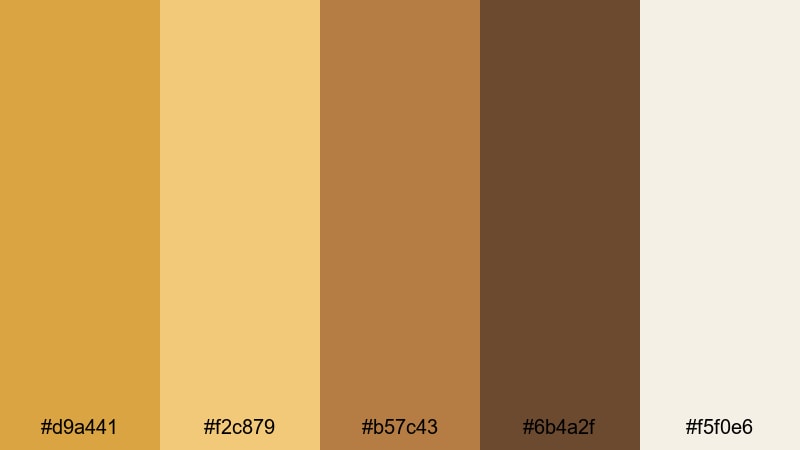
- HEX Codes: #d9a441, #f2c879, #b57c43, #6b4a2f, #f5f0e6
- Mood: Nostalgic, cozy, and film inspired.
- Use for: Use for retro edits, analog inspired reels, and nostalgic storytime videos.
Retro Mustard Reel shifts Gold Yellow toward muted mustard, supported by warm browns and a soft cream. It evokes old film stock, print photos, and cozy living rooms. This palette is perfect when you want your content to feel like a memory.
Use #d9a441 and #f2c879 for titles and shapes that echo vintage typography, while #b57c43 and #6b4a2f create frames, borders, and subtle grain overlays. #f5f0e6 works as a gentle background for story captions and journaling style text in Filmora.
Harvest Storyboard
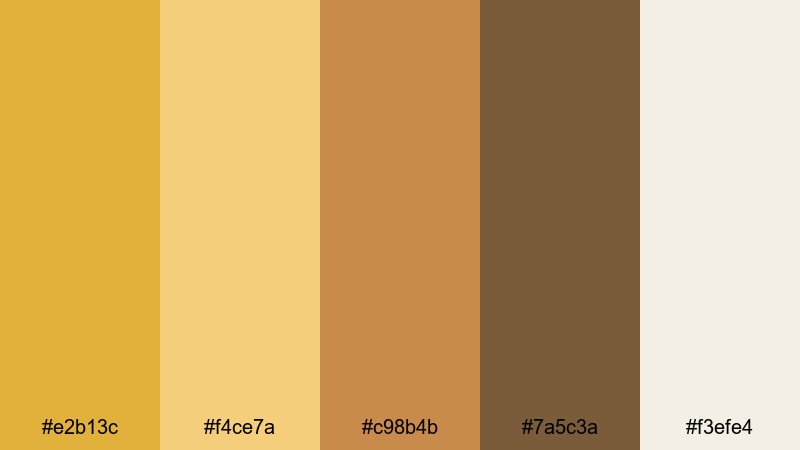
- HEX Codes: #e2b13c, #f4ce7a, #c98b4b, #7a5c3a, #f3efe4
- Mood: Grounded, rustic, and storytelling focused.
- Use for: Perfect for food channels, homestead vlogs, and cozy documentary pieces.
Harvest Storyboard wraps Gold Yellow in caramel and wood tones, giving your visuals an earthy, honest atmosphere. It feels like farm tables, recipe cards, and handwritten notes, which makes it ideal for food, lifestyle, and homestead channels.
Use #e2b13c and #f4ce7a for recipe titles, chapter headers, and callouts, while #c98b4b and #7a5c3a ground your frames, borders, and info boxes. #f3efe4 is a perfect backdrop for ingredient lists and step-by-step overlays in Filmora, keeping everything readable while reinforcing the warm, rustic mood.
Old Film Festival

- HEX Codes: #d8a93e, #f0d188, #9b7b52, #5a4a3a, #e8e1d4
- Mood: Classic, artistic, and slightly faded.
- Use for: Great for indie film titles, festival bumpers, and archival style edits.
Old Film Festival uses slightly desaturated Gold Yellow alongside taupe browns and soft cream to echo classic film posters and archival prints. It feels artistic and mature, making it a strong fit for film essays, festival reels, or portfolio pieces.
Use #d8a93e for key titles and laurels, #f0d188 and #e8e1d4 for full-screen title cards, and #9b7b52 or #5a4a3a for text, borders, and subtle grain overlays. In Filmora, this palette pairs nicely with 4:3 crops, film burn overlays, and gentle vignette effects to complete the vintage cinema vibe.
Tips for Creating Gold Yellow Color Palettes
Gold Yellow is versatile enough to feel sunny, luxurious, or vintage depending on what you pair it with. These tips will help you build palettes that look great in video, thumbnails, and branding while staying consistent across Filmora projects.
- Decide the role of Gold Yellow: Is it your main background color, a highlight for calls to action, or a subtle accent? Use it consistently so your audience instantly recognizes it as part of your brand.
- Balance Gold Yellow with neutrals like charcoal, navy, or off white to keep overlays and text readable, especially on small screens and busy thumbnails.
- Limit strong accent colors to one or two per palette. Too many saturated colors alongside Gold Yellow can make your titles and icons feel noisy instead of focused.
- Check contrast for text: pair bright Gold Yellow with dark backgrounds, or use darker yellows on light backgrounds, so captions and lower thirds remain easy to read.
- Match your palette to your footage: warmer Gold Yellows suit sunset, indoor tungsten, and vintage content, while slightly cooler or pastel yellows feel better with daylight and tech visuals.
- Use Filmora's color tools to test variants: duplicate a clip on the timeline and experiment with different Gold Yellow tints, saturation, and brightness until you find a signature look.
- Keep platform previews in mind: export test frames of your Gold Yellow titles and thumbnails, then view them on mobile, tablet, and desktop to make sure the palette still pops.
- Create a simple brand guide: save your HEX codes for Gold Yellow and its supporting colors, and reuse them in overlays, intros, channel banners, and social posts for a cohesive identity.
Gold Yellow palettes can make your videos feel warm, optimistic, cinematic, or nostalgic depending on how you combine them with darks, pastels, or earthy tones. Whether you lean toward neon Gold Yellow for gaming, soft buttercups for lifestyle content, or mustard hues for vintage stories, a clear palette gives your channel a strong and memorable visual identity.
Use these 15 palettes as ready-made recipes: plug the HEX codes into Filmora for titles, backgrounds, and graphics, then fine tune with AI Color Palette, HSL, and filters until the look feels uniquely yours. Testing a few variations on intros, thumbnails, and end screens will quickly show you which version your audience responds to best.
Once you lock in your favorite Gold Yellow combination, save it as a repeatable style in Filmora so every new video, Reel, or Short feels like part of the same golden brand story.
secure download