

 100% Security Verified | No Subscription Required | No Malware


 ChatGPT
 Perplexity
 Gemini
 Claude
 Grok
Grok
Orange and cyan sit opposite each other on the color wheel, so they naturally create strong, cinematic contrast. Orange feels warm, human, and energetic, while cyan feels cool, modern, and techy. When you combine them, you get visuals that are bold and eye-catching but still balanced, which is why this pairing dominates movie posters, thumbnails, and cinematic color grades.
For video creators, designers, and brand builders, an orange cyan color palette works beautifully in intros, lower thirds, channel branding, and social thumbnails. Below are ready-made orange cyan color palettes with HEX codes you can plug straight into your designs or color grading in Filmora, so your vlogs, trailers, tutorials, and reels look cohesive from frame to frame.
In this article
Bold & Cinematic Orange Cyan Color Palettes
Tropical Lens Flare
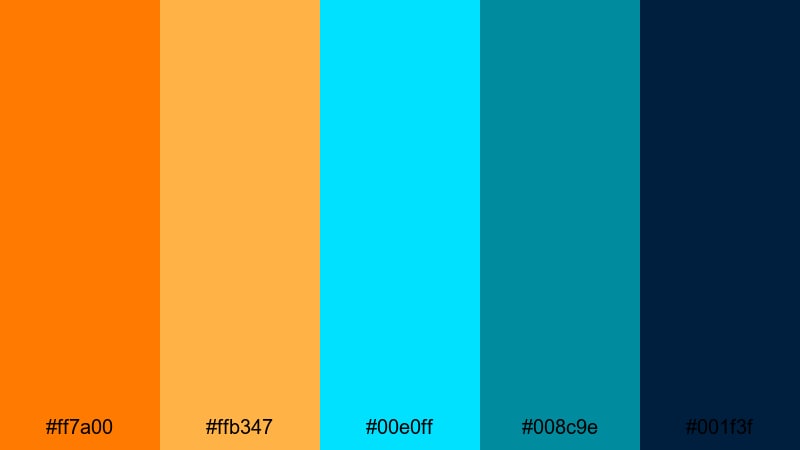
- HEX Codes: #ff7a00, #ffb347, #00e0ff, #008c9e, #001f3f
- Mood: Energetic, sun-drenched, and cinematic with strong contrast.
- Use for: Great for travel vlogs, cinematic title cards, and bold YouTube thumbnails.
This palette feels like golden hour on a tropical beach shot through a cinema lens. The glowing oranges (#ff7a00, #ffb347) mimic flares from the sun, while the electric cyan tones (#00e0ff, #008c9e) cool everything down and keep the image feeling modern. The deep navy (#001f3f) gives you a solid base for text, logos, and UI elements that need to stay readable.
Use this combination for travel intros, fullscreen title cards, or subscriber bumpers where you want instant blockbuster energy. It also works perfectly for channel art, logo reveals, and shorts thumbnails that need to stand out in a crowded feed without looking messy.
Pro Tip: Build a Cinematic Orange Cyan Look in Filmora
To keep this tropical orange cyan mood consistent across your edit, start by picking one or two hero oranges and cyans from the palette for your titles, overlays, and key graphics. In Filmora, you can then match the overall footage to those tones with color grading so the sky, skin tones, and water all sit comfortably within the same warm-vs-cool contrast.
Use the same HEX codes for your text, shapes, and lower thirds inside Filmora so your whole project feels like one cohesive visual language. This way, your intro, b-roll, talking head shots, and even short vertical exports all share the same cinematic orange cyan identity.
AI Color Palette
If you have a reference frame or a still image using this Tropical Lens Flare palette, you can turn it into a style for the rest of your project. Filmora's AI Color Palette feature analyzes your reference and automatically transfers its orange cyan balance onto other clips.
Import your hero shot, apply AI Color Palette to a sequence of b-roll and A-roll, and you will get a consistent teal-and-orange style without manually tweaking every clip. This saves time while keeping your brand look locked in across long edits, social cutdowns, and shorts.
 secure download

HSL, Color Wheels & Curves
Once your base orange cyan style is in place, use Filmora's HSL, color wheels, and curves tools to refine it. Slightly deepen blues in the shadows, warm up midtones for skin, and push highlights toward soft orange to get that true cinema-grade teal-and-orange look. For more ideas, you can follow the workflow in Filmora's color correction guide and adapt it to these HEX codes.
In curves, pull down the blue channel shadows and lift the red channel midtones to emphasize contrast without crushing detail. Fine-tune saturation in HSL so the oranges and cyans are vivid, but text and UI elements still stay clean and readable.
secure download1000+ Video Filters & 3D LUTs
To speed up your grading, combine this palette with Filmora's built-in looks. Filmora's video filters and 3D LUTs make it easy to get a cinematic orange cyan style in one click, then you can tweak tones with HSL or curves to match these specific HEX codes.
Apply a teal-and-orange LUT to your clips, then adjust intensity so your oranges stay punchy without clipping and your cyan shadows do not overpower skin. This approach works well for long-form travel vlogs, cinematic reels, and any content where you want a consistent, high-end finish.
secure downloadNeon Sunset Surf

- HEX Codes: #ff6a3d, #ff9f1c, #00f5ff, #00bcd4, #02111b
- Mood: Neon, adventurous, and slightly futuristic.
- Use for: Best for extreme sports edits, nightlife reels, and high-energy channel intros.
Neon Sunset Surf blends fiery sunset oranges with glowing cyan and teal against a deep oceanic base. The result feels like surfing under LED lights at blue hour, bold enough to grab attention on any platform.
Use it for high-speed montages, sports highlights, or nightlife b-roll where you want motion, adrenaline, and a hint of cyberpunk. The dark navy (#02111b) is a great background for white or light orange text on YouTube thumbnails, animated titles, and stream overlays.
Blockbuster Teal And Tangerine
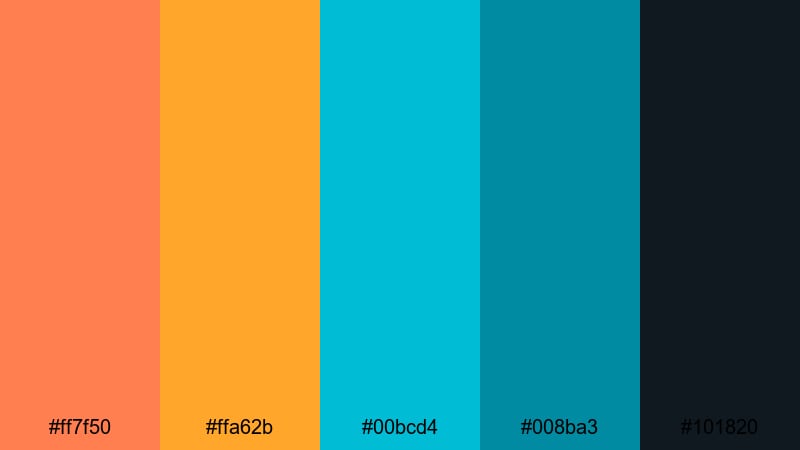
- HEX Codes: #ff7f50, #ffa62b, #00bcd4, #008ba3, #101820
- Mood: Dramatic, polished, and cinematic with classic teal-and-orange vibes.
- Use for: Perfect for short films, trailers, and dramatic storytelling edits.
This is the classic Hollywood teal-and-orange look, refined for modern screens. Warm tangerine (#ff7f50, #ffa62b) plays beautifully against cool cyan and teal (#00bcd4, #008ba3), anchored by deep charcoal (#101820) for text and UI.
Use it whenever you want your footage to instantly feel like a movie: narrative shorts, dramatic travel stories, character-driven documentaries, or cinematic YouTube intros. It is also strong for brand kits where you want a serious but stylish identity.
Action Title Splash
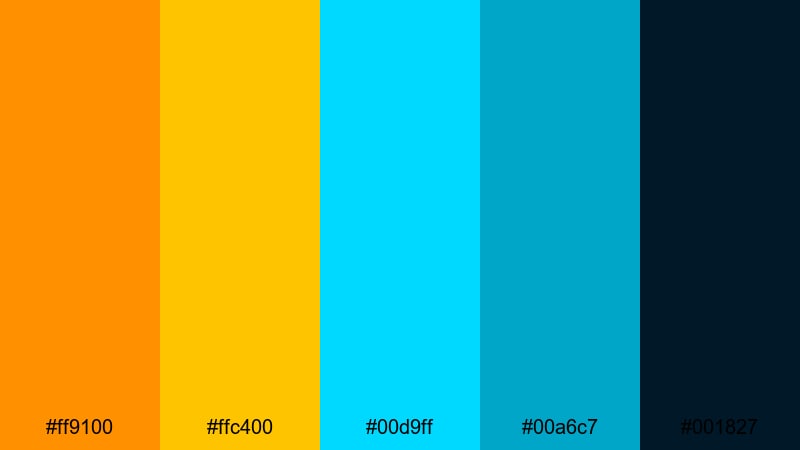
- HEX Codes: #ff9100, #ffc400, #00d9ff, #00a6c7, #001827
- Mood: Explosive, bold, and attention-grabbing.
- Use for: Use for kinetic typography, gaming highlights, and punchy promo teasers.
Action Title Splash is all about impact. The high-saturation oranges (#ff9100, #ffc400) and bright cyans (#00d9ff, #00a6c7) jump off the deep midnight blue (#001827), making text and shapes feel like they are exploding out of the frame.
Use this palette for motion graphics, animated titles, or countdown screens where you need instant visibility and excitement. It is perfect for gaming intros, esports highlight reels, or bold product announcements where every frame should shout for attention.
Soft & Pastel Orange Cyan Color Palettes
Cotton Candy Reef

- HEX Codes: #ffd1a4, #ffe6c7, #b3f4ff, #80deea, #264653
- Mood: Soft, dreamy, and gently coastal.
- Use for: Lovely for lifestyle vlogs, calm travel diaries, and soft branding overlays.
Cotton Candy Reef mixes creamy peach tones with airy cyan pastels, creating a gentle seaside feeling. The muted deep blue (#264653) keeps everything grounded and gives you a reliable color for titles and logo marks.
This palette is ideal for cozy lifestyle vlogs, slow travel diaries, wellness content, or brand stories focused on calm and comfort. Use the lighter oranges as background blocks in thumbnails and the cyan tones for subtle gradients in lower thirds and end screens.
Mellow Beach Morning
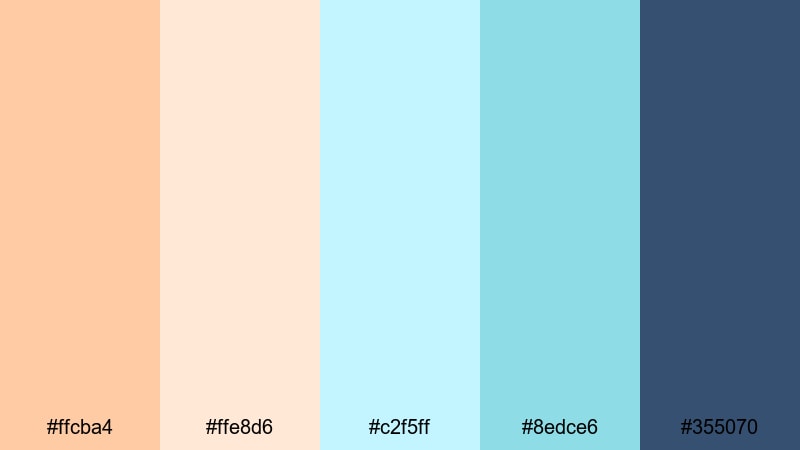
- HEX Codes: #ffcba4, #ffe8d6, #c2f5ff, #8edce6, #355070
- Mood: Calm, soothing, and optimistic.
- Use for: Great for morning routines, wellness content, and minimalist lifestyle channels.
Mellow Beach Morning feels like an early walk by the shore. Soft orange sand tones (#ffcba4, #ffe8d6) blend into light cyan sky hues (#c2f5ff, #8edce6), with a cool slate accent (#355070) that works nicely for legible text.
Use it to brand morning routines, journaling prompts, productivity tips, or yoga videos. In Filmora, you can use these HEX codes for subtle overlays, transparent shapes behind text, and gentle gradients on end screens that invite viewers to subscribe.
Dreamy Coral Clouds
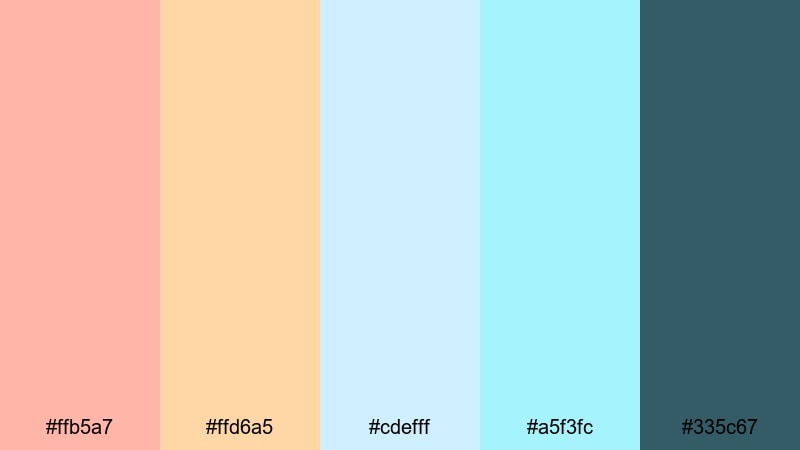
- HEX Codes: #ffb5a7, #ffd6a5, #cdefff, #a5f3fc, #335c67
- Mood: Romantic, whimsical, and airy.
- Use for: Use for aesthetic reels, soft product showcases, and dreamy montage edits.
Dreamy Coral Clouds pairs blush-coral oranges with powdery cyan clouds, giving your visuals a romantic, floaty quality. The muted teal (#335c67) keeps the palette from feeling too sweet and provides contrast for text and UI lines.
Choose this palette for dreamy reels, mood boards, and montages, especially for beauty, stationery, or handmade products. It works well on Pinterest-style graphics, Instagram Stories, and YouTube covers where a soft but modern pastel aesthetic is key.
Pastel Popsicle Drift
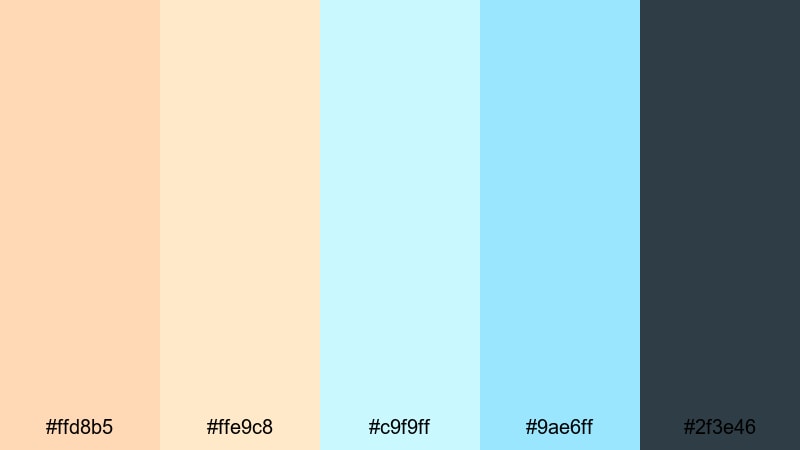
- HEX Codes: #ffd8b5, #ffe9c8, #c9f9ff, #9ae6ff, #2f3e46
- Mood: Playful, light-hearted, and nostalgic.
- Use for: Perfect for DIY tutorials, kid-friendly content, and cheerful social posts.
Pastel Popsicle Drift feels like summer treats and lazy afternoons. Frosty oranges and icy cyan tones float over a cool charcoal green (#2f3e46), so you get sweetness with enough depth for readable text.
Use this palette for DIY craft tutorials, family vlogs, kids content, or educational shorts that should feel friendly and approachable. In thumbnails, place bright objects or characters in pastel blocks while using the dark accent color for bold, clean titles.
Modern & Minimal Orange Cyan Color Palettes
Clean Studio Glow

- HEX Codes: #ff8a3d, #ffb88c, #00d4ff, #009fb7, #f4f4f9
- Mood: Fresh, professional, and minimal.
- Use for: Ideal for channel branding, product explainers, and clean UI-inspired graphics.
Clean Studio Glow combines soft glowing orange accents with crisp cyan on a bright neutral base (#f4f4f9). It feels like a modern tech studio or product photo set: clean, bright, and trustworthy.
Use it for explainer videos, app demos, and SaaS content where you want minimal design with just enough personality. In Filmora, set your background plates to the light neutral and keep orange and cyan for call-to-action buttons, icons, and key phrases in lower thirds.
Tech Startup Splash
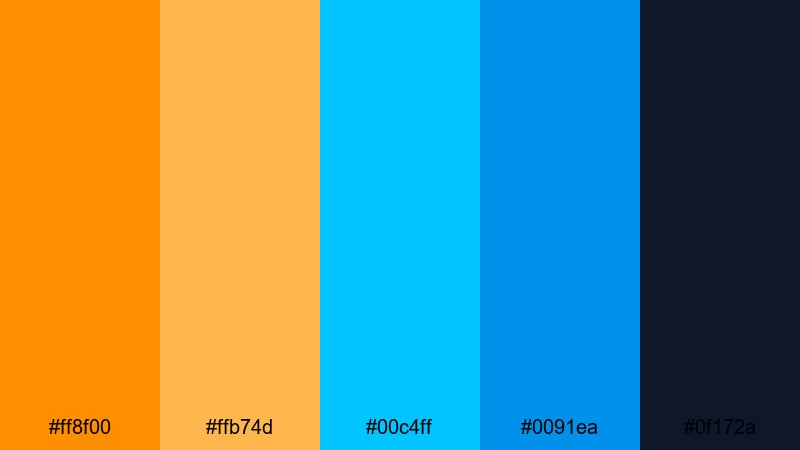
- HEX Codes: #ff8f00, #ffb74d, #00c4ff, #0091ea, #0f172a
- Mood: Innovative, bold, and confident.
- Use for: Great for app promos, SaaS explainers, and pitch videos needing a tech-forward look.
Tech Startup Splash is a confident mix of punchy orange highlights and clear cyan blues over a deep navy foundation (#0f172a). It instantly signals modern tech and innovation.
Use it on product launch videos, pitch decks turned into motion graphics, or social ads for digital tools. Let the dark navy handle backgrounds and overlays, keep cyan for data visuals and UI mockups, and save bright orange for CTAs and key stats in titles.
Urban Glass Reflection
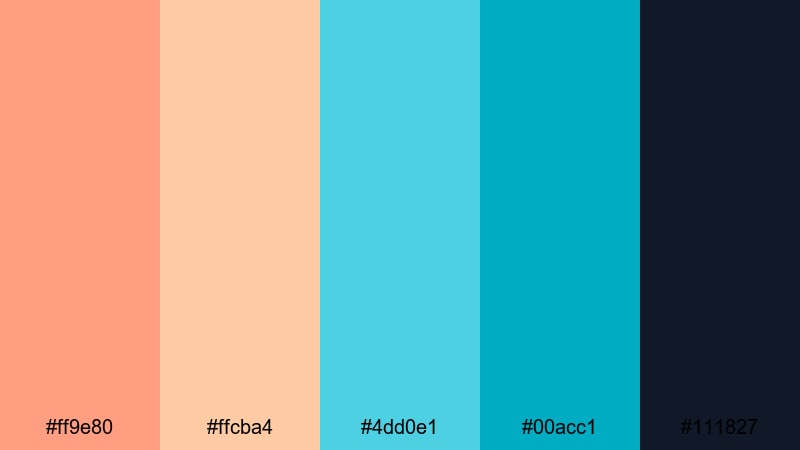
- HEX Codes: #ff9e80, #ffcba4, #4dd0e1, #00acc1, #111827
- Mood: Chic, contemporary, and slightly moody.
- Use for: Use for city vlogs, fashion lookbooks, and sleek lower thirds.
Urban Glass Reflection mixes muted salmon oranges with cool cyan glass tones, sitting on inky charcoal (#111827). It feels like city lights reflecting off modern architecture at dusk.
Use this palette for fashion lookbooks, city vlogs, office-tour videos, and portfolio reels. The darker base is perfect for lower thirds and text bars, while subtle cyan gradients can echo reflections on glass or water in your motion graphics.
Muted Interface Stream
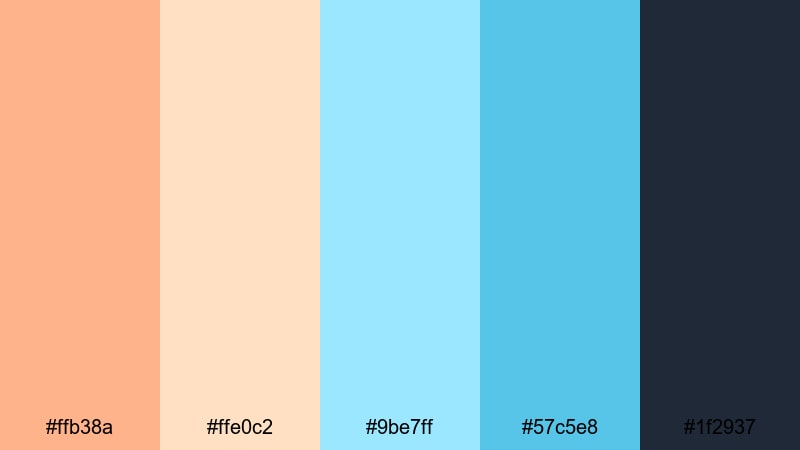
- HEX Codes: #ffb38a, #ffe0c2, #9be7ff, #57c5e8, #1f2937
- Mood: Balanced, understated, and UI-friendly.
- Use for: Perfect for overlays, motion graphics, and interface-style lower thirds.
Muted Interface Stream offers soft orange highlights and gentle cyan accents on a dark neutral base (#1f2937). It is designed to be readable and low-strain, ideal for long-form content.
Use it for tutorial overlays, interface mockups, and minimal title designs where text clarity is crucial. In dashboards, timeline graphics, or step-by-step explainer animations, this palette gives you structure and hierarchy without overwhelming the viewer.
Retro & Neon Orange Cyan Color Palettes
Synthwave Boardwalk
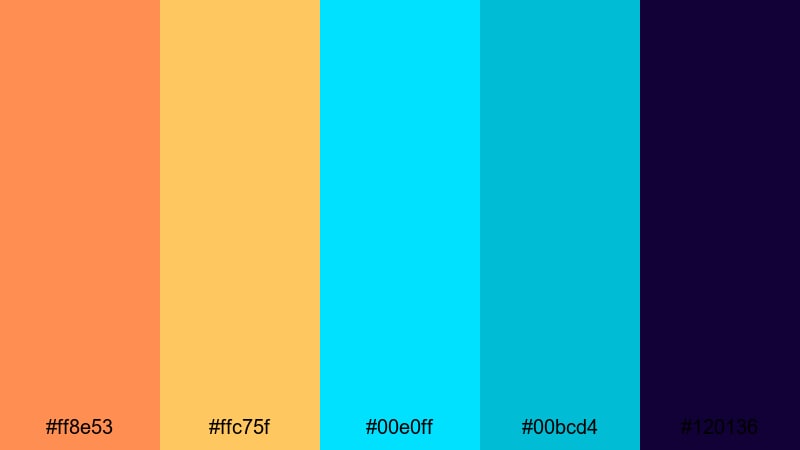
- HEX Codes: #ff8e53, #ffc75f, #00e0ff, #00bcd4, #120136
- Mood: Retro, nostalgic, and high-energy.
- Use for: Great for music videos, retro gaming intros, and throwback edit styles.
Synthwave Boardwalk captures that neon beach arcade feeling with warm oranges and bright cyan lights set against a deep violet-blue night (#120136). It is nostalgic but still sharp enough for modern HD and vertical content.
Use it in music videos, lo-fi loops, retro gaming intros, or 80s-themed edit styles. Neon gradient titles, grid backgrounds, and animated sun or wave motifs all look great in this palette, especially when paired with synth or electro soundtracks.
Arcade Pixel Burst

- HEX Codes: #ff9100, #ffd54f, #00f0ff, #00acc1, #1a103d
- Mood: Playful, intense, and nostalgic gamer-core.
- Use for: Use for gaming highlights, esports branding, and animated scoreboards.
Arcade Pixel Burst throws hyper-bright oranges and cyans onto a deep indigo backdrop (#1a103d). It feels like classic arcade cabinets, scoreboards, and exploding power-ups.
Use it for stream overlays, killfeed animations, transition wipes, and highlight intros. The dark background lets you place bold, chunky text while the orange and cyan accents guide the eye to scores, timers, and key gameplay moments.
Vintage Travel Poster
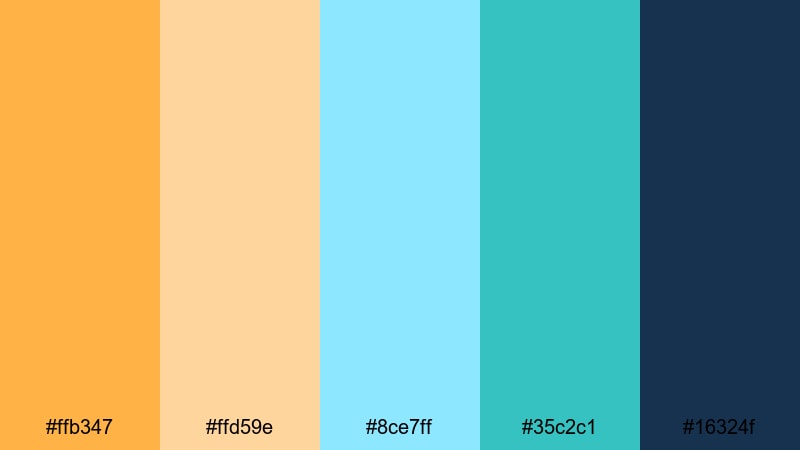
- HEX Codes: #ffb347, #ffd59e, #8ce7ff, #35c2c1, #16324f
- Mood: Warm, adventurous, and slightly nostalgic.
- Use for: Ideal for travel diaries, destination guides, and animated map graphics.
Vintage Travel Poster softens orange and cyan into sun-faded tones, supported by a classic navy base (#16324f). It feels like old print posters, postcards, and analog brochures, but it stays crisp and legible on digital screens.
Use this palette for animated map graphics, destination guides, travel story chapters, and intro cards. It is also a strong choice for channels focused on history, culture, or slow travel where you want warmth and nostalgia without neon intensity.
Tips for Creating Orange Cyan Color Palettes
When you design your own orange cyan color combinations for video and design, a few practical rules help you stay cinematic, readable, and on-brand across everything you create in Filmora.
- Decide your balance: choose whether orange or cyan is dominant, then use the other mainly for accents and contrast.
- Protect readability: always test white or near-white text over your background colors, and reserve a dark or light neutral as a safe text base.
- Use contrast for hierarchy: keep the strongest orange cyan contrast for titles and calls to action, and use softer tints for backgrounds and overlays.
- Match your footage: if your camera footage is warm (sunset, indoor lights), lean into cyan shadows; if it is cool (overcast, night), use orange to bring life back into skin tones.
- Limit your brights: pick 1–2 vivid colors from the palette and keep the rest slightly muted so your frames do not feel chaotic.
- Stay consistent across assets: use the same HEX codes for thumbnails, intros, lower thirds, and end screens so viewers instantly recognize your brand.
- Adapt for vertical video: in shorts and Reels, ensure important text sits on solid blocks or gradients where orange and cyan do not fight with background detail.
- Save presets in Filmora: once you like a grade, save it as a preset or LUT inside Filmora so you can reuse the same orange cyan look in future projects.
Conclusion
Orange cyan color palettes give you a powerful way to shape mood, from bold cinematic trailers to soft lifestyle vlogs or retro neon edits. With the right mix of warm oranges and cool cyans, your videos, thumbnails, and branding can feel intentional and instantly recognizable.
Use these 15 palette ideas as ready-made starting points, then refine them inside Filmora using AI Color Palette, HSL, color wheels, curves, and LUTs. The more consistently you apply your chosen palette, the stronger your visual identity will be across YouTube, TikTok, Instagram, and beyond.
Open a new project in Filmora, plug in the HEX codes you like best, and start building your own orange cyan look that viewers will remember.
secure downloadNext: Minimalist Color Palette
