
Trending Hindi Dynamic Text Templates
Browse our extensive collection of Hindi kinetic typography hindi assets and motion graphic guides
Loading more Hindi dynamic text templates...
 Category:
 Duration:
 Aspect Ratio:
Advanced Capabilities for Hindi Dynamic Typography
Bring your narrative to life with sophisticated Hindi text motion templates. Filmora provides everything you need for creating stunning visual sequences, integrating cutting-edge tools like the Filmora AI Image Generator and Text to Speech to ensure your Hindi content stands out. Whether you want bold graphics or subtle lower thirds, crafting your vision has never been easier.
Effortless Hindi Kinetic Typography Hindi
Effortless Hindi Kinetic Typography Hindi
Ditch the complex keyframing process and use our pre-built library of Hindi animated text templates to instantly inject energy into your projects. Simply drop a template onto the timeline and let the intuitive Filmora video editor handle the intricate motion curves, making sure your Hindi characters scale, rotate, and fade with absolute precision.
- Select from a diverse range of Hindi dynamic text animation styles tailored for any genre.
- Customize your tracking and leading to perfectly accommodate complex Hindi script ligatures.
- Preview your Hindi animated title templates in real time without waiting for slow rendering.
Seamless AI Integration for Video Assets
Seamless AI Integration for Video Assets
Enhance your Hindi moving text templates by pairing them with breathtaking visuals generated directly inside the editor. Using the powerful Filmora AI Image Generator, which features GPT Image 2 and Nano Banana Pro, you can instantly produce stunning backgrounds and overlays that perfectly complement your Hindi dynamic typography.
- Generate immersive backgrounds using ChatGPT Image 2 to make your Hindi text pop off the screen.
- Experiment with the Nano Banana model for stylized visual assets that match your theme.
- Blend your generated graphics with Hindi text layers using advanced video filters for a cohesive aesthetic.
Intelligent Automation for Social Media Formats

Intelligent Automation for Social Media Formats
Streamline your workflow when creating multi-platform content with intelligent reformatting and AI tools. Filmora automatically adapts your Hindi text motion templates for vertical and horizontal aspect ratios, ensuring your typography always looks pristine. You can also utilize our auto caption feature to synchronize spoken Hindi directly with your dynamic text overlays.
- Automatically resize your Hindi dynamic text templates to fit Instagram Reels and YouTube Shorts effortlessly.
- Sync your dynamic text animations perfectly with background audio tracks or voiceovers.
- Apply professional video transitions between text segments to maintain high viewer retention rates.
Frequently Asked Questions About Hindi Dynamic Text
How to Use Hindi Dynamic Text Templates in Filmora
Launch Filmora, select your favorite Hindi dynamic text animation, customize the visual properties, and export your engaging video project in minutes.
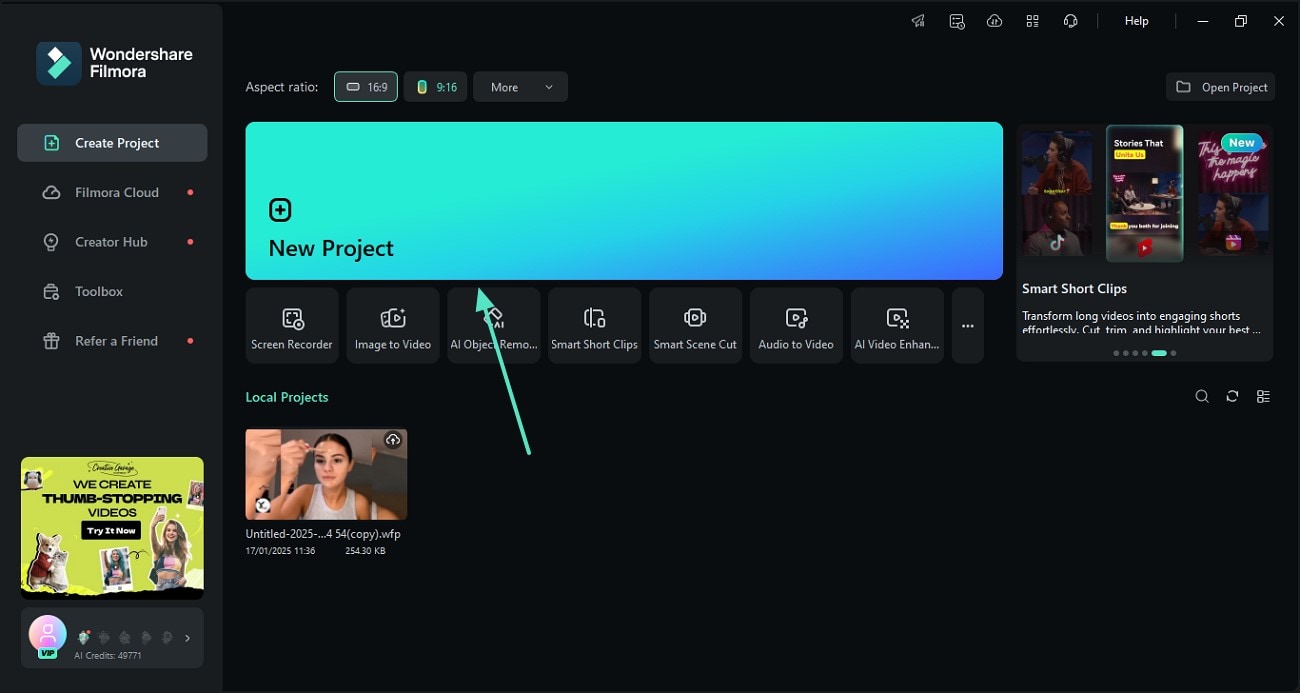
Step 1 Open Filmora and Import Your Media
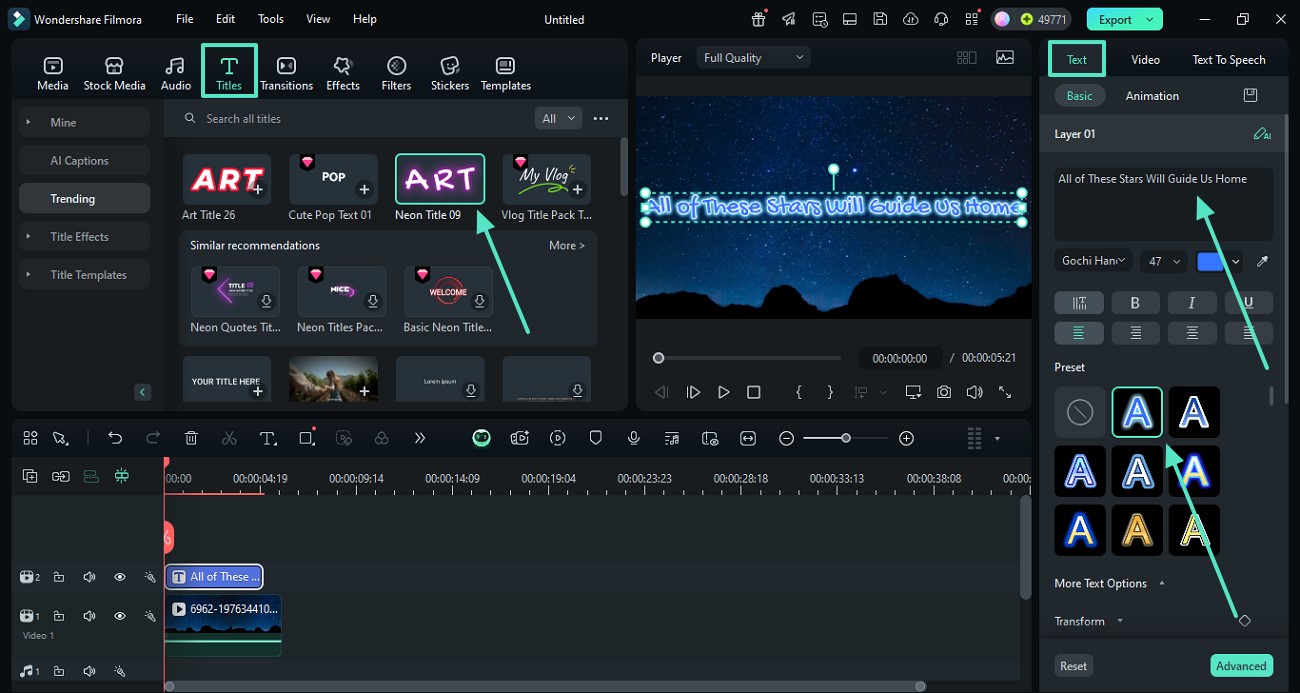
Step 2 Apply Hindi Moving Text Templates
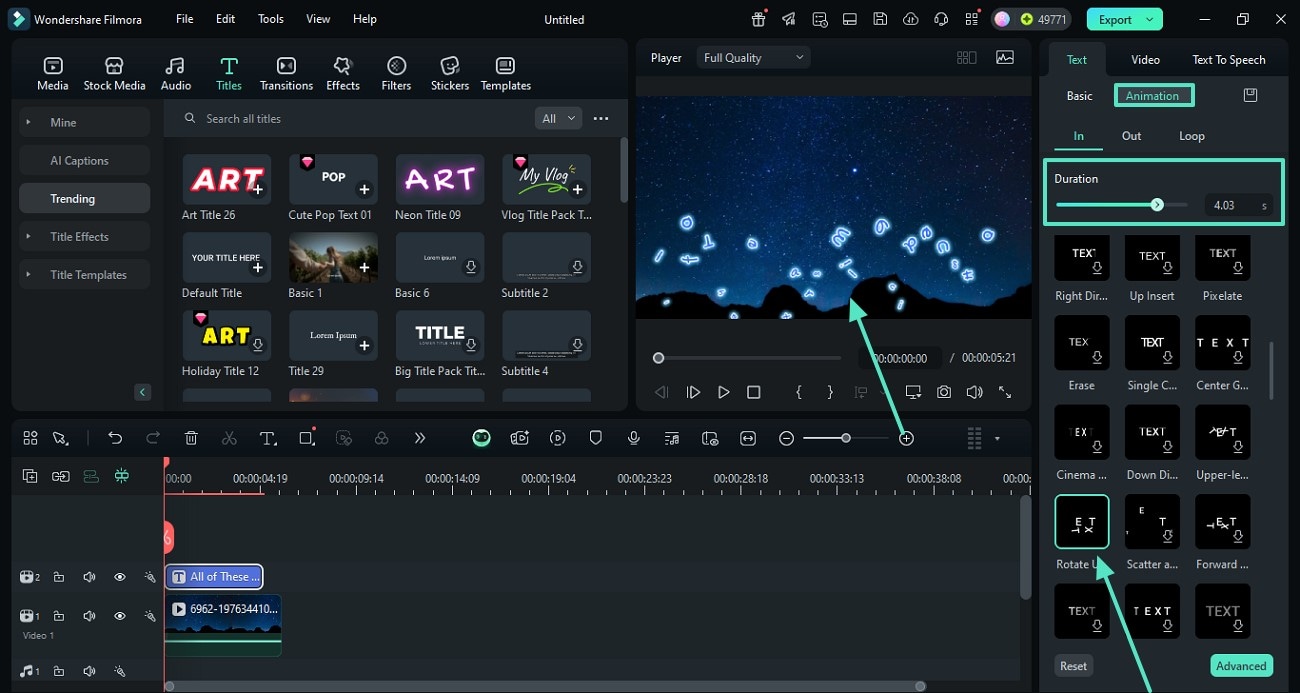
Step 3 Customize Motion and Export
-
1:Open Filmora and Import Your Media
Launch the application, start a new project, and import your footage into the media pool. Then, navigate to the titles tab to begin crafting your video. -
2:Apply Hindi Moving Text Templates
Browse the extensive library for Hindi moving text templates. Drag your selected preset onto the timeline and type in your desired Hindi characters to update the placeholder. -
3:Customize Motion and Export
Adjust the timing, color, and positioning of your Hindi animated text templates. Once satisfied with the Hindi dynamic typography, preview your sequence and export the final video.
Unleash Your Creativity With AI Tools
Beyond exceptional Hindi dynamic text templates, Filmora offers an expansive suite of AI-driven capabilities to transform your workflow. Seamlessly blend your typography with the AI music generator to craft the perfect auditory experience. Generate stunning concept art, storyboard your next big hit with advanced AI models, and explore limitless creative horizons right from your timeline.








