
Indian Cricket Text Examples & Guides
Explore popular cricket title templates and how-to guides
Loading more cricket text animation templates...
 Category:
 Duration:
 Aspect Ratio:
Everything You Need to Craft Perfect Indian Cricket Text
A well-placed graphic can turn an ordinary clip into a professional-looking sports broadcast. Filmora gives you a full library of Indian cricket text templates with built-in motion presets that drop straight into your timeline. Whether you are producing a quick player highlight or an intense match summary, our powerful suite of editing features gives you total control over your cricket title templates.
Energize Your Highlights With Cricket Text Animation
Energize Your Highlights With Cricket Text Animation
Transform standard gameplay footage into a stadium-worthy spectacle effortlessly. Filmora offers exclusive video templates designed to capture the fast-paced energy of thrilling T20 matches.
- Drag and drop cricket video text templates directly onto your timeline for immediate visual impact.
- Apply glowing borders and bold fonts to showcase crucial player statistics seamlessly.
- Customize dynamic entrance motions to synchronize perfectly with massive boundaries and crucial wickets.
Generate Custom Visuals With AI Integration
Generate Custom Visuals With AI Integration
Go beyond traditional editing by blending your cricket typography templates with cutting-edge artificial intelligence. Leverage built-in models like GPT Image 2 and Nano Banana directly inside Filmora to generate bespoke fan edit assets.
- Type simple descriptions to instantly generate cinematic stadium backgrounds and unique player illustrations.
- Enhance your cricket intro text templates with AI-generated team badges that capture the sporting spirit.
- Blend innovative AI visuals with your timeline graphics to keep viewers hooked from the very first frame.
Adapt Cricket Match Text Effects for Any Platform

Adapt Cricket Match Text Effects for Any Platform
Whether you are uploading a legendary run chase to YouTube or sharing short clips on Instagram, formatting should never slow you down. Filmora makes it simple to adjust your cricket text animation templates for any aspect ratio and language.
- Reformat your cinematic cricket edits automatically for both vertical feeds and widescreen displays.
- Utilize the auto caption feature to generate synchronized commentary text in multiple languages.
- Layer high-energy sound effects and background music underneath your customized sports typography seamlessly.
Frequently Asked Questions About Cricket Text Editing
How to Create Indian Cricket Text in Filmora
Open Filmora, pick a dynamic cricket title template, adjust colors, and export a clean sports sequence.
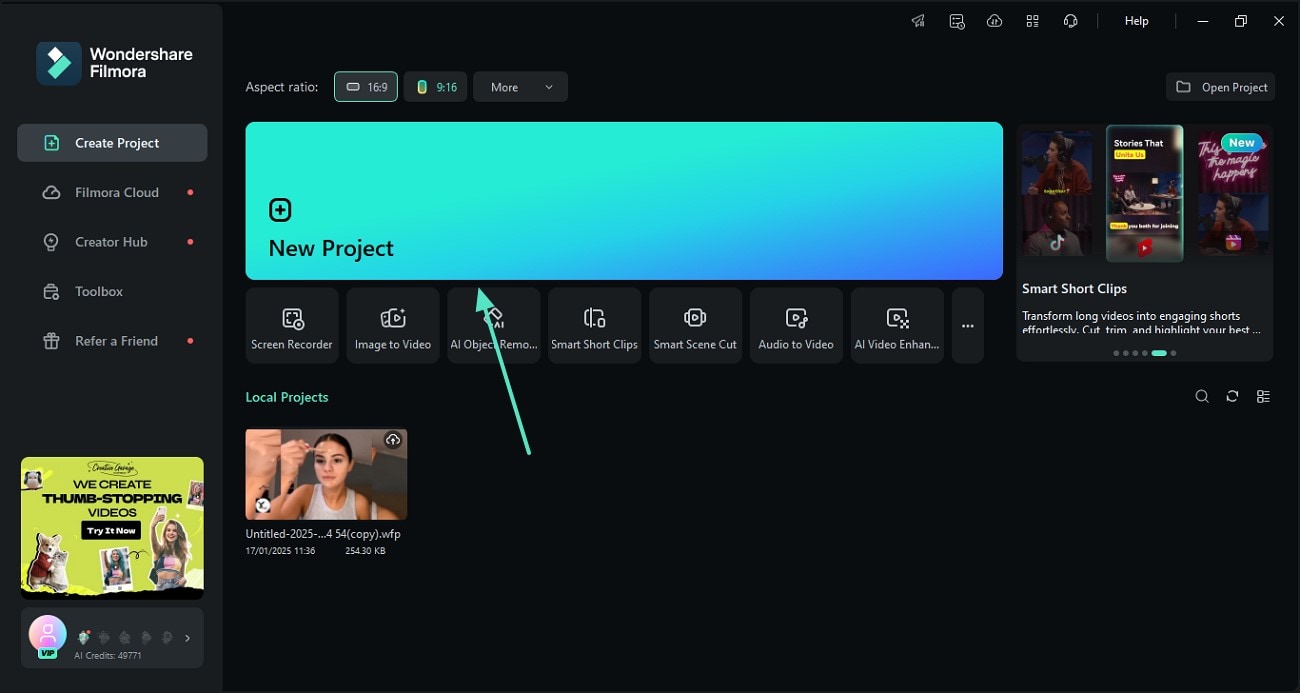
Step 1 Open Filmora and Import Your Match Footage
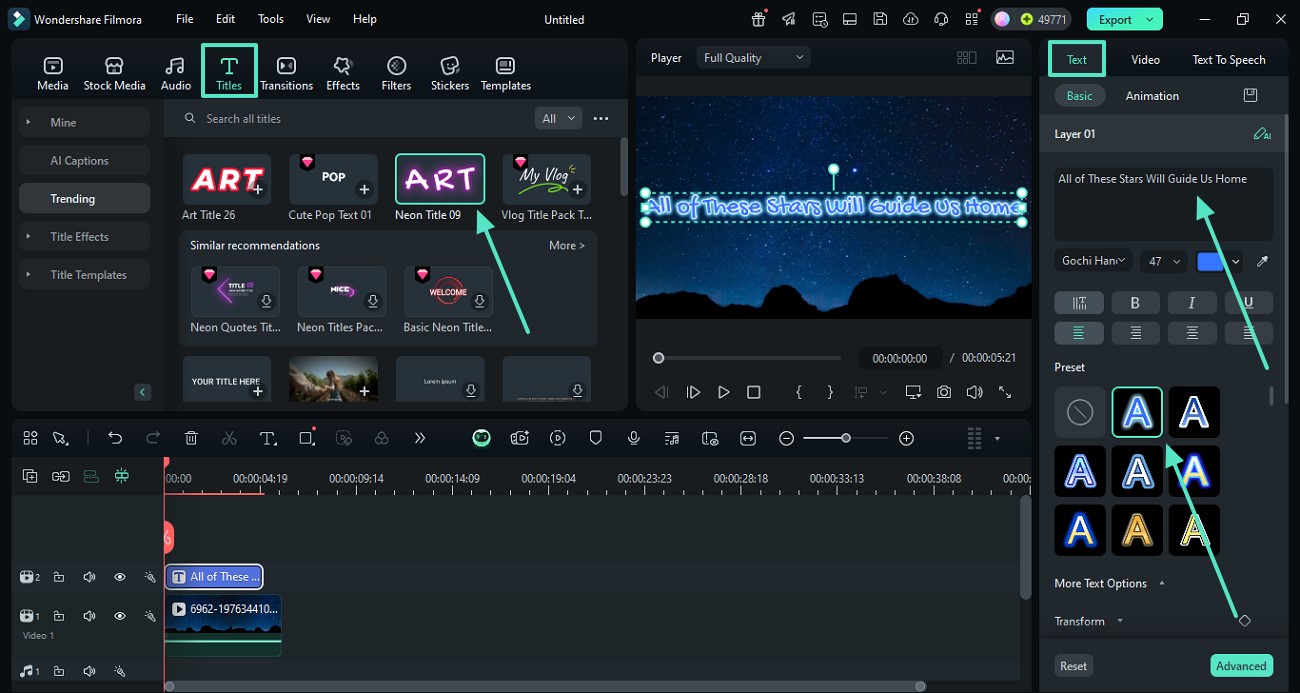
Step 2 Choose Indian Cricket Text Templates
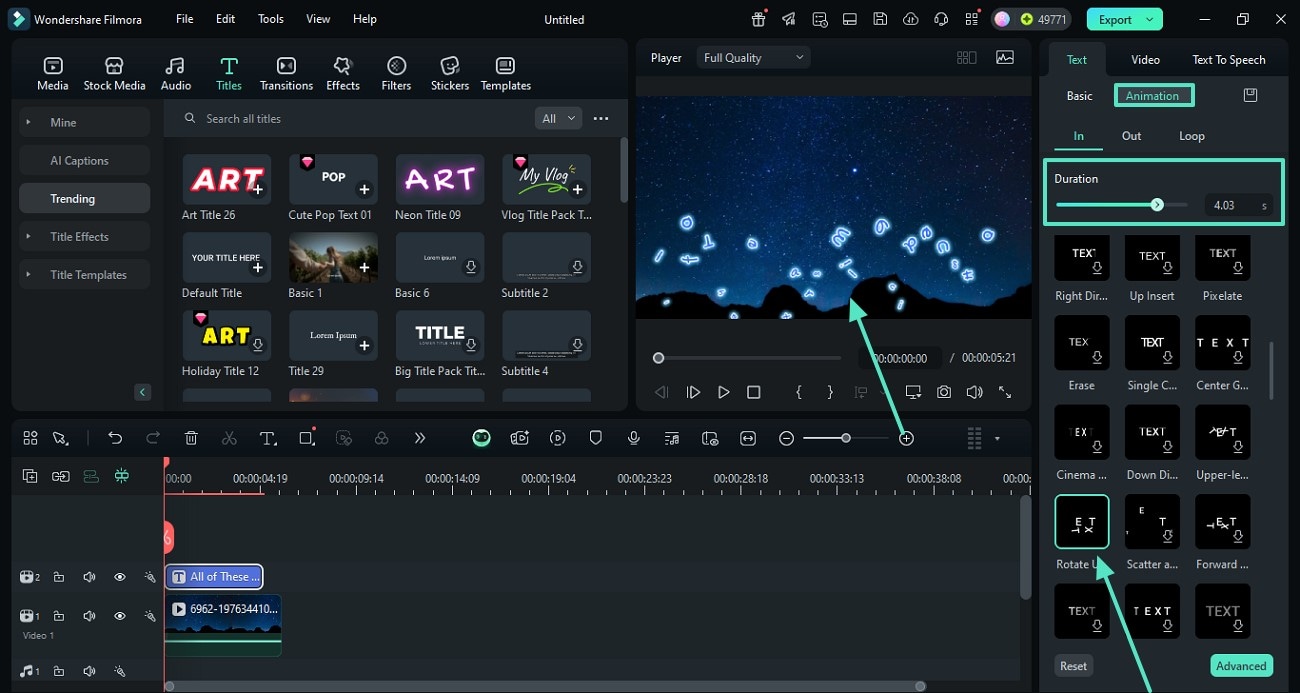
Step 3 Customize and Export Your Sports Video
-
1:Open Filmora and Import Your Match Footage
Launch Filmora, create a new project, and import your sports clips. Then open the titles panel to easily add titles. -
2:Choose Indian Cricket Text Templates
Browse the library and select cricket typography templates. Drag one to the timeline and replace the placeholder text with your team names or player stats. -
3:Customize and Export Your Sports Video
Fine-tune your cricket match text effects and motion timing. Preview your high-energy highlight reel and export it for your fans.
Beyond Basic Cricket Text Animation
Crafting the ultimate fan edit requires more than just standard typography. Filmora empowers creators with advanced AI tools to push the boundaries of sports video production. Utilize the AI Image Generator to create custom stadium backgrounds, seamlessly apply dynamic video filters, and elevate the drama with the built-in AI music generator. Whether you are producing a cinematic highlight reel or an intense pre-match promo, these powerful tools allow you to crush the competition and captivate cricket fans worldwide.








