

 100% Security Verified | No Subscription Required | No Malware

Tiny yawns, wobbly first steps, and sleepy smiles deserve more than a flat, unedited clip. With the right baby video filters for TikTok, you can turn everyday baby moments into soft, shareable edits that stay on-trend and feel naturally magical.
This Filmora preset set, Baby Video Filters for TikTok: Trendy Bright Social Color, is built for TikTok creators and short-form storytellers who post cute baby moments and short milestone edits. Use these 12 ready-made looks to match current baby TikTok aesthetics while keeping skin tones gentle, cozy, and true to life.
In this article
Soft and Dreamy Baby Aesthetic Filters
Cotton Cloud Soft Glow
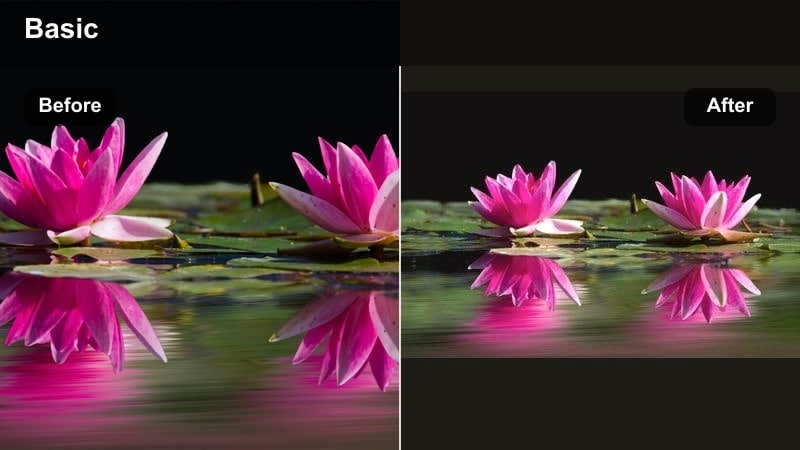
- Effect look: Creamy highlights with a gentle glow that wraps around baby skin and blankets
- Best for: Peaceful nap clips, crib shots, and quiet cuddle moments in soft daylight
- Editing tip: Lower contrast slightly and keep exposure modest so the glow feels dreamy, not washed out on TikTok's smaller screen.
Cotton Cloud Soft Glow adds a hazy, pillow-soft glow that makes naps and snuggles look like a cozy storybook scene. Highlights become creamy and gentle, helping baby skin, blankets, and plush toys blend into a soft, dreamy frame that feels perfect for calm TikTok scroll moments.
In Filmora, apply this preset, then nudge contrast down and watch your scopes to avoid clipping highlights on foreheads, cheeks, or light bedding. Use it on slow crib pans or static shots of baby sleeping, and keep transitions minimal so the glowing aesthetic remains the star of your short-form edit.
Pro tip: Keep the glow flattering on baby skin
Use Cotton Cloud Soft Glow with your phone slightly angled toward a window so the light skims across baby's face instead of hitting straight on. If highlights clip on foreheads or cheeks, pull down the whites slider in Filmora before exporting to TikTok to protect delicate details.
Let Filmora's AI keep baby colors soft and true
Filmora's AI-driven color tools help you keep baby skin tones gentle while you experiment with trendy looks like glows, matte finishes, and pastel pops. Instead of manually balancing every clip, AI can intelligently correct exposure and color so blankets stay creamy and faces remain natural.
Apply a preset from this baby TikTok collection, then let AI-assisted adjustments refine the overall tone. This keeps your feed stylish and cohesive while preserving the soft, true-to-life feeling that makes baby clips so watchable and shareable.
Open Filmora, load your baby clip, and test one AI-tuned preset at a time to see how it shapes your overall feed aesthetic.
 secure download

Preview baby filters in seconds before posting
With Filmora's real-time preview, you can scroll through multiple baby video filters for TikTok and instantly see how each one handles blankets, toys, and tiny facial expressions. This lets you quickly compare soft, dreamy, bright, and cool options on the exact same clip.
Because you see changes live, it is easy to pair specific filters with different baby scenarios, from sleepy crib shots to high-energy giggle reels, without wasting time on trial-and-error exports.
Drop a 10-second baby clip into Filmora, preview several filters back to back, and favorite the ones that match your current TikTok trend sounds.
secure downloadSave your signature baby look as reusable presets
Once you fine-tune a filter's exposure, contrast, and color for your baby content, you can save that look as a custom preset or LUT in Filmora. This turns your favorite aesthetic into a one-click style that you can apply to every new clip.
Reusing the same presets keeps your cute viral baby edits, trending newborn effects, and milestone clips visually consistent across TikTok, Instagram Reels, and Stories, helping your profile feel more intentional and professional.
Create a custom preset named after your baby or series so you can apply that look in a single click to every new TikTok or Instagram upload.
secure downloadPastel Nursery Haze
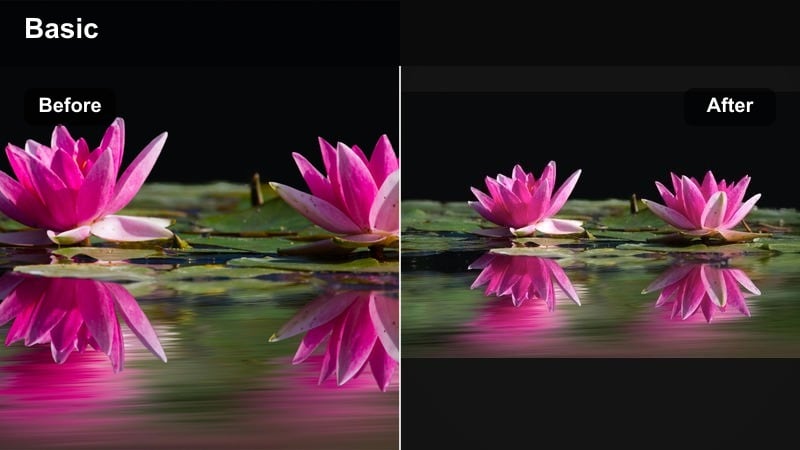
- Effect look: Muted pastel color shift with low contrast and velvety shadows for a nursery-soft vibe
- Best for: Room tours, crib reveals, and quick TikTok edits showing baby outfits and decor details
- Editing tip: Lean into subtle camera movement and keep cuts short; the pastel haze looks best in under-15-second reels and TikToks.
Pastel Nursery Haze wraps your nursery in a muted, pastel color shift that softens primary colors and bright decor into a cohesive aesthetic. Low contrast and velvety shadows make walls, rugs, and tiny outfits all feel like part of the same gentle color story.
In Filmora, try this preset on pan shots of the crib, shelving, and decor, then mix in one or two close-ups of baby in their outfit of the day. Keep clips short so the pastel mood stays light and engaging, and tweak saturation for key hues like pink or sage to match your real nursery palette.
Pro tip: Match your nursery color palette
Adjust saturation of one or two key hues to match your nursery's theme so every TikTok from that room feels like part of a series. Save your custom version as a preset in Filmora so all future baby room clips instantly land in the same pastel mood.
Milky Morning Soft Film
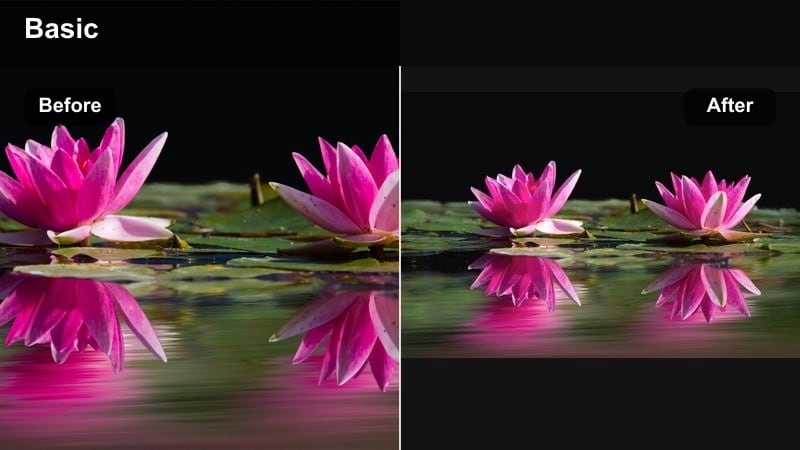
- Effect look: Faint film grain with softened edges and cool-warm balanced tones for early daylight clips
- Best for: Morning diaper changes, first bottle of the day, and sleepy-cozy routine edits
- Editing tip: Trim each beat of the routine to one or two seconds so the soft film feel carries viewers smoothly through your mini-montage.
Milky Morning Soft Film brings a gentle, cinematic feel to early-day routines, adding light grain and softened edges that echo classic film without feeling heavy. The balanced tones help mixed natural and indoor light look pleasing and cohesive on camera.
Use this preset in Filmora when you are building mini-montages of diaper changes, bottle prep, and first smiles of the day. Cut each step into short, one- to two-second beats, and let the film texture tie the sequence together into a calm, scroll-stopping TikTok.
Pro tip: Pair film grain with quiet audio
Use softer sounds or light music instead of loud trending audio so the film texture stays cozy and intentional. If you do use a viral sound, keep volume low and let real baby sounds peek through to raise authenticity and engagement.
Bright and Playful Viral Baby Edits
Peekaboo Pop Bright
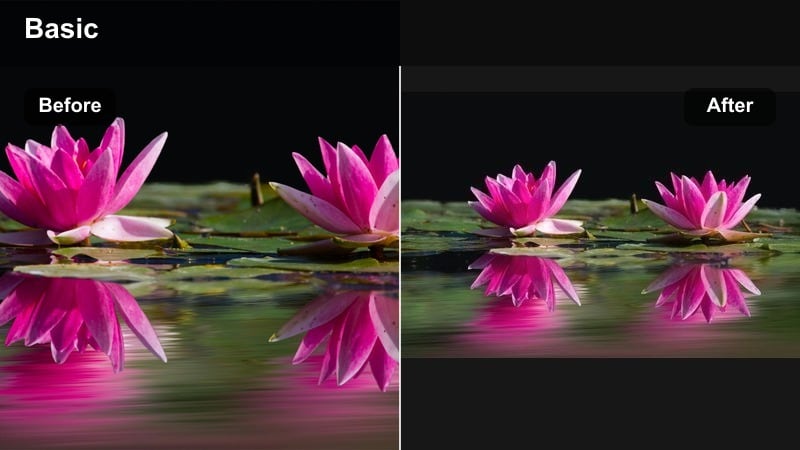
- Effect look: Clean whites, lifted mids, and crisp colors that make toys and outfits pop without hurting soft skin
- Best for: Fun peekaboo clips, tummy-time giggles, and high-energy TikTok baby trends
- Editing tip: Cut on the laugh or surprise moment and sync to a beat drop so the color pop lands with the cutest expression.
Peekaboo Pop Bright is built for loud giggles and playful moments, lifting midtones and cleaning up whites so toys, blankets, and outfits look extra vivid. At the same time, it keeps baby's skin natural so the colors feel fun but not artificial.
In Filmora, use this preset on dynamic clips with movement, like tummy-time kicks or surprise peekaboo reveals. Sync your cuts to beat drops or punchlines in the audio, and let the boosted color intensity underline every laugh and big-eyed reaction.
Pro tip: Use motion to show off the pop
Shoot quick pans across toys before landing on baby's big smile so the color pop has a satisfying reveal. Avoid over-sharpening; let the bright colors do the heavy lifting while keeping baby's features soft.
Giggle Party Pastel Pop
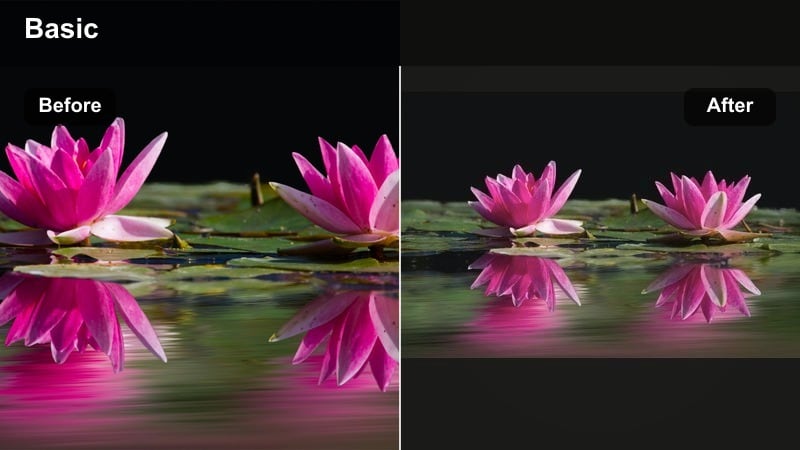
- Effect look: Soft pastel shift with a little extra saturation in playful colors like pinks, blues, and yellows
- Best for: Birthday reels, cake smash edits, and playful milestone celebrations on TikTok and Instagram
- Editing tip: Use quick jump cuts between decorations, cake, and baby's face to create a mini party montage that feels bright but gentle.
Giggle Party Pastel Pop turns birthdays and celebrations into candy-colored scenes, boosting playful shades while keeping everything softly pastel. Balloons, confetti, and frosting stand out with extra charm, but the overall image remains gentle and baby-safe.
In Filmora, drop this filter on your cake smash or milestone clips and build jump-cut sequences between decor, close-ups of little hands, and big reaction shots. If whites on cake or outfits get too bright, dial back highlights slightly to keep details in frosting and fabric.
Pro tip: Protect frosting and skin tones
If whites on frosting and cheeks start to blend, slightly lower highlights and add a touch of warmth back into the midtones. This keeps the viral birthday look candy-like without making baby's skin look too cold or flat.
Playroom Vibe Boost
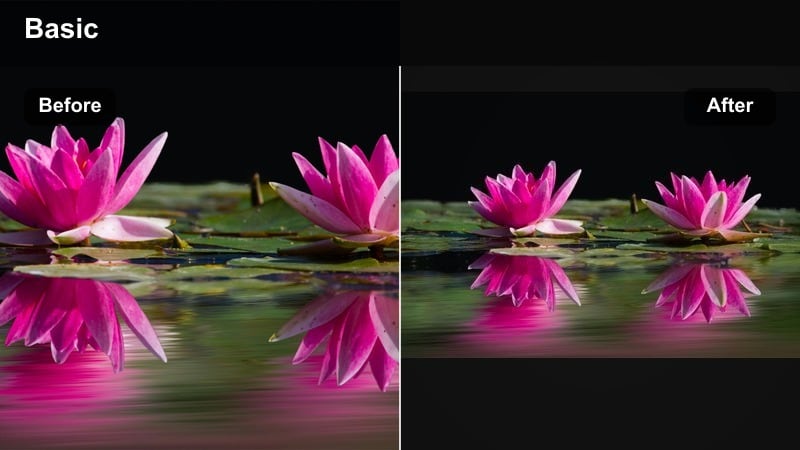
- Effect look: Balanced brightness with a subtle clarity boost that defines toys and textures
- Best for: Playroom tours, toy unboxings, and interactive clips with parents or siblings
- Editing tip: Use gentle zooms and speed ramps on the most excited moments to lean into the boosted clarity and energy.
Playroom Vibe Boost adds just enough clarity and brightness to make toy textures, books, and play mats look crisp and inviting. It works especially well in busy spaces, helping viewers see what is happening without the frame feeling too harsh.
Apply this preset in Filmora when filming toy rotations, unboxings, or games with parents and siblings. Combine it with smooth zooms and light speed ramps on the most excited reactions to amplify the sense of energy while still keeping baby's features soft and friendly.
Pro tip: Keep busy scenes from feeling messy
Use Playroom Vibe Boost with simple compositions and clear focal points so the extra detail supports your story instead of distracting. Crop tighter around interactions so viewers lock onto eye contact, smiles, and gestures even in a toy-filled room.
Warm and Nostalgic Newborn Moments
Golden Snuggle Glow
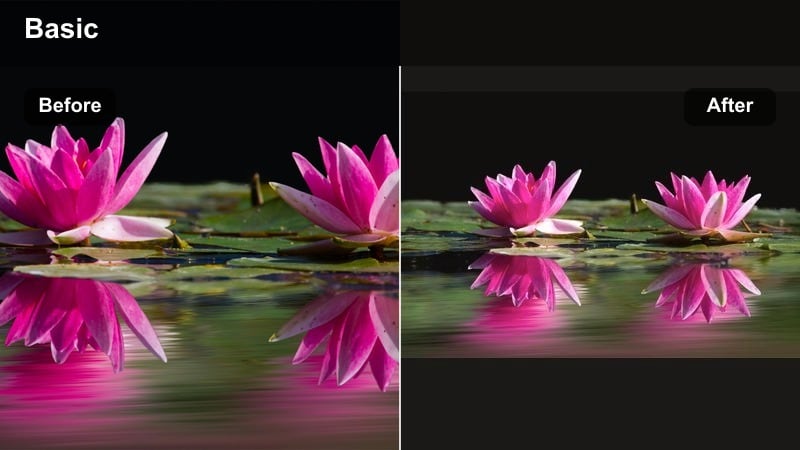
- Effect look: Warm, golden tones with soft contrast and gentle highlights that flatter skin and fabrics
- Best for: Skin-to-skin clips, quiet feeding moments, and golden hour window light shots
- Editing tip: Shoot near a window and apply the filter lightly; then fine-tune warmth to keep whites in blankets from turning orange.
Golden Snuggle Glow bathes newborn clips in a cozy, amber warmth that makes every cuddle feel like a treasured memory. Soft contrast and gentle highlights flatter skin and fabric, giving your TikToks a comforting, late-afternoon mood even indoors.
In Filmora, apply this preset to skin-to-skin or feeding clips captured near a window or during golden hour. If blankets or onesies start looking too orange, pull back overall warmth and selectively reduce yellow saturation to keep whites clean while maintaining that intimate glow.
Pro tip: Balance warmth with neutral whites
If your swaddles or onesies look too yellow, pull down saturation in the yellows while leaving reds and oranges warmer. This keeps baby's skin glowing while blankets and walls stay pleasantly neutral on TikTok.
Vintage Baby Memory
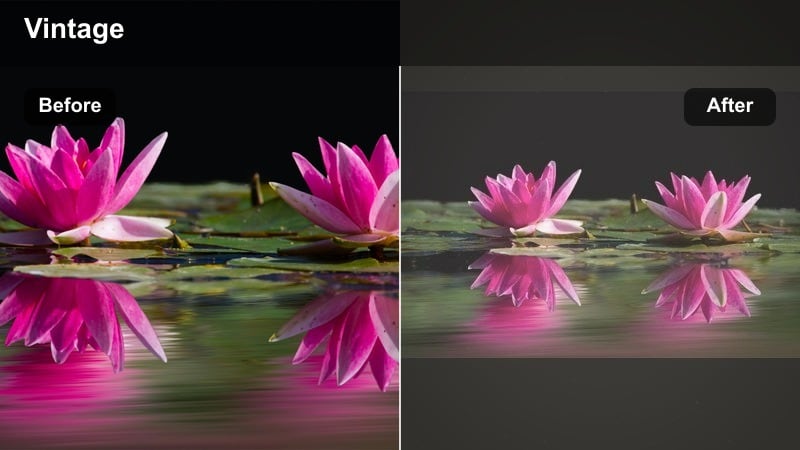
- Effect look: Subtle fade, slightly lifted blacks, and soft grain for a nostalgic, filmic baby look
- Best for: Throwback edits, first-48-hour clips, and sentimental newborn montages
- Editing tip: Pair the filter with slower cuts and gentle zoom-ins to emphasize sentimental expressions and tiny details.
Vintage Baby Memory adds a tasteful fade and lifted blacks that mimic old home movies, ideal for emotional newborn compilations. The light grain and softened contrast make hospital rooms, swaddles, and first car-seat rides feel timeless and cinematic.
Use this preset in Filmora when you are creating reflective or throwback TikToks, like a month-one recap or first-48-hours montage. Keep cuts slow, lean on gentle zoom-ins, and consider adding soft music or voiceover to complete the nostalgic storytelling style.
Pro tip: Use text overlays like old captions
Add small, simple captions with dates or milestones to mimic the feel of old camcorder labels. Keep fonts clean and minimal so the vintage filter and raw baby moments stay center stage.
Hug in a Blanket Warm Matte
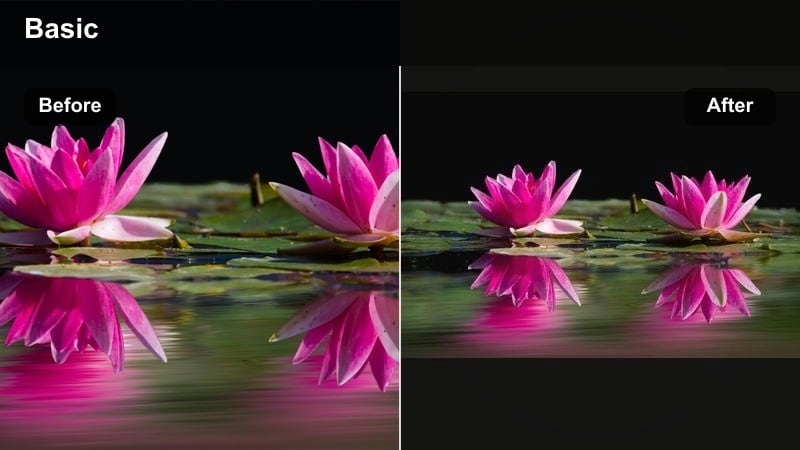
- Effect look: Matte shadows with warm midtones and desaturated backgrounds to keep focus on baby
- Best for: Cozy couch clips, bedtime routines, and late-night rocking sessions
- Editing tip: Lower background saturation slightly more so baby's face and hands become the brightest, most colorful points in the frame.
Hug in a Blanket Warm Matte rolls off contrast in the shadows for a matte, cinematic feel that is perfect for bedtime routines and gentle cuddles. Warm midtones add a feeling of comfort, while subtly desaturated backgrounds keep attention locked on baby's face.
In Filmora, use this filter on low-key living-room or nursery clips, where lamps or nightlights provide soft pools of light. Slightly reduce background saturation even more, and add a mild vignette so baby's face and hands remain the most vivid areas of the frame.
Pro tip: Shape light around your focal point
Use a vignette or slight radial exposure adjustment to guide attention to baby's face inside the warm matte look. Keep the effect low so it feels like natural room light rather than a heavy spotlight.
Cool, Clean, and Trendy Feed Aesthetic
Minimal Feed Baby Clean
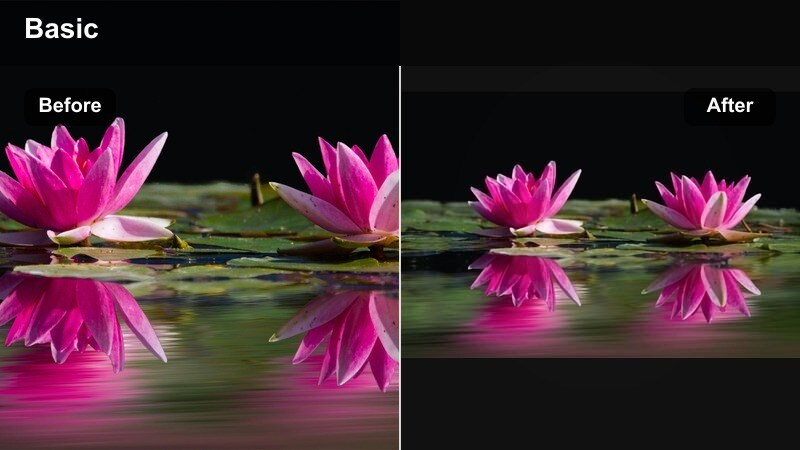
- Effect look: Neutral whites, soft contrast, and a tiny cool shift for a polished, minimalist grid
- Best for: Creators with a clean, neutral feed who still want cute viral baby edits that match their brand
- Editing tip: Shoot against plain bedding, rugs, or walls; the cleaner the background, the more intentional this filter looks.
Minimal Feed Baby Clean is designed for creators with a neutral, curated feed who want baby content that still fits their brand. Soft contrast, clean whites, and a slight cool shift give your clips that airy, magazine-like finish without overstyling.
In Filmora, apply this preset to top-down shots on neutral bedding, bassinet clips, or simple outfit-of-the-day videos. Avoid busy backgrounds and keep compositions minimal so the clean aesthetic feels intentional and on-brand across TikTok and Instagram.
Pro tip: Keep a signature baby look
Use this same filter on every baby TikTok so followers instantly recognize your clips on the For You page. Save a Filmora preset with your preferred temperature and exposure so your signature look is one click away.
Trend Sync Baby Cool Tone
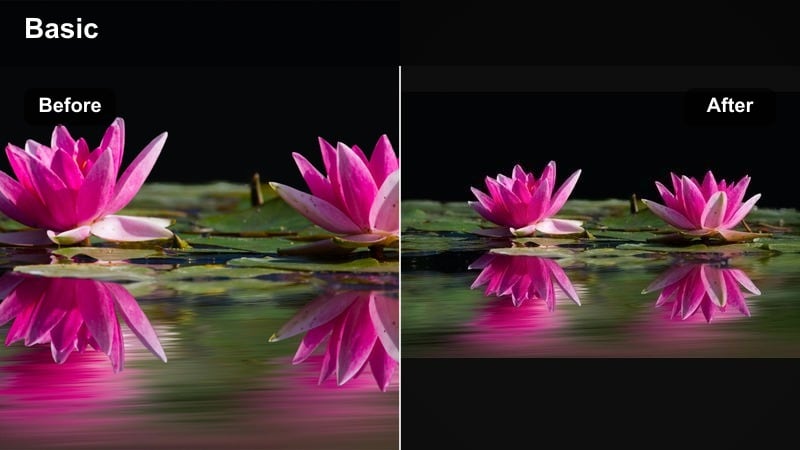
- Effect look: Slight cool shift with crisp contrast that pairs well with viral TikTok audios and transitions
- Best for: On-beat trend recreations, lip-syncs with parents, and playful caption-led baby content
- Editing tip: Cut precisely to the beat and keep shots short; the cool tones help fast transitions feel sharp and modern.
Trend Sync Baby Cool Tone pushes your baby clips into a modern, slightly cool space that works perfectly with trending audios and transition-heavy edits. The crisp contrast keeps each frame feeling sharp and energetic, ideal for short, snappy TikToks.
Use this preset in Filmora when you are recreating viral formats, doing parent-and-baby lip-syncs, or using popular caption templates. Keep shots short, edit tightly to the beat, and, if needed, selectively warm skin tones so faces stay lively against cooler backgrounds.
Pro tip: Balance cool tones with warmth in faces
If faces look too cold, add a little warmth or vibrance to skin tones only while keeping backgrounds cool. This keeps the trending aesthetic intact without making baby's skin look dull on camera.
Social Bright Share-Ready
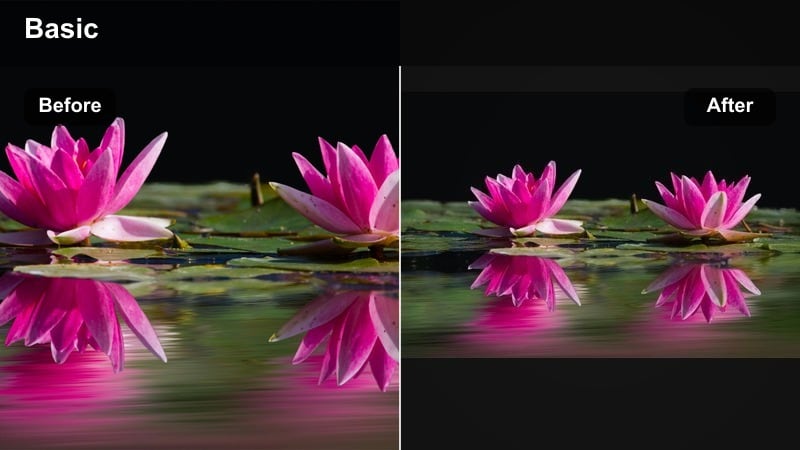
- Effect look: Even brightness and color that looks consistent across TikTok, Instagram Reels, and Stories
- Best for: Cross-posting baby clips from TikTok to Instagram without separate color tweaks
- Editing tip: Edit once in Filmora, then export in vertical format and reuse the same file across platforms for a unified baby aesthetic.
Social Bright Share-Ready is your go-to preset when you want a single edit that looks good everywhere. It keeps brightness and color balanced so your baby clips translate cleanly from TikTok to Reels, Stories, and Shorts without additional corrections.
In Filmora, apply this filter to any vertical baby clip that you plan to cross-post. Make sure important details and text stay within safe margins, then export once and reuse the file across platforms to maintain a cohesive, bright baby brand.
Pro tip: Plan once, post everywhere
Frame your shots with safe margins so text and captions fit both TikTok and Instagram without cropping baby's face. Use Social Bright Share-Ready as your default baby look so every post feels cohesive no matter where it's viewed.
Tips for Using Baby Tiktok Trendy Filters in Filmora
- Shoot in soft natural light whenever possible so baby filters enhance rather than repair harsh lighting.
- Keep clips short and focused on one moment or milestone to make filters feel intentional, not distracting.
- Use similar filters for all videos in a series so your baby TikTok playlist and profile grid look cohesive.
- Test each filter at slightly lower intensity; subtle color work often looks more premium and timeless.
- Record in the highest resolution your phone allows so Filmora's filters and effects stay clean after export.
- Mix wide shots with close-ups of hands, feet, and expressions to let each filter show off its detail and mood.
- Pair softer, dreamy filters with calmer audio and brighter filters with upbeat trending sounds to match the vibe.
With the right mix of soft, bright, and trendy baby video filters for TikTok, every tiny expression and milestone can feel ready for the For You page without losing its tenderness. These Filmora looks help you stay on trend while still protecting the warmth and authenticity of your baby moments.
Use this Filmora preset collection to build a consistent baby aesthetic, then adjust each filter just enough to fit your story, your sound, and your favorite cute baby moments. Over time, your clips will start to share a recognizable style that followers associate with your family and your feed.
secure downloadNext: Baby Video Filters for Instagram: Make Every Tiny Moment Feed-Ready
