

 100% Security Verified | No Subscription Required | No Malware

This collection of cool outdoor color grading LUT-style filters is designed for content creators who want crisp skies, clean greens, and a cinematic blue-toned finish in their outdoor footage.
Use these presets to quickly balance harsh daylight, add a modern cool vibe, and keep skin tones natural while your landscapes and cityscapes stay detailed and punchy.
In this article
Blue Hour Trails And Mountain Walks
Cool Trail Mist
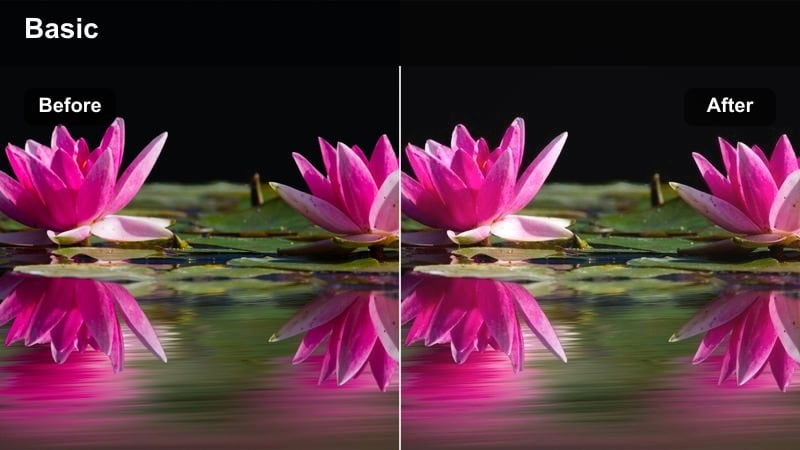
- Effect look: Soft, low-contrast cool wash that deepens blues and slightly mutes greens for misty hiking footage.
- Best for: Early morning hikes, foggy forest paths, and overcast mountain trails shot in natural light.
- Editing tip: Lower saturation slightly and raise shadows to preserve details in fog while keeping the cool mood intact.
Cool Trail Mist wraps your outdoor shots in a gentle blue cast that suits fog, low clouds, and hazy backlit paths. Blues and blue-greens become richer, while overall contrast stays soft so the atmosphere of your location feels airy instead of harsh.
In Filmora, pair this look with subtle adjustments to saturation and shadows inside the Color panel to keep grains of dirt, rock textures, and backpack details visible. When people are in the frame, warm up the midtones just a touch so faces remain natural while the environment stays cool and cinematic.
Speed Up Cool Outdoor Grading With AI Color Tools
Filmora's AI-driven color tools help you get to your final cool outdoor look faster by automatically balancing exposure and white balance before you apply any filter. This gives Cool Trail Mist and other LUT-style presets a cleaner starting point so your blues and greens do not shift unpredictably.
Use AI correction to neutralize strong color casts from mixed daylight and shade, then drop in your favorite cool outdoor preset to focus entirely on mood and style. Small tweaks in the HSL or color wheels will then be enough to customize each trail or mountain shot.
 secure download

Preview Cool Outdoor Filters In Real Time
With Filmora's filter panel, you can hover over cool outdoor presets like Cool Trail Mist or Glacier Breeze and instantly preview how each one reshapes your shadows, skies, and foliage. This makes it simple to compare subtle foggy trail looks against crisper mountain grades without applying them one by one.
Once you find a base look you like, fine-tune intensity via the filter sliders so the cool tone fits your camera profile and location. You can quickly decide whether a soft cinematic grade or a punchier contrast suits your hiking vlog or travel reel.
secure downloadCombine Filters With LUTs For Custom Outdoor Looks
If you already grade with LUTs, Filmora lets you stack LUTs with cool outdoor filters so you can separate technical correction from creative style. A base LUT can unify contrast and saturation across cameras, while filter presets add location-specific cool blue atmospheres for trails, beaches, or city streets.
Apply your preferred cool outdoor color grading LUT first, then layer Filmora filters at lower intensity to nudge blues, greens, and skin tones into a cohesive look. This combination keeps your workflow fast while still giving you flexibility to tailor each scene.
secure downloadGlacier Breeze
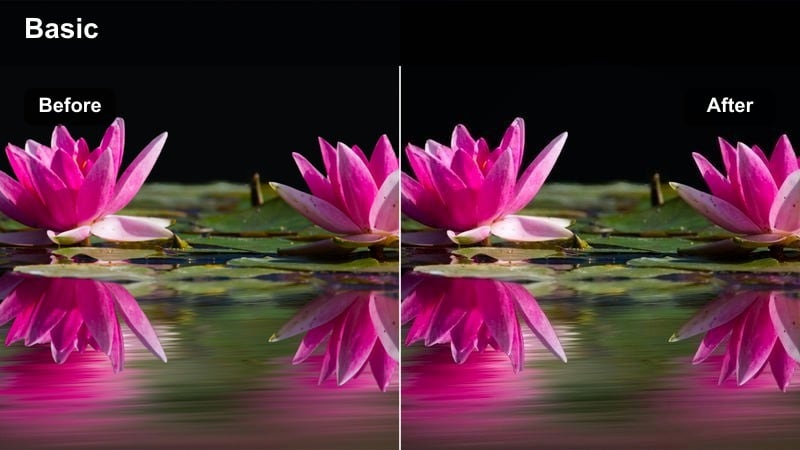
- Effect look: Crisp cyan-blue shift with lifted highlights and cooled shadows for high-altitude scenery.
- Best for: Snowy peaks, glacier lakes, and bright mountain days with strong sunlight and clear skies.
- Editing tip: Pull down exposure slightly and add a touch of vignette to keep focus on the subject against the expansive scenery.
Glacier Breeze leans into airy cyan and ice-blue tones that make mountain lakes and high ridges feel pristine and cold. Highlights are gently lifted so snow and reflections on water look luminous, while shadows stay cool, giving your footage a polished, cinematic travel look.
In Filmora, combine this filter with a slight exposure reduction and optional vignette to frame your subject against wide-open alpine scenes. Use highlight recovery to bring back detail in snowbanks and clouds, and fine-tune blues in the HSL panel if you want a subtler or more intense glacier vibe.
Evergreen Chill
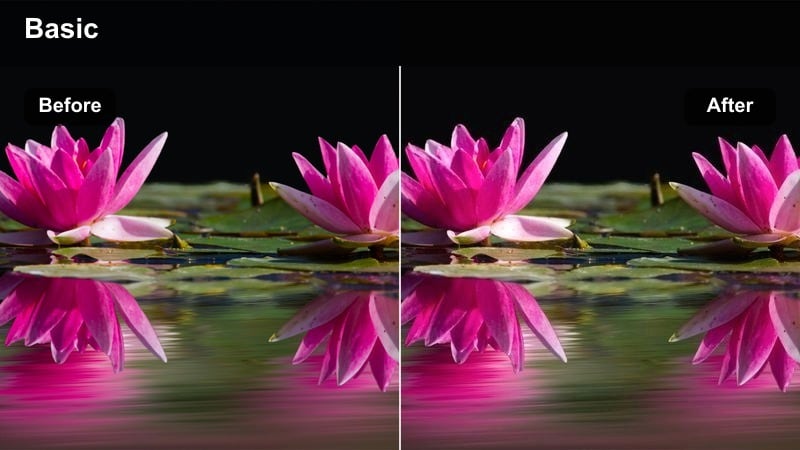
- Effect look: Cool-toned forest look that darkens greens and cools shadows while keeping midtones soft and cinematic.
- Best for: Shaded forest walks, riverside trails, and woodland camping scenes shot under tree cover.
- Editing tip: Boost midtone contrast for definition in trees and rocks, but keep shadows lifted to avoid crushing the darker forest areas.
Evergreen Chill adds depth and mood to woodland footage by deepening greens and shifting shadows toward blue, while midtones remain gentle and filmic. It emphasizes the structure of trees, moss, and rivers without making the scene look overly dark or saturated.
Inside Filmora, apply this filter to your forest clips, then use the tone curve or midtone contrast to carve out more separation between trunks, leaves, and pathways. A soft vignette and slightly raised shadows help guide the eye along the trail while preserving a calm, cinematic forest atmosphere.
Cool Coastal And Beach Escapes
Ocean Aqua Cool
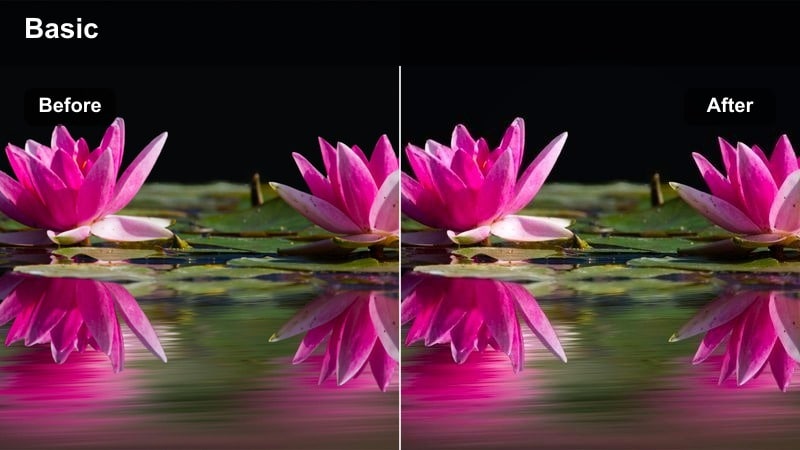
- Effect look: Punchy teal-blue water with softened warm tones in sand and skin for a modern seaside aesthetic.
- Best for: Beach vlogs, coastal drone shots, and shoreline B-roll with clear water and open skies.
- Editing tip: Use selective color to slightly dial back teal in skin ranges while keeping the ocean water vibrant and cool.
Ocean Aqua Cool delivers a trendy teal-and-blue treatment that makes shorelines and waves pop while toning down harsh yellows in sand and sunlit skin. The result is a sleek, modern coastal look that feels perfect for travel reels, shorts, and cinematic vacation videos.
In Filmora, apply this filter to your beach footage, then quickly correct skin tones by warming the orange and red ranges so people do not turn cyan. If the water feels too intense, reduce overall saturation slightly and boost vibrance to keep nuanced color variations in the sea and sky.
Stormy Shoreline
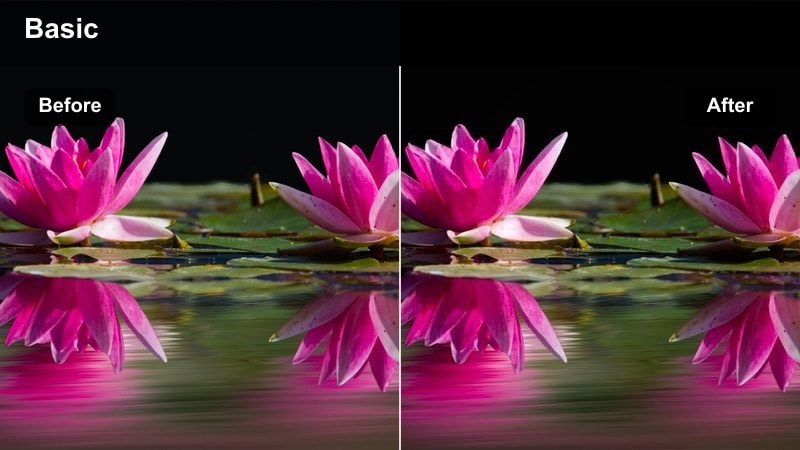
- Effect look: Desaturated cool blues and greys with stronger contrast that give beaches a moody, storm-on-the-way feeling.
- Best for: Cloudy coastal days, rocky shores, and dramatic wave footage under overcast skies.
- Editing tip: Lower highlights to keep the sky detailed, then add a subtle grain effect for a cinematic, documentary-style finish.
Stormy Shoreline pulls color toward muted blues and greys, turning flat overcast beach footage into a dramatic, moody sequence. Stronger contrast and cooled highlights give clouds and waves extra shape, making stormy conditions feel intentional and cinematic.
After applying this filter in Filmora, lower highlights and slightly raise blacks to hold texture in clouds while avoiding crushed shadows. Adding a light film grain layer and a soft S-curve in the tone curve panel creates a cohesive, documentary-style coastal look ideal for story-driven edits.
Harbor Frost
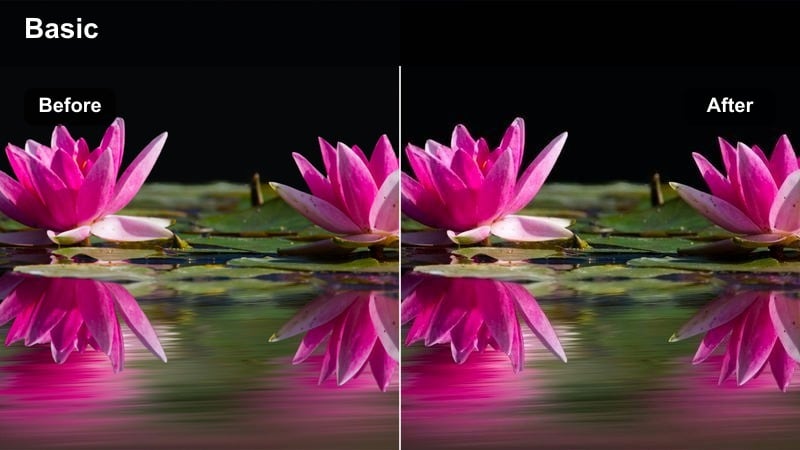
- Effect look: Cooled-down waterfront tones with deeper blues and neutralized reds for clean marina and pier scenes.
- Best for: Harbor walks, docks, piers, and waterfront city parks at golden or blue hour.
- Editing tip: Slightly increase micro contrast and sharpness to define boats, ropes, and dock textures against the water.
Harbor Frost refreshes marina and pier footage by emphasizing clean blues in water and sky while quietly dialing back red and orange pollution in buildings and boats. The result is a crisp, cool city-waterfront aesthetic that feels organized and modern.
In Filmora, combine this filter with a small boost to clarity or sharpness so masts, ropes, and dock planks stand out clearly. Adjust the intensity slider to fine-tune how blue the scene becomes, and use the vignette tool if you want more focus on your subject walking along the pier.
Cool Urban Outdoor Street Scenes
City Park Cooler
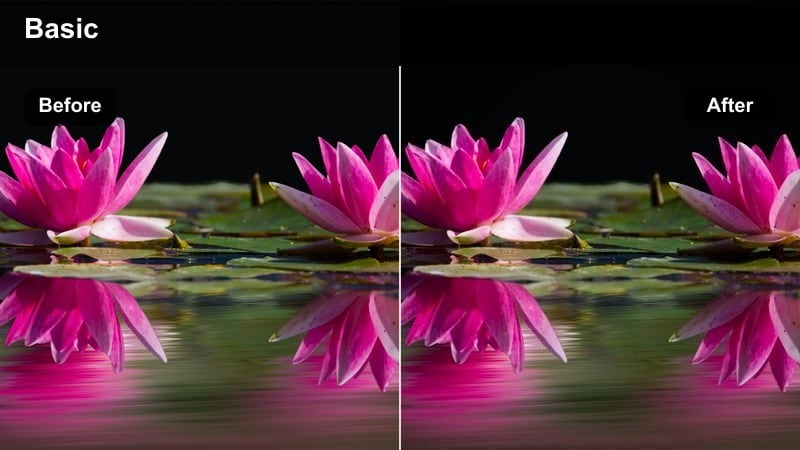
- Effect look: Clean cool cast with balanced contrast that softens yellows in grass and boosts structure in buildings.
- Best for: Outdoor city parks, skate spots, and public squares shot during the day.
- Editing tip: Raise the blacks slightly to get a trendy low-contrast city look that works well for vlogs and B-roll.
City Park Cooler adds a subtle cool wash to your daytime urban greenery while taming overly bright yellows and guiding detail into surrounding architecture. It delivers a relaxed, lifestyle-ready look that flatters both people and the city backdrop in vlogs and social content.
In Filmora, apply this filter to all of your park clips, then tweak exposure clip by clip so brightness stays consistent across angles. Lifting blacks a little creates a soft, low-contrast aesthetic, and gently softening sharpness on close-ups keeps skin and clothing natural.
Rooftop Breeze
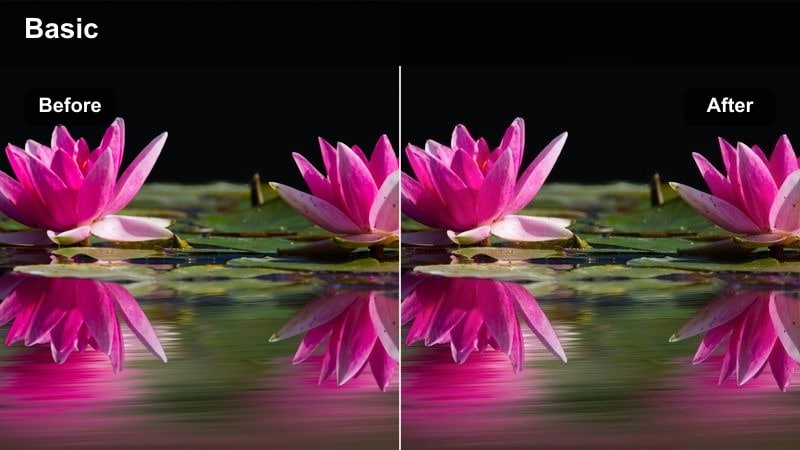
- Effect look: Stylish cyan-leaning highlights with cooler shadows that give rooftops and terraces a modern city vibe.
- Best for: Rooftop hangouts, skyline time-lapses, and balcony storytelling shots during late afternoon or evening.
- Editing tip: Add a gentle push of saturation into blues and cyans to make the skyline pop without overpowering your subject.
Rooftop Breeze infuses your skyline shots with clean cyan highlights and cool shadows, turning standard terraces and balconies into cinematic city stages. It works especially well during late afternoon and early evening when the sky still carries color but city lights begin to glow.
Inside Filmora, pair this filter with slight boosts to blue and cyan saturation so distant buildings and sky gradients stand out. If you notice banding in the sky, add a subtle film grain or noise layer, and expose a bit darker in camera so you can lift midtones without blowing out the horizon in post.
Street Shadow Cool
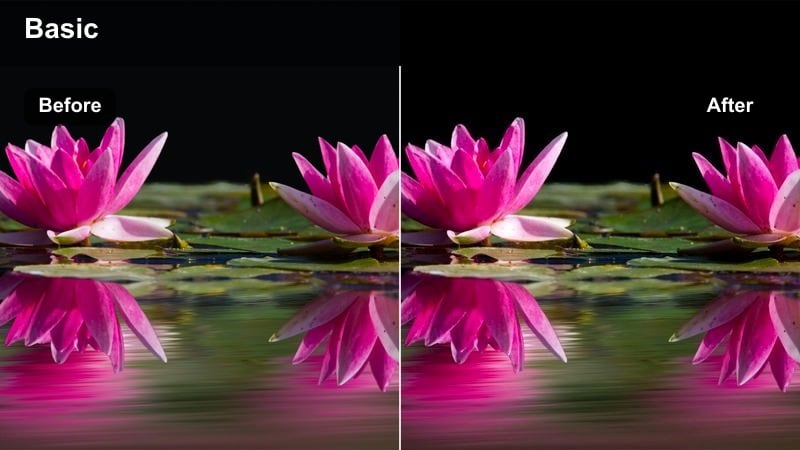
- Effect look: Deep, cool shadows and slightly muted midtones for graphic city streets with strong contrast and lines.
- Best for: Sidewalk shots, street crossings, bike rides, and handheld city walks during bright daytime.
- Editing tip: Use masks to lighten faces if they fall into heavy shadow so people remain readable against darker backgrounds.
Street Shadow Cool embraces harsh daylight by turning long shadows and bold shapes into a strong graphic style. Shadows are pushed cooler and deeper while midtones are gently muted, ideal for crosswalks, bikes, and architectural lines in busy downtown areas.
In Filmora, use this filter on well-exposed street clips, then add masks or keyframes to brighten faces that drop into dark zones. A touch of clarity and texture on buildings and pavement enhances structural details, while optional motion blur on fast movement keeps attention on shapes instead of distractions.
Twilight, Campsite, And Night Outdoor Vibes
Campfire Cool Balance
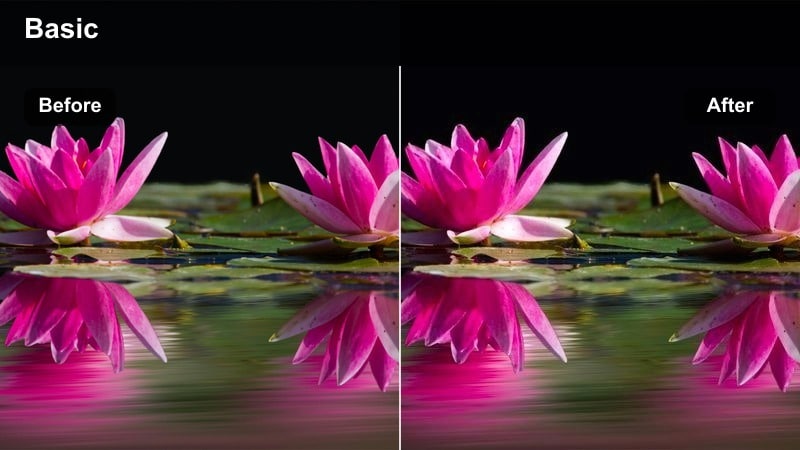
- Effect look: Balances warm firelight with cool surroundings, keeping flames rich while cooling shadows and background tones.
- Best for: Campsite stories, tents, and outdoor gatherings lit by fire, lanterns, or string lights.
- Editing tip: Use color wheels to warm highlights just a touch if the fire loses its orange glow after applying the cool filter.
Campfire Cool Balance is tuned for mixed lighting, preserving the cozy orange of flames while cooling down trees, tents, and sky. This creates a cinematic split between warm subjects and cooler backgrounds, perfect for storytelling around a camp or backyard fire.
In Filmora, drop this filter onto your night clips, then adjust highlight temperature if the fire starts to look too neutral. A gentle vignette and a small lift in midtones around faces help your subjects stand out, and applying light noise reduction before sharpening keeps night shadows clean.
Blue Hour Lakeside
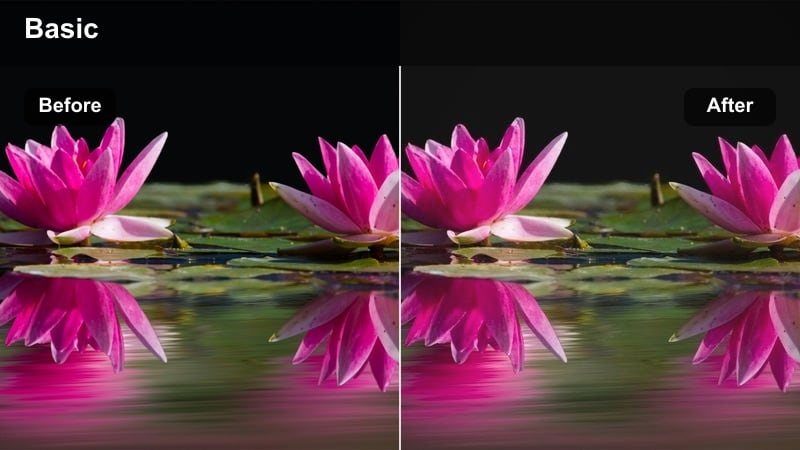
- Effect look: Leans heavily into blue hour tones with gentle contrast and slightly faded blacks for a dreamy dusk feel.
- Best for: Lakeside evenings, twilight dock scenes, and late-day outdoor reflections on water.
- Editing tip: Reduce saturation a bit and raise blacks to enhance the soft, cinematic fade while preserving enough detail in silhouettes.
Blue Hour Lakeside enhances the natural blues of dusk, softening contrast and slightly fading blacks to produce a dreamy, nostalgic mood. Reflections on water become smoother and more cinematic, while silhouettes keep just enough detail to guide the viewer.
In Filmora, use this filter on your last daylight and early night clips to create a smooth visual transition from day to night. Adjust blacks upward for a gentle fade, fine-tune saturation to avoid electric-looking blues, and keep your music and crossfades consistent so the color shift supports the emotional arc.
City Night Chill
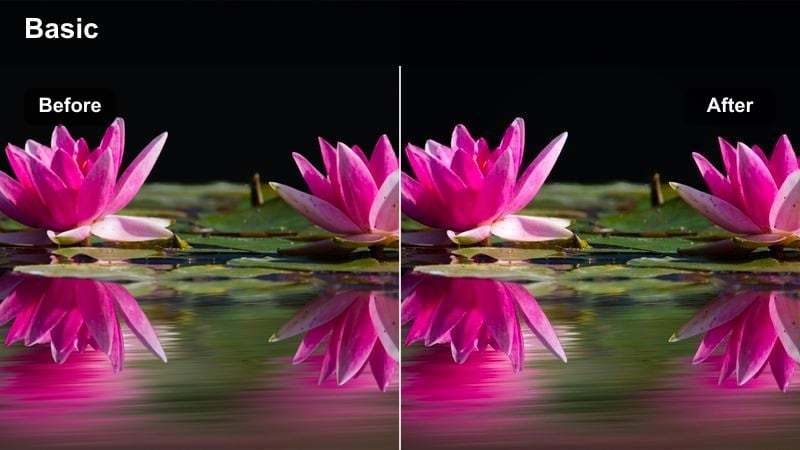
- Effect look: Cool, contrasty night look that deepens blues in shadows while taming overly warm streetlights and signage.
- Best for: Night street walks, bridges, plazas, and outdoor nightlife scenes lit by city lights.
- Editing tip: Pull down saturation in orange and yellow while gently boosting blues to emphasize neon and sky reflections.
City Night Chill transforms your night city footage into a sleek, modern look by cooling shadows and neutralizing overly orange streetlights. Neon signs, reflections, and sky patches take on a deeper blue tone, giving your night walks and urban B-roll a cohesive, stylized grade.
In Filmora, apply this filter to well-exposed clips and avoid lifting shadows too much so noise does not overpower the cool mood. Then reduce saturation in orange and yellow ranges, boost blues slightly, and finish with a small contrast increase to keep edges crisp and nightlife scenes punchy.
Tips for Using Cool Outdoor Color Grading Lut Filters in Filmora
- Shoot slightly underexposed in bright outdoor environments so your cool filters have more highlight detail to work with.
- Keep skin tones natural by adjusting only the orange and red ranges after applying a strong cool outdoor filter.
- Use different cool presets for wide landscapes and close-ups, then match contrast and saturation so the sequence still feels cohesive.
- Dial back filter intensity to around 60 to 80 percent for talking-head content where you want the story to stay more important than the grade.
- Save your favorite cool outdoor filter plus exposure tweaks as a custom preset in Filmora to reuse across episodes or series.
- Combine Filmora's AI color tools with LUT-style filters to fix white balance first, then focus on creative cool tones.
- Experiment with stacking two cool outdoor presets at low opacity and blend them for unique blue and teal mixes.
- Always preview filters on multiple clips from the same shoot to ensure consistent results across lighting changes.
Cool outdoor color grading LUT-style filters can quickly turn ordinary daylight footage into cohesive, cinematic scenes with crisp skies and controlled contrast.
Experiment with different presets for trails, coastlines, cities, and night shots, then adjust intensity and color balance in Filmora to build a consistent signature outdoor look for your channel.
secure download