

 100% Security Verified | No Subscription Required | No Malware

Couple TikTok videos live and die on vibe. The right filter can turn a simple date clip or inside-joke moment into a scroll-stopping, shareable romance edit that feels ready for the For You page.
Below you will find 12 Filmora-style couple video filters for TikTok that are perfect for relationship edits, viral date videos, and trendy romance transitions, so short-form creators can lock in a consistent, bingeable look across their couple content.
In this article
Soft Romance Filters for Cozy Couple Moments
Blush Haze
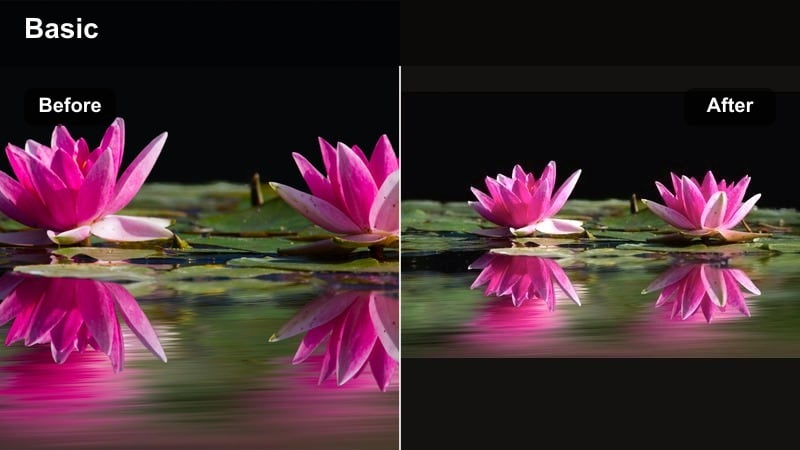
- Effect look: Soft pastel warmth with gentle pink highlights and a light glow around skin tones.
- Best for: Quiet date nights, couch cuddles, and low-light relationship edits that need a dreamy boost.
- Editing tip: Lower contrast slightly and add a subtle vignette so the pink glow pulls focus toward your faces.
Blush Haze wraps your couple TikToks in a soft pastel tint, adding a gentle pink lift to highlights and smoothing out skin so every frame feels romantic. In Filmora, this style works beautifully on clips that were shot in dim living rooms or bedrooms, because the warm tones make shadows feel cozy instead of muddy.
Use Blush Haze on relationship edits built from small, intimate moments like cuddles, shared looks, or low-key weekend vlogs. In Filmora, combine the filter with slight noise reduction and a touch of blur on the background so the softness looks intentional. Add a light vignette to keep attention on your faces and keep exposure just under neutral so the glow does not wash out your skin.
Lock In Your Couple Aesthetic with AI Color Matching
Instead of guessing which filter to use for every new TikTok, Filmora-style AI color tools let you quickly match any new clip to the couple aesthetic you already love. You can sample the tones from a favorite Blush Haze edit and apply a similar romance palette across your whole project.
Once you dial in a look that fits your relationship edits, save it as a preset in Filmora. That way every new date vlog, trend video, or anniversary recap automatically feels like part of the same cohesive love story.
Experiment with AI-driven color matching until your couple feed looks cohesive from top to bottom.
 secure download

Preview Couple Filters on Your Clips in Seconds
When you are building couple TikToks around trending audio, you need to see quickly which filter actually fits the beat. In Filmora, you can drag in a short clip, cycle through soft, trendy, and moody presets like Blush Haze or Neon Date, and judge the vibe in real time.
Test each romance video effect on bright outdoor dates and dim bedroom scenes to make sure your chosen filter stays flattering everywhere. Side-by-side comparisons help you lock in the look that feels most shareable for your next viral date edit.
Use quick side-by-side previews to compare how each filter performs before you commit to a full edit.
secure downloadSave Filters as LUT-Style Presets for TikTok and Instagram
Once you have built your favorite couple TikTok filter combos in Filmora, you can convert them into LUT-style presets. That means any future relationship edit, from TikTok trends to Instagram Reels, can reuse the exact same tones with a single click.
Keeping a few go-to presets for soft romance, moody storytime, and high-energy trends makes it easy to stay on-brand without regrading every clip from scratch.
Build a small library of go-to couple presets for soft romance, moody storytime, and high-energy trend videos.
secure downloadCandlelight Soft
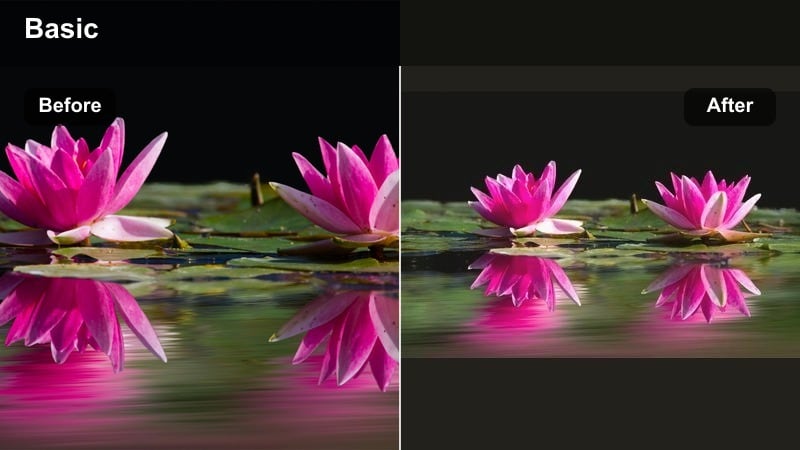
- Effect look: Golden, low-contrast glow that mimics candle or fairy light with gentle highlights.
- Best for: Dinner dates, anniversary surprises, and proposal teasers that need warm storytelling energy.
- Editing tip: Slow down your clips slightly and add a subtle blur transition to match the smooth, glowing mood.
Candlelight Soft adds a golden glaze to your shots, lifting warm tones and softening harsh edges so restaurant bulbs and fairy lights feel cinematic. In Filmora, it is ideal for romantic dinners, surprise bouquets, and ring-closeups where you want the warmth of the scene to tell the story.
Apply this filter to clips where the light source is visible in frame, then use Filmora to add gentle slow motion and smooth blur transitions between shots. Sync your brightest frames to beat drops or lyrics like this is what love feels like so the glow becomes part of the audio-driven moment.
Dreamy Fade
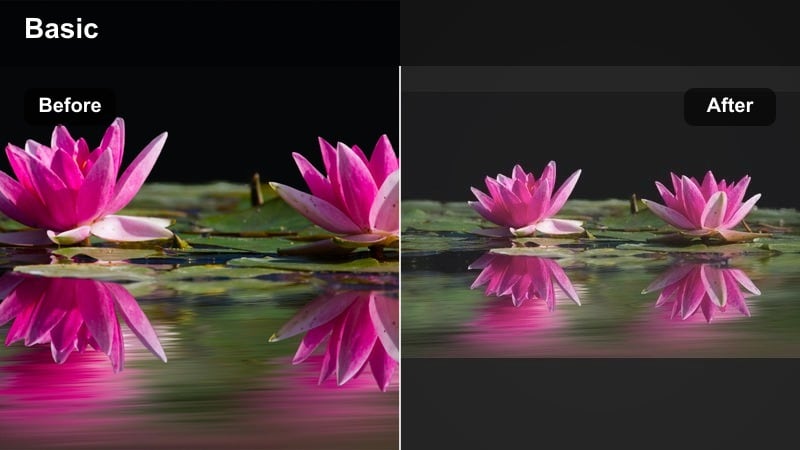
- Effect look: Low-clarity, slightly desaturated filter with soft highlights and a hazy edge around the frame.
- Best for: Flashback-style couple TikToks, first-date stories, and slow romance transitions.
- Editing tip: Add a very short crossfade between clips and lower sharpness so the whole edit feels like a memory.
Dreamy Fade gives your couple edits a soft-focus, memory-like atmosphere with delicate highlights and reduced sharpness. In Filmora, it works especially well on older footage from your camera roll, smoothing over quality differences while adding emotional nostalgia.
Use Dreamy Fade when you are building storytime TikToks about how you met, your first trip, or key relationship milestones. Combine it with short crossfades, timestamp overlays, and lower image clarity so the audience instantly reads those clips as flashbacks when you cut back to present-day footage with a cleaner filter.
Trendy Pop Color Filters for Viral Date Edits
Neon Date
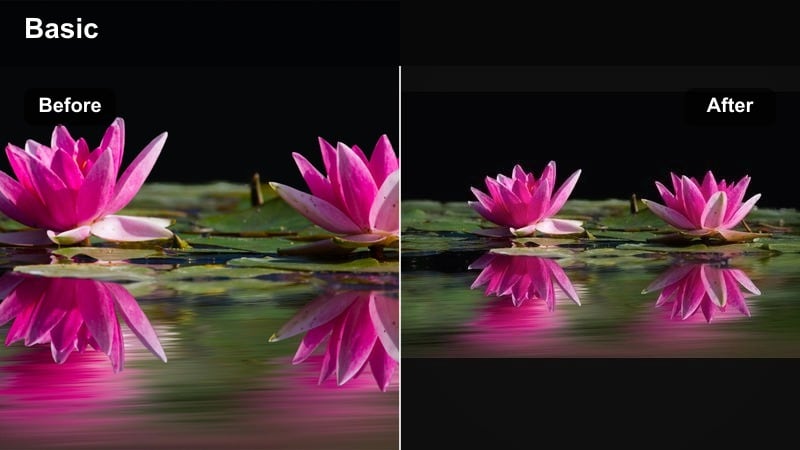
- Effect look: Punchy saturation with boosted blues and pinks, perfect for city lights and neon signs.
- Best for: Late-night arcade dates, city walks, and fun couple trend videos at colorful locations.
- Editing tip: Shoot with strong colored lights in frame, then use speed ramps on the brightest pops of neon.
Neon Date cranks up blues, pinks, and purples to make city lights and LED signs explode with color. In Filmora, this filter turns late-night arcade runs, fairgrounds, and downtown walks into high-energy, scroll-stopping visuals that match upbeat audio trends.
Frame your shots so neon signs sit behind or beside you, then apply Neon Date and add speed ramps around head turns, spins, or high-fives. The boosted saturation makes every quick camera move feel more dramatic, helping your couple TikToks grab attention within the first second on the For You page.
Bubble Pop
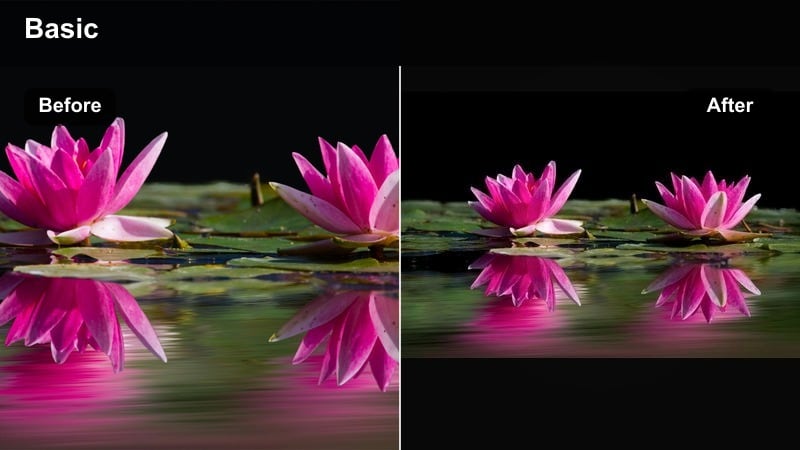
- Effect look: High-contrast, candy-color filter with punchy reds and teals for playful couple vibes.
- Best for: Silly couple challenges, prank clips, and lighthearted relationship edits.
- Editing tip: Use quick jump cuts and zooms to match the energetic colors; keep shots short and snappy.
Bubble Pop adds candy-bright reds and teals with higher contrast to make every frame feel playful and animated. In Filmora, it is ideal for dance trends, pranks, or joke POVs where you and your partner are leaning into chaotic, fun energy.
Pair Bubble Pop with rapid-fire jump cuts, zoom-ins on reactions, and text callouts or emojis near your faces. Cutting on every beat or clap in trending audio helps the color energy stay in sync with the pacing, boosting retention and replay value on your couple challenge videos.
Cotton Candy Sky
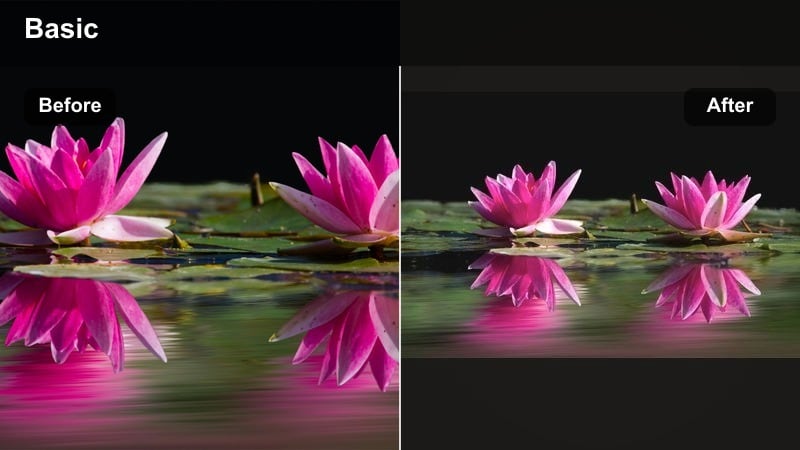
- Effect look: Soft blue and pink split-tone style that makes skies and backgrounds look pastel and dreamy.
- Best for: Golden hour dates, rooftop sunsets, and park picnics where the sky is in frame.
- Editing tip: Tilt your camera up slightly to include more sky so the pastel tones dominate the frame.
Cotton Candy Sky repaints your background with pastel blues and pinks, especially when the sky fills most of the frame. In Filmora, this filter turns everyday rooftop hangs, beach walks, and park dates into soft, aesthetic visuals that look custom-made for couple TikTok trends.
When filming, set your phone lower and angle it upward to maximize the visible sky. After applying the filter in Filmora, add slow-motion spins, lifts, or hand-holding shots synced with soft audio. The pastel split tones make your silhouettes stand out against the dreamy background for highly shareable romance edits.
Moody Aesthetic Filters for Story-Driven Couple Edits
Cinema Mood
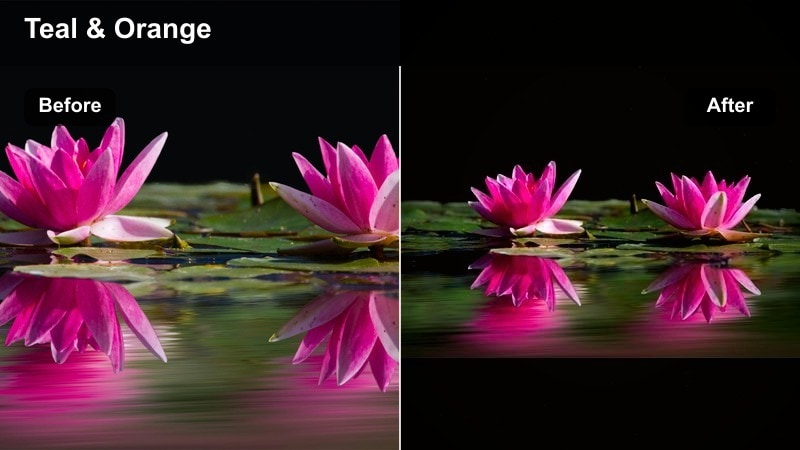
- Effect look: Muted tones with deep shadows and slight teal-and-orange balance for a film-style frame.
- Best for: POV relationship stories, arguments-then-make-up edits, and narrative couple TikToks.
- Editing tip: Use horizontal framing when possible and add subtle film grain for a mini-movie feel.
Cinema Mood brings a teal-and-orange influenced film look with deeper shadows and softened saturation, immediately making everyday scenes feel like movie stills. In Filmora, this filter works perfectly for POV stories, emotional arcs, or text-driven edits that walk viewers through a relationship moment.
Record simple actions like closing doors, sitting apart, and then reuniting, then apply Cinema Mood and add gentle film grain for texture. With well-timed cuts and on-screen captions like POV: you realized they were your safe place, you can build mini-movie couple TikToks that feel far more premium than the raw footage you started with.
Stormy Teal
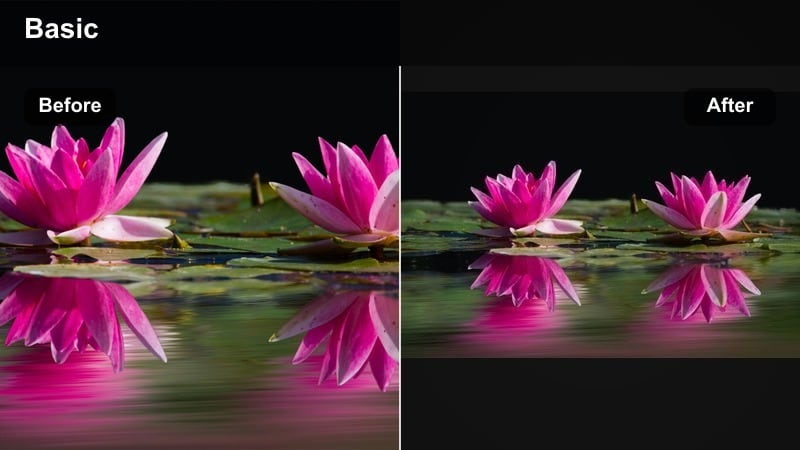
- Effect look: Cool teal shadows with softened highlights and a slightly desaturated overall tone.
- Best for: Rainy-day dates, car window shots, and emotional romance edits synced to slower sounds.
- Editing tip: Add light speed ramps in and out of focus changes to mirror the emotional shift in your audio.
Stormy Teal cools down your shadows and lowers saturation slightly, giving your couple clips a reflective, late-night vibe. In Filmora, it is great for parked car conversations, rainy windows, or walking shots where the mood is more introspective than bubbly.
Shoot through windows, mirrors, or puddles so both your faces and their reflections catch the teal tint. Then, in Filmora, add light speed ramps and focus pulls that land on key lyrics or spoken lines, letting the cool color palette underline emotional beats in your romance edit.
Sepia Memory
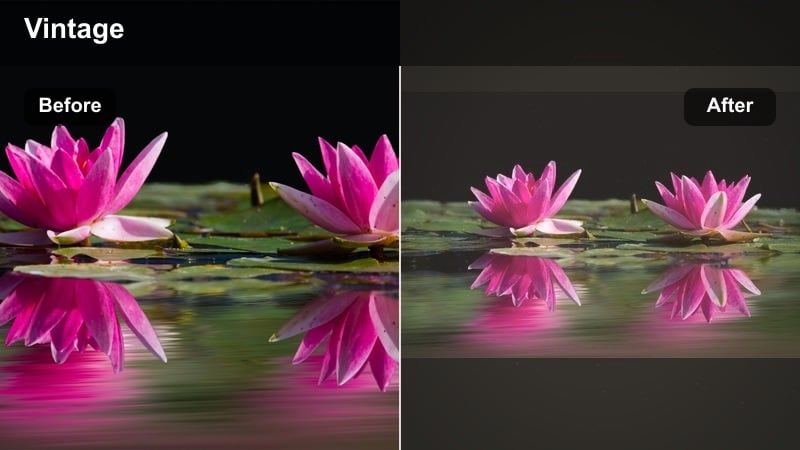
- Effect look: Warm brownish tones with subtle fade in blacks to mimic vintage photos.
- Best for: Throwback couple montages, then-and-now trends, and long-term relationship recaps.
- Editing tip: Alternate between sepia clips and normal color clips to highlight time jumps in your relationship story.
Sepia Memory washes your clips in warm brown tones with slightly faded blacks, giving everything an instant vintage-photo feel. In Filmora, it is ideal for long-term couples who want to turn old photos, screenshots, and early video clips into a cohesive throwback montage.
Apply Sepia Memory across mixed media like vertical videos, horizontal footage, and still images so your timeline feels unified. Alternate sepia flashbacks with modern, full-color shots to emphasize time jumps, and overlay milestone text like first trip or moved in to make your relationship recap even more engaging on TikTok.
Clean Creator Filters for On-Brand Couple Content
Soft Creator Clean
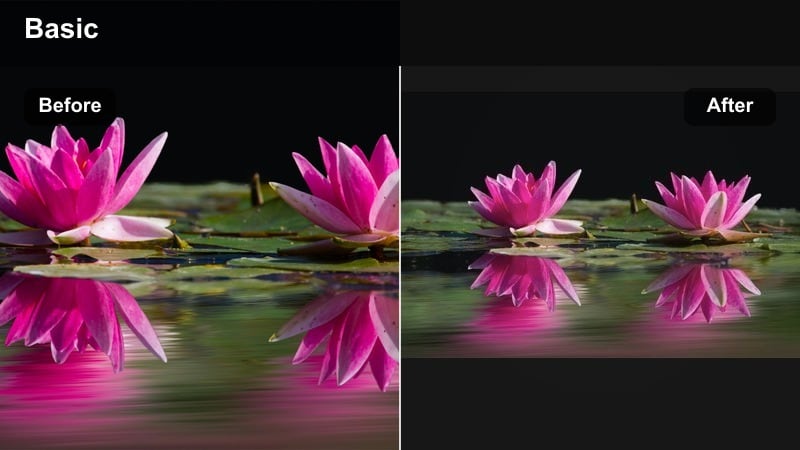
- Effect look: Neutral, skin-friendly filter with gentle contrast and slight brightness lift.
- Best for: Daily couple vlogs, GRWM with your partner, and brand collab-style TikTok content.
- Editing tip: Keep your background simple and repeat this filter across your series for a recognizable couple aesthetic.
Soft Creator Clean keeps colors close to true-to-life while smoothing contrast and lifting brightness just enough to flatter skin. In Filmora, this filter is perfect for daily vlogs, routines, and any couple content that you want to look professional yet natural.
Use it as your default look for recurring formats like GRWM, day-in-the-life, or Q and A clips with your partner. By applying the same filter across episodes in Filmora, you build a recognizable couple brand that feels ready for sponsors and easy to cross-post to TikTok, Reels, and Shorts.
White Room Glow
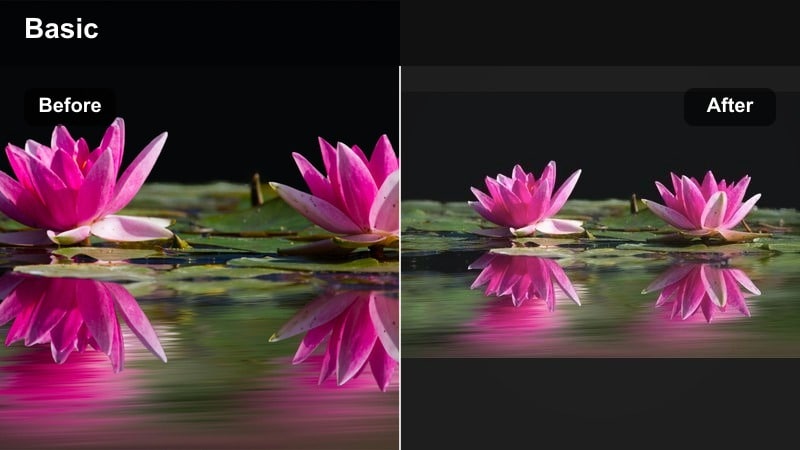
- Effect look: Bright whites, softened shadows, and a clean, airy tone that flatters indoor spaces.
- Best for: Home routines, matching outfit reveals, and mirror couple transitions.
- Editing tip: Stand near windows or white walls to let the filter amplify the airy, minimal vibe.
White Room Glow brightens whites and softens shadows to give small indoor rooms a studio-like, airy feel. In Filmora, it is especially useful for bedroom or living-room shoots where you want a minimal, lifestyle-creator aesthetic without extra lighting gear.
Declutter your visible background, stand near a window or white wall, and then apply White Room Glow to stretch the sense of space. Add gentle slide or push-in transitions between mirror shots and outfit reveals so the entire sequence feels polished and ready for brand integrations.
Creator Neutral Film
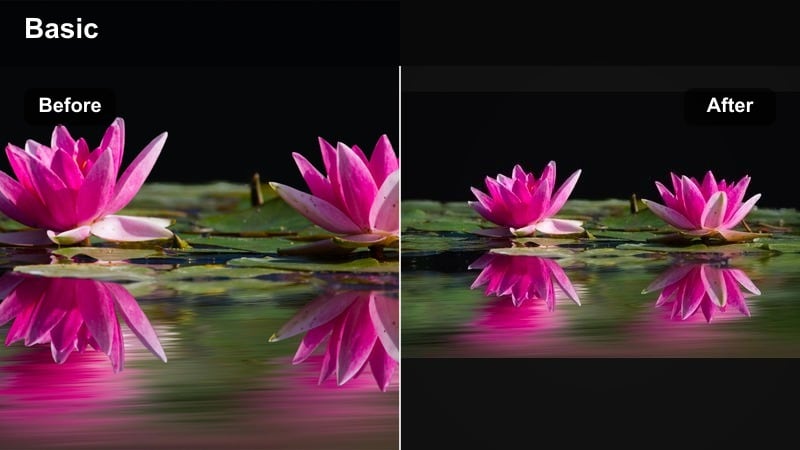
- Effect look: Balanced, film-inspired neutral tones with subtle contrast and a touch of warmth.
- Best for: Sponsored couple videos, travel diaries, and any content you might cross-post to Instagram.
- Editing tip: Avoid oversaturating; let this filter be your base look so you can recycle clips on multiple platforms.
Creator Neutral Film delivers a balanced, slightly warm film look that works across almost any scene, from city walks to hotel rooms. In Filmora, it is a strong base filter when you know you will export the same couple vlog for TikTok, Reels, and Shorts.
Keep saturation under control and let the filter handle most of the grading so your footage stays flexible. Export a high-resolution master from Filmora and then cut multiple viral date edits from the same footage with different crops and audios, knowing the underlying neutral film look will hold up everywhere.
Tips for Using Couple Tiktok Trendy Filters in Filmora
- Batch shoot a few couple clips in similar lighting so your favorite TikTok couple filter looks consistent across a whole series.
- Sync your biggest color or glow moments to the hook of the audio to boost watch time on romance edits.
- Create one soft, one trendy, and one moody preset so you can quickly match filters to different relationship storylines.
- Test your edits on both dark and light phone themes to be sure text, overlays, and filter intensity stay readable.
- When cross-posting to Instagram, slightly lower saturation so couple video filters for TikTok do not look overprocessed in Reels.
- Mix close-ups and wide shots under the same filter to show both emotion and setting without breaking your visual style.
- Use Filmora keyframes to animate subtle zooms that complement the mood of each filter rather than overpowering it.
- Save and label your presets by mood, like cozy, neon, or drama, so you can match them quickly to new trend sounds.
With the right couple video filters for TikTok, simple date clips and everyday moments can turn into aesthetic, bingeable edits that feel made for the For You page.
Pick two or three signature looks from these presets, save them, and reuse them across relationship edits, trend videos, and cross-posted Reels so your couple brand looks intentional everywhere you show up.
secure download