

 100% Security Verified | No Subscription Required | No Malware


 ChatGPT
 Perplexity
 Gemini
 Claude
 Grok
Grok
These editorial portrait cinematic filters are designed for content creators who want every frame to feel like a still from a fashion film or magazine cover shoot.
Use these presets to shape light, color, and contrast so your portraits instantly look more intentional, story-driven, and ready for high-end editorial campaigns or social content.
In this article
Moody Studio Close-Ups
Velvet Shadow Portrait
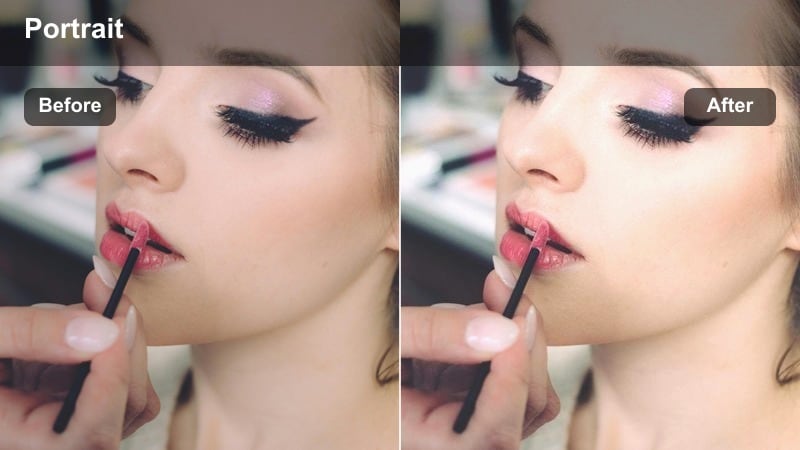
- Effect look: Soft contrast with deep shadows and a velvety skin glow for dramatic studio portraits.
- Best for: Close-up editorial headshots under controlled studio lighting or a single key light.
- Editing tip: Lower the blacks slightly and add a subtle vignette to keep the viewer's focus on the eyes.
In Filmora, Velvet Shadow Portrait is your go-to when you want a cinematic, almost painterly studio look that feels instantly premium. The filter deepens shadows while keeping skin silky, so cheekbones, jawlines, and eye sockets are sculpted without adding harsh texture or digital noise.
Apply this preset to shots captured with a single softbox or beauty dish and then fine-tune the black levels with the color tools so details in hair and wardrobe remain visible. Add a gentle vignette and a touch of sharpening on the eyes to create a cover-ready editorial portrait that stands out on Instagram, Reels, and campaign lookbooks.
Use AI to Match Editorial Color Stories
Filmora AI Color tools help you keep consistent editorial color stories across multiple portraits, even when they are shot in different studios or on different days. Once you have a hero frame with the perfect magazine-style grading, you can analyze it and transfer that look to the rest of your timeline.
Combine this with Velvet Shadow Portrait or any other Editorial Portrait Cinematic Filter to lock in a cohesive aesthetic across an entire campaign or social series, without spending hours dialing in each clip by hand.
 secure download

Preview Filters on Real Editorial Portraits
Before locking in a final grade, test how each Editorial Portrait Cinematic Filter behaves on different skin tones and lighting setups directly inside Filmora. Load a short sequence that includes studio, window light, and night-city shots, then cycle through presets to see which ones feel most on-brand.
Watching these comparisons in motion makes it easier to build a small toolkit of go-to looks: one for clean beauty, one for moody campaigns, and another for night fashion reels, so you can grade faster while keeping your style consistent.
secure downloadCombine Filters with LUTs for Signature Looks
For maximum control, start with a clean portrait LUT in Filmora to correct exposure and skin tones, then stack your favorite Editorial Portrait Cinematic Filter on top for style. This two-step approach keeps the grade technically accurate while giving you room to push contrast, color, and mood.
Once you have a combination you love, save it as a custom preset so you can apply the same editorial look across multiple shoots and platforms, from TikTok teasers to long-form campaign videos.
secure downloadGlassy Skin Glam
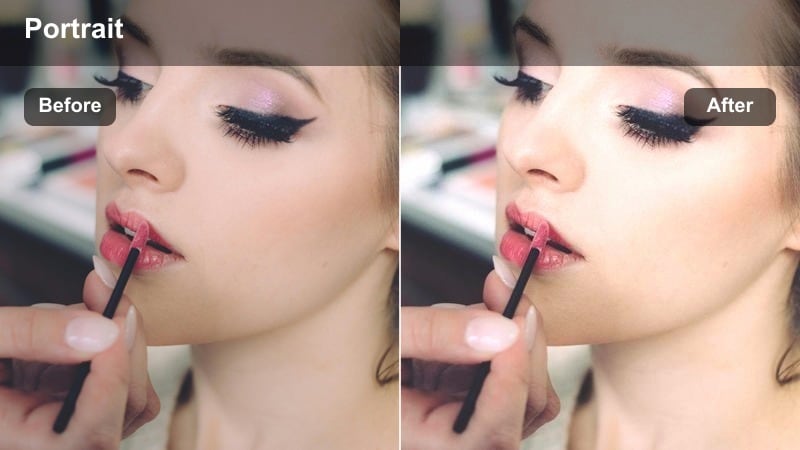
- Effect look: High-end beauty gloss with softened highlights and clean, neutral tones.
- Best for: Beauty reels, skincare promos, and glossy editorial portraits that need polished skin.
- Editing tip: Reduce clarity or sharpness around the cheeks and forehead for an even smoother glass-skin effect.
Glassy Skin Glam in Filmora is ideal when you want complexions to look luxurious and editorial without veering into plastic or artificial territory. The filter gently lifts highlights and smooths minor imperfections while keeping the overall palette neutral, which is perfect for product-focused beauty content.
After applying the preset, use Filmoras masking and detail adjustment tools to selectively sharpen only the eyes, brows, and lips so the face stays luminous but still crisp where it matters. If your footage was shot under harsh makeup lights, dial back saturation and tweak white balance slightly to maintain a clean, magazine-ready finish.
Ink Black Contrast
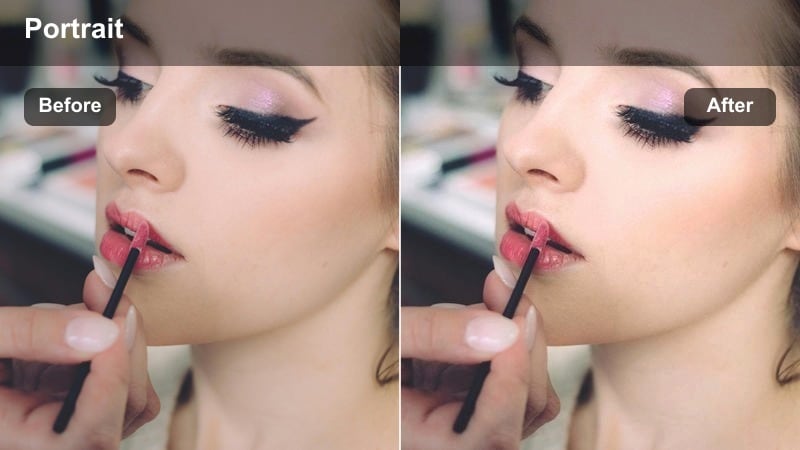
- Effect look: Punchy contrast with inky blacks and cool, cinematic midtones.
- Best for: Monochrome-inspired fashion portraits, dramatic beauty shots, and edgy studio campaigns.
- Editing tip: Pair with a subtle film grain layer to make the deep blacks feel organic, not digitally crushed.
Ink Black Contrast is built for bold, statement-making portraits where negative space and deep shadows drive the mood. In Filmora, the filter intensifies contrast and cools the midtones, giving your shots a sleek, high-fashion edge that feels like a still from a luxury campaign.
Apply it to footage that is slightly underexposed so highlights remain controlled, then add Filmoras film grain and curve tools to refine how your blacks roll off. If skin starts to look too hard, pull back contrast in the midtone range while preserving deep blacks, striking the balance between gritty and flattering.
Window Light Editorial Scenes
Soft Magazine Daylight
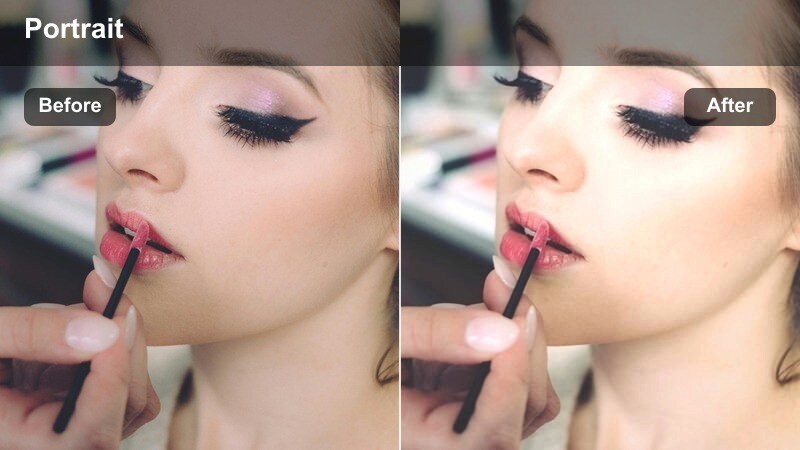
- Effect look: Low-contrast, airy tones with slightly lifted blacks and gentle warm highlights.
- Best for: Lifestyle portraits by large windows, editorial coffee shop shoots, or apartment scenes.
- Editing tip: Reduce saturation in the greens and yellows to keep the scene feeling polished and editorial, not casual vlog.
Soft Magazine Daylight turns everyday window light into a delicate, editorial glow that flatters skin and interiors alike. In Filmora, the filter gently lifts blacks and lowers overall contrast so your portraits feel breathable and modern, perfect for lifestyle content that still needs a luxury edge.
Use it on clips shot near big windows or open doorways, then refine color with Filmoras HSL panel to mute greens, yellows, or any distracting background tones. Add a light vignette and micro-contrast around the face to ensure your subject remains the focal point while the environment stays soft and cinematic.
Editorial Muted Neutrals
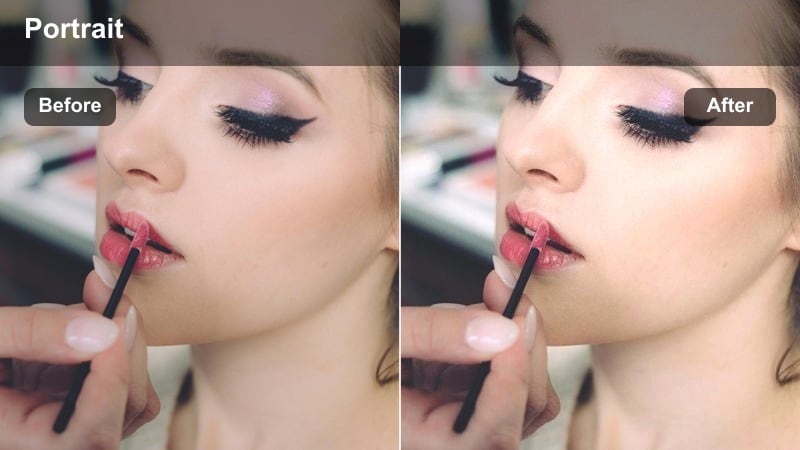
- Effect look: Desaturated earthy tones with creamy highlights and subtle cool shadows.
- Best for: Editorial living-room portraits, wardrobe lookbooks, and soft storytelling scenes.
- Editing tip: Pull back saturation in reds and oranges to make wardrobe and skin stay understated and chic.
Editorial Muted Neutrals is ideal for content where wardrobe, texture, and posing matter more than bold color. In Filmora, this filter dials down saturation and smooths highlights so beige, taupe, and other earth tones look intentionally minimal and magazine-ready.
Apply it to neutral interiors, capsule wardrobe shoots, or storytelling Reels where you want a calm, cohesive palette. Then fine-tune reds, oranges, and yellows using Filmoras HSL controls so skin looks soft but not washed out, and any stray bright colors remain controlled within the overall muted aesthetic.
Hazy Backlit Glow
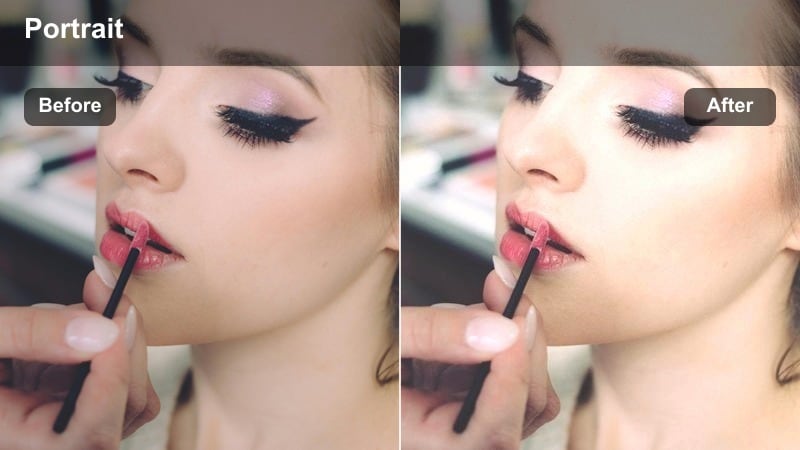
- Effect look: Dreamy halation with lifted highlights and a subtle soft-focus bloom around edges.
- Best for: Backlit window portraits, doorway reveals, and romantic editorial sequences.
- Editing tip: If the glow feels too strong, reduce overall exposure slightly then compensate with a gentle midtone lift.
Hazy Backlit Glow is designed to make strong backlight feel intentional and ethereal rather than simply overexposed. In Filmora, the filter adds a soft bloom around bright edges and lifts highlights so your subject appears wrapped in a cinematic halo.
Use it on scenes where your subject stands in front of windows, open doors, or bright outdoor spaces and then manage exposure in the color tools to keep facial details visible. A mild midtone lift combined with careful sharpening on the eyes will keep the subject engaging while the background softens into a dreamy, editorial blur.
Night City Fashion Portraits
Neon Cinema Portrait
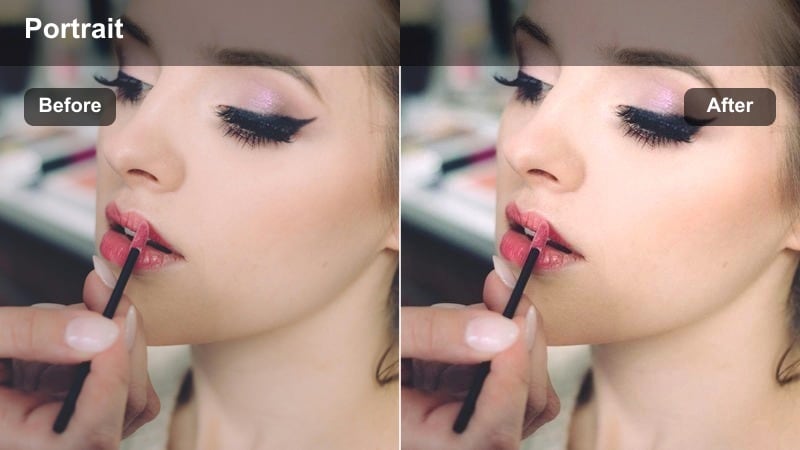
- Effect look: Rich neon saturation with cyan shadows and magenta-tinted highlights for a city-night vibe.
- Best for: Street fashion portraits shot under signs, storefronts, and city lights after dark.
- Editing tip: Increase contrast slightly and darken the background to keep neon colors from overpowering the skin tones.
Neon Cinema Portrait pushes city lights into bold cyan and magenta tones that feel straight out of a music video or fashion film. In Filmora, the filter deepens night shadows while amplifying color reflections on skin and wardrobe for a high-energy, urban aesthetic.
Apply it to clips shot near neon signs, LED screens, or colorful storefronts, then refine skin with Filmoras HSL and masking tools to prevent oversaturation on faces. Slightly darken the background and add selective sharpening to facial features so your subject pops against the glowing night environment.
Midnight Editorial Grit
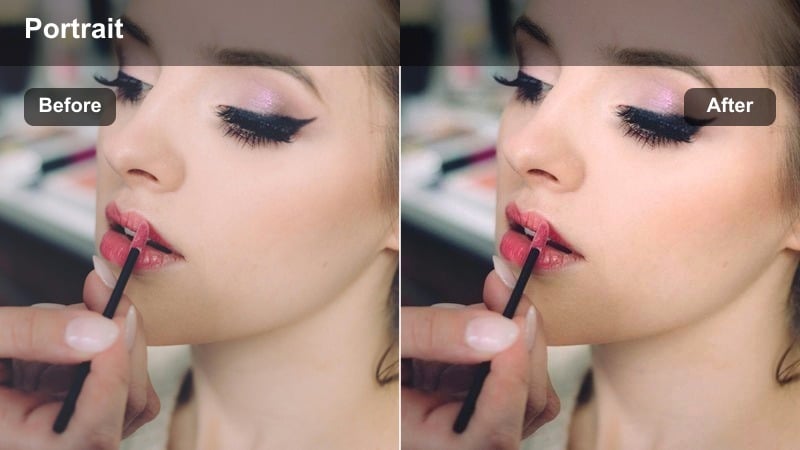
- Effect look: Crushed blacks with cool steel tones and subtle film grain for gritty city portraits.
- Best for: Underground parking lots, alleyway fashion shoots, and edgy rooftop portraits at night.
- Editing tip: Add a small amount of noise reduction before the filter to keep low-light grain from becoming too harsh.
Midnight Editorial Grit is all about embracing darkness and texture to tell a moodier story. In Filmora, this filter cools the color palette, deepens blacks, and introduces a subtle grainy feel that works beautifully with concrete, metal, and streetlight sources.
Use it on night portraits where you want to highlight only the most important parts of the frame, like the face and select wardrobe details. Run light noise reduction before applying the filter, then fine-tune shadows and blacks with Filmoras curve controls to keep just enough detail in dark clothing and hair while maintaining a strong, cinematic silhouette.
Cinema Street Gold
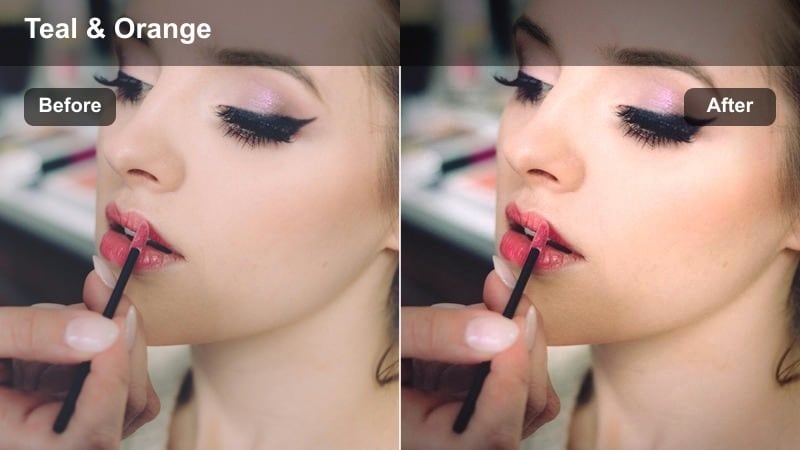
- Effect look: Warm streetlamp highlights with teal-tinted shadows and a soft cinematic roll-off.
- Best for: Night stroll portraits under streetlights, crosswalk scenes, and downtown date-night shoots.
- Editing tip: Warm the white balance slightly before applying the filter to maximize that golden streetlamp look.
Cinema Street Gold gives your night portraits the classic teal-and-gold split that dominates modern cinematic grading. In Filmora, the filter warms highlights where streetlamps hit skin while nudging shadows toward teal, creating depth and color contrast without losing realism.
Apply it to clips filmed under sodium-vapor lamps, headlights, or ambient city glow and adjust white balance a touch warmer before the preset to enhance the golden effect. Then refine saturation and luminance in Filmoras HSL to keep skin tones believable while backgrounds take on that stylized, movie-night atmosphere.
Studio Color Gel Experiments
Duotone Fashion Gel
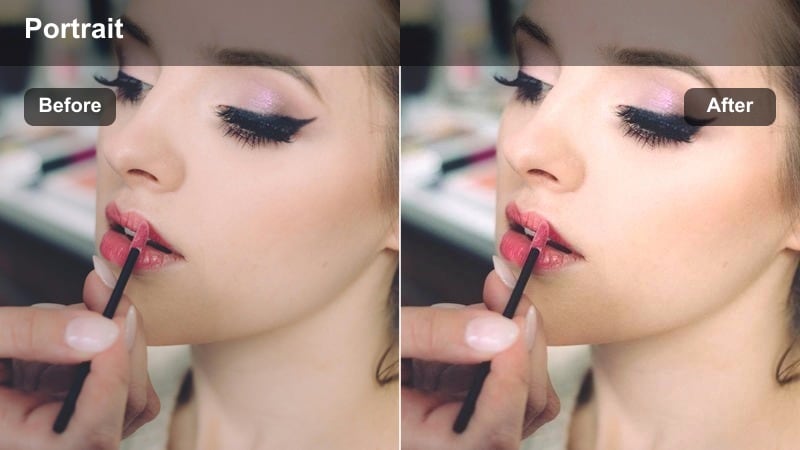
- Effect look: Bold two-color split with one warm and one cool tone creating a graphic editorial feel.
- Best for: Studio gel portraits, experimental fashion reels, and campaign teasers.
- Editing tip: Align your gels to roughly match the filter's warm-cool directions so the colors stack instead of clashing.
Duotone Fashion Gel is made for graphic, color-driven studio portraits where lighting design becomes part of the story. In Filmora, the filter amplifies your warm and cool gel setup, defining a strong split-tone look that feels perfect for campaign teasers and experimental fashion edits.
Use it on footage shot against simple backdrops with clear left-right gel separation, then adjust overall saturation and hue in Filmoras color tools to match brand colors. A touch of sharpening on the eyes and lips, plus controlled midtone contrast, will keep facial details readable amid the bold duotone color blocking.
Editorial Candy Gel
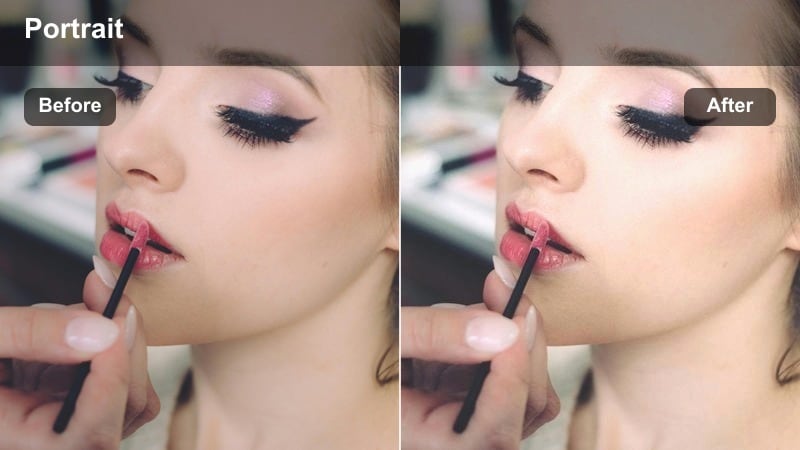
- Effect look: Playful pastel gels with smoothed contrast and a soft cinematic roll-off.
- Best for: Youthful fashion portraits, playful beauty campaigns, and colorful studio TikToks or Shorts.
- Editing tip: Lower saturation in just the magenta channel if skin starts to look too candy-colored.
Editorial Candy Gel transforms strong colored lights into airy, pastel hues that feel playful yet polished. In Filmora, this filter softens contrast and smooths the highlight roll-off so your gel lighting becomes creamy and cinematic instead of harsh or club-like.
Apply it to energetic beauty or fashion content aimed at younger audiences, then adjust specific color channels in HSL to keep skin from shifting too far into pinks or purples. Slight underexposure at capture combined with a gentle S-curve in the midtones will help maintain depth while preserving that pastel, editorial charm.
Monochrome Gel Dramatic
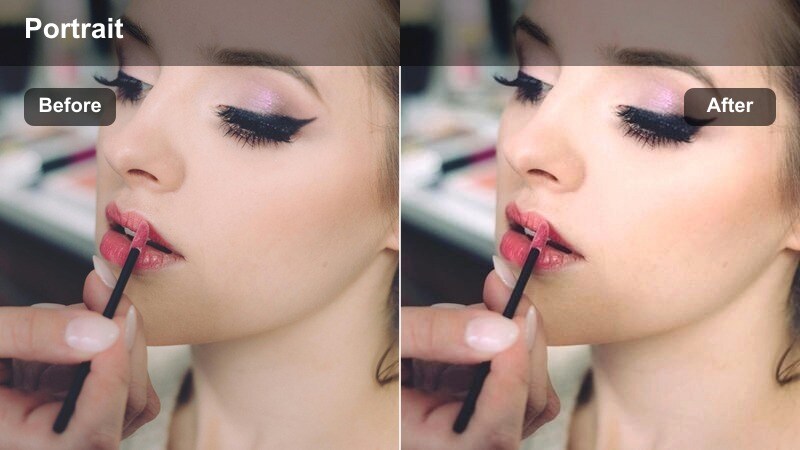
- Effect look: Single-color gel dominance with deep shadows and crisp, graphic edges.
- Best for: High-concept editorial portraits where one brand color or mood color drives the shot.
- Editing tip: Use this on footage lit mostly by one gel color and fine-tune that hue with HSL for brand consistency.
Monochrome Gel Dramatic focuses attention on a single, powerful color to create portraits that double as brand statements. In Filmora, the filter pushes your chosen gel hue while preserving clean edges and strong shadows, resulting in bold, poster-ready imagery.
Use it on sets lit primarily by one gel color against a dark or minimal background, then nudge the main hue in Filmoras HSL panel to match brand palettes or campaign themes. If facial features start to disappear into the color wash, add localized exposure and contrast adjustments on the face so expressions remain clear without diluting the monochrome impact.
Tips for Using Editorial Portrait Cinematic Filter Filters in Filmora
- Shoot with intentional, directional lighting so each Editorial Portrait Cinematic Filter can enhance your existing mood instead of trying to fix flat scenes.
- Keep a close eye on skin tones after applying filters and use Filmoras HSL and color wheels to correct oversaturated or shifted complexions.
- Stack a subtle corrective LUT first, then apply your chosen editorial filter to keep technical accuracy while pushing style.
- Save successful combinations of filters, LUTs, and color tweaks as custom presets in Filmora to speed up grading across series or campaigns.
- When filming, slightly underexpose portraits so highlights stay protected; most cinematic filters look better with preserved highlight detail.
- Use masks to refine your grade, applying extra sharpening, exposure, or desaturation only on the face while leaving backgrounds more stylized.
- Test filters on a short multi-lighting sequence before a big shoot so you know which looks work best for studio, window light, and night city scenes.
- For social content, maintain consistency by reusing the same 1 to 3 editorial filters across thumbnails, Reels, and long-form videos.
Editorial portrait cinematic filters turn ordinary portrait clips into frames that look curated, intentional, and ready for campaigns or high-end social content.
Experiment with a few presets on the same scene, then save your winning combinations as Filmora presets so your channel maintains a recognizable, cinematic editorial style over time.
secure download