

 100% Security Verified | No Subscription Required | No Malware

This collection of Filmora food vlog natural color filters is built for creators who want honest, appetizing colors without heavy stylization or fake saturation. Each preset is tuned to keep skin tones soft, plates clean, and ingredients rich but realistic.
Whether you film cozy home-cooked meals, kitchen POVs, or restaurant tastings, these filters help you lock in a natural look that feels like real life, so viewers can almost taste every bite through the screen.
In this article
Cozy Kitchen Mornings
Soft Window Light Breakfast
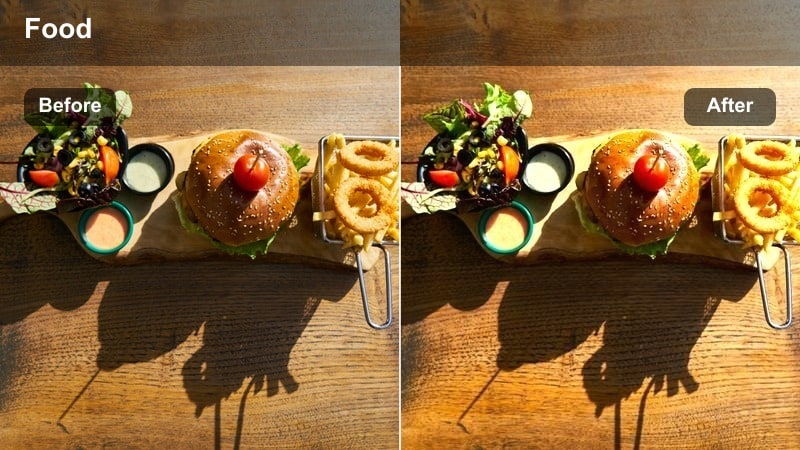
- Effect look: Gentle contrast with clean whites and naturally warm highlights that mimic early daylight.
- Best for: Breakfast vlogs by the window, coffee-making shots, and minimal table setups with light plates.
- Editing tip: Lower saturation slightly if your walls are colored to keep the plate as the visual focus.
Soft Window Light Breakfast is tuned to mimic that flattering, early daylight glow you get beside a kitchen window. Whites stay clean so plates and mugs look crisp, while a touch of warmth in the highlights keeps eggs, pastries, and coffee looking inviting instead of washed out or overly stylized.
In Filmora, apply this filter to all your morning clips first, then fine-tune temperature to match how cool or warm your real window light is. If your kitchen walls are strongly colored, gently pull back overall saturation so those tones do not overpower your food, and keep your exposure just under clipping so steam and subtle textures on toast or foam remain visible.
Use AI to Lock in a Natural Food Palette
Filmora AI Color Palette can analyze your best-looking breakfast or hero plate shot and build a balanced, natural reference that keeps whites neutral and ingredients vivid. This helps your Soft Window Light Breakfast preset look consistent even when you move between different windows or film across cloudy and sunny days.
Once you have a shot where the colors feel perfect, run AI Color Matching and apply that look across your timeline so every cup of coffee and slice of toast matches, without manual tweaking clip by clip.
 secure download

Preview Filters on Real Food Vlog Footage
Before you lock in a look for your series, test your food vlog natural color filters on a short sequence that represents your real workflow: window breakfasts, stovetop cooking, tabletop B roll, and reaction shots. This lets you see how each preset handles skin tones, plates, and decor in the exact spaces you use most.
In Filmora, duplicate that test project and try different filters side by side, toggling them on and off as you scrub the timeline so you can quickly spot which style keeps your food appetizing and realistic in every situation.
secure downloadCombine Filters and LUTs for Series Branding
Once you have a natural food filter you love, you can lightly stack a Filmora LUT on top to give your channel a subtle signature while keeping dishes believable. This combination lets you build a recognizable brand look across multiple playlists like breakfasts, meal prep, and restaurant tours.
Keep LUT intensity low and always compare several dishes and skin tones before and after. When the LUT is dialed in correctly, your channel will feel cohesive without pushing colors into unrealistic territory.
secure downloadClean Countertop Top-Down
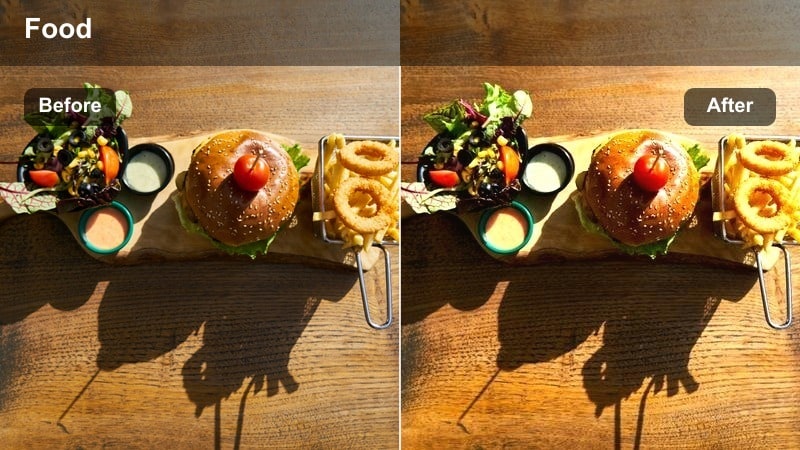
- Effect look: Neutral, low-contrast look that keeps colors true and shadows soft on bright countertops.
- Best for: Top-down cutting boards, meal prep tutorials, and overhead kitchen setups on white or light counters.
- Editing tip: Increase clarity slightly on wooden boards to enhance texture without oversharpening the food.
Clean Countertop Top-Down is built for flat-lay and overhead recordings where bright counters and plates can easily blow out. The neutral, low-contrast profile keeps ingredients readable and prevents heavy shadows from your hands or tripod rigs from distracting viewers.
In Filmora, pair this preset with gentle clarity and a subtle sharpening boost so grains, herbs, and chopped vegetables look detailed without becoming crunchy. Watch your scopes while adjusting highlights to keep whites below clipping, especially when you are working with glossy cutting boards or reflective bowls.
Morning Routine Snack
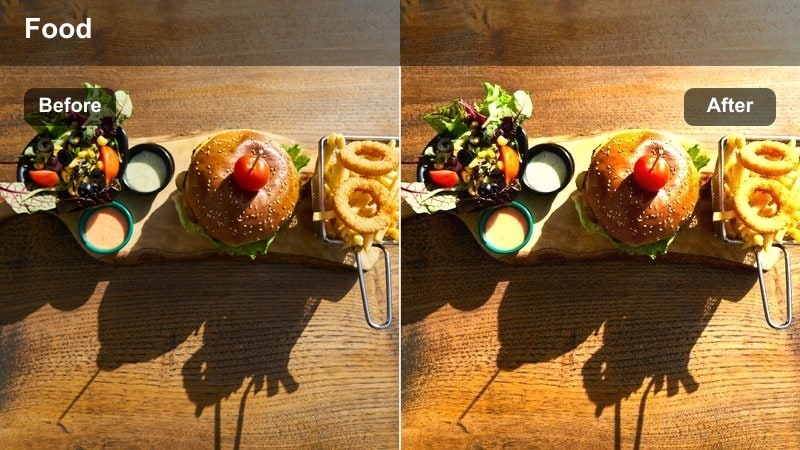
- Effect look: Soft, slightly warm palette that flatters skin tones while keeping snacks and drinks true-to-life.
- Best for: Daily life morning vlogs where you talk to camera while eating or preparing a quick snack.
- Editing tip: Use a gentle vignette to keep attention on your face and the plate you are holding.
Morning Routine Snack focuses on balancing flattering skin tones with natural-looking food, so your casual check ins feel authentic. The slight warmth in the midtones helps faces look healthy and awake without turning everything in frame orange or overly filtered.
In Filmora, add a subtle vignette and minor exposure adjustment so your eyes and the snack you are holding share the same visual priority. Avoid stacking heavy beauty effects on top of this preset to keep your daily routine honest, and adjust tint just enough to remove any magenta cast from bathroom or kitchen lighting.
Home Cooking Step-by-Step
True Color Stovetop
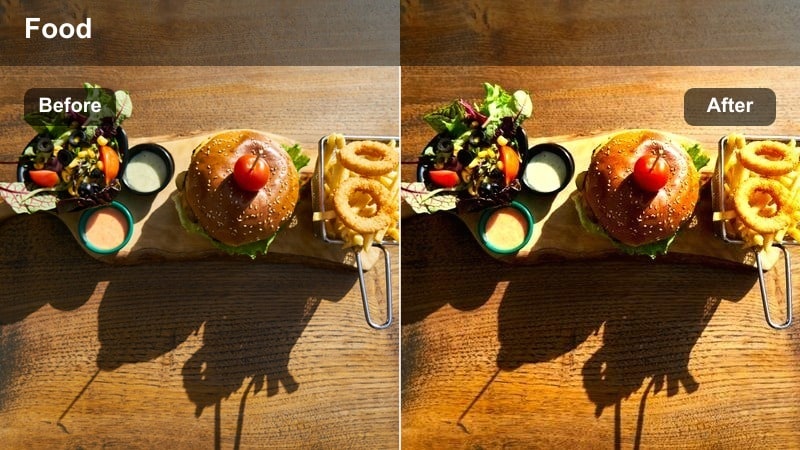
- Effect look: Balanced contrast with accurate reds and greens so sauces and veggies stay realistic on the stove.
- Best for: Stovetop close-ups, simmering sauces, and pan-frying sequences shot in mixed kitchen lighting.
- Editing tip: Use subtle noise reduction if you shoot in low light to keep steam and bubbling textures clear.
True Color Stovetop is designed to keep reds from sauces and greens from vegetables looking believable when they are hit by a mix of daylight and warm stove lights. The balanced contrast gives enough depth to highlight bubbling textures and steam without crushing shadows in the pan.
In Filmora, apply this preset to all your stovetop angles, then fine-tune white balance until steam and pan edges look neutral rather than overly orange or blue. Add light noise reduction if you shoot at higher ISOs, and avoid over-sharpening so the motion of simmering or frying still feels natural and smooth.
Cutting Board Natural
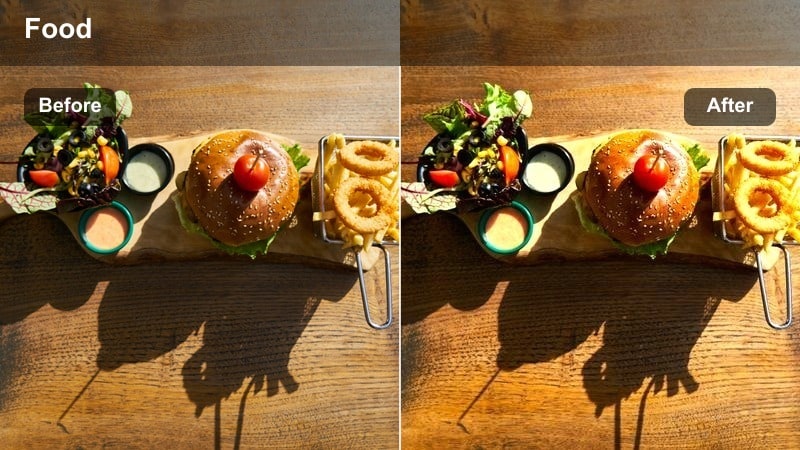
- Effect look: Gentle contrast with slightly lifted shadows to keep chopping sequences detailed but soft.
- Best for: Knife work, ingredient close-ups, and step-by-step prep shots on wood or neutral boards.
- Editing tip: Slow your shutter speed while shooting and add subtle speed ramps in Filmora to emphasize key cuts.
Cutting Board Natural keeps your prep sequences clean and easy to follow by lifting shadows just enough that fingers, knives, and ingredients all stay visible. Gentle contrast prevents the board from becoming a dark slab while still adding separation between colorful vegetables and the background.
Inside Filmora, use this preset as your base for all chopping B roll, then add speed ramps on key actions like dicing, slicing, or sprinkling herbs. If your board is darker, slightly boost shadows and lower overall contrast so details do not disappear, and keep sharpening modest so edges remain crisp without looking harsh.
Recipe Voiceover Neutral
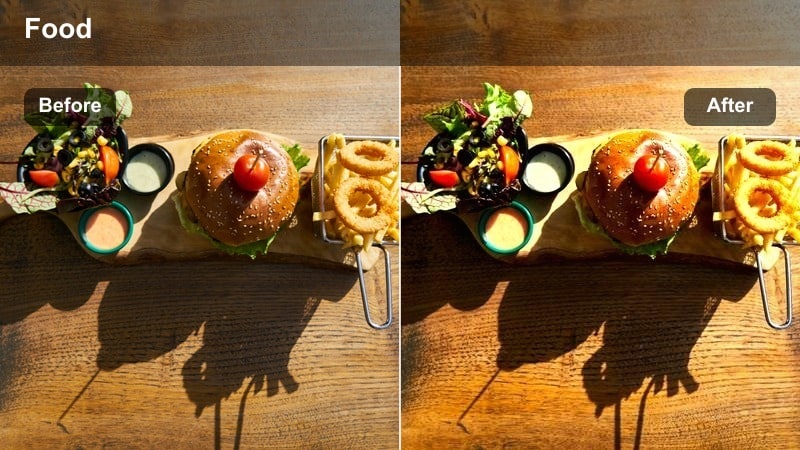
- Effect look: Flat, documentary-style tone that preserves natural colors and is easy to match across multiple clips.
- Best for: Montage-style recipe vlogs with voiceover and many different angles and light sources.
- Editing tip: Use this as your base look, then apply minor color tweaks per clip for seamless transitions.
Recipe Voiceover Neutral gives you a flexible, documentary-style base when your video jumps between prep, cooking, and plating angles. The flatter look preserves natural color information so you can easily tweak individual clips without fighting strong stylistic grading baked into the footage.
In Filmora, apply this preset first to all clips in your recipe sequence, then make small adjustments to exposure and white balance per shot to keep transitions smooth. Saving this as a custom preset ensures that every episode in your recipe series shares the same neutral foundation, which you can then build on with titles and overlays.
Restaurant and Cafe Visits
Tabletop Dining Natural
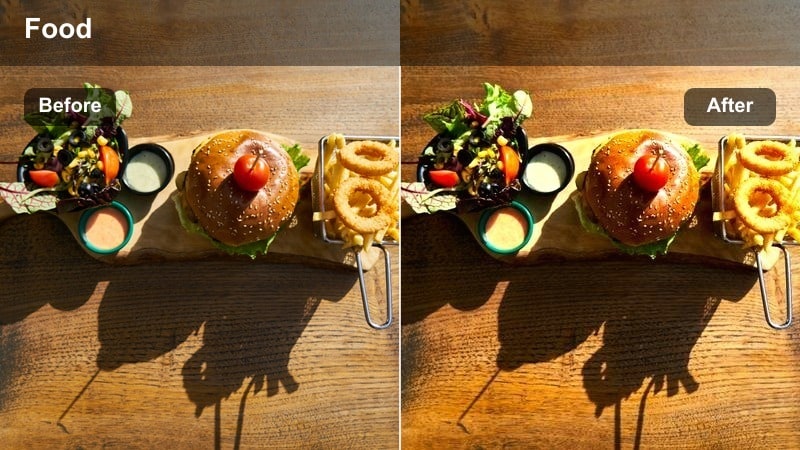
- Effect look: Clean, slightly cool balance that controls yellow restaurant lights while keeping dishes appetizing.
- Best for: Restaurant table shots, casual dining vlogs, and shared plates under warm indoor lighting.
- Editing tip: Add a subtle highlight roll-off to stop shiny plates or glasses from distracting viewers.
Tabletop Dining Natural is built to neutralize heavy yellow or orange casts from restaurant lighting while keeping your meals looking rich and appetizing. The slightly cool balance pulls overhead bulb color back toward neutral so white plates look clean and sauces do not turn neon.
In Filmora, adjust temperature a little cooler if your raw footage is extremely warm, then refine saturation in the orange range only so faces stay believable. Use soft highlight roll off or curves to tame reflections on glossy plates and glassware, helping the texture of the food remain the main focus on screen.
Cafe Latte Chat
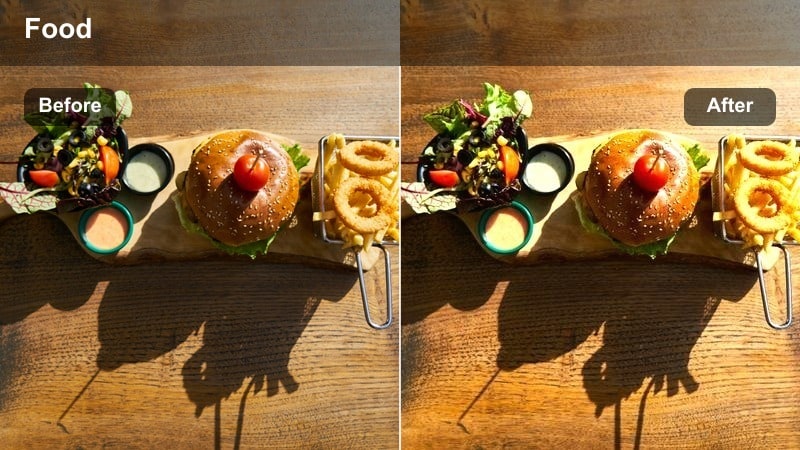
- Effect look: Soft contrast and warm midtones that flatter faces while keeping drinks and pastries true in color.
- Best for: Sit-down cafe vlogs, talking-to-camera segments, and B-roll of drinks on small tables.
- Editing tip: Use Filmora’s face recognition to apply slight smoothing separately from the main filter if needed.
Cafe Latte Chat softens contrast and gently warms midtones so your face looks flattering and cozy without pushing lattes, matcha, or pastries into unrealistic tones. Backgrounds stay understated, letting your expressions and the drink in front of you carry the scene.
In Filmora, apply this preset to all of your cafe sit-down angles, then use face recognition or masks to apply minimal smoothing only where needed. If your face is brighter than the table, use keyframed exposure masks to balance skin and drink exposure so cuts between angles feel seamless and natural.
Night Street Food Stand
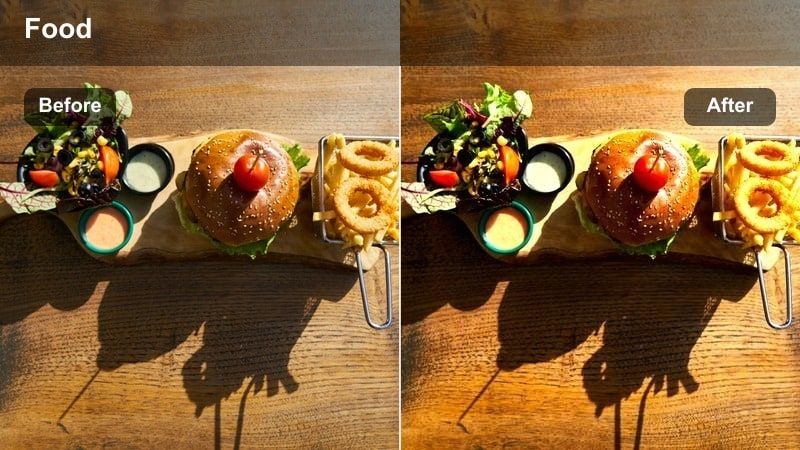
- Effect look: Lifted shadows and controlled saturation that keep night street food scenes bright but believable.
- Best for: Street food vlogs, night markets, and food truck visits under neon or harsh outdoor lights.
- Editing tip: Use selective color to gently mute overbearing neon signs while keeping the food vivid.
Night Street Food Stand helps you brighten low-light scenes without turning them flat or noisy. Lifted shadows reveal detail in stalls, grills, and crowds, while carefully controlled saturation prevents neon signs and colored bulbs from overpowering the colors of the dishes themselves.
Within Filmora, start by applying this preset, then add moderate noise reduction and a small sharpness decrease to smooth digital noise. Use selective color tools to tone down extreme neon hues while leaving midtone saturation on food untouched so skewers, noodles, and sauces still look vibrant and true to life.
Plating Shots and Thumbnails
Hero Plate Natural Pop
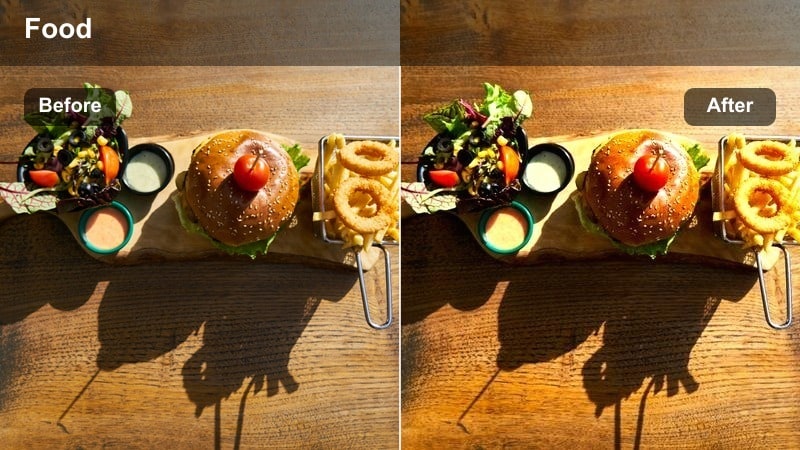
- Effect look: Crisp, slightly boosted contrast with subtle micro-saturation for standout hero dishes.
- Best for: Final plating reveals, slow pan shots, and food close-ups used for thumbnails.
- Editing tip: Crop slightly tighter and add a gentle vignette to build a strong focal point in your thumbnail frame.
Hero Plate Natural Pop is optimized to make your main dish stand out on screen while keeping colors grounded in reality. A touch of extra contrast and micro-saturation highlights textures and garnishes so your food looks sharp and mouthwatering in both video and thumbnail frames.
In Filmora, apply this filter to your final reveal shots, then fine-tune framing with crops and subtle vignettes that direct the eye straight to the center of the plate. Pause on the strongest frame, export a still for your thumbnail, and double-check the image on mobile to ensure details remain clear and appetizing at smaller sizes.
Family Table Overview
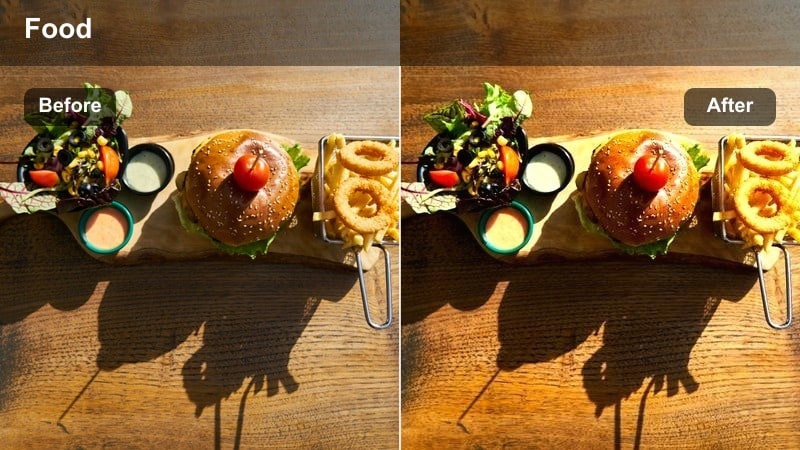
- Effect look: Balanced exposure with slightly lifted shadows so every dish on a crowded table stays visible.
- Best for: Family meal vlogs, wide dining table shots, and celebration spreads filmed at home.
- Editing tip: Use keyframe zooms to highlight different dishes on the same wide shot during editing.
Family Table Overview is tuned for wide, busy frames where many dishes need to stay readable at once. By lifting shadows and carefully balancing exposure, this preset keeps everything from side bowls to main platters visible without washing out highlights on white plates.
In Filmora, apply this preset to your main table scenes, then use keyframed crops or gentle zooms to guide viewers from one area of the table to another. If parts of the frame look darker, add gradient masks to brighten specific corners rather than raising the overall exposure, preserving a natural evening or indoor mood.
Handheld Bite Shot
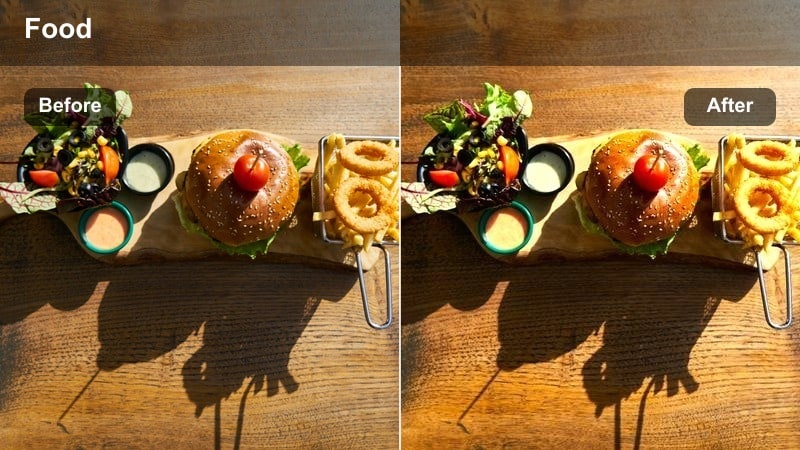
- Effect look: Stable midtones with gentle contrast tuned for moving handheld shots of bites and taste reactions.
- Best for: Taste-test moments, first-bite reactions, and handheld daily life food snippets.
- Editing tip: Combine with Filmora’s stabilization and light sharpening to keep motion energetic but not dizzying.
Handheld Bite Shot is designed for dynamic, close-up reaction clips where both your face and the food are constantly moving. The stable midtones and gentle contrast keep exposure under control as you move past windows or lights, so skin tones and ingredients stay consistent from frame to frame.
In Filmora, pair this preset with built-in stabilization to smooth micro-shakes, then add a touch of sharpening to preserve detail in the food as it moves toward the camera. If your face is noticeably brighter than the dish, prioritize exposure for the food and use masks or midtone saturation boosts so expressions remain lively without overpowering the meal.
Tips for Using Food Vlog Natural Color Filter Filters in Filmora
- Film near windows or neutral light sources so these natural color filters have a clean base to work with in each scene.
- Use white or light-colored plates whenever possible to avoid strong color casts bouncing onto your food.
- Expose slightly darker while shooting; it is easier to lift shadows in Filmora than to recover blown highlights on bright plates.
- Choose a single base filter for each episode and only apply small clip-level tweaks for a cohesive viewing experience.
- Match white balance across clips before heavy editing so AI color tools and filters deliver more consistent results.
- Regularly clean your camera or phone lens; natural color presets can make smudges, haze, and flare very noticeable.
- Check your graded videos on both phone and desktop to ensure food still looks realistic across different screens.
- Save your favorite tweaks as custom Filmora presets so you can apply your signature food vlog look in one click.
With the right food vlog natural color filter, your meals can stay honest, appetizing, and consistent from breakfast to late-night snacks without heavy grading work.
Use these presets as your starting point in Filmora, then fine-tune white balance, exposure, and saturation to match your kitchen, restaurants, and daily life home vlog scenes.
secure download