

 100% Security Verified | No Subscription Required | No Malware

Lifestyle creators live in motion, and your Instagram feed should reflect that with video filters that feel soft, cinematic, and intentional. The right lifestyle video filters for Instagram turn simple moments like coffee runs, outfit checks, and cozy nights in into scroll-stopping visuals.
This guide walks Instagram lifestyle influencers, personal brand creators, and aesthetic account owners through 12 polished filter styles tailored for lifestyle reels, aesthetic stories, and daily life posts, so every clip looks cohesive, on-brand, and ready to post in minutes.
In this article
Soft Daily Glow Filters for Gentle Lifestyle Aesthetics
Soft Cream Glow
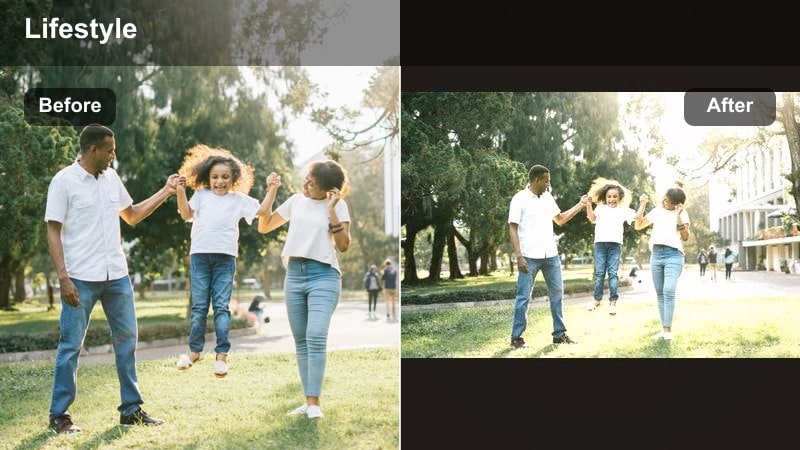
- Effect look: Subtle brightening with warm cream highlights and softened contrast for airy, inviting lifestyle clips.
- Best for: Morning routines, desk setups, wellness reels, light-filled home tours.
- Editing tip: Lower contrast slightly and lift shadows to keep skin tones soft; avoid over-sharpening to preserve the dreamy feel.
Soft Cream Glow wraps your lifestyle footage in warm, creamy highlights that flatter skin and interiors without pushing the effect too far. It gently lifts exposure, smooths contrast, and adds a subtle glow that makes everyday shots like coffee pours or bed-making clips feel light and aspirational.
In Filmora, apply this look by brightening your clip slightly, then softening contrast and raising shadows until faces and fabrics look airy but not washed out. Use the sharpen and clarity controls sparingly so hair, lashes, and textures stay natural. This filter works especially well on vertical reels and stories that use natural window light and neutral decor.
Match Filters to Your Lifestyle Brand Colors with AI
Use Filmora s AI-powered color tools to quickly align lifestyle video filters for Instagram with your existing brand palette. Instead of guessing warmth, saturation, and contrast for every clip, you can analyze a reference image from your feed and let AI guide your adjustments.
This keeps your instagram lifestyle filter choices consistent across reels, aesthetic stories, and daily life posts, so every new video feels like it naturally belongs on your grid. Import a screenshot of your profile, let AI read the tones, and then fine-tune Soft Cream Glow or any other filter so it echoes your signature look.
 secure download

See Lifestyle Filters in Action on Reels and Stories
Before you commit a new aesthetic instagram video filter to your entire feed, preview it side by side on several lifestyle clips inside Filmora. Test morning routines, city walks, and cozy nights with the same filter to see how it behaves across different lighting conditions and color palettes.
This mini demo workflow helps you narrow down a small set of go-to lifestyle story filters you can reuse, so you spend less time experimenting and more time posting. Drop a few short vertical clips in one timeline, apply Soft Cream Glow, Everyday Skin Smooth, or any favorite, and compare the results in real time.
secure download1000+ Video Filters and 3D LUTs in Filmora
Filmora includes a large library of built-in filters and 3D LUT-style looks that cover everything from subtle lifestyle grades to bold cinematic color. You can layer creative filters with color tools like curves, HSL, and temperature to create a custom instagram lifestyle filter that perfectly matches your brand.
Once you have tuned your look, save it as a reusable preset so you can apply the same treatment to stories, reels, and long-form content in seconds. Over time, this keeps your lifestyle account consistent without having to rebuild your filter stack from scratch.
secure downloadPro Tip: Pair Soft Cream Glow with Natural Window Light
Film facing a window or in open shade, then apply Soft Cream Glow to keep whites clean and highlights flattering for skin.
If your clip feels too yellow, pull the temperature slightly cooler and reduce saturation on oranges to keep your aesthetic refined.
Everyday Skin Smooth
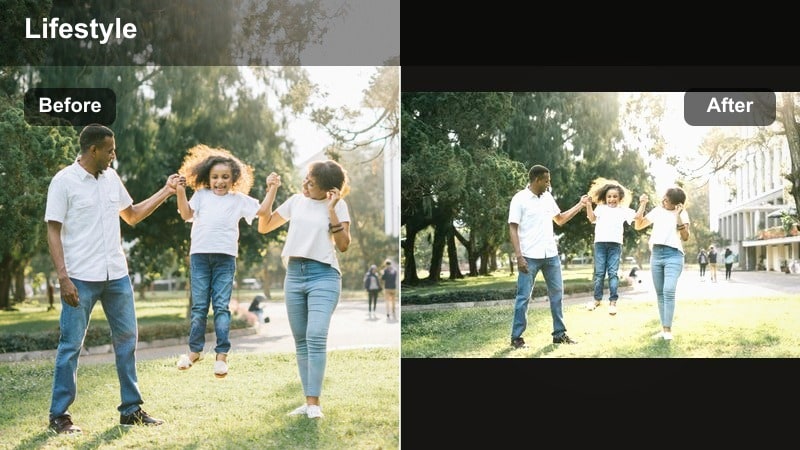
- Effect look: Light skin-smoothing with soft contrast and neutral warmth that keeps facial details natural.
- Best for: Chatty stories, GRWM videos, talking reels, close-up product shares.
- Editing tip: Use subtle smoothing only and add a tiny bit of clarity on eyes and hair so the shot stays sharp where it matters.
Everyday Skin Smooth is designed to polish close-ups without turning your face into a filter mask. It gently evens out texture, mutes harsh shadows, and adds a soft warmth that flatters most skin tones while preserving natural features like freckles and fine lines.
In Filmora, apply skin smoothing at a low intensity, then use masking or detail tools to add clarity around the eyes, brows, and hairline so your expression stays crisp. This combo works perfectly for daily check-ins, GRWM segments, or product chat clips that need to look camera-ready but still authentic on Instagram.
Pro Tip: Balance Skin Smooth with Detail
After applying this filter, slightly boost sharpness around the eyes and brows to avoid a plastic or blurry look.
If background noise is distracting, pair the visual polish with light audio noise reduction for a more professional story feel.
Soft Apartment Light
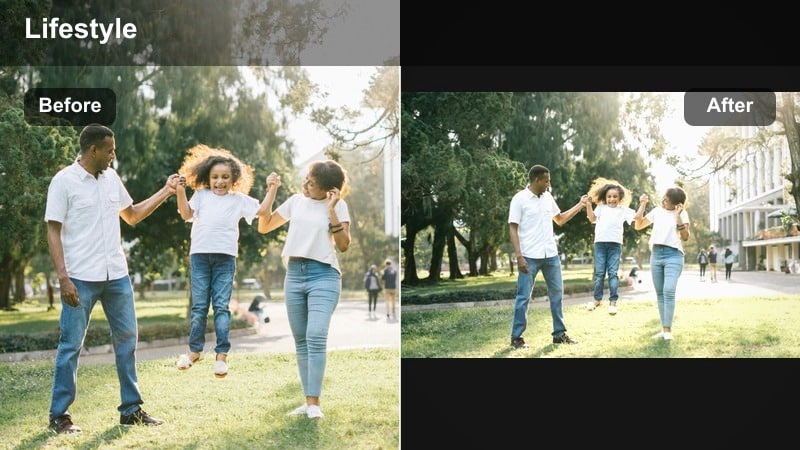
- Effect look: Gentle lift in exposure with soft highlights, reduced shadows, and neutral whites for dim indoor spaces.
- Best for: Cozy home vlogs, reading nooks, kitchen prep, slow evening routines.
- Editing tip: Increase brightness first, then apply the filter so the tones stay clean rather than muddy in low light.
Soft Apartment Light is built for darker interiors where bulbs and limited windows can make footage look flat or muddy. It brightens midtones, calms harsh yellows, and keeps whites more neutral so your apartment clips feel curated instead of cluttered.
Inside Filmora, start by nudging exposure and shadows up until you can clearly see details in walls, bookshelves, and countertops. Then apply this filter to refine the color balance and soften contrast. If your lighting leans orange, use color temperature and tint sliders to cool things off while preserving a cozy mood ideal for lifestyle reels and stories.
Pro Tip: Fix Yellow Indoor Light with a Quick Tint Adjustment
If your apartment lighting is very warm, add a small blue and green tint after applying the filter to clean up yellow walls and counters.
You can also slightly lower saturation on yellows for lamps and kitchen lights so your clip feels more curated and less fluorescent.
Neutral Aesthetic Filters for a Cohesive Lifestyle Feed
Beige Feed Balance
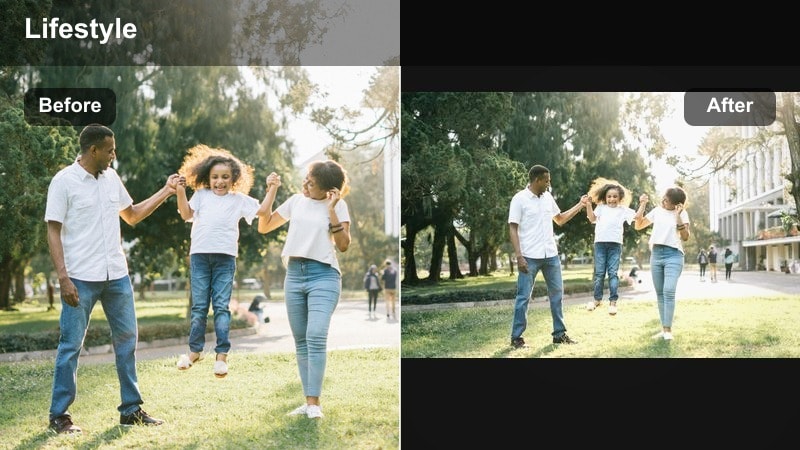
- Effect look: Soft beige tones, gentle desaturation, and balanced contrast for a minimal, curated feed style.
- Best for: Outfit clips, flatlays, aesthetic desk shots, brand collaborations with neutral palettes.
- Editing tip: Pull saturation down slightly on greens and reds to keep backgrounds calm and prevent color noise in your grid.
Beige Feed Balance shifts your color palette toward warm neutrals, smoothing out busy backgrounds and making outfits and props feel more editorial. Colors stay present but low-key, which is perfect for creators whose grids lean into tans, creams, and soft browns.
In Filmora, apply this filter and then fine-tune HSL by lowering saturation on vivid greens, reds, and blues that might distract from your neutral wardrobe or product layout. Use this look consistently on outfit-of-the-day reels, desk shots, and collaboration content so everything on your profile shares the same calm, beige-forward tone.
Pro Tip: Match This Filter Across Photo and Video
Use similar temperature and saturation settings on photos and clips so your beige feed feels seamless when someone taps into your profile.
Save the filter as a preset and apply it to batches of footage at once to keep your posting workflow fast and consistent.
Soft Muted City
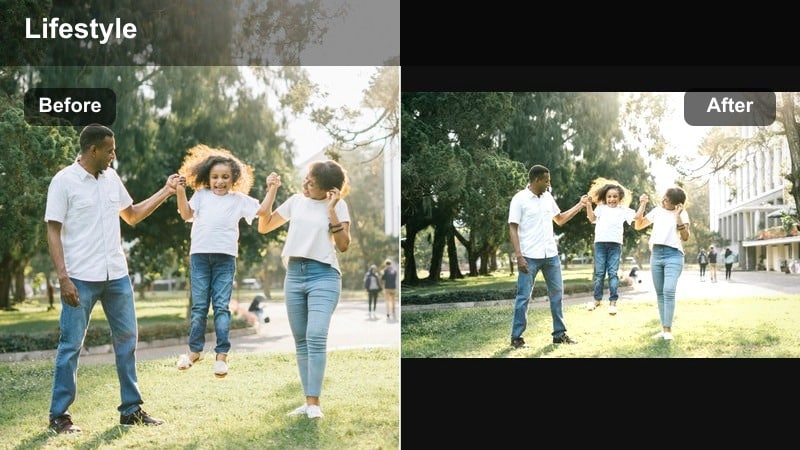
- Effect look: Muted colors, softened midtones, and subtle cool shadows for lifestyle content in busy urban spaces.
- Best for: City walks, cafe runs, commuting clips, everyday B-roll around town.
- Editing tip: Reduce saturation on bright signage and blues so the focus stays on your outfit and movement, not the background clutter.
Soft Muted City is ideal for shooting in colorful urban environments where bright signage and traffic can overwhelm your frame. It tones down saturation, adds a touch of coolness to shadows, and softens midtones so you and your outfit remain the star of the shot.
Use Filmora s color tools to selectively desaturate blues, reds, and other loud hues after applying this filter, especially in street scenes. Combine it with gentle stabilization and smooth panning shots to create editorial-feeling reels and stories that look cinematic without distracting color chaos.
Pro Tip: Use Motion to Add Energy, Not Color
Film dynamic shots like walking past the camera or panning across crosswalks, then let this muted filter simplify the color palette.
If skin tones look too cool, warm the overall temperature slightly and increase orange saturation just a bit to bring life back to faces.
Clean Minimal White
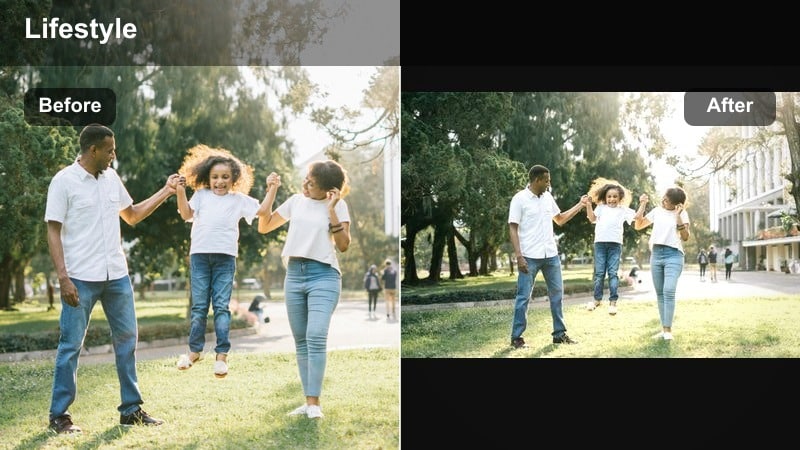
- Effect look: Bright whites, low saturation, and crisp lines for a minimal, editorial lifestyle look.
- Best for: Product shots, aesthetic routines, brand content, lifestyle reels with lots of white space.
- Editing tip: Use highlight recovery to protect white backgrounds from blowing out and keep text overlays readable.
Clean Minimal White transforms scenes with lots of negative space into sharp, gallery-style visuals. It emphasizes whites and off-whites, slightly pulls back saturation, and keeps edges crisp, making it perfect for minimal flatlays, desk tours, or sponsored product reels.
In Filmora, lower exposure a touch before applying this filter, then raise highlights carefully so surfaces look bright but still textured. Use highlight recovery if your backgrounds begin to clip, and choose mid-tone colors for any text overlays so they remain readable against the bright, minimal backdrop.
Pro Tip: Avoid Overexposed Whites in Reels
Lower exposure slightly before applying the filter, then raise highlights just enough so whites look intentional, not blown out.
When adding text to reels or stories, choose mid-tone colors or soft greys so your titles remain legible over bright backgrounds.
Warm and Cozy Lifestyle Filters for Reels
Golden Routine Glow
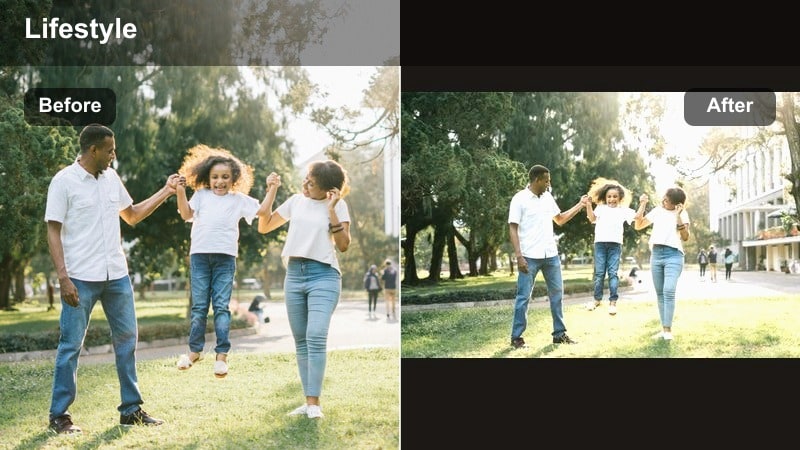
- Effect look: Golden warmth, soft highlights, and gentle contrast to mimic golden hour even indoors.
- Best for: Morning and evening routines, cozy kitchen scenes, candlelit clips, soft-lens reels.
- Editing tip: Keep saturation under control and add a slight vignette so the warmth feels intentional instead of overwhelming.
Golden Routine Glow brings golden hour vibes into your home, adding warm midtones and soft highlights that flatter skin and wood surfaces. It is ideal for routine-based reels where you want everything from tea steam to lamp light to feel cozy and inviting.
Within Filmora, push temperature slightly warmer and reduce global saturation just a bit after applying this filter to prevent orange overload. Add a subtle vignette to draw focus toward the center of the frame, and pair the look with slow, steady camera moves for a calm, cinematic mood in your lifestyle stories.
Pro Tip: Layer Golden Glow with Candle or Lamp Light
Use real warm light sources like candles or table lamps, then add this filter to amplify the cozy atmosphere in your reels.
If skin tones start to look too orange, reduce orange saturation slightly and pull the temperature back toward neutral.
Latte Film Soft
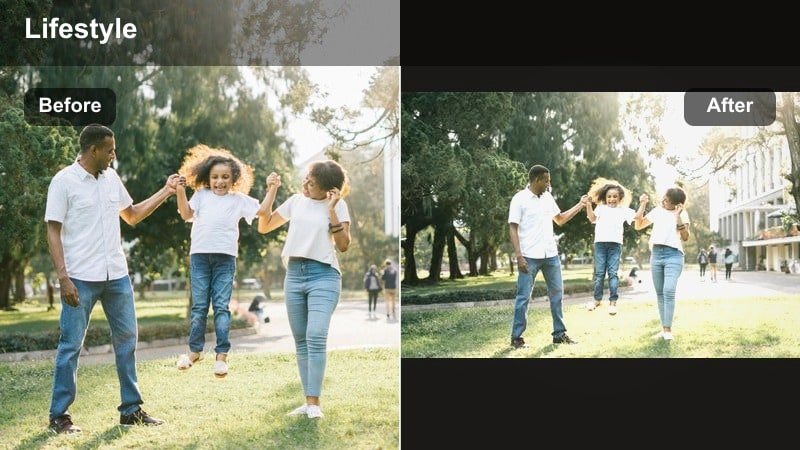
- Effect look: Creamy latte tones, reduced contrast, and soft grain for a film-inspired lifestyle aesthetic.
- Best for: Cafe visits, book content, journaling, slow weekend vlogs, aesthetic b-roll.
- Editing tip: Add just a hint of grain and fade the blacks slightly for a vintage-inspired, cozy film look.
Latte Film Soft leans into browns, creams, and off-whites to give your clips a coffee-inspired, analog feel. By lowering contrast and adding a touch of grain, it makes cafe corners, notebooks, and knitwear feel like frames from a gentle film.
In Filmora, soften the blacks using curves or fade controls, then introduce a low level of film grain so the texture feels intentional. This aesthetic instagram video filter works beautifully on slow pans across latte art, journaling sessions, and weekend reading reels that prioritize mood over motion.
Pro Tip: Lean Into Neutrals for the Best Latte Look
Surround your subject with browns, beiges, and whites so this filter can create a cohesive latte palette across the frame.
If your clip has bright colors you cannot avoid, lower their saturation locally so the warm neutrals still dominate the mood.
Evening Cozy Haze
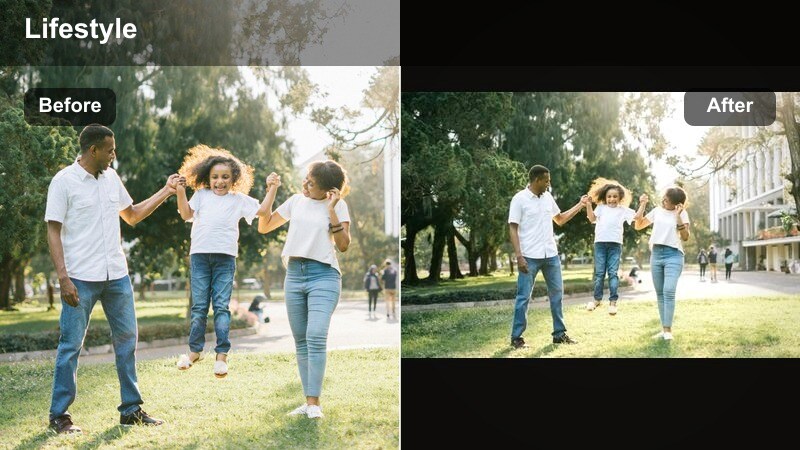
- Effect look: Dimmed contrast, lifted shadows, and warm midtones that soften harsh evening lighting.
- Best for: Nighttime routines, movie nights, soft bedroom vlogs, end-of-day check-ins.
- Editing tip: Lift blacks slightly and add a tiny bit of blur or reduced clarity to background areas for a hazy, intimate vibe.
Evening Cozy Haze is made for low-light clips where lamps and screens can create harsh contrast. It lifts shadows, warms midtones, and gently mutes contrast so your bedroom, living room, or movie corner feels soft and intimate instead of noisy and dark.
In Filmora, raise the blacks and shadows and then use a small amount of background blur or lowered clarity to create a subtle haze around the scene. Leave your subject in sharper focus so the softness feels like a stylistic choice. This lifestyle story filter helps night routines and wind-down reels look cinematic even when shot on a phone.
Pro Tip: Turn Noisy Low Light into a Style Choice
If your footage is grainy, lean into it by adding a little controlled grain and haze to make the clip feel like a moody film scene.
Keep movement slow and steady in low light so your cozy filter can focus on soft tones instead of fixing motion blur.
Cinematic Story Filters for Polished Lifestyle Moments
Subtle Film Lifestyle
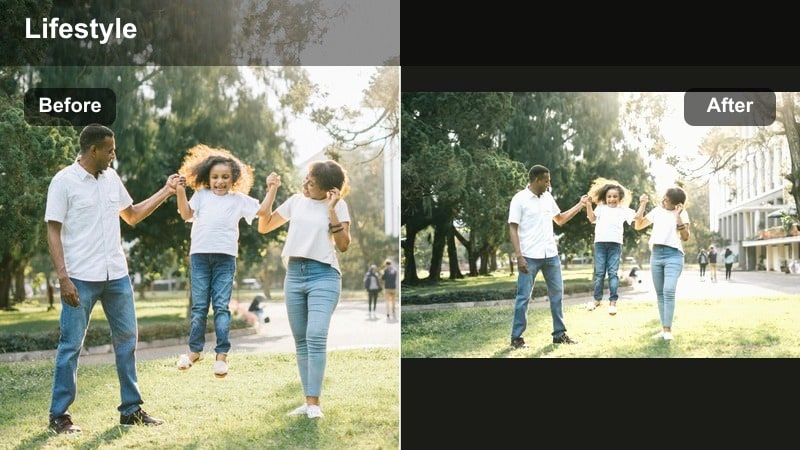
- Effect look: Gentle fade in blacks, soft halation-style glow, and slightly cooler shadows for a modern film vibe.
- Best for: Narrative reels, weekend montages, lifestyle mini-vlogs with transitions.
- Editing tip: Add light motion blur on transitions and keep cuts on the beat of your audio to sell the cinematic mood.
Subtle Film Lifestyle gives your day-in-the-life sequences a refined, movie-inspired finish without completely changing your brand colors. It slightly fades blacks, cools shadows, and adds a mild glow around highlights that feels like modern film stock.
In Filmora, pair this filter with smooth transitions, gentle motion blur, and beat-synced editing for maximum impact. Use it across an entire mini-vlog so each clip shares the same cinematic DNA, helping your followers experience the reel as one cohesive story rather than disconnected lifestyle snippets.
Pro Tip: Build a Story with Consistent Film Tones
Apply this filter across all clips in a mini-vlog so the reel feels like one cohesive story rather than a mix of random moments.
Use similar framing and transitions between scenes, then let the film look tie the entire narrative together visually.
Cinematic Lifestyle Story
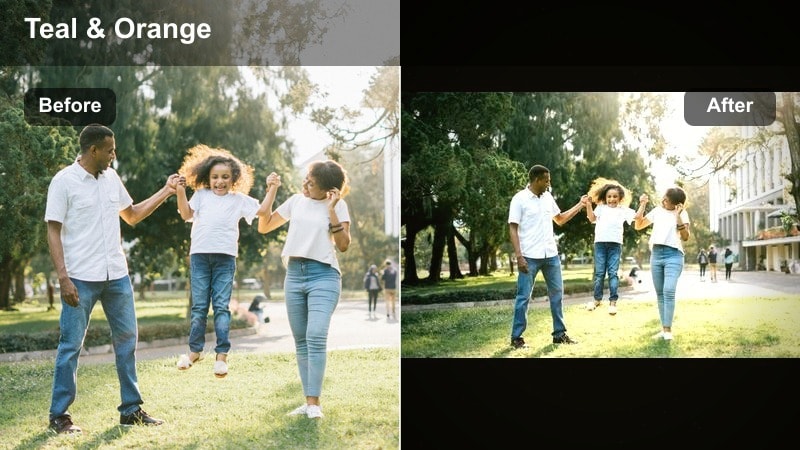
- Effect look: Richer contrast, slightly teal shadows, and warm skin tones for a modern cinematic color grade.
- Best for: High-impact reels, brand storytelling, day-in-the-life recaps, travel lifestyle content.
- Editing tip: Protect skin tones by slightly reducing orange saturation while raising luminance to keep faces glowing, not oversaturated.
Cinematic Lifestyle Story is a bolder grade that adds depth and drama to your most important content. By combining teal-tinted shadows with glowing warm skin, it creates that recognizable blockbuster-style contrast that makes everyday scenes feel elevated.
In Filmora, apply this look to hero reels like brand campaigns, travel recaps, or milestone days. Use the HSL panel to keep oranges balanced and bright so faces do not turn too intense, and consider layering subtle vignette and grain for an extra cinematic touch that stands out in the Instagram feed.
Pro Tip: Use This Look for Key Hero Content
Reserve this filter for your most important reels so they stand out as cinematic anchor pieces on your profile.
Combine carefully framed shots, intentional camera movement, and this cinematic look to create content that feels above everyday posts.
Soft Focus Story Filter
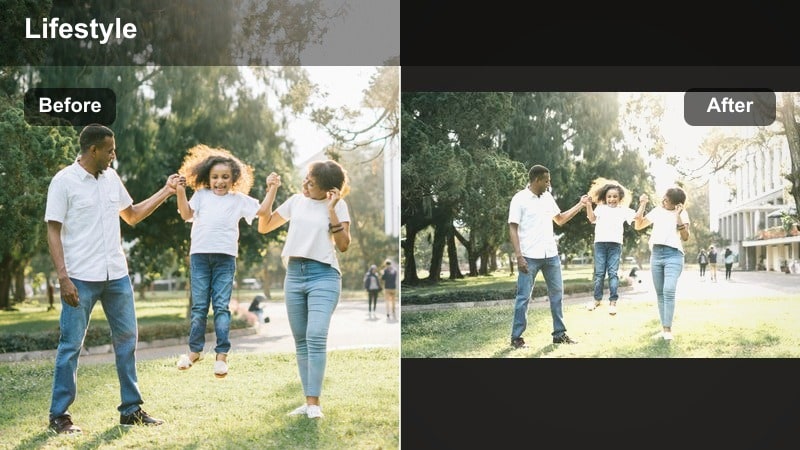
- Effect look: Gentle blur on edges, lifted highlights, and pastel-tinted midtones for dreamy lifestyle stories.
- Best for: Romantic moments, slow mornings, aesthetic stories with text overlays and music.
- Editing tip: Lower clarity just around the frame edges and keep your subject in focus so the softness feels like a lens choice, not an error.
Soft Focus Story Filter wraps your frame in dreamy softness, brightening highlights and nudging midtones toward pastel shades. It is perfect for quiet, emotional clips like slow mornings, date-night details, or reflective captions set to music.
In Filmora, use masking or vignette-style blur to keep your subject sharp while softening only the edges of the frame. Pair the look with slower music and minimal movement, then layer simple text or lyrics over your clip to transform everyday shots into intimate, story-driven moments for Instagram.
Pro Tip: Turn Simple Clips into Story Moments
Use this filter on short, quiet clips and layer text or captions over them to turn everyday shots into emotional story beats.
Pair with slower music and minimal on-screen movement so the dreamy softness feels intentional and cinematic.
Tips for Using Lifestyle Video Instagram Filters in Filmora
- Batch film your lifestyle reels in similar lighting conditions so your favorite filters are easier to match across multiple clips.
- Save two or three go-to lifestyle story filters and reuse them instead of switching looks every day to keep your personal brand recognizable.
- Always test filters on skin tones first, then adjust temperature and saturation so faces look natural before tweaking the rest of the frame.
- Create separate presets for indoor, outdoor, and night clips so you can quickly pick the best lifestyle filter for each scenario.
- Keep sharpening and clarity gentle when chasing a soft, aesthetic Instagram video filter look to avoid a harsh or overly digital feel.
- Use the same filter on both vertical reels and story snippets from the same day so your content feels like one continuous story.
- If your feed leans neutral, slightly reduce overall saturation after applying filters so bold colors do not break your aesthetic.
- Trim clips tightly and sync cuts to music beats before applying heavy filters so the pacing feels polished and intentional.
Choosing the right lifestyle video filters for Instagram is less about chasing trends and more about building a repeatable visual language that fits your routines, spaces, and personality.
Lock in a small toolkit of on-brand filters, save them as presets in Filmora, and use them consistently across reels, aesthetic stories, and daily life posts to keep your lifestyle account polished with minimal effort.
secure download