

 100% Security Verified | No Subscription Required | No Malware

This collection of Filmora filters is designed to mimic the look of a minimal color grading video LUT, giving creators a clean, modern aesthetic without heavy, stylized processing.
Each filter keeps skin tones natural and tones down distractions so your story and composition stay front and center, ideal for content creators who favor subtle polish over dramatic color shifts.
In this article
Soft Daylight Scenes for Vlogs and Talking Heads
Soft Neutral Portrait
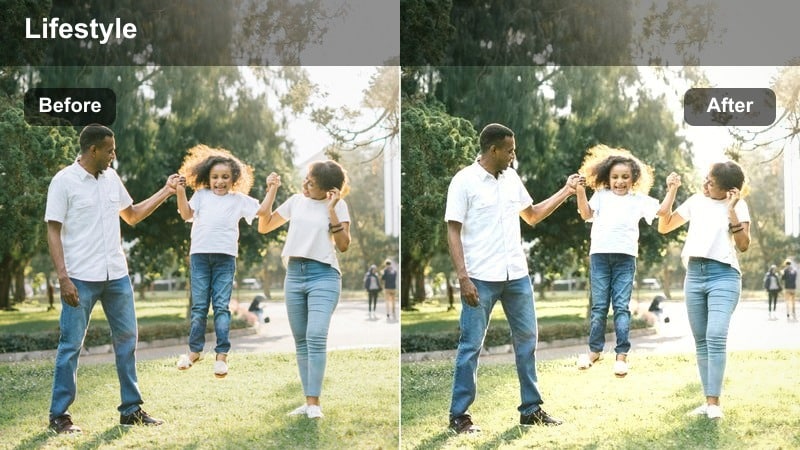
- Effect look: Softens contrast, slightly lifts shadows, and cools highlights for a clean, neutral talking-head look.
- Best for: Daytime vlogs, tutorials, and sit-down content in softly lit rooms or near windows.
- Editing tip: Dial the filter intensity down to around 60% to keep skin tones natural while gently muting background colors.
Soft Neutral Portrait is designed to act like a minimal color grading video LUT, giving your talking-head footage a clean, honest feel without pushing colors too far. In Filmora, the softened contrast and lifted shadows help keep details in the face while slightly cooling the highlights to avoid any harsh, overly warm shine from window light or soft boxes.
Apply this filter to your vlog clips, then fine-tune intensity so skin tones stay believable and the background feels gently muted rather than flat. Because it prioritizes neutral color, it works well across different cameras and lighting setups, making it a go-to base look you can reuse for consistent, minimal grading on your channel.
Refine Minimal Looks with Filmora AI Color Tools
After you apply a minimal filter like Soft Neutral Portrait, Filmora AI color tools can help you make subtle global adjustments without ruining the clean look. Use AI-powered exposure and white balance tuning to gently correct clips that were shot in slightly different lighting so your project feels cohesive.
These small, smart corrections mean you do not have to dig into advanced grading controls just to balance a sequence of vlogs or tutorials. Let the filter set the mood, then let AI keep each shot aligned with that minimal aesthetic.
 secure download

Preview Minimal Filters on Real Footage
Before you commit to a specific minimal color grading video LUT-style filter, try it on a range of sample clips inside Filmora. Test how each preset handles skin, background elements, and highlights so you can quickly see which ones match your usual filming environments.
By previewing filters on real footage first, you can choose a subtle, polished look that works across vlogs, B-roll, and talking-head segments. Once you find that sweet spot, you can save time by applying the same minimal filter settings across entire projects.
secure download1000+ Video Filters and 3D LUTs
Filmora includes a large library of video filters and 3D LUTs that you can layer with these minimal looks for extra control. Start with a subtle, clean base filter, then lightly stack an additional LUT or effect to introduce a gentle brand color or cinematic tone.
Because the base filters keep exposure and contrast balanced, your added LUTs can stay at low intensity while still making a visible difference. This workflow lets you stay within a minimal aesthetic while still giving your footage a distinctive signature style.
secure downloadAiry Window Light
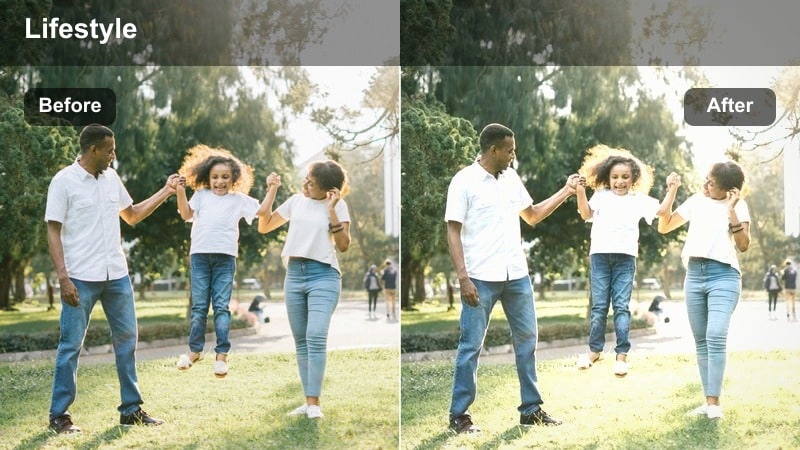
- Effect look: Brightens midtones, adds a soft matte finish, and desaturates warm hues for an airy, minimal vibe.
- Best for: Home office desk setups, productivity vlogs, and lifestyle content shot near large windows.
- Editing tip: Use gentle exposure tweaks instead of pushing highlights so the matte finish stays smooth and minimal.
Airy Window Light is ideal when you want your workspace or lifestyle shots to feel bright and open without looking overly punchy. The soft matte finish and lighter midtones gently smooth out contrast, which works especially well on footage shot in natural window light where highlights can otherwise look harsh.
In Filmora, apply this filter to your desk setups or day-in-the-life clips to create a consistent, minimal daylight look. Keep saturation restrained and avoid boosting highlights too far, letting the filter handle the subtle lift so your scene remains airy, clean, and easy on the eyes.
Calm Workspace Neutral
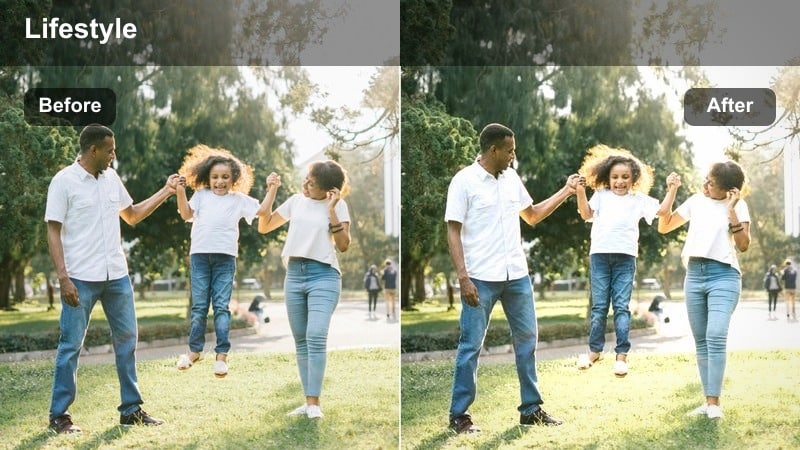
- Effect look: Gently lowers saturation and contrast, balancing warm and cool tones for a calm, studio-like mood.
- Best for: Desk tours, productivity breakdowns, and B-roll of keyboards, notebooks, and monitors.
- Editing tip: If your scene has colorful LEDs, reduce the filter intensity slightly to avoid losing intentional accent colors.
Calm Workspace Neutral is built to make busy desks and creative workspaces feel more focused and professional. By subtly reducing saturation and balancing warm and cool tones, it minimizes color distractions from books, gadgets, and accessories while keeping everything readable and clear.
Use this filter in Filmora on your desk B-roll, overhead shots, and productivity sequences to create a cohesive, minimal visual language. If your setup includes strong LED accent lights, dial the intensity back a bit so those deliberate color choices still stand out within the otherwise neutral palette.
Urban Minimal Street and B-Roll Shots
Concrete Muted Tones
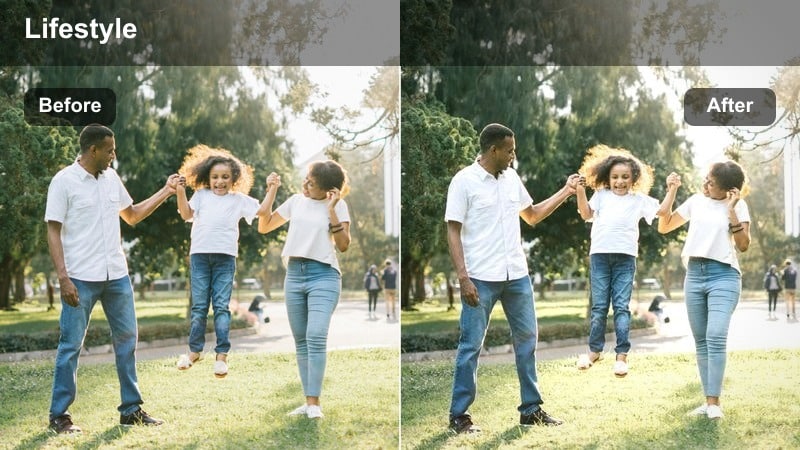
- Effect look: Desaturates vivid hues, slightly cools the image, and lifts shadows for a quiet urban feel.
- Best for: City sidewalks, building exteriors, and minimalist street B-roll between scenes.
- Editing tip: Use slower, stabilized camera moves so the understated color grade complements the calm motion.
Concrete Muted Tones turns vibrant city colors into a restrained, modern palette that highlights architecture and shapes instead of bright signage. The cooler overall tone and lifted shadows make concrete, glass, and metal surfaces feel soft yet structured, perfect for linking scenes in your edit.
When editing in Filmora, drop this filter onto transitional B-roll between segments of your video. Paired with slow, stabilized movements, it gives your urban cutaways a calm, minimal feel that resets the viewer without competing with your main content or message.
Subtle City Contrast
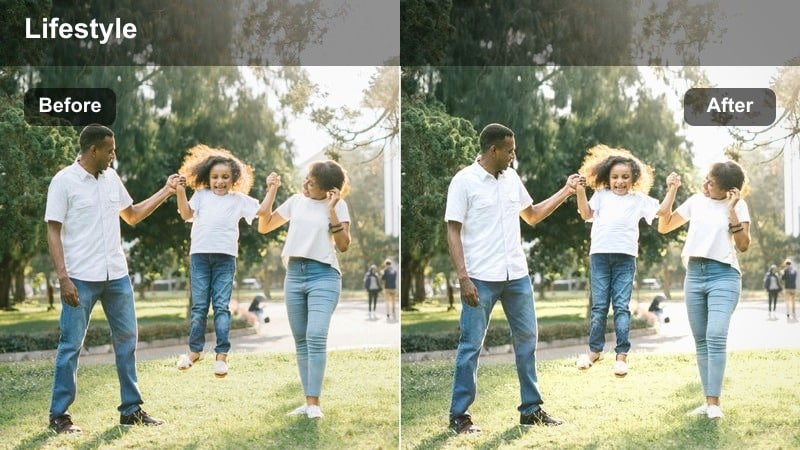
- Effect look: Adds a light contrast boost and selective clarity in midtones while keeping saturation low and controlled.
- Best for: Architectural details, street signs, and static shots of city textures like walls and railings.
- Editing tip: Avoid stacking sharpening tools; let the selective clarity from the filter handle micro-contrast.
Subtle City Contrast is designed to bring out edges and lines in urban scenes without creating a crunchy or over-processed look. The gentle boost in midtone clarity highlights building details, street textures, and signage while the low saturation keeps everything within a minimal, cinematic palette.
In Filmora, use this filter on tripod or static shots where structure and geometry matter more than color. Skip extra sharpening effects and rely on the filter to add enough micro-contrast, keeping your city sequences crisp yet understated and aligned with a minimalist visual style.
Monochrome Urban Wash
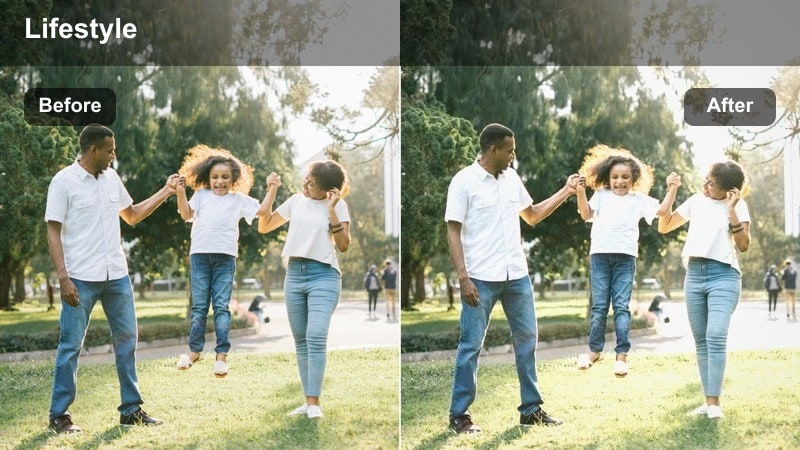
- Effect look: Pushes colors toward a soft near-monochrome palette while preserving subtle skin tone detail.
- Best for: Moody city walks, lone subject in the street, and minimalist fashion shots in urban spaces.
- Editing tip: Combine with a slight vignette to keep attention centered without making the frame feel heavy.
Monochrome Urban Wash gives your city footage a nearly black-and-white look with just a hint of color, ideal for moody sequences and minimalist storytelling. It focuses on tone and composition by suppressing most hues but carefully keeps skin tones from looking lifeless or gray.
Apply this filter in Filmora to walking shots, fashion B-roll, or reflective city moments where you want emotion and silhouette to stand out. A light vignette effect can support the look by centering attention on your subject while the rest of the frame stays softly desaturated and understated.
Minimal Indoor Studio and Set-Based Content
Studio Soft Keys
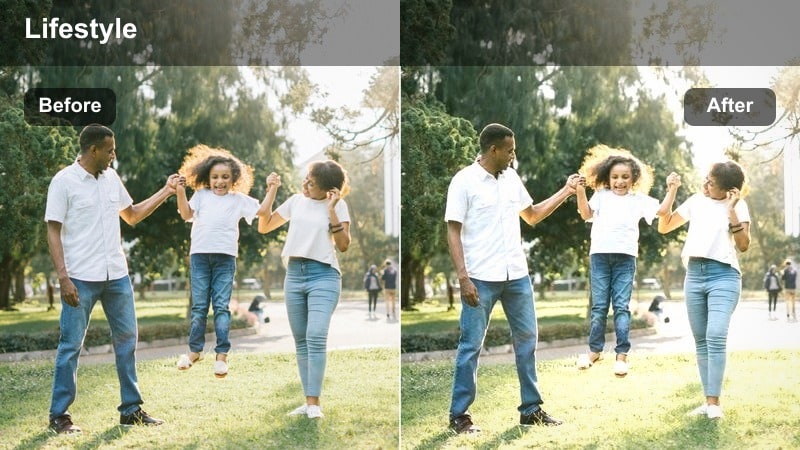
- Effect look: Smooths contrast around faces, slightly warms midtones, and keeps backgrounds clean and subdued.
- Best for: Podcast sets, studio interviews, and YouTube explainers with controlled lighting.
- Editing tip: Set your camera profile flat or neutral, then apply this filter for an easy, minimal finished look.
Studio Soft Keys is tailored for controlled sets where you already have decent lighting and just need a polished, minimal finish. It subtly warms midtones for flattering skin while rolling off contrast so facial features look smooth and natural rather than sharp and high-contrast.
In Filmora, drop this filter onto your podcast or interview timelines as a quick finishing step after basic exposure balancing. Because it keeps backgrounds subdued, it helps your hosts or guests stand out, giving your studio content a modern, consistent look with very little manual grading.
Product Flat Tone
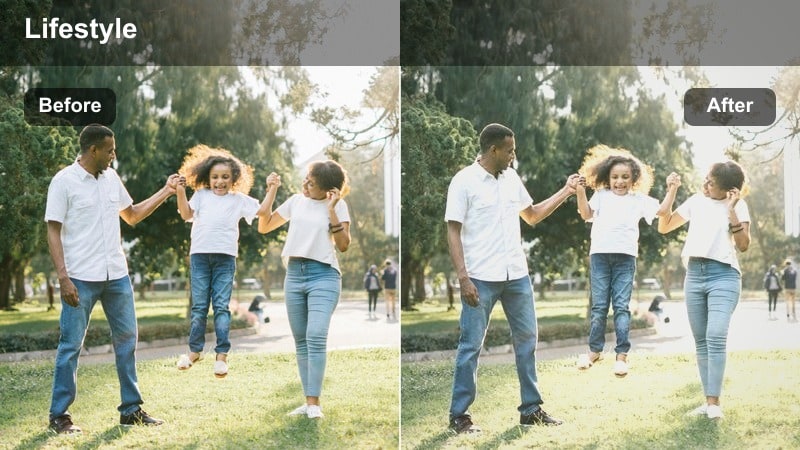
- Effect look: Flattens heavy contrast, reduces color intensity, and adds a faint matte to emphasize shape over color.
- Best for: Tech product shots, unboxings, and tabletop B-roll on neutral backgrounds.
- Editing tip: Crop tighter and keep backgrounds plain so the subtle matte finish feels intentional and premium.
Product Flat Tone is created for clean, detail-focused product visuals where design and form are the star. By gently flattening contrast and pulling back saturation, it makes edges, materials, and textures easier to read without the distraction of overly vivid colors or reflections.
Use this filter in Filmora on unboxing sequences and close-up B-roll of gadgets, packaging, or accessories. Pair it with neutral backdrops and tighter crops so the soft matte finish looks deliberate and high-end, helping your product videos feel consistent across multiple uploads.
Clean Backdrop Subtle
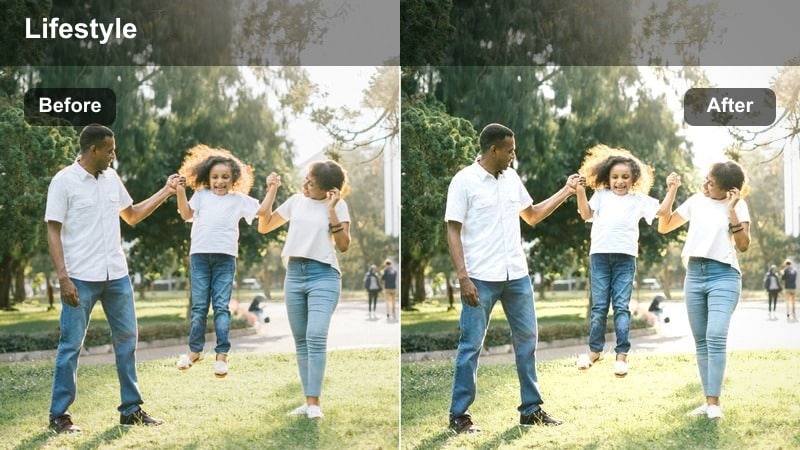
- Effect look: Softly evens out backdrop color, tames saturation, and keeps the subject separated with gentle midtone emphasis.
- Best for: Standing intros against paper or seamless backdrops and brand announcement videos.
- Editing tip: Use this filter instead of heavy background blur when you want a modern, minimal studio aesthetic.
Clean Backdrop Subtle is perfect for simple talking-head or announcement videos shot against paper rolls or seamless walls. It smooths minor variations in backdrop color and reduces saturation so the background feels uniform and modern without needing aggressive blur or masking.
Inside Filmora, apply this filter to your intro and outro shots to keep brand colors soft and consistent behind your presenter. The gentle midtone emphasis keeps the subject clearly separated from the backdrop, giving you a professional, minimal studio look with minimal setup and grading time.
Evening, Mood, and Ambient Minimal Scenes
Evening Soft Hues
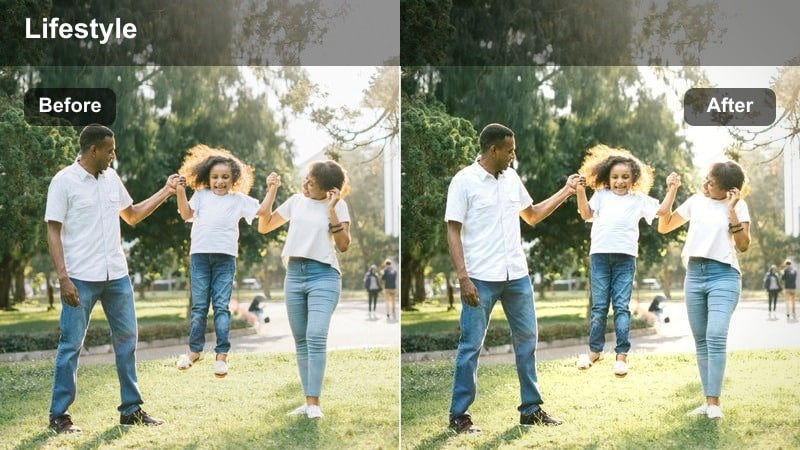
- Effect look: Gently cools highlights, softens contrast, and preserves warm practical lights for a quiet evening feel.
- Best for: Night desk sessions, late-night editing montages, and ambient room B-roll.
- Editing tip: Lower saturation a touch more if your scene has strong colored LEDs to stay within the minimal palette.
Evening Soft Hues balances the mix of screen glow, lamps, and room shadows you get when filming at night. By cooling highlights slightly and softening contrast, it lets warm practical lights stay cozy without pushing the overall frame into a heavy orange cast.
In Filmora, use this filter on night desk shots, study sessions, or late-editing montages to create a gentle, reflective mood. If your room uses strong RGB lighting, reduce saturation a little further so the palette stays calm and minimal while still hinting at color accents.
Neon Muted Glow
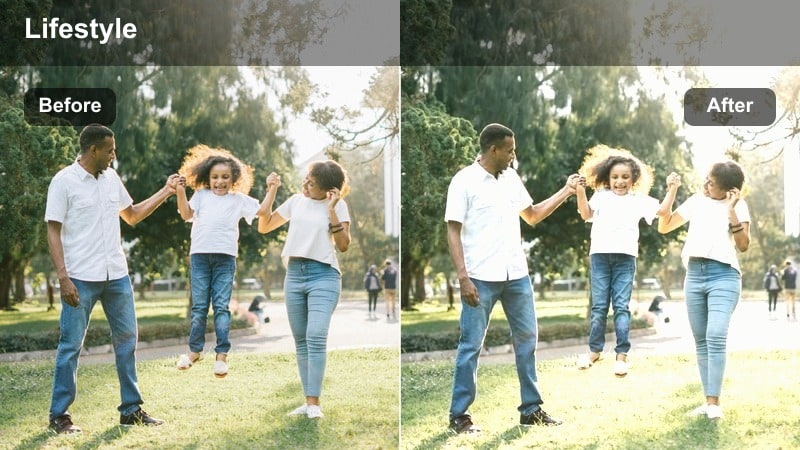
- Effect look: Softens neon highlights, pulls overall saturation down, and keeps skin tones tame around colored lighting.
- Best for: Cinematic B-roll near neon signs, minimal city night walks, and creative intros with colored lights.
- Editing tip: Expose slightly darker in-camera, then let the filter bring back midtones for a restrained neon look.
Neon Muted Glow is built to control intense signage and RGB lighting so your night scenes look stylish rather than chaotic. It smooths out harsh neon highlights and reduces saturation while carefully protecting skin tones, which is crucial when your subject is close to colored light sources.
Apply this filter in Filmora to night walks, cyberpunk-inspired B-roll, or creative intros shot near neon and LED panels. Expose a bit darker during shooting to avoid clipping, then let the filter and subtle midtone adjustments bring back just enough detail for a cinematic yet minimal neon atmosphere.
Ambient Room Minimal
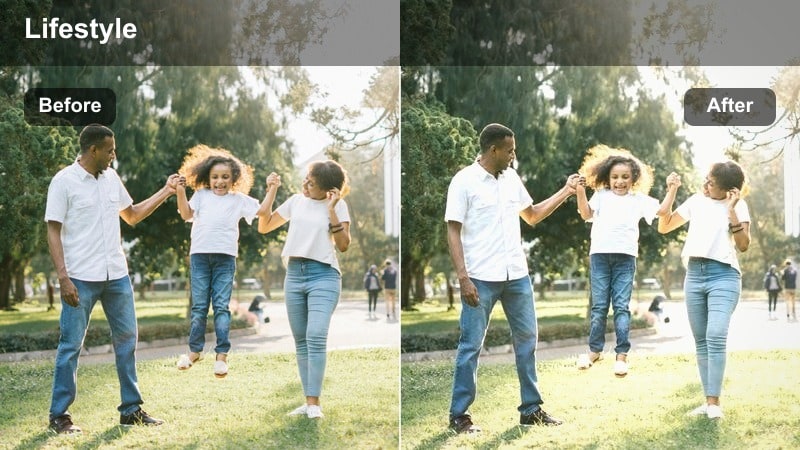
- Effect look: Adds a faint matte, lowers saturation, and balances warm and cool lamp tones for intimate ambient scenes.
- Best for: Cozy room tours, reading corners, and behind-the-scenes shots of your creative space at night.
- Editing tip: Use slow pans and minimal movement so the soft matte finish reinforces the relaxed atmosphere.
Ambient Room Minimal is ideal for capturing the cozy, lived-in feel of bedrooms, studios, or creative spaces lit by a mix of lamps and screens. The faint matte effect and reduced saturation tie together different light sources so the room feels unified rather than patchy or overly colorful.
In Filmora, apply this filter to slow pans, handheld impressions, or BTS moments in your space to build atmosphere between main segments. Keep camera moves gentle and avoid heavy color corrections on top of the filter so the balanced, minimal mood remains intact from shot to shot.
Tips for Using Minimal Color Grading Video Lut Filters in Filmora
- Shoot with consistent white balance so minimal color grading filters can fine-tune rather than fix major color shifts across clips.
- Set your camera profile to flat or neutral and lower in-camera contrast and saturation to give Filmora filters more room to create a subtle grade.
- Avoid strongly colored clothing and busy props if you want a truly minimal, neutral palette that lets the filters shine.
- Use Filmora filter intensity sliders instead of stacking many effects to keep your final look clean, simple, and easy to repeat.
- Create a reusable preset once you like a combination of minimal filter and basic adjustments so future projects match quickly.
- Test each filter on a short sequence of different shots to ensure skin, backgrounds, and B-roll all respond well to the same minimal grade.
- Combine a single minimal filter with only light LUT or color tweaks so your grade stays restrained and consistent across the edit.
Minimal color grading video LUT-style filters help content creators keep their footage clean, modern, and consistent without spending hours on manual corrections. By starting from a subtle base, you can shape the tone of your channel while preserving natural skin tones and believable color.
Open your project in Filmora, try one or two of these minimal filters, and adjust intensity until they blend seamlessly with your footage. With a saved preset and a simple workflow, you can apply the same understated, polished look across vlogs, B-roll, and studio content so your visuals always support your story instead of distracting from it.
secure download