

 100% Security Verified | No Subscription Required | No Malware


 ChatGPT
 Perplexity
 Gemini
 Claude
 Grok
Grok
These Modern Downtown Architecture LUT-style filters are built for content creators who want sharp lines, cool tones, and cinematic contrast in their city footage.
Use these presets in Filmora to quickly match the mood of glass towers, busy intersections, and neon-lit skylines without spending hours on manual color grading.
In this article
Glass and Steel Dayscapes
Crisp Skyline Clarity
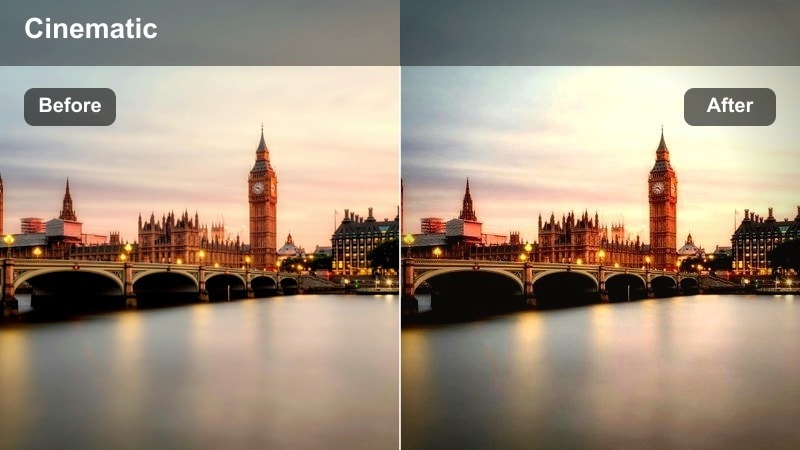
- Effect look: Bright, high-contrast filter that sharpens building edges and deepens blue skies while keeping skin tones neutral.
- Best for: Daytime drone shots of downtown skylines, rooftop b-roll, and wide establishing shots of modern business districts.
- Editing tip: Slightly lower exposure and push clarity or sharpness just a bit to make glass reflections and metal frames stand out.
Use Crisp Skyline Clarity when you want your modern downtown skylines to feel clean, bold, and architectural. In Filmora, this style brings out the edges of glass and steel, deepens the sky, and maintains natural skin tones so people on rooftops or balconies still look realistic against a dramatic backdrop.
Apply this filter to your drone, crane, or rooftop footage, then fine-tune with Filmoras exposure and clarity sliders to control how intense the glass reflections appear. For extra polish, add gentle highlight reduction to prevent reflective windows from clipping, and finish with subtle film grain if your skyline feels overly digital.
Match Modern City Colors with AI
Use Filmoras AI color tools to quickly match the look of your favorite Modern Downtown Architecture LUT-style filter across multiple skyline, rooftop, and street clips. Instead of grading each shot from scratch, you can build one hero grade and let AI help carry that palette through the entire sequence.
Analyze a single graded city shot, then apply the AI-matched palette to the rest of your footage so glass towers, blue skies, and neutral skin tones stay consistent from angle to angle.
 secure download

Preview Filters on Your Downtown Footage
Test how each Modern Downtown Architecture LUT-style filter interacts with glass, concrete, and sky by dragging it onto a short sample clip in Filmora. This quick preview workflow lets you see whether a bright, crisp skyline look or a softer, warmer city tone fits your story.
Try stacking two or three filters on duplicates of the same clip in the timeline so you can compare moods side by side before committing to a direction for your full edit.
secure downloadCombine Filters with LUTs for Signature Looks
For a more advanced grade, start with a Filmora 3D LUT to define overall contrast and color balance, then layer one of these Modern Downtown Architecture LUT-style filters on top for final mood. This combination makes it easy to keep your channel look consistent across daytime, blue hour, and night scenes.
Once you have a combination you love, save it as a custom preset in Filmora so you can apply your signature city style with a single click on future projects.
secure downloadSunlit Street Grid
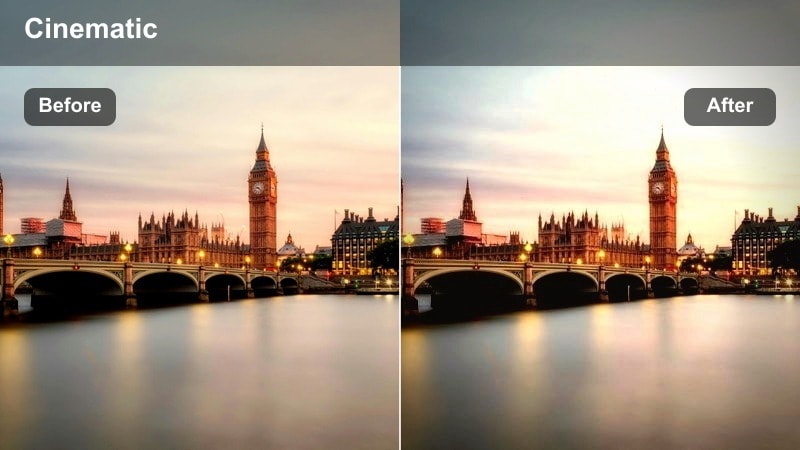
- Effect look: Warm, slightly desaturated tones with lifted shadows to reveal detail in shaded street canyons.
- Best for: Handheld walking tours, street-level vlogs, and architectural b-roll in bright city daylight.
- Editing tip: Use gentle stabilization and add a subtle vignette so the viewer s focus stays on the corridor of buildings ahead.
Sunlit Street Grid is ideal for creators filming walk-through tours, lifestyle vlogs, and urban canyons where harsh daylight often hides details. The lifted shadows keep building textures and storefronts visible while the gentle warmth adds a friendly, inviting city tone.
In Filmora, pair this filter with built-in stabilization for handheld clips and add a light vignette to guide attention down the avenue. Combine it with slow push-ins or gimbal moves to create a smooth, immersive journey through your favorite downtown streets.
Minimalist Faade Focus
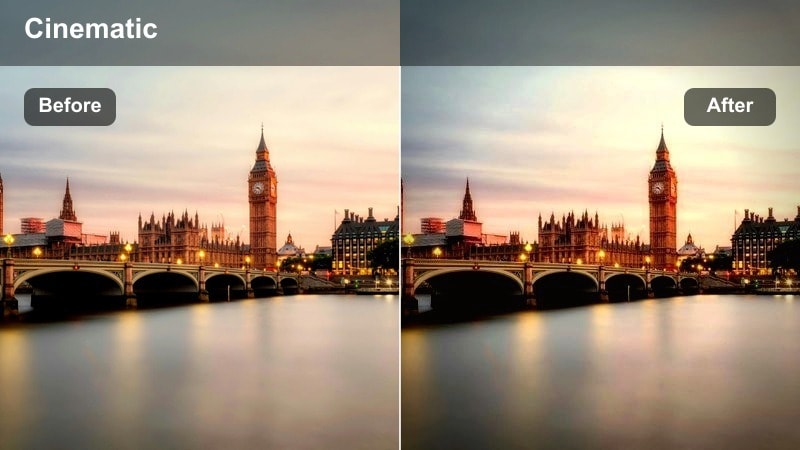
- Effect look: Cool, neutral palette with reduced saturation and strong micro-contrast to emphasize patterns and textures.
- Best for: Close-ups of building faades, geometric compositions, and architectural detail shots.
- Editing tip: Crop to stronger vertical or horizontal lines, and keep camera movement slow to let the patterns and symmetry stand out.
Minimalist Faade Focus turns ordinary walls and windows into graphic compositions by cooling the palette and boosting fine contrast. It works especially well for shots that showcase symmetry, repeating windows, or striking material textures in modern architecture.
After applying this filter in Filmora, refine your framing with crops and straightening tools to align horizontals and verticals perfectly. Slightly increasing texture or clarity can further enhance the sculpted light on concrete, metal, and glass without overwhelming the minimalist mood.
Blue Hour Business Districts
Neon Glass Reflections
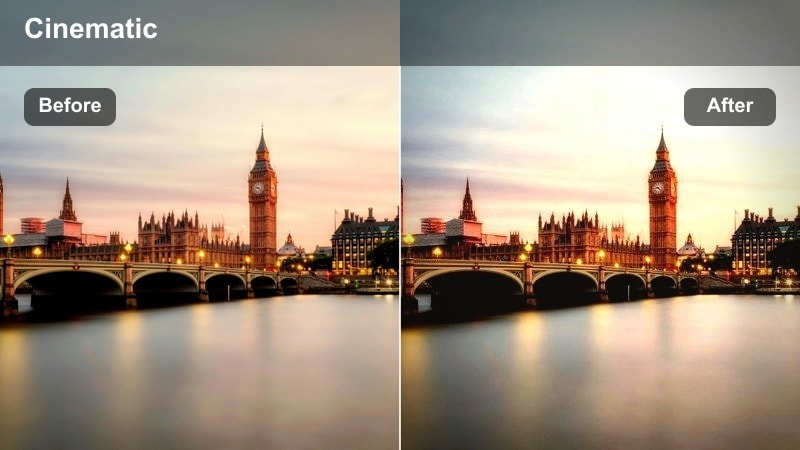
- Effect look: Rich blues and teals in shadows with vibrant neon accents and slightly crushed blacks for a stylized city glow.
- Best for: Blue hour office towers, glass buildings reflecting signage, and cyberpunk-style city scenes.
- Editing tip: Underexpose slightly in-camera, then apply the filter and lift midtones just enough to keep people visible against glowing lights.
Neon Glass Reflections is perfect for giving business districts a futuristic, cyberpunk-inspired energy once the sun goes down. Deep blues and teals in the shadows make neon signs, LED panels, and traffic lights pop dramatically across glass surfaces.
In Filmora, use this filter on shots angled toward reflective windows, shiny cars, or wet pavement to multiply the number of light sources. If skin tones start leaning too teal, use HSL or color correction tools to selectively warm them back up while preserving the stylized urban glow.
Twilight Skyline Balance
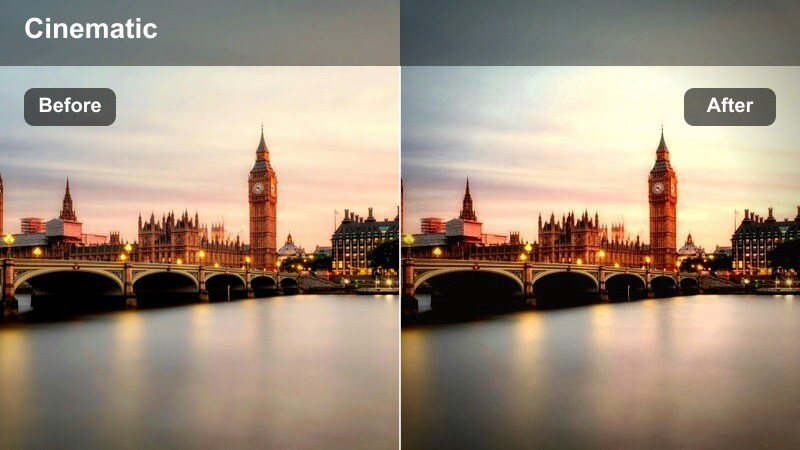
- Effect look: Balanced cinematic contrast with gentle cool highlights and protected detail in midtones and shadows.
- Best for: Timelapses of city lights turning on, evening skyline reveals, and calm downtown overview shots.
- Editing tip: Use smooth crossfades between clips and keep camera motion slow to match the relaxed, cinematic pacing of this look.
Twilight Skyline Balance is designed for the blue hour transition when city lights begin to glow but the sky still holds color. It keeps highlights controlled and midtones detailed, giving your skyline a polished, cinematic finish that feels calm and refined.
Apply this filter to timelapses, slow pans, and drone reveals in Filmora, then use simple crossfades instead of flashy transitions to maintain the tranquil mood. For multi-clip sequences, lock your white balance in-camera and use Filmoras color match tools to ensure every shot feels like part of the same twilight moment.
Office Tower Ambience
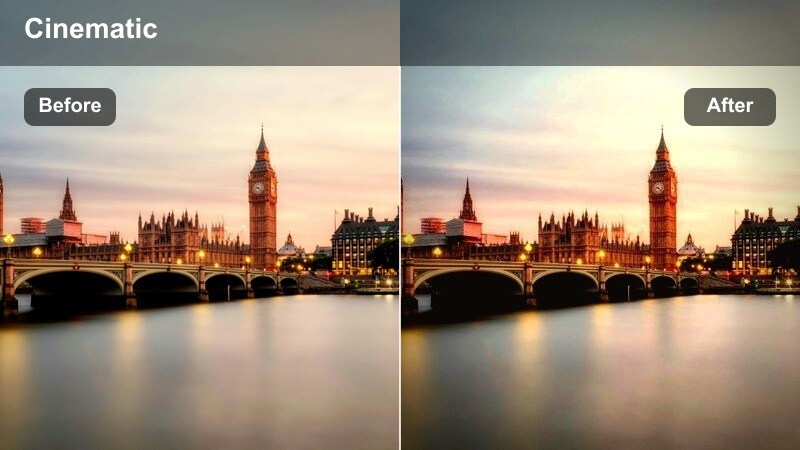
- Effect look: Soft contrast with slightly warm interior lights and cool exterior tones for a dynamic interior-exterior feel.
- Best for: Medium shots of lit office towers, coworking spaces with city views, and corporate b-roll.
- Editing tip: Use depth of field to keep one subject or window in focus and let this filter handle subtle color contrast between inside and outside.
Office Tower Ambience creates a pleasing separation between warm, inviting interiors and the cooler tones of the surrounding city. It is excellent for corporate b-roll, coworking spaces, or any shot where you want to tell a story through lit windows against a dusk skyline.
In Filmora, combine this filter with controlled depth of field and gentle camera moves to highlight a specific window or subject. If you notice flicker from office lighting, run a deflicker or adjust clip speed before grading so the final result feels smooth and professional.
Nighttime Urban Contrasts
High Contrast Night Grid
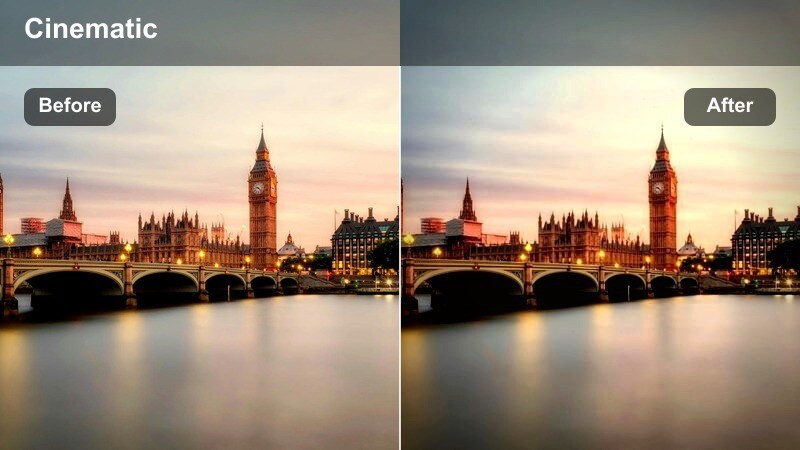
- Effect look: Deep blacks, punchy highlights, and saturated signage colors for bold, graphic night city frames.
- Best for: Night streets with bright billboards, downtown intersections, and handheld nightlife sequences.
- Editing tip: Avoid pushing ISO too high; noise will be more noticeable with strong contrast, so add light grain instead of over-sharpening.
High Contrast Night Grid is built for intense, energetic downtown nights where billboards, storefronts, and headlights dominate the frame. The deep blacks and bright highlights give your footage a bold graphic feel, ideal for nightlife b-roll or fast-paced city edits.
Once applied in Filmora, keep an eye on noise in darker areas and use film grain instead of heavy sharpening to maintain a cinematic texture. You can also slightly adjust curves to soften midtones if the look starts to feel too harsh while still preserving dramatic blacks and glowing signs.
Urban Noir Walk
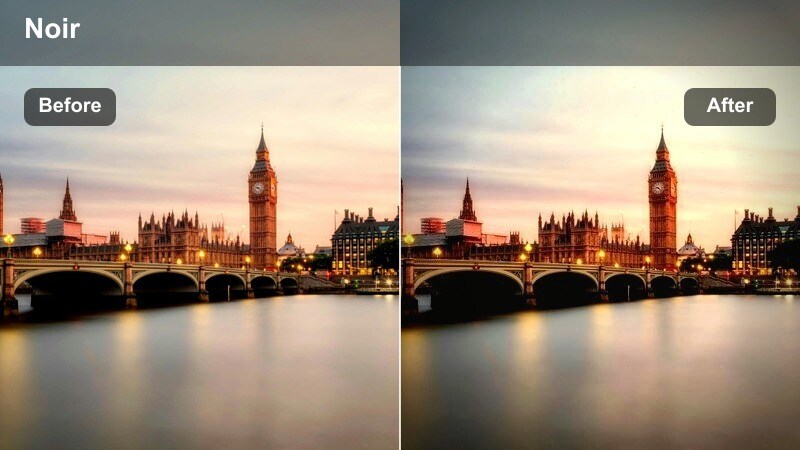
- Effect look: Muted colors with a subtle green-blue cast in shadows and cinematic bloom on brighter lights.
- Best for: Slow street walks, character-focused night vlogs, and narrative scenes between tall buildings.
- Editing tip: Pair with slower frame rates or gentle slow motion to let the noir-style mood sink in and avoid fast, choppy cuts.
Urban Noir Walk is tailored for moody, character-driven city stories at night. The muted palette and slight green-blue tint in the shadows deliver a classic noir atmosphere, while soft blooms around practical lights create a dreamy, cinematic quality.
In Filmora, slow your footage down slightly or edit with longer cuts to let the mood breathe. You can reduce saturation even further to approach a near-monochrome style, keeping just a few colored signs or signals as visual accents in your narrative.
Sleek Parking Structure
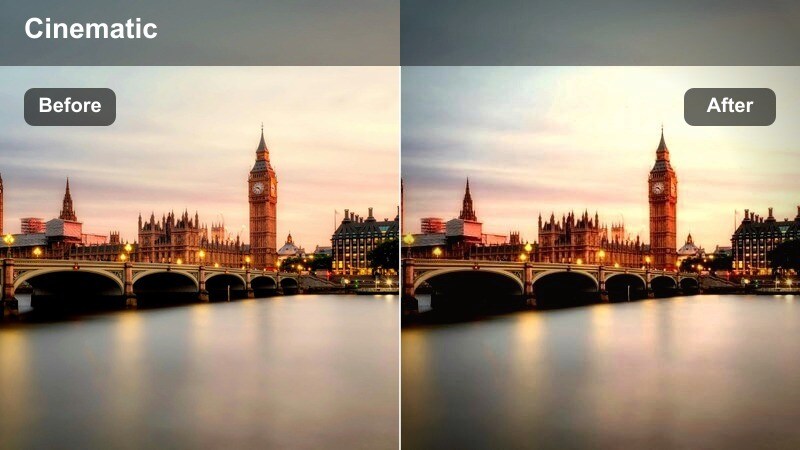
- Effect look: Neutral yet polished tones with emphasized highlights on concrete and metal, giving a futuristic parking-lot vibe.
- Best for: Night shoots in parking garages, rooftop parking scenes, and car-focused downtown b-roll.
- Editing tip: Use static or locked-off shots and let the geometry of ramps and rails do the work while this filter adds a sleek finish.
Sleek Parking Structure turns utilitarian garages and rooftops into futuristic sets with crisp highlights on concrete, rails, and cars. The neutral, polished look is great for automotive content, fashion shoots, or music videos that use urban structures as minimal backdrops.
Apply this filter in Filmora to locked-off shots where ramps, pillars, and railings create strong lines through the frame. For an extra sci-fi edge, gently push the shadows toward blue and add subtle light flares or glows around overhead fixtures while keeping surfaces sharp.
Dynamic Streets and Transit
Commuter Flow Motion
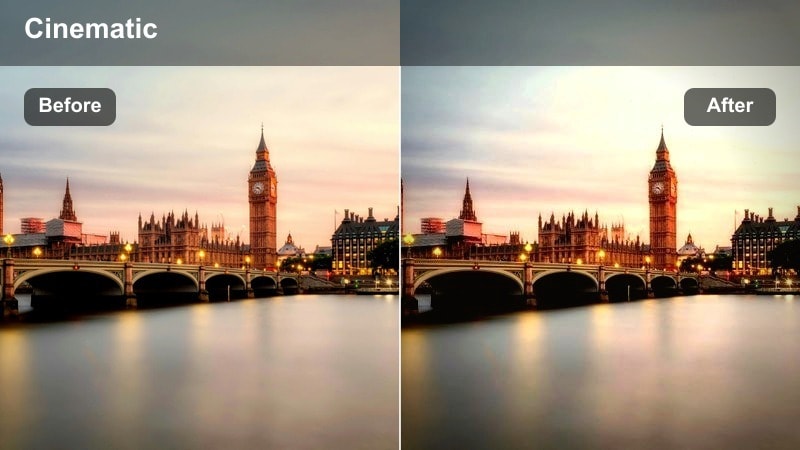
- Effect look: Balanced saturation with slightly warm midtones and crisp contrast that keeps moving crowds readable.
- Best for: Busy sidewalks, rush-hour crosswalks, and time-lapse of crowds around modern office blocks.
- Editing tip: Speed up certain clips or alternate real-time and time-lapse shots to emphasize the constant flow of downtown life.
Commuter Flow Motion helps you capture the energy of rush hour without losing clarity in faces, outfits, and building edges. The warm midtones and balanced contrast keep both crowds and architecture readable, even when there is a lot of motion in the frame.
In Filmora, use this filter on real-time and sped-up clips of crossings, sidewalks, and plazas. Alternate between time-lapse and normal speed, then add motion blur effects where needed to reinforce the feeling of a constant human flow while skyscrapers stay solid and stable.
Transit Hub Clarity
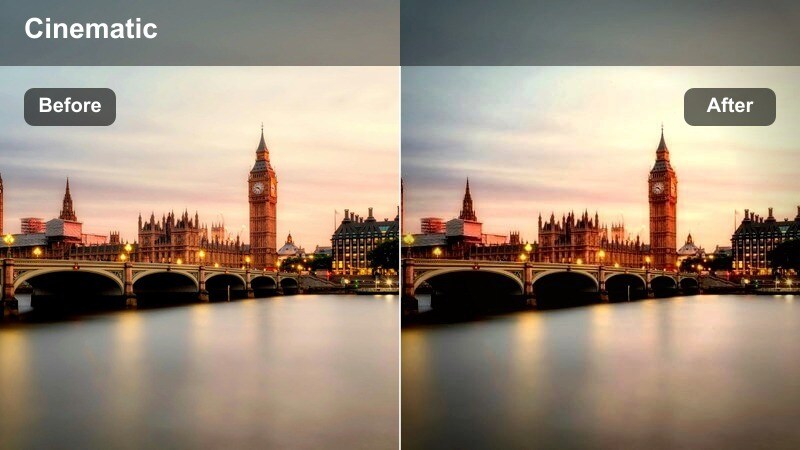
- Effect look: Clean, slightly cool tone with boosted clarity and reduced haze, ideal for glassy transit hubs and overpasses.
- Best for: Modern train stations, elevated walkways, and bus terminals integrated into downtown architecture.
- Editing tip: Use leading lines from rails and platforms, and keep camera pans slow to show off structural depth and symmetry.
Transit Hub Clarity is optimized for bright, glass-heavy environments like stations, concourses, and elevated walkways. By reducing haze and boosting clarity, it reveals the structural rhythm of beams, rails, and platforms while keeping the overall tone cool and modern.
Apply this style in Filmora to footage captured from slightly elevated angles so lines and patterns stretch through the frame. Slow, deliberate pans or tilts will let viewers appreciate the architecture, and minor exposure tweaks can ensure bright glass surfaces retain detail without washing out.
Bike Lane Perspective
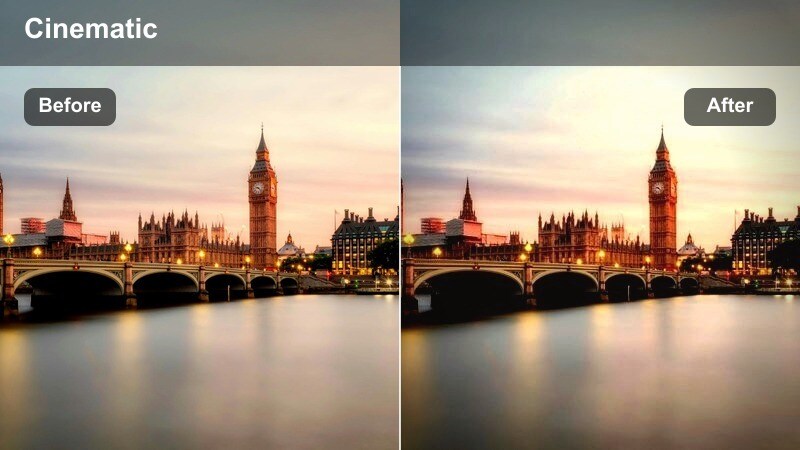
- Effect look: Energetic, slightly punchy saturation with medium contrast and a subtle cool shift in shadows.
- Best for: POV rides through downtown bike lanes, action camera shots, and low-angle clips along modern streets.
- Editing tip: Stabilize your footage in Filmora and mix wide shots with handlebar-level angles to keep the sense of speed and space.
Bike Lane Perspective brings a dynamic, energetic feel to POV rides and street-level action footage. Punchy saturation and cool shadows underline the modern city environment while keeping enough contrast to read passing buildings and lane markings.
In Filmora, stabilize your action camera clips first, then apply this filter to unify colors across different angles. Mix wide establishing shots with low, handlebar-level perspectives, and cut on turns or major landmarks to make the viewer feel every shift in direction through the downtown grid.
Tips for Using Modern Downtown Architecture Lut Filters in Filmora
- Shoot with a slightly flatter in-camera profile so Modern Downtown Architecture LUT-style filters have more room to shape contrast and color.
- Keep white balance locked across your city clips to avoid unwanted shifts when applying the same filter or LUT sequence.
- Compose shots with strong leading lines from streets, rails, or faades so clarity and contrast enhancements are more impactful.
- Stabilize handheld downtown footage in Filmora before adding aggressive sharpening or contrast to prevent jittery-looking clips.
- Mix wide skylines with tight architectural close-ups so your edit feels dynamic while remaining cohesive in overall color tone.
- Expose for highlights on glass and metal surfaces, then let the filters recover depth in midtones and shadows where possible.
- Adjust filter intensity or opacity in Filmora if skin tones, branding colors, or signage start to look overly stylized.
- Add a touch of film grain to very crisp glass-and-steel scenes to soften edges and create a more cinematic, less clinical feel.
Modern Downtown Architecture LUT-style filters give content creators a fast, reliable way to turn raw city footage into sleek, cinematic visuals without extensive color grading skills.
Experiment with different presets for day, blue hour, and night scenes, then fine-tune intensity in Filmora until the look perfectly matches your urban storytelling style.
secure download