

 100% Security Verified | No Subscription Required | No Malware


 ChatGPT
 Perplexity
 Gemini
 Claude
 Grok
Grok
The Portrait Lighting Video Filter LUT pack is designed for content creators who want flattering, cinematic portraits straight from the Filmora timeline. These filters help you shape light, define mood, and keep skin tones natural and consistent across every shot.
Whether you film talking-head videos, fashion reels, beauty content, or cinematic portraits, this collection gives you ready-made looks that quickly enhance lighting, depth, and detail without complex color grading.
In this article
Soft Studio Glow Portraits
Soft Cream Glow
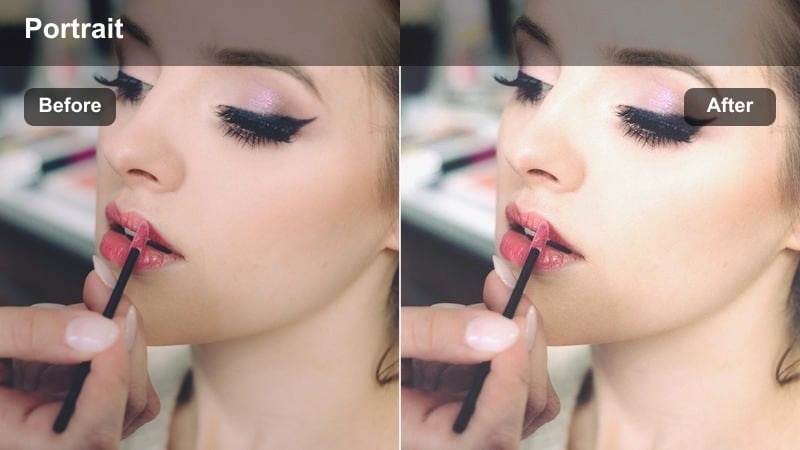
- Effect look: Gentle brightening with creamy highlights and soft contrast for flattering close-up portraits.
- Best for: Beauty vlogs, skincare reviews, and softly lit studio portrait interviews.
- Editing tip: Slightly reduce contrast if your footage is already high key to avoid blowing out highlights on the face.
Soft Cream Glow wraps your subject in a gentle, luminous finish that smooths transitions between light and shadow while preserving natural skin detail. In Filmora, it is ideal when you want a polished studio feel without obvious retouching, especially for talking-head segments and product-focused beauty shots.
Apply this LUT after basic exposure correction, then fine-tune intensity on an adjustment layer so it affects all similar clips consistently. For face-forward content, nudge the slider down around 60 to 70 percent so skin keeps some authentic texture while still benefiting from the creamy highlights and flattering soft contrast.
AI-Assisted Portrait Lighting in Filmora
Combine the Portrait Lighting Video Filter LUT pack with Filmoras AI-powered color tools to quickly balance exposure and white balance across all your portrait angles. Once your base is unified, each LUT can focus on shaping mood, depth, and skin tone instead of fixing technical issues.
Use AI auto-correction at the beginning of your workflow to normalize clips from different cameras or locations, then apply your preferred portrait lighting LUTs on adjustment layers for a consistent, cinematic finish.
 secure download

Preview Portrait Filters in Real Time
Filmoras real-time preview lets you test every portrait lighting LUT on a short section of your clip before rolling it out to an entire sequence. This makes it easy to compare subtle differences in contrast, color, and skin tone across multiple portrait looks.
Apply the LUT to an adjustment layer above a few representative shots, then scrub the timeline to see how it handles changes in angle, distance, and lighting. Once you are satisfied, extend the layer across the rest of your edit for instant consistency.
secure download1000+ Video Filters and 3D LUTs in Filmora
Beyond this Portrait Lighting Video Filter LUT pack, Filmora includes a large collection of cinematic filters, creative LUTs, and stylistic overlays. You can combine them with your portrait presets to build signature looks for vlogs, interviews, and branded content.
Stack basic corrections beneath creative filters on adjustment layers so you can swap styles without redoing your entire grade, and quickly adapt the same project to different platforms or clients.
secure downloadPowder Soft Studio
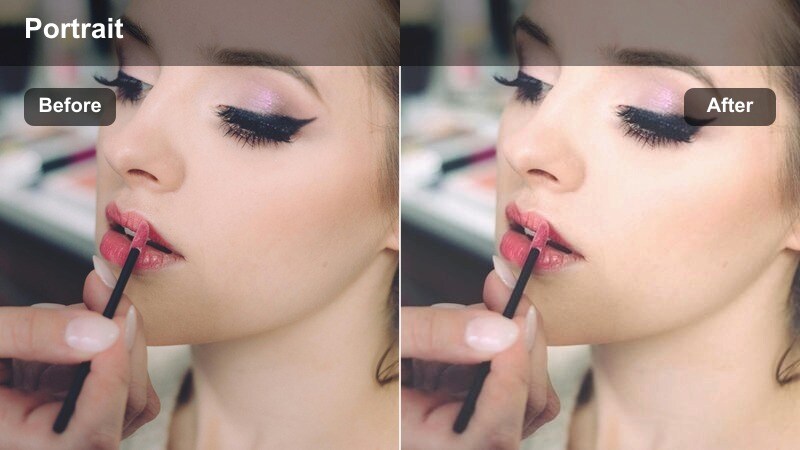
- Effect look: Muted contrast with a delicate matte finish and balanced studio whites.
- Best for: Tutorials, product-focused portraits, and clean studio influencer content.
- Editing tip: Add a slight vignette after applying this filter to focus attention on the subject's face and eyes.
Powder Soft Studio creates a refined matte aesthetic that softens harsh shadows while keeping whites clean and neutral. It is especially useful for minimal studio setups where you want the subject and product to stand out without heavy saturation or glossy highlights.
In Filmora, apply this LUT to give your tutorial or influencer content a cohesive, editorial feel across multiple shots. Layer a subtle vignette and mild sharpening on the eyes to naturally pull focus to the face while the rest of the frame maintains a calm, desaturated studio mood.
Pearl Skin Highlight
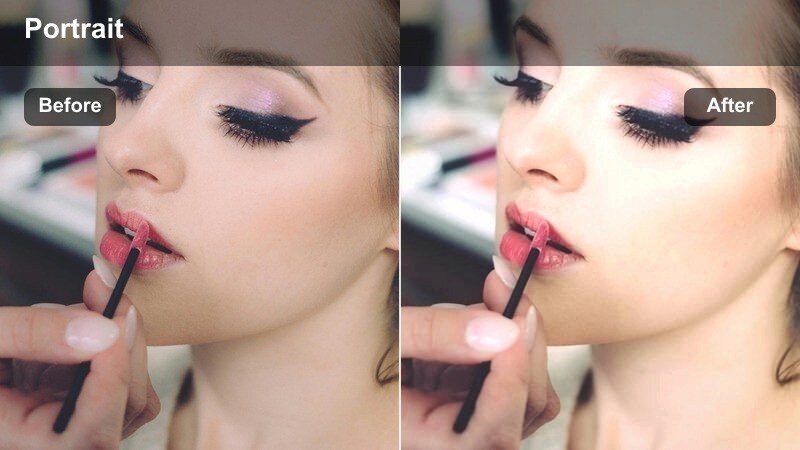
- Effect look: Bright, pearly highlights with subtle warmth for healthy, luminous skin.
- Best for: Makeup tutorials, GRWM videos, and high-key portrait intros.
- Editing tip: Drop exposure slightly before applying if your footage is already bright to keep detail in the highlights.
Pearl Skin Highlight enhances studio and ring-light setups by adding a luminous, pearly sheen to cheeks, forehead, and other key facial planes. It gently warms skin tones, helping complexion appear healthy and radiant without pushing colors into unnatural territory.
When grading in Filmora, first use basic color correction to neutralize any color cast, then apply this LUT on an adjustment layer to refine the glow. Keep sharpening modest so the boosted highlights remain smooth, and dial down overall intensity for ultra-close beauty shots where you want both radiance and pore-level detail.
Moody Window Light Portraits
Cinematic Side Light
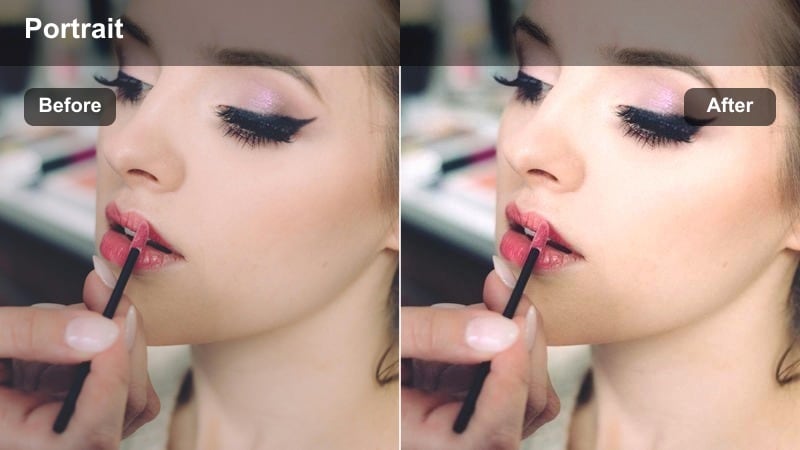
- Effect look: Directional contrast with rich midtones and gentle falloff into shadow for cinematic depth.
- Best for: Story-driven portraits, interview sequences, and cinematic talking-head scenes.
- Editing tip: Use a slight crop-in after applying to emphasize the lit side of the face and hide clutter in the dark areas.
Cinematic Side Light emphasizes the drama of window or key-light setups by deepening shadows and enriching midtones around the face. It creates a natural roll-off from highlight to darkness, giving portraits a filmic, narrative feel ideal for interviews and story-led pieces.
In Filmora, apply this LUT to side-lit footage and then fine-tune shadow levels to keep eye detail visible while preserving depth. A gentle crop and subtle vignetting on the darker side of the frame can further guide viewer attention to the illuminated half of the face and strengthen the cinematic composition.
Amber Window Glow
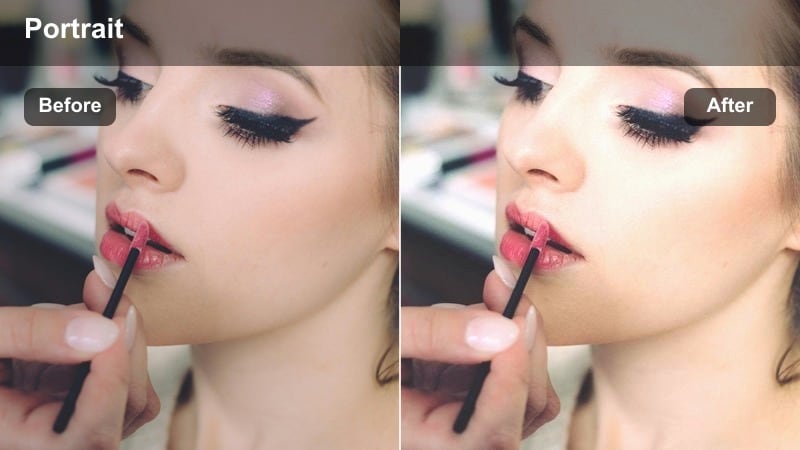
- Effect look: Warm, sunset-like window light with lifted blacks and soft amber highlights.
- Best for: Late-afternoon indoor portraits, lifestyle reels, and cozy storytelling content.
- Editing tip: Lower saturation of reds slightly if skin tones become too intense in direct warm light.
Amber Window Glow mimics golden-hour sunlight streaming through a window, adding gentle amber warmth and soft lifted blacks for a cozy indoor atmosphere. It works especially well for lifestyle vlogs, reading nooks, or home-office portraits that lean into comfort and intimacy.
Within Filmora, start with neutral white balance, then apply this LUT to introduce controlled warmth across your scene. If skin tones push too orange, pull back red or orange saturation slightly and fine-tune intensity so the ambience feels golden and inviting without overwhelming facial detail.
Shadow Frame Portrait
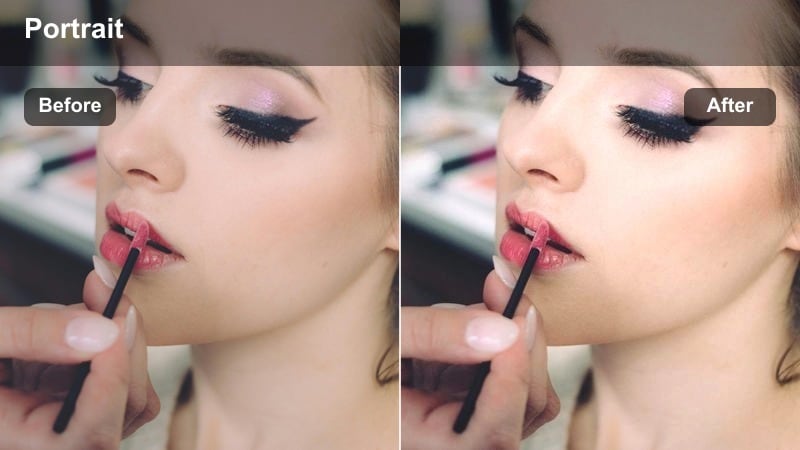
- Effect look: Deep shadows with focused highlights on the face to frame the subject against a darker scene.
- Best for: Dramatic monologues, emotional storytelling, and creative portrait shorts.
- Editing tip: Add a subtle radial blur behind the subject after this filter to enhance separation from the background.
Shadow Frame Portrait draws the viewer directly to the subject by surrounding them with rich, deep shadows while keeping the face clean and illuminated. This strong chiaroscuro effect is perfect for emotional monologues, poetry reads, or stylized social clips where mood is central.
Use this LUT in Filmora on footage with a controlled light source, then refine exposure so the brightest facial areas stay just below clipping. Adding a light radial blur or vignette behind the subject can heighten separation, creating a focused, theatrical portrait that plays beautifully on both large and small screens.
Neon and Night Street Portraits
Neon Edge Portrait
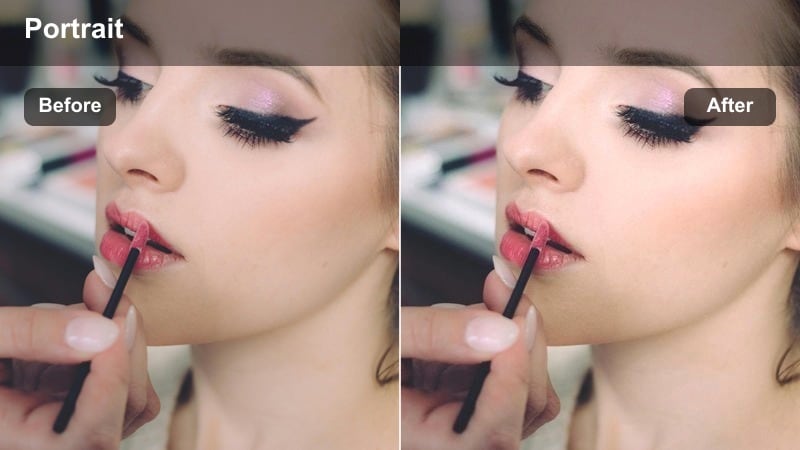
- Effect look: Punchy contrast with boosted neon hues and crisp highlights around the subject's outline.
- Best for: Night street portraits, music video close-ups, and edgy creator intros.
- Editing tip: Reduce clarity slightly if your lens is very sharp to avoid harsh edges on skin under neon lighting.
Neon Edge Portrait is designed for urban night scenes, amplifying sign and streetlight colors while tightening contrast around your subject. It emphasizes edges and specular highlights so portraits feel energetic and stylized, ideal for music content or bold creator branding.
In Filmora, apply this LUT to city-night footage shot at moderate ISO, then tame any excessive sharpness or noise with a touch of noise reduction and reduced clarity. Balance saturation so neon colors pop without clipping, and consider adding slow push-ins or handheld motion to accentuate the dynamic, high-contrast feel.
Cyan Magenta Dual Tone
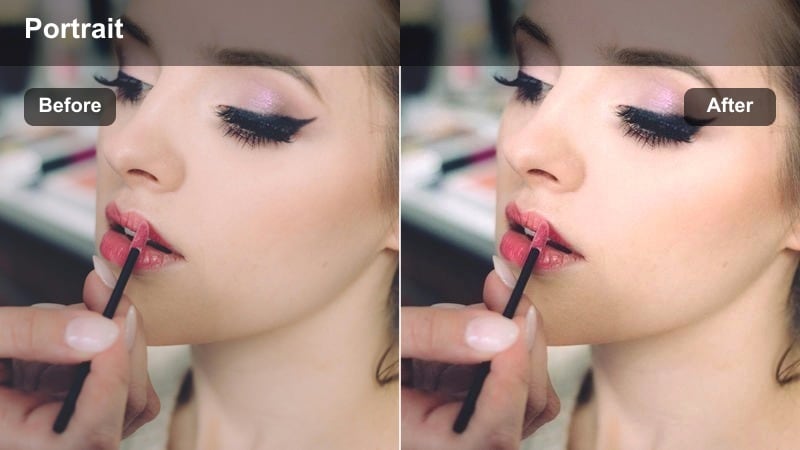
- Effect look: Stylized cyan and magenta color split with cool shadows and vibrant midtones.
- Best for: Music reels, dance portraits, club intros, and futuristic creator branding.
- Editing tip: Add slow motion and light camera movement to emphasize the color split and stylized lighting in motion.
Cyan Magenta Dual Tone creates a bold, futuristic palette by pushing highlights and midtones into complementary cyan and magenta. The result is a highly stylized portrait that feels at home in music videos, nightlife content, and visually experimental intros.
When editing in Filmora, pair this LUT with dark, uncluttered backgrounds to keep the color split clean and graphic. Use subtle slow motion, smooth keyframed zooms, or rotation effects to let the opposing hues glide across the face, turning simple portraits into eye-catching, on-brand visuals.
Soft Night Bokeh
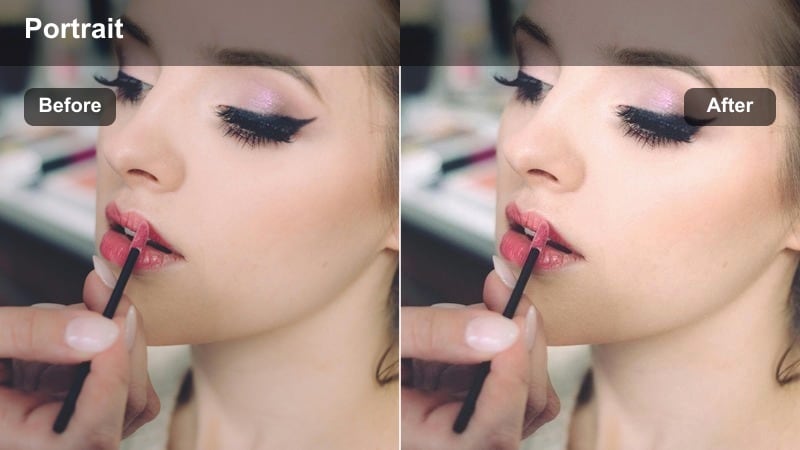
- Effect look: Soft contrast night portrait with lifted shadows and gentle blooming around city lights.
- Best for: Nighttime vlogs, cinematic street portraits, and romantic night scenes.
- Editing tip: Reduce sharpness on the background only to exaggerate the bokeh and make the subject pop.
Soft Night Bokeh turns busy city backdrops into dreamy, glowing orbs while keeping your subject clear and flattering. It lifts shadows slightly and adds a delicate bloom around light sources, perfect for romantic walks, reflective night vlogs, or cinematic street portraits.
In Filmora, use this LUT on footage shot with a wide aperture to maximize background blur, then selectively soften only the background using masks or blur effects. Keep subject sharpening controlled so faces remain natural, letting the enhanced bokeh and gentle contrast create the overall mood.
Natural Outdoor Portrait Lighting
Golden Hour Soft Warmth
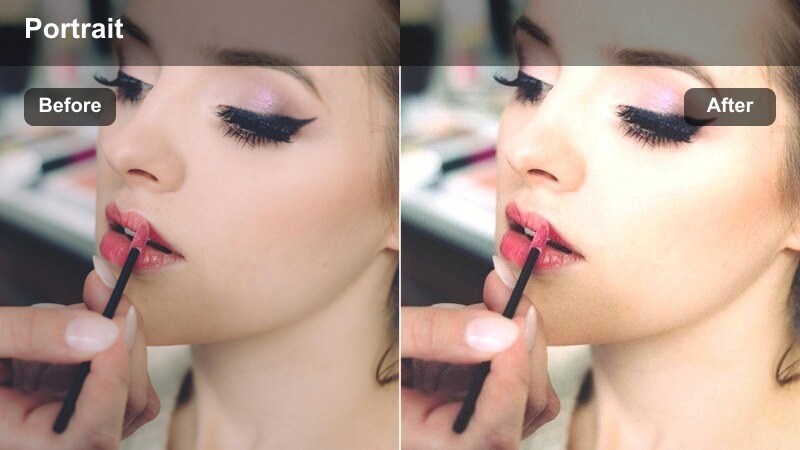
- Effect look: Soft warm highlights and gentle contrast for late-afternoon outdoor portraits.
- Best for: Sunset walks, outdoor creator intros, and lifestyle portrait reels.
- Editing tip: Lower global saturation slightly if your original golden hour footage is already very warm.
Golden Hour Soft Warmth enhances late-afternoon sunlight, giving skin tones a pleasing glow while keeping details in both the face and sky. It leans into warm highlights and gentle contrast, making outdoor portraits feel cinematic and nostalgic without becoming overly orange.
Apply this LUT in Filmora to footage captured during sunset or early evening, then fine-tune saturation so colors stay rich but believable. If your sky is bright, slightly underexpose in-camera and adjust LUT intensity instead of heavy exposure changes in post to preserve smooth gradients and highlight detail.
Overcast Skin Balancer
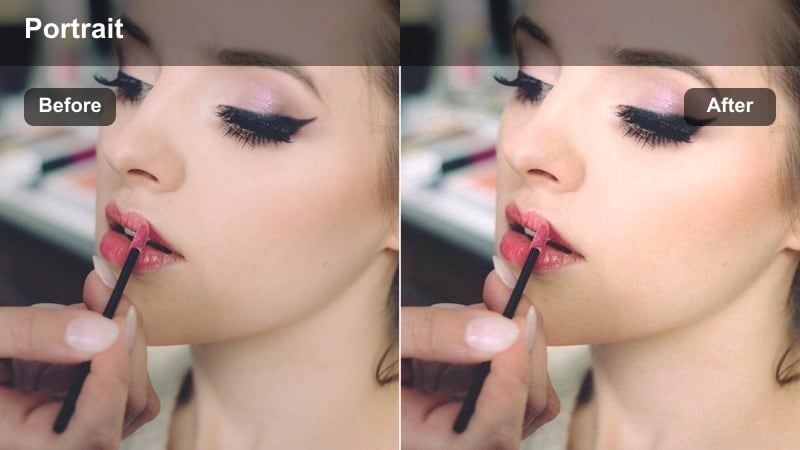
- Effect look: Neutral, low-contrast correction that adds subtle warmth and clarity in flat cloudy light.
- Best for: Cloudy day portraits, park interviews, and documentary-style outdoor content.
- Editing tip: Increase local contrast on the eyes only to add dimension without making the whole frame too crunchy.
Overcast Skin Balancer is built to rescue flat, cloudy-day footage by adding gentle warmth and clarity while preserving the softness of diffused light. It keeps contrast controlled so skin remains smooth, yet introduces enough separation for faces to stand out from grayish surroundings.
In Filmora, apply this LUT as a base correction for outdoor interviews or doc-style scenes shot under clouds, then use masks to selectively boost contrast or sharpness on the eyes and mouth. This targeted approach maintains the calm, even lighting of an overcast day while still giving your subject presence and dimension on screen.
Backlight Halo Portrait
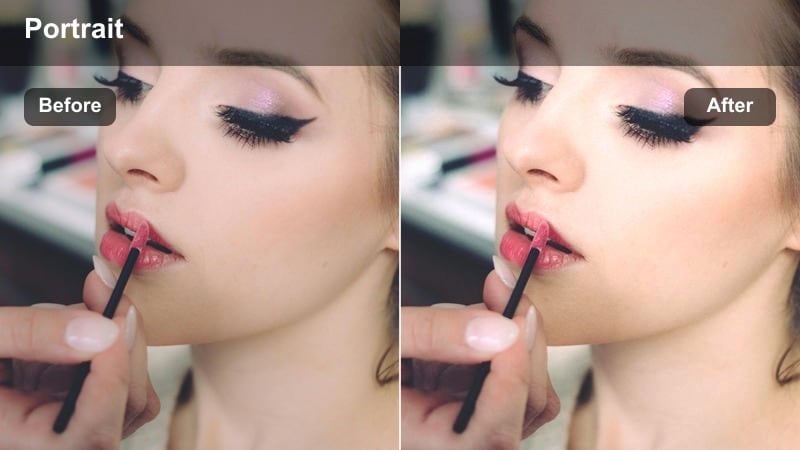
- Effect look: Bright backlit halo around hair and shoulders with controlled face exposure.
- Best for: Backlit outdoor reels, romantic portraits, and slow-motion introduction shots.
- Editing tip: Use masks to keep the subject's face slightly darker than the halo so features stay defined.
Backlight Halo Portrait accentuates sunlight wrapping around hair and shoulders, creating a glowing rim while managing exposure on the face. It is especially effective for romantic sequences, slow-motion walks, and outdoor intros where the sun sits behind your subject.
In Filmora, apply this LUT to backlit clips and then refine exposure with masks so the face remains readable against the glowing background. Avoid heavy flares by slightly adjusting framing or cropping, and tweak LUT intensity until the halo feels soft and dreamy without washing out important facial features.
Tips for Using Portrait Lighting Video Filter Lut Filters in Filmora
- Shoot portrait footage as flat and clean as possible so the lighting filters and LUTs have more room to shape contrast and color.
- Keep exposure consistent across all portrait angles before you apply any LUTs to avoid noticeable jumps between cuts.
- Use adjustment layers for portrait lighting filters so you can tweak or swap styles without touching the original clips.
- Lower filter intensity for close-up shots and raise it slightly for wider portraits to keep faces looking natural.
- Always check skin tones on a calibrated screen or trusted device, especially when using stylized neon or dual-tone looks.
- Use Filmora's masking tools to keep faces controlled if a strong filter overly brightens or darkens the background.
- Combine subtle sharpening on the eyes with gentle noise reduction on the background for clean, cinematic portraits.
- Test your favorite LUTs on both indoor and outdoor footage to build a small set of go-to looks for different lighting scenarios.
The Portrait Lighting Video Filter LUT pack gives content creators a fast, reliable way to shape light, refine skin tones, and build a recognizable portrait style in Filmora.
Experiment with these filters on your next portrait sequence, adjust intensity to match your footage, and save your best combinations as presets so your future videos start from a polished, cinematic base.
secure download