

 100% Security Verified | No Subscription Required | No Malware


 ChatGPT
 Perplexity
 Gemini
 Claude
 Grok
Grok
Prairie Gold is a warm, earthy gold that feels like late afternoon sun on open fields. It blends the richness of classic gold with the softness of wheat and dry grass, which makes it perfect for visuals that feel nostalgic, cozy, and grounded. In color psychology, tones like Prairie Gold often suggest stability, comfort, and quiet optimism, so they work beautifully for creators who want their content to feel trustworthy and human.
On screen, Prairie Gold shines in golden hour color grading, YouTube intros, channel branding, thumbnails, and subtle overlays on titles or lower thirds. Below are 15 ready-to-use Prairie Gold color palettes with HEX codes that you can plug into your video edits, thumbnails, and motion graphics. Every palette is creator-friendly and works especially well in Filmora for building consistent looks across your intros, b-roll, and social cutdowns.
In this article
Warm Cinematic Prairie Gold Color Palettes
Golden Prairie Dusk
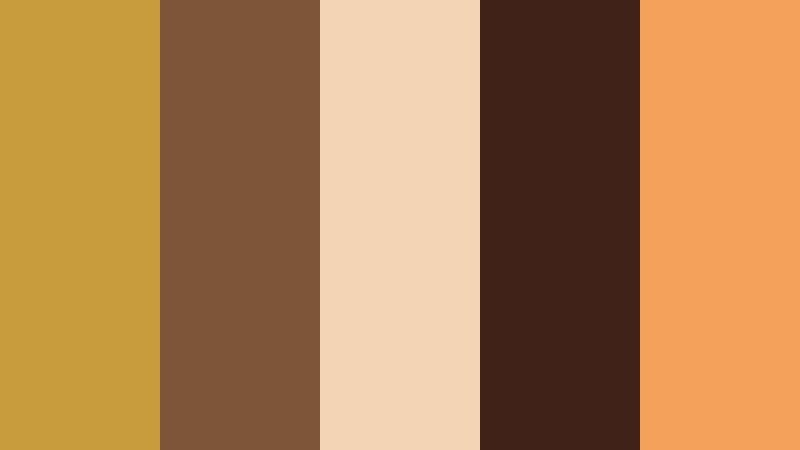
- HEX Codes: #c89b3c, #7f5539, #f3d5b5, #402218, #f4a259
- Mood: Cinematic, nostalgic, and gently dramatic.
- Use for: Perfect for cinematic vlogs and travel films that lean into golden hour storytelling.
Golden Prairie Dusk wraps Prairie Gold in deep browns and soft beige, like sun slipping behind distant hills. The warm gold (#c89b3c) and amber accent (#f4a259) add glow, while the rich browns (#7f5539, #402218) ground your frame and keep it moody and filmic.
Use this palette for story-driven vlogs, travel memories, and titles over sunset b-roll. It works especially well for YouTube thumbnails that promise emotion and narrative, intro sequences with cinematic text, and branding for channels that lean into nostalgic visuals.
Pro Tip: Build a Cinematic Prairie Gold Look in Filmora
For a cohesive Golden Prairie Dusk look in Filmora, start by choosing Prairie Gold as your hero accent. Use it on titles, lower thirds, and call-to-action buttons, then let the deep browns handle backgrounds and frames. Keeping that same gold on text and icons across your intro, b-roll, and end screen makes your channel feel instantly recognizable.
To intensify the dusk feeling, slightly lower overall exposure and add a touch of warmth in your color correction. Filmora makes it easy to save this as a custom preset, so you can apply the same Prairie Gold mood to every clip in a series or playlist without rebuilding the grade from scratch.
AI Color Palette
You can turn a single Golden Prairie Dusk reference image into a full project-wide grade using Filmora. Grab a still frame from your favorite golden hour shot, or design a simple color card featuring these HEX codes, then use Filmora's AI Color Palette feature to match that look across all your clips.
The AI automatically analyzes the tones in your reference and applies a consistent Prairie Gold balance to your footage. This is perfect when you want your talking head shots, b-roll, and cutaway scenes to feel like they all live in the same dusk-lit world, with minimal manual tweaking.
 secure download

HSL, Color Wheels & Curves
To fine-tune Prairie Gold in Filmora, use HSL to target yellows and oranges. You can push saturation on the gold tones slightly while muting competing colors so that #c89b3c stands out without clipping. With the color wheels, warm up midtones for skin and prairie fields while keeping shadows richer and cooler for more depth.
If you want an even more cinematic result, gently lift the blacks and curve down the highlights using the curves panel. This adds a soft, analog roll-off that suits sunset scenes. For more grading ideas, watch Filmora's tutorial on using color wheels and curves effectively in cinematic edits on YouTube.
secure download1000+ Video Filters & 3D LUTs
Once your Prairie Gold base look is set, you can quickly stylize it with Filmora's library of creative filters and LUTs. Stack subtle film-style filters on top of your Golden Prairie Dusk grade to add grain, faded contrast, or a hint of vintage color shift.
Filmora's video filters and 3D LUTs make it easy to test different cinematic moods without rebuilding your grade each time. Try warm film LUTs for nostalgic travel vlogs, or softer matte filters for emotional storytelling, while still letting Prairie Gold be the hero tone.
secure downloadSunlit Grain Fields
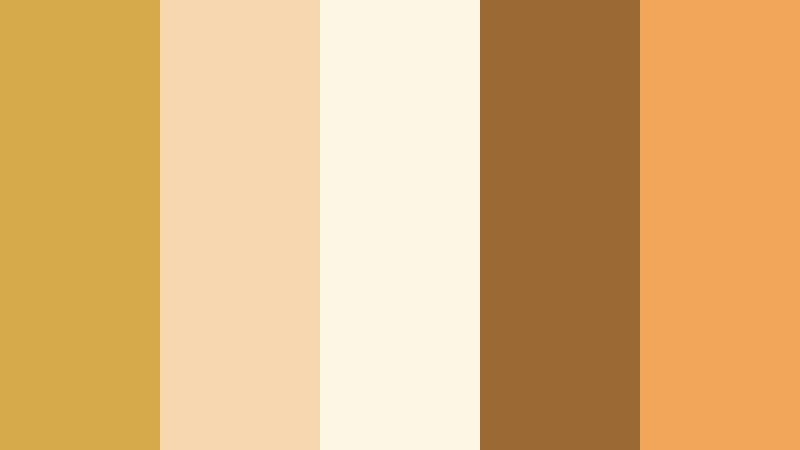
- HEX Codes: #d6a94a, #f6d7b0, #fef6e4, #9b6a34, #f2a65a
- Mood: Bright, hopeful, and sun-warmed.
- Use for: Great for uplifting YouTube intros, lifestyle reels, and family highlight videos.
Sunlit Grain Fields is soft and optimistic, like standing in bright wheat under a clear sky. The fresh Prairie Gold (#d6a94a) is supported by creamy highlights (#f6d7b0, #fef6e4) and a grounded brown (#9b6a34), giving your visuals a warm but light character.
Apply this palette to lifestyle vlogs, home videos, and reels that celebrate everyday joy. Use the light creams for backgrounds, the gold for titles and buttons, and the deeper brown for outlines or drop shadows in thumbnails so text stays crisp and readable.
Campfire Story Night
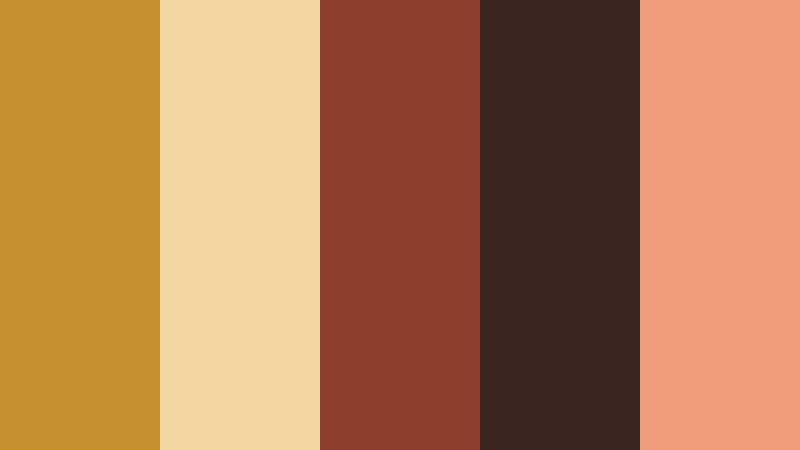
- HEX Codes: #c7902f, #f4d6a0, #8c3f2d, #3b2521, #f19c79
- Mood: Cozy, intimate, and storytelling-focused.
- Use for: Ideal for camp vlogs, acoustic music sessions, and storytime sit-down videos.
Campfire Story Night wraps Prairie Gold (#c7902f) in ember oranges (#f19c79) and smoky browns (#8c3f2d, #3b2521). It feels like faces lit by firelight against a dark forest, perfect for content where voice and narrative are at the center.
Use the darker tones as backgrounds behind your talking head, with Prairie Gold highlighting your name, chapter titles, and subscribe prompts. This palette works well for podcast-style videos, acoustic music sessions, and storytelling shorts where you want warmth without losing contrast.
Vintage Harvest Reel
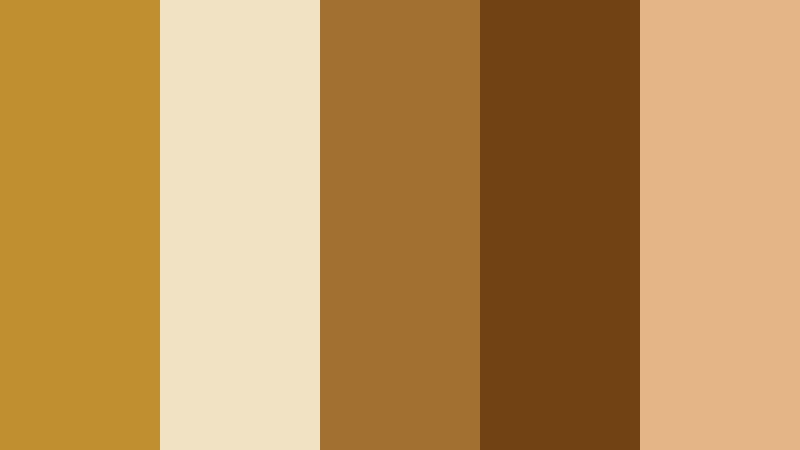
- HEX Codes: #bf8f30, #f2e2c4, #a3712f, #704214, #e3b587
- Mood: Retro, rustic, and documentary-style.
- Use for: Use for documentary cuts, farm or homestead content, and nostalgic family edits.
Vintage Harvest Reel brings together Prairie Gold (#bf8f30), faded neutrals (#f2e2c4, #e3b587), and richer browns (#a3712f, #704214) for a look that echoes old film stock and printed postcards. It feels slightly desaturated and timeless.
Apply this palette when you want your edits to feel like archival footage or a family documentary. Use the light beige for lower thirds and captions, keep Prairie Gold on key icons and titles, and let the darker browns frame your footage with borders, overlays, or letterbox bars.
Golden Horizon Roadtrip

- HEX Codes: #d2973a, #f6e6c9, #487a9f, #273447, #f4b66b
- Mood: Adventurous, cinematic, and open-hearted.
- Use for: Perfect for travel vlogs, drone shots, and driving montages set against big skies.
Golden Horizon Roadtrip balances warm Prairie Golds (#d2973a, #f4b66b) with dusty blues (#487a9f, #273447). This warm-cool contrast captures glowing fields under expansive blue skies and instantly feels like a road movie.
Use gold for text, highlight lines, and progress bars, while the deep blue serves as a background for titles and end screens. In thumbnails, pair a blue sky gradient with Prairie Gold text to make your travel videos and driving timelapses stand out in search results.
Soft Rustic Prairie Gold Color Palettes
Wildflower Meadow Glow
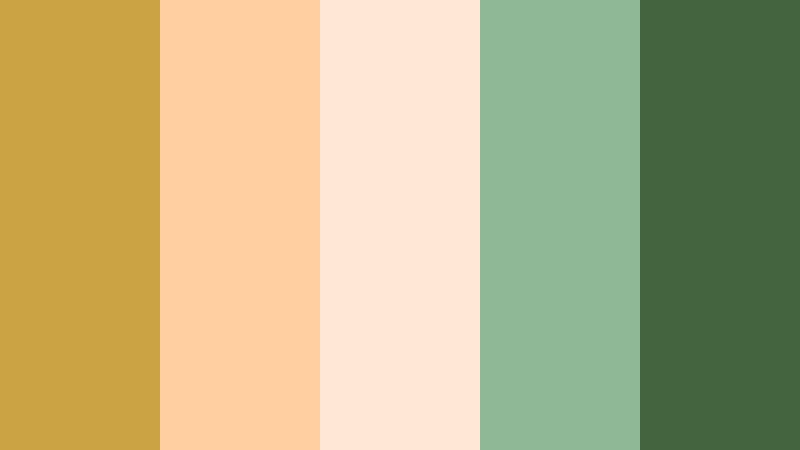
- HEX Codes: #cba244, #ffcf9f, #ffe9d6, #8fb996, #44633f
- Mood: Gentle, organic, and refreshing.
- Use for: Lovely for nature b-roll, eco brands, and mindfulness or wellness channels.
Wildflower Meadow Glow softens Prairie Gold (#cba244) with peach (#ffcf9f), cream (#ffe9d6), and gentle greens (#8fb996, #44633f). It feels airy and natural, like wild blooms scattered across a late afternoon field.
This palette is ideal for wellness content, eco-focused branding, and calming nature reels. Use the greens for backgrounds, Prairie Gold for callouts and icons, and the peach tones for thumbnail frames or gradient overlays that keep everything feeling light and breathable.
Barnwood Morning Light
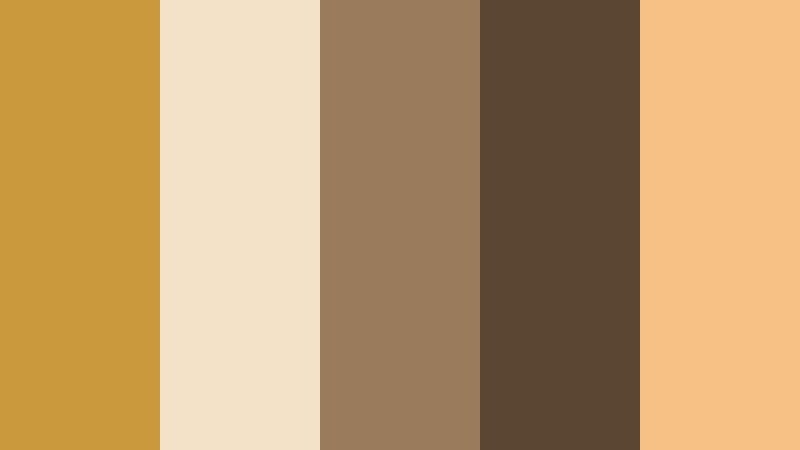
- HEX Codes: #c89a3d, #f3e2c7, #9a7b5c, #5b4634, #f5c185
- Mood: Homely, grounded, and reassuring.
- Use for: Best for homestead vlogs, baking content, and cozy studio backdrops.
Barnwood Morning Light pairs Prairie Gold (#c89a3d) with creamy highlights (#f3e2c7, #f5c185) and wood-inspired browns (#9a7b5c, #5b4634). It feels like sunlight streaming through barn slats onto wooden beams and flour-dusted tables.
Use this palette in recipe videos, DIY homestead content, and cozy studio setups. Apply the lighter tones to background cards and overlays, then use Prairie Gold on headings, chapter markers, and subscribe graphics to gently guide the viewer's eye.
Prairie Porch Coffee
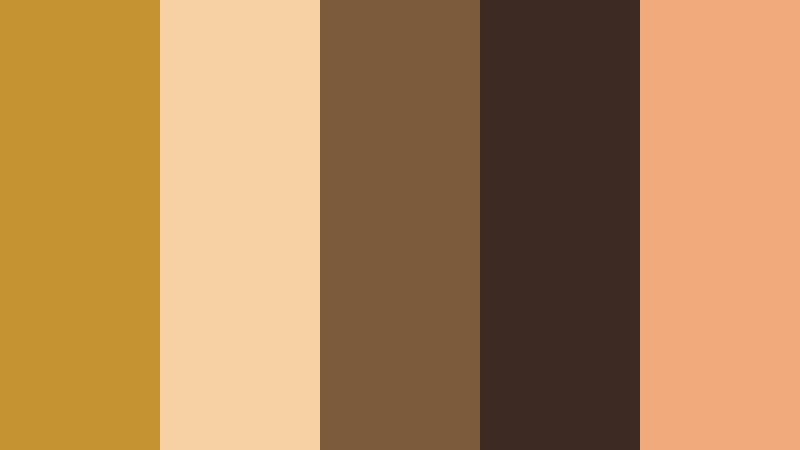
- HEX Codes: #c59332, #f5d1a3, #7c5a3c, #3d2b23, #f0aa7b
- Mood: Slow, comforting, and reflective.
- Use for: Ideal for talking head videos, podcasts, and lifestyle shorts focused on daily routines.
Prairie Porch Coffee mixes coffee browns (#7c5a3c, #3d2b23) with creamy highlights (#f5d1a3) and Prairie Gold (#c59332), plus a soft apricot accent (#f0aa7b). It feels like early morning reflections with a warm mug and notebook in hand.
Apply this palette to sit-down videos, reflective vlogs, and podcast recordings. Use dark browns for background panels or podcast frames, Prairie Gold for timestamps and graphics, and the apricot for gentle accents on like and subscribe buttons in your thumbnails and overlays.
Hayloft Afternoon Drift
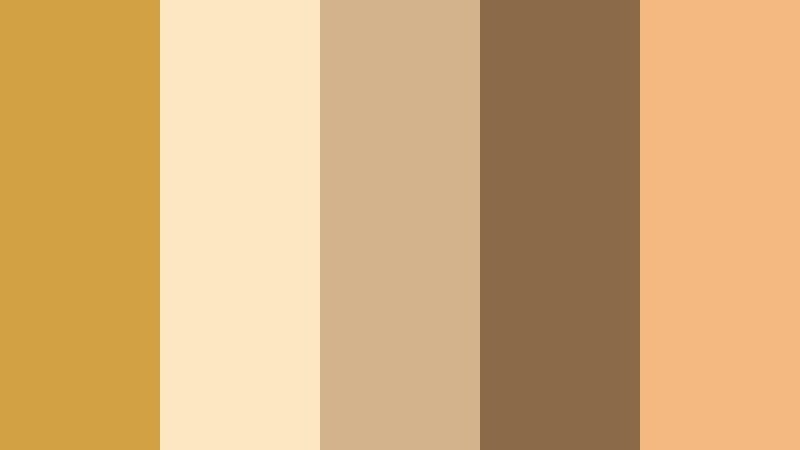
- HEX Codes: #d0a244, #fbe8c3, #d3b38c, #8b6a4a, #f3b980
- Mood: Airy, nostalgic, and soft-focused.
- Use for: Use in b-roll overlays, slow-motion shots, and dreamy lifestyle edits.
Hayloft Afternoon Drift gives Prairie Gold (#d0a244) a hazy, dreamlike spin, with pale creams (#fbe8c3), tan midtones (#d3b38c), and a soft brown anchor (#8b6a4a). The peachy accent (#f3b980) adds a whisper of warmth.
Use this palette when you want gentle, cinematic b-roll and dreamy slow motion shots. In Filmora, you can pair this color scheme with reduced contrast and a bit of blur on text boxes so they float softly over your footage without feeling harsh or modern.
Dusty Trail Sunbeam
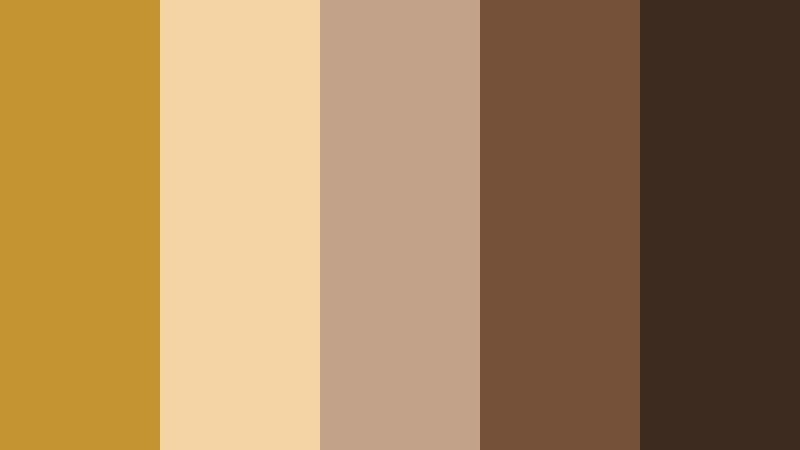
- HEX Codes: #c49331, #f4d3a5, #c2a38a, #755139, #3d2b1f
- Mood: Earthy, wandering, and introspective.
- Use for: Great for road diaries, hiking videos, and solo travel storytelling.
Dusty Trail Sunbeam tones Prairie Gold (#c49331) down with muted tans (#f4d3a5, #c2a38a) and trail-inspired browns (#755139, #3d2b1f). It feels honest and unpolished, like dust on boots and soft rays of sun cutting through canyon air.
This palette is made for introspective travel diaries and hiking videos. Use the darker browns for map-style lower thirds and location callouts, while Prairie Gold highlights routes, subtitles, and on-screen prompts to keep the viewer connected to your journey.
Modern Editorial Prairie Gold Color Palettes
Urban Loft Ember

- HEX Codes: #c68f30, #f2d3a2, #373737, #121212, #f05d23
- Mood: Edgy, stylish, and editorial.
- Use for: Perfect for channel rebrands, motion graphics, and high-contrast thumbnails.
Urban Loft Ember throws Prairie Gold (#c68f30) against charcoal gray (#373737) and deep black (#121212), with a bold ember orange (#f05d23) for pops of energy. The neutral cream (#f2d3a2) softens things just enough to keep it sophisticated.
Use this palette when you want your branding to feel like a modern magazine or city loft studio. Put Prairie Gold on main titles and logo marks, use the dark neutrals for backgrounds, and drop in ember orange as a sparing accent on important buttons or thumbnail badges to boost click-through rates.
Minimal Studio Glow

- HEX Codes: #d7a748, #fff3dd, #d1d1d1, #606060, #f7c37a
- Mood: Clean, polished, and professional.
- Use for: Best for tutorials, product demos, and personal brand channels.
Minimal Studio Glow keeps everything light and neutral, letting Prairie Gold (#d7a748) and its softer cousin (#f7c37a) shine as accents against white and gray (#fff3dd, #d1d1d1, #606060). It feels like a clean studio with thoughtfully placed warm lights.
Use the neutrals for backgrounds, frames, and device mockups in your product demos, while Prairie Gold defines your logo, lower thirds, and important keywords on screen. This palette suits teaching, design walkthroughs, and tech explainers where clarity and professionalism matter.
Cinematic Copper Frame
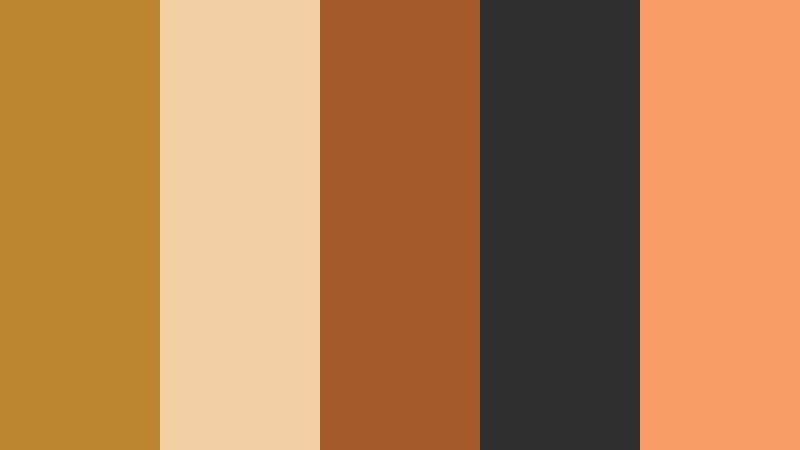
- HEX Codes: #bd8530, #f2d0a4, #a45a2a, #2f2f2f, #f79d65
- Mood: Luxurious, dramatic, and cinematic.
- Use for: Ideal for trailers, teasers, and fashion or music video visuals.
Cinematic Copper Frame deepens Prairie Gold into copper (#bd8530, #a45a2a) and sets it against charcoal gray (#2f2f2f) and peachy highlights (#f2d0a4, #f79d65). The effect is premium and theatrical, like a cinema poster or album cover.
Use this palette for trailers, fashion content, or music visuals. Let the dark gray form your letterbox bars or background, then frame titles and logos in copper for a high-end feel. In thumbnails, combine a dark vignette with copper typography for an instant cinematic impression.
Gallery Wall Sunrise
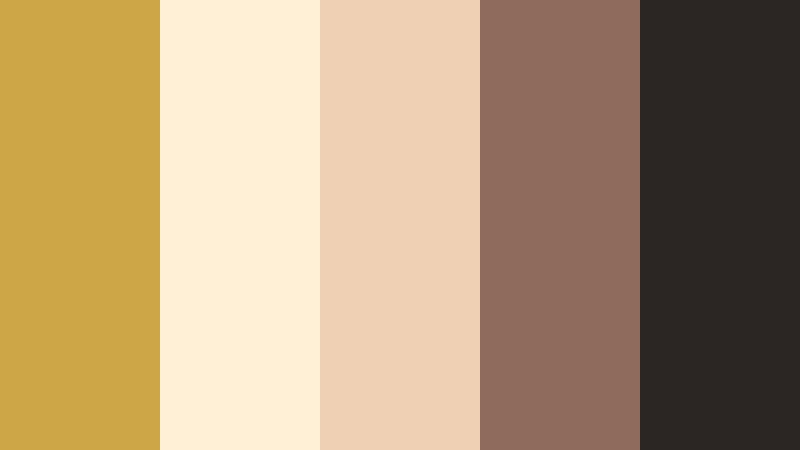
- HEX Codes: #cda647, #fff0d6, #f0d0b4, #8e6b5b, #2b2523
- Mood: Artful, curated, and sophisticated.
- Use for: Great for portfolio videos, case studies, and creative studio reels.
Gallery Wall Sunrise pairs Prairie Gold (#cda647) with blush neutrals (#fff0d6, #f0d0b4) and espresso accents (#8e6b5b, #2b2523). It feels like a carefully curated gallery wall in morning light, warm but refined.
Use this palette for design portfolios, photography reels, and agency case studies. Let the blush tones be your slide backgrounds, Prairie Gold become your highlight color for stats and titles, and the dark espresso tones support logos and footer elements for a polished, gallery-like finish.
Screenlight Honey Fade

- HEX Codes: #d3a647, #ffe8c7, #b3c7d6, #59708a, #242933
- Mood: Techy, moody, and cinematic-modern.
- Use for: Perfect for tech explainers, app promos, and streaming overlays.
Screenlight Honey Fade balances warm Prairie Gold (#d3a647) and cream (#ffe8c7) with cool blue-grays (#b3c7d6, #59708a, #242933). It looks like honey-colored light reflecting off screens in a dark workspace, mixing human warmth with digital polish.
Use gold and cream for callouts, buttons, and human-centric elements like faces or testimonials, while the cool blues create UI-style panels, overlays, and data cards. This palette is ideal for tech explainers, SaaS promos, and stream overlays where you want both warmth and a modern, cinematic tech feel.
Tips for Creating Prairie Gold Color Palettes
Prairie Gold is versatile, but it really shines when paired thoughtfully with supporting tones. Use these tips to build your own Prairie Gold color combinations for video, thumbnails, and brand design that look great in Filmora and across all your platforms.
- Choose a clear hero: Let Prairie Gold be the main accent for titles, buttons, and key icons, while background colors stay more neutral or darker.
- Balance warm and cool: Pair Prairie Gold with cool blues or grays when you want contrast and a modern feel, or with browns and creams for rustic, cozy visuals.
- Protect readability: When using gold for text, place it on dark or muted backgrounds and add a subtle shadow or outline so it stays legible on small screens.
- Limit accent colors: Stick to 4–5 total colors in your palette (including Prairie Gold) to keep thumbnails, intros, and lower thirds from feeling busy.
- Match footage lighting: If your footage is shot at golden hour, lean into warmer supporting colors; for cooler daylight or tech content, add more gray or blue around Prairie Gold.
- Unify your brand: Reuse the same Prairie Gold HEX code in your logo, YouTube banner, thumbnails, and Filmora titles so viewers recognize your content at a glance.
- Test on dark and light: Check how your palette looks on both light and dark backgrounds, since your videos, overlays, and website may all use different base tones.
- Save presets in Filmora: Once you dial in a Prairie Gold grade and graphics style, save it as a custom preset so you can apply it to new projects in a few clicks.
Prairie Gold palettes can make your videos feel like golden hour, even when you shot in less-than-ideal light. Whether you go for rustic, cinematic, or clean editorial looks, this warm gold helps define mood, strengthen your brand identity, and guide attention to the most important parts of the frame.
Use the ready-made palettes above as a starting point, then tweak them in Filmora so they match your footage, your niche, and your personality. With consistent use across intros, b-roll, lower thirds, and thumbnails, your Prairie Gold color story will quickly become part of how viewers recognize and remember your channel.
Open a new project in Filmora, drop in your favorite palette, and start experimenting with titles, filters, and color grading until you find a Prairie Gold look that feels like you.
secure downloadNext: Sage Leaf Color Palette
