

 100% Security Verified | No Subscription Required | No Malware

These Urban Street Filters for Instagram are built for creators who live in the city and want their grid to feel cinematic, gritty, and atmospheric. From neon nights to soft morning light, each filter helps your street shots stand out without losing the raw texture of real life.
Whether you shoot with your phone or camera and post to Instagram Feed, Stories, or Reels, this preset pack gives you quick one-tap looks plus room to fine-tune in Filmora. Use them to unify your street series, add a signature color vibe, and keep your city visuals consistent across every post.
In this article
Bold Contrast Urban Vibes
Gritty High Contrast
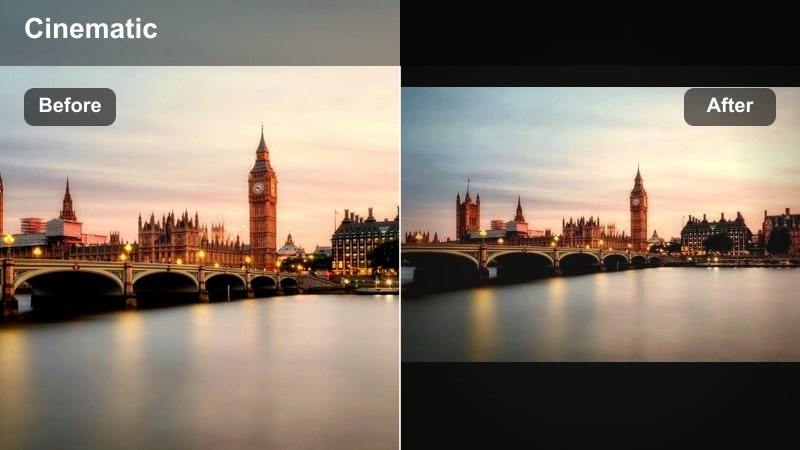
- Effect look: Punchy blacks, sharp midtones, and a subtle faded highlight roll-off that makes concrete, brick, and street textures feel extra tangible.
- Best for: Moody alleyways, rainy sidewalks, crosswalk shots, and close-up details like street signs, bikes, or staircases.
- Editing tip: Drop the blacks slightly and raise clarity or texture for extra grit, then pull saturation down -5 to keep skin tones from looking too harsh.
Gritty High Contrast is the go to urban street Instagram filter when you want your city shots to feel tactile and intense. It pushes blacks and midtones to carve out strong structure in buildings, asphalt, and wet pavement, while the slightly softened highlights stop bright areas from blowing out, even in high contrast scenes.
In Filmora, this look works beautifully on both stills and video. Apply the filter, then fine tune the Curves and Clarity sliders to match your scene, especially in rainy or overcast environments where you want to emphasize texture. Use local adjustments to protect faces so you keep cinematic grit in the environment without sacrificing a natural, flattering look for people in your frame.
Dial in your city color with Filmora’s AI tools
Use Filmora’s AI driven color correction to quickly normalize white balance before adding any of these urban street filters. This gives your presets a clean, consistent base, which is essential when you are shooting fast across different streets, storefronts, and light sources.
Once your footage is balanced, apply your favorite urban street filter and refine the look with contrast, saturation, and split toning. This workflow helps you build a recognizable Instagram urban aesthetic that stays consistent from post to post, even when you are mixing phone clips with camera footage.
Open your city clips in Filmora and run AI color correction first, then stack these filters on top for fast, pro level grading.
 secure download

Preview every street filter before you post
Filmora makes it easy to audition different urban street filters on the same shot so you can compare how each preset handles skin, neon signs, and deep shadows in real time. Instead of guessing which look will work on your grid, you can flip through options and pick the one that best matches your existing feed.
Once you have chosen a favorite look, sync that filter and its adjustments across your entire batch of photos and clips for a unified Instagram series or Reel. This keeps your city storytelling intentional, even when you are editing quickly for daily posts.
Load a test clip, try these 12 filters back to back, and save the one that best matches your street aesthetic.
secure downloadTurn your favorite filters into LUTs for any project
Once you dial in a signature urban street look in Filmora, you can save it as a LUT and reuse it across future edits. That means your Instagram feed, Reels, YouTube videos, and even branded client pieces can all share the same recognizable city color style.
This LUT based workflow is especially powerful for street creators who shoot regularly in the same neighborhoods or at the same time of day. Instead of rebuilding your grade from scratch, you can apply your saved LUT, tweak exposure for each shot, and stay locked into one cohesive visual identity.
Save your preferred urban filter settings as LUTs and apply them to future edits for instant, consistent color.
secure downloadHardlight City Pop
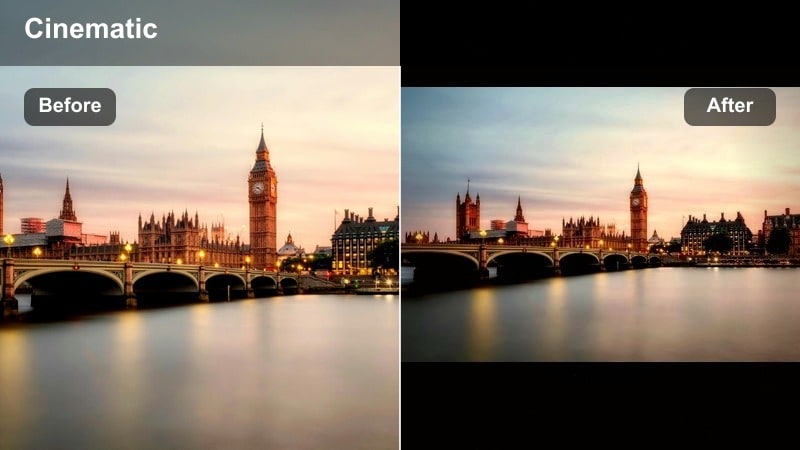
- Effect look: Crisp contrast with bright whites, boosted primary colors, and a subtle cool shift in shadows for a modern urban punch.
- Best for: Sunny street portraits, cross-street shots at golden hour, and bold architecture with strong light and shadow lines.
- Editing tip: Reduce highlights to bring back sky detail, then fine-tune individual color channels to keep reds and yellows from overpowering your subject.
Hardlight City Pop is built for blue sky days and sharp sunlight that carves strong graphic shapes across sidewalks and buildings. The filter brightens whites and boosts primary colors without crushing detail, so sunlit portraits and architectural shots feel vibrant but still controlled.
In Filmora, start by applying this filter to your hardest lit clips, then pull down Highlights and refine each hue in HSL. This lets you tame aggressive reds in traffic lights or signage while keeping skin tones natural. For Reels, combine this filter with scenes that emphasize shadow patterns and leading lines to create bold, design forward Instagram posts.
Shadow Lane
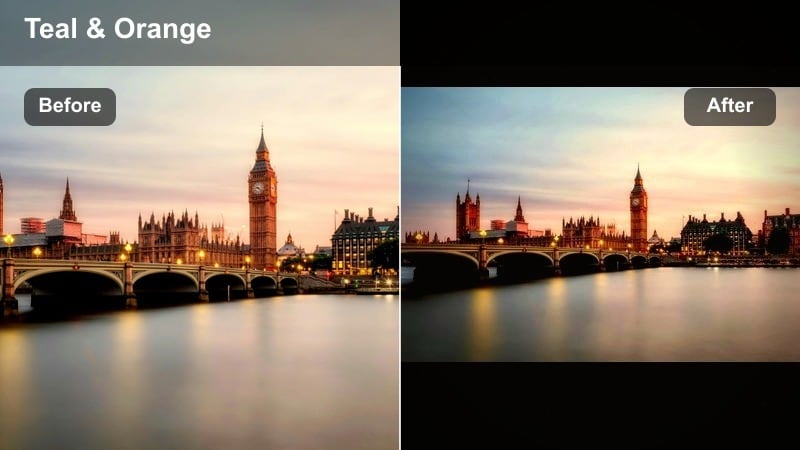
- Effect look: Deep, cinematic shadows with controlled highlights, muted saturation, and a slight teal push in cool tones for a filmic city feel.
- Best for: Narrow streets, underpasses, stairwells, subway entrances, and silhouettes against brighter backgrounds.
- Editing tip: Use the vignette slider lightly and raise exposure a touch to keep the subject readable while the edges stay dark and immersive.
Shadow Lane leans into the darker side of the city, creating cinematic pockets of shadow that pull the viewer into the frame. Saturation is dialed back so colors do not distract from form and light, and a hint of teal in the cool tones pushes the look toward a subtle movie grade.
Inside Filmora, apply this filter to underpasses, back alleys, and subway entrances, then use masks to lift exposure only on your subject. This keeps the overall frame moody while making sure faces and key details are still readable, which is crucial once Instagram compresses your images or Reels in the feed.
Neon Night City Styles
Neon Noir
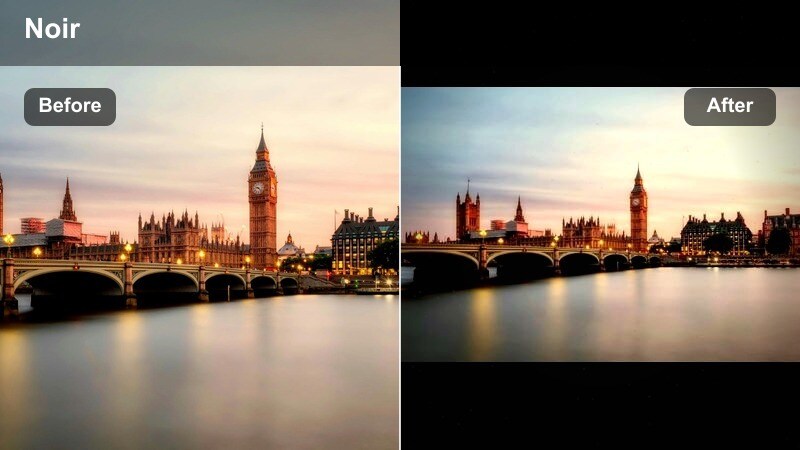
- Effect look: Deep blacks, glowing neon signs, and rich magentas and cyans with a subtle bloom effect for cinematic night scenes.
- Best for: Rainy nights, reflections in puddles, neon shopfronts, wet sidewalks, and low-light street portraits.
- Editing tip: Lift exposure just enough to see faces, then use HSL to tame neon reds and magentas so they glow without clipping or banding.
Neon Noir is made for classic rain slicked streets and glowing signage, turning everyday shopfronts into frames that feel like stills from a night movie. It deepens blacks to hide distractions, amplifies neon magentas and cyans, and adds a gentle bloom around bright signs to make them stand out.
In Filmora, apply this urban street Instagram filter to your rainiest clips, then fine tune exposure until faces are barely but clearly visible. Use HSL to pull back extreme reds and magentas so they do not band when Instagram recompresses your uploads, and look for compositions that capture reflections in puddles or windows to double the impact of the neon glow.
Cyber Street Glow
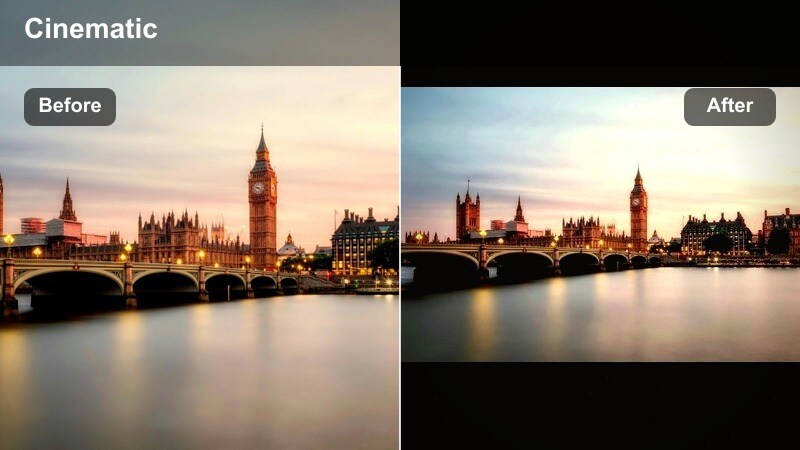
- Effect look: Cool-toned highlights, boosted blues and teals, and softened contrast for a futuristic cyberpunk city vibe.
- Best for: LED-lit streets, train stations, billboards, and night scenes with lots of blue or teal light sources.
- Editing tip: Reduce clarity slightly to smooth digital noise, then sharpen just the subject to keep them crisp against dreamy city lights.
Cyber Street Glow shifts your night footage into a stylized, futuristic palette where teals and blues dominate. The softer contrast keeps highlights from clipping while still giving you enough punch for signs, screens, and LED strips to feel dramatic and modern.
In Filmora, this filter is perfect for metro stations, futuristic malls, and billboard lined streets. Apply it, gently reduce Clarity to hide sensor noise in shadows, then use selective sharpening on your subject so they stay crisp against the softer, glowing environment. Export at higher resolution and bitrate when possible to preserve the smooth gradients in your teal heavy scenes on Instagram.
Midnight Magenta
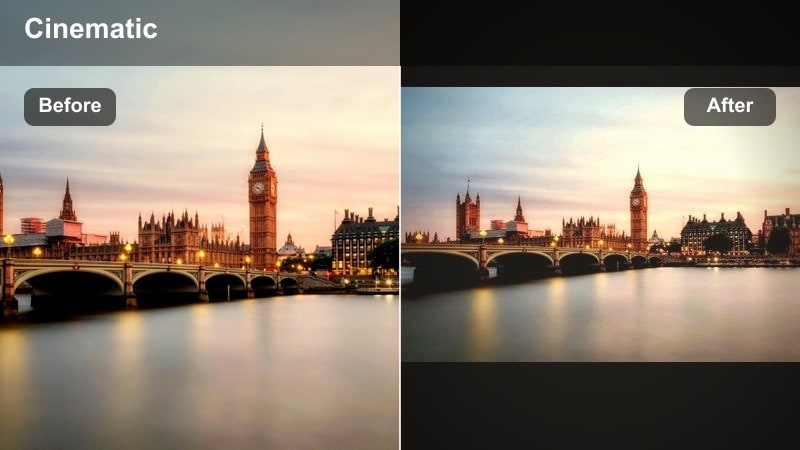
- Effect look: Soft contrast with magenta and purple highlights, warm skin tones, and a gentle fade in blacks for dreamy late-night scenes.
- Best for: Street portraits under colored lights, nightlife candids, rooftop hangs, and bar exteriors with warm neon.
- Editing tip: Lower saturation in yellows and oranges slightly so magenta accents stand out without making skin tones too orange or cartoonish.
Midnight Magenta is a nightlife friendly filter that blends flattering skin tones with dreamy purple and pink accents. Blacks are slightly lifted for a soft fade, which keeps your night portraits from feeling too harsh or contrast heavy, even in tricky mixed lighting outside bars and venues.
Within Filmora, use this filter for people focused content: friends on rooftops, street portraits under colored signs, and date night vlogs. After applying it, lower Yellow and Orange saturation just a touch in HSL, then re warm skin if needed so faces look natural while magenta and purple highlights give your feed a distinctive, stylized night look.
Soft Daytime City Tones
Soft Concrete Matte
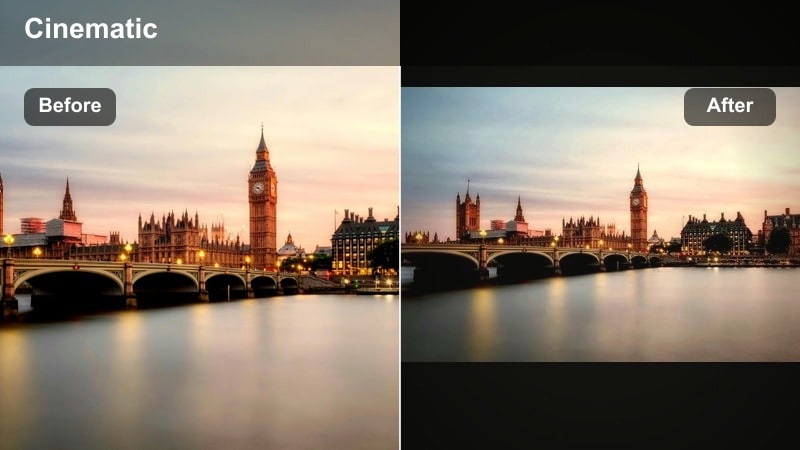
- Effect look: Muted colors, lifted blacks, and gentle contrast that turns harsh city light into a soft, matte street aesthetic.
- Best for: Overcast days, flat mid-day city light, coffee runs, and casual lifestyle street shots.
- Editing tip: Add a slight warm temperature shift and a touch of grain to keep the look cozy and filmic instead of washed out.
Soft Concrete Matte is ideal when city light is flat or unflattering, such as overcast mornings or mid day errands. By muting saturation and lifting blacks, it transforms hard edges into a calmer, lifestyle oriented look that still feels urban but more relaxed and minimal.
In Filmora, apply this filter to casual B roll of walking, commuting, or coffee shop visits. Introduce a slight warm temperature shift and subtle grain to give the matte aesthetic a cozy, film inspired character. This style works especially well for Instagram grids that lean into neutral tones and text overlays, since backgrounds stay gentle and never compete with your captions.
Urban Film Fade
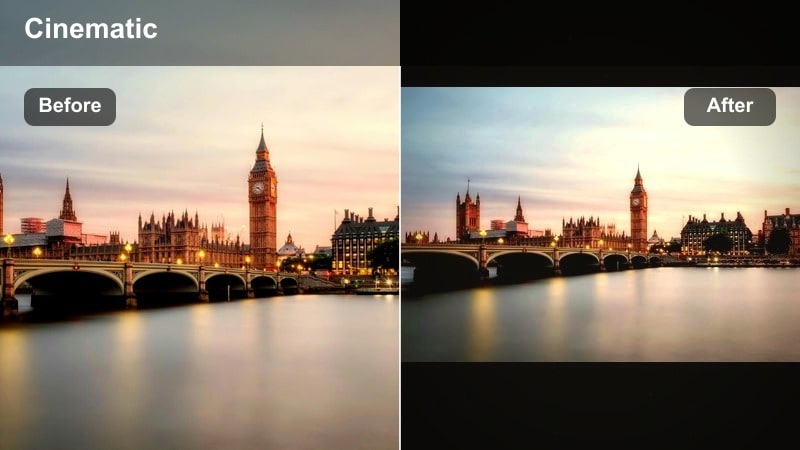
- Effect look: Warm highlights, slightly cool shadows, and a faded film-style curve with soft grain for nostalgic city imagery.
- Best for: Candid street stories, market scenes, bike rides, and everyday city routines with natural light.
- Editing tip: Dial in subtle vignette to draw attention toward the center, and keep saturation moderate to avoid clashing with the filmic fade.
Urban Film Fade adds a gentle, nostalgic cast to your everyday city life content. Warm highlights and cooler shadows mimic classic film stocks, while the faded curve softens contrast so even mundane moments like commuting or shopping feel like part of a visual story.
In Filmora, this filter is a strong base look for both stills and Reels that document your daily routines. After applying it, keep saturation under control and add a light vignette to guide attention toward your subject. You can then copy these color settings across multiple clips in a Reel so your entire story carries the same analog, memory like tone on Instagram.
Clean City Neutral
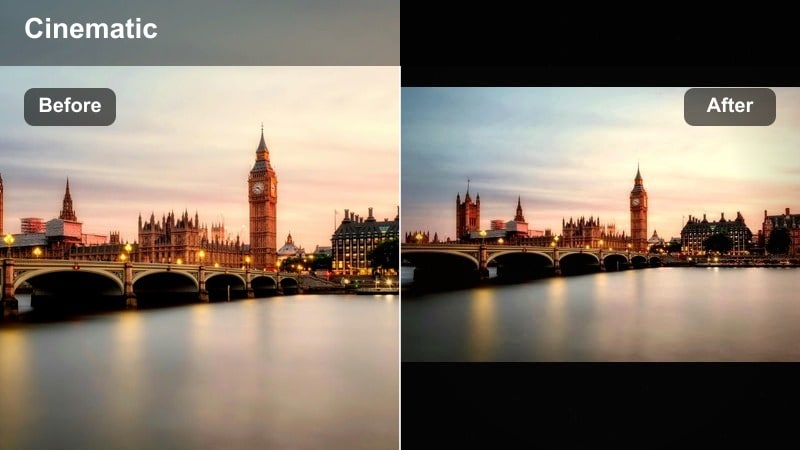
- Effect look: Balanced contrast, neutral white balance, and minimal color shift to keep buildings, skies, and skin tones true to life.
- Best for: Architecture shots, cityscapes, skyline views, and product-in-street content where brand colors must stay accurate.
- Editing tip: Use subtle local adjustments to brighten the subject or signage while leaving the rest of the scene more neutral and documentary-style.
Clean City Neutral is your documentary friendly filter that polishes a scene without dramatically changing its colors. It keeps brand logos, storefronts, and skyline tones accurate, which is crucial for sponsored posts or content where your client’s palette must stay true.
In Filmora, use this as a base grade for architecture, skyline panoramas, and product focused shots. Apply the filter, then use local adjustments to brighten only the subject, such as a person or product, so they stand out while the rest of the frame remains realistically neutral. This approach fits perfectly with Instagram feeds that balance creative vibes with professional, brand safe visuals.
Reels-Ready Motion-Friendly Filters
Motion Street Crisp
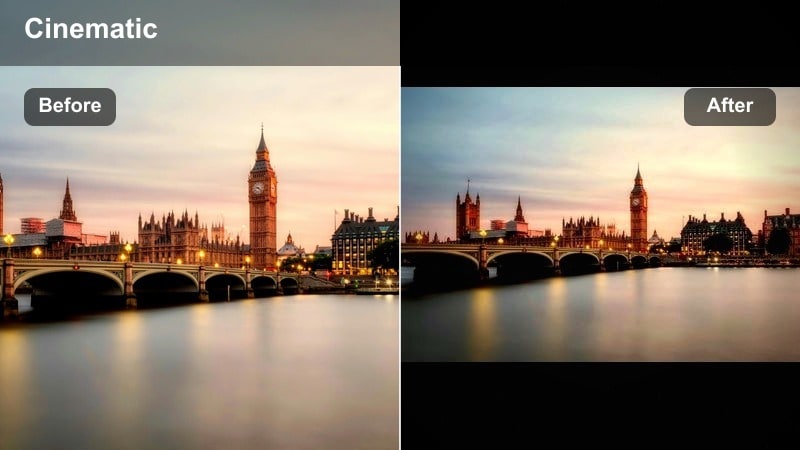
- Effect look: Clean, high micro-contrast with slightly cooler shadows that keeps moving subjects sharp and detailed.
- Best for: Walk-through POV videos, bike rides, skate clips, and handheld Reels around busy intersections.
- Editing tip: Apply light sharpening after the filter, and stabilize footage in Filmora so edges stay crisp and do not shimmer on Instagram compression.
Motion Street Crisp is tailored for movement heavy content where every frame passes quickly on screen. The filter boosts fine detail and slightly cools shadows so crosswalks, street textures, and building edges stay readable even in fast POV walks or rides.
In Filmora, stabilize your clips first, then apply this filter and add a touch of sharpening. This sequence helps preserve detail when Instagram compresses your Reels. It is especially effective for busy city B roll, skate lines, or bike commutes where you want viewers to feel the texture of the street without losing clarity.
Street Vlog Warm
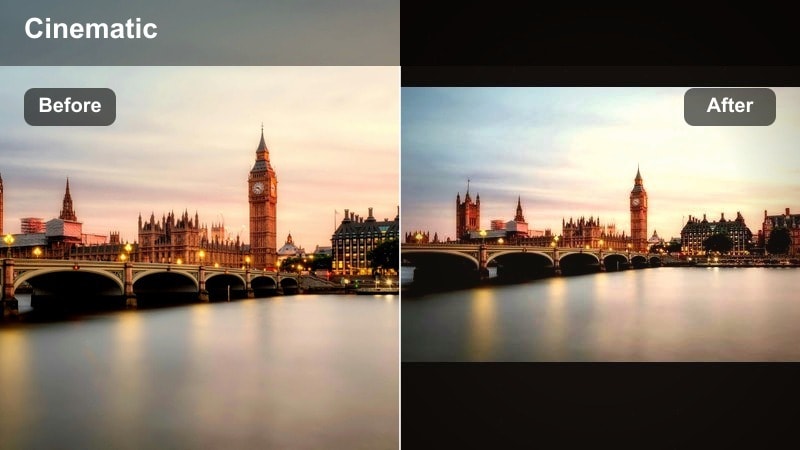
- Effect look: Soft contrast with gentle warm tones, flattering skin, and slightly desaturated backgrounds for vlog-style storytelling.
- Best for: Talking-to-camera street walks, behind-the-scenes clips, cafe hops, and casual day-in-the-life Reels.
- Editing tip: Keep saturation modest and increase brightness slightly, since Instagram’s interface and captions can make vlogs feel darker than intended.
Street Vlog Warm is designed around faces first, softening contrast and warming tones to keep you looking flattering while the city gently recedes into the background. It slightly desaturates the environment so signage, cars, and crowds do not steal focus from your storytelling.
Use this filter in Filmora on talking head Reels and day in the life sequences. After applying it, raise overall brightness a bit and check your framing with Instagram’s interface in mind, since overlays and captions can darken the perceived image. This preset is a great choice to use consistently whenever you are on screen, helping followers instantly recognize your presence while scrolling.
Loop Ready Urban
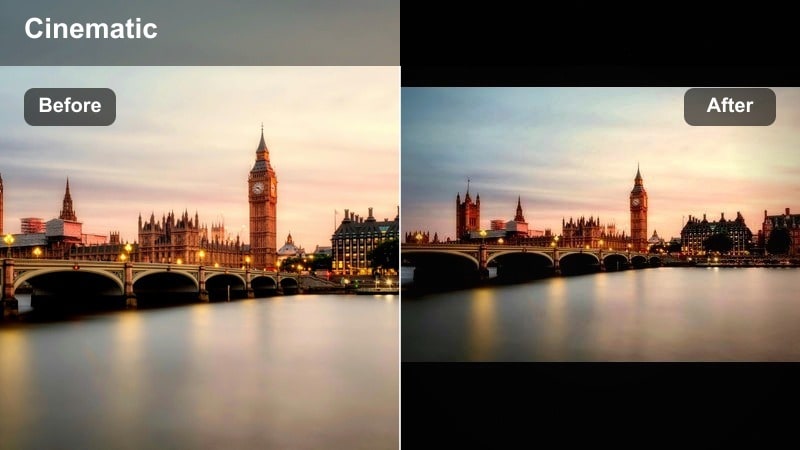
- Effect look: Balanced contrast with slightly boosted saturation and subtle teal in shadows to make loops and transitions pop.
- Best for: Looping Reels, transition edits, hyperlapse shots, and dynamic B-roll of cars, signs, and street crowds.
- Editing tip: Keep exposure consistent across all clips before adding transitions so the filter’s color and contrast do not jump between cuts.
Loop Ready Urban is built for dynamic, transition heavy Reels where smooth color from first frame to last is essential. The filter adds a touch of teal to the shadows and boosts saturation enough to make transitions and hyperlapses stand out without destroying highlight detail.
In Filmora, first arrange and trim your loop or transition sequence, then normalize exposure across clips. After that, apply this filter and copy its settings to every shot so color and contrast stay consistent when the loop repeats on Instagram. Choose a thumbnail frame where the teal shadows and punchy colors are most visible to maximize click through in the Reels tab.
Tips for Using Urban Street Instagram Filter Filters in Filmora
- Shoot a simple gray wall or neutral street surface and test a few filters on it to see how each preset treats shadows, midtones, and highlights before grading a full series.
- When posting Reels and photos from the same session, grade the Reel first, then color match your stills to that look so your profile feels like one continuous story.
- Avoid stacking too many strong filters on top of each other; pick one primary look and adjust exposure, contrast, and HSL rather than adding multiple heavy effects.
- Use the same two or three filters consistently for a few weeks to help followers instantly recognize your style as they scroll their Instagram feed.
- Always check how your filtered shots look on both light and dark mode Instagram interfaces so text overlays and details remain readable.
- Export from Filmora at a slightly higher brightness and bitrate than you think you need, since Instagram compression and UI overlays can darken high contrast urban scenes.
Urban street filters for Instagram give your city stories a clear, recognizable identity, whether you are posting gritty alley portraits, neon night scenes, or soft daytime vlogs. By picking a few go to presets and adjusting them carefully in Filmora, you can keep your grid looking cohesive while still letting each neighborhood and moment feel unique.
Experiment with these 12 filters on both photos and Reels, then save your favorite combination as your personal street aesthetic. With a consistent color style locked in, your focus can shift to finding better angles, more honest moments, and stronger narratives in every city you explore.
secure download