



 100% Security Verified | No Subscription Required | No Malware


 ChatGPT
 Perplexity
 Gemini
 Claude
 Grok
Grok
A single video can hide hours of information, and nobody wants to scrub through every frame just to find one useful moment. That is why AI video analysis is becoming useful for creators, marketers, researchers, and businesses working with large video libraries.
The tricky part is that video analysis AI isn't one single thing; it's a whole category of tools with wildly different strengths, and picking the wrong one wastes both time and money. So, we'll break down how AI video analytics works, what actually matters when comparing tools, and which platforms are genuinely worth your attention this year.
In this article
Short on time? Here's a quick snapshot of what you need to know about using AI for video analysis.
- What It Is: AI video analysis uses computer vision, speech recognition, and machine learning together to scan footage and pull out labels, transcripts, emotions, and key moments.
- What Makes a Tool Good: The strongest AI video analysis software combines multiple recognition types (visual, audio, text) instead of leaning on just one.
- The Lineup: Filmora, ScreenApp, Valossa, TwelveLabs, and Google Cloud Video Intelligence each take a different angle, from all-in-one editing to enterprise-grade APIs.
- How to Choose: The right AI video analyzer depends on your use case. Creators want editing integration, researchers want search, and enterprises want scale.
- Top Creative Pick: Wondershare Filmora 16 introduces the AI Media Analysis feature driven by the Qwen3.7 Flash model to analyze your clip directly inside your editor.
Part 1. What is AI Video Analysis?
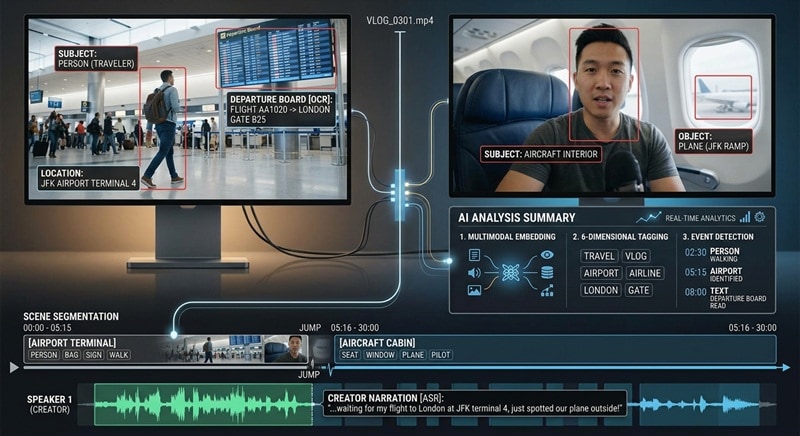
AI video analysis simply means using artificial intelligence to examine the visual and audio information inside a video. For example, in a 30-minute travel vlog, an AI system could detect:
- A person walking through an airport.
- Identify the airport as a location.
- Detect a plane in the background.
- Transcribe the creator’s narration.
- Read text on a departure board.
- Identify the point where the footage changes from the airport to the aircraft.
Key Capabilities of AI Video Analysis
You might be wondering, how does it actually work? Well, depending on the tool, AI video analytics software can do a surprisingly wide range of things. Here's what shows up most often across the platforms on this list:
- Scene and Object Detection: Identifies what's physically in the frame (people, products, locations, logos, even specific actions) and flags when the scene changes.
- Emotion Analysis and Facial Recognition: Reads facial expressions and vocal tone to gauge sentiment, and in some tools, recognizes specific individuals across a video library.
- Text and Speech Capture: Transcribes spoken dialogue and pulls on-screen text (think slides, captions, or signage) using OCR.
- Video Summarization: Condenses a long video into a short written or clipped summary, so you get the gist without watching the whole thing.
- Connect Findings to Specific Moments: Timestamps every detection, so a search for "product demo" or "customer complaint" jumps straight to the exact second it happens.
- Content Classification: Sorts videos into categories or topics automatically, which is a big help for organizing large libraries.
- Clip Identification: Separates top-tier highlight shots from blurry, out-of-focus, or invalid segments so you don't waste time on unusable footage.
Part 2. What to Look for in AI for Video Analytics
The thing is, not every AI for video analysis tool is built for the same job. To pick the right tool, you need to weigh a few crucial factors based on what you actually want to achieve. Below are the five areas worth checking:
- Analysis Capabilities: Some tools only transcribe audio. Others go deeper with object detection, sentiment analysis, and OCR. So, determine if you need visual detection, transcript analysis, or both.
- Video Input Support: Check whether the tool accepts uploaded files, live streams, screen recordings, or a direct URL.
- Accuracy & Context Understanding: Look for tools powered by advanced multimodal models. The better platforms understand context, like recognizing that a person is giving a product demo, not just standing in a room.
- Search & Organization: Look for natural-language search, tags, filters, timestamps, transcripts, metadata, and semantic search. This is the whole point of using AI-based video analytics in the first place.
- Editing & Workflow Integration: The good tools connect insights directly to an edit, a clip, or a report, instead of leaving you to copy-paste the results somewhere else and start from scratch.
Part 3. 5 Best AI Video Analysis Tools for Creators and Businesses
Using the criteria above, we've shortlisted five tools that approach video AI analysis from very different angles. We'll walk through each one using the same format below, so it's easy to line them up side by side and see which one fits your workflow.
At a Glance
|
Platform |
Pricing Model |
Capabilities |
Main Limitation |
|
|
Filmora |
Windows, macOS |
Subscription / Perpetual Options |
AI Media Analysis, tagging, descriptions, subjects, scenes, actions, emotions, spoken content, editing workflow |
Requires AI credits to run the analysis |
|
ScreenApp |
Web & Windows |
Free Tier & Monthly Subscriptions |
Audio + on-screen OCR, summarizer, chat-with-video |
Built for meetings/research, not filmmaking |
|
Valossa |
Web |
Custom / Enterprise Quote |
Multimodal tags, moderation, brand safety, agentic search |
No public self-serve pricing |
|
TwelveLabs |
API / developer platform |
Free Tier / Usage-Based API |
Semantic natural-language video search, summarization |
Developer-oriented, needs API integration |
|
Google Cloud |
Cloud API |
Free Quota / Pay-per-minute API |
Label & object detection, shot detection, AutoML |
No editing tools, costs scale with usage |
1. Wondershare Filmora
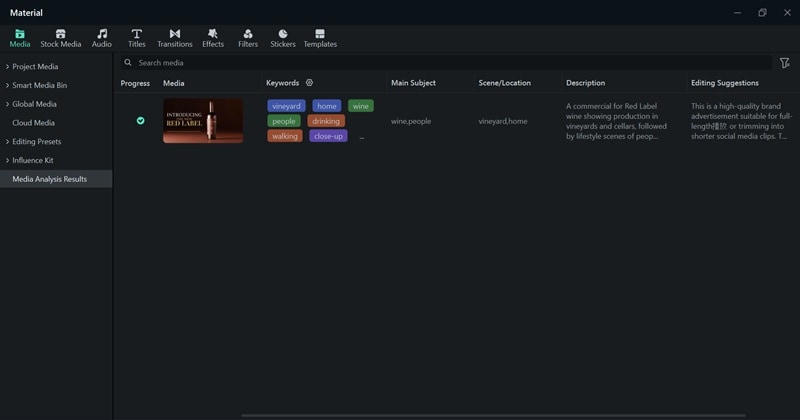
Wondershare Filmora is a staple in the video editing space, and the latest Filmora 16 release takes AI video understanding further with the AI Media Analysis feature. It uses the Qwen3.7 Flash AI model to scan imported video and image media and organize the results into a searchable library. The interesting part is that the AI for video analysis isn't limited to basic object detection.
Key Features:
- Blazing Fast Processing: Scans through a 20-minute high-definition video in under 2 minutes, displaying real-time visual results as it works.
- 6-Dimensional Structured Tagging: Automatically categorizes clips across Keywords, Subjects/Objects, Scenes/Locations, Actions/States, Emotions/Atmosphere, and Spoken Content.
- Timeline Integration & Hover Preview: Drops AI markers straight onto your progress bar and timeline, flagging quality highlights or unusable takes. You can hover over markers to read clip notes or double-click to adjust them.
- Smart Filtering & Synonym Search: Lets you search using everyday phrasing instead of exact file titles.
- Cross-Project Memory: Saves analysis data locally on your machine, meaning uploaded assets retain their smart tags when opened in future projects.
Pros:
- Instantly points out low-quality, blurry, or invalid shots so you don't accidentally put them in your sequence.
- Cuts down pre-edit review time significantly by replacing manual watching with clear summaries, visual scores, and structural tags.
- You don't have to analyze footage in one app and then move everything into an editor.
Cons:
- Built strictly for video clips and static images, so standalone voice recordings won't be processed by the visual engine.
Pricing: Filmora offers a free version with a watermark. Paid plans are varied and flexible, available on the Filmora pricing page.
2. ScreenApp
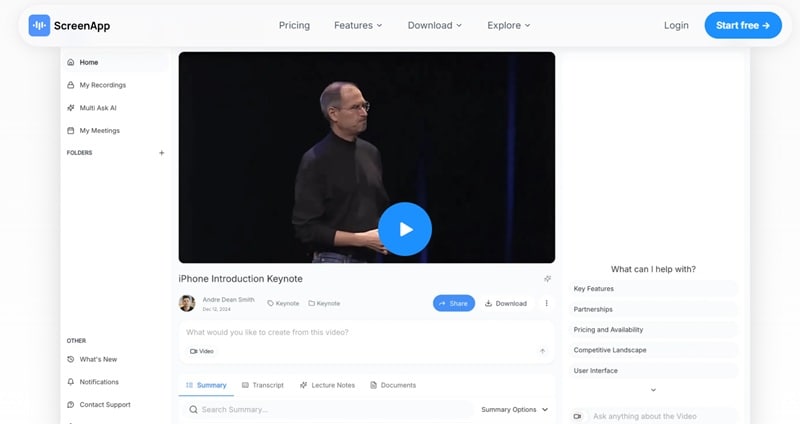
Next on our list is a nice option for those looking for an AI video analysis free option: ScreenApp. This is a browser-based recording and analysis platform that can analyze what's said and what's shown on screen at the same time. It leans on OCR to read on-screen text, slides, UI elements, and captions, alongside standard audio transcription, which makes it a strong pick for meetings, product demos, and research interviews rather than creative filmmaking.
Key Features:
- Automatic Cloud Transcription: Turns recorded screen audio into clean text with solid multi-language accuracy.
- Interactive AI Chat Assistant: Lets you ask questions directly to your video (e.g., "What was the agreed budget?") and returns precise timestamped answers.
- Automated Notes & Summaries: Automatically generates bulleted summaries, highlight reels, and assigned action items from lengthy calls.
Pros:
- Reads both spoken and on-screen content at once, which most analyzers don't do.
- Works entirely in your web browser, allowing fast sharing via simple web links.
Cons:
- Less suited to filmmaking or creative editing.
- Because it operates in the cloud, uploading giant multi-gigabyte camera files can slow you down.
Pricing: Free version available. Paid plans start from $30 per month.
3. Valossa
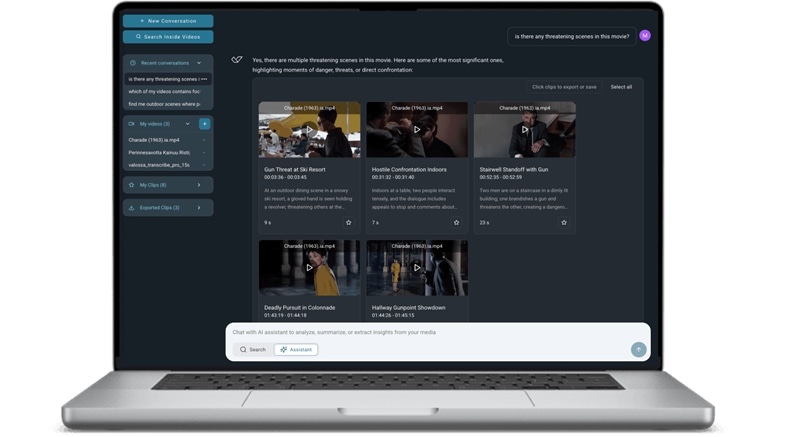
Valossa approaches video AI analysis from a conversational angle. Its Valossa Assistant can analyze what videos show, say, and contain, then let you ask questions about the footage in natural language. It reads speech, on-screen text, celebrities, topics, sentiment, and sensitive content in a single pass.
Key Features:
- Deep Contextual Visual Recognition: Identifies thousands of visual concepts, including specific faces, brand logos, environments, and precise actions.
- Automated Content Moderation: Flags explicit scenes, violence, profane language, and brand compliance risks automatically.
- Explicit Scene Detection: Pinpoints precise timecodes for sensitive visual elements to simplify age-rating classifications.
Pros:
- Genuinely deep multimodal analysis, not just basic object tags.
- Strong fit for brand safety, content moderation, and large media libraries.
Cons:
- Clearly built for enterprise use instead of solo creators.
- No public self-serve pricing, so you'll need to go through a sales conversation.
Pricing: Valossa doesn't publish flat pricing. Costs are quoted based on usage volume, deployment method, and which products you actually need.
4. TwelveLabs
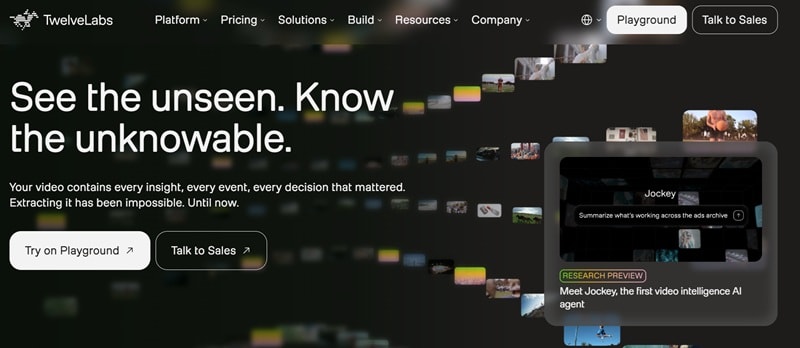
There's also TwelveLabs. This is a deeper, more enterprise-flavored AI video analyzer aimed at broadcasters, streaming platforms, and advertisers. By converting video content into powerful vector embeddings, it lets developers build custom applications with fast, accurate visual and semantic search capabilities.
Key Features:
- Multimodal Vector Search: Transforms visual frames, speech, and audio cues into vector space, enabling lightning-fast semantic queries.
- Natural Language Queries: Search your library with descriptive queries without needing precise file tags.
- Text Generation from Video: Automatically creates detailed video chapters, titles, and social captions based on raw visual content.
Pros:
- Supports retrieval and generative video workflows.
- Clean documentation and REST APIs make custom integrations straightforward.
Cons:
- It provides the raw API engine; you have to build or connect the user interface yourself.
- You'll need technical knowledge to make the most of the platform.
Pricing: Free tier available with up to 10 hours of video indexing to test out API calls. Custom enterprise plans available for large-scale deployments.
5. Google Cloud Video Intelligence
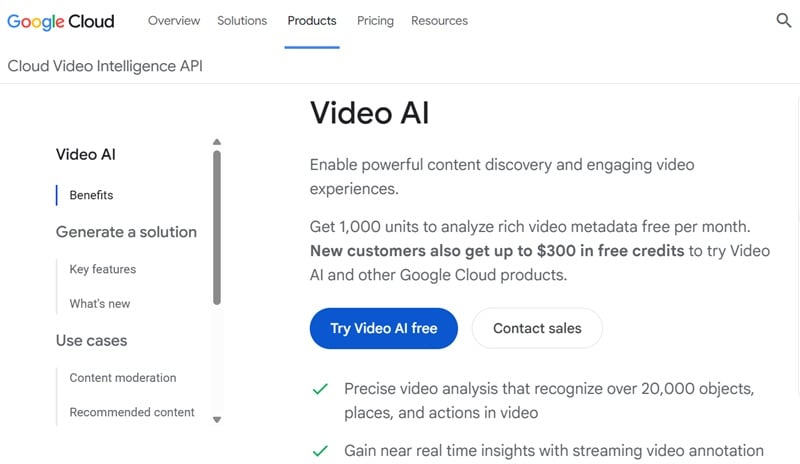
Our last AI video analyzer recommendation would be from one of the biggest companies in the world. Google Cloud Video Intelligence is a powerful enterprise API that brings Google's advanced computer vision models to developer workflows. It scans stored or streaming videos to annotate objects, identify explicit content, transcribe speech, and detect scene changes at scale.
Key Features:
- Text Extraction (OCR): Reads on-screen text, signs, subtitles, and labels across diverse languages.
- Shot & Frame Analysis: Automatically tracks exact frame transitions and shot boundaries across massive archives.
- Streaming Video Annotation: Parses live video streams in real time, alerting systems to objects or shot changes instantly.
Pros:
- Integrates natively with BigQuery, Cloud Storage, and the rest of the Google Cloud stack.
- Backed by Google's machine-learning infrastructure, with strong baseline accuracy.
Cons:
- Offers no native video player or consumer editing interface out of the box.
- Costs can increase as video-processing volume grows.
Pricing: Google Cloud gives new users up to $300 in free credits plus a limited free monthly quota. After that, it's billed per minute of video processed, with rates that vary depending on the feature.
Part 4. How Does AI Video Analysis Work?
You may have a better understanding of AI for video analysis after reading reviews of each tool above, but the easiest way to understand AI video analysis is to look at it in practice. Since Filmora pairs its analysis features with a full editing timeline, it's a good real-world example of how this technology moves from “here's what's in your video” to “here's your finished video.”
See the steps below to learn how to analyze videos in Filmora:
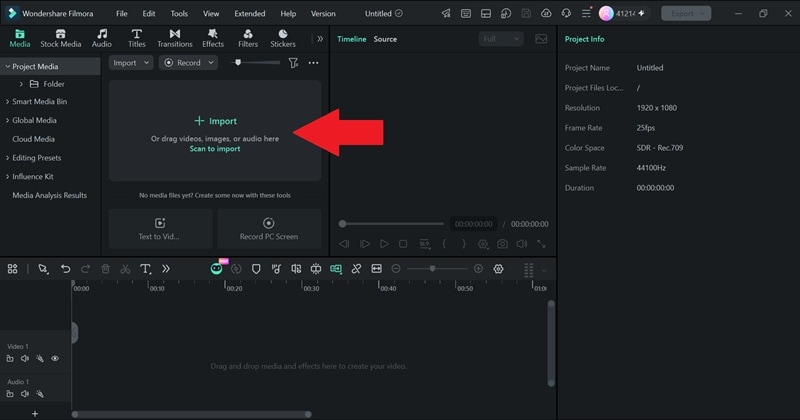
- Step 1. Import Your Footage
Download and install Filmora on your device. Create a New Project, and click Import to upload the video you want to analyze.
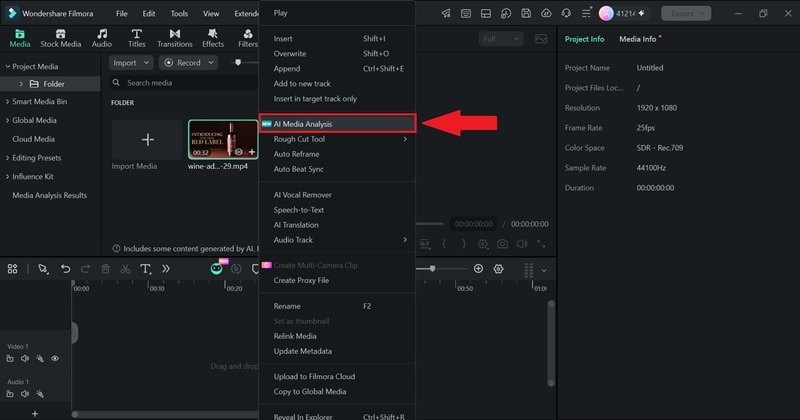
- Step 2. Start AI Media Analysis
Right-click on the clip you just uploaded, select AI Media Analysis.
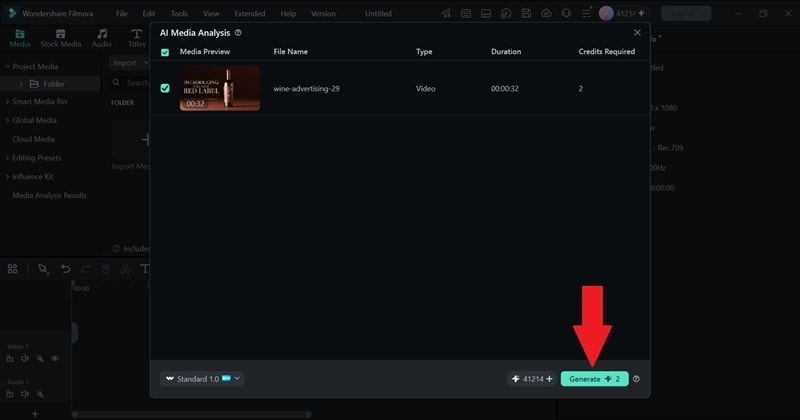
In the next interface, click Generate.
- Step 3. Review the Suggested Edit
Once it’s one analyzing, see the result in Media Analysis Results.
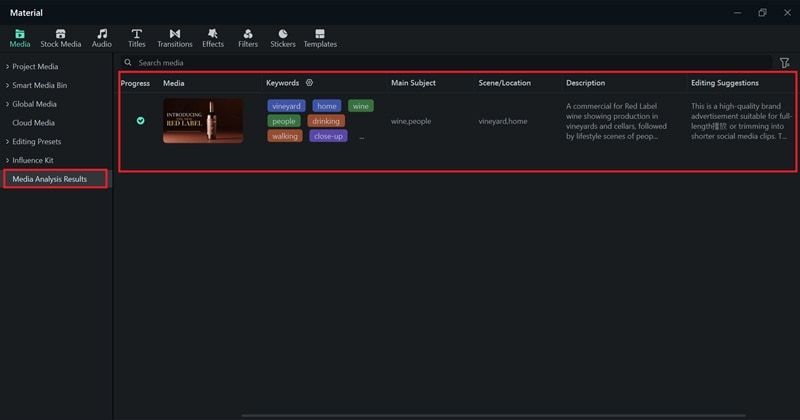
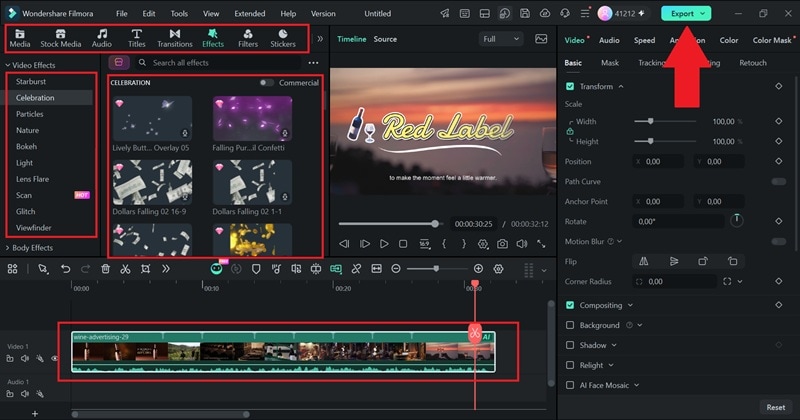
Drag your clip to the timeline below. And if you agree, you can follow the editing suggestions from the AI Media Analysis feature. For example, you can add more effects or filters to make the video more engaging. Once you’re done, select Export to save the result to your device.
Conclusion
AI video analysis has quietly become one of the most useful shortcuts in modern content work. It turns hours of raw footage into searchable, actionable information in a fraction of the time manual review would take. Either way, finding the right AI video analyzer comes down to what you are trying to build or create.
For video creators, storytellers, and editors who want to spend less time scrubbing footage and more time actually editing, Wondershare Filmora provides an ideal solution. Its AI Media Analysis feature brings 6-dimensional tagging, quick quality scoring, and smart timeline markers straight into your editing desktop.
