

 100% Security Verified | No Subscription Required | No Malware


 ChatGPT
 Perplexity
 Gemini
 Claude
 Grok
Grok
Imagine you're a busy video editor, racing against a deadline to create eye-catching thumbnails for your latest tutorial, but your sketches just aren't cutting it. Enter the FLUX Image Generator, the AI powerhouse revolutionizing visual creation. In this guide, we'll break down exactly how the FLUX Image Generator works.
The FLUX AI Image Generator is an AI tool developed by Black Forest Labs, powered by 12-billion-parameter diffusion models. It converts detailed text prompts into photorealistic or artistic images with high accuracy, anatomical diversity, and stylistic diversity. Discover what to expect, impressive realism, style versatility, and tips to avoid common pitfalls in this article.
In this article
Part 1. Key Features of Flux Image Generator
Available in different variants, Flux Image Generator offers speed and quality to create visuals instantly. Here are some of the prominent features that the tool offers:
- Text-to-Image Generation: Converts detailed text prompts into stunning visuals with exceptional accuracy.
- Image-to-Image Transformation: Edits and restyles existing images based on new prompts for seamless refinements.
- Multiple Aspect Ratio Options: Supports 1:1, 16:9, 9:16, 4:3, and custom ratios for versatile thumbnails and videos.
- Multiple AI Model Variants: Choose from FLUX.1 [pro], [dev], and [schnell] for speed vs. quality balance.
- Superior Prompt Adherence: Achieves 99% text-to-image fidelity for reliable, revision-free results.
Part 2. Is FLUX AI Free or Paid? (Flux Free Explained)
The Google FLUX Image Generator offers a freemium model: new users get 20 free credits upon signup. enough for several high-quality images (typically 5 credits per generation). Flux Schnell and Dev models are offered in the free version. However, you need to upgrade to the premium version to use other generation models such as Flux Pro.
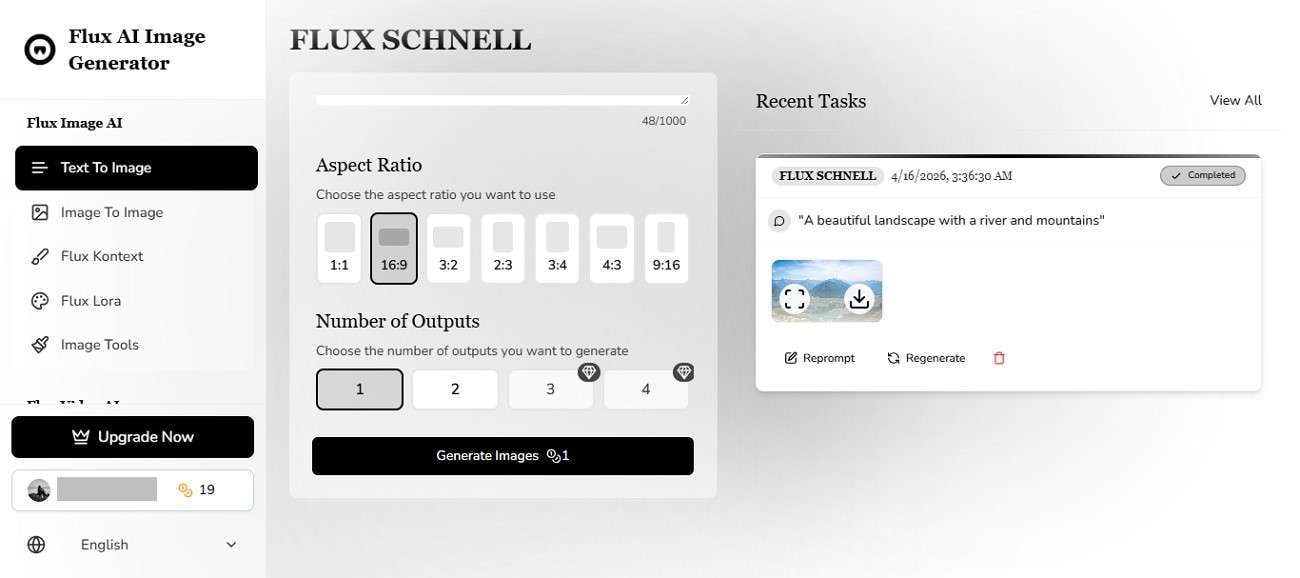
Part 3. How to Use FLUX AI Image Generator Step by Step
Now that you know the FLUX Free Image Generator's powerful features, it's time to put it into action. Provided below is the step-by-step guide on how to use this tool:
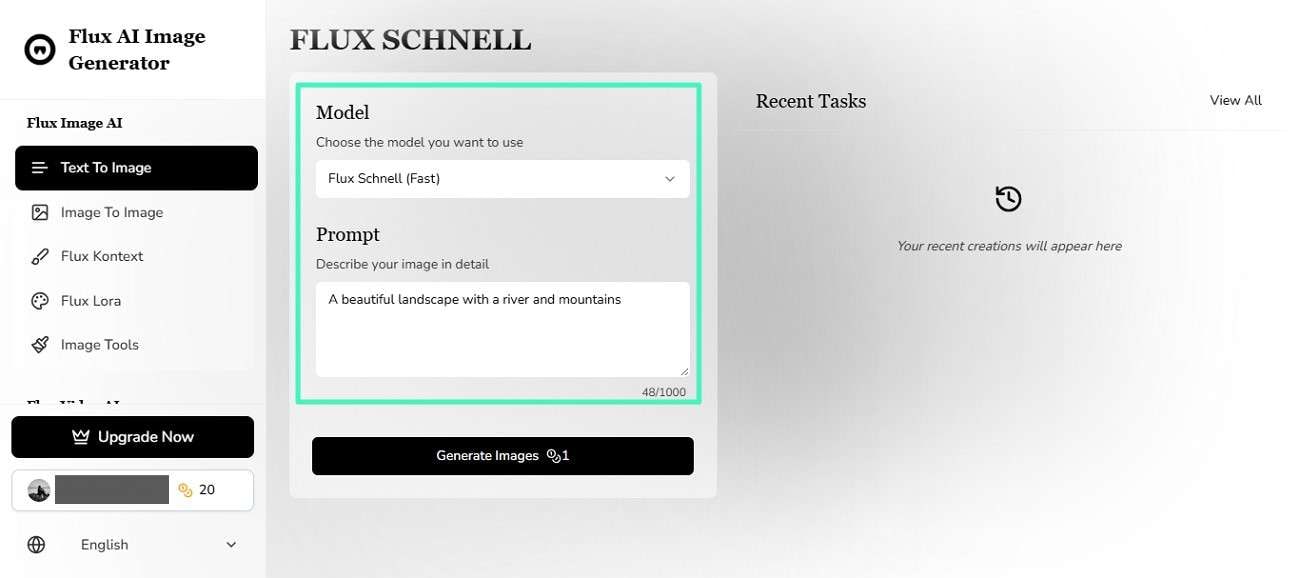
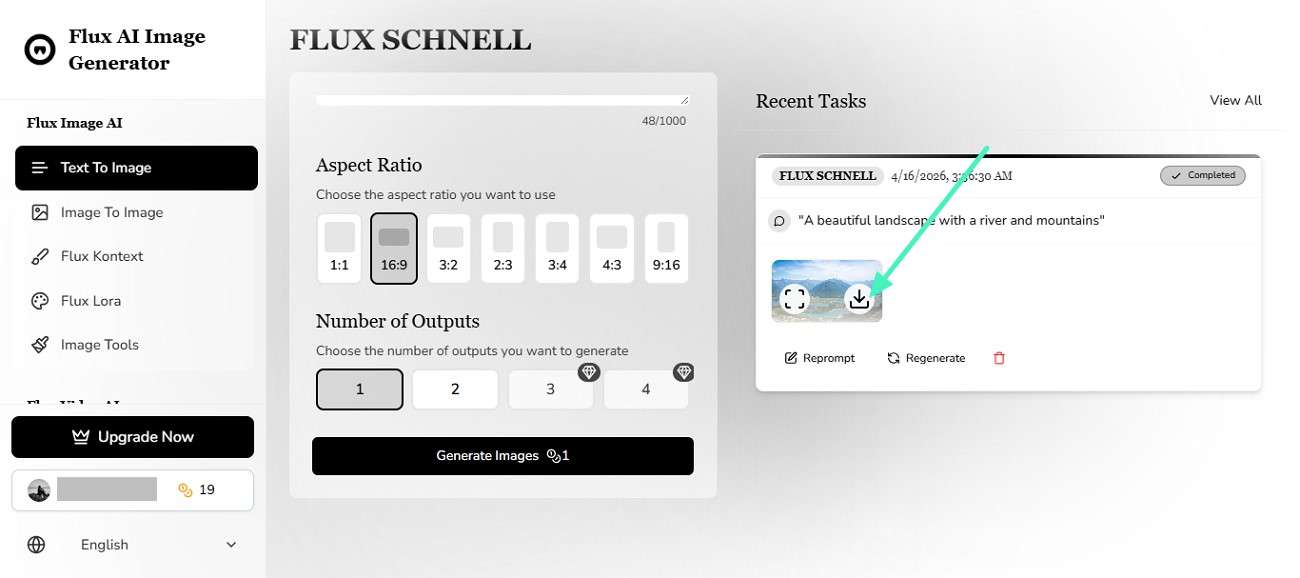
Step 1. Start by opening the tool in your web browser and choosing the "Text-to-Image" feature from the left. Once selected, choose the generation model from the dropdown menu. Next, input your text prompt in the designated field to proceed.
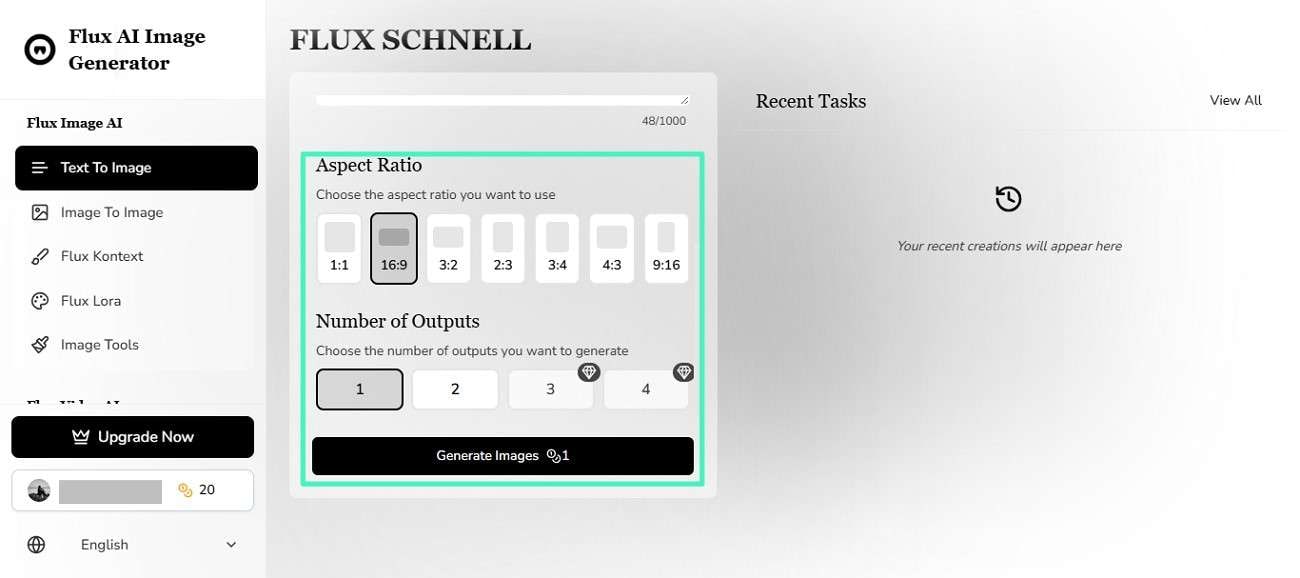
Step 2. Now scroll down a bit and select the aspect ratio from the options provided. Choose the number of outputs you want in the prompt, then hit the "Generate Image" button to run the process.
Step 3. Once the image is successfully generated, preview it and press the "Download" button to save it successfully to your device.
Part 4. Pros & Cons of FLUX AI Image Generator
Having learned about how to use this tool, let's now move to its pros and cons. Provided below are some of the advantages and drawbacks you might encounter while using the Flux Generator:
Part 5. Meet Filmora: The Easiest Way to Improve AI Image Generation Quality
Although FLUX AI excels at turning text prompts into images, it doesn't offer much support for refining those prompts or polishing the final results. That's where Wondershare Filmora becomes useful. It provides an intuitive, beginner-friendly platform with built-in AI tools to improve prompts.
What Is Filmora and Why Use It With FLUX?
Filmora is a beginner-friendly, yet powerful video editing software designed to simplify content creation with built-in AI tools. When paired with the FLUX generator, Filmora becomes even more valuable. While FLUX generates high-quality images from prompts, Filmora helps you refine, enhance, and actually use those prompts and visuals in real projects.
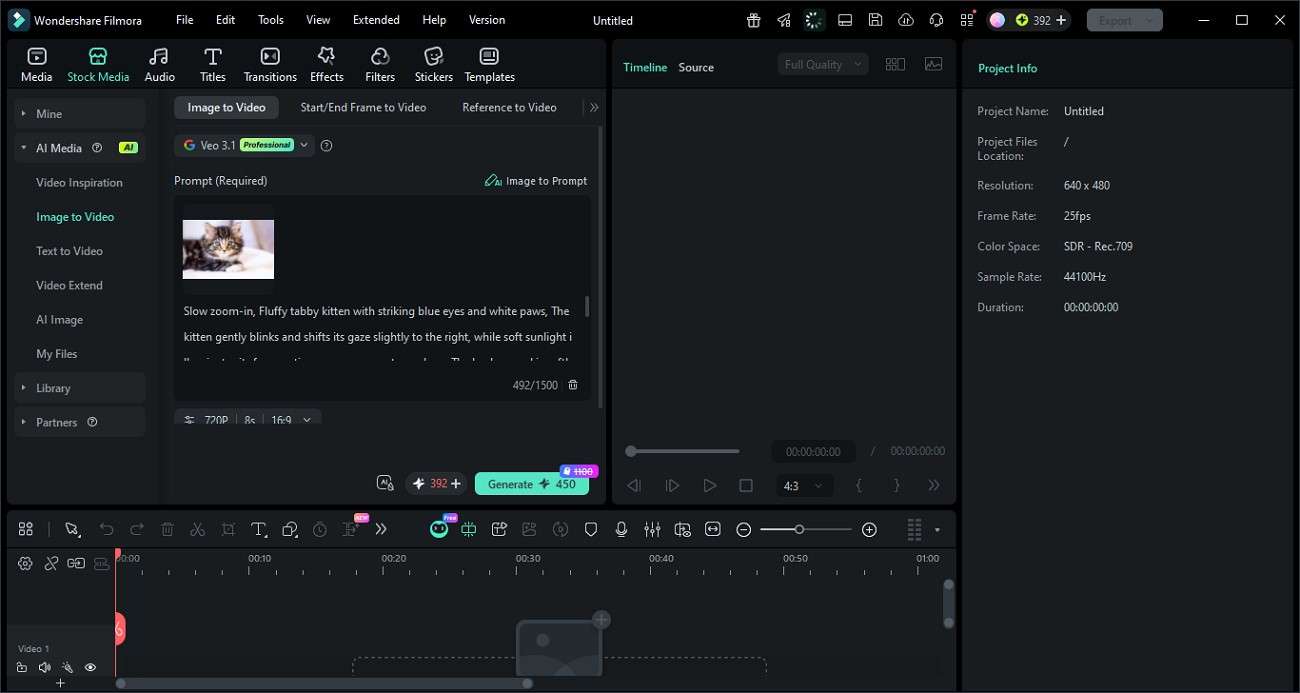
To simplify both AI image creation and prompt refinement, Filmora integrates two powerful tools: an AI Image Generator that turns text into visuals, and an Image-to-Prompt feature that converts existing images into detailed prompts. Together, they streamline the creative process by helping you generate, analyze, and improve visuals in one place.
 secure download

Why Filmora + FLUX = Better Results Than FLUX Alone
Filmora, combined with FLUX AI, delivers better results than FLUX alone for several key reasons:
- Prompt Refinement Advantage: Filmora helps refine and improve AI prompts, which leads to more accurate and visually aligned outputs compared to using FLUX without guidance.
- Post-Generation Editing Power: While FLUX generates images, Filmora allows users to enhance, adjust, and polish those visuals for professional-quality results.
- Seamless Workflow Integration: Users can generate images in FLUX and directly import them into Filmora for editing, animation, or video creation without switching complex tools.
- Multi-Format Content Creation: Filmora enables turning FLUX images into videos, thumbnails, and social media content, expanding their use beyond static visuals.
- Creative Control & Flexibility: The combination gives users both generation (FLUX) and refinement (Filmora), ensuring more control over the final creative output.
Conclusion
To sum it up, this article provided a detailed review of FLUX AI and how to use it. It also explained its key features, working process, and overall strengths and limitations in modern content creation. However, for users who want more control and refinement, Wondershare Filmora is a great addition. It helps you enhance, edit, and transform AI-generated visuals into polished, professional-quality content effortlessly.
secure download Frequently Asked Questions
-
1. What is FLUX AI Image Generator used for?
FLUX AI Image Generator is used to create high-quality images from text prompts. It helps designers, creators, and marketers quickly generate visuals for thumbnails, social media, and creative projects with strong detail and realism. -
2. Is FLUX AI free to use?
FLUX AI offers a freemium model where users get limited free credits to generate images. However, advanced models and higher usage limits require a paid upgrade. -
3. Can I edit FLUX AI-generated images easily?
Yes, you can edit them using external tools. For a smoother workflow, Wondershare Filmora is highly recommended because it lets you refine, enhance, and turn AI images into polished videos or visual content in one place. -
4. Which tool works best with FLUX AI for content creation?
For better results, combining FLUX AI with Filmora is ideal. FLUX handles image generation, while Filmora helps you edit, improve, and transform those visuals into professional-quality creative projects.
