

 100% Security Verified | No Subscription Required | No Malware

This Beauty Vlog Portrait Color LUT-inspired filter pack is designed for content creators who want flattering skin tones, soft contrast, and consistent color across all their beauty vlogs.
Whether you film GRWMs, makeup tutorials, or chatty sit-down videos, these portrait-focused filters help you correct color quickly and craft a signature look that still feels natural on every upload.
In this article
Soft Indoor Beauty Vlog Scenes
Soft Glow Vanity Light
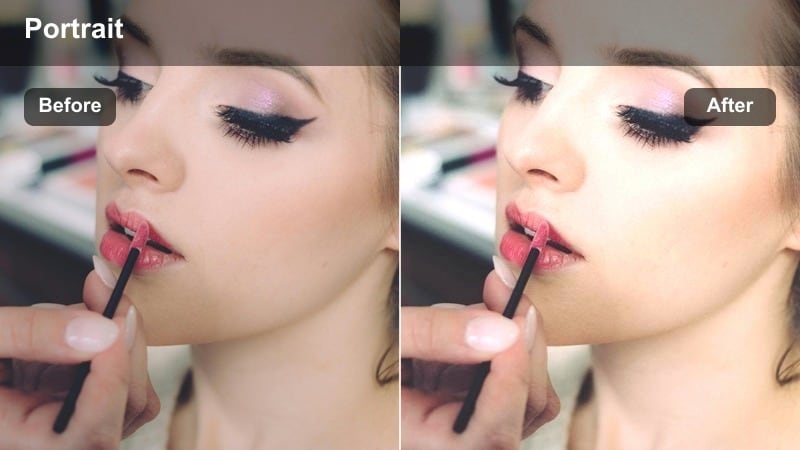
- Effect look: Creamy soft contrast with gentle highlight roll-off and subtle warmth on skin.
- Best for: Sit-down beauty vlogs filmed in front of a vanity mirror or ring light.
- Editing tip: Lower the filter intensity to around 60% if your key light is already very bright to avoid blown-out cheeks and forehead.
Soft Glow Vanity Light is ideal when your beauty setup relies on ring lights, vanity bulbs, or LED panels that can look harsh straight out of the camera. In Filmora, this portrait-friendly filter smooths contrast, softens highlights on the forehead and cheekbones, and adds a gentle warmth that flatters most skin tones without hiding your makeup work.
Apply the filter on your timeline clips, then fine-tune strength on a per-shot basis so your contour, blush, and highlight still show clear definition. Pair it with a slight sharpness boost on eyes and lashes and your viewers will see crisp makeup detail framed by smooth, glowy skin that feels polished but not over-edited.
AI-Assisted Beauty Color Matching
Filmora s AI-powered color tools automatically detect faces and prioritize natural skin tones, so your beauty vlog portrait filters stay flattering even when lighting shifts between clips. Instead of manually correcting every frame, you can apply a filter once and let AI keep exposure and tone balanced across your whole video.
When you combine this AI color control with the Beauty Vlog Portrait Color LUT-inspired filters, you get smoother transitions between scenes, more accurate foundation shades, and fewer color jumps in your final upload.
 secure download

See the Beauty Portrait Filters in Action
You can quickly see how each portrait filter responds to your skin tone, foundation finish, and lighting by dropping a few sample clips onto the Filmora timeline. Cycle through filters, compare them side by side, and decide which combination best keeps your blush, bronzer, and eye makeup true to life.
Use split-screen or before-and-after views to judge subtle differences in saturation and contrast, then commit to the look that feels most like your everyday brand aesthetic.
secure download1000+ Video Filters and 3D LUTs
Beyond this dedicated beauty vlog portrait pack, Filmora includes hundreds of filters and 3D LUTs you can stack, tweak, and save as presets. That means you can blend cinematic looks with skin-friendly portrait grades, then reuse the combo as your own signature LUT-style aesthetic.
When you find a look that fits your channel, save it as a preset to apply the same style to GRWMs, tutorials, and haul vlogs in just a few clicks.
secure downloadStudio Foundation Match
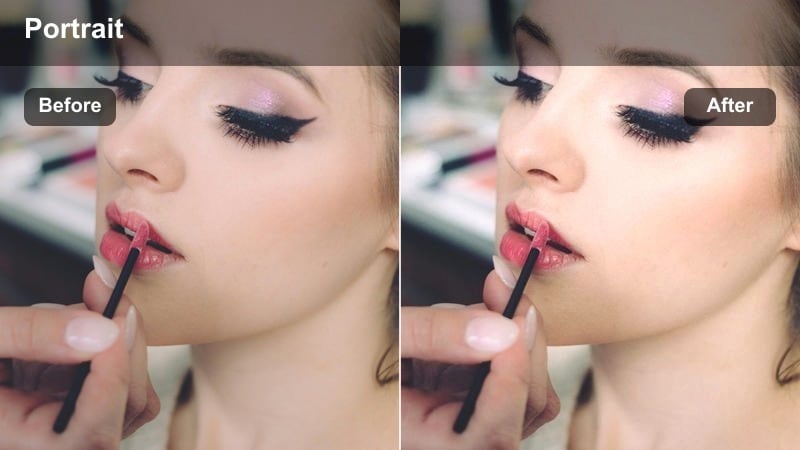
- Effect look: Neutral, even color that keeps foundation shades accurate and reduces redness.
- Best for: Foundation reviews, shade matching demos, and base routine breakdowns.
- Editing tip: Use white balance eyedropper on a neutral surface first, then apply this filter so your foundation shades stay true on every camera.
Studio Foundation Match is tuned to keep undertones faithful, making it perfect when you are comparing multiple shades on camera. In Filmora, use it on clips where you swatch products on your face, neck, or arm to minimize redness and camera bias that can throw off how a product really looks.
Once applied, you can slightly cut saturation in the red channel or tweak HSL for the skin range to prevent cheeks and blemishes from overpowering the frame. Save the adjusted filter as a preset so every foundation review on your channel shares the same neutral, trustworthy baseline.
Cozy Bedroom Chat
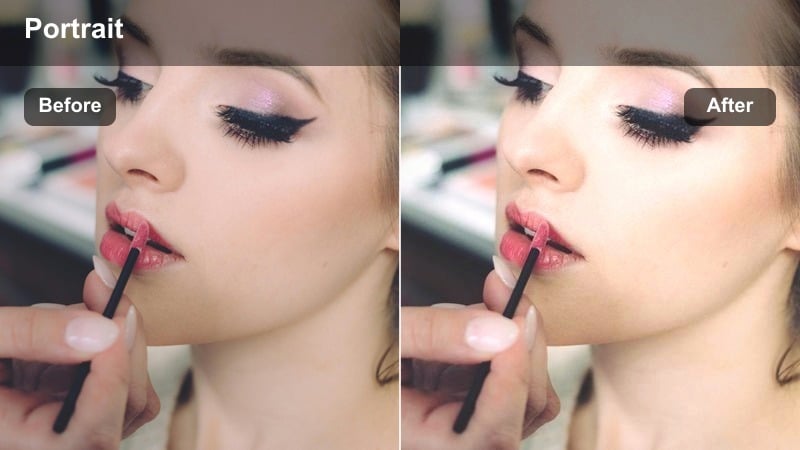
- Effect look: Warm, soft contrast with lifted shadows to keep cozy corners visible.
- Best for: Nighttime chatty vlogs or self-care routines filmed in a bedroom setup.
- Editing tip: Reduce saturation on orange tones slightly if your bedside lamps make your skin look too yellow.
Cozy Bedroom Chat is designed to preserve the intimate feel of bedroom setups where string lights and lamps create pockets of shadow. In Filmora, the filter gently lifts dark areas so viewers can still see your expressions and background decor without crushing blacks or adding grain.
When your lamps lean too warm, combine the filter with a minor temperature decrease or targeted orange saturation cut so your skin does not drift into yellow. This balance keeps your self-care routines and night chats soft and inviting, while still looking clean and professional on larger screens.
Daytime Window Light Portraits
Natural Window Soft Skin
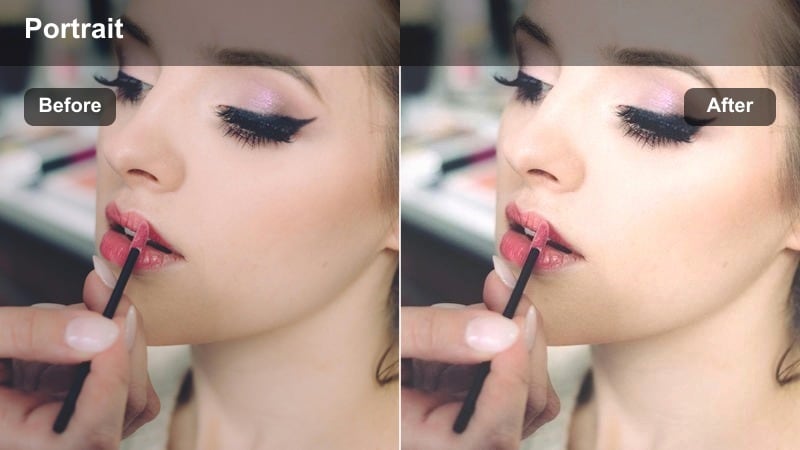
- Effect look: Bright, airy portrait look with softened highlights and gentle color in the cheeks.
- Best for: Daytime GRWM videos and natural makeup tutorials shot next to a window.
- Editing tip: Use a gentle vignette after applying this filter to pull focus toward your face without darkening the overall scene.
Natural Window Soft Skin takes advantage of bright daylight, smoothing harsh contrast while keeping the overall exposure feeling fresh and bright. In Filmora, this filter is ideal for morning routines and light, natural looks where you want skin to appear hydrated and even without losing real-life texture.
After applying the filter, you can add a subtle vignette or slight exposure adjustment to make sure your face stays the focal point even if the window behind you is strong. This combination creates an airy, lifestyle feel that works well for YouTube and vertical clips repurposed to Reels or Shorts.
Soft Matte Day Look
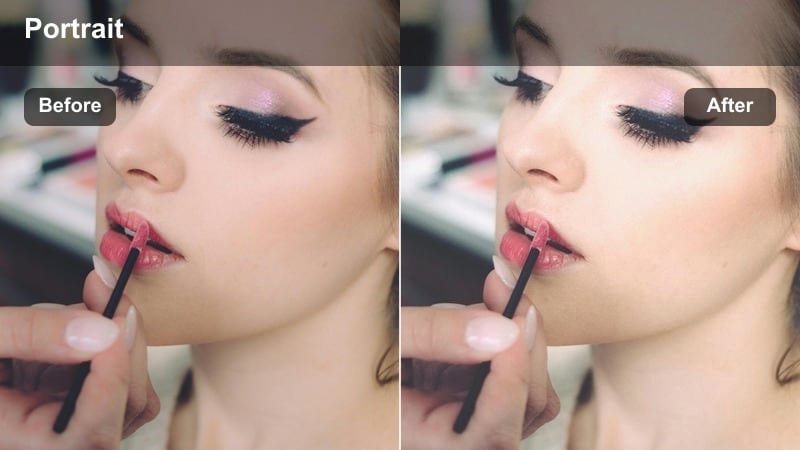
- Effect look: Subtle matte finish on skin with gentle contrast and controlled shine on the T-zone.
- Best for: Everyday makeup routines, work-ready looks, and no-makeup-makeup vlogs.
- Editing tip: Lower the filter strength on oily skin close-ups to keep texture real while still reducing distracting glare.
Soft Matte Day Look helps calm shine without erasing the natural dimension of your face, which is key for honest everyday makeup content. In Filmora, the filter slightly pulls down highlight intensity and evens midtones so your T-zone looks controlled but not blurred out.
Use it on both talking-head shots and B-roll close-ups of your base routine, then tweak intensity for different camera angles. A mild clarity boost around brows and lash lines stops the matte finish from feeling flat, keeping your eyes bright and expressive in thumbnails and feeds.
Fresh Face Bright Pop
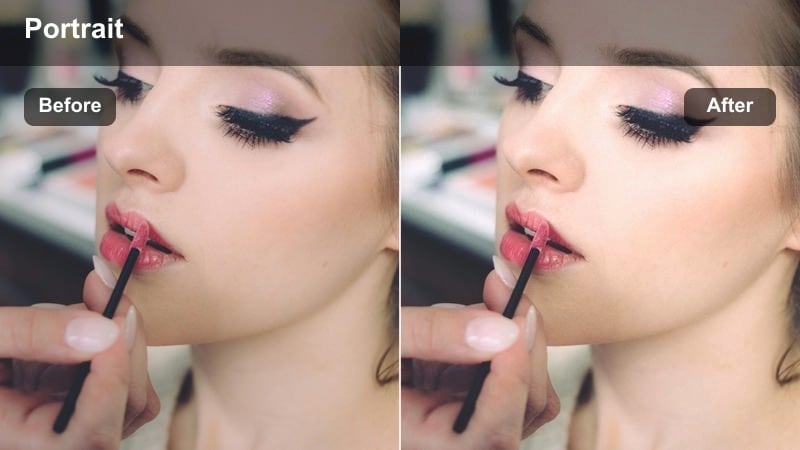
- Effect look: Clean, bright tones that add a subtle pop of saturation to lips and blush.
- Best for: Minimal makeup looks, skincare-focused content, and morning vlogs.
- Editing tip: Dial back overall saturation slightly if your lipstick shade becomes too intense compared to your real-life look.
Fresh Face Bright Pop is made for dewy, skin-first content where you want brightness and a touch of color without heavy grading. In Filmora, it lightly boosts midtone brightness and selective saturation so your lips, blush, and under-eye area look awake and healthy on camera.
Apply it to clips where you are showing bare skin, skincare steps, or minimal coverage looks, then adjust saturation if bold lip shades start to dominate the frame. The result is a clean, honest aesthetic that keeps your routine looking approachable yet elevated.
Evening Glam and Event Looks
Golden Glam Portrait
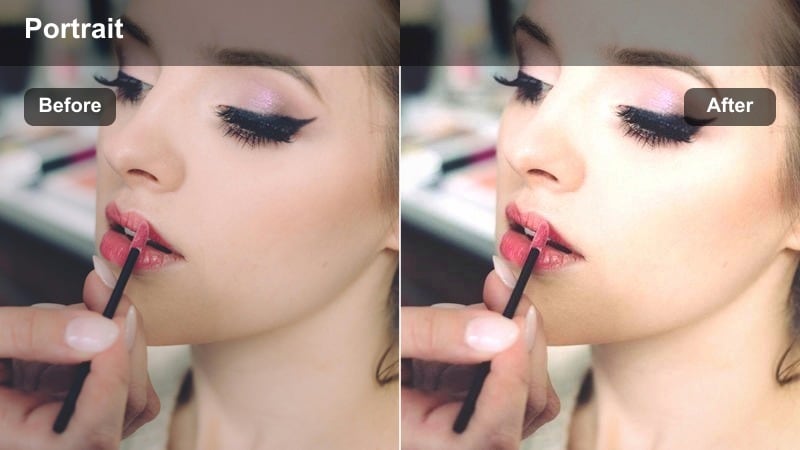
- Effect look: Warm golden tint with boosted contrast and subtle glow on high points of the face.
- Best for: Full glam looks, event-ready makeup, and party vlog intros.
- Editing tip: If your bronzer looks too orange, slightly desaturate warm midtones while keeping highlights bright and golden.
Golden Glam Portrait leans into warm, glamorous tones that flatter full-coverage bases, cut creases, and bold lashes. In Filmora, it increases contrast and adds a golden sheen to cheekbones, temples, and the bridge of the nose so your highlight and shimmer products catch the light beautifully.
Use it for intros, transitions, and close-ups of your glam eye look, then fine-tune saturation in the warm midtones to keep bronzer and contour from going too orange. This filter helps your evening looks feel red-carpet ready while staying polished enough for product-focused content.
Cool Evening Balance
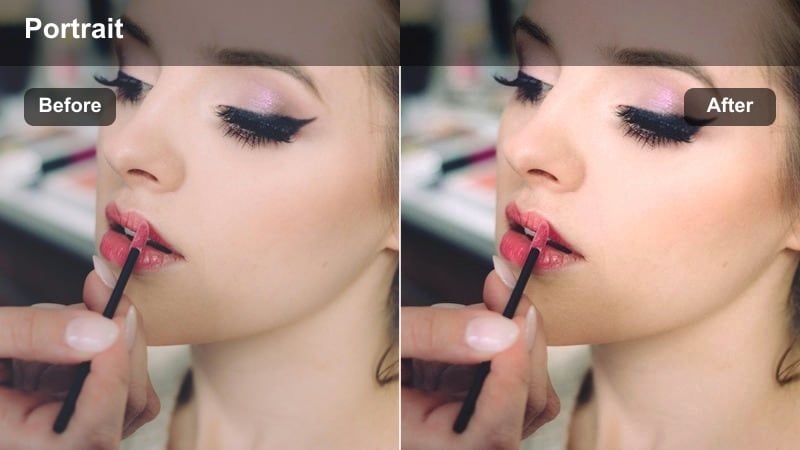
- Effect look: Cool-toned correction that neutralizes yellow indoor lights and preserves contour depth.
- Best for: Glam tutorials filmed under mixed warm and cool lights before a night event.
- Editing tip: Slightly raise exposure on your face after applying this filter so cooler tones do not make your skin appear dull.
Cool Evening Balance is designed for tricky indoor setups where daylight, LEDs, and tungsten bulbs mix and push your skin toward yellow. In Filmora, the filter gently shifts the palette cooler, reining in orange casts while keeping your contour, liner, and brow definition intact.
Apply it to scenes filmed near windows and lamps at the same time, then lift exposure and selectively warm highlights if your skin starts to look flat. This gives you a polished, editorial feel while still representing your true shade and undertone for viewers shopping your recommendations.
Night Out Vlog Glow
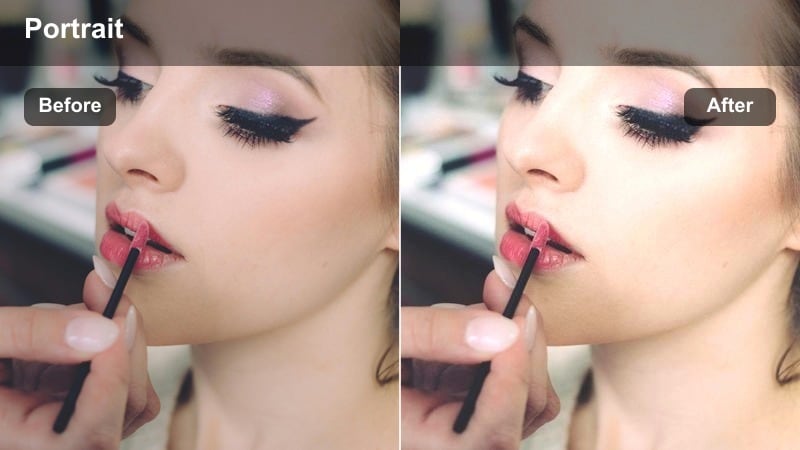
- Effect look: Elevated contrast with controlled noise and a subtle cinematic lift in the shadows.
- Best for: Night-out vlogs, club-ready makeup, and city evening transitions before or after beauty segments.
- Editing tip: Enable light noise reduction first, then apply this filter so the glow feels smooth instead of grainy in dark scenes.
Night Out Vlog Glow is tailored to low-light situations where street lamps and neon signs can easily turn skin muddy or noisy. In Filmora, it lifts shadows just enough to keep your face visible, while the contrast curve and subtle glow effect make your glam makeup stand out against dark backgrounds.
Use it on walking shots, Uber check-ins, and outdoor clips with city lights, pairing it with moderate noise reduction before the filter for cleaner results. A slight saturation trim can also help hide chroma noise, letting the glow effect focus attention on your skin and highlight rather than image artifacts.
On-the-Go Mobile Beauty Vlogs
Car Vlog Soft Balance
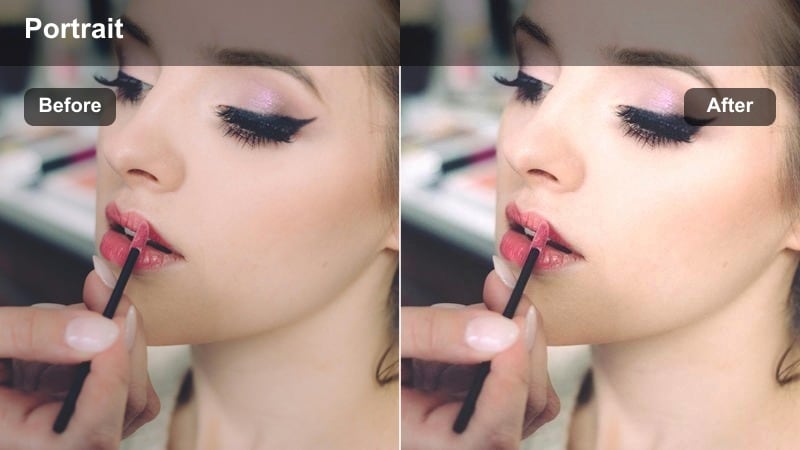
- Effect look: Gentle contrast with reduced harshness from direct sunlight and windshield reflections.
- Best for: Car vlogs, quick beauty chats, and first-impressions filmed on the move.
- Editing tip: Use a small highlight recovery after the filter to fix blown spots on your nose and forehead from strong front light.
Car Vlog Soft Balance is built for unpredictable sunlight patterns that hit your face as you drive or ride. In Filmora, the filter tames bright hotspots on the forehead, nose, and cheeks while adding a bit of structure so your face does not disappear into flat, overexposed light.
Apply it to all your in-car clips, then refine highlight recovery and exposure to keep your skin tone even as the background brightness changes. This makes quick check-ins and first impressions feel more watchable and consistent, even when you are filming entirely on your phone.
Mall Day Vlog Glow
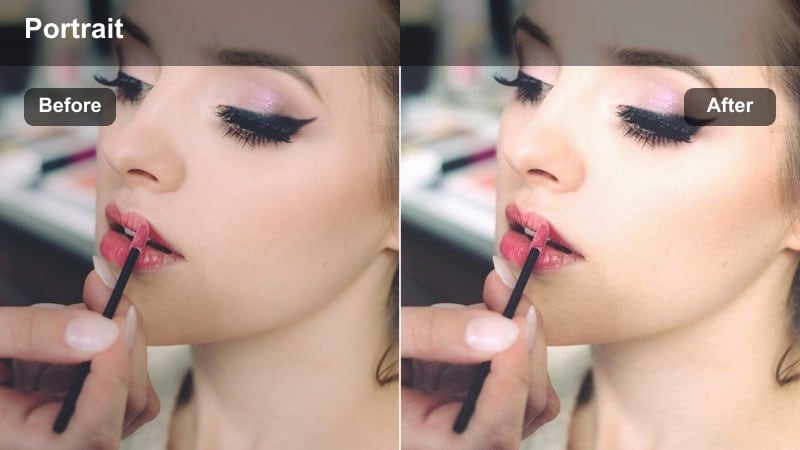
- Effect look: Soft neutral tones that smooth overhead mall lighting and reduce green casts.
- Best for: Shopping hauls, beauty store walk-throughs, and casual day vlog segments.
- Editing tip: Subtly lower green saturation if store lights make your under-eyes look tired on camera.
Mall Day Vlog Glow is tuned for commercial interiors where fluorescent or LED fixtures can make skin look washed out or slightly green. In Filmora, the filter adds a touch of warmth, smooths contrast from overhead lighting, and gently neutralizes color casts on your face.
Use it for walk-and-talk segments, try-on clips in dressing rooms, or beauty store tours. If under-eye areas pick up green or gray tones, pair the filter with a minor tint and green saturation adjustment so your complexion looks refreshed and bright throughout the shopping segment.
On-the-Go Selfie Correct
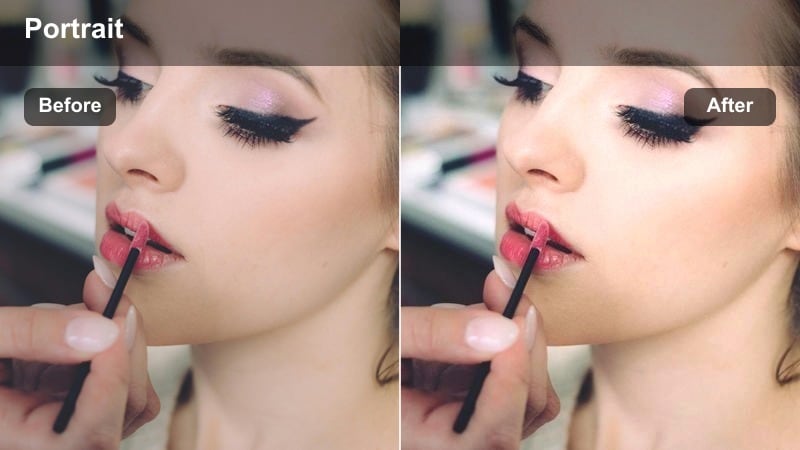
- Effect look: Quick-fix color balance with modest skin smoothing and boosted midtone brightness.
- Best for: Vertical beauty snippets, quick check-ins, and phone-filmed stories.
- Editing tip: Use the filter at lower strength for close-up product swatches so texture and color stay accurate.
On-the-Go Selfie Correct works as a universal quick fix for vertical clips and spontaneous updates filmed on your phone. In Filmora, it lightly evens out color balance, brightens midtones, and adds subtle skin smoothing so your face looks camera-ready with almost no extra grading.
Apply it across all B-roll selfies and story-style segments, then adjust intensity for shots featuring close-up swatches so product texture and finish remain visible. This makes it easier to match mobile footage with your main camera look, keeping your entire vlog cohesive from intro to outro.
Tips for Using Beauty Vlog Portrait Color Lut Filters in Filmora
- Always set or correct white balance in-camera or in Filmora before applying portrait filters so skin tones start from a neutral, accurate base.
- Record a short test clip in your main lighting setup at the start of every shoot and try 2 to 3 filters to see which one best matches your makeup and outfit.
- After adding a filter, quickly check lipstick, blush, and bronzer saturation so the colors stay realistic and close to how the products look in real life.
- Create separate presets for daytime window light and evening indoor scenes so you can switch looks instantly without regrading every clip.
- Use Filmora s AI face detection and color tools alongside these filters to keep skin exposure and tone consistent as you move between locations.
- Avoid stacking too many beauty filters at full strength; instead, combine one main portrait filter with subtle manual tweaks for a more natural finish.
- Monitor your footage on both a phone and a larger screen to be sure smoothing, contrast, and color grading look flattering in all viewing environments.
With a focused set of beauty vlog portrait color filters, you can keep your skin tones flattering, your makeup true to color, and your channel visuals consistent from video to video.
Experiment with these looks on your next GRWM or tutorial, then refine your favorite settings into a reusable preset that feels like a custom beauty LUT for your brand.
secure download