

 100% Security Verified | No Subscription Required | No Malware


 ChatGPT
 Perplexity
 Gemini
 Claude
 Grok
Grok
Cinema Shadow Teal sits between deep ocean blue and muted green, giving it a calm yet cinematic energy. It feels stable, modern, and slightly mysterious, which is why it works so well for storytelling, tech content, and anything that needs a polished, film-inspired mood without looking too loud or saturated.
Creators use Cinema Shadow Teal across YouTube thumbnails, intros, lower thirds, channel branding, and cinematic color grading to create a consistent visual identity. Below are ready-made Cinema Shadow Teal color palettes with HEX codes that you can drop straight into your designs and edits, especially if you are working in Filmora and want fast, cohesive results.
In this article
Cinematic & Moody Cinema Shadow Teal Color Palettes
Midnight Edit Suite

- HEX Codes: #0b1b1f, #104b57, #1f777a, #f5f5f5
- Mood: Dark, polished, and cinematic with a professional studio feel.
- Use for: Ideal for cinematic YouTube edits, channel banners, and dark UI overlays in video dashboards.
Midnight Edit Suite mixes near-black shadows with rich Cinema Shadow Teal and a clean off-white highlight. It feels like working late in a high-end studio, where the interface disappears and the footage takes center stage. The deep teal tones keep everything cinematic, while the soft white keeps text and icons easy to read.
Use this palette when you want your thumbnails, channel art, and lower thirds to look sleek and professional without being flashy. It is great for editing tutorials, short films, or any series where you want consistent studio branding across intros, overlays, and end screens.
Pro Tip: Build a Cinematic Cinema Shadow Teal Look in Filmora
To keep a Midnight Edit Suite vibe across your entire project in Filmora, start by using the dark teal shades for backgrounds and panels, then reserve the lightest tone for text and key icons. This creates a clear visual hierarchy so viewers focus on your story, not the interface.
You can set up a style system in Filmora by saving custom title presets that use the same Cinema Shadow Teal colors for fonts, outlines, and shapes. Reusing these presets in intros, b-roll overlays, and end cards keeps your channel looking polished and consistent.
AI Color Palette
If you have a screenshot or design mockup with the Midnight Edit Suite palette, you can turn it into a full video look using Filmora. Filmora's AI Color Palette feature analyzes the reference frame and applies its Cinema Shadow Teal balance to the rest of your clips.
This is especially useful when you mix footage from different cameras or lighting setups. Instead of matching each clip manually, you can let AI push everything toward the same cool teal shadows and neutral highlights, then fine-tune where needed.
 secure download

HSL, Color Wheels & Curves
Once your base Cinema Shadow Teal look is in place, use HSL, color wheels, and curves in Filmora to refine it. Slightly darken the cyans and teals in HSL to deepen the shadows, then use the midtone color wheel to nudge overall warmth or coolness until skin tones and backgrounds feel balanced.
If you want a stronger cinematic punch, add a gentle S-shaped curve to increase contrast, while lifting the blacks just a touch so your shadows keep that soft Midnight Edit Suite character. For a step-by-step walk-through, you can follow Filmora tutorials that show exactly how to shape your teal and orange grades using these tools.
secure download1000+ Video Filters & 3D LUTs
To speed up your Cinema Shadow Teal workflow, you can start from Filmora presets instead of grading from scratch. Filmora’s video filters and 3D LUTs make it easy to layer teal-focused styles over your footage, then fine-tune them to match the Midnight Edit Suite palette.
Apply a teal cinematic LUT to your clips, then adjust intensity until your shadows match #0b1b1f and your midtones lean toward #104b57 or #1f777a. This gives you a strong, cohesive base grade that you can reuse across thumbnails, intros, trailers, and long-form content.
secure downloadUrban Shadow Frame

- HEX Codes: #091015, #0f3e46, #1c6b73, #e0e4ea
- Mood: Gritty yet refined, like a street film shot at blue hour.
- Use for: Great for documentary titles, tech reviews, and overlays that need a modern urban edge.
Urban Shadow Frame blends inky night tones with cooler Cinema Shadow Teal midtones and a pale, concrete-like highlight. It feels like neon reflecting on wet asphalt, but with a clean digital polish rather than chaos.
Use this palette for tech channels, street documentaries, and product reviews where you want a city-night mood. The bright #e0e4ea is perfect for legible title text on dark thumbnails, while #1c6b73 and #0f3e46 make strong backgrounds for lower thirds and on-screen stats.
Noir Teal Spotlight

- HEX Codes: #050608, #103842, #1e7575, #f2e8dc
- Mood: Film-noir drama softened by teal light and warm highlights.
- Use for: Perfect for narrative shorts, title cards, and dramatic podcast cover art.
Noir Teal Spotlight sets heavy black shadows against focused teal light and a creamy highlight. The warm off-white #f2e8dc breaks up the cool tones and adds that slightly vintage, spotlight-on-the-protagonist feeling.
This palette is ideal for dramatic intros, mystery podcasts, and cinematic storytelling thumbnails. Use the darkest shade for letterbox bars or backgrounds, add #103842 and #1e7575 for accents and graphic shapes, then highlight key text or character names with #f2e8dc.
Studio Control Room

- HEX Codes: #111820, #165059, #25a0a4, #c7d4d9
- Mood: Technical, focused, and slightly futuristic.
- Use for: Use for motion graphics dashboards, lower thirds, and tech explainer visuals.
Studio Control Room combines deep blue-black with precise Cinema Shadow Teal and cool steel grays. It feels like looking at a wall of scopes and monitors in a broadcast truck or grading suite.
Use this palette for interface-style animations, data overlays, and explainer videos. #25a0a4 works well for key icons and callouts, while #c7d4d9 keeps body text readable over darker backgrounds. This is a strong choice for brands that want a sleek tech identity without resorting to neon.
Deep Reel Horizon

- HEX Codes: #021017, #12454e, #1c7a80, #f0fafb
- Mood: Calm, expansive, and introspective like an ocean night sequence.
- Use for: Great for travel vlogs, moody b-roll sequences, and minimalist title cards.
Deep Reel Horizon layers near-black ocean depths under smooth teal midtones and a pale, misty white. The result is peaceful rather than harsh, with lots of negative space for typography and simple graphics.
Use it for slow travel vlogs, cinematic b-roll edits, and minimalist titles where you want viewers to feel calm and reflective. #021017 makes excellent background gradients, while #f0fafb is ideal for clean logo marks and simple sans-serif titles.
Modern & Minimal Cinema Shadow Teal Color Palettes
Clean Teal Interface

- HEX Codes: #0f5056, #19a3af, #fbfcfd, #c6d3d6
- Mood: Fresh, minimal, and highly legible.
- Use for: Ideal for app-style overlays, UI explainer videos, and product demos.
Clean Teal Interface pushes Cinema Shadow Teal into a brighter, more digital space. The crisp white and light gray tones keep layouts airy and easy to scan, while the deep and bright teals create clear accents.
Use this palette when designing UI walkthroughs, SaaS promos, or productivity app demos. #19a3af works well for buttons and progress bars, #0f5056 for headers or navigation, and #fbfcfd for backgrounds in your thumbnails and explainer slides.
Minimal Title Card Teal
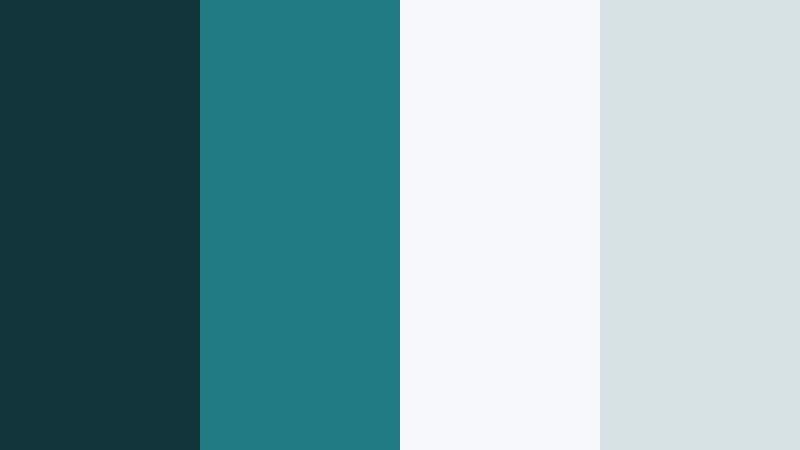
- HEX Codes: #12353c, #1f7a81, #f7f8f9, #d7e2e4
- Mood: Understated, airy, and professional.
- Use for: Use on minimalist title cards, subtle intro animations, and corporate video templates.
Minimal Title Card Teal is all about soft contrast and breathable layouts. The teals are calm and slightly muted, while the whites and grays stay light and neutral, making it perfect for professional or corporate content.
Apply this palette for training videos, brand guidelines, and simple YouTube intros. Use #12353c for small logo marks or thin frames, #1f7a81 for subtle accent lines or icons, and #f7f8f9 as a clean background that keeps your typography front and center.
Storyboard Grid Teal

- HEX Codes: #1a3d44, #1c7f86, #fdfdfd, #b5c0c3
- Mood: Organized, smart, and design-forward.
- Use for: Perfect for tutorial frames, storyboard-style layouts, and slide videos.
Storyboard Grid Teal mixes structured teal blocks with bright white and a cool silver-gray, echoing a digital storyboard or content calendar. It feels highly organized and clean, ideal for educational content.
Use it for step-by-step tutorials, planning videos, and carousel-style slides. #1a3d44 and #1c7f86 are great for panel borders and headers, while #b5c0c3 keeps secondary text visible without competing with main titles on #fdfdfd.
Edit Suite Air

- HEX Codes: #0e3e45, #1c868c, #e9f2f3, #ffffff
- Mood: Light, breathable, and quietly creative.
- Use for: Great for editing walkthroughs, UI mocks, and minimalist creator branding.
Edit Suite Air softens Cinema Shadow Teal with lots of white space and very light blue-tinted neutrals. It feels like an uncluttered workspace, helping viewers focus on your message instead of heavy colors.
Use this palette for clean creator branding, editing tutorial overlays, or productivity-focused channels. #1c868c makes a calm accent color for icons and progress indicators, while #e9f2f3 and #ffffff keep frames bright for screen recordings and interface demos.
Teal Wireframe Draft

- HEX Codes: #10262c, #1b5f66, #27adb5, #eef3f4
- Mood: Conceptual, precise, and slightly futuristic.
- Use for: Use for wireframe animations, prototype reveals, and product launch decks.
Teal Wireframe Draft combines deep teal foundations with a bright aqua highlight and a light, cool background. It feels like a blueprint turned into a polished interface, perfect for product development and tech-focused storytelling.
Use #10262c for background grids or blueprint-style lines, #1b5f66 for headings, and #27adb5 as your main accent for hotspots, buttons, or feature highlights. #eef3f4 works as a neutral canvas for text-heavy slides and launch announcements.
Warm & Cinematic Cinema Shadow Teal Color Palettes
Teal And Amber Credits

- HEX Codes: #0f444a, #1c7b83, #ffb25c, #fff4e4
- Mood: Warm, cinematic contrast with a blockbuster feel.
- Use for: Perfect for end credits, title reveals, and cinematic vlog openers.
Teal And Amber Credits leans into the classic teal-and-orange film look. Deep and mid Cinema Shadow Teal shades sit opposite glowing amber and a soft cream highlight, delivering instant cinematic contrast.
Use the teal tones for backgrounds and shadows, then let #ffb25c and #fff4e4 carry your title text, highlight keywords, or icon accents. This palette is ideal for vlog openers, short film credits, and dramatic YouTube thumbnails that need to pop in the feed.
Sunset Lens Flare Teal

- HEX Codes: #143e44, #20838a, #ff8a5c, #ffe7cc
- Mood: Golden-hour warmth against cool teal shadows.
- Use for: Use for travel vlogs, lifestyle intros, and cinematic b-roll overlays.
Sunset Lens Flare Teal balances cool teal shadows with soft coral and peach, echoing golden hour light streaking through city or coastal scenes. It feels warm but still grounded in a cinematic teal base.
Use #143e44 and #20838a for shadows, shapes, and gradients behind your subject. Then bring attention to titles, subtitles, and graphic flares with #ff8a5c and #ffe7cc. It works beautifully for lifestyle channels, couple vlogs, or any travel edit that leans into soft sunset colors.
Festival Marquee Teal

- HEX Codes: #105259, #1f8d93, #ffcf5a, #ffeede
- Mood: Playful, bright, and festival-ready.
- Use for: Great for event promos, concert highlight reels, and upbeat social edits.
Festival Marquee Teal pairs energetic teal shades with marquee-style gold and warm off-white. It feels like bright lights, posters, and ticket stubs, but with a modern color balance.
Use this palette for music festival recaps, event promos, and social media countdowns. #105259 and #1f8d93 can carry the main brand color, while #ffcf5a and #ffeede highlight dates, artist names, or CTA buttons on thumbnails and vertical edits.
Vintage Ticket Teal

- HEX Codes: #15393f, #1e747b, #f2a472, #fbe9d8
- Mood: Nostalgic, soft, and film-inspired.
- Use for: Perfect for retro title cards, film festival bumpers, and nostalgic vlog themes.
Vintage Ticket Teal softens Cinema Shadow Teal with dusty apricot and cream, evoking old cinema tickets and faded posters. The colors are warm but slightly muted, giving a gentle, retro feel.
Use #15393f and #1e747b for primary backgrounds and frames, and let #f2a472 and #fbe9d8 carry your titles or accent elements. This palette works well for memory-style vlogs, archival footage edits, and festival bumpers that nod to classic cinema.
Soft & Atmospheric Cinema Shadow Teal Color Palettes
Foggy Teal Morning
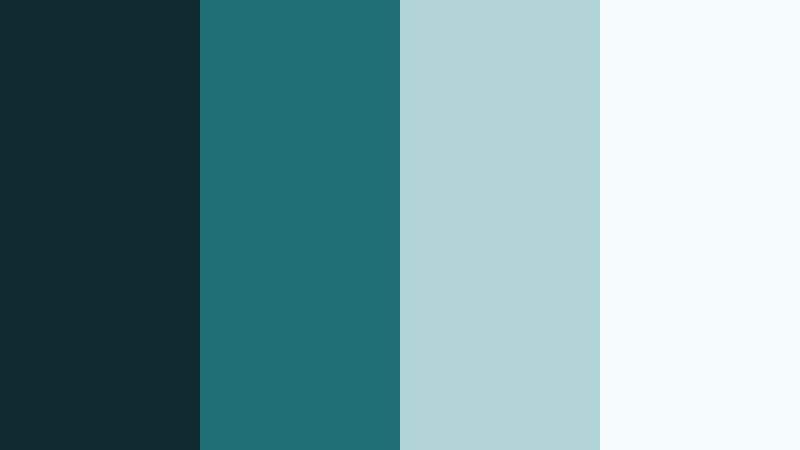
- HEX Codes: #112a2f, #1e6e73, #b3d4d6, #f5fbfb
- Mood: Soft, calm, and atmospheric like early morning mist.
- Use for: Use for slow-travel vlogs, ambient music visuals, and meditative b-roll.
Foggy Teal Morning drifts from a deep teal base into soft blue-grays and almost white mist. It feels quiet and spacious, like early morning light before the sun fully rises.
Use #112a2f and #1e6e73 for gentle gradients, subtle overlays, and background shapes. #b3d4d6 and #f5fbfb are ideal for soft typography, ambient music cover art, and YouTube intros that aim to relax rather than excite. It is a great match for lo-fi beats, ASMR, and slow-travel content.
Tips for Creating Cinema Shadow Teal Color Palettes
When you build your own Cinema Shadow Teal palettes, think about balance, readability, and how the colors will sit over real footage. The right mix of teal, neutrals, and warm accents can make your videos look cohesive and cinematic across intros, overlays, and thumbnails.
- Pair Cinema Shadow Teal with warm accents like amber, coral, or soft bronze to create classic cinematic contrast without overpowering skin tones.
- Always include at least one dark tone and one very light tone for strong text contrast, especially on small screens and YouTube thumbnails.
- Test your palette over actual footage in Filmora to see how the teal interacts with real-world colors such as skin, skies, and interiors.
- Limit your core palette to 3–4 colors for branding (primary teal, secondary accent, light neutral, dark neutral) so your channel identity stays consistent.
- Use more muted versions of teal for backgrounds and save the brightest variants for call-to-action buttons, important titles, and icons.
- Check accessibility by making sure text in your lightest or darkest colors is easy to read at small sizes, especially in lower thirds and end screens.
- For cinematic grading, shift shadows slightly toward teal while keeping highlights and skin tones closer to neutral or gently warm.
- Create reusable presets in Filmora for titles, overlays, and filters so every new video automatically follows the same Cinema Shadow Teal look.
Cinema Shadow Teal is versatile enough to feel modern, soothing, or dramatic depending on what you pair it with. By choosing the right palette, you can shape how viewers feel about your brand the moment your thumbnail appears or your intro rolls.
Use these 15 palettes as ready-made starting points, then refine them inside Filmora to match your footage and style. Whether you prefer moody noir, clean minimalism, or warm cinematic contrast, a consistent Cinema Shadow Teal look will help your channel feel more intentional and professional.
Experiment with different combinations, save your favorite presets, and build a visual language your audience can recognize instantly across every upload.
secure download