

 100% Security Verified | No Subscription Required | No Malware


 ChatGPT
 Perplexity
 Gemini
 Claude
 Grok
Grok
Deep Film Bronze is a warm, cinematic shade that instantly suggests depth, memory, and story. It sits between dark chocolate and aged gold, evoking sun-faded film stock, weathered props, and softly lit interiors. In color psychology, tones like this feel grounded, trustworthy, and nostalgic, which is why they work so well for creators who want their videos and designs to feel rich and intentional instead of overly bright or trendy.
For video editors, YouTube creators, and designers, Deep Film Bronze is a natural choice for titles, lower thirds, channel branding, thumbnail frames, and intro sequences. It pairs well with both subtle neutrals and bold accents, making it a flexible base for cinematic vlogs, tutorials, or podcast visuals. Below you will find curated Deep Film Bronze color palettes with HEX codes, so you can recreate these looks precisely in Filmora and keep your branding consistent across edits, thumbnails, and social assets.
In this article
Cinematic Warm Deep Film Bronze Color Palettes
Golden Reel Glow
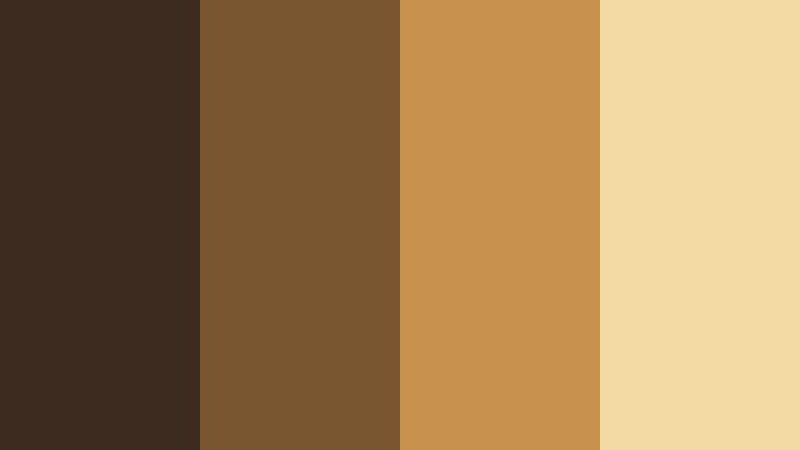
- HEX Codes: #3e2b20, #7a5630, #c8924e, #f3d9a4
- Mood: Warm, nostalgic, and story-driven like a late afternoon on a classic film set.
- Use for: Perfect for cinematic vlogs, documentary intros, and storytelling thumbnails with a golden-hour vibe.
Golden Reel Glow moves from deep brown bronze into bright honey and soft cream, like sunlight spilling across an old film reel. It feels instantly cinematic and emotional, ideal when you want your project to look like it has a built-in warm filter without becoming orange or oversaturated.
Use the darkest shade as a background for titles or lower thirds, then let the mid bronzes shape your frames, borders, and overlays. The brightest tone (#f3d9a4) works beautifully for readable text, highlight strokes, or glow effects around your subject in intros and thumbnails. This palette suits travel diaries, personal documentaries, and any video where Deep Film Bronze is the hero color for your brand look.
Pro Tip: Build a Cinematic Deep Film Bronze Look in Filmora
To keep Golden Reel Glow consistent across an entire project in Filmora, start by setting your primary Deep Film Bronze tone as a reference for backgrounds, frames, and title cards. Save it in the custom color swatches so you can reuse the exact HEX codes on text, shapes, and overlays from your opener through to your end screen.
Then, apply the lighter gold and cream tones to callouts, subtitles, and small graphic details. This creates a clear hierarchy on screen: deep bronze for context, a mid bronze for accent elements, and soft golds for anything you want the viewer to read or tap on. With this structure, even quick cuts, B-roll, and short-form edits feel like part of one cinematic Deep Film Bronze universe.
AI Color Palette
If you have a reference still or mood board that uses Golden Reel Glow, you can push that exact Deep Film Bronze style across all your clips with Filmora's AI powered tools. Filmora's AI Color Palette feature analyzes your reference frame and automatically applies similar tones, contrast, and warmth to the rest of your timeline.
Import your reference image that showcases the warm bronze-to-gold range, capture the look, and then apply it as a preset to your footage. This keeps your intros, B-roll sequences, and even vertical cuts for social media aligned with the same golden Deep Film Bronze mood, without manually grading each clip.
 secure download

HSL, Color Wheels & Curves
Once you have the base palette applied, use Filmora's color tools to fine tune your Deep Film Bronze tones. With HSL, you can selectively warm up the orange and yellow channels to give skin tones a flattering bronze glow while keeping shadows rich and neutral. Color wheels let you nudge the midtones slightly toward amber and keep highlights creamy instead of pure white.
If you want an even more cinematic feel, gently shape your contrast with curves to deepen the darkest shade and lift the brightest gold just a bit. This low-contrast curve keeps the image soft and filmic. You can see this workflow in action in Filmora's color grading tutorials on YouTube, where curves and wheels are used to build rich, warm looks from simple footage.
secure download1000+ Video Filters & 3D LUTs
To move even faster, you can stack Deep Film Bronze grading with ready made looks in Filmora. Filmora's video filters and 3D LUTs make it easy to test film emulation, soft fade, or warm retro styles on top of your bronze palette until you find a combination that fits your channel identity.
Apply a cinematic LUT to your footage, then tweak the intensity so your Golden Reel Glow colors still dominate. Filters like vignette, glow, and light leaks also pair well with this palette, adding subtle depth and atmosphere to intros, credit rolls, and B-roll sequences without breaking your Deep Film Bronze branding.
secure downloadStudio Spotlight Bronze
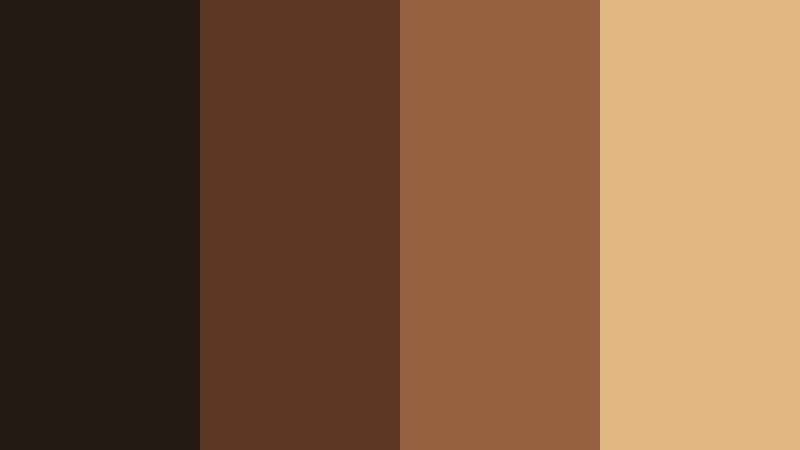
- HEX Codes: #241813, #5b3622, #986141, #e1b780
- Mood: Focused, professional, and slightly dramatic, like a key light in a dark studio.
- Use for: Great for cinematic tutorials, gear reviews, and brand openers that need a polished studio look.
Studio Spotlight Bronze layers deep espresso shadows with clean, warm bronze highlights, mimicking a single key light cutting through a dark studio. The contrast feels intentional and premium, perfect if you want your channel to look more like a professional set than a casual bedroom vlog.
Use the darkest shade as a background or vignette and let the lighter bronze tones frame your talking head or product shots. In thumbnails and title cards, the bright #e1b780 is ideal for key text and logo marks, while the mid bronze can outline buttons or subscribe prompts so they stand out without clashing with your footage.
Sunset Film Ember
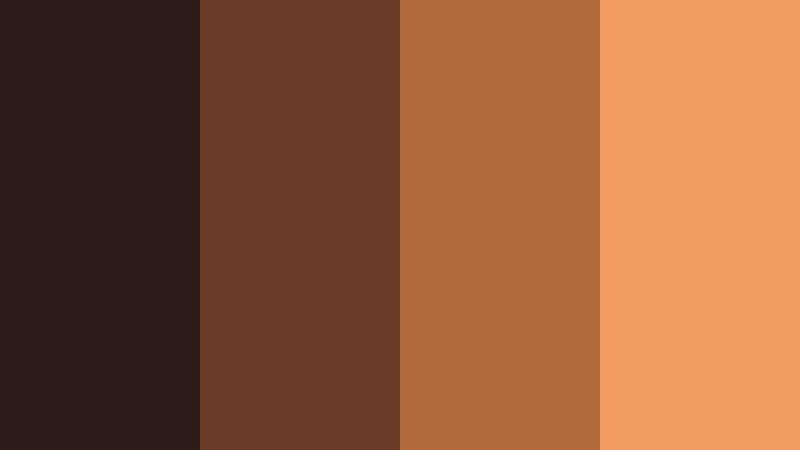
- HEX Codes: #2d1b18, #6a3b28, #b06a3b, #f29b63
- Mood: Fiery yet cozy, like the last burst of color before the sun slips below the horizon.
- Use for: Ideal for travel vlogs, romantic scenes, and cinematic b-roll emphasizing warm skies and silhouettes.
Sunset Film Ember leans into glowing ember oranges on a sturdy bronze base. It captures those final minutes of daylight when shadows are long and the sky tilts toward copper and peach. The palette feels passionate but still grounded, so it never looks like a harsh orange filter.
Use the mid oranges for light leaks, gradient overlays, and animated background shapes behind your titles. The darkest tone can support silhouettes or text drop shadows, while #f29b63 is perfect for call-to-action buttons and key captions in YouTube thumbnails or Reels covers that need to pop in a crowded feed.
Vintage Cinema Seat
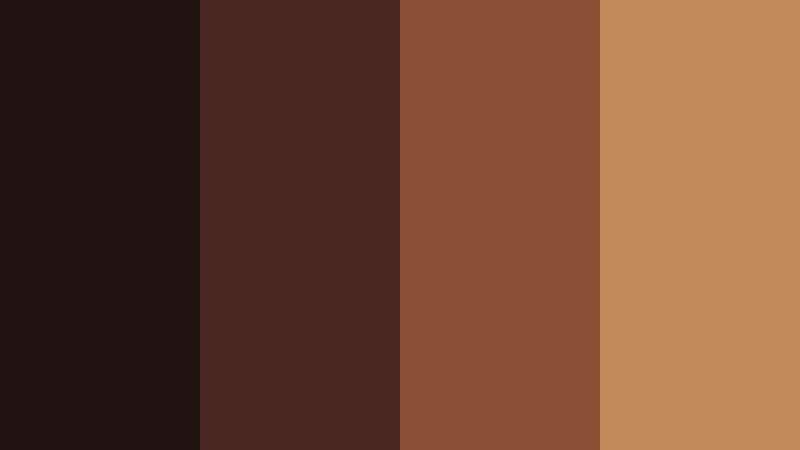
- HEX Codes: #201312, #4a2720, #8a4e34, #c08a5b
- Mood: Retro and cozy, like worn leather seats and dim theater lights.
- Use for: Perfect for movie review channels, retro edits, and nostalgic title cards.
Vintage Cinema Seat is all about muted bronze and russet browns that feel like aged leather and old projector rooms. The palette is warm but slightly desaturated, giving your visuals a cultured, cinephile mood rather than a loud blockbuster feel.
Apply it to title cards for film essays, review shows, or commentary videos about cinema history. The darkest shade (#201312) can serve as a letterbox bar or backdrop, while the lighter bronze (#c08a5b) keeps titles and rating graphics readable. This combination works especially well when paired with grain overlays and serif typography in Filmora.
Festival Lantern Bronze
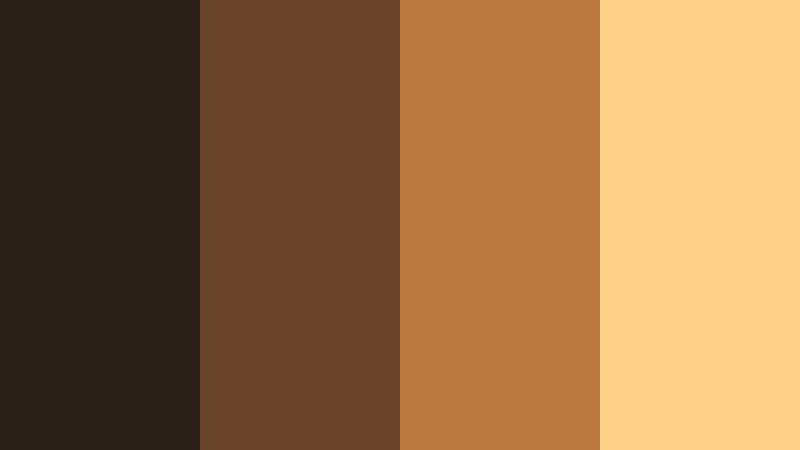
- HEX Codes: #2a2018, #68432a, #b9763d, #ffd08a
- Mood: Festive, intimate, and glowing, like lanterns strung across a night market.
- Use for: Use for event recaps, festival highlight reels, and lifestyle vlogs with cozy night scenes.
Festival Lantern Bronze moves from soft, inky browns to bright lantern amber. It feels like walking under strings of lights at a street festival, with just enough contrast to make faces and details glow against darker surroundings.
In video projects, use the darker tones for background plates and night-sky gradients, then bring in #b9763d and #ffd08a for text, badges, and animated accents that mimic lantern light. This palette is ideal for recap videos, party highlights, and lifestyle vlogs where Deep Film Bronze adds warmth without losing the magic of night scenes.
Elegant & Modern Deep Film Bronze Color Palettes
Bronze Title Card Luxe
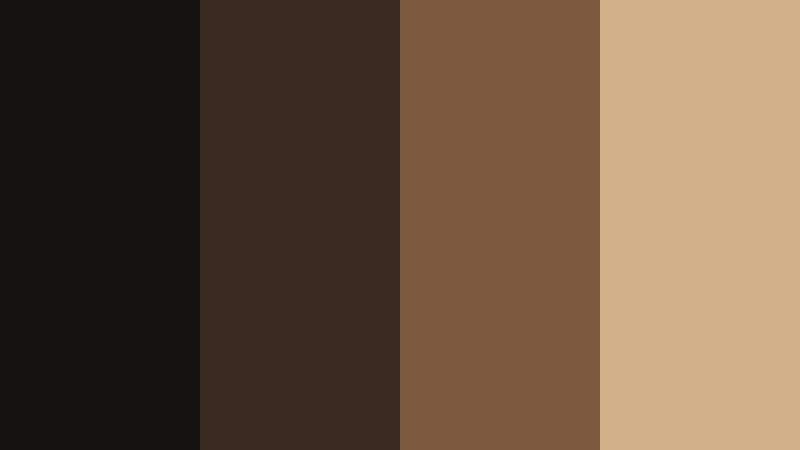
- HEX Codes: #151312, #3b2a22, #7c5a3f, #d1b18a
- Mood: Sophisticated and calm with a luxury brand feel.
- Use for: Designed for logo reveals, channel branding, and premium course intros.
Bronze Title Card Luxe is a smooth gradient from near black to champagne bronze, capturing the aesthetic of luxury packaging and high end title sequences. It immediately signals that your content is polished and thoughtfully designed.
Use the deepest shade as a solid background for bold logos or monogram marks, then bring in #d1b18a for your main text and key lines. Mid bronzes like #7c5a3f work well for subtle borders, animated dividers, and icons in your opener. This palette adapts easily to course thumbnails, channel banners, and brand decks built in Filmora.
Art House Bronze Minimal
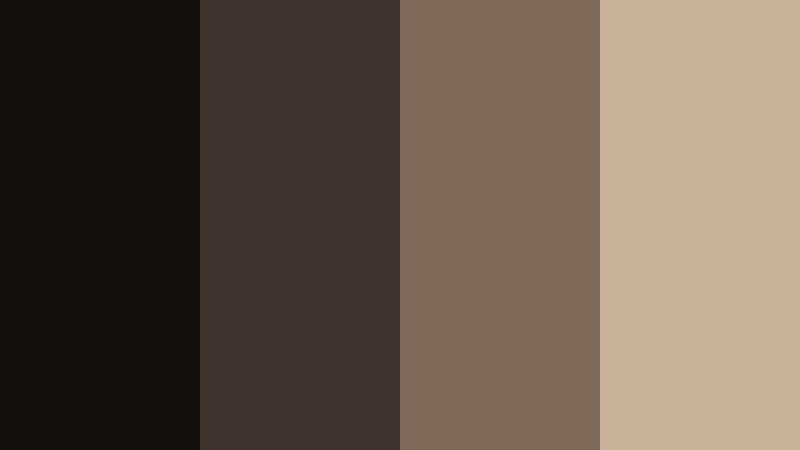
- HEX Codes: #11100f, #3c352e, #7a6a57, #c7b297
- Mood: Understated, modern, and artistic with a gallery-like calm.
- Use for: Ideal for indie film credits, art portfolio reels, and minimalist channel aesthetics.
Art House Bronze Minimal softens Deep Film Bronze into smoky neutrals and muted highlights, echoing gallery walls, matte paper, and quiet framing. It is subtle enough to sit behind bold artwork or photography without competing for attention.
In your edits, reserve the darker tones for backgrounds and full screen slates, then use #c7b297 for credits, captions, and clean sans serif or serif titles. This palette is perfect when you want the color scheme to feel deliberate yet minimalist across title sequences, lookbooks, and slow paced reels.
Monochrome Slate Bronze
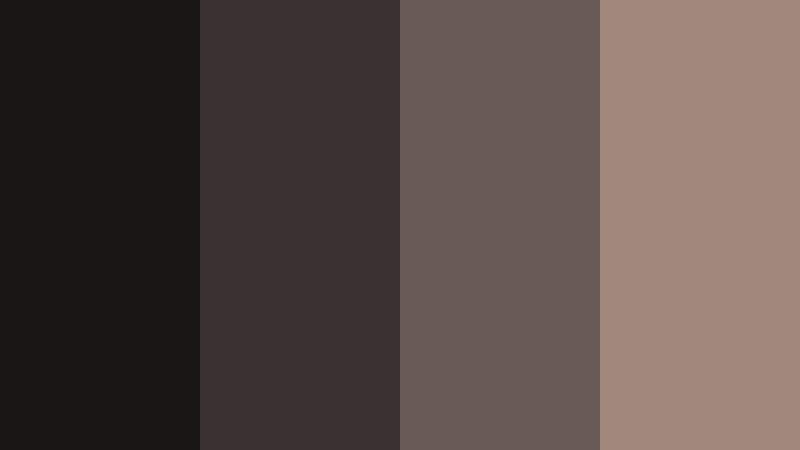
- HEX Codes: #181716, #3a3230, #6a5a55, #9f877c
- Mood: Cool, balanced, and professional with a subtle bronze undertone.
- Use for: Great for tech explainers, corporate reels, and UI overlays in product demos.
Monochrome Slate Bronze pushes Deep Film Bronze toward cool, slate-like neutrals with just a whisper of warmth. It feels stable and professional, ideal for tech brands, educational content, and corporate storytelling where you want sophistication without flashy color.
The darker tones are perfect for status bars, UI mockups, and frame elements, while #9f877c offers enough contrast for key labels and headings. Use this palette in Filmora when designing explainer overlays, charts, or animated interface elements that sit neatly over your screen recordings.
Editorial Bronze Serif
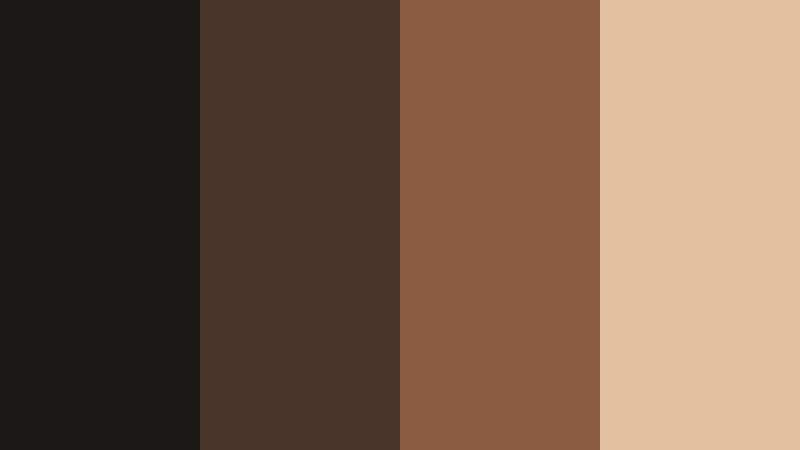
- HEX Codes: #1b1816, #493429, #8a5b40, #e2c1a0
- Mood: Editorial and high-end, like a luxury magazine spread.
- Use for: Use for talking-head commentary, think pieces, and docu-style openers with strong typography.
Editorial Bronze Serif combines a robust dark base with warm, creamy highlights that feel straight out of a design magazine. It is made for big, confident headlines and clean layouts that let your words carry the weight.
In your Filmora projects, pair #1b1816 as the backdrop with serif or modern serif type in #e2c1a0 for main titles. The mid bronzes can highlight pull quotes, keywords, and chapter markers in long form commentary videos. This palette works well for intellectual channels, brand storytelling, and docu-style narratives.
Conference Hall Bronze
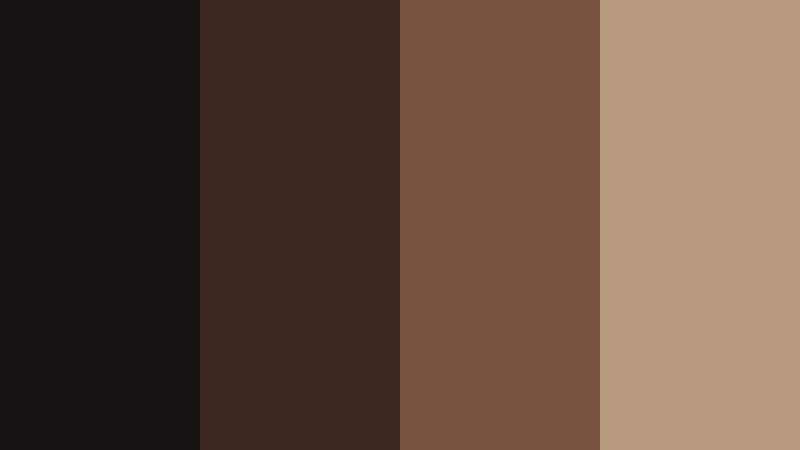
- HEX Codes: #15110f, #3c2820, #76513c, #b89a7e
- Mood: Authoritative yet welcoming, suited for professional storytelling.
- Use for: Ideal for keynote recordings, webinar intros, and personal branding for experts.
Conference Hall Bronze blends dark wood tones with welcoming bronze light, echoing well lit auditoriums and expert stages. It balances authority and warmth, so your content feels trustworthy but not cold.
Use #15110f for subtle background fields behind your name, title, or webinar topic. The lighter bronze #b89a7e can highlight bullet points, infographics, and key phrases. This palette is a solid match for business coaches, consultants, and educators building a recognizable Deep Film Bronze brand inside Filmora.
Soft & Romantic Deep Film Bronze Color Palettes
Bronze Wedding Candlelight
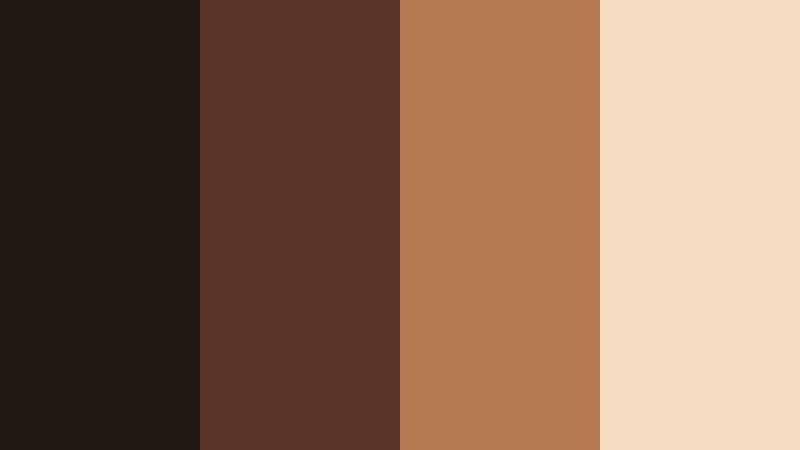
- HEX Codes: #221713, #5a3526, #b47a52, #f4dbc2
- Mood: Romantic, tender, and softly glowing like candlelit vows.
- Use for: Perfect for wedding films, engagement reels, and romantic storytelling projects.
Bronze Wedding Candlelight captures the warm flicker of candles and fairy lights, pairing deep bronze shadows with blush beige highlights. It makes skin tones look gentle and flattering, ideal for emotional storytelling.
Apply the darker shades as subtle vignettes and background slates for names and dates, while using #f4dbc2 for main text, overlays, and simple line graphics like hearts or rings. This palette helps wedding films, proposal videos, and anniversary tributes feel cohesive and soft from start to finish.
Autumn Storyboard Bronze
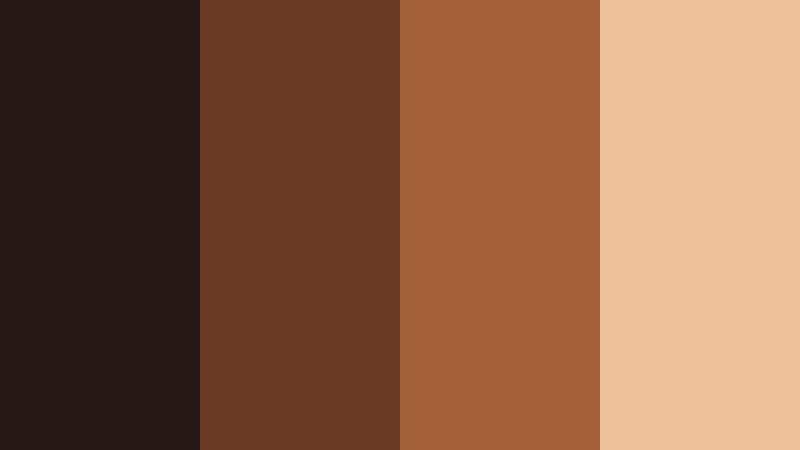
- HEX Codes: #251814, #6b3a24, #a46039, #edc29a
- Mood: Cozy and narrative-driven, like flipping through a fall scrapbook.
- Use for: Great for lifestyle vlogs, cozy day-in-the-life edits, and seasonal montages.
Autumn Storyboard Bronze blends Deep Film Bronze with pumpkin and cream tones that evoke knit sweaters, leaves, and warm drinks. It is inviting and story focused, making it ideal for personal vlogs and seasonal recaps.
Use the mid oranges and bronzes for transitions, section headers, and animated sticker style elements. The light cream #edc29a ensures that on-screen text remains easy to read, even over warm footage. This palette is especially strong for fall themed thumbnails and channel banners built in Filmora.
Cafeteria Film Grain
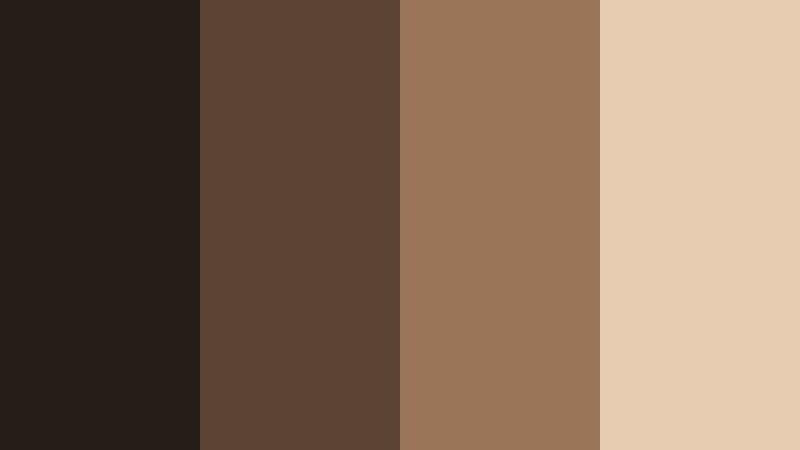
- HEX Codes: #271d18, #5c4334, #9a7558, #e7ccb2
- Mood: Comforting and intimate, like a quiet coffee shop with grainy 16mm footage.
- Use for: Use for study vlogs, lo-fi music visuals, and cozy storytelling shorts.
Cafeteria Film Grain is inspired by latte foam, wooden tables, and soft ambient light. Its bronze and coffee tones feel warm and relaxed, and they take particularly well to film grain and vignette effects.
Use #271d18 and #5c4334 as muted bases for frames and sidebars, then highlight titles and handwritten fonts in #e7ccb2. This palette gives study-with-me videos, lo-fi loops, and quiet storytelling shorts a unified coffee shop aesthetic that is easy to repeat across multiple uploads.
Soft Focus Bronze Bloom
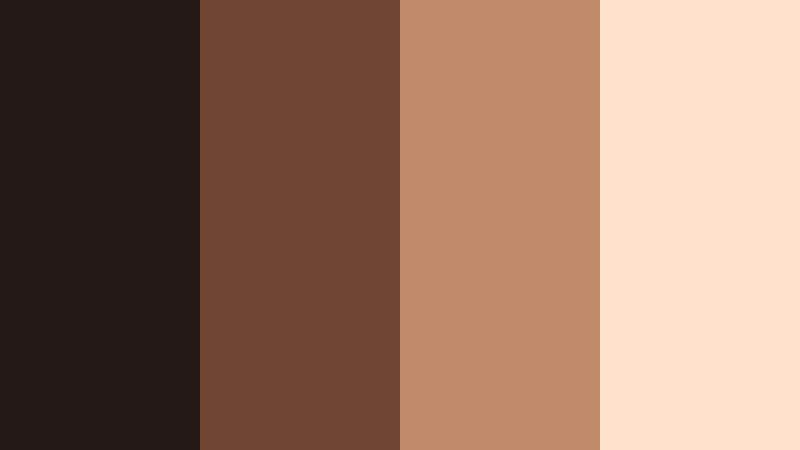
- HEX Codes: #241917, #704633, #c18a68, #ffe2cc
- Mood: Dreamy and sentimental with a hint of vintage romance.
- Use for: Perfect for lookbooks, fashion reels, and dreamy montage sequences.
Soft Focus Bronze Bloom layers a hazy bronze base with peach cream highlights, echoing lens flare and soft focus photography. It adds a dreamy, nostalgic mood to visuals without losing clarity.
Try using the deeper tones behind slow pans and macro closeups, then overlay delicate titles and captions in #ffe2cc. This palette suits fashion edits, dreamy mood reels, and memory style montages where Deep Film Bronze adds emotional depth to your compositions.
Bold & Vibrant Deep Film Bronze Color Palettes
Neon Marquee Bronze
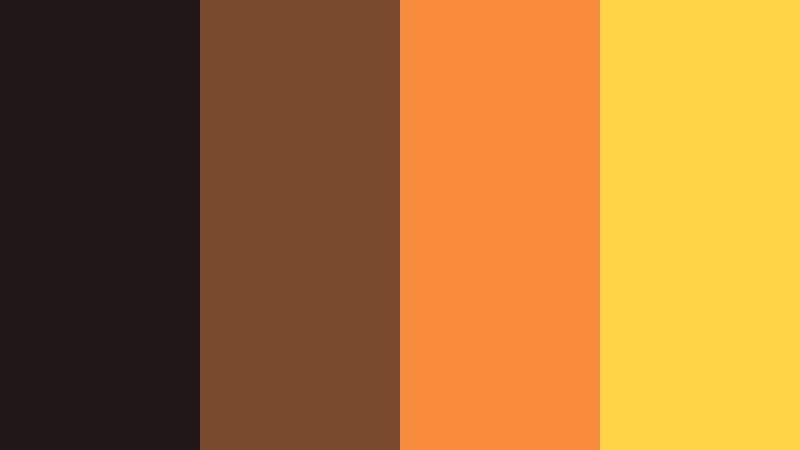
- HEX Codes: #211716, #7a4a2f, #f78b3b, #ffd447
- Mood: Energetic and showy, like a neon-lit cinema marquee at night.
- Use for: Best for dynamic intros, trailer-style edits, and attention-grabbing thumbnails.
Neon Marquee Bronze contrasts dark bronze shadows with electric orange and bright yellow that recall vintage cinema signs. It is bold and high energy, perfect when you want your content to scream Now Playing.
Use #211716 as a dramatic backdrop and let #f78b3b and #ffd447 handle your main typography, badges, and CTA buttons. This palette shines in trailer style intros, countdown animations, and thumbnails that need to stand out in a grid of recommendations.
Urban Street Bronze Pop

- HEX Codes: #181516, #5a3a30, #c9703d, #00b3b8, #f5f1ec
- Mood: Urban, creative, and edgy with a splash of modern color.
- Use for: Great for street photography edits, skate videos, and fast-cut city montages.
Urban Street Bronze Pop grounds your visuals in dark bronze and clay tones, then jolts them alive with a bright teal accent and clean off white. It feels like city walls, graffiti, and neon signs sharing the same frame.
Use the bronze shades for backgrounds, frames, and type, then drop #00b3b8 into glitch text, outlines, and icons for a high contrast punch. The light #f5f1ec keeps captions and UI elements legible over darker footage. This palette is ideal for high tempo city edits, skate reels, and experimental YouTube intros where Deep Film Bronze meets street style color.
Tips for Creating Deep Film Bronze Color Palettes
Deep Film Bronze works best when you balance its warm, cinematic depth with clear contrast, legible text, and a small set of supporting colors. Use these tips to design your own variations or adapt the palettes above inside Filmora.
- Start with one anchor bronze: Choose a single Deep Film Bronze HEX as your base, then build lighter and darker variations around it for backgrounds, accents, and highlights.
- Protect readability: Always test white or light cream text over your darkest bronze, and dark text over your lightest highlight, to ensure titles stay readable on mobile screens.
- Limit bright accents: Use bold hues like teal or neon yellow sparingly alongside bronze, mainly for CTAs, icons, or key words, so the palette stays cinematic rather than chaotic.
- Match skin tones: When editing people, adjust warmth and saturation so Deep Film Bronze complements natural skin rather than overpowering it; small tweaks in Filmora's color tools go a long way.
- Keep branding consistent: Reuse the same 3 to 5 HEX codes in your intros, lower thirds, thumbnails, and end screens so your channel or brand feels cohesive at a glance.
- Balance warm and neutral: If your bronze base is very warm, pair it with more neutral or slightly cool supporting tones to avoid an overly orange look in your videos.
- Test on multiple devices: Export short samples and check your bronze palette on phone, tablet, and desktop to confirm contrast and mood hold up across different displays.
- Save presets in Filmora: Once you like a Deep Film Bronze grade, save it as a custom preset or LUT so you can reapply it quickly to future projects and keep your style unified.
Deep Film Bronze color palettes give your work a distinctive, cinematic identity, whether you are making vlogs, documentaries, tutorials, or brand videos. With the right mix of shadows, mid bronzes, and gentle highlights, you can create visuals that feel warm, intentional, and instantly recognizable as your style.
Use the HEX codes above as starting points, then refine them in Filmora using AI tools, HSL adjustments, and LUTs until they fit your footage and story. Over time, your Deep Film Bronze palette can become a visual signature that viewers associate with your channel or brand.
Experiment with these palettes across intros, lower thirds, B-roll overlays, and thumbnails. Once you lock in a look you love, let Filmora handle the heavy lifting so every edit carries that same deep, cinematic bronze mood.
secure download